

Drawing with canvas: what changed
Revision 1 to 2. Removed lines have a minus sign; added lines have a plus sign.
| Old | New | Line | |
|---|---|---|---|
| 1 | - | ||
| 2 | - | ||
| 3 | - | ||
| 4 | - | ||
| 5 | - | ||
| 1 | + | **Drawing with canvas** can be done using several procedures e.g. | |
| 6 | 2 | ||
| 7 | - | ||
| 3 | + | * [[Canvas line]], draws a line from coordinates (x1,y1) to (x2,y2) | |
| 4 | + | * [[Canvas rectangle]], draws a rectangle from upper left (x1,y1) to lower right (x2,y2) | |
| 5 | + | * [[Canvas ellipse]], draws an ellipse in a rectangle defined by (x1,y1) and (x2,y2). If x2-x1 = y2-y1, the ellipse will be a circle with radius (x2-x1)/2. | |
| 6 | + | * [[Canvas Arc]], Draws an arc of an ellipse. | |
| 7 | + | * [[Canvas Polygon]], Draws a filled polygon. | |
| 8 | + | * [[Canvas TextOut]], Draws text at a specified position. | |
| 9 | + | * [[Canvas DrawText]], Draws text with additional formatting options. | |
| 8 | 10 | ||
| 9 | - | ||
| 10 | - | ||
| 11 | - | ||
| 12 | - | ||
| 13 | - | ||
| 14 | - | ||
| 15 | - | ||
| 16 | - | ||
| 17 | - | ||
| 18 | - | ||
| 19 | - | ||
| 20 | - | ||
| 21 | - | ||
| 11 | + | In the Canvas object the `Brush` and `Pen` objects are defined, both with a `Color` property, which indicate the color that makes the fill and stroke of the various objects that are drawn. To paint an object of one color, the first thing is to change the brush and color, before giving the instruction to draw, the order of the statements is important. This would be the code, notice how the color is changed before drawing the ellipse: | |
| 22 | 12 | ``` | |
| 23 | - | ||
| 24 | - | ||
| 13 | + | Canvas.Brush.Color:= clRed; | |
| 14 | + | Canvas.Ellipse(195, 117, 205, 128); | |
| 15 | + | Canvas.Brush.Color:= clBlue; | |
| 16 | + | Canvas.Rectangle (192, 130,208,160); | |
| 17 | + | Canvas.Brush.Color:= clGreen; | |
| 18 | + | Canvas.Rectangle (187, 130,191,162); | |
| 19 | + | Canvas.Brush.Color:= clYellow; | |
| 20 | + | Canvas.Rectangle (209, 130,213,162); | |
| 21 | + | Canvas.Brush.Color:= clMaroon; | |
| 22 | + | Canvas.Rectangle (193,161,199,200); | |
| 23 | + | Canvas.Brush.Color:= clPurple; | |
| 24 | + | Canvas.Rectangle (201,161,207,200); | |
| 25 | + | ``` | |
| 25 | 26 | ||
| 26 | - | ||
| 27 | - | ||
| 28 | - | ||
| 29 | - | ||
| 30 | - | ||
| 31 | - | ||
| 32 | - | ||
| 33 | - | ||
| 34 | - | ||
| 35 | - | ||
| 36 | - | ||
| 37 | - | ||
| 38 | - | ||
| 39 | - | ||
| 40 | - | ||
| 27 | + | or shorter: | |
| 41 | 28 | ``` | |
| 29 | + | with Canvas do begin | |
| 30 | + | Brush.Color:= clRed; | |
| 31 | + | Ellipse(195, 117, 205, 128); | |
| 32 | + | Brush.Color:= clBlue; | |
| 33 | + | Rectangle (192, 130,208,160); | |
| 34 | + | Brush.Color:= clGreen; | |
| 35 | + | Rectangle (187, 130,191,162); | |
| 36 | + | Brush.Color:= clYellow; | |
| 37 | + | Rectangle (209, 130,213,162); | |
| 38 | + | Brush.Color:= clMaroon; | |
| 39 | + | Rectangle (193,161,199,200); | |
| 40 | + | Brush.Color:= clPurple; | |
| 41 | + | Rectangle (201,161,207,200); | |
| 42 | + | end; | |
| 43 | + | ``` | |
| 42 | 44 | ||
| 43 | - | ||
| 45 | + | This will give something like this: [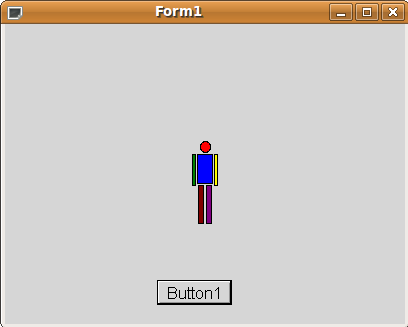](</File:canvas.png>) | |
| 44 | 46 | ||
| 45 | 47 | --- | |
| 46 | - | ||
| 48 | + | *From the Free Pascal wiki, page "Drawing with canvas", as the Internet Archive kept it on 2024-09-13, last changed on 2024-08-25. Copyright stays with the author who wrote it, according to the old wiki's [[Licensing]] page. If you have concerns about this material, [message the admin](/wiki-contact).* |