

Drawing with canvas/zh CN
Deutsch · English · Français · 中文(中国)
leo_tecnologica@yahoo.com.ar 发布 —— Leonardo Gabriel Calautti
Line (x1, y1, x2, y2)-> 从(x1,y1)到(x2,y2)画线
Rectangle (x1, y1, x2, y2)-> 从(x1,y1)点到(x2,y2)点画矩形
Ellipse (x1, y1, x2, y2)-> 从(x1,y1)点到(x2,y2)点画椭圆
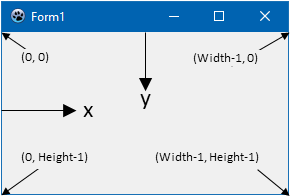
如,下面的代码,将绘制对角线,在Button1Click间:
procedure TForm1.Button1Click(Sender: TObject);
begin
  canvas.Line(0,0, form1.Width,form1.Height);
  canvas.Line(0,form1.height,form1.width,0);
end;如何绘制矩形和椭圆在里面使用Rectangle和Ellipse;在调用Brush和Pen时,使用color设置颜色,该属性给绘制对象填充、线条的颜色。在绘制前,顺序很重要:
 canvas.Brush.color:= clred;
 canvas.Ellipse(195, 117, 205, 128);
 canvas.Brush.color:= clblue;
 canvas.Rectangle (192, 130,208,160);
 canvas.Brush.color:= clgreen;
 Canvas.Rectangle (187, 130,191,162);
 canvas.Brush.color:= clyellow;
 Canvas.Rectangle (209, 130,213,162);
 canvas.Brush.color:= clmaroon;
 Canvas.Rectangle (193,161,199,200);
 canvas.Brush.color:= clpurple;
 Canvas.Rectangle (201,161,207,200);
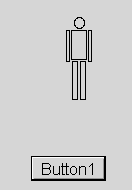
如果按着步骤,你可以做到:
From the Free Pascal wiki, page "Drawing with canvas/zh CN", as it stood on 2020-02-14 after a change by Trev, out of the wiki's dump of 2024-05-26. Copyright stays with the author who wrote it, according to the old wiki's Licensing page. If you have concerns about this material, message the admin.
Talk about this page
Nobody has opened a bench for this page yet. Sign in to open one.