

Drawing with canvas/de: what changed
Revision 0 to 1. Removed lines have a minus sign; added lines have a plus sign.
Title: Drawing with canvas/de
| Old | New | Line | |
|---|---|---|---|
| 1 | + | \ | |
| 2 | + | Zurück zur Seite [[code examples/de|Code Beispiele]].\ | |
| 3 | + | \ | |
| 4 | + | veröffentlicht von leo_tecnologica@yahoo.com.ar --- Leonardo Gabriel Calautti\ | |
| 5 | + | * **Line** (x1, y1, x2, y2) -\> zieht eine Linie von Punkt (x1, y1) zu Punkt (x2, y2)\ | |
| 6 | + | * **Rectangle** (x1, y1, x2, y2) -\> zeichnet ein Rechteck mit einem Scheitelpunkt ausgehend vom Punkt (x1, y1) und dem gegenüberliegenden Punkt (x2, y2)\ | |
| 7 | + | * **Ellipse** (x1, y1, x2, y2) -\> zeichnet eine Ellipse in einem durch die Punkte (x1, y1) und (x2, y2) definierten Rechteck\ | |
| 8 | + | 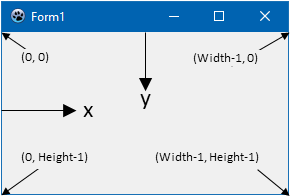 | |
| 9 | + | ||
| 10 | + | Beispiel: Der folgende Code zeichnet zwei Diagonalen auf dem Formular: | |
| 11 | + | ||
| 12 | + | ``` pascal | |
| 13 | + | procedure TForm1.Form1Paint(Sender: TObject); | |
| 14 | + | begin | |
| 15 | + | Canvas.Line(0, 0, Width-1, Height-1); | |
| 16 | + | Canvas.Line(0, Height-1, Width-1, 0); | |
| 17 | + | end; | |
| 18 | + | ``` | |
| 19 | + | ||
| 20 | + | Wie kann man das Innere der Rechtecke und Ellipsen malen?\ | |
| 21 | + | Im Canvas-Objekt, gibt es ein Objekt namens'' `Brush` (Pinsel) und ein Objekt namens `Pen` (Stift), beide haben Farbeigenschaften (`Color`) für die Fläche und die Kontur der Objekte.\ | |
| 22 | + | Um ein Objekt in einer Farbe zu malen müssen die Eigenschaften von `Brush` und `Pen` entsprechend angepasst werden. | |
| 23 | + | ||
| 24 | + | ``` pascal | |
| 25 | + | Canvas.Brush.Color := clRed; | |
| 26 | + | Canvas.Ellipse(195, 117, 205, 128); | |
| 27 | + | Canvas.Brush.Color:= clBlue; | |
| 28 | + | Canvas.Rectangle (192, 130,208,160); | |
| 29 | + | Canvas.Brush.Color:= clGreen; | |
| 30 | + | Canvas.Rectangle (187, 130,191,162); | |
| 31 | + | Canvas.Brush.Color:= clYellow; | |
| 32 | + | Canvas.Rectangle (209, 130,213,162); | |
| 33 | + | Canvas.Brush.Color:= clMaroon; | |
| 34 | + | Canvas.Rectangle (193,161,199,200); | |
| 35 | + | Canvas.Brush.Color:= clPurple; | |
| 36 | + | Canvas.Rectangle (201,161,207,200); | |
| 37 | + | ``` | |
| 38 | + | ||
| 39 | + | \ | |
| 40 | + | Falls Sie die obenstehenden Schritte nachvollzogen haben, dann sehen Sie folgendes Bild:\ | |
| 41 | + | 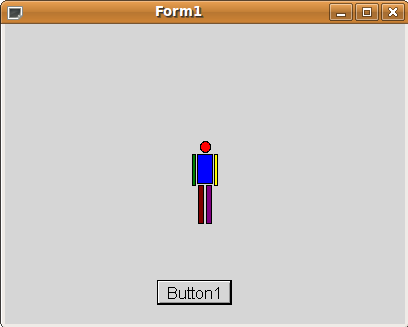 | |
| 42 | + | ||
| 43 | + | --- | |
| 44 | + | *From the Free Pascal wiki, page "Drawing with canvas/de", as it stood on 2020-02-14 after a change by Trev, out of the wiki's dump of 2024-05-26. Copyright stays with the author who wrote it, according to the old wiki's [[Licensing]] page. If you have concerns about this material, [message the admin](/wiki-contact).* |