

Drag and Drop sample: what changed
Revision 1 to 2. Removed lines have a minus sign; added lines have a plus sign.
| Old | New | Line | |
|---|---|---|---|
| 1 | 1 | Drag and Drop is a common operation that makes the interface user friendly: a user can drag/drop information to controls instead of having to type etc. | |
| 2 | 2 | ||
| 3 | 3 | The following sample explains basics of drag and drop. For detailed information you should refer to other articles in the wiki and reference documentation. | |
| 4 | 4 | ||
| 5 | 5 | Please note, since LCL is partially compatible with Delphi's VCL, some articles/examples about Delphi drag-and-drop may also apply to LCL. | |
| 6 | 6 | ||
| 7 | 7 | ## Drag and Drop | |
| 8 | 8 | ||
| 9 | 9 | Despite of the operation's simplicity from the user's point of view, it might give hard times to an inexperienced developer. | |
| 10 | 10 | ||
| 11 | 11 | For the code, Drag and Drop operation always consists of at least these 3 steps: | |
| 12 | 12 | ||
| 13 | 13 | 1. Some control starts the drag-and-drop operation. This is called the Source. | |
| 14 | 14 | 2. User drags the mouse cursor around, above other controls or the Source itself. Now a dragged over control needs to decide, if it is able to accept the dragged data. | |
| 15 | 15 | 3. Drop happens if a control agrees to accept the dragged data. The accepting control is called the Sender. | |
| 16 | 16 | ||
| 17 | 17 | To simplify drag-and-drop handling, the LCL provides "automatic" mode. It doesn't mean, that LCL does the whole drag-and-drop for you, but it will handle low-level drag object managing (which is not covered in this article). | |
| 18 | 18 | ||
| 19 | 19 | ## Example | |
| 20 | 20 | ||
| 21 | - | ||
| 22 | - | ||
| 23 | - | ||
| 24 | - | ||
| 21 | + | 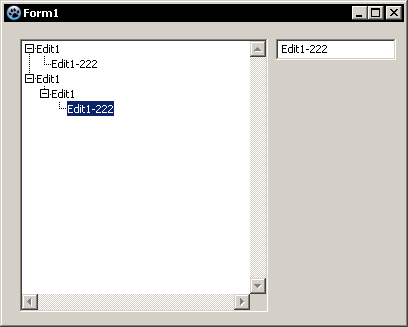 | |
| 25 | 22 | ||
| 26 | 23 | The example covers automatic drag-and-drop feature between 2 controls (Edit-\>Treeview) as well as inside a single control (Treeview-\>Treeview) | |
| 27 | 24 | ||
| 28 | 25 | - Start the new application. | |
| 29 | 26 | - Put a TreeView component and Edit on the form. | |
| 30 | 27 | - Enable Automatic drag-and-drop mode for TreeView by setting **DragMode: dkAutomatic** | |
| 31 | 28 | - Edit in Object Inspector and add a few items | |
| 32 | 29 | ||
| 33 | 30 | Drag and drop still won't work, but launching the application and trying to drag the items in the Treeview will show cursor icon changes. | |
| 34 | 31 | ||
| 35 | 32 | ### Dragging between controls | |
| 36 | 33 | ||
| 37 | 34 | Let's make a drag-and-drop operation between Edit and TreeView. There the content of Edit will be "dragged" to TreeView and a new tree node created. | |
| 38 | 35 | ||
| 39 | 36 | To initiate the drag, controls have a special method: `BeginDrag()` | |
| 40 | 37 | ||
| 41 | 38 | Create OnMouseDown event for the Edit: | |
| 42 | 39 | ||
| 43 | 40 | ``` pascal | |
| 44 | 41 | procedure TForm1.Edit1MouseDown(Sender: TObject; Button: TMouseButton; | |
| 45 | 42 | Shift: TShiftState; X, Y: Integer); | |
| 46 | 43 | begin | |
| 47 | 44 | if Button = mbLeft then {check if left mouse button was pressed} | |
| 48 | 45 | Edit1.BeginDrag(true); {starting the drag operation} | |
| 49 | 46 | end; | |
| 50 | 47 | ``` | |
| 51 | 48 | ||
| 52 | 49 | If you launch the application right now and try drag and drop, you'll notice that Edit starts the operation, but still nothing happens then you're trying to drop to TreeView. | |
| 53 | 50 | ||
| 54 | 51 | This is because TreeView doesn't accept the data. None of the controls accept data by default, so you'll always need to provide the proper event handler. | |
| 55 | 52 | ||
| 56 | 53 | Assign TreeView.OnDragOver operation: | |
| 57 | 54 | ||
| 58 | 55 | ``` pascal | |
| 59 | 56 | procedure TForm1.TreeView1DragOver(Sender, Source: TObject; X, Y: Integer; | |
| 60 | 57 | State: TDragState; var Accept: Boolean); | |
| 61 | 58 | begin | |
| 62 | 59 | Accept := true; | |
| 63 | 60 | end; | |
| 64 | 61 | ``` | |
| 65 | 62 | ||
| 66 | 63 | Of course in some cases, TreeView might deny dropping (if Source or data cannot be handled), but for now, TreeView always accepts the dragging. | |
| 67 | 64 | ||
| 68 | 65 | Run application and test. Everything should be better now, though still nothing happens on drop. | |
| 69 | 66 | ||
| 70 | 67 | Assign TreeView.OnDragDrop operation: | |
| 71 | 68 | ||
| 72 | 69 | ``` pascal | |
| 73 | 70 | procedure TForm1.TreeView1DragDrop(Sender, Source: TObject; X, Y: Integer); | |
| 74 | 71 | var | |
| 75 | 72 | tv : TTreeView; | |
| 76 | 73 | iNode : TTreeNode; | |
| 77 | 74 | begin | |
| 78 | 75 | tv := Sender as TTreeView; { Sender is TreeView where the data is being dropped } | |
| 79 | 76 | iNode := tv.GetNodeAt(x,y); { x,y are drop coordinates (relative to the Sender) } | |
| 80 | 77 | { since Sender is TreeView we can evaluate } | |
| 81 | 78 | { a tree at the X,Y coordinates } | |
| 82 | 79 | ||
| 83 | 80 | { TreeView can also be a Source! So we must make sure } | |
| 84 | 81 | { that Source is TEdit, before getting its text } | |
| 85 | 82 | if Source is TEdit then | |
| 86 | 83 | tv.Items.AddChild(iNode, TEdit(Source).Text); {now, we can add a new node, with a text from Source } | |
| 87 | 84 | end; | |
| 88 | 85 | ``` | |
| 89 | 86 | ||
| 90 | 87 | Run and test. It should be working now. Dragging a text from Edit to TreeView should create a new node. | |
| 91 | 88 | ||
| 92 | 89 | ### Dragging within a control | |
| 93 | 90 | ||
| 94 | 91 | Sender and Source can be the same control! It's not prohibited in any way. Let's add the ability to a TextView, to change its nodes location. Since TextView is in automatic DragMode, you don't need to start the drag by using `DragBegin()`. It's started automatically on mouse moved with left button hold. | |
| 95 | 92 | ||
| 96 | 93 | Make sure you have "Accept:=true;" inside the DragOver operation for TreeView source. | |
| 97 | 94 | ||
| 98 | 95 | Modify the DragDrop event handler to the following: | |
| 99 | 96 | ||
| 100 | 97 | ``` pascal | |
| 101 | 98 | procedure TForm1.TreeView1DragDrop(Sender, Source: TObject; X, Y: Integer); | |
| 102 | 99 | var | |
| 103 | 100 | tv : TTreeView; | |
| 104 | 101 | iNode : TTreeNode; | |
| 105 | 102 | begin | |
| 106 | 103 | tv := Sender as TTreeView; { Sender is TreeView where the data is being dropped } | |
| 107 | 104 | iNode := tv.GetNodeAt(x,y); { x,y are drop coordinates (relative to the Sender) } | |
| 108 | 105 | { since Sender is TreeView we can evaluate } | |
| 109 | 106 | { a tree at the X,Y coordinates } | |
| 110 | 107 | ||
| 111 | 108 | { TreeView can also be a Source! So we must make sure } | |
| 112 | 109 | { that Source is TEdit, before getting its text } | |
| 113 | 110 | if Source is TEdit then | |
| 114 | 111 | tv.Items.AddChild(iNode, TEdit(Source).Text) {now, we can add a new node, with a text from Source } | |
| 115 | 112 | ||
| 116 | 113 | else if Source = Sender then begin { drop is happening within a TreeView } | |
| 117 | 114 | if Assigned(tv.Selected) and { check if any node has been selected } | |
| 118 | 115 | (iNode <> tv.Selected) then { and we're dropping to another node } | |
| 119 | 116 | begin | |
| 120 | 117 | if iNode <> nil then | |
| 121 | 118 | tv.Selected.MoveTo(iNode, naAddChild) { complete the drop operation, by moving the selectede node } | |
| 122 | 119 | else | |
| 123 | 120 | tv.Selected.MoveTo(iNode, naAdd); { complete the drop operation, by moving in root of a TreeView } | |
| 124 | 121 | end; | |
| 125 | 122 | end; | |
| 126 | 123 | end; | |
| 127 | 124 | ``` | |
| 128 | 125 | ||
| 129 | 126 | That's it. If you run the application now, you should have both features working. | |
| 130 | 127 | ||
| 131 | 128 | - Adding a new node by dragging text from Edit to TreeView | |
| 132 | 129 | - Dragging nodes inside the treeview | |
| 133 | 130 | ||
| 134 | 131 | ## Hints | |
| 135 | 132 | ||
| 136 | 133 | - You can?/cannot? use some global data to inspect what is being dragged now. Don't use global variables, but your form class's fields. | |
| 137 | 134 | - Put the data when you start the drag | |
| 138 | 135 | - Inspect the data, during control's drag over event, and modify Accept flag accordingly | |
| 139 | 136 | - Read and use the data on drop event | |
| 140 | 137 | ||
| 141 | 138 | ## Dragging from other applications | |
| 142 | 139 | ||
| 143 | 140 | You can drag/drop | |
| 144 | 141 | ||
| 145 | 142 | ### Files | |
| 146 | 143 | ||
| 147 | 144 | Files can be dropped and handled easily by implementing the FormDropFiles event, once AllowDropFiles on the form is set: | |
| 148 | 145 | ||
| 149 | 146 | ``` pascal | |
| 150 | 147 | procedure TForm1.FormDropFiles(Sender: TObject; const FileNames: array of String); | |
| 151 | 148 | var FileName : String; | |
| 152 | 149 | begin | |
| 153 | 150 | for FileName in FileNames do | |
| 154 | 151 | begin | |
| 155 | 152 | ShowMessage(FileName); | |
| 156 | 153 | end; | |
| 157 | 154 | end; | |
| 158 | 155 | ``` | |
| 159 | 156 | ||
| 160 | 157 | ### Text etc | |
| 161 | 158 | ||
| 162 | 159 | You can drag and drop e.g. text from another application (e.g. Notepad) to a control on your application. The way this is implemented is platform-dependent. | |
| 163 | 160 | ||
| 164 | 161 | #### Windows | |
| 165 | 162 | ||
| 166 | 163 | This code lets you drag and drop selected text from other applications onto an edit control. | |
| 167 | 164 | ||
| 168 | 165 | ``` pascal | |
| 169 | 166 | unit Unit1; | |
| 170 | 167 | ||
| 171 | 168 | {$mode objfpc}{$H+} | |
| 172 | 169 | ||
| 173 | 170 | interface | |
| 174 | 171 | ||
| 175 | 172 | uses | |
| 176 | 173 | Classes, SysUtils, FileUtil, Forms, Controls, Graphics, Dialogs, StdCtrls, | |
| 177 | 174 | Windows, ActiveX, ComObj; | |
| 178 | 175 | ||
| 179 | 176 | type | |
| 180 | 177 | ||
| 181 | 178 | { TForm1 } | |
| 182 | 179 | ||
| 183 | 180 | TForm1 = class(TForm, IDropTarget) | |
| 184 | 181 | Memo1: TMemo; | |
| 185 | 182 | procedure FormCreate(Sender: TObject); | |
| 186 | 183 | procedure FormDestroy(Sender: TObject); | |
| 187 | 184 | private | |
| 188 | 185 | // IDropTarget | |
| 189 | 186 | function DragEnter(const dataObj: IDataObject; grfKeyState: DWORD; pt: TPoint; var dwEffect: DWORD): HResult;StdCall; | |
| 190 | 187 | function DragOver(grfKeyState: DWORD; pt: TPoint; var dwEffect: DWORD): HResult;StdCall; | |
| 191 | 188 | function DragLeave: HResult;StdCall; | |
| 192 | 189 | function Drop(const dataObj: IDataObject; grfKeyState: DWORD; pt: TPoint; var dwEffect: DWORD):HResult;StdCall; | |
| 193 | 190 | // IUnknown | |
| 194 | 191 | // Ignore referance counting | |
| 195 | 192 | function _AddRef: Integer; stdcall; | |
| 196 | 193 | function _Release: Integer; stdcall; | |
| 197 | 194 | public | |
| 198 | 195 | { public declarations } | |
| 199 | 196 | end; | |
| 200 | 197 | ||
| 201 | 198 | var | |
| 202 | 199 | Form1: TForm1; | |
| 203 | 200 | ||
| 204 | 201 | implementation | |
| 205 | 202 | ||
| 206 | 203 | {$R *.lfm} | |
| 207 | 204 | ||
| 208 | 205 | { TForm1 } | |
| 209 | 206 | ||
| 210 | 207 | procedure TForm1.FormCreate(Sender: TObject); | |
| 211 | 208 | begin | |
| 212 | 209 | OleInitialize(nil); | |
| 213 | 210 | OleCheck(RegisterDragDrop(Handle, Self)); | |
| 214 | 211 | end; | |
| 215 | 212 | ||
| 216 | 213 | procedure TForm1.FormDestroy(Sender: TObject); | |
| 217 | 214 | begin | |
| 218 | 215 | RevokeDragDrop(Handle); | |
| 219 | 216 | OleUninitialize; | |
| 220 | 217 | end; | |
| 221 | 218 | ||
| 222 | 219 | function TForm1.DragEnter(const dataObj: IDataObject; grfKeyState: DWORD; | |
| 223 | 220 | pt: TPoint; var dwEffect: DWORD): HResult; StdCall; | |
| 224 | 221 | begin | |
| 225 | 222 | dwEffect := DROPEFFECT_COPY; | |
| 226 | 223 | Result := S_OK; | |
| 227 | 224 | end; | |
| 228 | 225 | ||
| 229 | 226 | function TForm1.DragOver(grfKeyState: DWORD; pt: TPoint; var dwEffect: DWORD | |
| 230 | 227 | ): HResult; StdCall; | |
| 231 | 228 | begin | |
| 232 | 229 | dwEffect := DROPEFFECT_COPY; | |
| 233 | 230 | Result := S_OK; | |
| 234 | 231 | end; | |
| 235 | 232 | ||
| 236 | 233 | function TForm1.DragLeave: HResult; StdCall; | |
| 237 | 234 | begin | |
| 238 | 235 | Result := S_OK; | |
| 239 | 236 | end; | |
| 240 | 237 | ||
| 241 | 238 | function TForm1._AddRef: Integer; stdcall; | |
| 242 | 239 | begin | |
| 243 | 240 | Result := 1; | |
| 244 | 241 | end; | |
| 245 | 242 | ||
| 246 | 243 | function TForm1._Release: Integer; stdcall; | |
| 247 | 244 | begin | |
| 248 | 245 | Result := 1; | |
| 249 | 246 | end; | |
| 250 | 247 | ||
| 251 | 248 | function TForm1.Drop(const dataObj: IDataObject; grfKeyState: DWORD; | |
| 252 | 249 | pt: TPoint; var dwEffect: DWORD): HResult; StdCall; | |
| 253 | 250 | var | |
| 254 | 251 | aFmtEtc: TFORMATETC; | |
| 255 | 252 | aStgMed: TSTGMEDIUM; | |
| 256 | 253 | pData: PChar; | |
| 257 | 254 | begin | |
| 258 | 255 | {Make certain the data rendering is available} | |
| 259 | 256 | if (dataObj = nil) then | |
| 260 | 257 | raise Exception.Create('IDataObject-Pointer is not valid!'); | |
| 261 | 258 | with aFmtEtc do | |
| 262 | 259 | begin | |
| 263 | 260 | cfFormat := CF_TEXT; | |
| 264 | 261 | ptd := nil; | |
| 265 | 262 | dwAspect := DVASPECT_CONTENT; | |
| 266 | 263 | lindex := -1; | |
| 267 | 264 | tymed := TYMED_HGLOBAL; | |
| 268 | 265 | end; | |
| 269 | 266 | {Get the data} | |
| 270 | 267 | OleCheck(dataObj.GetData(aFmtEtc, aStgMed)); | |
| 271 | 268 | try | |
| 272 | 269 | {Lock the global memory handle to get a pointer to the data} | |
| 273 | 270 | pData := GlobalLock(aStgMed.hGlobal); | |
| 274 | 271 | { Replace Text } | |
| 275 | 272 | Memo1.Text := pData; | |
| 276 | 273 | finally | |
| 277 | 274 | {Finished with the pointer} | |
| 278 | 275 | GlobalUnlock(aStgMed.hGlobal); | |
| 279 | 276 | {Free the memory} | |
| 280 | 277 | ReleaseStgMedium(aStgMed); | |
| 281 | 278 | end; | |
| 282 | 279 | Result := S_OK; | |
| 283 | 280 | end; | |
| 284 | 281 | ||
| 285 | 282 | end. | |
| 286 | 283 | ``` | |
| 287 | 284 | ||
| 288 | 285 | Source forum: <http://forum.lazarus.freepascal.org/index.php/topic,25769.msg156933.html#msg156933> | |
| 289 | 286 | ||
| 290 | 287 | ## See also | |
| 291 | 288 | ||
| 292 | 289 | - [[LCL Drag Drop]] | |
| 293 | 290 | ||
| 294 | 291 | --- | |
| 295 | 292 | *From the Free Pascal wiki, page "Drag and Drop sample", as it stood on 2023-12-14 after a change by Alextpp, out of the wiki's dump of 2024-05-26. Copyright stays with the author who wrote it, according to the old wiki's [[Licensing]] page. If you have concerns about this material, [message the admin](/wiki-contact).* |