

Double Gradient/de: what changed
Revision 1 to 2. Removed lines have a minus sign; added lines have a plus sign.
| Old | New | Line | |
|---|---|---|---|
| 1 | 1 | Jetzt sind 'DoubleGradientAlphaFill' & 'nGradientAlphaFill' in [[BGRABitmap/de|BGRABitmap]] enthalten, in der Unit 'BGRAGradients'. | |
| 2 | 2 | ||
| 3 | 3 | ## Double Gradient | |
| 4 | 4 | ||
| 5 | - | ||
| 6 | - | ||
| 7 | - | ||
| 8 | - | ||
| 5 | + | 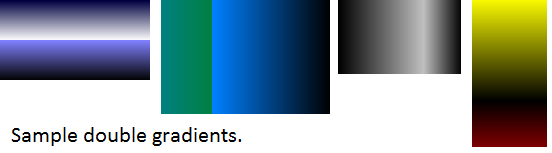 | |
| 9 | 6 | ||
| 10 | 7 | ### Unit | |
| 11 | 8 | ||
| 12 | 9 | #### DoubleGradient | |
| 13 | 10 | ||
| 14 | 11 | ``` pascal | |
| 15 | 12 | unit doublegradient; | |
| 16 | 13 | ||
| 17 | 14 | {$mode objfpc}{$H+} | |
| 18 | 15 | ||
| 19 | 16 | interface | |
| 20 | 17 | ||
| 21 | 18 | uses | |
| 22 | 19 | Classes, Graphics; | |
| 23 | 20 | ||
| 24 | 21 | function DoubleGradientFill(ARect: TRect; AStart1,AStop1,AStart2,AStop2: TColor; | |
| 25 | 22 | ADirection1,ADirection2,APos: TGradientDirection; AValue: Single): TBitmap; | |
| 26 | 23 | ||
| 27 | 24 | implementation | |
| 28 | 25 | ||
| 29 | 26 | function DoubleGradientFill(ARect: TRect; AStart1,AStop1,AStart2,AStop2: TColor; | |
| 30 | 27 | ADirection1,ADirection2,APos: TGradientDirection; AValue: Single): TBitmap; | |
| 31 | 28 | var | |
| 32 | 29 | ABitmap: TBitmap; ARect1,ARect2: TRect; | |
| 33 | 30 | begin | |
| 34 | 31 | ABitmap := TBitmap.Create; | |
| 35 | 32 | ABitmap.Width:=ARect.Right; | |
| 36 | 33 | ABitmap.Height:=ARect.Bottom; | |
| 37 | 34 | if AValue <> 0 then ARect1:=ARect; | |
| 38 | 35 | if AValue <> 1 then ARect2:=ARect; | |
| 39 | 36 | if APos = gdVertical then begin | |
| 40 | 37 | ARect1.Bottom:=Round(ARect1.Bottom * AValue); | |
| 41 | 38 | ARect2.Top:=ARect1.Bottom; | |
| 42 | 39 | end | |
| 43 | 40 | else if APos = gdHorizontal then begin | |
| 44 | 41 | ARect1.Right:=Round(ARect1.Right * AValue); | |
| 45 | 42 | ARect2.Left:=ARect1.Right; | |
| 46 | 43 | end; | |
| 47 | 44 | if AValue <> 0 then ABitmap.Canvas.GradientFill(ARect1,AStart1,AStop1,ADirection1); | |
| 48 | 45 | if AValue <> 1 then ABitmap.Canvas.GradientFill(ARect2,AStart2,AStop2,ADirection2); | |
| 49 | 46 | Result:=ABitmap; | |
| 50 | 47 | end; | |
| 51 | 48 | ||
| 52 | 49 | end. | |
| 53 | 50 | ``` | |
| 54 | 51 | ||
| 55 | 52 | #### DoubleGradientAlpha | |
| 56 | 53 | ||
| 57 | 54 | Diese Unit erfordert [[BGRABitmap/de|BGRABitmap]]. | |
| 58 | 55 | ||
| 59 | 56 | ``` pascal | |
| 60 | 57 | unit doublegradientalpha; | |
| 61 | 58 | ||
| 62 | 59 | {$mode objfpc}{$H+} | |
| 63 | 60 | ||
| 64 | 61 | interface | |
| 65 | 62 | ||
| 66 | 63 | uses | |
| 67 | 64 | Classes, Graphics, | |
| 68 | 65 | BGRABitmap, BGRABitmapTypes; | |
| 69 | 66 | ||
| 70 | 67 | function DoubleGradientAlphaFill(ARect: TRect; AStart1,AStop1,AStart2,AStop2: TBGRAPixel; | |
| 71 | 68 | ADirection1,ADirection2,APos: TGradientDirection; AValue: Single): TBGRABitmap; | |
| 72 | 69 | ||
| 73 | 70 | implementation | |
| 74 | 71 | ||
| 75 | 72 | function DoubleGradientAlphaFill(ARect: TRect; AStart1,AStop1,AStart2,AStop2: TBGRAPixel; | |
| 76 | 73 | ADirection1,ADirection2,APos: TGradientDirection; AValue: Single): TBGRABitmap; | |
| 77 | 74 | var | |
| 78 | 75 | ABitmap: TBGRABitmap; ARect1,ARect2: TRect; APoint1,APoint2,APoint3,APoint4: TPointF; | |
| 79 | 76 | begin | |
| 80 | 77 | ABitmap := TBGRABitmap.Create(ARect.Right,ARect.Bottom); | |
| 81 | 78 | if AValue <> 0 then ARect1:=ARect; | |
| 82 | 79 | if AValue <> 1 then ARect2:=ARect; | |
| 83 | 80 | if APos = gdVertical then begin | |
| 84 | 81 | ARect1.Bottom:=Round(ARect1.Bottom * AValue); | |
| 85 | 82 | ARect2.Top:=ARect1.Bottom; | |
| 86 | 83 | end | |
| 87 | 84 | else if APos = gdHorizontal then begin | |
| 88 | 85 | ARect1.Right:=Round(ARect1.Right * AValue); | |
| 89 | 86 | ARect2.Left:=ARect1.Right; | |
| 90 | 87 | end; | |
| 91 | 88 | if ADirection1 = gdVertical then begin | |
| 92 | 89 | APoint1:=PointF(ARect1.Left,ARect1.Top); | |
| 93 | 90 | APoint2:=PointF(ARect1.Left,ARect1.Bottom); | |
| 94 | 91 | end | |
| 95 | 92 | else if ADirection1 = gdHorizontal then begin | |
| 96 | 93 | APoint1:=PointF(ARect1.Left,ARect1.Top); | |
| 97 | 94 | APoint2:=PointF(ARect1.Right,ARect1.Top); | |
| 98 | 95 | end; | |
| 99 | 96 | if ADirection2 = gdVertical then begin | |
| 100 | 97 | APoint3:=PointF(ARect2.Left,ARect2.Top); | |
| 101 | 98 | APoint4:=PointF(ARect2.Left,ARect2.Bottom); | |
| 102 | 99 | end | |
| 103 | 100 | else if ADirection2 = gdHorizontal then begin | |
| 104 | 101 | APoint3:=PointF(ARect2.Left,ARect2.Top); | |
| 105 | 102 | APoint4:=PointF(ARect2.Right,ARect2.Top); | |
| 106 | 103 | end; | |
| 107 | 104 | if AValue <> 0 then | |
| 108 | 105 | ABitmap.GradientFill(ARect1.Left,ARect1.Top,ARect1.Right,ARect1.Bottom, | |
| 109 | 106 | AStart1,AStop1,gtLinear,APoint1,APoint2,dmDrawWithTransparency,True,False); | |
| 110 | 107 | if AValue <> 1 then | |
| 111 | 108 | ABitmap.GradientFill( ARect2.Left,ARect2.Top,ARect2.Right,ARect2.Bottom, | |
| 112 | 109 | AStart2,AStop2,gtLinear,APoint3,APoint4,dmDrawWithTransparency,True,False); | |
| 113 | 110 | Result:=ABitmap; | |
| 114 | 111 | end; | |
| 115 | 112 | ||
| 116 | 113 | end. | |
| 117 | 114 | ``` | |
| 118 | 115 | ||
| 119 | 116 | ### Gebrauch | |
| 120 | 117 | ||
| 121 | 118 | Erstens benötigen Sie eine 'TBitmap' um den Gradienten zu speichern, dann können Sie das Image zeichnen, beispielsweise im gesamten sichtbaren Bereich der 'Form1': | |
| 122 | 119 | ||
| 123 | - | ||
| 124 | - | ||
| 125 | - | ||
| 126 | - | ||
| 120 | + |  | |
| 127 | 121 | ||
| 128 | 122 | *Dies ist das Ergebnis (verwendet DoubleGradientFill).* | |
| 129 | 123 | ||
| 130 | 124 | ``` pascal | |
| 131 | 125 | procedure TForm1.FormPaint(Sender: TObject); | |
| 132 | 126 | var | |
| 133 | 127 | ABitmap: TBitmap; | |
| 134 | 128 | begin | |
| 135 | 129 | ABitmap:=DoubleGradientFill(Self.ClientRect,clMedGray,clWhite,clSilver,clGray,gdVertical,gdVertical,gdVertical,0.50); | |
| 136 | 130 | Self.Canvas.Draw(0,0,ABitmap); | |
| 137 | 131 | ABitmap.Free | |
| 138 | 132 | end; | |
| 139 | 133 | ``` | |
| 140 | 134 | ||
| 141 | 135 | Wenn Sie 'DoubleGradientAlphaFill' benutzen, fügen Sie zuerst 'BGRABitmap' und 'BGRABitmapTypes' in der Sektion Uses hinzu, dann wenden Sie die Funktion an: | |
| 142 | 136 | ||
| 143 | 137 | ``` pascal | |
| 144 | 138 | var | |
| 145 | 139 | myBitmap: TBGRABitmap; | |
| 146 | 140 | begin | |
| 147 | 141 | myBitmap:= DoubleGradientAlphaFill( | |
| 148 | 142 | Self.ClientRect, | |
| 149 | 143 | BGRA(0,0,0,10),BGRA(255,255,255,100), | |
| 150 | 144 | BGRA(100,100,100,255),BGRA(150,150,150,10), | |
| 151 | 145 | gdVertical,gdVertical,gdVertical,0.5); | |
| 152 | 146 | Self.Canvas.Draw(0,0,myBitmap.Bitmap); | |
| 153 | 147 | myBitmap.Free; | |
| 154 | 148 | end; | |
| 155 | 149 | ``` | |
| 156 | 150 | ||
| 157 | 151 | ### Editor | |
| 158 | 152 | ||
| 159 | 153 | Sie können aber auch den 'Double Gradient Editor' verwenden. Das ist ein GUI-Programm, das sofort ein sichtbares Ergebnis liefert (nur bei doppelten Gradienten). Speichern Sie den Gradienten in einer Bitmap-Datei (oder als '*.doublegradient' Sitzungsdatei) oder kopieren Sie einfach den Code in die Zwischenablage um ihn in Lazarus zu verwenden. | |
| 160 | 154 | ||
| 161 | - | ||
| 162 | - | ||
| 163 | - | ||
| 164 | - | ||
| 155 | + | 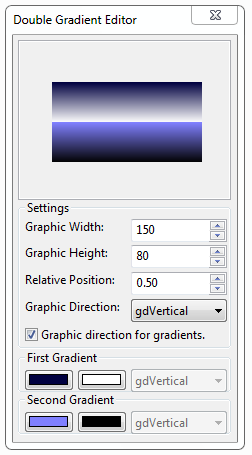 | |
| 165 | 156 | ||
| 166 | 157 | - Ein Rechtsklick auf die Scrollbox (den Gradientenbereich) zeigt das Kontextmenü an: | |
| 167 | 158 | - Save bitmap.. Zeigt einen Dialog zum Speichern als *.bmp Datei. | |
| 168 | 159 | - Load gradient.. Zeigt einen Dialog zum Laden einer *.doublegradient Sitzungsdatei. | |
| 169 | 160 | - Save gradient.. Zeigt einen Dialog zum Speichern der aktuellen Einstellungen in einer Sitzungsdatei. | |
| 170 | 161 | - Copy code to clipboard.. Kopiert einfach die Einstellungen in Textform in die Zwischenablage, die Sie dann im Lazarus-Quelltexteditor einfügen können, um die 'doublegradientfill'-Prozedur aufzurufen. | |
| 171 | 162 | ||
| 172 | 163 | - default.doublegradient: Diese Datei enthält die letzten Einstellungen im Editor, wird beim Start geladen und beim Programmende gespeichert. | |
| 173 | 164 | ||
| 174 | 165 | [Double Gradient Editor 1.0 Source Code](http://www.multiupload.com/5WJ6N8E0N0) dbgdedit1.0.zip (5.64 KB) | |
| 175 | 166 | ||
| 176 | 167 | Bearbeiten und verbessern Sie diesen Editor nach Belieben, natürlich kostenlos. | |
| 177 | 168 | ||
| 178 | 169 | ## nGradient | |
| 179 | 170 | ||
| 180 | 171 | Mit dieser Unit 'ngradient' können Sie ganz einfach Farbverläufe (= Gradienten) für Toolbars, Schaltflächen, etc... erzeugen. Speichern Sie den untenstehenden Code in einer Textdatei 'ngradient.pas' und fügen Sie 'ngradient' im Abschnitt 'uses' von Ihrem Projekt hinzu. | |
| 181 | 172 | ||
| 182 | 173 | ### Unit | |
| 183 | 174 | ||
| 184 | 175 | #### nGradientFill | |
| 185 | 176 | ||
| 186 | 177 | Kopieren Sie den Code und speichern Sie ihn in einer Textdatei namens 'ngradient.pas': | |
| 187 | 178 | ||
| 188 | 179 | ``` pascal | |
| 189 | 180 | unit ngradient; | |
| 190 | 181 | ||
| 191 | 182 | {$mode objfpc}{$H+} | |
| 192 | 183 | ||
| 193 | 184 | interface | |
| 194 | 185 | ||
| 195 | 186 | uses | |
| 196 | 187 | Classes, Graphics; | |
| 197 | 188 | ||
| 198 | 189 | type | |
| 199 | 190 | TnGradientInfo = record | |
| 200 | 191 | StartColor,StopColor:TColor; | |
| 201 | 192 | Direction: TGradientDirection; | |
| 202 | 193 | endPercent:single; // This is not the percent of the width, this is the percent of the end of the rect- which means, if this value is 1 - the rect could be from 0.99 to 1 and needs not be from 0 to 1 | |
| 203 | 194 | end; | |
| 204 | 195 | ||
| 205 | 196 | function nGradientFill(ARect: TRect;APos: TGradientDirection; AGradient: array of TnGradientInfo): TBitmap; | |
| 206 | 197 | ||
| 207 | 198 | implementation | |
| 208 | 199 | ||
| 209 | 200 | function nGradientFill(ARect: TRect;APos: TGradientDirection; AGradient: array of TnGradientInfo): TBitmap; | |
| 210 | 201 | var | |
| 211 | 202 | i:integer; | |
| 212 | 203 | AnRect,OldRect: TRect; | |
| 213 | 204 | begin | |
| 214 | 205 | Result := TBitmap.Create; | |
| 215 | 206 | Result.Width:=ARect.Right-ARect.Left; | |
| 216 | 207 | Result.Height:=ARect.Bottom-ARect.Top; | |
| 217 | 208 | OldRect := ARect; | |
| 218 | 209 | if APos = gdVertical then OldRect.Bottom := ARect.Top | |
| 219 | 210 | else OldRect.Right := ARect.Left ; // upside down... in case of i = 0... | |
| 220 | 211 | ||
| 221 | 212 | for i := 0 to high(AGradient) do | |
| 222 | 213 | begin | |
| 223 | 214 | AnRect:=OldRect; | |
| 224 | 215 | if APos = gdVertical then | |
| 225 | 216 | begin | |
| 226 | 217 | AnRect.Bottom:=Round((ARect.Bottom-ARect.Top) * AGradient[i].endPercent + ARect.Top); | |
| 227 | 218 | AnRect.Top:=OldRect.Bottom; | |
| 228 | 219 | end | |
| 229 | 220 | else | |
| 230 | 221 | begin | |
| 231 | 222 | AnRect.Right:=Round((ARect.Right-ARect.Left) * AGradient[i].endPercent + ARect.Left); | |
| 232 | 223 | AnRect.Left:=OldRect.Right; | |
| 233 | 224 | end; | |
| 234 | 225 | ||
| 235 | 226 | Result.Canvas.GradientFill(AnRect,AGradient[i].StartColor,AGradient[i].StopColor,AGradient[i].Direction); | |
| 236 | 227 | OldRect := AnRect; | |
| 237 | 228 | end; | |
| 238 | 229 | end; | |
| 239 | 230 | ``` | |
| 240 | 231 | ||
| 241 | 232 | #### nGradientAlphaFill | |
| 242 | 233 | ||
| 243 | 234 | Diese Unit erfordert [[BGRABitmap/de|BGRABitmap]]. | |
| 244 | 235 | ||
| 245 | 236 | Kopieren Sie den Code und speichern Sie ihn in einer Textdatei namens 'ngradientalpha.pas': | |
| 246 | 237 | ||
| 247 | 238 | ``` pascal | |
| 248 | 239 | unit ngradientalpha; | |
| 249 | 240 | ||
| 250 | 241 | {$mode objfpc}{$H+} | |
| 251 | 242 | ||
| 252 | 243 | interface | |
| 253 | 244 | ||
| 254 | 245 | uses | |
| 255 | 246 | Classes, Graphics, BGRABitmap, BGRABitmapTypes; | |
| 256 | 247 | ||
| 257 | 248 | type | |
| 258 | 249 | TnGradientInfo = record | |
| 259 | 250 | StartColor, StopColor : TBGRAPixel; | |
| 260 | 251 | Direction : TGradientDirection; | |
| 261 | 252 | endPercent : single; | |
| 262 | 253 | end; | |
| 263 | 254 | ||
| 264 | 255 | function nGradientAlphaFill(ARect: TRect;APos: TGradientDirection; | |
| 265 | 256 | AGradient: array of TnGradientInfo): TBGRABitmap; | |
| 266 | 257 | ||
| 267 | 258 | implementation | |
| 268 | 259 | ||
| 269 | 260 | function nGradientAlphaFill(ARect: TRect;APos: TGradientDirection; | |
| 270 | 261 | AGradient: array of TnGradientInfo): TBGRABitmap; | |
| 271 | 262 | var | |
| 272 | 263 | i:integer; AnRect, OldRect: TRect; Point1, Point2: TPointF; | |
| 273 | 264 | begin | |
| 274 | 265 | Result := TBGRABitmap.Create(ARect.Right-ARect.Left,ARect.Bottom-ARect.Top); | |
| 275 | 266 | OldRect := ARect; | |
| 276 | 267 | if APos = gdVertical then OldRect.Bottom := ARect.Top else OldRect.Right := ARect.Left; | |
| 277 | 268 | for i := 0 to high(AGradient) do | |
| 278 | 269 | begin | |
| 279 | 270 | AnRect:=OldRect; | |
| 280 | 271 | if APos = gdVertical then begin | |
| 281 | 272 | AnRect.Bottom:=Round((ARect.Bottom-ARect.Top) * AGradient[i].endPercent + ARect.Top); | |
| 282 | 273 | AnRect.Top:=OldRect.Bottom; | |
| 283 | 274 | Point1:=PointF(AnRect.Left,AnRect.Top); | |
| 284 | 275 | Point2:=PointF(AnRect.Left,AnRect.Bottom); | |
| 285 | 276 | end | |
| 286 | 277 | else begin | |
| 287 | 278 | AnRect.Right:=Round((ARect.Right-ARect.Left) * AGradient[i].endPercent + ARect.Left); | |
| 288 | 279 | AnRect.Left:=OldRect.Right; | |
| 289 | 280 | Point1:=PointF(AnRect.Left,AnRect.Top); | |
| 290 | 281 | Point2:=PointF(AnRect.Right,AnRect.Top); | |
| 291 | 282 | end; | |
| 292 | 283 | Result.GradientFill(AnRect.Left,AnRect.Top,AnRect.Right,AnRect.Bottom, | |
| 293 | 284 | AGradient[i].StartColor,AGradient[i].StopColor,gtLinear,Point1,Point2,dmDrawWithTransparency,True,False); | |
| 294 | 285 | OldRect := AnRect; | |
| 295 | 286 | end; | |
| 296 | 287 | end; | |
| 297 | 288 | ||
| 298 | 289 | end. | |
| 299 | 290 | ``` | |
| 300 | 291 | ||
| 301 | 292 | ### Gebrauch | |
| 302 | 293 | ||
| 303 | 294 | If you use nGradientAlphaFill first add BGRABitmap and BGRABitmapTypes in the Uses section, then use the function: Wenn Sie 'nGradientAlphaFill' benutzen, fügen Sie zuerst 'BGRABitmap' und 'BGRABitmapTypes' in der Sektion Uses hinzu, dann wenden Sie die Funktion an: | |
| 304 | 295 | ||
| 305 | 296 | ``` pascal | |
| 306 | 297 | var | |
| 307 | 298 | myBitmap: TBGRABitmap; | |
| 308 | 299 | AGradInfo: array [0..1] of TnGradientInfo; | |
| 309 | 300 | begin | |
| 310 | 301 | AGradInfo[0].Direction:=gdVertical; | |
| 311 | 302 | AGradInfo[0].endPercent:=0.50; | |
| 312 | 303 | AGradInfo[0].StartColor:=BGRA(0,0,0,200); | |
| 313 | 304 | AGradInfo[0].StopColor:=BGRA(255,255,255,100); | |
| 314 | 305 | ||
| 315 | 306 | AGradInfo[1].Direction:=gdVertical; | |
| 316 | 307 | AGradInfo[1].endPercent:=1.00; | |
| 317 | 308 | AGradInfo[1].StartColor:=BGRA(0,0,0,100); | |
| 318 | 309 | AGradInfo[1].StopColor:=BGRA(255,255,255,50); | |
| 319 | 310 | ||
| 320 | 311 | myBitmap:= nGradientAlphaFill(Self.ClientRect,gdVertical,Agradinfo); | |
| 321 | 312 | Self.Canvas.Draw(0,0,myBitmap.Bitmap); | |
| 322 | 313 | myBitmap.Free; | |
| 323 | 314 | end; | |
| 324 | 315 | ``` | |
| 325 | 316 | ||
| 326 | 317 | ### Editor | |
| 327 | 318 | ||
| 328 | 319 | Der nGradient-Editor ist eine aktualisierte Version des 'Double Gradient Editor' mit zahlreichen Veränderungen und Verbesserungen, wie der Fähigkeit, Farbverläufe mit 'n-fachen' Gradienten zu erzeugen. | |
| 329 | 320 | ||
| 330 | 321 | Mit dem nGradient-Editor können Sie 'n-fache' Gradienten erzeugen. | |
| 331 | 322 | ||
| 332 | - | ||
| 333 | - | ||
| 334 | - | ||
| 335 | - | ||
| 323 | + | 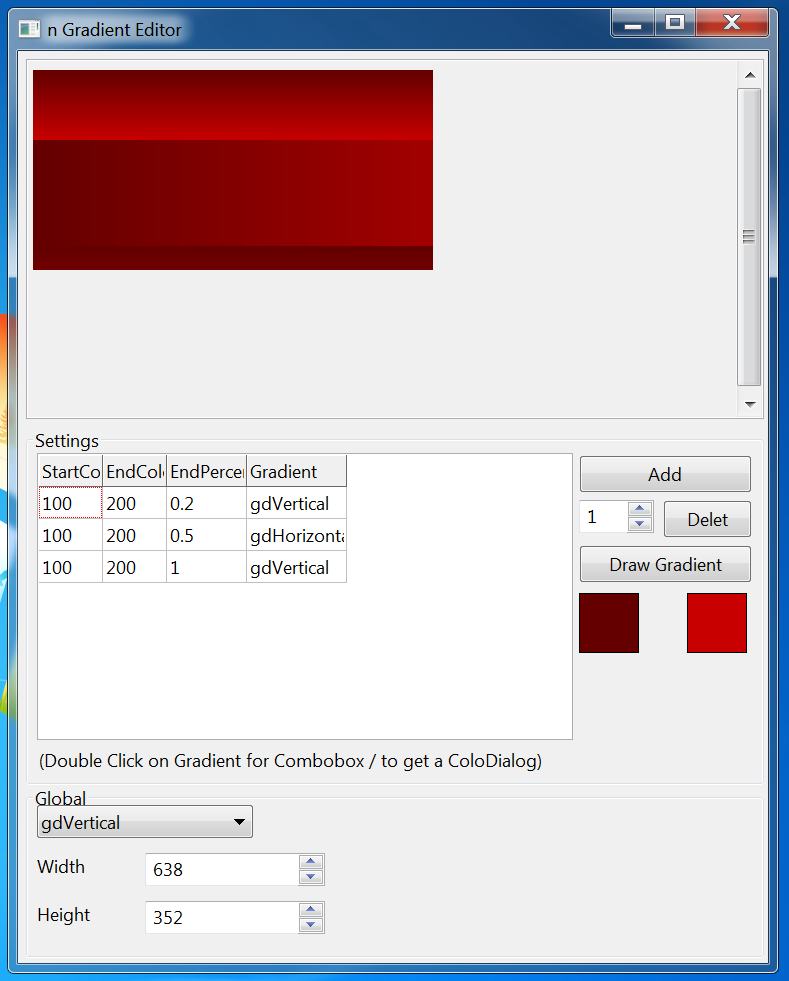 | |
| 336 | 324 | ||
| 337 | 325 | [nGradient Editor 1.1 (With alpha support) Source Code](http://www.multiupload.com/Z5CEFYE5CO) ngdedit1.1alpha.zip (22.58 KB) / [forum attach](http://lazarus.freepascal.org/index.php?action=dlattach;topic=12145.0;attach=1641) | |
| 338 | 326 | ||
| 339 | 327 | **Anmerkung:** Dieser Editor benutzt nicht BGRABitmap, sondern seine eigenen Alpha-Prozeduren. | |
| 340 | 328 | ||
| 341 | 329 | [nGradient Editor 1.1 Source Code](http://www.multiupload.com/SJDCG5P21Z) ngdedit1.1.zip (26.14 KB) / [forum attach](http://lazarus.freepascal.org/index.php?action=dlattach;topic=12145.0;attach=1636) | |
| 342 | 330 | ||
| 343 | 331 | --- | |
| 344 | 332 | *From the Free Pascal wiki, page "Double Gradient/de", as it stood on 2020-02-14 after a change by Trev, out of the wiki's dump of 2024-05-26. Copyright stays with the author who wrote it, according to the old wiki's [[Licensing]] page. If you have concerns about this material, [message the admin](/wiki-contact).* |