

DockedFormEditor: what changed
Revision 1 to 2. Removed lines have a minus sign; added lines have a plus sign.
| Old | New | Line | |
|---|---|---|---|
| 1 | 1 | The DockedFormEditor is a package for the Lazarus IDE that docks a form next to source editor unit. This package is shipped with Lazarus version 2.1 upwards. | |
| 2 | 2 | ||
| 3 | 3 | ## Why is it useful? | |
| 4 | 4 | ||
| 5 | 5 | If you don't like to search a form related to a unit, you can switch in the source editor pages. There you find the form docked as tab. Useful is a combination of packages **[[AnchorDockingDsgn]]** with **DockedFormEditor**, if you don't like the default "separate windows" look of the Lazarus IDE and prefer a single window. | |
| 6 | 6 | ||
| 7 | 7 | DockedFormEditor is the replacement and initially forked form Sparta_DockedFormEditor. If you used this package in the past, please switch to DockedFormEditor as all Sparta packages are now defined as deprecated and will be removed in a future version of Lazarus. | |
| 8 | 8 | ||
| 9 | 9 | ## Installation | |
| 10 | 10 | ||
| 11 | 11 | - Uninstall any other docking managers (e.g., easydockmgrdsgn) and especially **Sparta_DockedFormEditor**! | |
| 12 | 12 | - Install this package (and maybe **[[AnchorDockingDsgn]]**) per MainMenu -\> Package -\> Install/Uninstall Packages... -\> check the package **dockedformeditor**. | |
| 13 | 13 | - Now recompile Lazarus IDE. | |
| 14 | 14 | ||
| 15 | 15 | ## Layout | |
| 16 | 16 | ||
| 17 | 17 | After installation there are the design tabs docked next to source editor unit: | |
| 18 | 18 | ||
| 19 | - | ||
| 20 | - | ||
| 21 | - | ||
| 22 | - | ||
| 19 | + | 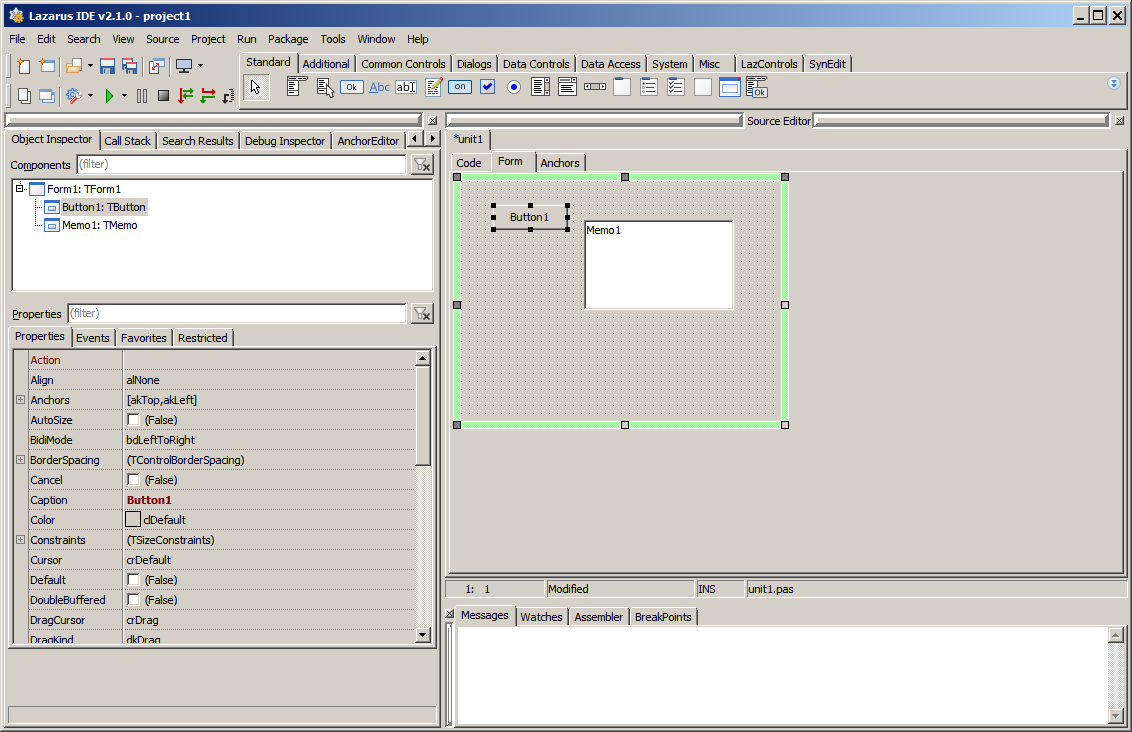 | |
| 23 | 20 | ||
| 24 | 21 | ## Pages | |
| 25 | 22 | ||
| 26 | 23 | ### Code | |
| 27 | 24 | ||
| 28 | 25 | In the tab Code is the source editor, where you can implement the logic of your app. | |
| 29 | 26 | ||
| 30 | - | ||
| 31 | - | ||
| 32 | - | ||
| 33 | - | ||
| 27 | + | 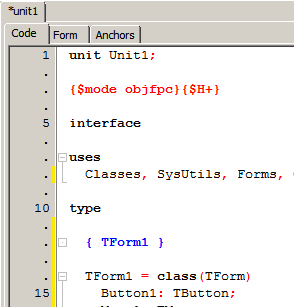 | |
| 34 | 28 | ||
| 35 | 29 | ### Form | |
| 36 | 30 | ||
| 37 | 31 | In the tab Form is the default form designer. Without this package it is a separate window. | |
| 38 | 32 | ||
| 39 | - | ||
| 40 | - | ||
| 41 | - | ||
| 42 | - | ||
| 33 | + | 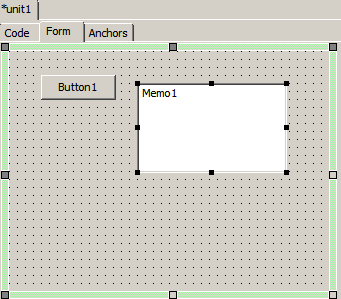 | |
| 43 | 34 | ||
| 44 | 35 | ### Anchors | |
| 45 | 36 | ||
| 46 | 37 | In the tab Anchors is a optional anchor designer. It's follows the WYSIWYG concept and your form reacts at runtime the same as at designtime. It can be used simultaneously with default Anchor Editor: | |
| 47 | 38 | ||
| 48 | 39 | - You can snap a control border or point with the grips and anchor it to a next or parent control. | |
| 49 | 40 | - Sizing or positioning without anchoring are possible with mouse. | |
| 50 | 41 | - With \<Ctrl\> + mouse you can change the border around a control. | |
| 51 | 42 | - Constraints of a control are noted. | |
| 52 | 43 | - Per popup menu a control can simply fixed on paranet or this fixing can be removed. | |
| 53 | 44 | - All properties affected per Anchor Designer are shown in hint of control. | |
| 54 | 45 | ||
| 55 | - | ||
| 56 | - | ||
| 57 | - | ||
| 58 | - | ||
| 46 | + | 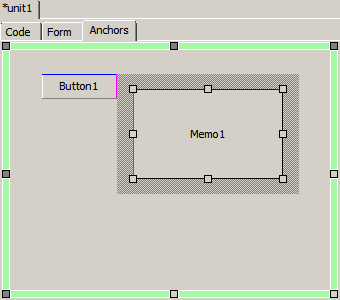 | |
| 59 | 47 | ||
| 60 | 48 | ## Options | |
| 61 | 49 | ||
| 62 | 50 | There are some options, found after package installation, under MainMenu -\> Tools -\> Options ... -\> Docked Form Editor. Next to some color definitions you find: | |
| 63 | 51 | ||
| 64 | 52 | - Tab position: defines the position of the tabs Code, Form, Anchors | |
| 65 | 53 | - Force Refreshing At Sizing: if the resizing eats to much time, this option can be deactivated | |
| 66 | 54 | - Capture Distance: this is the minimal distance in pixel to catch a control with mouse | |
| 67 | 55 | - Automatically treat Align properties: the Anchor Designer can only work with Anchors, so Aligns are translated to Anchors when this option is activated | |
| 68 | 56 | - Automatically treat BorderSpacing properties: allow Anchor designer to change all Borders (Around, Left, Top, Right, Bottom) to fit in | |
| 69 | 57 | - Allow size changing: you can change the size of a control or you can really only set or remove Anchors and BorderSpacing | |
| 70 | 58 | ||
| 71 | 59 | ## Limits | |
| 72 | 60 | ||
| 73 | 61 | - Tested on Windows7, 10, Linux Mint Cinnamon with GTK2, QT4, QT5. | |
| 74 | 62 | ||
| 75 | 63 | ## Known Issues | |
| 76 | 64 | ||
| 77 | 65 | - When the designed form / frame is moved out of screen, there the form has no designer grid (dots). | |
| 78 | 66 | - Qt5 shows own menu in form, this isn't shown in the anchor designer. | |
| 79 | 67 | - Designer: mouse wheel to scroll content doesn't work - csDesigning is set and form doesn't get a LM_MOUSEWHEEL message. | |
| 80 | 68 | - If main menu is visible, the height of the client area is wrong, see [Issue \#38701](https://bugs.freepascal.org/view.php?id=38701) | |
| 81 | 69 | - Form size is limited to screen size | |
| 82 | 70 | - AnchorDesigner: Child controls of some controls like TPageControl aren't visible | |
| 83 | 71 | ||
| 84 | 72 | ## See also | |
| 85 | 73 | ||
| 86 | 74 | - [[Docking]] in general | |
| 87 | 75 | - [[Anchor Docking]] in your application | |
| 88 | 76 | ||
| 89 | 77 | --- | |
| 90 | 78 | *From the Free Pascal wiki, page "DockedFormEditor", as it stood on 2023-04-09 after a change by Serbod, out of the wiki's dump of 2024-05-26. Copyright stays with the author who wrote it, according to the old wiki's [[Licensing]] page. If you have concerns about this material, [message the admin](/wiki-contact).* | |
| 91 | 79 | Category: Lazarus IDE plugins |