

DockedFormEditor
English · Русский
The DockedFormEditor is a package for the Lazarus IDE that docks a form next to source editor unit. This package is shipped with Lazarus version 2.1 upwards.
Why is it useful?
If you don't like to search a form related to a unit, you can switch in the source editor pages. There you find the form docked as tab. Useful is a combination of packages AnchorDockingDsgn with DockedFormEditor, if you don't like the default "separate windows" look of the Lazarus IDE and prefer a single window.
DockedFormEditor is the replacement and initially forked form Sparta_DockedFormEditor. If you used this package in the past, please switch to DockedFormEditor as all Sparta packages are now defined as deprecated and will be removed in a future version of Lazarus.
Installation
- Uninstall any other docking managers (e.g., easydockmgrdsgn) and especially Sparta_DockedFormEditor!
- Install this package (and maybe AnchorDockingDsgn) per MainMenu -> Package -> Install/Uninstall Packages... -> check the package dockedformeditor.
- Now recompile Lazarus IDE.
Layout
After installation there are the design tabs docked next to source editor unit:
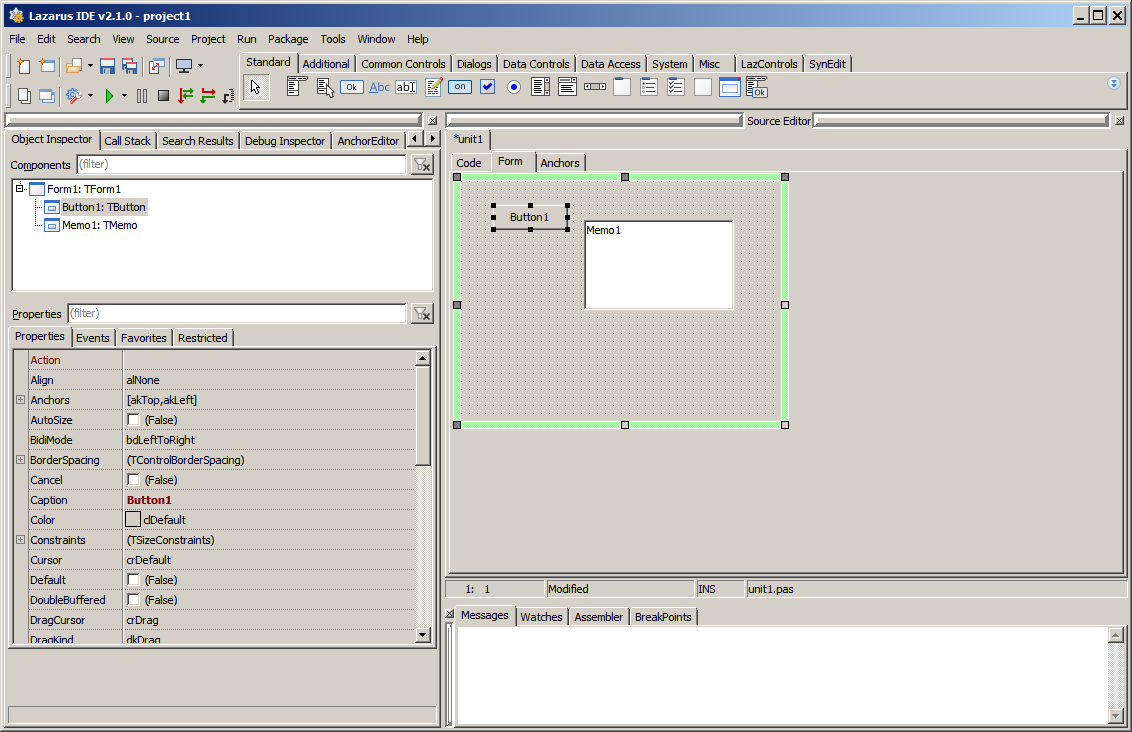
Pages
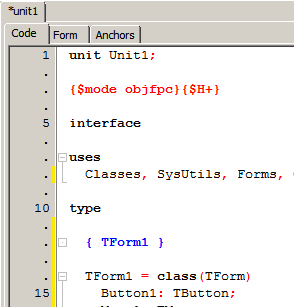
Code
In the tab Code is the source editor, where you can implement the logic of your app.
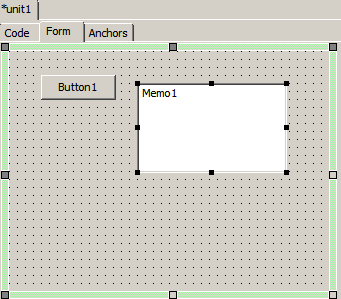
Form
In the tab Form is the default form designer. Without this package it is a separate window.
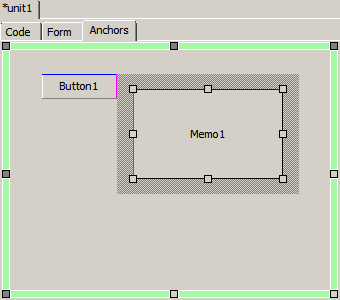
Anchors
In the tab Anchors is a optional anchor designer. It's follows the WYSIWYG concept and your form reacts at runtime the same as at designtime. It can be used simultaneously with default Anchor Editor:
- You can snap a control border or point with the grips and anchor it to a next or parent control.
- Sizing or positioning without anchoring are possible with mouse.
- With <Ctrl> + mouse you can change the border around a control.
- Constraints of a control are noted.
- Per popup menu a control can simply fixed on paranet or this fixing can be removed.
- All properties affected per Anchor Designer are shown in hint of control.
Options
There are some options, found after package installation, under MainMenu -> Tools -> Options ... -> Docked Form Editor. Next to some color definitions you find:
- Tab position: defines the position of the tabs Code, Form, Anchors
- Force Refreshing At Sizing: if the resizing eats to much time, this option can be deactivated
- Capture Distance: this is the minimal distance in pixel to catch a control with mouse
- Automatically treat Align properties: the Anchor Designer can only work with Anchors, so Aligns are translated to Anchors when this option is activated
- Automatically treat BorderSpacing properties: allow Anchor designer to change all Borders (Around, Left, Top, Right, Bottom) to fit in
- Allow size changing: you can change the size of a control or you can really only set or remove Anchors and BorderSpacing
Limits
- Tested on Windows7, 10, Linux Mint Cinnamon with GTK2, QT4, QT5.
Known Issues
- When the designed form / frame is moved out of screen, there the form has no designer grid (dots).
- Qt5 shows own menu in form, this isn't shown in the anchor designer.
- Designer: mouse wheel to scroll content doesn't work - csDesigning is set and form doesn't get a LM_MOUSEWHEEL message.
- If main menu is visible, the height of the client area is wrong, see Issue #38701
- Form size is limited to screen size
- AnchorDesigner: Child controls of some controls like TPageControl aren't visible
See also
- Docking in general
- Anchor Docking in your application
From the Free Pascal wiki, page "DockedFormEditor", as it stood on 2023-04-09 after a change by Serbod, out of the wiki's dump of 2024-05-26. Copyright stays with the author who wrote it, according to the old wiki's Licensing page. If you have concerns about this material, message the admin.
Talk about this page
Nobody has opened a bench for this page yet. Sign in to open one.