

Dialog Examples: what changed
Revision 1 to 2. Removed lines have a minus sign; added lines have a plus sign.
| Old | New | Line | |
|---|---|---|---|
| 1 | 1 | # Some useful dialogs | |
| 2 | 2 | ||
| 3 | 3 | Here are some useful dialogs not found in the [[Component Palette]]: | |
| 4 | 4 | ||
| 5 | 5 | - `procedure ShowMessage (const Msg: string);` | |
| 6 | 6 | - `function MessageBox (Text, Caption : PChar; Flags: Word): Integer;` | |
| 7 | 7 | - `function MessageDlg (const Msg: string; AType: TMsgDlgType; AButtons: TMsgDlgButtons; HelpCtx: LongInt): Word;` | |
| 8 | 8 | - `function InputBox (const ACaption, APrompt, ADefault: string); string;` | |
| 9 | 9 | - `function InputQuery (const ACaption, APrompt: string; var Value: string): Boolean;` | |
| 10 | 10 | - `function PasswordBox(const ACaption, APrompt : String) : String;` | |
| 11 | 11 | ||
| 12 | 12 | Each of these components causes a small popup box to be displayed, which contains some information and requires a user response: either a button press or some text entry or both. The programmer has little control over the format, size or position of these popup boxes, but can influence their textual content.\ | |
| 13 | 13 | The reason why there are often several very similar alternatives, is to allow different methods of calling the component and receiving data back from the [[Procedure|procedure]] or [[Function|function]]. These dialogs might be **platform dependent** i.e. they might be displayed differently. For example, strings which are fully displayed in Windows XP, might be truncated in Windows 7. | |
| 14 | 14 | ||
| 15 | 15 | ## Message Dialogs | |
| 16 | 16 | ||
| 17 | 17 | Message dialogs display a message and wait for a key-press or mouse-click response. | |
| 18 | 18 | ||
| 19 | 19 | ### ShowMessage | |
| 20 | 20 | ||
| 21 | 21 | ``` pascal | |
| 22 | 22 | procedure ShowMessage(const Msg: string); | |
| 23 | 23 | ``` | |
| 24 | 24 | ||
| 25 | 25 | { Defined in Dialogs.pp } | |
| 26 | 26 | ||
| 27 | - | ||
| 27 | + | The simplest message dialog: takes a simple [[String|string]] as parameter, displays it in a stereotyped box, and waits for a mouse-click or `Enter`-key event before returning to the calling [[Routine|routine]] or [[Program|program]].\ | |
| 28 | 28 | This is a modal procedure call, that is the box is displayed, receives focus, and does not relinquish focus until the OK box is clicked or otherwise selected. | |
| 29 | 29 | ||
| 30 | 30 | Example: | |
| 31 | 31 | ||
| 32 | 32 | ``` pascal | |
| 33 | 33 | program LazMessage; | |
| 34 | 34 | uses | |
| 35 | 35 | Dialogs; | |
| 36 | 36 | begin | |
| 37 | 37 | ShowMessage('This is a message from Lazarus'); | |
| 38 | 38 | end. | |
| 39 | 39 | ``` | |
| 40 | 40 | ||
| 41 | 41 | You have the ability to create multilines message using the following line separators, they will all work: | |
| 42 | 42 | ||
| 43 | 43 | - `sLineBreak` | |
| 44 | 44 | - [[End of Line|LineEnding]] | |
| 45 | 45 | - or the character code: \#13#10 | |
| 46 | 46 | ||
| 47 | 47 | **Multiple lines example:** | |
| 48 | 48 | ||
| 49 | 49 | ``` pascal | |
| 50 | 50 | program LazMessage; | |
| 51 | 51 | uses | |
| 52 | 52 | Dialogs; | |
| 53 | 53 | begin | |
| 54 | 54 | ShowMessage('This is a multilines' + sLineBreak + 'message!' ); | |
| 55 | 55 | end. | |
| 56 | 56 | ``` | |
| 57 | 57 | ||
| 58 | 58 | ### MessageBox | |
| 59 | 59 | ||
| 60 | 60 | ``` pascal | |
| 61 | 61 | function Application.MessageBox(Text, Caption: PChar; Flags: LongInt): Integer; | |
| 62 | 62 | ``` | |
| 63 | 63 | ||
| 64 | 64 | { Defined in Forms.pp as part of TApplication; hence must be called as Application.Messagebox() or using the '[[With|with]] `Application` [[Do|do]] ...' construct } | |
| 65 | 65 | ||
| 66 | 66 | Parameters include | |
| 67 | 67 | ||
| 68 | 68 | - Text: the string that is displayed as a prompt or instruction in the Box; | |
| 69 | 69 | - Caption: the string label at the top of the message box; | |
| 70 | 70 | - Flags: [[Longint|longint]] - an [[Integer|integer]] constructed by adding together various [[Constant|constants]] to define the contents and behaviour of the box, for example `MB_ABORTRETRYIGNORE + MR_ICONQUESTION` will cause the application to display a query (?) icon in a box with three buttons: ABORT RETRY IGNORE. | |
| 71 | 71 | ||
| 72 | 72 | The function returns an integer value corresponding to the button that was pressed; its value can be determined by reference to the constants \[IDOK..IDHELP\] | |
| 73 | 73 | ||
| 74 | 74 | It can be invoked like a procedure call (ie as a 'MessageBox()' [[statement]] rather than as a 'Variable := MessageBox()' function call - see example below) | |
| 75 | 75 | ||
| 76 | 76 | Example: | |
| 77 | 77 | ||
| 78 | 78 | ``` pascal | |
| 79 | 79 | uses | |
| 80 | 80 | Forms, Dialogs, LCLType; | |
| 81 | 81 | ||
| 82 | 82 | procedure DisplayMessageBox; | |
| 83 | 83 | var | |
| 84 | 84 | Reply, BoxStyle: Integer; | |
| 85 | 85 | begin | |
| 86 | 86 | BoxStyle := MB_ICONQUESTION + MB_YESNO; | |
| 87 | 87 | Reply := Application.MessageBox('Press either button', 'MessageBoxDemo', BoxStyle); | |
| 88 | 88 | if Reply = IDYES then Application.MessageBox('Yes ', 'Reply',MB_ICONINFORMATION) | |
| 89 | 89 | else Application.MessageBox('No ', 'Reply', MB_ICONHAND); | |
| 90 | 90 | end; | |
| 91 | 91 | ``` | |
| 92 | 92 | ||
| 93 | 93 | Notice that in this example the 'Yes' and 'No' strings have been padded out with spaces; otherwise the box would not be wide enough to display the caption properly | |
| 94 | 94 | ||
| 95 | - | ||
| 96 | - | ||
| 97 | 95 | 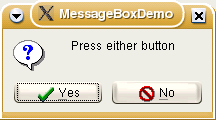 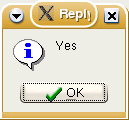 | |
| 98 | 96 | ||
| 99 | - | ||
| 100 | - | ||
| 101 | 97 | ### MessageDLG | |
| 102 | 98 | ||
| 103 | 99 | ``` pascal | |
| 104 | 100 | function MessageDlg(const aMsg: string; DlgType: TMsgDlgType; | |
| 105 | 101 | Buttons: TMsgDlgButtons; HelpCtx: Longint): Integer; | |
| 106 | 102 | function MessageDlg(const aCaption, aMsg: string; DlgType: TMsgDlgType; | |
| 107 | 103 | Buttons: TMsgDlgButtons; HelpCtx: Longint): Integer; | |
| 108 | 104 | ``` | |
| 109 | 105 | ||
| 110 | 106 | Two versions of this function, ie first 'Caption' parameter is optional; if omitted, caption is missing from box | |
| 111 | 107 | ||
| 112 | 108 | This is the most complete and elaborate of the message dialogs, and allows the programmer considerable control over the appearance of the dialog box. The parameters defining the kind of box and its icon are types rather than integer constants, and the buttons can be specified as a [[Set|set]] in [[square brackets]] eg `[mbRetry, mbIgnore, mbAbort, mbCancel]`. The HelpCtx parameter is not currently implemented and should be set to zero. The return value from the function is the identity of the button pressed, expressed as an integer (see the definitions below, \[mrNone..mrAll\]). | |
| 113 | 109 | ||
| 114 | 110 | Example: | |
| 115 | 111 | ||
| 116 | 112 | ``` pascal | |
| 117 | 113 | uses | |
| 118 | 114 | Forms, Dialogs, LCLType, Controls; | |
| 119 | 115 | ||
| 120 | 116 | procedure TryMessageDlg; | |
| 121 | 117 | begin | |
| 122 | 118 | if MessageDlg('Question', 'Do you wish to Execute?', mtConfirmation, | |
| 123 | 119 | [mbYes, mbNo, mbIgnore],0) = mrYes | |
| 124 | 120 | then { Execute rest of Program }; | |
| 125 | 121 | end; | |
| 126 | 122 | ``` | |
| 127 | 123 | ||
| 128 | - | ||
| 129 | - | ||
| 130 | - | ||
| 131 | - | ||
| 132 | - | ||
| 133 | - | ||
| 134 | - | ||
| 135 | - | ||
| 124 | + | 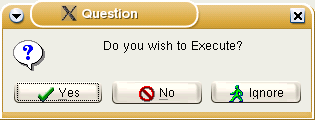 | |
| 136 | 125 | ||
| 137 | 126 | ### QuestionDlg | |
| 138 | 127 | ||
| 139 | 128 | Question dialog allows changing button captions and setting default and cancel buttons. The 3rd argument in the `QuestionDlg()` call determines the icon shown in the dialog. In some widgetsets, the icon can be suppressed by selecting message type `mtCustom`. | |
| 140 | 129 | ||
| 141 | 130 | Example: | |
| 142 | 131 | ||
| 143 | 132 | ``` pascal | |
| 144 | 133 | case QuestionDlg('Caption', 'Message', mtInformation, [mrYes, 'Positive', mrNo, 'Negative', 'IsDefault'], '') of | |
| 145 | 134 | mrYes: QuestionDlg('Caption', 'So you mean „Yes“', mtCustom, [mrOK, 'That is right'],''); | |
| 146 | 135 | mrNo: QuestionDlg('Caption', 'Oh, you mean „No“', mtCustom, [mrOK, 'Exactly'], ''); | |
| 147 | 136 | mrCancel: QuestionDlg('Caption', 'You cancelled the dialog with ESC or close button.', mtCustom, [mrOK, 'Exactly'], ''); | |
| 148 | 137 | end; | |
| 149 | 138 | ``` | |
| 150 | 139 | ||
| 151 | - | ||
| 152 | - | ||
| 153 | - | ||
| 154 | - | ||
| 155 | - | ||
| 156 | - | ||
| 157 | - | ||
| 158 | - | ||
| 140 | + | 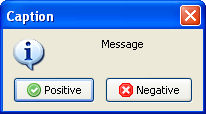 | |
| 159 | 141 | ||
| 160 | 142 | > **Note:** If the user cancels the dialog and there is no 'IsCancel' button defined, mrCancel is returned! If you want to redirect ESC/close to a defined button use the 'IsCancel' parameter just after the cancel button. | |
| 161 | 143 | ||
| 162 | 144 | > **Warning:** Do not confuse here the `mrXXXX` button identifiers with the `mbXXXX` identifiers used by MessageDlg, otherwise the return value will not be correct. | |
| 163 | 145 | ||
| 164 | 146 | Advanced examples for buttons (from promptdialog.inc) | |
| 165 | 147 | ||
| 166 | 148 | ``` pascal | |
| 167 | 149 | [mrOk, mrCancel, 'Cancel now', mrIgnore, 300, 'Do it', 'IsDefault'] | |
| 168 | 150 | ``` | |
| 169 | 151 | ||
| 170 | 152 | This will result in 4 buttons: | |
| 171 | 153 | ||
| 172 | 154 | - 'Ok' returning mrOk | |
| 173 | 155 | - 'Cancel now' returning mrCancel | |
| 174 | 156 | - 'Ignore' returning mrIgnore | |
| 175 | 157 | - 'Do it' returning 300. This will be the default button (focused) | |
| 176 | 158 | ||
| 177 | 159 | Usually buttons in Lazarus dialogs have icons. In order to prevent icons from being shown non standardize values for message results can be used. Currently highest standardized value is 11. For example: | |
| 178 | 160 | ||
| 179 | 161 | ``` pascal | |
| 180 | 162 | case QuestionDlg ('Caption','Message',mtCustom,[20,'Positive', 21, 'Negative',22,'I do not know','IsCancel'],'') of | |
| 181 | 163 | 20: QuestionDlg ('Caption','So you mean „Yes“',mtCustom,[20,'That is right'],''); | |
| 182 | 164 | 21: QuestionDlg ('Caption','Oh, you mean „No“',mtCustom,[21,'Exactly'],''); | |
| 183 | 165 | 22: QuestionDlg ('Caption','So, please find out!',mtCustom,[22,'Maybe'],''); | |
| 184 | 166 | end; | |
| 185 | 167 | ``` | |
| 186 | 168 | ||
| 187 | 169 | In order to facilitate work, constants can be defined. For example: | |
| 188 | 170 | ||
| 189 | 171 | ``` pascal | |
| 190 | 172 | const | |
| 191 | 173 | mrNoneNI= 20; // "NI" to indicate: "no icon" | |
| 192 | 174 | mrOkNI= mrNoneNI+1; | |
| 193 | 175 | mrCancelNI= mrNoneNI+2; | |
| 194 | 176 | mrAbortNI= mrNoneNI+3; | |
| 195 | 177 | mrRetryNI= mrNoneNI+4; | |
| 196 | 178 | mrIgnoreNI= mrNoneNI+5; | |
| 197 | 179 | mrYesNI= mrNoneNI+6; | |
| 198 | 180 | mrNoNI= mrNoneNI+7; | |
| 199 | 181 | mrAllNI= mrNoneNI+8; | |
| 200 | 182 | mrYesToAllNI= mrNoneNI+10; | |
| 201 | 183 | mrCloseNI= mrNoneNI+11; | |
| 202 | 184 | mrLastNI= mrCloseNI; | |
| 203 | 185 | begin | |
| 204 | 186 | case QuestionDlg ('Caption','Message',mtCustom,[mrYesNI,'Positive', mrNoNI, 'Negative',mrCancelNI,'I do not know','IsCancel'],'') of | |
| 205 | 187 | mrYesNI: QuestionDlg ('Caption','So you mean „Yes“',mtCustom,[mrYesNI,'That is right'],''); | |
| 206 | 188 | mrNoNI: QuestionDlg ('Caption','Oh, you mean „No“',mtCustom,[mrNoNI,'Exactly'],''); | |
| 207 | 189 | mrCancelNI: QuestionDlg ('Caption','So, please find out!',mtCustom,[mrCancelNI,'Maybe'],''); | |
| 208 | 190 | end; //case | |
| 209 | 191 | end; | |
| 210 | 192 | ``` | |
| 211 | 193 | ||
| 212 | - | ||
| 213 | - | ||
| 214 | - | ||
| 215 | - | ||
| 216 | - | ||
| 217 | - | ||
| 218 | - | ||
| 219 | - | ||
| 194 | + | 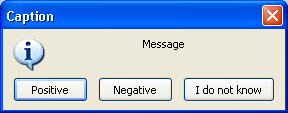 | |
| 220 | 195 | ||
| 221 | 196 | ## Text input Dialogs | |
| 222 | 197 | ||
| 223 | 198 | ### InputBox | |
| 224 | 199 | ||
| 225 | 200 | Text input Dialogs: display a message and await user text input | |
| 226 | 201 | ||
| 227 | 202 | ``` pascal | |
| 228 | 203 | function InputBox(const ACaption, APrompt, ADefault: String): String; | |
| 229 | 204 | ``` | |
| 230 | 205 | ||
| 231 | 206 | Displays a box with defined title and prompt, and expects user input in a text box. A default string can optionally be displayed in the text box. The user-entered or default string is returned as the function result. If user clicks Cancel, default string is returned as the function result. | |
| 232 | 207 | ||
| 233 | 208 | Example: | |
| 234 | 209 | ||
| 235 | 210 | ``` pascal | |
| 236 | 211 | uses | |
| 237 | 212 | Forms, LCLType, Dialogs, Controls; | |
| 238 | 213 | ||
| 239 | 214 | procedure TryInputBox; | |
| 240 | 215 | var | |
| 241 | 216 | UserString: string; | |
| 242 | 217 | begin | |
| 243 | 218 | UserString := InputBox('Get some text input', | |
| 244 | 219 | 'Please type in some information', 'Some sample text'); | |
| 245 | 220 | ShowMessage(UserString) | |
| 246 | 221 | end; | |
| 247 | 222 | ``` | |
| 248 | 223 | ||
| 249 | 224 | ### InputQuery | |
| 250 | 225 | ||
| 251 | 226 | ``` pascal | |
| 252 | 227 | function InputQuery(const ACaption, APrompt : String; | |
| 253 | 228 | MaskInput : Boolean; var Value : String) : Boolean; | |
| 254 | 229 | function InputQuery(const ACaption, APrompt : String; | |
| 255 | 230 | var Value : String) : Boolean; | |
| 256 | 231 | ``` | |
| 257 | 232 | ||
| 258 | 233 | Two versions of this function which displays a prompt and expects user input of textual data; the first includes a MaskInput [[Boolean|boolean]] parameter which determines whether the user input is masked out by [[*|asterisks (*)]] in the text-input box (like during entry of a password), while the second omits this property. The text entered by the user is returned in the variable parameter 'Value'; the function result is a boolean which returns [[True|true]] if the OK button was pressed, or [[False|false]] if the box was closed by any other mechanism (such as clicking the 'Close' icon on the top title bar). Omitting the MaskInput parameter is equivalent to setting it `false`. | |
| 259 | 234 | ||
| 260 | 235 | Example: | |
| 261 | 236 | ||
| 262 | 237 | ``` pascal | |
| 263 | 238 | uses | |
| 264 | 239 | Forms, LCLType, Dialogs, Controls; | |
| 265 | 240 | ||
| 266 | 241 | procedure TryInputQuery; | |
| 267 | 242 | var | |
| 268 | 243 | QueryResult: Boolean; | |
| 269 | 244 | UserString: string; | |
| 270 | 245 | begin | |
| 271 | 246 | if InputQuery('Question', 'Type in some data', TRUE, UserString) | |
| 272 | 247 | then ShowMessage(UserString) | |
| 273 | 248 | else | |
| 274 | 249 | begin | |
| 275 | 250 | InputQuery('Don''t be silly', 'Please try again', UserString); | |
| 276 | 251 | ShowMessage(UserString); | |
| 277 | 252 | end | |
| 278 | 253 | end; | |
| 279 | 254 | ``` | |
| 280 | 255 | ||
| 281 | - | ||
| 282 | - | ||
| 283 | - | ||
| 284 | - | ||
| 285 | - | ||
| 286 | - | ||
| 287 | - | ||
| 288 | - | ||
| 289 | - | ||
| 290 | - | ||
| 291 | - | ||
| 292 | - | ||
| 293 | - | ||
| 294 | - | ||
| 295 | - | ||
| 256 | + | 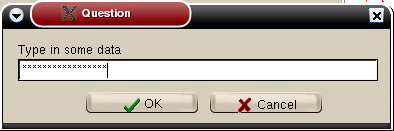 | |
| 296 | 257 | ||
| 297 | - | ||
| 258 | + | 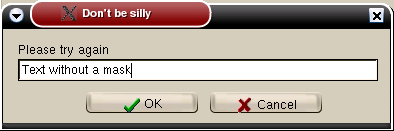 | |
| 298 | 259 | ||
| 299 | 260 | ### PasswordBox | |
| 300 | 261 | ||
| 301 | 262 | ``` pascal | |
| 302 | 263 | Function PasswordBox(const ACaption, APrompt : String) : String; | |
| 303 | 264 | ``` | |
| 304 | 265 | ||
| 305 | 266 | Behaves very similarly to the InputQuery function with MaskInput = TRUE; the difference is that the password that was typed in is returned as the result of the function (like InputBox). | |
| 306 | 267 | ||
| 307 | 268 | ## Constants and Types used in message dialogs | |
| 308 | 269 | ||
| 309 | 270 | Several constants and types relevant for use with the dialog boxes are pre-defined in the [[LCL]] library: | |
| 310 | 271 | ||
| 311 | 272 | const { Defined in LCLType.pp } | |
| 312 | 273 | ||
| 313 | 274 | integer constants for defining the types of buttons and the icon for display in MessageBox | |
| 314 | 275 | ||
| 315 | 276 | ``` pascal | |
| 316 | 277 | MB_OK = $00000000; | |
| 317 | 278 | MB_OKCANCEL = $00000001; | |
| 318 | 279 | MB_ABORTRETRYIGNORE = $00000002; | |
| 319 | 280 | MB_YESNOCANCEL = $00000003; | |
| 320 | 281 | MB_YESNO = $00000004; | |
| 321 | 282 | MB_RETRYCANCEL = $00000005; | |
| 322 | 283 | ||
| 323 | 284 | ||
| 324 | 285 | MB_ICONHAND = $00000010; | |
| 325 | 286 | MB_ICONQUESTION = $00000020; | |
| 326 | 287 | MB_ICONEXCLAMATION = $00000030; | |
| 327 | 288 | MB_ICONASTERICK = $00000040; | |
| 328 | 289 | MB_ICONWARNING = MB_ICONEXCLAMATION; | |
| 329 | 290 | MB_ICONERROR = MB_ICONHAND; | |
| 330 | 291 | MB_ICONINFORMATION = MB_ICONASTERICK; | |
| 331 | 292 | ``` | |
| 332 | 293 | ||
| 333 | 294 | integer constants defining the return value from MessageBox according to which button was pressed | |
| 334 | 295 | ||
| 335 | 296 | ``` pascal | |
| 336 | 297 | IDOK = 1; ID_OK = IDOK; | |
| 337 | 298 | IDCANCEL = 2; ID_CANCEL = IDCANCEL; | |
| 338 | 299 | IDABORT = 3; ID_ABORT = IDABORT; | |
| 339 | 300 | IDRETRY = 4; ID_RETRY = IDRETRY; | |
| 340 | 301 | IDIGNORE = 5; ID_IGNORE = IDIGNORE; | |
| 341 | 302 | IDYES = 6; ID_YES = IDYES; | |
| 342 | 303 | IDNO = 7; ID_NO = IDNO; | |
| 343 | 304 | IDCLOSE = 8; ID_CLOSE = IDCLOSE; | |
| 344 | 305 | IDHELP = 9; ID_HELP = IDHELP; | |
| 345 | 306 | ``` | |
| 346 | 307 | ||
| 347 | 308 | define whether first, second or third button is default | |
| 348 | 309 | ||
| 349 | 310 | ``` pascal | |
| 350 | 311 | MB_DEFBUTTON1 = $00000000; | |
| 351 | 312 | MB_DEFBUTTON2 = $00000100; | |
| 352 | 313 | MB_DEFBUTTON3 = $00000200; | |
| 353 | 314 | MB_DEFBUTTON4 = $00000300; | |
| 354 | 315 | ``` | |
| 355 | 316 | ||
| 356 | 317 | The Flags parameter of MessageBox is constructed by adding a button constant \[MB_OK..MB_RETRYCANCEL\], an optional icon constant \[MB_ICONHAND..MB_ICONINFORMATION\] and an optional default button constant \[MB_DEFBUTTON1..MB_DEFBUTTON3\] | |
| 357 | 318 | ||
| 358 | 319 | Types for use in MessageDlg, which needs parameters AType of TMsgDlgType and AButtons of TMSgDlgButtons | |
| 359 | 320 | ||
| 360 | 321 | ``` pascal | |
| 361 | 322 | { Defined in Dialogs.pp } | |
| 362 | 323 | type | |
| 363 | 324 | TMsgDlgType = (mtWarning, mtError, mtInformation, mtConfirmation, | |
| 364 | 325 | mtCustom); | |
| 365 | 326 | TMsgDlgBtn = (mbYes, mbNo, mbOK, mbCancel, mbAbort, mbRetry, mbIgnore, | |
| 366 | 327 | mbAll, mbNoToAll, mbYesToAll, mbHelp, mbClose); | |
| 367 | 328 | TMsgDlgButtons = set of TMsgDlgBtn; | |
| 368 | 329 | ||
| 369 | 330 | ||
| 370 | 331 | const | |
| 371 | 332 | mbYesNoCancel = [mbYes, mbNo, mbCancel]; | |
| 372 | 333 | mbOKCancel = [mbOK, mbCancel]; | |
| 373 | 334 | mbAbortRetryIgnore = [mbAbort, mbRetry, mbIgnore]; | |
| 374 | 335 | ||
| 375 | 336 | ||
| 376 | 337 | MsgDlgBtnToBitBtnKind: array[TMsgDlgBtn] of TBitBtnKind = ( | |
| 377 | 338 | bkYes, bkNo, bkOK, bkCancel, bkAbort, bkRetry, bkIgnore, | |
| 378 | 339 | bkAll, bkNoToAll, bkYesToAll, bkHelp, bkClose | |
| 379 | 340 | ); | |
| 380 | 341 | ||
| 381 | 342 | ||
| 382 | 343 | BitBtnKindToMsgDlgBtn: array[TBitBtnKind] of TMsgDlgBtn = ( | |
| 383 | 344 | mbOk, mbOK, mbCancel, mbHelp, mbYes, mbNo, | |
| 384 | 345 | mbClose, mbAbort, mbRetry, mbIgnore, mbAll, mbNoToALl, mbYesToAll | |
| 385 | 346 | ); | |
| 386 | 347 | ||
| 387 | 348 | ||
| 388 | 349 | { Defined in Controls.pp } | |
| 389 | 350 | const | |
| 390 | 351 | mrNone = 0; | |
| 391 | 352 | mrOK = mrNone + 1; | |
| 392 | 353 | mrCancel = mrNone + 2; | |
| 393 | 354 | mrAbort = mrNone + 3; | |
| 394 | 355 | mrRetry = mrNone + 4; | |
| 395 | 356 | mrIgnore = mrNone + 5; | |
| 396 | 357 | mrYes = mrNone + 6; | |
| 397 | 358 | mrNo = mrNone + 7; | |
| 398 | 359 | mrAll = mrNone + 8; | |
| 399 | 360 | mrNoToAll = mrNone + 9; | |
| 400 | 361 | mrYesToAll = mrNone + 10; | |
| 401 | 362 | mrLast = mrYesToAll; | |
| 402 | 363 | ``` | |
| 403 | 364 | ||
| 404 | 365 | --- | |
| 405 | 366 | *From the Free Pascal wiki, page "Dialog Examples", as it stood on 2021-11-24 after a change by Wp, out of the wiki's dump of 2024-05-26. Copyright stays with the author who wrote it, according to the old wiki's [[Licensing]] page. If you have concerns about this material, [message the admin](/wiki-contact).* |