

Dialog Examples/zh CN: what changed
Revision 1 to 2. Removed lines have a minus sign; added lines have a plus sign.
| Old | New | Line | |
|---|---|---|---|
| 1 | 1 | # 一些有用的对话框 | |
| 2 | 2 | ||
| 3 | 3 | 这是在[[Component Palette|组件调色板]]中找不到的一些有用的对话框: | |
| 4 | 4 | ||
| 5 | 5 | - `procedure ShowMessage (const Msg: string);` | |
| 6 | 6 | - `function MessageBox (Text, Caption : PChar; Flags: Word): Integer;` | |
| 7 | 7 | - `function MessageDlg (const Msg: string; AType: TMsgDlgType; AButtons: TMsgDlgButtons; HelpCtx: LongInt): Word;` | |
| 8 | 8 | - `function InputBox (const ACaption, APrompt, ADefault: string); string;` | |
| 9 | 9 | - `function InputQuery (const ACaption, APrompt: string; var Value: string): Boolean;` | |
| 10 | 10 | - `function PasswordBox(const ACaption, APrompt : String) : String;` | |
| 11 | 11 | ||
| 12 | 12 | 这些对话框组件都可以显示一个小型的弹出对话框,对话框中包含一些信息并需要用户响应:要么按下一个按钮,要么输入一些文本,再者两者都有所要求。程序员几乎不能控制这些弹出对话框的格式,大小或位置,但是可以控制它们的文本内容。\ | |
| 13 | 13 | The reason why there are often several very similar alternatives, 允许不同的方法来调用组件并从[[Procedure|过程]]或[[Function|函数]]中接收回数据。 这些对话框可能是**依赖于平台的**。例如,它们可能显示不同。例如,字符串在Windows XP中会完全显示, 可能在Windows 7中会显示不全。 | |
| 14 | 14 | ||
| 15 | 15 | ## 信息对话框 | |
| 16 | 16 | ||
| 17 | 17 | 消息对话框显示一条消息并等待一次按键或鼠标点击响应。 | |
| 18 | 18 | ||
| 19 | 19 | ### ShowMessage | |
| 20 | 20 | ||
| 21 | 21 | ``` pascal | |
| 22 | 22 | procedure ShowMessage(const Msg: string); | |
| 23 | 23 | ``` | |
| 24 | 24 | ||
| 25 | 25 | { 在Dialogs.pp中定义 } | |
| 26 | 26 | ||
| 27 | - | ||
| 27 | + | 最简单的信息对话框: 获取一个简单的[[String|字符串]]作为参数,并在一个模板化的对话框中显示该字符串。并在返回调用[[Routine|routine|实例程序]]或[[Program|program|程序]]前,等待一次鼠标单击或按下 `Enter`-按键。\ | |
| 28 | 28 | 这是一个模式化过程调用,这会是一个在单击确定或其它选择前一直会显示、接收焦点、并且不放弃焦点的对话框。 | |
| 29 | 29 | ||
| 30 | 30 | 示例: | |
| 31 | 31 | ||
| 32 | 32 | ``` pascal | |
| 33 | 33 | program LazMessage; | |
| 34 | 34 | uses | |
| 35 | 35 | Dialogs; | |
| 36 | 36 | begin | |
| 37 | 37 | ShowMessage('This is a message from Lazarus'); | |
| 38 | 38 | end. | |
| 39 | 39 | ``` | |
| 40 | 40 | ||
| 41 | 41 | 你能够使用下面的行分隔符来创建多行消息,这些行分隔符都能工作: | |
| 42 | 42 | ||
| 43 | 43 | - `sLineBreak` | |
| 44 | 44 | - [[End of Line|LineEnding]] | |
| 45 | 45 | - 或字符代码:#13#10 | |
| 46 | 46 | ||
| 47 | 47 | **多行消息示例:** | |
| 48 | 48 | ||
| 49 | 49 | ``` pascal | |
| 50 | 50 | program LazMessage; | |
| 51 | 51 | uses | |
| 52 | 52 | Dialogs; | |
| 53 | 53 | begin | |
| 54 | 54 | ShowMessage('This is a multilines' + sLineBreak + 'message!' ); | |
| 55 | 55 | end. | |
| 56 | 56 | ``` | |
| 57 | 57 | ||
| 58 | 58 | ### MessageBox | |
| 59 | 59 | ||
| 60 | 60 | ``` pascal | |
| 61 | 61 | function Application.MessageBox(Text, Caption: PChar; Flags: LongInt): Integer; | |
| 62 | 62 | ``` | |
| 63 | 63 | ||
| 64 | 64 | { 在Forms.pp中定义,是TApplication的一部分;因此必须称其为Application.Messagebox()或者使用'[[With|with]] `Application` [[Do|do]] ...' 构造 } | |
| 65 | 65 | ||
| 66 | 66 | 参数包括 | |
| 67 | 67 | ||
| 68 | 68 | - Text: the string that is displayed as a prompt or instruction in the Box; | |
| 69 | 69 | - Caption: the string label at the top of the message box; | |
| 70 | 70 | - Flags: [[Longint|longint]] - an [[Integer|integer]] constructed by adding together various [[Constant|constants]] to define the contents and behaviour of the box, for example `MB_ABORTRETRYIGNORE + MR_ICONQUESTION` will cause the application to display a query (?) icon in a box with three buttons: ABORT RETRY IGNORE. | |
| 71 | 71 | ||
| 72 | 72 | The function returns an integer value corresponding to the button that was pressed; its value can be determined by reference to the constants \[IDOK..IDHELP\] | |
| 73 | 73 | ||
| 74 | 74 | It can be invoked like a procedure call (ie as a 'MessageBox()' [[statement]] rather than as a 'Variable := MessageBox()' function call - see example below) | |
| 75 | 75 | ||
| 76 | 76 | 示例: | |
| 77 | 77 | ||
| 78 | 78 | ``` pascal | |
| 79 | 79 | uses | |
| 80 | 80 | Forms, Dialogs, LCLType; | |
| 81 | 81 | ||
| 82 | 82 | procedure DisplayMessageBox; | |
| 83 | 83 | var | |
| 84 | 84 | Reply, BoxStyle: Integer; | |
| 85 | 85 | begin | |
| 86 | 86 | BoxStyle := MB_ICONQUESTION + MB_YESNO; | |
| 87 | 87 | Reply := Application.MessageBox('Press either button', 'MessageBoxDemo', BoxStyle); | |
| 88 | 88 | if Reply = IDYES then Application.MessageBox('Yes ', 'Reply',MB_ICONINFORMATION) | |
| 89 | 89 | else Application.MessageBox('No ', 'Reply', MB_ICONHAND); | |
| 90 | 90 | end; | |
| 91 | 91 | ``` | |
| 92 | 92 | ||
| 93 | 93 | 注意,在这个示例中,字符串'Yes'和'No'需要使用空格填充;否则对话框可能会没有足够的宽度来正确地显示标题 | |
| 94 | 94 | ||
| 95 | - | ||
| 96 | - | ||
| 97 | 95 | 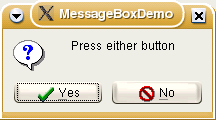 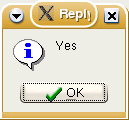 | |
| 98 | 96 | ||
| 99 | - | ||
| 100 | - | ||
| 101 | 97 | ### MessageDLG | |
| 102 | 98 | ||
| 103 | 99 | ``` pascal | |
| 104 | 100 | function MessageDlg(const aMsg: string; DlgType: TMsgDlgType; | |
| 105 | 101 | Buttons: TMsgDlgButtons; HelpCtx: Longint): Integer; | |
| 106 | 102 | function MessageDlg(const aCaption, aMsg: string; DlgType: TMsgDlgType; | |
| 107 | 103 | Buttons: TMsgDlgButtons; HelpCtx: Longint): Integer; | |
| 108 | 104 | ``` | |
| 109 | 105 | ||
| 110 | 106 | 这个函数有两个版本,第一个版本:'Caption'参数是可选的;如果省略掉,对话框会丢失标题 | |
| 111 | 107 | ||
| 112 | 108 | This is the most complete and elaborate of the message dialogs, and allows the programmer considerable control over the appearance of the dialog box. The parameters defining the kind of box and its icon are types rather than integer constants, and the buttons can be specified as a [[Set|set]] in [[square brackets]] eg `[mbRetry, mbIgnore, mbAbort, mbCancel]`. The HelpCtx parameter is not currently implemented and should be set to zero. The return value from the function is the identity of the button pressed, expressed as an integer (see the definitions below, \[mrNone..mrAll\]). | |
| 113 | 109 | ||
| 114 | 110 | 示例: | |
| 115 | 111 | ||
| 116 | 112 | ``` pascal | |
| 117 | 113 | uses | |
| 118 | 114 | Forms, Dialogs, LCLType, Controls; | |
| 119 | 115 | ||
| 120 | 116 | procedure TryMessageDlg; | |
| 121 | 117 | begin | |
| 122 | 118 | if MessageDlg('Question', 'Do you wish to Execute?', mtConfirmation, | |
| 123 | 119 | [mbYes, mbNo, mbIgnore],0) = mrYes | |
| 124 | 120 | then { Execute rest of Program }; | |
| 125 | 121 | end; | |
| 126 | 122 | ``` | |
| 127 | 123 | ||
| 128 | - | ||
| 129 | - | ||
| 130 | - | ||
| 131 | - | ||
| 132 | - | ||
| 133 | - | ||
| 134 | - | ||
| 135 | - | ||
| 124 | + | 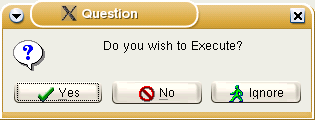 | |
| 136 | 125 | ||
| 137 | 126 | ### QuestionDlg | |
| 138 | 127 | ||
| 139 | 128 | 询问对话框允许各国按钮标题和设置默认按钮和取消按钮。 | |
| 140 | 129 | ||
| 141 | 130 | 示例: | |
| 142 | 131 | ||
| 143 | 132 | ``` pascal | |
| 144 | 133 | case QuestionDlg ('Caption','Message',mtCustom,[mrYes,'Positive', mrNo, 'Negative', 'IsDefault'],'') of | |
| 145 | 134 | mrYes: QuestionDlg ('Caption','So you mean „Yes“',mtCustom,[mrOK,'That is right'],''); | |
| 146 | 135 | mrNo: QuestionDlg ('Caption','Oh, you mean „No“',mtCustom,[mrOK,'Exactly'],''); | |
| 147 | 136 | mrCancel: QuestionDlg ('Caption','You canceled the dialog with ESC or close button.',mtCustom,[mrOK,'Exactly'],''); | |
| 148 | 137 | end; | |
| 149 | 138 | ``` | |
| 150 | 139 | ||
| 151 | - | ||
| 152 | - | ||
| 153 | - | ||
| 154 | - | ||
| 155 | - | ||
| 156 | - | ||
| 157 | - | ||
| 158 | - | ||
| 140 | + | 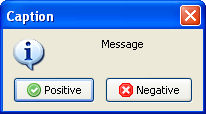 | |
| 159 | 141 | ||
| 160 | 142 | > **Note:** 如果以后取消对话框,并且没有定义'IsCancel'按钮的话,将返回mrCancel!If you want to redirect ESC/close to a defined button use the 'IsCancel' parameter just after the cancel button. | |
| 161 | 143 | ||
| 162 | 144 | > **Note:** Using letters of the local alphabet in UnicodeString type as button captions may raise errors (found in v1.6.4). | |
| 163 | 145 | ||
| 164 | 146 | 针对按钮的高级示例(来自promptdialog.inc) | |
| 165 | 147 | ||
| 166 | 148 | ``` pascal | |
| 167 | 149 | [mrOk,mrCancel,'Cancel now',mrIgnore,300,'Do it','IsDefault'] | |
| 168 | 150 | ``` | |
| 169 | 151 | ||
| 170 | 152 | 这将产生4个按钮: | |
| 171 | 153 | ||
| 172 | 154 | - 'Ok'返回mrOk | |
| 173 | 155 | - 'Cancel now'返回mrCancel | |
| 174 | 156 | - 'Ignore'返回mrIgnore | |
| 175 | 157 | - 'Do it'返回300。这将是默认的按钮(聚焦选择项) | |
| 176 | 158 | ||
| 177 | 159 | 通常按钮在Lazarus对话框中有图标。In order to prevent icons from being shown non standardize values for message results can be used.当前最高标准值是11。例如: | |
| 178 | 160 | ||
| 179 | 161 | ``` pascal | |
| 180 | 162 | case QuestionDlg ('Caption','Message',mtCustom,[20,'Positive', 21, 'Negative',22,'I do not know','IsCancel'],'') of | |
| 181 | 163 | 20: QuestionDlg ('Caption','So you mean „Yes“',mtCustom,[20,'That is right'],''); | |
| 182 | 164 | 21: QuestionDlg ('Caption','Oh, you mean „No“',mtCustom,[21,'Exactly'],''); | |
| 183 | 165 | 22: QuestionDlg ('Caption','So, please find out!',mtCustom,[22,'Maybe'],''); | |
| 184 | 166 | end; | |
| 185 | 167 | ``` | |
| 186 | 168 | ||
| 187 | 169 | 为了便于工作,常量可以被定义,例如: | |
| 188 | 170 | ||
| 189 | 171 | ``` pascal | |
| 190 | 172 | const | |
| 191 | 173 | mrNoneNI= 20; | |
| 192 | 174 | mrOkNI= mrNoneNI+1; | |
| 193 | 175 | mrCancelNI= mrNoneNI+2; | |
| 194 | 176 | mrAbortNI= mrNoneNI+3; | |
| 195 | 177 | mrRetryNI= mrNoneNI+4; | |
| 196 | 178 | mrIgnoreNI= mrNoneNI+5; | |
| 197 | 179 | mrYesNI= mrNoneNI+6; | |
| 198 | 180 | mrNoNI= mrNoneNI+7; | |
| 199 | 181 | mrAllNI= mrNoneNI+8; | |
| 200 | 182 | mrYesToAllNI= mrNoneNI+10; | |
| 201 | 183 | mrCloseNI= mrNoneNI+11; | |
| 202 | 184 | mrLastNI= mrCloseNI; | |
| 203 | 185 | begin | |
| 204 | 186 | case QuestionDlg ('Caption','Message',mtCustom,[mrYesNI,'Positive', mrNoNI, 'Negative',mrCancelNI,'I do not know','IsCancel'],'') of | |
| 205 | 187 | mrYesNI: QuestionDlg ('Caption','So you mean „Yes“',mtCustom,[mrYesNI,'That is right'],''); | |
| 206 | 188 | mrNoNI: QuestionDlg ('Caption','Oh, you mean „No“',mtCustom,[mrNoNI,'Exactly'],''); | |
| 207 | 189 | mrCancelNI: QuestionDlg ('Caption','So, please find out!',mtCustom,[mrCancelNI,'Maybe'],''); | |
| 208 | 190 | end; //case | |
| 209 | 191 | end; | |
| 210 | 192 | ``` | |
| 211 | 193 | ||
| 212 | - | ||
| 213 | - | ||
| 214 | - | ||
| 215 | - | ||
| 216 | - | ||
| 217 | - | ||
| 218 | - | ||
| 219 | - | ||
| 194 | + | 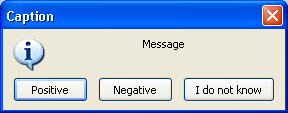 | |
| 220 | 195 | ||
| 221 | 196 | ## 文本输入对话框 | |
| 222 | 197 | ||
| 223 | 198 | ### InputBox | |
| 224 | 199 | ||
| 225 | 200 | 文本输入对话框:显示一条信息,并等待用户输入文本 | |
| 226 | 201 | ||
| 227 | 202 | ``` pascal | |
| 228 | 203 | function InputBox(const ACaption, APrompt, ADefault: String): String; | |
| 229 | 204 | ``` | |
| 230 | 205 | ||
| 231 | 206 | 显示一个带有已定义标题和提示的对话框,并要求用户在一个文本框中输入文本。A default string can optionally be displayed in the text box.用户输入的字符串或默认的字符串将作为函数的结果而返回。 | |
| 232 | 207 | ||
| 233 | 208 | 示例: | |
| 234 | 209 | ||
| 235 | 210 | ``` pascal | |
| 236 | 211 | uses | |
| 237 | 212 | Forms, LCLType, Dialogs, Controls; | |
| 238 | 213 | ||
| 239 | 214 | procedure TryInputBox; | |
| 240 | 215 | var | |
| 241 | 216 | UserString: string; | |
| 242 | 217 | begin | |
| 243 | 218 | UserString := InputBox('Get some text input', | |
| 244 | 219 | 'Please type in some information', 'Some sample text'); | |
| 245 | 220 | ShowMessage(UserString) | |
| 246 | 221 | end; | |
| 247 | 222 | ``` | |
| 248 | 223 | ||
| 249 | 224 | ### InputQuery | |
| 250 | 225 | ||
| 251 | 226 | ``` pascal | |
| 252 | 227 | function InputQuery(const ACaption, APrompt : String; | |
| 253 | 228 | MaskInput : Boolean; var Value : String) : Boolean; | |
| 254 | 229 | function InputQuery(const ACaption, APrompt : String; | |
| 255 | 230 | var Value : String) : Boolean; | |
| 256 | 231 | ``` | |
| 257 | 232 | ||
| 258 | 233 | 这个函数的第二个版本,显示一个提示并要求用户输入文本数据; 这个函数的第一个版本,包含一个MaskInput [[Boolean|布尔值]]参数,which determines whether the user input is masked out by [[*|asterisks (*)]] in the text-input box (like during entry of a password), while the second omits this property. The text entered by the user is returned in the variable parameter 'Value'; the function result is a boolean which returns [[True|true]] if the OK button was pressed, or [[False|false]] if the box was closed by any other mechanism (such as clicking the 'Close' icon on the top title bar). Omitting the MaskInput parameter is equivalent to setting it `false`. | |
| 259 | 234 | ||
| 260 | 235 | 示例: | |
| 261 | 236 | ||
| 262 | 237 | ``` pascal | |
| 263 | 238 | uses | |
| 264 | 239 | Forms, LCLType, Dialogs, Controls; | |
| 265 | 240 | ||
| 266 | 241 | procedure TryInputQuery; | |
| 267 | 242 | var | |
| 268 | 243 | QueryResult: Boolean; | |
| 269 | 244 | UserString: string; | |
| 270 | 245 | begin | |
| 271 | 246 | if InputQuery('Question', 'Type in some data', TRUE, UserString) | |
| 272 | 247 | then ShowMessage(UserString) | |
| 273 | 248 | else | |
| 274 | 249 | begin | |
| 275 | 250 | InputQuery('Don''t be silly', 'Please try again', UserString); | |
| 276 | 251 | ShowMessage(UserString); | |
| 277 | 252 | end | |
| 278 | 253 | end; | |
| 279 | 254 | ``` | |
| 280 | 255 | ||
| 281 | - | ||
| 282 | - | ||
| 283 | - | ||
| 284 | - | ||
| 285 | - | ||
| 286 | - | ||
| 287 | - | ||
| 288 | - | ||
| 289 | - | ||
| 290 | - | ||
| 291 | - | ||
| 292 | - | ||
| 293 | - | ||
| 294 | - | ||
| 295 | - | ||
| 256 | + | 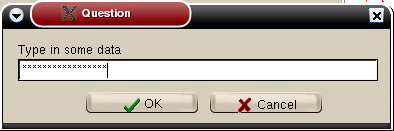 | |
| 296 | 257 | ||
| 297 | - | ||
| 258 | + | 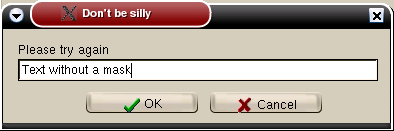 | |
| 298 | 259 | ||
| 299 | 260 | ### PasswordBox | |
| 300 | 261 | ||
| 301 | 262 | ``` pascal | |
| 302 | 263 | Function PasswordBox(const ACaption, APrompt : String) : String; | |
| 303 | 264 | ``` | |
| 304 | 265 | ||
| 305 | 266 | Behaves very similarly to the InputQuery function with MaskInput = TRUE; the difference is that the password that was typed in is returned as the result of the function (like InputBox). | |
| 306 | 267 | ||
| 307 | 268 | ## Constants and Types used in message dialogs | |
| 308 | 269 | ||
| 309 | 270 | Several constants and types relevant for use with the dialog boxes are pre-defined in the [[LCL]] library: | |
| 310 | 271 | ||
| 311 | 272 | const { Defined in LCLType.pp } | |
| 312 | 273 | ||
| 313 | 274 | integer constants for defining the types of buttons and the icon for display in MessageBox | |
| 314 | 275 | ||
| 315 | 276 | ``` pascal | |
| 316 | 277 | MB_OK = $00000000; | |
| 317 | 278 | MB_OKCANCEL = $00000001; | |
| 318 | 279 | MB_ABORTRETRYIGNORE = $00000002; | |
| 319 | 280 | MB_YESNOCANCEL = $00000003; | |
| 320 | 281 | MB_YESNO = $00000004; | |
| 321 | 282 | MB_RETRYCANCEL = $00000005; | |
| 322 | 283 | ||
| 323 | 284 | ||
| 324 | 285 | MB_ICONHAND = $00000010; | |
| 325 | 286 | MB_ICONQUESTION = $00000020; | |
| 326 | 287 | MB_ICONEXCLAMATION = $00000030; | |
| 327 | 288 | MB_ICONASTERICK = $00000040; | |
| 328 | 289 | MB_ICONWARNING = MB_ICONEXCLAMATION; | |
| 329 | 290 | MB_ICONERROR = MB_ICONHAND; | |
| 330 | 291 | MB_ICONINFORMATION = MB_ICONASTERICK; | |
| 331 | 292 | ``` | |
| 332 | 293 | ||
| 333 | 294 | integer constants defining the return value from MessageBox according to which button was pressed | |
| 334 | 295 | ||
| 335 | 296 | ``` pascal | |
| 336 | 297 | IDOK = 1; ID_OK = IDOK; | |
| 337 | 298 | IDCANCEL = 2; ID_CANCEL = IDCANCEL; | |
| 338 | 299 | IDABORT = 3; ID_ABORT = IDABORT; | |
| 339 | 300 | IDRETRY = 4; ID_RETRY = IDRETRY; | |
| 340 | 301 | IDIGNORE = 5; ID_IGNORE = IDIGNORE; | |
| 341 | 302 | IDYES = 6; ID_YES = IDYES; | |
| 342 | 303 | IDNO = 7; ID_NO = IDNO; | |
| 343 | 304 | IDCLOSE = 8; ID_CLOSE = IDCLOSE; | |
| 344 | 305 | IDHELP = 9; ID_HELP = IDHELP; | |
| 345 | 306 | ``` | |
| 346 | 307 | ||
| 347 | 308 | define whether first, second or third button is default | |
| 348 | 309 | ||
| 349 | 310 | ``` pascal | |
| 350 | 311 | MB_DEFBUTTON1 = $00000000; | |
| 351 | 312 | MB_DEFBUTTON2 = $00000100; | |
| 352 | 313 | MB_DEFBUTTON3 = $00000200; | |
| 353 | 314 | MB_DEFBUTTON4 = $00000300; | |
| 354 | 315 | ``` | |
| 355 | 316 | ||
| 356 | 317 | The Flags parameter of MessageBox is constructed by adding a button constant \[MB_OK..MB_RETRYCANCEL\], an optional icon constant \[MB_ICONHAND..MB_ICONINFORMATION\] and an optional default button constant \[MB_DEFBUTTON1..MB_DEFBUTTON3\] | |
| 357 | 318 | ||
| 358 | 319 | Types for use in MessageDlg, which needs parameters AType of TMsgDlgType and AButtons of TMSgDlgButtons | |
| 359 | 320 | ||
| 360 | 321 | ``` pascal | |
| 361 | 322 | { Defined in Dialogs.pp } | |
| 362 | 323 | type | |
| 363 | 324 | TMsgDlgType = (mtWarning, mtError, mtInformation, mtConfirmation, | |
| 364 | 325 | mtCustom); | |
| 365 | 326 | TMsgDlgBtn = (mbYes, mbNo, mbOK, mbCancel, mbAbort, mbRetry, mbIgnore, | |
| 366 | 327 | mbAll, mbNoToAll, mbYesToAll, mbHelp, mbClose); | |
| 367 | 328 | TMsgDlgButtons = set of TMsgDlgBtn; | |
| 368 | 329 | ||
| 369 | 330 | ||
| 370 | 331 | const | |
| 371 | 332 | mbYesNoCancel = [mbYes, mbNo, mbCancel]; | |
| 372 | 333 | mbOKCancel = [mbOK, mbCancel]; | |
| 373 | 334 | mbAbortRetryIgnore = [mbAbort, mbRetry, mbIgnore]; | |
| 374 | 335 | ||
| 375 | 336 | ||
| 376 | 337 | MsgDlgBtnToBitBtnKind: array[TMsgDlgBtn] of TBitBtnKind = ( | |
| 377 | 338 | bkYes, bkNo, bkOK, bkCancel, bkAbort, bkRetry, bkIgnore, | |
| 378 | 339 | bkAll, bkNoToAll, bkYesToAll, bkHelp, bkClose | |
| 379 | 340 | ); | |
| 380 | 341 | ||
| 381 | 342 | ||
| 382 | 343 | BitBtnKindToMsgDlgBtn: array[TBitBtnKind] of TMsgDlgBtn = ( | |
| 383 | 344 | mbOk, mbOK, mbCancel, mbHelp, mbYes, mbNo, | |
| 384 | 345 | mbClose, mbAbort, mbRetry, mbIgnore, mbAll, mbNoToALl, mbYesToAll | |
| 385 | 346 | ); | |
| 386 | 347 | ||
| 387 | 348 | ||
| 388 | 349 | { Defined in Controls.pp } | |
| 389 | 350 | const | |
| 390 | 351 | mrNone = 0; | |
| 391 | 352 | mrOK = mrNone + 1; | |
| 392 | 353 | mrCancel = mrNone + 2; | |
| 393 | 354 | mrAbort = mrNone + 3; | |
| 394 | 355 | mrRetry = mrNone + 4; | |
| 395 | 356 | mrIgnore = mrNone + 5; | |
| 396 | 357 | mrYes = mrNone + 6; | |
| 397 | 358 | mrNo = mrNone + 7; | |
| 398 | 359 | mrAll = mrNone + 8; | |
| 399 | 360 | mrNoToAll = mrNone + 9; | |
| 400 | 361 | mrYesToAll = mrNone + 10; | |
| 401 | 362 | mrLast = mrYesToAll; | |
| 402 | 363 | ``` | |
| 403 | 364 | ||
| 404 | 365 | --- | |
| 405 | 366 | *From the Free Pascal wiki, page "Dialog Examples/zh CN", as it stood on 2021-12-10 after a change by Robsean, out of the wiki's dump of 2024-05-26. Copyright stays with the author who wrote it, according to the old wiki's [[Licensing]] page. If you have concerns about this material, [message the admin](/wiki-contact).* |