

Delphi Converter in Lazarus: what changed
Revision 1 to 2. Removed lines have a minus sign; added lines have a plus sign.
| Old | New | Line | |
|---|---|---|---|
| 1 | 1 | A Delphi project, Delphi package and a single unit file can be converted for Lazarus. The entries can be found in Lazarus Tools menu: | |
| 2 | 2 | ||
| 3 | 3 | - **Convert Delphi unit to Lazarus unit ...** | |
| 4 | 4 | - **Convert Delphi project to Lazarus project ...** | |
| 5 | 5 | - **Convert Delphi package to Lazarus package ...** | |
| 6 | 6 | ||
| 7 | 7 | There is also: | |
| 8 | 8 | ||
| 9 | 9 | - **Convert binary DFM file to text LFM and check syntax ...** | |
| 10 | 10 | ||
| 11 | 11 | which is seldom needed because the DFM form file is always converted while converting a unit. | |
| 12 | 12 | ||
| 13 | 13 | # Conversions | |
| 14 | 14 | ||
| 15 | 15 | Here the different conversions are listed briefly. See the sections below for details. | |
| 16 | 16 | ||
| 17 | 17 | ## Unit file | |
| 18 | 18 | ||
| 19 | 19 | - All unit source files get a **{\$mode delphi}** directive. It makes the compiler support language syntax exactly like Delphi has it. This makes sense because we are converting a Delphi program after all. The user can take advantage of **{\$mode objfpc}** features later if he wants, by making the necessary changes manually. | |
| 20 | 20 | ||
| 21 | 21 | - **{\$R *.DFM}** is replaced with **{\$R *.lfm}** if the form file is renamed and converted. Conditional compilation is used if the target is **Lazarus and Delphi**. | |
| 22 | 22 | ||
| 23 | 23 | - Unit names in Uses section and include file names are fixed to match the real case sensitive names found in the file system. This is needed for case sensitive file systems. | |
| 24 | 24 | ||
| 25 | 25 | - Some unit names in Uses section are either replaced or removed. | |
| 26 | 26 | ||
| 27 | 27 | - Some Delphi types are replaced with "fall-back" LCL types (same as in form files). | |
| 28 | 28 | ||
| 29 | 29 | - Some function names called in the code are replaced. | |
| 30 | 30 | ||
| 31 | 31 | ## Form file | |
| 32 | 32 | ||
| 33 | 33 | - Older Delphi versions used a binary format for .dfm form files. They are always converted to ascii text format. | |
| 34 | 34 | ||
| 35 | 35 | - .dfm form file is renamed or copied to .lfm and converted as needed. There is also an option to use the same Delphi form file directly. See section **Target** below. | |
| 36 | 36 | ||
| 37 | 37 | - Unknown properties are removed. | |
| 38 | 38 | ||
| 39 | 39 | - Some Delphi types are replaced with "fall-back" LCL types (same as in unit files). | |
| 40 | 40 | ||
| 41 | 41 | - Top and Left coordinate offset adjustment for controls inside visual containers. | |
| 42 | 42 | ||
| 43 | 43 | # Settings dialog | |
| 44 | 44 | ||
| 45 | 45 | After selecting an entry from the Tools menu, and then selecting the unit / project / package to convert, the user is presented with a settings dialog. All settings are saved in file **delphiconverter.xml** in local Lazarus configuration directory. The dialog allows to configure many details of conversion: | |
| 46 | 46 | ||
| 47 | 47 | - **Project Path** shows the selected path. | |
| 48 | 48 | ||
| 49 | 49 | - **Make backup of changed files** saves the original files to directory ConverterBackup under the selected directory. | |
| 50 | 50 | ||
| 51 | 51 | - **Keep converted files open in editor**. When checked, the converted unit files remain open after conversion. | |
| 52 | 52 | ||
| 53 | 53 | Rest of the dialog settings are covered below. | |
| 54 | 54 | ||
| 55 | - | ||
| 56 | - | ||
| 57 | - | ||
| 58 | - | ||
| 55 | + | 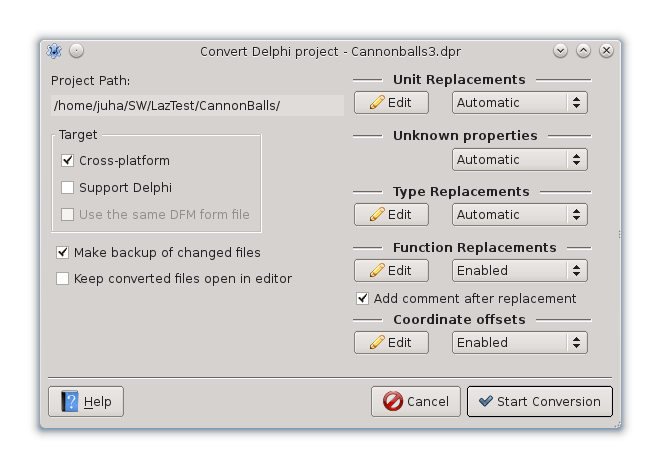 | |
| 59 | 56 | ||
| 60 | 57 | ## Target | |
| 61 | 58 | ||
| 62 | 59 | The conversion target is defined in settings dialog. It can be: | |
| 63 | 60 | ||
| 64 | 61 | - **Cross-platform** -- Replace Windows specific units with their cross-platform equivalents. | |
| 65 | 62 | ||
| 66 | 63 | - **Support Delphi** -- Tries to make units compatible with both Delphi and Lazarus by using {\$IFDEF...} in Uses section. The Delphi form file .dfm is copied to Lazarus form file .lfm and converted. | |
| 67 | 64 | ||
| 68 | 65 | - **Use the same DFM form file** -- The Delphi form file .dfm is used also with Lazarus. It is not modified except for converting binary format to ascii text format when needed. | |
| 69 | 66 | ||
| 70 | 67 | However maintaining the file later in both Delphi and Lazarus is problematic because components have slightly different properties. | |
| 71 | 68 | ||
| 72 | 69 | ## Unit name replacement and removal | |
| 73 | 70 | ||
| 74 | 71 | When a unit listed in Uses section is not found, it can be replaced or removed. The replacements are configurable, see "Unit Replacements" in settings dialog. An empty "New name" means removal. For example by default "Windows" is replaced with "LCLIntf, LCLType, LMessages". | |
| 75 | 72 | ||
| 76 | 73 | The replacement supports regular expression syntax. For example: | |
| 77 | 74 | ||
| 78 | 75 | - ^Q(.+) --\> \$1 | |
| 79 | 76 | ||
| 80 | 77 | means something like: match a string starting with 'Q', followed by anything, and save the part after 'Q', then replace with the saved part. In essence this removes 'Q' in the beginning. | |
| 81 | 78 | ||
| 82 | 79 | Replacement can be interactive or automatic. When interactive, the user can edit the replacements before they are applied. | |
| 83 | 80 | ||
| 84 | 81 | If there are still missing units after the replacement, the user will be asked about them in any case. He can then choose to comment them out or search for their unit paths. | |
| 85 | 82 | ||
| 86 | - | ||
| 87 | - | ||
| 88 | - | ||
| 89 | - | ||
| 83 | + | 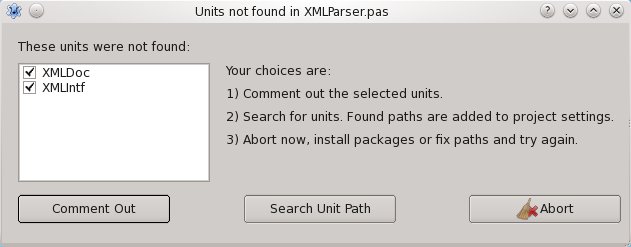 | |
| 90 | 84 | ||
| 91 | 85 | ## Unknown property removal | |
| 92 | 86 | ||
| 93 | 87 | Not all Delphi component properties are implemented in LCL components. These properties can be removed. There is a system in LCL where non-existent properties are registered and the form loader ignores them. The converter also removes them, automatically or interactively. The interactive removal currently happens in the same dialog that is used for component type replacements (see below). The property can be replaced, too, but that is usually not needed. | |
| 94 | 88 | ||
| 95 | 89 | ## Type replacement | |
| 96 | 90 | ||
| 97 | 91 | Some Delphi components do not exist in LCL. Many 3rd party components also exist only for Delphi. Those types can be replaced with fall-back LCL types. For example: | |
| 98 | 92 | ||
| 99 | 93 | - TCoolBar --\> TToolBar. | |
| 100 | 94 | ||
| 101 | 95 | It is configurable, too, see "Type Replacements" in settings dialog. | |
| 102 | 96 | ||
| 103 | 97 | The same regular expression syntax as used in unit name replacement is supported here. | |
| 104 | 98 | ||
| 105 | 99 | The types are replaced in both the Pascal source file and the form file (.lfm). The replacement works also in a nested component structure where a component of replaced type has child components that must also be replaced. | |
| 106 | 100 | ||
| 107 | 101 | Different properties between the original component and the replacement component can cause problems after conversion. There is no easy solution for this. | |
| 108 | 102 | ||
| 109 | 103 | The best solution would be to make more Delphi compatible components and port all 3rd party components to Lazarus. Because of these potential problems the type conversion is always interactive. | |
| 110 | 104 | ||
| 111 | - | ||
| 112 | - | ||
| 113 | - | ||
| 114 | - | ||
| 105 | + | 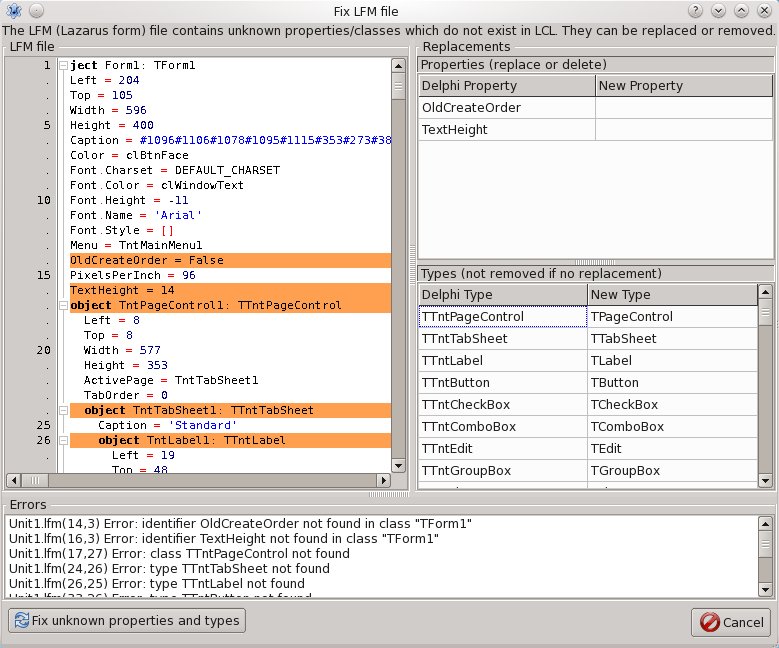 | |
| 115 | 106 | ||
| 116 | 107 | ## Function call replacement | |
| 117 | 108 | ||
| 118 | 109 | Some Windows-only function calls in the source code can be replaced with a functionally similar RTL / LCL library function calls. It is configurable, see "Function Replacements" in settings dialog. | |
| 119 | 110 | ||
| 120 | 111 | There is a category defined for each function. The replacement can be enabled or disabled by category. For example there is "UTF8Names" category for file operation related functions. | |
| 121 | 112 | ||
| 122 | 113 | The syntax for replacements is: | |
| 123 | 114 | ||
| 124 | 115 | - FileExists --\> FileExistsUTF8(\$1) | |
| 125 | 116 | ||
| 126 | 117 | where (\$1) means the first parameter from the original function call is used for replacement function. There is also a more advanced syntax available. Like this: | |
| 127 | 118 | ||
| 128 | 119 | - ShellExecute --\> if \$3 match ":/" then OpenURL(\$3); OpenDocument(\$3) | |
| 129 | 120 | ||
| 130 | 121 | ShellExecute can map to 2 different LCL functions. The string after "match" keyword is again a regular expression. If it matches, the replacement right after it is used, otherwise the next replacement. | |
| 131 | 122 | ||
| 132 | 123 | ## Coordinate offsets | |
| 133 | 124 | ||
| 134 | 125 | In Delphi and Lazarus, components have different meaning for Top and Left coordinates when they are inside a visual container. In Delphi the coordinates are relative to container's Top and Left. In Lazarus they are relative to container's client area which leaves out the border. It causes the most visible problem for TGroupBox because it has a title text on the border. | |
| 135 | 126 | ||
| 136 | 127 | Subtracting an offset from the coordinates makes the form layout look the same as it looked in Delphi. The offsets are defined in "Coordinate offsets" in settings dialog. | |
| 137 | 128 | ||
| 138 | 129 | # Issues | |
| 139 | 130 | ||
| 140 | 131 | When a Delphi program contains Windows API calls which are not ported in RTL/LCL, there is no automatic way to convert it. Other Windows specific technologies like OLE cause the same problem. | |
| 141 | 132 | ||
| 142 | 133 | Database connections often require changes. Either the DB or the connection component is not compatible. | |
| 143 | 134 | ||
| 144 | 135 | Another problem are some libraries which are not compatible with Delphi libraries. For example XML is used in a slightly different way. Maybe the converter can be improved in this area in the future. | |
| 145 | 136 | ||
| 146 | 137 | As mentioned earlier, Delphi components that don't exist in Lazarus/LCL cause problem, even if they are replaced with a fall-back component type, because they have different properties. | |
| 147 | 138 | ||
| 148 | 139 | Yet, if the program uses only VCL classes and functions, there is a big chance for the conversion to succeed. | |
| 149 | 140 | ||
| 150 | 141 | --- | |
| 151 | 142 | *From the Free Pascal wiki, page "Delphi Converter in Lazarus", as it stood on 2024-05-03 after a change by Hieroly, out of the wiki's dump of 2024-05-26. Copyright stays with the author who wrote it, according to the old wiki's [[Licensing]] page. If you have concerns about this material, [message the admin](/wiki-contact).* | |
| 152 | 143 | Category: Lazarus |