

Debugging with Valgrind: what changed
Revision 2 to 3. Removed lines have a minus sign; added lines have a plus sign.
| Old | New | Line | |
|---|---|---|---|
| 1 | 1 | ## Introduction | |
| 2 | 2 | ||
| 3 | 3 | Valgrind is system for debugging and profiling Linux programs. It comprises of the Valgrind framework and set of tools that can automatically detect many memory management and threading bugs, and profile your programs in detail. You can read about Valgrind here <https://valgrind.org/> | |
| 4 | 4 | ||
| 5 | 5 | A program running under Valgrind is not executed directly by the CPU. Instead it runs on a synthetic CPU provided by Valgrind. This allows Valgrind to have full control and track program and resources very meticulously. | |
| 6 | 6 | ||
| 7 | 7 | Valgrind can be used as standalone issue reporting or performance profiling tool. Also it can be used as a debugger. For this it includes VGDB utility that is GDB-compatible interface to Valgrind. | |
| 8 | 8 | ||
| 9 | 9 | The debugging applications stack is following: | |
| 10 | 10 | ||
| 11 | 11 | - GDB | |
| 12 | 12 | - VGDB | |
| 13 | 13 | - Valgrind executing YourProgram | |
| 14 | 14 | ||
| 15 | 15 | Though GDB can connect to VGDB directly (via interprocess communication), Lazarus cannot use this mode. You have to use Remote debugging over TCP. In this setup VGDB plays role of GDBServer listening on a TCP port, and Lazarus via GDB connects to it. | |
| 16 | 16 | ||
| 17 | 17 | So the debugging applications stack with Lazarus will be: | |
| 18 | 18 | ||
| 19 | 19 | - Lazarus IDE | |
| 20 | 20 | - GDB | |
| 21 | 21 | - tcp/ip | |
| 22 | 22 | - VGDB | |
| 23 | 23 | - Valgrind executing YourProgram | |
| 24 | 24 | ||
| 25 | 25 | Usually you will run all parts on same computer. But there is possibility to run them on 2 computers via network. | |
| 26 | 26 | ||
| 27 | 27 | In the following example everything will be on same computer. Network interface will be localhost and TCP port will be 33333. | |
| 28 | 28 | ||
| 29 | 29 | ## Configuration | |
| 30 | 30 | ||
| 31 | 31 | ### Install valgrind in your system | |
| 32 | 32 | ||
| 33 | 33 | Refer to Valgrind resources to install it. | |
| 34 | 34 | ||
| 35 | 35 | ### Compile your program | |
| 36 | 36 | ||
| 37 | 37 | (here it is named valgrind_test1.pas) with Valgrind option (-gv). Select menu Project -\> Project Options | |
| 38 | 38 | ||
| 39 | - | ||
| 39 | + | 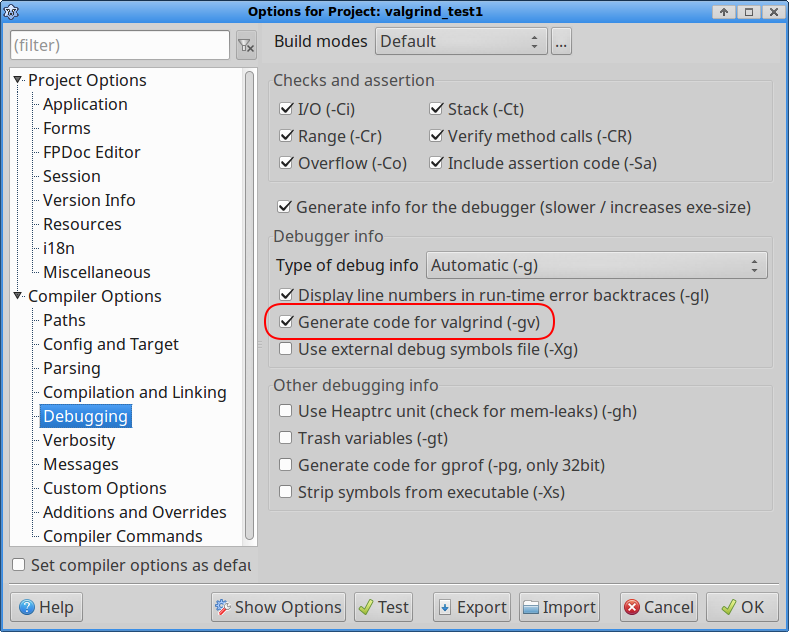 | |
| 40 | 40 | ||
| 41 | 41 | ### Configure Lazarus debugger. | |
| 42 | 42 | ||
| 43 | 43 | Select menu Tools -\> Options | |
| 44 | 44 | ||
| 45 | - | ||
| 45 | + | 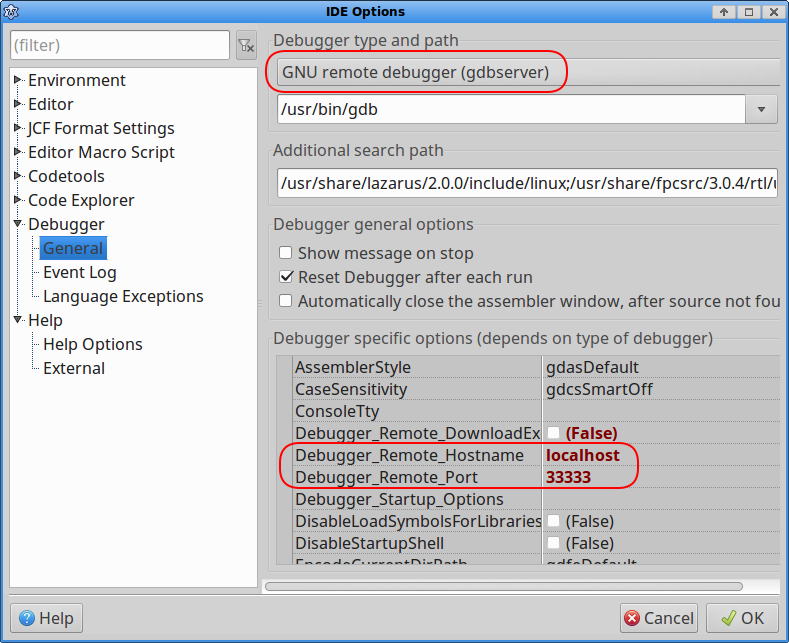 | |
| 46 | 46 | ||
| 47 | 47 | ## Debugging | |
| 48 | 48 | ||
| 49 | 49 | ### Start Valgrind and VGDB in a separate shell | |
| 50 | 50 | ||
| 51 | 51 | ```shell | |
| 52 | 52 | valgrind --tool=memcheck --leak-check=yes --log-file=valgrind.trc --vgdb-error=0 ./valgrind_test1 & | |
| 53 | 53 | sleep 2; vgdb --port=33333 | |
| 54 | 54 | ``` | |
| 55 | 55 | ||
| 56 | 56 | ### Run your program in Lazarus and debug it | |
| 57 | 57 | ||
| 58 | 58 | Actually the program is already run by Valgrind, it is just staying in debugger and waiting for continue. | |
| 59 | 59 | ||
| 60 | 60 | Please note Valgrind is accurate but it is not a fastest debugger. Execution will be much slower than usual. Be patient. | |
| 61 | 61 | ||
| 62 | 62 | Lazarus via VGDB communicates with the program in Valgrind. You can set breakpoints, inspect variable values and so on, like in regular debugger. | |
| 63 | 63 | ||
| 64 | 64 | Lasarus will stop on lines where Valgrind throws exceptions. Valgrind tracks memory usage very carefully and detects the issues where FPC, RTL and a Memory Manager may ignore memory misuse. Like in example below, at line 4. | |
| 65 | 65 | ||
| 66 | 66 | ``` pascal | |
| 67 | 67 | mo:=TMyObj.Create; | |
| 68 | 68 | mo.Field:=12345; | |
| 69 | 69 | mo.Free; | |
| 70 | 70 | if mo.Field = 0 // Mistakenly accessing released memory block | |
| 71 | 71 | then exit; | |
| 72 | 72 | ``` | |
| 73 | 73 | ||
| 74 | 74 | Lazarus will show a message when Valgrind issues an exception. | |
| 75 | 75 | ||
| 76 | - | ||
| 76 | + | 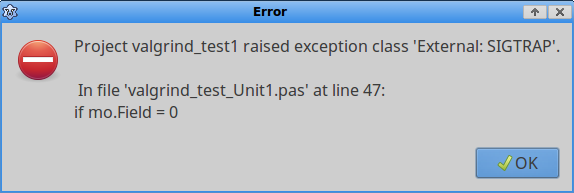 | |
| 77 | 77 | ||
| 78 | 78 | After you close it Lazasarus will position you on a source row where the exception has happened. | |
| 79 | 79 | ||
| 80 | 80 | Lazarus tells you pretty much nothing about what actually happened. Valgrind will give you lots of details. To get these details you can either take a look into Valgrind trace file itself. But more convenient is to load the trace file into IDE. Select menu View -\> Leaks and Traces Open valgrind.trc | |
| 81 | 81 | ||
| 82 | - | ||
| 82 | + | 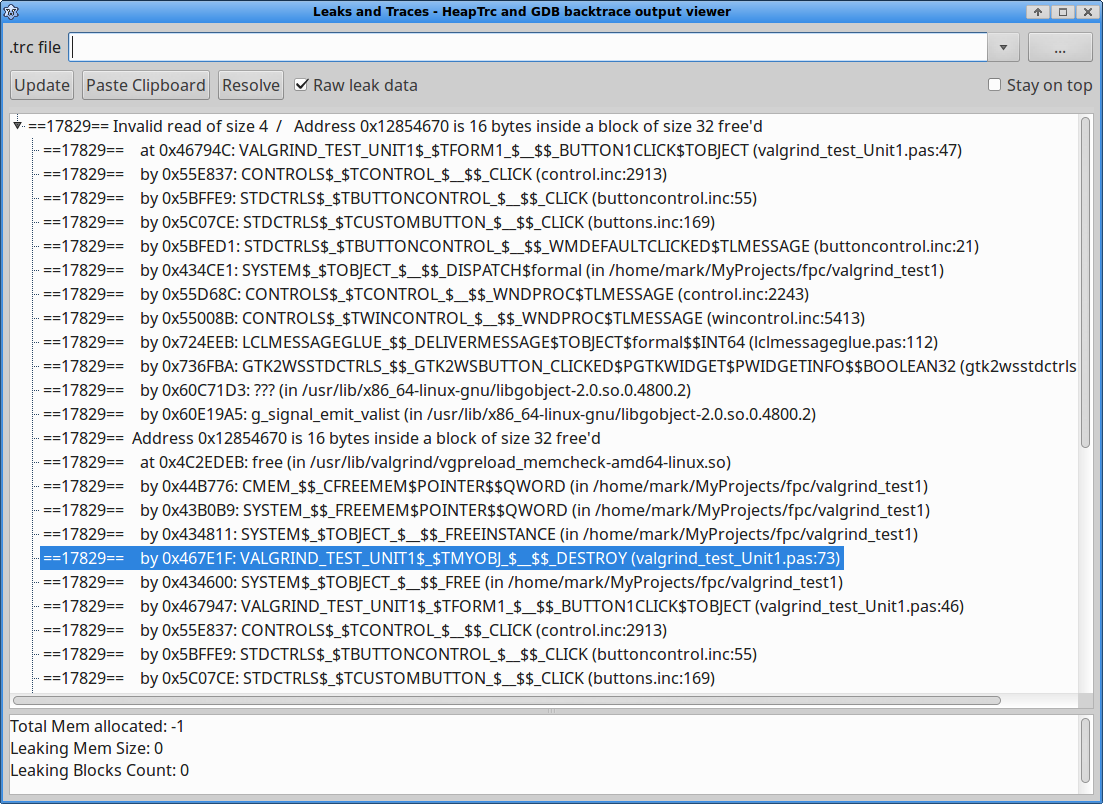 | |
| 83 | 83 | ||
| 84 | 84 | Here you can see the errors descriptions and three call stacks for each error: for the place where the exception happened, where the memory was freed and where it was allocated. All this is especially helpful for bug fixing. Select a line, double click and Lazarus will open a file and position cursor at a line in question. | |
| 85 | 85 | ||
| 86 | 86 | ## Other suggestions | |
| 87 | 87 | ||
| 88 | 88 | Sometimes it can be still unclear if some memory misuse or a leak happened inside RTL or OS binaries. You can compile RTL with debugging info for Valgrind and without optimization. Please refer to FPC Wiki how to rebuild RTL. | |
| 89 | 89 | ||
| 90 | 90 | In some cases Valgrind can generate so called false positives. For example, a small variable was allocated in stack. | |
| 91 | 91 | ||
| 92 | 92 | ``` pascal | |
| 93 | 93 | var A2: array[2] of char; | |
| 94 | 94 | ``` | |
| 95 | 95 | ||
| 96 | 96 | Then the variable was populated from a file and then compared to a constant | |
| 97 | 97 | ||
| 98 | 98 | ``` pascal | |
| 99 | 99 | if A2 = 'AA' then ... | |
| 100 | 100 | ``` | |
| 101 | 101 | ||
| 102 | 102 | FPC may choose to use MMX instructions for the comparison and allocates 16 bytes block for it, populating just first 2 bytes from the variable. Valgrind may detect it as an error of reading from uninitialized block. Technically it is correct - only two bytes were initialized, and the rest 14 bytes of the alignment block were not initialized but still scanned by MMX instruction. FPC is aware of this, it will mask the result and never use the result of the scan from masked bytes. But Valgrind still treats this as an error. As soon as bytes were allocated and scanned - it is access to uninitialized memory block. | |
| 103 | 103 | ||
| 104 | 104 | You can suppress reporting for such logical false positives and for other issues in OS or 3-rd party binaries like GTK, X11, etc, to concentrate more on your code. Please refer to Valgrind documentation regarding suppressions. | |
| 105 | 105 | ||
| 106 | 106 | ## See also | |
| 107 | 107 | ||
| 108 | 108 | - [[GDB Debugger Tips|General tips/info on debugging]] | |
| 109 | 109 | ||
| 110 | 110 | --- | |
| 111 | 111 | *From the Free Pascal wiki, page "Debugging with Valgrind", as it stood on 2020-03-06 after a change by Mm7, out of the wiki's dump of 2024-05-26. Copyright stays with the author who wrote it, according to the old wiki's [[Licensing]] page. If you have concerns about this material, [message the admin](/wiki-contact).* |