

Debugger Setup: what changed
Revision 0 to 1. Removed lines have a minus sign; added lines have a plus sign.
Title: Debugger Setup
| Old | New | Line | |
|---|---|---|---|
| 1 | + | ## Configure the IDE | |
| 2 | + | ||
| 3 | + | ### Updating from an older IDE | |
| 4 | + | ||
| 5 | + | Older versions of Lazarus were only providing the GdbMI backend. It is highly recommended to update to Fp-Debugger or LLDB+FpDebug as indicated for your OS below. | |
| 6 | + | ||
| 7 | + | Please note that many other wiki pages may be outdated and still refer only to GDB. | |
| 8 | + | ||
| 9 | + | ### Choosing the correct debugger backend | |
| 10 | + | ||
| 11 | + | The Lazarus IDE provides several debuggers (backends). The page [[Debugger Status|Status of the debugger backends]] provides an overview. | |
| 12 | + | ||
| 13 | + | The list below indicates which backend is recommended for your environment. | |
| 14 | + | ||
| 15 | + | <table> | |
| 16 | + | <thead> | |
| 17 | + | <tr> | |
| 18 | + | <th class="partial"><p>Operating System</p></th> | |
| 19 | + | <th class="unknown"><p>Hardware</p></th> | |
| 20 | + | <th class="working"><p>Recommended<br /> | |
| 21 | + | debugger backend</p></th> | |
| 22 | + | <th class="working"><p>Recommended<br /> | |
| 23 | + | debug info</p></th> | |
| 24 | + | <th class="unknown"><p>Notes</p></th> | |
| 25 | + | </tr> | |
| 26 | + | </thead> | |
| 27 | + | <tbody> | |
| 28 | + | <tr> | |
| 29 | + | <td class="partial" style="text-align:left"><p>Windows 32/64bit</p></td> | |
| 30 | + | <td class="unknown"><p>Intel/AMD<br /> | |
| 31 | + | i386 or x86_64</p></td> | |
| 32 | + | <td class="working"><p>Fp-Debugger</p></td> | |
| 33 | + | <td class="working"><p>DWARF-3</p></td> | |
| 34 | + | <td class="unknown"><p>Includes cross debugging of a 32bit app on a 64bit system</p></td> | |
| 35 | + | </tr> | |
| 36 | + | <tr> | |
| 37 | + | <td class="partial" style="text-align:left"><p>Windows 32bit<br /> | |
| 38 | + | </p> | |
| 39 | + | <div style="font-size:0.7em"> | |
| 40 | + | <p>Cross 64bit</p> | |
| 41 | + | </div></td> | |
| 42 | + | <td class="unknown"><p>Intel/AMD<br /> | |
| 43 | + | x86_64</p></td> | |
| 44 | + | <td class="working"><p>GdbMi</p></td> | |
| 45 | + | <td class="working"><p>DWARF-2 with sets</p></td> | |
| 46 | + | <td class="unknown"><p><u><strong>Only</strong></u> <strong>cross debugging</strong> of a 64bit app on a 32bit system</p></td> | |
| 47 | + | </tr> | |
| 48 | + | <tr> | |
| 49 | + | <td class="partial" style="text-align:left"><p>Windows</p></td> | |
| 50 | + | <td class="unknown"><p>ARM / AArch64 / other</p></td> | |
| 51 | + | <td class="working"><p>GdbMi</p></td> | |
| 52 | + | <td class="working"><p>DWARF-2 with sets</p></td> | |
| 53 | + | <td class="unknown"><p>You may also try "GdbMI+FpDebug"</p></td> | |
| 54 | + | </tr> | |
| 55 | + | <tr> | |
| 56 | + | <td class="partial" style="text-align:left"><p>Linux</p></td> | |
| 57 | + | <td class="unknown"><p>Intel/AMD<br /> | |
| 58 | + | i386 or x86_64</p></td> | |
| 59 | + | <td class="working"><p>Fp-Debugger</p></td> | |
| 60 | + | <td class="working"><p>DWARF-3</p></td> | |
| 61 | + | <td class="unknown"><p>If RTL or packages have debug info, ensure it is the exact same type as for the project</p></td> | |
| 62 | + | </tr> | |
| 63 | + | <tr> | |
| 64 | + | <td class="partial" style="text-align:left"><p>Linux</p></td> | |
| 65 | + | <td class="unknown"><p>ARM / AArch64 / other</p></td> | |
| 66 | + | <td class="working"><p>GdbMi</p></td> | |
| 67 | + | <td class="working"><p>DWARF-2 with sets</p></td> | |
| 68 | + | <td class="unknown"><p>You may also try "GdbMI+FpDebug"</p></td> | |
| 69 | + | </tr> | |
| 70 | + | <tr> | |
| 71 | + | <td class="partial" style="text-align:left"><p>Mac</p></td> | |
| 72 | + | <td class="unknown"><p>Intel/AMD x86_64<br /> | |
| 73 | + | AArch64 (e.g. M1)</p></td> | |
| 74 | + | <td class="working"><p>LLDB+FpDebug</p></td> | |
| 75 | + | <td class="working"><p>DWARF-3</p></td> | |
| 76 | + | <td class="unknown"></td> | |
| 77 | + | </tr> | |
| 78 | + | <tr> | |
| 79 | + | <td class="partial" style="text-align:left"><p>Embedded AVR</p></td> | |
| 80 | + | <td class="unknown"></td> | |
| 81 | + | <td class="working"><p>FpDebug-avr package</p></td> | |
| 82 | + | <td class="working"><p>DWARF-2 or 3</p></td> | |
| 83 | + | <td class="unknown"><p>Requires gdb server</p></td> | |
| 84 | + | </tr> | |
| 85 | + | <tr> | |
| 86 | + | <td class="partial" style="text-align:left"><p>Remote</p></td> | |
| 87 | + | <td class="unknown"><p>Any supported by GDB</p></td> | |
| 88 | + | <td class="working"><p>Gdb-Server</p></td> | |
| 89 | + | <td class="working"><p>DWARF-2 with sets</p></td> | |
| 90 | + | <td class="unknown"><p>Debugging on a different PC or VM</p></td> | |
| 91 | + | </tr> | |
| 92 | + | <tr> | |
| 93 | + | <td class="partial" style="text-align:left"><p>Other</p></td> | |
| 94 | + | <td class="unknown"><p>Any supported by GDB</p></td> | |
| 95 | + | <td class="working"><p>GdbMi</p></td> | |
| 96 | + | <td class="working"><p>DWARF-2 with sets</p></td> | |
| 97 | + | <td class="unknown"></td> | |
| 98 | + | </tr> | |
| 99 | + | <tr> | |
| 100 | + | <td class="partial" style="text-align:left"><p>Any OS<br /> | |
| 101 | + | Debug with <b>STDIN/STDOUT redirect</b><br /> | |
| 102 | + | </p> | |
| 103 | + | <div style="font-size:0.7em"> | |
| 104 | + | <p>(via "Run Parameters" command line: >file < file)</p> | |
| 105 | + | </div></td> | |
| 106 | + | <td class="unknown"><p>Any supported by GDB</p></td> | |
| 107 | + | <td class="working"><p>GdbMi</p></td> | |
| 108 | + | <td class="working"><p>DWARF-2 with sets</p></td> | |
| 109 | + | <td class="unknown"></td> | |
| 110 | + | </tr> | |
| 111 | + | </tbody> | |
| 112 | + | </table> | |
| 113 | + | ||
| 114 | + | ### Setting up the debugger backend for the IDE | |
| 115 | + | ||
| 116 | + | The following settings should be made once, after you installed Lazarus. They are often already set by default. | |
| 117 | + | ||
| 118 | + | The settings can be found under | |
| 119 | + | ||
| 120 | + | <center> | |
| 121 | + | ||
| 122 | + | <u>Tools \> Options \> Debugger \> Debugger Backend</u> | |
| 123 | + | ||
| 124 | + | </center> | |
| 125 | + | ||
| 126 | + | <center> | |
| 127 | + | ||
| 128 | + |  The image shows where to find the option dialog. On Mac the dialog is under "Preferences" | |
| 129 | + | ||
| 130 | + | </center> | |
| 131 | + | ||
| 132 | + | \ | |
| 133 | + | 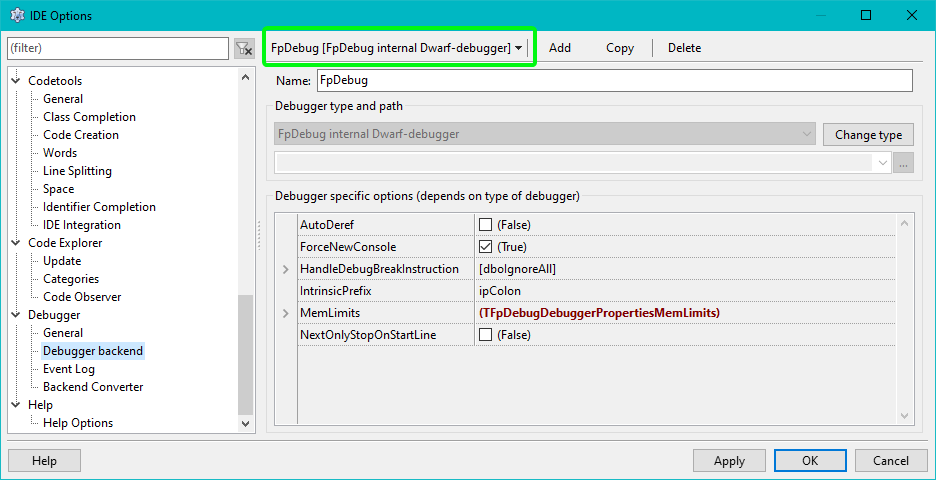 | |
| 134 | + | ||
| 135 | + | <div style="min-width:20%; display:table;"> | |
| 136 | + | ||
| 137 | + | - Select the correct backend on top of the page | |
| 138 | + | - The Fp-Debugger does not require a path. | |
| 139 | + | - If you have an LLDB or Gdb(MI) based debugger you must set the path to the gdb or lldb exe under "Debugger type and path" | |
| 140 | + | - On Linux/Unix/Mac systems it may be something like "/usr/bin/gdb" or "/usr/bin/lldb" | |
| 141 | + | - On Windows it should be in a folder called "mingw\bin\\" under the directory in which Lazarus is installed. | |
| 142 | + | ||
| 143 | + | - On [[Debugger Status|Status of the debugger backends]] you find a list of all backends with details on further settings. | |
| 144 | + | - For the GdbMI debugger under Lazarus 2.0 and up, enable the option "FixIncorrectStepOver" in the property grid. | |
| 145 | + | ||
| 146 | + | </div> | |
| 147 | + | ||
| 148 | + | \ | |
| 149 | + | The backend can also be set on a per project config. For details see [[IDE Window: Project Options - Debugger Backend]] | |
| 150 | + | ||
| 151 | + | ## Project Options | |
| 152 | + | ||
| 153 | + | <figure> | |
| 154 | + | <img src="Dbg_setup_project1.png" title="Dbg_setup_project1.png" /> | |
| 155 | + | <figcaption>Dbg_setup_project1.png</figcaption> | |
| 156 | + | </figure> | |
| 157 | + | ||
| 158 | + | <div style="min-width:20%; display:table;"> | |
| 159 | + | ||
| 160 | + | In order to debug your project, you need to tell the IDE to compile it in a special way, which provides additional information required by the debugger. | |
| 161 | + | ||
| 162 | + | The required settings are made in the "Project Options" dialog: | |
| 163 | + | ||
| 164 | + | - Please note: This will considerably increase the size of your executable ([[Lazarus Faq|See FAQ]]). If you want to build a release version of your software you should switch those settings off (see also [[IDE Window: Compiler Options|Build Modes]]) | |
| 165 | + | ||
| 166 | + | </div> | |
| 167 | + | ||
| 168 | + | \ | |
| 169 | + | ||
| 170 | + | <figure> | |
| 171 | + | <img src="lazarus_projectopts_dbg.png" title="lazarus_projectopts_dbg.png" /> | |
| 172 | + | <figcaption>lazarus_projectopts_dbg.png</figcaption> | |
| 173 | + | </figure> | |
| 174 | + | ||
| 175 | + | <div style="min-width:20%; display:table;"> | |
| 176 | + | ||
| 177 | + | - You must enable "Generate Debug Info for GDB" | |
| 178 | + | - You must enable "Run uses the debugger (disable for release mode)" | |
| 179 | + | - You should set "Type of debug info" as recommended for your PC. | |
| 180 | + | - If you set this to a non supported type, the IDE will prompt you for a correct setting when you try to start the debugger. | |
| 181 | + | - **Automatic**: Lets fpc choose. Can not be used with all backends. | |
| 182 | + | - **Stabs**: Old and outdated. Supported by GDB only (maybe LLDB **without** FpDebug). Should not be used | |
| 183 | + | - **Dwarf 2**: Minimal setting. Can not display watches for "set of". Issues with detecting PChar vs AnsiString. Should not be used | |
| 184 | + | - **Dwarf 2 with sets**: GDB friendly. Issues with detecting PChar vs AnsiString | |
| 185 | + | - **Dwarf 3**: Best setting for FpDebug. | |
| 186 | + | - None of them can currently display "property" with getter function. | |
| 187 | + | ||
| 188 | + | ------------------------------------------------------------------------ | |
| 189 | + | ||
| 190 | + | - You should **not** enable "Use external debug symbols"\ | |
| 191 | + | (It is a recommendation not to use this) | |
| 192 | + | - You **must** **not** enable "Strip symbols from executable" | |
| 193 | + | ||
| 194 | + | ------------------------------------------------------------------------ | |
| 195 | + | ||
| 196 | + | You can use the "Build modes". The "..." button brings of a dialog to create "release and debug mode". In this case you should still check the "Type of debug info". | |
| 197 | + | ||
| 198 | + | </div> | |
| 199 | + | ||
| 200 | + | \ | |
| 201 | + | ||
| 202 | + | <figure> | |
| 203 | + | <img src="Dbg_setup_project4.png" title="Dbg_setup_project4.png" /> | |
| 204 | + | <figcaption>Dbg_setup_project4.png</figcaption> | |
| 205 | + | </figure> | |
| 206 | + | ||
| 207 | + | <div style="min-width:20%; display:table;"> | |
| 208 | + | ||
| 209 | + | - - Use optimization "Level 0" ("Level 1" may be used, but in some cases may cause issues)\ | |
| 210 | + | - Do **not** use "Link Smart" | |
| 211 | + | ||
| 212 | + | </div> | |
| 213 | + | ||
| 214 | + | \ | |
| 215 | + | ||
| 216 | + | ## GDB / LLDB Version | |
| 217 | + | ||
| 218 | + | GDB 7.5 requires Lazarus 1.4 or higher. | |
| 219 | + | ||
| 220 | + | GDB 7.7.1 seems to work well with Lazarus 1.2.4. | |
| 221 | + | ||
| 222 | + | On macOS: **lldb** is part of the Apple developer tools | |
| 223 | + | ||
| 224 | + | ## See also | |
| 225 | + | ||
| 226 | + | - IDE Options / Configuration | |
| 227 | + | Lazarus 2.0.x (and before) | |
| 228 | + | [[IDE Window: Debugger Options]] | |
| 229 | + | ||
| 230 | + | Lazarus 2.2 (and up) | |
| 231 | + | [[IDE Window: DebuggerGeneralOptionsFrame|Debugger General Options]] and [[IDE Window: DebuggerClassOptionsFrame|Debugger Backend Options]] | |
| 232 | + | - Project Option / Command line args, Environment, and launcher app: [[IDE Window: Run parameters|Run -> Run Parameters]] | |
| 233 | + | - The FAQ for the default "GNU Debugger" in Lazarus: [[GDB Debugger Tips]] | |
| 234 | + | - Alternative debuggers in Lazarus: [[Debugger Status]] Includes a feature map and default-key-strokes | |
| 235 | + | ||
| 236 | + | --- | |
| 237 | + | *From the Free Pascal wiki, page "Debugger Setup", as it stood on 2023-12-13 after a change by Martin, out of the wiki's dump of 2024-05-26. Copyright stays with the author who wrote it, according to the old wiki's [[Licensing]] page. If you have concerns about this material, [message the admin](/wiki-contact).* | |
| 238 | + | Category: Debugging | |
| 239 | + | Category: Lazarus |