

Custom Drawn Interface: what changed
Revision 0 to 1. Removed lines have a minus sign; added lines have a plus sign.
Title: Custom Drawn Interface
| Old | New | Line | |
|---|---|---|---|
| 1 | + | > **Warning:** THIS INFORMATION IS EXTREMELY DATED AND NEEDS UPDATING as of 2015 | |
| 2 | + | ||
| 3 | + | ## Introduction | |
| 4 | + | ||
| 5 | + | LCL-CustomDrawn-Android has the following features: | |
| 6 | + | ||
| 7 | + | - Backends for X11, Android and Windows and a partially working one for Cocoa, more can be added in the future | |
| 8 | + | - Painting is done completely inside Lazarus without any interference from the native libraries except for text drawing. This assures a complete perfection of the executed drawings in all platforms and a uniform level of supported features | |
| 9 | + | - Only 1 native window is utilized for each form, in the Android backend at the moment this is 1 native window for the entire application | |
| 10 | + | - Utilizes the Lazarus Custom Drawn Controls for implementing the LCL standard controls | |
| 11 | + | - Utilizes as it's painting engine the lcl parts: TLazIntfImage, TRawImage, lazcanvas and lazregions | |
| 12 | + | ||
| 13 | + | ## FAQ | |
| 14 | + | ||
| 15 | + | ### Diagram of the Custom Drawn Interface | |
| 16 | + | ||
| 17 | + | <figure> | |
| 18 | + | <img src="customdrawn_diagram.png" title="customdrawn_diagram.png" /> | |
| 19 | + | <figcaption>customdrawn_diagram.png</figcaption> | |
| 20 | + | </figure> | |
| 21 | + | ||
| 22 | + | Legend: | |
| 23 | + | ||
| 24 | + | - Blue - New elements implemented as part of the LCL-CustomDrawn project | |
| 25 | + | - Yellow - Pre-existing LCL elements | |
| 26 | + | - Gray - System APIs | |
| 27 | + | ||
| 28 | + | ## The LCL-CustomDrawn Backends | |
| 29 | + | ||
| 30 | + | LCL-CustomDrawn needs backends to implement the most basic parts of the widgetset. Each backend should implement the following minimal parts: | |
| 31 | + | ||
| 32 | + | - TWidgetSet.Run, ProcessMessages, etc | |
| 33 | + | - TForm | |
| 34 | + | - TWinControl with all events | |
| 35 | + | - TTrayIcon | |
| 36 | + | ||
| 37 | + | ### LCL-CustomDrawn-Android | |
| 38 | + | ||
| 39 | + | This backend is working. See this page [[Custom Drawn Interface/Android]] | |
| 40 | + | ||
| 41 | + | And also [[Android Programming]] | |
| 42 | + | ||
| 43 | + | ### LCL-CustomDrawn-X11 | |
| 44 | + | ||
| 45 | + | This backend is working. See [[Custom Drawn Interface/X11]] | |
| 46 | + | ||
| 47 | + | ### LCL-CustomDrawn-Cocoa | |
| 48 | + | ||
| 49 | + | This backend is working. | |
| 50 | + | ||
| 51 | + | ### LCL-CustomDrawn-Windows | |
| 52 | + | ||
| 53 | + | This backend is working. | |
| 54 | + | ||
| 55 | + | ### LCL-CustomDrawn-iPhone | |
| 56 | + | ||
| 57 | + | This is planned, but not yet started. | |
| 58 | + | ||
| 59 | + | ## Canvas | |
| 60 | + | ||
| 61 | + | TCanvas will be fully non-native in this widgetset and based on [[Developing with Graphics|LazCanvas]]. All drawings to visual controls and on the OnPaint event of controls of the form are naturally double-buffered because the entire drawing of the form is first performed on an off-screen buffer and then copied in 1 operation to the form native canvas. In reality there is only 1 TLazCanvas for the entire form, but sub-controls will think they are on a separate canvas because the property BaseWindowOrg sets an internal start position of the canvas and also because all drawings will be clipped to reflect the size and shape of the sub-control. | |
| 62 | + | ||
| 63 | + | ### Getting the TLazCanvas object inside TCanvas | |
| 64 | + | ||
| 65 | + | This works only in the LCL-CustomDrawn interface: | |
| 66 | + | ||
| 67 | + | ``` pascal | |
| 68 | + | uses lazcanvas, lclintf; | |
| 69 | + | ||
| 70 | + | var | |
| 71 | + | MyLazCanvas: TLazCanvas: | |
| 72 | + | begin | |
| 73 | + | if nctLazCanvas in LCLIntf.GetAvailableNativeCanvasTypes(MyCanvas.Handle) then | |
| 74 | + | begin | |
| 75 | + | MyLazCanvas := TLazCanvas(LCLIntf.GetNativeCanvas(MyCanvas.Handle, nctLazCanvas)); | |
| 76 | + | // do something here with TLazCanvas | |
| 77 | + | end; | |
| 78 | + | ``` | |
| 79 | + | ||
| 80 | + | ### Drawing optimization roadmap | |
| 81 | + | ||
| 82 | + | #### Optimizations already done | |
| 83 | + | ||
| 84 | + | - Give 1 bitmap to each control and buffer the control images and only redraw them if invalidated. This greatly helps in large forms when invalidating only 1 control. | |
| 85 | + | - Don't draw controls which are completely covered by other ones. Commits: | |
| 86 | + | - <http://svn.freepascal.org/cgi-bin/viewvc.cgi?view=rev&root=lazarus&revision=36437> | |
| 87 | + | - <http://svn.freepascal.org/cgi-bin/viewvc.cgi?view=rev&root=lazarus&revision=36455> | |
| 88 | + | - Change the control bitmaps to use the native format (with ifdefs for ARGB32 for alpha blending support). This was implemented together with the next optimization: | |
| 89 | + | - Optimize the case of drawing a bitmap to a canvas, when the pixel formats match and the clip rect is inexistent or rectangular. The magnifier full painting went from 630ms to 477ms for me. | |
| 90 | + | - <http://svn.freepascal.org/cgi-bin/viewvc.cgi?view=rev&root=lazarus&revision=36576> | |
| 91 | + | - <http://svn.freepascal.org/cgi-bin/viewvc.cgi?view=rev&root=lazarus&revision=36578> | |
| 92 | + | - Optimize rectangle area filling if the clip rect is inexistent or rectangular. Decreased the drawing of a fullscreen form in X11 with 4 buttons from 95ms to 33ms for me | |
| 93 | + | - <http://svn.freepascal.org/cgi-bin/viewvc.cgi?view=rev&root=lazarus&revision=36580> | |
| 94 | + | ||
| 95 | + | #### Optimizations to be done | |
| 96 | + | ||
| 97 | + | - Buffer the native bitmap of the form instead of generating it on each operation | |
| 98 | + | - Reuse the buffered native bitmap contents if they don't change | |
| 99 | + | - Support invalidating only a rectangle instead of the entire control | |
| 100 | + | ||
| 101 | + | ## Font rendering | |
| 102 | + | ||
| 103 | + | When the define CD_UseNativeText is activated, LCL-CustomDrawn will use the native text rendering of the platform as provided by the backend. If it isn't activated, then it will use [[LazFreeType]] to render the text. The define is automatically activated for some backends if convenient when using them. | |
| 104 | + | ||
| 105 | + | ## Message and Common Dialogs | |
| 106 | + | ||
| 107 | + | Message and Common Dialogs might be native if this is considered very convenient for the backend. If not, they will be non-native. At the moment the Android backend has native message boxes. | |
| 108 | + | ||
| 109 | + | ## Windowed visual controls | |
| 110 | + | ||
| 111 | + | All Windowed visual controls (TButton, TPageControl, etc) will be based in the [[Lazarus Custom Drawn Controls]] | |
| 112 | + | ||
| 113 | + | ## Conditional defines accepted by LCL-CustomDrawn | |
| 114 | + | ||
| 115 | + | One easy way to set a conditional define for the LCL-CustomDrawn is to define it in the file lcl/interfaces/customdrawn/customdrawndefines.inc | |
| 116 | + | ||
| 117 | + | Here are defines which affect the functionality offered by this interface: | |
| 118 | + | ||
| 119 | + | - CD_UseNativeText - Activates using native text instead of PasFreeType. This define will be automatically set if convenient for a particular backend, don't set it manually unless you know what you are doing. | |
| 120 | + | ||
| 121 | + | And here debug information defines: | |
| 122 | + | ||
| 123 | + | - VerboseCDPaintProfiler - Adds profiling information to indicate how fast the paint event is processed | |
| 124 | + | - VerboseCDWinAPI - Extended verbose information for LCLIntf calls, except those which are covered by one of these defines instead: | |
| 125 | + | - VerboseCDText - Verbose info for text winapi calls | |
| 126 | + | - VerboseCDDrawing - Verbose info for Canvas and drawing operations | |
| 127 | + | - VerboseCDBitmap - Verbose info for Bitmap and rawimage creation and handling | |
| 128 | + | - VerboseCDForms - Extended verbose information for TWSCustomForm methods and about the non-native form from customdrawnproc (when utilized) | |
| 129 | + | - VerboseCDEvents - Extended verbose information for native events (for example mouse click, key input, etc). This excludes the paint event | |
| 130 | + | - VerboseCDPaintEvent - Debug info for the paint event | |
| 131 | + | - VerboseCDApplication - Verbose info for App routines from the Widgetset object | |
| 132 | + | - VerboseCDMessages - Verbose info for messages from the operating system (Paint, keyboard, mouse) | |
| 133 | + | ||
| 134 | + | ## Screenshots | |
| 135 | + | ||
| 136 | + | <figure> | |
| 137 | + | <img src="Lazclock_customdrawn.png" title="Lazclock_customdrawn.png" /> | |
| 138 | + | <figcaption>Lazclock_customdrawn.png</figcaption> | |
| 139 | + | </figure> | |
| 140 | + | ||
| 141 | + | 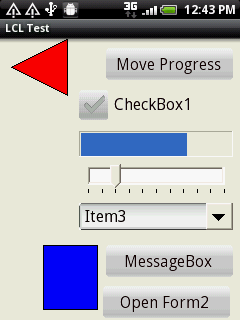 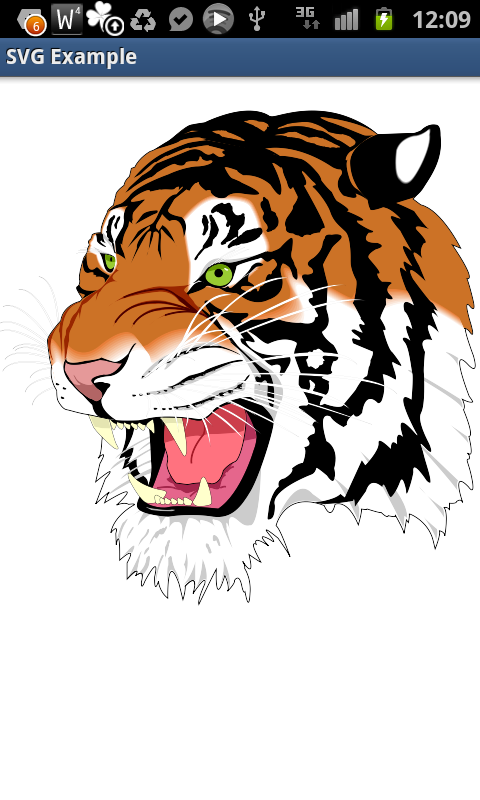 | |
| 142 | + | ||
| 143 | + | ## See Also | |
| 144 | + | ||
| 145 | + | - [[Lazarus Custom Drawn Controls]] | |
| 146 | + | ||
| 147 | + | --- | |
| 148 | + | *From the Free Pascal wiki, page "Custom Drawn Interface", as it stood on 2020-02-08 after a change by Trev, out of the wiki's dump of 2024-05-26. Copyright stays with the author who wrote it, according to the old wiki's [[Licensing]] page. If you have concerns about this material, [message the admin](/wiki-contact).* | |
| 149 | + | Category: Custom Drawn |