

CryptINI: what changed
Revision 0 to 1. Removed lines have a minus sign; added lines have a plus sign.
Title: CryptINI
| Old | New | Line | |
|---|---|---|---|
| 1 | + | ## Contents | |
| 2 | + | ||
| 3 | + | * 1 CryptINI | |
| 4 | + | * 1.1 Screenshots | |
| 5 | + | * 1.2 Purpose | |
| 6 | + | * 1.3 Disclaimer | |
| 7 | + | * 1.4 Encryption | |
| 8 | + | * 1.5 FPC versions | |
| 9 | + | * 1.6 Use and Example Code | |
| 10 | + | * 1.6.1 Simple use | |
| 11 | + | * 1.6.2 Using the WriteIdent etc in Form.Create | |
| 12 | + | * 1.7 Encrypting/Decrypting the whole INI file | |
| 13 | + | * 1.8 Original IniFiles methods and properties | |
| 14 | + | * 1.9 Testing App/Demo | |
| 15 | + | * 1.10 Documentation | |
| 16 | + | * 1.11 Licence | |
| 17 | + | * 2 Download | |
| 18 | + | * 2.1 Package Installation | |
| 19 | + | ||
| 20 | + | ## CryptINI | |
| 21 | + | ||
| 22 | + | ### Screenshots | |
| 23 | + | ||
| 24 | + | ||
| 25 | + | ||
| 26 | + | * Screenshot of Test/Demo app | |
| 27 | + | ||
| 28 | + | [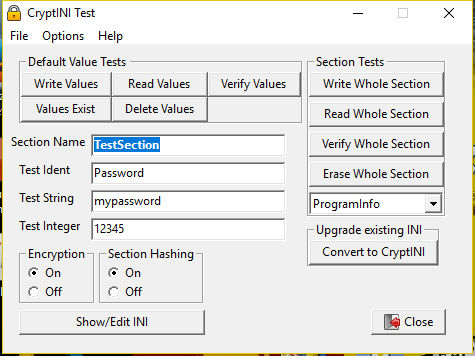](</File:latest_testcryptini.jpg>) | |
| 29 | + | ||
| 30 | + | * Contents of INI written by CryptINI | |
| 31 | + | ||
| 32 | + | [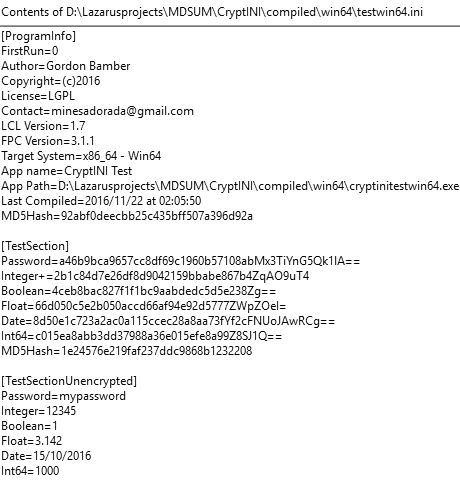](</File:testcryptini1.jpg>) | |
| 33 | + | ||
| 34 | + | ### Purpose | |
| 35 | + | ||
| 36 | + | TCryptIni is a TiniFile implementation that is resistant to tampering. In normal (PlainTextMode = FALSE) mode, any calls to Write values are accompanied by an embedded MD5 hash value (and also reversed then Base64/IDEA Encrypted) This is invisible in normal use (i.e. read methods return normal results) but there are added methods to internally verify any entries. It also is able to write a standard ident section containing various details including authorship and copyright. A single function allows you to check on app startup whether this section has been altered. It also includes a useful 'First Run' functionality. It's intended purpose is to store information that cannot be easily altered in a text editor (such as HiScores etc) by a weekend scripter. The WriteInteger method is the most secure as it double-encrypts as well as embedding an MD5Hash value as a checksum. Very handy to save scores etc. It is paired with ReadInteger and VerifyInteger | |
| 37 | + | ||
| 38 | + | ### Disclaimer | |
| 39 | + | ||
| 40 | + | This unit does not claim to pass any security tests nor be used in any environment where a moderate-level hacker could circumvent it. | |
| 41 | + | ||
| 42 | + | ### Encryption | |
| 43 | + | ||
| 44 | + | By Default CryptINI uses the DCPCrypt package for string encryption. The mode is IDEA cipher with an MD5 hash for the key. The EncryptINI and DecryptINI methods use DCPCrypt RC4 Cipher (With SHA hash) There is a $DEFINE USE_DCPCRYPT directive at the top of the ucryptini file. | |
| 45 | + | ||
| 46 | + | If this DEFINE is commented out, then CryptINI will default to BASE64 string encryption, which is weaker. Encrypt/DecryptINI methods will be unavailable. You can then delete any requirement for dcpcrypt in the project inspector. | |
| 47 | + | ||
| 48 | + | ### FPC versions | |
| 49 | + | ||
| 50 | + | Starting in FPC V3.1.1 there are additional options in TINIFile which are implemented in TCryptINI if the FPC Version >= 3.1.1 is detected. | |
| 51 | + | ||
| 52 | + | ### Use and Example Code | |
| 53 | + | ||
| 54 | + | * **Tip:** Add CryptINI as a requirement in Project Inspector | |
| 55 | + | ||
| 56 | + | #### Simple use | |
| 57 | + | ||
| 58 | + | Instead of | |
| 59 | + | ``` | |
| 60 | + | Uses Inifiles; | |
| 61 | + | TForm1.SomeProcedure; | |
| 62 | + | Var INI:TIniFile; | |
| 63 | + | begin | |
| 64 | + | INI := TIniFile.Create(ChangeFileExt(Application.EXEName, '.cfg')); | |
| 65 | + | end; | |
| 66 | + | ``` | |
| 67 | + | ||
| 68 | + | You do: (note the 'uses ucryptini') | |
| 69 | + | ``` | |
| 70 | + | Uses ucryptini; | |
| 71 | + | TForm1.SomeProcedure; | |
| 72 | + | Var INI:TCryptIniFile; | |
| 73 | + | begin | |
| 74 | + | INI := TCryptIniFile.Create(ChangeFileExt(Application.EXEName, '.cfg')); | |
| 75 | + | end; | |
| 76 | + | ``` | |
| 77 | + | ||
| 78 | + | * If you do: | |
| 79 | + | ||
| 80 | + | ``` | |
| 81 | + | INI.PlainTextMode=True; | |
| 82 | + | INI.SectionHashing:=False; | |
| 83 | + | ``` | |
| 84 | + | ||
| 85 | + | .. then TCryptINI will behave *exactly* as TIniFile does, so you can drop it into existing code without changing an existing INI file. | |
| 86 | + | ||
| 87 | + | * If you are coding a new app, then leave PlainTextmode as its default value (TRUE) and code as you would for Tinifile. The advantage is that you can then use CryptINI's extra methods, like Verify and WriteIdent etc. | |
| 88 | + | ||
| 89 | + | #### Using the WriteIdent etc in Form.Create | |
| 90 | + | ||
| 91 | + | * You can hard-code an Ident Section in your INI file and check if it has been altered | |
| 92 | + | * **Note** to use this function you must include Version Info in your project (Project/Project Options/Version Info) | |
| 93 | + | * Typical Form.Create() | |
| 94 | + | ||
| 95 | + | ``` | |
| 96 | + | procedure TForm1.FormCreate(Sender: TObject); | |
| 97 | + | const | |
| 98 | + | C_KEYPHRASE = 'I do like to be beside the seaside'; // Move this to the top of the unit | |
| 99 | + | Begin | |
| 100 | + | ...other code | |
| 101 | + | // Initialise the encrypted config file | |
| 102 | + | INI := TCryptIniFile.Create(ChangeFileExt(Application.EXEName, '.cfg')); | |
| 103 | + | ||
| 104 | + | // First ever run. INI is absent | |
| 105 | + | If INI.IsVirgin then INI.WriteIdent('minesadorada','(c)2016','minesadorada@charcodelvalle.com','Creative Commons',TRUE); | |
| 106 | + | ||
| 107 | + | if NOT INI.VerifyIdent('5b319674f5cb55f3ed1e404e33c25868') then // I got this from the INI file | |
| 108 | + | ShowMessage('This is not a genuine copy of ' + Application.Title + '!') | |
| 109 | + | else INI.Deflower; // If not Deflowered then the default ini is used. | |
| 110 | + | ||
| 111 | + | // After first run, use the encrypted version | |
| 112 | + | If NOT INI.IsVirgin then | |
| 113 | + | begin | |
| 114 | + | INI.DecryptINI(TRUE,C_KEYPHRASE); | |
| 115 | + | // Check the unencrypted version.. | |
| 116 | + | if NOT INI.VerifyIdent('5b319674f5cb55f3ed1e404e33c25868') then // I got this from the INI file | |
| 117 | + | ShowMessage('This is not a genuine copy of ' + Application.Title + '!'); | |
| 118 | + | end; | |
| 119 | + | INI.KeyPhrase:=C_KEYPHRASE; // for subsequent read/writes | |
| 120 | + | ...other code | |
| 121 | + | end; | |
| 122 | + | ||
| 123 | + | procedure Tmainform.FormDestroy(Sender: TObject); | |
| 124 | + | const | |
| 125 | + | C_KEYPHRASE = 'I do like to be beside the seaside'; // Move this to the top of the unit | |
| 126 | + | Begin | |
| 127 | + | ...other code | |
| 128 | + | INI.EncryptINI(TRUE,C_KEYPHRASE); | |
| 129 | + | ...other code | |
| 130 | + | end; | |
| 131 | + | ``` | |
| 132 | + | ||
| 133 | + | * Has the Ident been tampered with? Put something like this in Form.Create: | |
| 134 | + | ||
| 135 | + | ``` | |
| 136 | + | // Use the MD5 value from the INI file (use your own!) | |
| 137 | + | If INI.VerifyIdent('92abf0deecbb25c435bff507a396d92a') then | |
| 138 | + | ShowMessage('Ident verified OK') // do nothing | |
| 139 | + | else | |
| 140 | + | ShowMessage('Ident failed verification'); // Warning message/exit | |
| 141 | + | ``` | |
| 142 | + | ||
| 143 | + | * Test for first run | |
| 144 | + | ||
| 145 | + | ``` | |
| 146 | + | If INI.IsVirgin then // note that doing the test Deflowers the app by default | |
| 147 | + | ShowMessage('First time run of this app'); | |
| 148 | + | ``` | |
| 149 | + | ||
| 150 | + | * Toggle to normal UnEncrypted INI use | |
| 151 | + | ||
| 152 | + | (by default it is set to FALSE) | |
| 153 | + | ``` | |
| 154 | + | INI.PlainTextMode:=TRUE; | |
| 155 | + | INI.WriteString('MySection', 'String', 'MyString'); // just writes normally | |
| 156 | + | ``` | |
| 157 | + | ||
| 158 | + | * When PlainTextMode = FALSE (default) and SectionHashing=TRUE (default),Write<anytype> encrypts the value and prefixes the encrypted value with an MD5Hash. In addition each section has an entry MD5Hash=<32 characters> which is updated on each write. | |
| 159 | + | ||
| 160 | + | ``` | |
| 161 | + | INI.WriteInteger('MySection', 'Integer',1000); | |
| 162 | + | ``` | |
| 163 | + | ||
| 164 | + | * Note WriteInteger adds a '+' (INTEGER_MARKER) to the written Key | |
| 165 | + | ||
| 166 | + | This is so that CryptINI can deal with Integers specially Using CryptINI in either mode, this is invisible in use (i.e. don't add a + to the ident for any methods) | |
| 167 | + | ||
| 168 | + | * When PlainTextMode = FALSE (default), use these convenient methods if you like: | |
| 169 | + | ||
| 170 | + | ``` | |
| 171 | + | INI.ReadUnencryptedString | |
| 172 | + | INI.WriteUnencryptedString | |
| 173 | + | INI.ReadUnEncryptedInteger | |
| 174 | + | INI.WriteUnencryptedInteger | |
| 175 | + | ``` | |
| 176 | + | ||
| 177 | + | * Store 'First Run' status using these methods: | |
| 178 | + | ||
| 179 | + | ``` | |
| 180 | + | INI.IsVirgin | |
| 181 | + | INI.Deflower | |
| 182 | + | INI.ReFlower (useful for testing) | |
| 183 | + | ``` | |
| 184 | + | ||
| 185 | + | ### Encrypting/Decrypting the whole INI file | |
| 186 | + | ||
| 187 | + | * You can encrypt and decrypt the entire INI file using methods EncryptINI and DecryptINI. | |
| 188 | + | ||
| 189 | + | This uses a different cipher and hash method, so is extra-secure. | |
| 190 | + | ||
| 191 | + | * Note: CryptINI methods and properties an only work with an unencrypted INI file, So; Decrypt on startup, and Encrypt before exit. | |
| 192 | + | * By default the routines use the KeyPhrase property, but you can override this in the EncryptINI/DecryptINI method calls along with whether to delete the "old" file and what file extension to use for the encrypted file. | |
| 193 | + | ||
| 194 | + | ### Original IniFiles methods and properties | |
| 195 | + | ||
| 196 | + | Just use them as normal. Note: you can mix-and-match Plaintext and Encrypted in the same INI file. Just toggle the property PlainTextMode before Writing/Reading | |
| 197 | + | ||
| 198 | + | ### Testing App/Demo | |
| 199 | + | ||
| 200 | + | * This can be downloaded from <https://sourceforge.net/projects/lazautoupdate/files/otherpackages/testcryptini_compiled.zip> | |
| 201 | + | * There are compiled versions for Windows 32/64-bit and Linux 32/64-bit in the archive. (Also untested MacOS 10 'Darwin' 32-bit) | |
| 202 | + | ||
| 203 | + | ### Documentation | |
| 204 | + | ||
| 205 | + | * As well as this page, ucryptini.pas is heavily commented. The Testing app (source also commented) will help you understand the strengths and limitations of CryptINI, and how to get the best of it in your own applications. | |
| 206 | + | ||
| 207 | + | ### Licence | |
| 208 | + | ||
| 209 | + | * [ModifiedGPL](<https://www.gnu.org/licenses/gpl-faq.en.html>) | |
| 210 | + | ||
| 211 | + | ## Download | |
| 212 | + | ||
| 213 | + | * Sourcecode and Testing app Direct link: <https://sourceforge.net/projects/lazautoupdate/files/otherpackages/cryptinitest_source.zip> | |
| 214 | + | * CryptIni as a component: via [[Online Package Manager]] | |
| 215 | + | ||
| 216 | + | ### Package Installation | |
| 217 | + | ||
| 218 | + | * Download the package: <https://sourceforge.net/projects/lazautoupdate/files/otherpackages/cryptini.zip> | |
| 219 | + | * Unzip it into a new folder (Suggest <LazarusDir>/components/cryptini) | |
| 220 | + | * In the Lazarus IDE Click Package/Open Package File (lpk), navigate to your new folder and click "cryptini.lpk", then "Open" | |
| 221 | + | * Just click "Compile". It is not a visual component, so cannot be "Installed" | |
| 222 | + | * To use it in your project, just add ucryptini to the Uses clause when required, or better still: add CryptIni (the component) to the projects's requirements. | |
| 223 | + | ||
| 224 | + | ||
| 225 | + | ||
| 226 | + | * * * | |
| 227 | + | ||
| 228 | + | [Minesadorada](</User:Minesadorada> "User:Minesadorada") | |
| 229 | + | ||
| 230 | + | --- | |
| 231 | + | *From the Free Pascal wiki, page "CryptINI", as the Internet Archive kept it on 2025-04-17. Copyright stays with the author who wrote it, according to the old wiki's [[Licensing]] page. If you have concerns about this material, [message the admin](/wiki-contact).* |