

Creating IDE Help: what changed
Revision 1 to 2. Removed lines have a minus sign; added lines have a plus sign.
| Old | New | Line | |
|---|---|---|---|
| 1 | 1 | # Overview | |
| 2 | 2 | ||
| 3 | 3 | The IDE can search help for various things and there are various sources in various help formats. Here is a short list to understand the complexity: | |
| 4 | 4 | ||
| 5 | 5 | - **FPC messages**: compiler message like *Error: Illegal enum minimum-size specifier*. The IDE has a default built-in to search for the *FPCSrcDir/compiler/msg/errore.msg file*, search the message there and show the corresponding comment. The comments contain Latex tags which are stripped. At the moment a simple MessageDlg is shown. Some notorious messages need more explanation and are manually connected to URLs. | |
| 6 | 6 | - **IDE windows, dialogs and controls**: | |
| 7 | 7 | - **Pascal sources**: | |
| 8 | 8 | - **FPC keywords**: | |
| 9 | 9 | - **FPC directives**: | |
| 10 | 10 | - **IDE directives**: | |
| 11 | 11 | ||
| 12 | 12 | # Demos and explore | |
| 13 | 13 | ||
| 14 | 14 | You can see the currently installed help under **View / IDE Internals / About IDE / Help**. | |
| 15 | 15 | ||
| 16 | 16 | There is a test and demonstration package under **examples/idehelp/demoidehelp.lpk**. It contains example code how you can add help to the IDE. | |
| 17 | 17 | ||
| 18 | 18 | To show your help in the user's browser see examples/helphtml/htmlhelp1.lpi. | |
| 19 | 19 | ||
| 20 | 20 | To show HTML help in a LCL control see examples/htmlhelp_ipro/htmlhelpsample.lpi. | |
| 21 | 21 | ||
| 22 | 22 | ## Help for LCL units | |
| 23 | 23 | ||
| 24 | 24 | Whenever the user presses F1 for an Object Inspector property or on an identifier in the source editor the IDE searches the declaration and invokes the HTML viewer for the fpdoc item. The items can be edited easily via the [[FPDoc Editor]] tool. | |
| 25 | 25 | ||
| 26 | 26 | You can see the state of the LCL documentation here: [[LCL Documentation Roadmap]]. | |
| 27 | 27 | ||
| 28 | 28 | ## Help for IDE windows | |
| 29 | 29 | ||
| 30 | 30 | This feature exists since 0.9.15. | |
| 31 | 31 | ||
| 32 | - | ||
| 32 | + | The help for the IDE windows (i.e. 'Object Inspector' or the 'Compiler Options') are documented in this wiki. The IDE has a mapping file *docs/IDEWindowHelpTree.xml*, which contains the paths from the various IDE forms/controls to wiki pages. This mapping file is edited via an editor that is shown at any place in the IDE via `Ctrl`+`Shift`+`F1`, except for controls that catch all keys, like synedit. You can set the shortcut in the editor options -\> key mapping. | |
| 33 | 33 | ||
| 34 | 34 | The root page of the IDE window docs is [[Lazarus IDE]]. | |
| 35 | 35 | ||
| 36 | 36 | ### Example | |
| 37 | 37 | ||
| 38 | 38 | - Open the project options: Project / Project Options | |
| 39 | - | ||
| 39 | + | - Open the help editor: `Shift`+`Ctrl`+`F1` | |
| 40 | 40 | ||
| 41 | - | ||
| 42 | - | ||
| 43 | - | ||
| 44 | - | ||
| 41 | + | 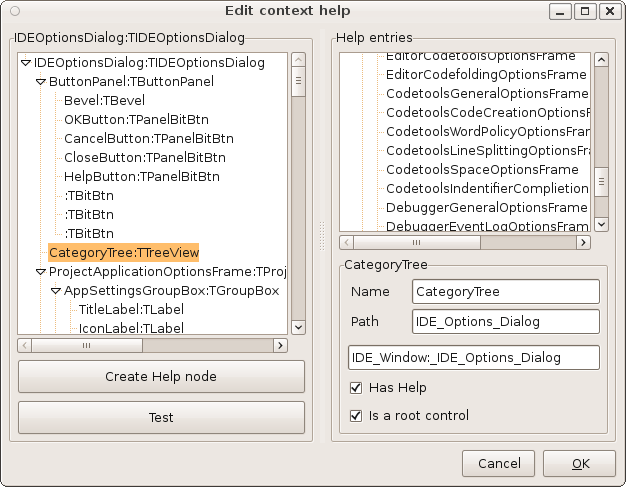 | |
| 45 | 42 | ||
| 46 | 43 | - To the left, you can see all controls of the project options dialog. You can see there are also the compiler options. | |
| 47 | 44 | - Select the **ProjectApplicationOptionsFrame** | |
| 48 | 45 | - Click **Create Help node**. This will create a new item on the right. | |
| 49 | 46 | - Check **Has Help** | |
| 50 | 47 | - Check **Is a root control**. All controls on the frame should use the help on our new help page. | |
| 51 | 48 | - Change the path to **Project_Options** | |
| 52 | 49 | ||
| 53 | - | ||
| 54 | - | ||
| 55 | - | ||
| 56 | - | ||
| 50 | + | 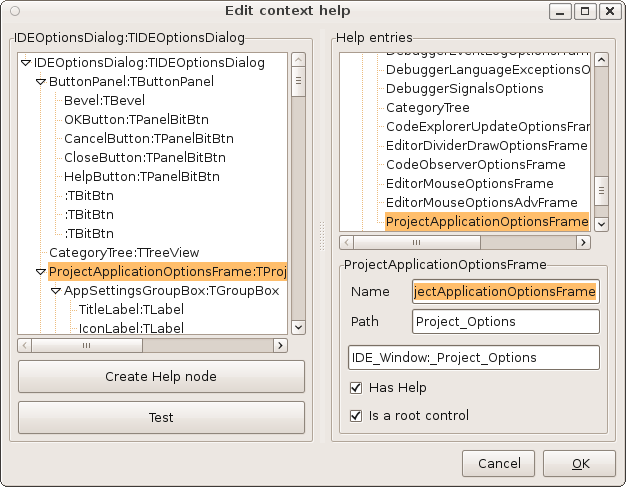 | |
| 57 | 51 | ||
| 58 | 52 | - You can click the **Test** button and should see [[IDE Window: Project Options]] in your browser. | |
| 59 | 53 | ||
| 60 | 54 | ### Redirect | |
| 61 | 55 | ||
| 62 | 56 | The TreeView in the IDE options dialog redirects the help to the help of the selected frame: | |
| 63 | 57 | ||
| 64 | 58 | ide/ideoptionsdlg.pas | |
| 65 | 59 | ||
| 66 | 60 | ``` pascal | |
| 67 | 61 | procedure TIDEOptionsDialog.CategoryTreeKeyDown(Sender: TObject; var Key: Word; | |
| 68 | 62 | Shift: TShiftState); | |
| 69 | 63 | var | |
| 70 | 64 | Command: Word; | |
| 71 | 65 | begin | |
| 72 | 66 | Command := EditorOpts.KeyMap.TranslateKey(Key,Shift,nil); | |
| 73 | 67 | if (Command=ecContextHelp) and (PrevEditor <> nil) then begin | |
| 74 | 68 | Key:=VK_UNKNOWN; | |
| 75 | 69 | ShowContextHelpForIDE(PrevEditor); | |
| 76 | 70 | end; | |
| 77 | 71 | end; | |
| 78 | 72 | ``` | |
| 79 | 73 | ||
| 80 | 74 | ## Help for FPC keywords | |
| 81 | 75 | ||
| 82 | 76 | You can register a help for fpc keywords. Note: One database can handle multiple contexts, for example help for fpc keywords, help for sources and help for messages. | |
| 83 | 77 | ||
| 84 | 78 | ``` pascal | |
| 85 | 79 | uses | |
| 86 | 80 | IDEHelpIntfs, HelpIntfs, LazHelpIntf, LazHelpHTML... | |
| 87 | 81 | ||
| 88 | 82 | { TSimpleFPCKeywordHelpDatabase } | |
| 89 | 83 | ||
| 90 | 84 | TSimpleFPCKeywordHelpDatabase = class(THTMLHelpDatabase) // you can use any type of database you like | |
| 91 | 85 | private | |
| 92 | 86 | FKeywordPrefixNode: THelpNode; | |
| 93 | 87 | public | |
| 94 | 88 | function GetNodesForKeyword(const HelpKeyword: string; | |
| 95 | 89 | var ListOfNodes: THelpNodeQueryList; var ErrMsg: string | |
| 96 | 90 | ): TShowHelpResult; override; | |
| 97 | 91 | function ShowHelp(Query: THelpQuery; BaseNode, NewNode: THelpNode; | |
| 98 | 92 | QueryItem: THelpQueryItem; | |
| 99 | 93 | var ErrMsg: string): TShowHelpResult; override; | |
| 100 | 94 | end; | |
| 101 | 95 | ||
| 102 | 96 | function TSimpleFPCKeywordHelpDatabase.GetNodesForKeyword( | |
| 103 | 97 | const HelpKeyword: string; var ListOfNodes: THelpNodeQueryList; | |
| 104 | 98 | var ErrMsg: string): TShowHelpResult; | |
| 105 | 99 | var | |
| 106 | 100 | KeyWord: String; | |
| 107 | 101 | begin | |
| 108 | 102 | Result:=shrHelpNotFound; | |
| 109 | 103 | if (csDesigning in ComponentState) then exit; | |
| 110 | 104 | if (FPCKeyWordHelpPrefix<>'') | |
| 111 | 105 | and (LeftStr(HelpKeyword,length(FPCKeyWordHelpPrefix))=FPCKeyWordHelpPrefix) then begin | |
| 112 | 106 | // HelpKeyword starts with KeywordPrefix | |
| 113 | 107 | KeyWord:=copy(HelpKeyword,length(FPCKeyWordHelpPrefix)+1,length(HelpKeyword)); | |
| 114 | 108 | // test: testfcpkeyword | |
| 115 | 109 | if KeyWord='testfcpkeyword' then begin | |
| 116 | 110 | // this help database knows this keyword | |
| 117 | 111 | // => add a node, so that if there are several possibilities the IDE can | |
| 118 | 112 | // show the user a dialog to choose | |
| 119 | 113 | // Note: In your own database you can create one dummy node or | |
| 120 | 114 | // one node per keyword or one node per group of keywords | |
| 121 | 115 | // or whatever you like. | |
| 122 | 116 | if FKeywordPrefixNode=nil then | |
| 123 | 117 | FKeywordPrefixNode:=THelpNode.CreateURL(Self,'',''); | |
| 124 | 118 | FKeywordPrefixNode.Title:='Pascal keyword '+KeyWord; | |
| 125 | 119 | CreateNodeQueryListAndAdd(FKeywordPrefixNode,nil,ListOfNodes,true); | |
| 126 | 120 | Result:=shrSuccess; | |
| 127 | 121 | end; | |
| 128 | 122 | end; | |
| 129 | 123 | end; | |
| 130 | 124 | ||
| 131 | 125 | function TSimpleFPCKeywordHelpDatabase.ShowHelp(Query: THelpQuery; BaseNode, | |
| 132 | 126 | NewNode: THelpNode; QueryItem: THelpQueryItem; var ErrMsg: string | |
| 133 | 127 | ): TShowHelpResult; | |
| 134 | 128 | var | |
| 135 | 129 | KeywordQuery: THelpQueryKeyword; | |
| 136 | 130 | KeyWord: String; | |
| 137 | 131 | begin | |
| 138 | 132 | Result:=shrHelpNotFound; | |
| 139 | 133 | if not (Query is THelpQueryKeyword) then exit; | |
| 140 | 134 | KeywordQuery:=THelpQueryKeyword(Query); | |
| 141 | 135 | KeyWord:=copy(KeywordQuery.Keyword,length(FPCKeyWordHelpPrefix)+1,length(KeywordQuery.Keyword)); | |
| 142 | 136 | debugln(['TSimpleFPCKeywordHelpDatabase.ShowHelp Keyword=',Keyword]); | |
| 143 | 137 | // ShowURL ... | |
| 144 | 138 | end; | |
| 145 | 139 | ||
| 146 | 140 | procedure Register; | |
| 147 | 141 | begin | |
| 148 | 142 | FPCKeywordsHelpDB:=HelpDatabases.CreateHelpDatabase('NameYourHelpDB', | |
| 149 | 143 | TSimpleFPCKeywordHelpDatabase,true); | |
| 150 | 144 | end; | |
| 151 | 145 | ``` | |
| 152 | 146 | ||
| 153 | 147 | ## Help for Messages | |
| 154 | 148 | ||
| 155 | 149 | This feature exists since 0.9.15 and requires the FPC sources installed locally. | |
| 156 | 150 | ||
| 157 | 151 | This is invoked when the user presses F1 or uses the Help menu item of the message window. | |
| 158 | 152 | ||
| 159 | 153 | Normally the IDE will search the errore.msg file in the FPC sources and show the comment for the message. But some messages like *unit not found* need extra help. The following describes how to do that: | |
| 160 | 154 | ||
| 161 | 155 | To add a wiki help page for a message, do the following: | |
| 162 | 156 | ||
| 163 | 157 | - Create a wiki page under [[Build messages]] | |
| 164 | 158 | - Right click on messages window / Edit help | |
| 165 | 159 | - This shows the editor for message additions. | |
| 166 | 160 | ||
| 167 | - | ||
| 168 | - | ||
| 169 | - | ||
| 170 | - | ||
| 161 | + | 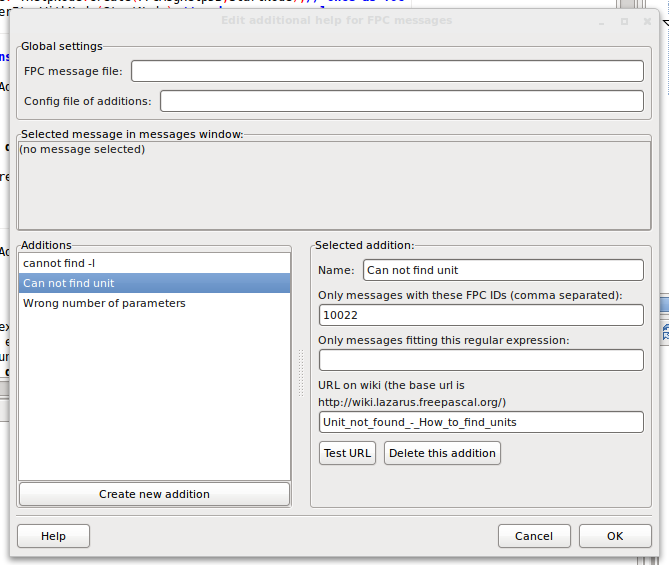 | |
| 171 | 162 | ||
| 172 | 163 | The items are stored in **\<lazarusdir\>/docs/additionalmsghelp.xml**. | |
| 173 | 164 | ||
| 174 | 165 | ## Adding Kylix help | |
| 175 | 166 | ||
| 176 | 167 | For wow to use the Borland Help files within the IDE editor, see [[Installing Help in the IDE|Adding Kylix Help]]. | |
| 177 | 168 | ||
| 178 | 169 | --- | |
| 179 | 170 | *From the Free Pascal wiki, page "Creating IDE Help", as it stood on 2020-08-22 after a change by Trev, out of the wiki's dump of 2024-05-26. Copyright stays with the author who wrote it, according to the old wiki's [[Licensing]] page. If you have concerns about this material, [message the admin](/wiki-contact).* | |
| 180 | 171 | Category: Help and Docs | |
| 181 | 172 | Category: IDE | |
| 182 | 173 | Category: Lazarus |