

Cocoa Internals/Text Controls: what changed
Revision 1 to 2. Removed lines have a minus sign; added lines have a plus sign.
| Old | New | Line | |
|---|---|---|---|
| 1 | 1 | ## Edit | |
| 2 | 2 | ||
| 3 | 3 | NSTextField. The field itself is readonly. Whenever it starts to edit, it's actually TCocoaFormEditor. | |
| 4 | 4 | ||
| 5 | 5 | ### MaxLength | |
| 6 | 6 | ||
| 7 | 7 | The maximum length is not supported natively in Cocoa. There are a few ways to do that: | |
| 8 | 8 | ||
| 9 | 9 | - textDidChange - (currently used) once the text changed - adjust it to the max length, before sending a notification | |
| 10 | 10 | - NSFormatter - there's an example of [stackoverflow](https://stackoverflow.com/questions/827014/how-to-limit-nstextfield-text-length-and-keep-it-always-upper-case) on how to do that. But it doesn't work in Pascal | |
| 11 | 11 | ||
| 12 | 12 | ## ComboBox | |
| 13 | 13 | ||
| 14 | 14 | Non-readonly ComboBox is implemented via NSComboBox type. Readonly combobox is implemented via NSPopupButton | |
| 15 | 15 | ||
| 16 | 16 | ### NSComboBox features | |
| 17 | 17 | ||
| 18 | 18 | - It doesn't like to be 29px or taller in height. The height is fixed to 26 pixels | |
| 19 | 19 | - It doesn't like custom fonts (other than default) to be assigned to itself (see [\#33626](https://bugs.freepascal.org/view.php?id=33626)) | |
| 20 | 20 | ||
| 21 | - | ||
| 22 | - | ||
| 23 | - | ||
| 24 | - | ||
| 21 | + | 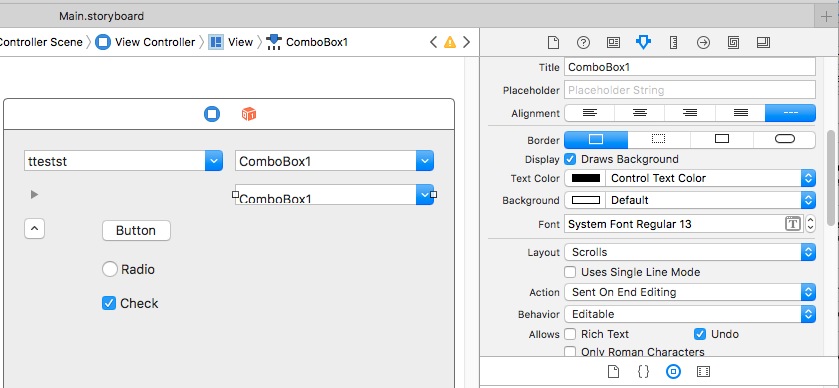 | |
| 25 | 22 | ||
| 26 | 23 | ### Programmatic Drop | |
| 27 | 24 | ||
| 28 | 25 | NSAppKit doesn't provide any means to trigger the comboBox dropdown via an API call. Thus any approach would be hacking solution anyway. | |
| 29 | 26 | ||
| 30 | 27 | There are a few options, that can be found online. | |
| 31 | 28 | ||
| 32 | 29 | 1\) Using NSAccessibility APIs [stackoverflow](https://stackoverflow.com/questions/4499262/how-to-programmatically-open-an-nscomboboxs-list) | |
| 33 | 30 | ||
| 34 | 31 | The solution suggests using a deprecated APIs. The solution itself is pretty old, and that's why deprecated methods are used. | |
| 35 | 32 | ||
| 36 | 33 | ||
| 37 | 34 | It should not be applied for macOS 10.11 and later. | |
| 38 | 35 | ||
| 39 | 36 | ```objc | |
| 40 | 37 | - (void) setExpanded: (BOOL)expanded | |
| 41 | 38 | { | |
| 42 | 39 | id ax = NSAccessibilityUnignoredDescendant(self); | |
| 43 | 40 | [ax accessibilitySetValue: [NSNumber numberWithBool: expanded] | |
| 44 | 41 | forAttribute: NSAccessibilityExpandedAttribute]; | |
| 45 | 42 | } | |
| 46 | 43 | ``` | |
| 47 | 44 | ||
| 48 | 45 | 2\) The same link as the method above, but it's suggesting to call **popUp:** selector. The selector isn't documented (but can be seen if studying backtrace) \<source lang="objc\> | |
| 49 | 46 | ||
| 50 | 47 | `[(NSComboBoxCell*)self.acomboBox.cell performSelector:@selector(popUp:)];` | |
| 51 | - | ||
| 52 | - | ||
| 53 | 48 | ||
| 54 | 49 | This is a hack and undesired approach, as it might cause problems in future. | |
| 55 | 50 | ||
| 56 | 51 | 3\) Instead of using **popUp:**, call for **moveDown:** which is a documented API However, it should not be called while processing the event. Instead it should be scheduled to be called after the current event is processed. As the key pressed stucks in the event queue | |
| 57 | 52 | ||
| 58 | 53 | ```delphi | |
| 59 | 54 | procedure TCocoaComboBox.lclPopup; | |
| 60 | 55 | var | |
| 61 | 56 | c : NSCell; | |
| 62 | 57 | begin | |
| 63 | 58 | if isDown then Exit; | |
| 64 | 59 | c:=cell; | |
| 65 | 60 | if not Assigned(c) then Exit; | |
| 66 | 61 | // cannot implement it immediately, as it blocks the current event processing | |
| 67 | 62 | c.performSelector_withObject_afterDelay( | |
| 68 | 63 | ObjCSelector('moveDown:'), nil, 0 | |
| 69 | 64 | ); | |
| 70 | 65 | end; | |
| 71 | 66 | ``` | |
| 72 | 67 | ||
| 73 | 68 | ## TMemo (NSTextView) | |
| 74 | 69 | ||
| 75 | 70 | TMemo widgetset is implemented over NSTextView and NSScrollView | |
| 76 | 71 | ||
| 77 | 72 | By default NSTextView is designed to be constantly word-wrapped. Disabling word-wrapping could be quite complicated from a start due to odd-default values chosen by Apple, as well as complex (yet flexible) Text Layout system. | |
| 78 | 73 | ||
| 79 | 74 | - NSTextView is a "cocoa" control, however it's not drawing the text by it's own it's also using: | |
| 80 | 75 | - NSTextContainer. Both NSTextContainer and NSTextView settings influence on how the text is rendered in the end. | |
| 81 | 76 | ||
| 82 | 77 | The example shows, of creating NSTextView that automatically resizes itself horizontally. However NSTextView doesn't provide its own scrollbars, thus no scrollbars would be seen. | |
| 83 | 78 | ||
| 84 | 79 | ```delphi | |
| 85 | 80 | procedure TForm1.FormShow(Sender: TObject); | |
| 86 | 81 | var | |
| 87 | 82 | txt : NSTextView; | |
| 88 | 83 | begin | |
| 89 | 84 | txt := NSTextView.alloc.initWithFrame(NSMakeRect(10,ClientHeight-10-50,50,50)); | |
| 90 | 85 | ||
| 91 | 86 | txt.setFont(NSFont.systemFontOfSize(NSFont.systemFontSizeForControlSize(NSRegularControlSize))); | |
| 92 | 87 | ||
| 93 | 88 | // making the maximum size - maximum! | |
| 94 | 89 | // 10000000 is a "constant" could be found in Apple documentation | |
| 95 | 90 | txt.setMaxSize( NSMakeSize(10000000, 10000000)); | |
| 96 | 91 | // preventing textContainer from following the width of NSTextView | |
| 97 | 92 | txt.textContainer.setWidthTracksTextView(false); | |
| 98 | 93 | // making TextContainer large enough. | |
| 99 | 94 | txt.textContainer.setContainerSize ( NSMakeSize( 10000000, 1024)); | |
| 100 | 95 | // making NSTextView to resize automatically to the text boundries (max width) | |
| 101 | 96 | txt.setHorizontallyResizable(true); | |
| 102 | 97 | ||
| 103 | 98 | NSView(Self.Handle).addSubView(txt); | |
| 104 | 99 | end; | |
| 105 | 100 | ``` | |
| 106 | 101 | ||
| 107 | 102 | The next step is actually to embed NSTextView into ScrollView (as a documentView). | |
| 108 | 103 | ||
| 109 | 104 | ### Inserting into Scroll View | |
| 110 | 105 | ||
| 111 | 106 | The process is straight-forward - allocate scroll view, use NSTextView as it's document view | |
| 112 | 107 | ||
| 113 | 108 | ```delphi | |
| 114 | 109 | procedure TForm1.FormShow(Sender: TObject); | |
| 115 | 110 | var | |
| 116 | 111 | txt : NSTextView; | |
| 117 | 112 | sc : NSScrollView; | |
| 118 | 113 | begin | |
| 119 | 114 | txt := NSTextView.alloc.initWithFrame(NSMakeRect(10,ClientHeight-10-50,50,50)); | |
| 120 | 115 | ||
| 121 | 116 | txt.setMaxSize( NSMakeSize(10000000, 10000000)); | |
| 122 | 117 | txt.textContainer.setWidthTracksTextView(false); | |
| 123 | 118 | txt.textContainer.setContainerSize ( NSMakeSize( 10000000, 1024)); | |
| 124 | 119 | txt.setHorizontallyResizable(true); | |
| 125 | 120 | ||
| 126 | 121 | // allocating scroll view and placing NSTextView inside | |
| 127 | 122 | sc := NSScrollView.alloc.initWithFrame(NSMakeRect(10,ClientHeight-10-150,150,150)); | |
| 128 | 123 | sc.setHasVerticalScroller(true); | |
| 129 | 124 | sc.setHasHorizontalScroller(true); | |
| 130 | 125 | sc.setAutohidesScrollers(true); | |
| 131 | 126 | sc.setDocumentView(txt); | |
| 132 | 127 | ||
| 133 | 128 | NSView(Self.Handle).addSubView(sc); | |
| 134 | 129 | end; | |
| 135 | 130 | ``` | |
| 136 | 131 | ||
| 137 | 132 | Now text-view and scrollbars would act as expected. | |
| 138 | 133 | ||
| 139 | 134 | ### Line padding oddity | |
| 140 | 135 | ||
| 141 | 136 | By default, there's 5 pixels padding between border of NSTextView and left-side of the text. | |
| 142 | 137 | ||
| 143 | 138 | It's possible to decrease it, however, setting it to zero is causing a very weird and unpleasant glitch. | |
| 144 | 139 | ||
| 145 | 140 | ```delphi | |
| 146 | 141 | var | |
| 147 | 142 | txt : NSTextView; | |
| 148 | 143 | sc : NSScrollView; | |
| 149 | 144 | begin | |
| 150 | 145 | txt := NSTextView.alloc.initWithFrame(NSMakeRect(10,ClientHeight-10-50,50,50)); | |
| 151 | 146 | ||
| 152 | 147 | txt.setMaxSize( NSMakeSize(10000000, 10000000)); | |
| 153 | 148 | txt.textContainer.setWidthTracksTextView(false); | |
| 154 | 149 | txt.textContainer.setContainerSize ( NSMakeSize( 10000000, 1024)); | |
| 155 | 150 | txt.setHorizontallyResizable(true); | |
| 156 | 151 | ||
| 157 | 152 | // setting this value to 0 is causing the problem. | |
| 158 | 153 | txt.textContainer.setLineFragmentPadding(0); | |
| 159 | 154 | ||
| 160 | 155 | sc := NSScrollView.alloc.initWithFrame(NSMakeRect(10,ClientHeight-10-150,150,150)); | |
| 161 | 156 | sc.setHasVerticalScroller(true); | |
| 162 | 157 | sc.setHasHorizontalScroller(true); | |
| 163 | 158 | sc.setAutohidesScrollers(true); | |
| 164 | 159 | sc.setDocumentView(txt); | |
| 165 | 160 | ||
| 166 | 161 | NSView(Self.Handle).addSubView(sc); | |
| 167 | 162 | end; | |
| 168 | 163 | ``` | |
| 169 | 164 | ||
| 170 | 165 | Now. Everytime a new line break is added **to the end of the text** the view scrolls to the top (while having cursor at the bottom). | |
| 171 | 166 | ||
| 172 | 167 | Either by pressing Enter on keyboard having cursor at the end of the text. Or by inserting a line break at the end of the text programmatically. | |
| 173 | 168 | ||
| 174 | 169 | The only way to avoid the problem is to have Fragment padding set to a value greater than zero. | |
| 175 | 170 | ||
| 176 | 171 | ### Forcing Lines Breaks | |
| 177 | 172 | ||
| 178 | 173 | NSTextView is a rich-text controls, thus it can (visually) handle all variety of Line breaks | |
| 179 | 174 | ||
| 180 | 175 | - CRLF (#13#10) - Windows | |
| 181 | 176 | - LF (#10) - Unix | |
| 182 | 177 | - CR (#13) - Classic Mac | |
| 183 | 178 | ||
| 184 | 179 | For consistency and Carbon compatibility, unix style (#10) is enforced. | |
| 185 | 180 | ||
| 186 | 181 | ## TSpinEdit | |
| 187 | 182 | ||
| 188 | 183 | Spin edit control is implemented using 2 controls NSEdit and NSStepper (up/down arrow). | |
| 189 | 184 | ||
| 190 | 185 | - Handle returned is NSEdit class. Even though the exact bounds of NSEdit ARE NOT identical to the SpinEdit boundaries. There's an additional offset to fit NSStepper | |
| 191 | 186 | - It's possible to implement **EditorEnabled** property, simply by only setting NSEdit to readonly mode and allowing NSStepper to change values | |
| 192 | 187 | ||
| 193 | 188 | ## Text Input | |
| 194 | 189 | ||
| 195 | 190 | ### Dead Keys | |
| 196 | 191 | ||
| 197 | 192 | By default Cocoa doesn't support dead keys entries for non NSTextView controls. The sample of they dead-keys can be seen, by installing (qwerty) Spanish keyboard layout (where accents are used). An accent is placed by pressing "'" followed by vowel character (a, e, i, o). | |
| 198 | 193 | ||
| 199 | 194 | If following code is used, you should see that two key presses followed by a single unicode character generated. | |
| 200 | 195 | ||
| 201 | 196 | Also, if "'" is followed by non-vowel character, exactly 2 separate characters would be generated | |
| 202 | 197 | ||
| 203 | 198 | ```delphi | |
| 204 | 199 | procedure TForm1.FormKeyDown(Sender: TObject; var Key: Word; Shift: TShiftState | |
| 205 | 200 | ); | |
| 206 | 201 | begin | |
| 207 | 202 | case Key of | |
| 208 | 203 | VK_SPACE, VK_BACK, VK_DELETE: | |
| 209 | 204 | Caption := ''; | |
| 210 | 205 | else | |
| 211 | 206 | writeln('down: ', Integer(Key)); | |
| 212 | 207 | end; | |
| 213 | 208 | end; | |
| 214 | 209 | ||
| 215 | 210 | procedure TForm1.FormUTF8KeyPress(Sender: TObject; var UTF8Key: TUTF8Char); | |
| 216 | 211 | begin | |
| 217 | 212 | if (UTF8Key <> ' ') and (UTF8Key <> #8) then begin | |
| 218 | 213 | Caption:=Caption+UTF8Key; | |
| 219 | 214 | writeln(UTF8Key); | |
| 220 | 215 | end; | |
| 221 | 216 | end; | |
| 222 | 217 | ``` | |
| 223 | 218 | ||
| 224 | 219 | ## See Also | |
| 225 | 220 | ||
| 226 | 221 | - [[Cocoa Internals]] | |
| 227 | 222 | - [Tracking the Size of a Text View](https://developer.apple.com/library/content/documentation/Cocoa/Conceptual/TextStorageLayer/Tasks/TrackingSize.html) - Apple's official documentation explains how text size is tracked between NSViewText and NSViewContainer | |
| 228 | 223 | - [Putting an NSTextView Object in an NSScrollView](https://developer.apple.com/library/content/documentation/Cocoa/Conceptual/TextUILayer/Tasks/TextInScrollView.html) - Apple's official documentation on how to place NSTextView into a scrollview. | |
| 229 | 224 | - [How to Disable Word-Wrap of NSTextview](https://stackoverflow.com/questions/3174140/how-to-disable-word-wrap-of-nstextview) - stackoverflow discussion of the problem. | |
| 230 | 225 | ||
| 231 | 226 | --- | |
| 232 | 227 | *From the Free Pascal wiki, page "Cocoa Internals/Text Controls", as it stood on 2021-10-13 after a change by Skalogryz, out of the wiki's dump of 2024-05-26. Copyright stays with the author who wrote it, according to the old wiki's [[Licensing]] page. If you have concerns about this material, [message the admin](/wiki-contact).* | |
| 233 | 228 | Category: Cocoa | |
| 234 | 229 | Category: macOS |