

ChemText: what changed
Revision 0 to 1. Removed lines have a minus sign; added lines have a plus sign.
Title: ChemText
| Old | New | Line | |
|---|---|---|---|
| 1 | + | ## About | |
| 2 | + | ||
| 3 | + | 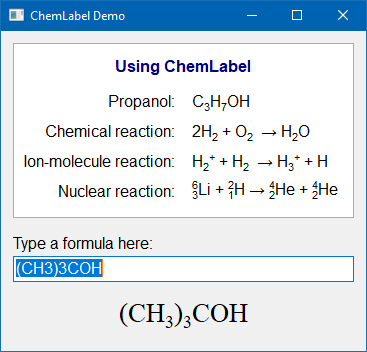 TChemText is a TCustomLabel descendant which can display chemical formulas and reaction equations with automatically placed subscripts and superscripts. | |
| 4 | + | ||
| 5 | + | ### Authors | |
| 6 | + | ||
| 7 | + | The code is based on "chemtxt" written by Patrick Spanel. It was adapted to Lazarus and extended by Werner Pamler. | |
| 8 | + | ||
| 9 | + | ### License | |
| 10 | + | ||
| 11 | + | Modified LGPL (with linking exception, like Lazarus LCL) | |
| 12 | + | ||
| 13 | + | ### Download and Installation | |
| 14 | + | ||
| 15 | + | #### Release version | |
| 16 | + | ||
| 17 | + | A zip file with the most recent release version can be found at [Lazarus CCR at SourceForge](https://sourceforge.net/projects/lazarus-ccr/files/chemtext/). Unzip the file into any folder. | |
| 18 | + | ||
| 19 | + | The current release version is 0.1.5 | |
| 20 | + | ||
| 21 | + | #### Development version | |
| 22 | + | ||
| 23 | + | Use an svn client to download the current trunk version from [<svn://svn.code.sf.net/p/lazarus-ccr/svn/components/chemtext/>](svn://svn.code.sf.net/p/lazarus-ccr/svn/components/chemtext/) | |
| 24 | + | ||
| 25 | + | #### Installation | |
| 26 | + | ||
| 27 | + | In Lazarus, go to *"Package"* \> *"Open Package File .lpk"*. Navigate to the folder with the callite sources, and select **laz_chemtext.lkp**. Click *"Compile"*, then *"Use"* \> *"Install"*. This will rebuild the IDE (it may take some time). When the process is finished the IDE will restart, and you'll find `TChemLabel` in the component palette **Misc** as this new icon:  | |
| 28 | + | ||
| 29 | + | ## Usage | |
| 30 | + | ||
| 31 | + | ### TChemLabel | |
| 32 | + | ||
| 33 | + | Simply drop a TChemLabel component on the form and type the chemical formula/reaction into the property `Caption`. | |
| 34 | + | ||
| 35 | + | The formulas are written in a straightforward way. The "2" in H<sub>2</sub>O is automatically subscripted, and the + in H<sup>+</sup> is automatically displayed as superscript. A period "." is converted to a "hydrate dot" •. Note that multiple-charge ions must repeat the charge sign, i.e. the double-negatively charged oxygon ion must be written as O--, not as O2-. | |
| 36 | + | ||
| 37 | + | For cases in which aligned subscripts and superscripts are required a special syntax with code symbols is available: | |
| 38 | + | ||
| 39 | + | - `@`: Save the current horizontal writing position | |
| 40 | + | - `|`: Return to the saved horizontal writing position | |
| 41 | + | - `^`: Write the next character as a superscript | |
| 42 | + | - `_`: Write the next character as a subscript. | |
| 43 | + | ||
| 44 | + | The size and offset of sub-/superscripts is determined by the following global integer variables: | |
| 45 | + | ||
| 46 | + | - `SmallFontSizePercent` = 67 | |
| 47 | + | - `SubscriptFontOffsetPercent` = 50 | |
| 48 | + | - `SuperscriptFontOffsetPercent` = 12 | |
| 49 | + | ||
| 50 | + | For chemical reactions, arrows can be entered as --\>, \<-- or \<--\>. The property `Arrow` of the TChemLabel determines whether this simple ASCII symbol is to be replaced by a nice UTF8 symbol: | |
| 51 | + | ||
| 52 | + | - `caAsciiSingle`: --\> \<-- \<--\> | |
| 53 | + | - `caAsciiDouble`: ==\> \<== \<==\> | |
| 54 | + | - `caUTF8`: → ← ⇌ | |
| 55 | + | - `caUTF8Single`: → ← ↔ | |
| 56 | + | - `caUTF8Double`: ⇒ ⇐ ⇔ | |
| 57 | + | - `caUTF8Half`: ⇀ ↽ ⇌ | |
| 58 | + | ||
| 59 | + | Note that the UTF8 characters may not be available in any font. | |
| 60 | + | ||
| 61 | + | If the ChemLabel contains other text besides the chemial formula the processing of numerical digits, +, - and arrows may be undesired. Therefore, the characters '0'..'9', '+', '-', '\<', and '\>' can be escaped by writing a backslash in front of them. And the backslash itself can be used by doubling it. | |
| 62 | + | ||
| 63 | + | **Examples** | |
| 64 | + | ||
| 65 | + | - The ChemLabel normally displays "Text1" as "Text<sub>1</sub>". To avoid the subscripted "1", use the text "Text\1". | |
| 66 | + | - To avoid the superscripted "-" in "ion-molecule reaction" use the text "ion\\-molecule reaction". | |
| 67 | + | - To display the file path "c:\data.txt" correctly use the text "c:\\\data.txt" | |
| 68 | + | ||
| 69 | + | ### Using the painting routine in other controls | |
| 70 | + | ||
| 71 | + | The main painting routine of TChemLabel is available as a global function and can be called in any owner-draw code of other components, e.g. a StringGrid. | |
| 72 | + | ||
| 73 | + | ``` pascal | |
| 74 | + | function ChemTextOut(ACanvas: TCanvas; X, Y:integer; const AText: String; | |
| 75 | + | Arrow: TChemArrow = caAsciiSingle; Measure: Boolean = false): TSize; | |
| 76 | + | ``` | |
| 77 | + | ||
| 78 | + | - `ACanvas`: canvas on which the chemical text will be painted | |
| 79 | + | - `X`, `Y`: top/left coordinates where the text will start | |
| 80 | + | - `AText`: text to be displayed. Numbers inserted between letters will be displayed as subscripts, + and - characters following a letter will be displayed as superscript. Reaction arrows can be inserted by '\<-', '-\>', or '\<-\>'. Special processing of these characters can be escaped by using a backslash ('\\') in front of them. | |
| 81 | + | - `Arrow`: defines the display style of a reaction arrow (optional) | |
| 82 | + | - `Measure`: if `true` does not draw anything, just determines the size of the bounding box and returns it as the function result (optional) | |
| 83 | + | ||
| 84 | + | In addition, the following functions can be used to determine the size of the text bounding box: | |
| 85 | + | ||
| 86 | + | - `function ChemTextExtent(ACanvas: TCanvas; const AText: String; Arrow: TChemArrow = caAsciiSingle): TSize` | |
| 87 | + | - `function ChemTextHeight(ACanvas: TCanvas; const AText: String; Arrow: TChemArrow = caAsciiSingle): Integer` | |
| 88 | + | - `function ChemTextWidth(ACanvas: TCanvas; const AText: String; Arrow: TChemArrow = caAsciiSingle): Integer` | |
| 89 | + | ||
| 90 | + | ### Demos | |
| 91 | + | ||
| 92 | + | The installation folder contains the following demon projects: | |
| 93 | + | ||
| 94 | + | - *runtime*: a basic demonstration of TChemLabel, does not require installation of the component into the IDE | |
| 95 | + | - *chemdemo*: demonstration of TChemLabel (see screenshot at the top of this page). | |
| 96 | + | - *grid_sample*: demonstration of the painting routine in a custom-drawn StringGrid. | |
| 97 | + | ||
| 98 | + | --- | |
| 99 | + | *From the Free Pascal wiki, page "ChemText", as it stood on 2021-03-12 after a change by Wp, out of the wiki's dump of 2024-05-26. Copyright stays with the author who wrote it, according to the old wiki's [[Licensing]] page. If you have concerns about this material, [message the admin](/wiki-contact).* | |
| 100 | + | Category: Components | |
| 101 | + | Category: Lazarus-CCR | |
| 102 | + | Category: SciTech |