

ChemText
About
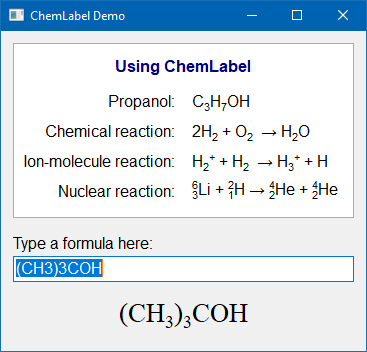 TChemText is a TCustomLabel descendant which can display chemical formulas and reaction equations with automatically placed subscripts and superscripts.
Authors
The code is based on "chemtxt" written by Patrick Spanel. It was adapted to Lazarus and extended by Werner Pamler.
License
Modified LGPL (with linking exception, like Lazarus LCL)
Download and Installation
Release version
A zip file with the most recent release version can be found at Lazarus CCR at SourceForge. Unzip the file into any folder.
The current release version is 0.1.5
Development version
Use an svn client to download the current trunk version from svn://svn.code.sf.net/p/lazarus-ccr/svn/components/chemtext/
Installation
In Lazarus, go to "Package" > "Open Package File .lpk". Navigate to the folder with the callite sources, and select laz_chemtext.lkp. Click "Compile", then "Use" > "Install". This will rebuild the IDE (it may take some time). When the process is finished the IDE will restart, and you'll find TChemLabel in the component palette Misc as this new icon: 
Usage
TChemLabel
Simply drop a TChemLabel component on the form and type the chemical formula/reaction into the property Caption.
The formulas are written in a straightforward way. The "2" in H<sub>2</sub>O is automatically subscripted, and the + in H<sup>+</sup> is automatically displayed as superscript. A period "." is converted to a "hydrate dot" •. Note that multiple-charge ions must repeat the charge sign, i.e. the double-negatively charged oxygon ion must be written as O--, not as O2-.
For cases in which aligned subscripts and superscripts are required a special syntax with code symbols is available:
@: Save the current horizontal writing position|: Return to the saved horizontal writing position^: Write the next character as a superscript_: Write the next character as a subscript.
The size and offset of sub-/superscripts is determined by the following global integer variables:
SmallFontSizePercent= 67SubscriptFontOffsetPercent= 50SuperscriptFontOffsetPercent= 12
For chemical reactions, arrows can be entered as -->, <-- or <-->. The property Arrow of the TChemLabel determines whether this simple ASCII symbol is to be replaced by a nice UTF8 symbol:
caAsciiSingle: --> <-- <-->caAsciiDouble: ==> <== <==>caUTF8: → ← ⇌caUTF8Single: → ← ↔caUTF8Double: ⇒ ⇐ ⇔caUTF8Half: ⇀ ↽ ⇌
Note that the UTF8 characters may not be available in any font.
If the ChemLabel contains other text besides the chemial formula the processing of numerical digits, +, - and arrows may be undesired. Therefore, the characters '0'..'9', '+', '-', '<', and '>' can be escaped by writing a backslash in front of them. And the backslash itself can be used by doubling it.
Examples
- The ChemLabel normally displays "Text1" as "Text<sub>1</sub>". To avoid the subscripted "1", use the text "Text\1".
- To avoid the superscripted "-" in "ion-molecule reaction" use the text "ion\-molecule reaction".
- To display the file path "c:\data.txt" correctly use the text "c:\\data.txt"
Using the painting routine in other controls
The main painting routine of TChemLabel is available as a global function and can be called in any owner-draw code of other components, e.g. a StringGrid.
function ChemTextOut(ACanvas: TCanvas;  X, Y:integer; const AText: String;
Arrow: TChemArrow = caAsciiSingle; Measure: Boolean = false): TSize;ACanvas: canvas on which the chemical text will be paintedX,Y: top/left coordinates where the text will startAText: text to be displayed. Numbers inserted between letters will be displayed as subscripts, + and - characters following a letter will be displayed as superscript. Reaction arrows can be inserted by '<-', '->', or '<->'. Special processing of these characters can be escaped by using a backslash ('\') in front of them.Arrow: defines the display style of a reaction arrow (optional)Measure: iftruedoes not draw anything, just determines the size of the bounding box and returns it as the function result (optional)
In addition, the following functions can be used to determine the size of the text bounding box:
function ChemTextExtent(ACanvas: TCanvas; const AText: String; Arrow: TChemArrow = caAsciiSingle): TSizefunction ChemTextHeight(ACanvas: TCanvas; const AText: String; Arrow: TChemArrow = caAsciiSingle): Integerfunction ChemTextWidth(ACanvas: TCanvas; const AText: String; Arrow: TChemArrow = caAsciiSingle): Integer
Demos
The installation folder contains the following demon projects:
- runtime: a basic demonstration of TChemLabel, does not require installation of the component into the IDE
- chemdemo: demonstration of TChemLabel (see screenshot at the top of this page).
- grid_sample: demonstration of the painting routine in a custom-drawn StringGrid.
From the Free Pascal wiki, page "ChemText", as it stood on 2021-03-12 after a change by Wp, out of the wiki's dump of 2024-05-26. Copyright stays with the author who wrote it, according to the old wiki's Licensing page. If you have concerns about this material, message the admin.
Talk about this page
Nobody has opened a bench for this page yet. Sign in to open one.