

Carbon interface internals: what changed
Revision 2 to 3. Removed lines have a minus sign; added lines have a plus sign.
| Old | New | Line | |
|---|---|---|---|
| 1 | 1 | ## Introduction | |
| 2 | 2 | ||
| 3 | 3 | > **Warning:** With the release of macOS 10.15 Catalina in October 2019, Apple has removed all support for the 32 bit Carbon framework from the operating system in favour of the [[Cocoa Internals|64 bit Cocoa framework]]. Consequently, the Carbon widgetset is no longer being developed. | |
| 4 | 4 | ||
| 5 | 5 | This page gives an overview of the LCL Carbon interface for macOS and will help new developers. | |
| 6 | 6 | ||
| 7 | 7 | For installation and creating a first Carbon application refer to [[Carbon Interface]]. | |
| 8 | 8 | ||
| 9 | 9 | ## Documentation about Carbon | |
| 10 | 10 | ||
| 11 | 11 | - [Apple Carbon docs](http://developer.apple.com/documentation/Carbon) | |
| 12 | 12 | ||
| 13 | 13 | - [Apple Mailing List search](http://search.lists.apple.com) | |
| 14 | 14 | ||
| 15 | 15 | - [Carbon Book for download](http://www.mactech.com/macintosh-c/downloads.html) | |
| 16 | 16 | ||
| 17 | 17 | - [Carbon Dev](http://www.carbondev.com/site/) | |
| 18 | 18 | ||
| 19 | 19 | - ["Learning Carbon" sample book chapter](http://www.oreilly.com/catalog/learncarbon) | |
| 20 | 20 | ||
| 21 | 21 | - Free Pascal's Carbon API unit is FPCMacOSAll.pas in /usr/local/share/fpcsrc/packages/extra/univint. | |
| 22 | 22 | ||
| 23 | 23 | ## Carbon interface development basics | |
| 24 | 24 | ||
| 25 | 25 | - Target Mac Tiger version is 10.4 | |
| 26 | 26 | - Avoid using obsolete or deprecated APIs and functions (e. g. QuickDraw vs. *Quartz 2D*) | |
| 27 | 27 | - Use object approach | |
| 28 | 28 | - Check Carbon calls result with OSError function | |
| 29 | 29 | - Assume UTF-8 encoded strings between LCL and Carbon widgetset (for future Lazarus Unicode support) | |
| 30 | 30 | ||
| 31 | 31 | ## What is already working ? | |
| 32 | 32 | ||
| 33 | 33 | - Features - see [[Roadmap|Roadmap#Status_of_features_on_each_widgetset]] | |
| 34 | 34 | - Forms and controls - see [[Roadmap|Roadmap#Status_of_components_on_each_widgetset]] | |
| 35 | 35 | - Creating TOpenGLControl with AGL context (see components/opengl/) | |
| 36 | 36 | - Mouse events | |
| 37 | 37 | - Keyboard events | |
| 38 | 38 | ||
| 39 | - | ||
| 39 | + | 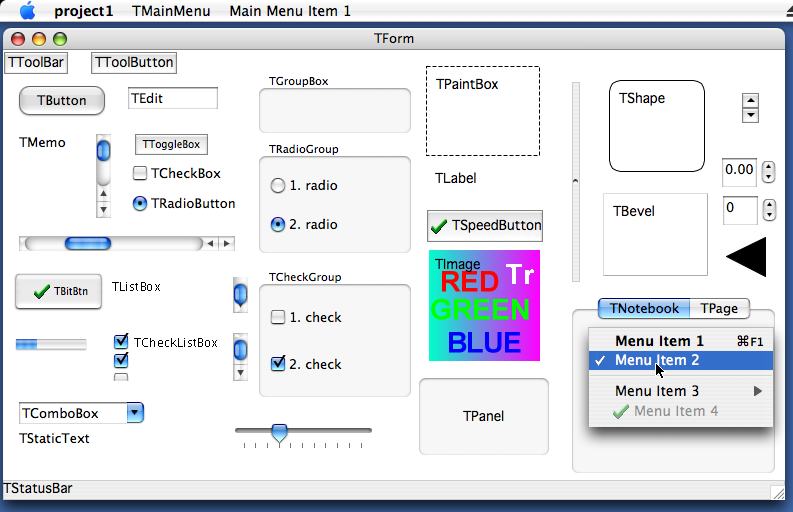 | |
| 40 | 40 | ||
| 41 | 41 | ## What needs to be done next? | |
| 42 | 42 | ||
| 43 | 43 | See [Bug Tracker Carbon open issues](http://www.freepascal.org/mantis/view_all_set.php?type=3&source_query_id=1017) | |
| 44 | 44 | ||
| 45 | 45 | ## Carbon IDE Bugs | |
| 46 | 46 | ||
| 47 | 47 | <thead> | |
| 48 | 48 | ||
| 49 | 49 | </thead> | |
| 50 | 50 | <tbody> | |
| 51 | 51 | ||
| 52 | 52 | File New should be Cmd+N<br /> | |
| 53 | 53 | File Save As should be Shift+Cmd+S<br /> | |
| 54 | 54 | File Quit should be Cmd+Q<br /> | |
| 55 | 55 | Search Find should be Cmd+F<br /> | |
| 56 | 56 | Search Find Next should be Cmd+G<br /> | |
| 57 | 57 | Search Find Previous should be Shift+Cmd+G<br /> | |
| 58 | 58 | (Goto line and Procedure List need to be reassigned)<br /> | |
| 59 | 59 | Option+Cmd+F does not bring up Search Results<br /> | |
| 60 | 60 | F11 behaves weird!</td> | |
| 61 | 61 | ||
| 62 | 62 | </tbody> | |
| 63 | 63 | ||
| 64 | 64 | See [Bug Tracker Carbon IDE open issues](http://www.freepascal.org/mantis/view_all_set.php?type=3&source_query_id=1018) | |
| 65 | 65 | ||
| 66 | 66 | ## Implementation Details | |
| 67 | 67 | ||
| 68 | 68 | ### Keyboard | |
| 69 | 69 | ||
| 70 | 70 | - Apple Command key is mapped to ssMeta | |
| 71 | 71 | - Apple Control key is mapped to ssCtrl | |
| 72 | 72 | - Apple Option key is mapped to its inscription, i.e. ssAlt | |
| 73 | 73 | - Virtual key codes mapping is not reliable (depends on keyboard language layout!) | |
| 74 | 74 | ||
| 75 | 75 | ### Application | |
| 76 | 76 | ||
| 77 | 77 | - Title: You cannot change it at runtime. You have to set it in Application Bundle. | |
| 78 | 78 | - OnDropFiles event is fired when file is dropped on application dock icon or opened via Finder if is associated. You have to enable this event in Application Bundle. | |
| 79 | 79 | ||
| 80 | 80 | ### Drawing and measuring text precisely in parts | |
| 81 | 81 | ||
| 82 | 82 | If you want to draw (via TextOut, TextRect) or measure (via TextWidth, TextHeight) text divided into various parts and rely it will be displayed same each time not depending on its division, you have to disable some default typographic features (like kerning, fractional positioning, ...) of Canvas. You can choose one of the following: | |
| 83 | 83 | ||
| 84 | 84 | - CarbonWidgetSet.SetTextFractional(Canvas, False); // from CarbonInt unit | |
| 85 | 85 | - TCarbonCustomControl(CustomControl.Handle).TextFractional := False; // from CarbonPrivate unit | |
| 86 | 86 | - TCarbonDeviceContext(Canvas.Handle)..TextFractional := False; // from CarbonCanvas unit | |
| 87 | 87 | ||
| 88 | 88 | ### Screenshot taking | |
| 89 | 89 | ||
| 90 | 90 | The only possible efficient way of taking a screenshot on macOS is using OpenGL. Apple provides a demonstration function which returns a CGImageRef with the screenshot. This function was converted to Pascal and is available on the glgrab.pas unit on the carbon interface directory. This function requires the Apple-specific parts of the Apple OpenGL headers, and those aren't yet on the FPC Packages, so they were translated and are located on lazarus/lcl/interfaces/carbon/opengl.pas until they are released on a stable Free Pascal. | |
| 91 | 91 | ||
| 92 | 92 | After obtaining a CGImageRef, the next step to implement the RawImage_fromDevice method is obtaining a local copy of it's pixel data. It isn't possible to directly access the bytes of a CGImageRef, so the image needs to be drawn to a CGContextRef which uses a memory area allocated by us as buffer. This method has the great advantage of converting from the internal format of the screenshot bytes to the very convenient ARGB, 32-bits depth, 8-bits per channel format that is default to LCL. | |
| 93 | 93 | ||
| 94 | 94 | ### Focusing | |
| 95 | 95 | ||
| 96 | 96 | macOS has two possible ways of focusing: Full keyboard navigation (enabled with Accessibility options), Text field navigation (only controls that are to receive text input should be focused). Full keyboard navigation is the same as any other widgetset. | |
| 97 | 97 | ||
| 98 | 98 | There's no way to say if control is text-input or not. Native OS controls will handle focus themselves. The Carbon Widgetset checks if bound LCLObject is SynEdit and will switch the focus to it. | |
| 99 | 99 | ||
| 100 | 100 | ### Canvas Clipping | |
| 101 | 101 | ||
| 102 | 102 | Because Quartz 2D's clipping is decreasing, care must be taken for proper clipping region change. There should be no code, that changes CGContext's clip region directly. Carbon widget API's functions should be used instead. | |
| 103 | 103 | ||
| 104 | 104 | ## Compatibility issues | |
| 105 | 105 | ||
| 106 | 106 | These are things that will probably never be solved. | |
| 107 | 107 | ||
| 108 | 108 | ### Mouse.CursorPos changing does not generate mouse (move) events | |
| 109 | 109 | ||
| 110 | 110 | ### Release mouse capture is not supported | |
| 111 | 111 | ||
| 112 | 112 | ### Command line parameters | |
| 113 | 113 | ||
| 114 | 114 | Because Carbon applications are executed via Application Bundle, command line parameters are not passed. You have to use OnDropFiles event to detect openning associated files. | |
| 115 | 115 | ||
| 116 | 116 | ### Shortcuts indication is not supported | |
| 117 | 117 | ||
| 118 | 118 | ### Drawing on Canvas outside OnPaint event is not supported | |
| 119 | 119 | ||
| 120 | 120 | ### Drawing on screen device context is not supported | |
| 121 | 121 | ||
| 122 | 122 | ### TCustomControl.Color of clBtnFace makes its background transparent | |
| 123 | 123 | ||
| 124 | 124 | ### TWinControl.Font fsStrikeOut is not supported | |
| 125 | 125 | ||
| 126 | 126 | ### TForm | |
| 127 | 127 | ||
| 128 | 128 | - Icon is not supported | |
| 129 | 129 | - ShowInTaskbar is not supported | |
| 130 | 130 | - TForm.top=0 is not good. Use TForm.top=23 | |
| 131 | 131 | ||
| 132 | 132 | ### TEdit.PasswordChar different then default is not supported | |
| 133 | 133 | ||
| 134 | 134 | ### TMemo.WordWrap when is disabled, does not allow to scroll text horizontally | |
| 135 | 135 | ||
| 136 | 136 | ### TListBox.Columns is not supported | |
| 137 | 137 | ||
| 138 | 138 | ### TComboBox | |
| 139 | 139 | ||
| 140 | 140 | - DroppedDown does not show drop down list when style is csDropDownList | |
| 141 | 141 | - DropDownCount is not supported | |
| 142 | 142 | - Style: csSimple, csOwnerDrawFixed and csOwnerDrawVariable are not supported | |
| 143 | 143 | ||
| 144 | 144 | ### TPanel.Bevelxxx: bvLowered and bvSpace are not supported | |
| 145 | 145 | ||
| 146 | 146 | ### TBitBtn.Spacing is not supported | |
| 147 | 147 | ||
| 148 | 148 | ### TTrackBar | |
| 149 | 149 | ||
| 150 | 150 | - LineSize is not supported | |
| 151 | 151 | - ScalePos is not supported | |
| 152 | 152 | - TickMarks are not supported | |
| 153 | 153 | ||
| 154 | 154 | ### TProgressBar | |
| 155 | 155 | ||
| 156 | 156 | - BarShowText is not supported | |
| 157 | 157 | - Smooth is not supported | |
| 158 | 158 | - Step is not supported | |
| 159 | 159 | ||
| 160 | 160 | ### TColorDialog.Title is not supported | |
| 161 | 161 | ||
| 162 | 162 | ### macOS System (Windows' and Controls') Handles | |
| 163 | 163 | ||
| 164 | 164 | It’s some times necessary to access system windows or control handles directly. For example, you wish to use some system features that are not available (not yet implemented?) for LCL. It’s very common for LCL Windows developers (and Delphi developers) to use TControl.Handle property, since Handle is a system window handle for Win32 widgetset. It can be used with any system function. But it’s not so for Carbon widgetset. TControl.Handle would return handle native to widgetset not macOS. TControl.Handle would return TCarbonWidget class (declared at CarbonDef unit). This’s a wrapper class, and you can use it to get system handle. | |
| 165 | 165 | ||
| 166 | 166 | ``` pascal | |
| 167 | 167 | var | |
| 168 | 168 | AHiView: HiViewRef; | |
| 169 | 169 | begin | |
| 170 | 170 | ... | |
| 171 | 171 | //this is incorrect way of getting system handle for Carbon widgetset | |
| 172 | 172 | //AHiView:= HiViewRef(Button1.Handle) | |
| 173 | 173 | ||
| 174 | 174 | //this is correct way | |
| 175 | 175 | AHiView := TCarbonWidget(Button1.Handle).Widget; | |
| 176 | 176 | ... | |
| 177 | 177 | end; | |
| 178 | 178 | ``` | |
| 179 | 179 | ||
| 180 | 180 | You should also note, that there’s difference in getting WindowRef in LCL versions. If you’re using Lazarus 0.9.26 or earlier you should get WindowRef in the following way: | |
| 181 | 181 | ||
| 182 | 182 | ``` pascal | |
| 183 | 183 | var | |
| 184 | 184 | MacWin: WindowRef; | |
| 185 | 185 | begin | |
| 186 | 186 | ... | |
| 187 | 187 | MacWin := TCarbonWidget(Form1.Handle).Widget; | |
| 188 | 188 | ... | |
| 189 | 189 | end; | |
| 190 | 190 | ``` | |
| 191 | 191 | ||
| 192 | 192 | If you’re using svn LCL version (latest trunk), then you should use the following way: | |
| 193 | 193 | ||
| 194 | 194 | ``` pascal | |
| 195 | 195 | uses | |
| 196 | 196 | ..CarbonPrivate.. | |
| 197 | 197 | var | |
| 198 | 198 | MacWin: WindowRef; | |
| 199 | 199 | begin | |
| 200 | 200 | ... | |
| 201 | 201 | MacWin := TCarbonWindow(Form1.Handle).Window; | |
| 202 | 202 | ... | |
| 203 | 203 | end; | |
| 204 | 204 | ``` | |
| 205 | 205 | ||
| 206 | 206 | Keep in mind, that LCL is designed to be cross-platform library, and accessing system handles to use with system functions makes you program hardly portable. The way of getting system objects handle might also be changed in future. | |
| 207 | 207 | ||
| 208 | 208 | ### TTrayIcon | |
| 209 | 209 | ||
| 210 | 210 | #### Checking if the TTrayIcon menu is visible | |
| 211 | 211 | ||
| 212 | 212 | Unfortunately Apple only added a facility to check menu visibility in Snow Leopard 10.6. To overcome this limitation in a simple way in previous versions one can use the following code, which should work in previous versions using a class method in TCarbonWSCustomTrayIcon: | |
| 213 | 213 | ||
| 214 | 214 | ``` pascal | |
| 215 | 215 | uses | |
| 216 | 216 | CarbonWSExtCtrls; | |
| 217 | 217 | ||
| 218 | 218 | ... | |
| 219 | 219 | ||
| 220 | 220 | begin | |
| 221 | 221 | if TCarbonWSCustomTrayIcon.IsTrayIconMenuVisible(TrayIcon1) then Caption := 'Visible' | |
| 222 | 222 | else Caption := 'Not visible'; | |
| 223 | 223 | end; | |
| 224 | 224 | ``` | |
| 225 | 225 | ||
| 226 | 226 | ## How to add a new control | |
| 227 | 227 | ||
| 228 | 228 | For example TButton. | |
| 229 | 229 | ||
| 230 | 230 | TButton is defined in lcl/buttons.pp. This is the platform independent part of the LCL, which is used by the normal LCL programmer. | |
| 231 | 231 | ||
| 232 | 232 | Its widgetset class is in lcl/widgetset/wsbuttons.pp. This is the platform independent base for all widgetsets (carbon, gtk, win32, ...). | |
| 233 | 233 | ||
| 234 | 234 | Its Carbon interface class is in lcl/interfaces/carbon/carbonwsbuttons.pp: | |
| 235 | 235 | ||
| 236 | 236 | ``` pascal | |
| 237 | 237 | TCarbonWSButton = class(TWSButton) | |
| 238 | 238 | private | |
| 239 | 239 | protected | |
| 240 | 240 | public | |
| 241 | 241 | class function CreateHandle(const AWinControl: TWinControl; const AParams: TCreateParams): TLCLIntfHandle; override; | |
| 242 | 242 | end; | |
| 243 | 243 | ``` | |
| 244 | 244 | ||
| 245 | 245 | Every WS class that actually implements something must be registered. See the initialization section at the end of the carbonwsXXX.pp unit: | |
| 246 | 246 | ||
| 247 | 247 | ``` pascal | |
| 248 | 248 | RegisterWSComponent(TCustomButton, TCarbonWSButton); | |
| 249 | 249 | ``` | |
| 250 | 250 | ||
| 251 | 251 | TCarbonWSButton overrides CreateHandle to create a Carbon button helper class called TCarbonButton in carbonprivate.pp, which really creates the button control in the Carbon and installs event handlers. | |
| 252 | 252 | ||
| 253 | 253 | --- | |
| 254 | 254 | *From the Free Pascal wiki, page "Carbon interface internals", as it stood on 2021-08-04 after a change by Trev, out of the wiki's dump of 2024-05-26. Copyright stays with the author who wrote it, according to the old wiki's [[Licensing]] page. If you have concerns about this material, [message the admin](/wiki-contact).* |