

Canvas line: what changed
Revision 1 to 2. Removed lines have a minus sign; added lines have a plus sign.
| Old | New | Line | |
|---|---|---|---|
| 1 | 1 | The **Canvas.Line(x1, y1, x2, y2)** statement will draw a line from point (x1, y1) to (x2, y2). | |
| 2 | 2 | ||
| 3 | 3 | The coordinates of the canvas are: | |
| 4 | 4 | ||
| 5 | - | ||
| 6 | - | ||
| 7 | - | ||
| 8 | - | ||
| 5 | + | 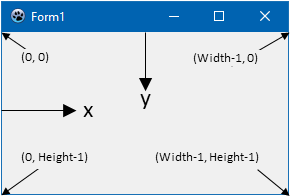 | |
| 9 | 6 | ||
| 10 | 7 | This code will draw the diagonals in a form: | |
| 11 | 8 | ||
| 12 | 9 | ``` pascal | |
| 13 | 10 | procedure TForm1.Form1Paint(Sender: TObject); | |
| 14 | 11 | begin | |
| 15 | 12 | Canvas.Line(0, 0, Width-1, Height-1); | |
| 16 | 13 | Canvas.Line(0, Height-1, Width-1 ,0); | |
| 17 | 14 | end; | |
| 18 | 15 | ``` | |
| 19 | 16 | ||
| 20 | 17 | ## See also | |
| 21 | 18 | ||
| 22 | 19 | - [[Drawing with canvas]] | |
| 23 | 20 | ||
| 24 | 21 | --- | |
| 25 | 22 | *From the Free Pascal wiki, page "Canvas line", as it stood on 2020-02-07 after a change by Trev, out of the wiki's dump of 2024-05-26. Copyright stays with the author who wrote it, according to the old wiki's [[Licensing]] page. If you have concerns about this material, [message the admin](/wiki-contact).* | |
| 26 | 23 | Category: GUI | |
| 27 | 24 | Category: LCL |