

CalLite: what changed
Revision 1 to 2. Removed lines have a minus sign; added lines have a plus sign.
| Old | New | Line | |
|---|---|---|---|
| 1 | 1 | ## About | |
| 2 | 2 | ||
| 3 | 3 | 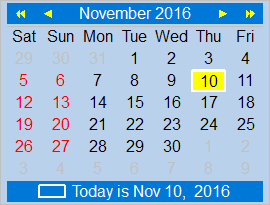 TCalendarLite is a lightweight calendar component, a TCustomControl descendant which consequently is not dependent on any widgetset. It is not a fixed-size component, as are most calendars, but will align and resize as needed. Various properties give access to almost every aspect of its appearance. | |
| 4 | 4 | ||
| 5 | 5 | ## Authors | |
| 6 | 6 | ||
| 7 | 7 | Howard Page-Clark, Ariel Rodriguez and Werner Pamler | |
| 8 | 8 | ||
| 9 | 9 | ## License | |
| 10 | 10 | ||
| 11 | 11 | Modified LGPL (with linking exception, like Lazarus LCL) | |
| 12 | 12 | ||
| 13 | 13 | ## Download and Installation | |
| 14 | 14 | ||
| 15 | 15 | #### Release version | |
| 16 | 16 | ||
| 17 | 17 | A zip file with the most recent release version can be found at [Lazarus CCR at SourceForge](https://sourceforge.net/projects/lazarus-ccr/files/CalLite/). Unzip the file into any folder. | |
| 18 | 18 | ||
| 19 | 19 | The current release version is 0.3.1 | |
| 20 | 20 | ||
| 21 | 21 | #### Development version | |
| 22 | 22 | ||
| 23 | 23 | Use an svn client to download the current trunk version from [<svn://svn.code.sf.net/p/lazarus-ccr/svn/components/callite/>](svn://svn.code.sf.net/p/lazarus-ccr/svn/components/callite/) | |
| 24 | 24 | ||
| 25 | 25 | #### Version Notes | |
| 26 | 26 | ||
| 27 | 27 | - **v0.3.10** breaks existing code relying on `TDayOfWeek` starting at value 1. This had to be changed to start at 0 to fix compilation with FPC 3.3.1. | |
| 28 | 28 | ||
| 29 | 29 | #### Installation | |
| 30 | 30 | ||
| 31 | 31 |  In Lazarus, go to *"Package"* \> *"Open Package File .lpk"*. Navigate to the folder with the callite sources, and select **callight_pkg.lkp**. Click *"Compile"*, then *"Use"* \> *"Install"*. This will rebuild the IDE (it may take some time). When the process is finished the IDE will restart, and you'll find TCalendarLite in the component palette **[[Misc tab|Misc]]**. | |
| 32 | 32 | ||
| 33 | 33 | ## Navigation | |
| 34 | 34 | ||
| 35 | 35 | - Click on any date | |
| 36 | 36 | - Use the arrow keys on the keyboard | |
| 37 | 37 | - Click on the arrow keys above the calendar; the single arrow advances by one month, the double arrow advances by one year | |
| 38 | 38 | - Click on the month name to open a popdown menu with month names, or click on the year number to open a popdown menu with the last and next ten years. | |
| 39 | 39 | ||
| 40 | 40 | ## Multi-selection | |
| 41 | 41 | ||
| 42 | 42 | If the property `MultiSelect` is set to `true` then several days can be selected in the calendar. All selected days are drawn with a highlighted background. Multi-selection is controlled by holding special keys down while selecting a day either by a mouse click or a key press: | |
| 43 | 43 | ||
| 44 | - | ||
| 45 | - | ||
| 46 | - | ||
| 47 | - | ||
| 44 | + | - **CTRL**: If the `CTRL` key is pressed while selecting another day then this day is added to the selection. This way a non-contiguous array of dates can be selected. | |
| 45 | + | - **SHIFT**: If the `SHIFT` key is held down during day selection then all day between the prevsiously and the currently selected day are added to the selection. | |
| 46 | + | - **Double-click**: A double click on a workday selects all workdays of the same week. Holding the `CTRL` or `SHIFT` key down extends the selection by the workdays of one or more weeks. | |
| 47 | + | - The selection can be extended into neighboring months if the arrow keys of the keyboard are pressed with the `CTRL` key held down. | |
| 48 | 48 | - Selection is cleared if any date is selected without pressed any of these keys, or if the arrows or dropdown menus in the top bar are used. | |
| 49 | 49 | - If previously selected days are added for a second time then they are unselected. | |
| 50 | 50 | ||
| 51 | 51 | At **run-time**, the selected data can be controlled or queried by these methods of the calendar: | |
| 52 | 52 | ||
| 53 | 53 | - `procedure AddSelectedDate(ADate: TDate)` - adds the specified date to the list of selected dates | |
| 54 | 54 | - `procedure ClearSelectedDates` - clears all selected dates | |
| 55 | 55 | - `function IsSelected(ADate: TDate): Boolean` - returns `true` when the given date is selected, `false` otherwise. | |
| 56 | 56 | - `function SelectedDates: TCalDateArray` - returns an array of TDate elements which contains the selected dates. | |
| 57 | 57 | ||
| 58 | 58 | ## Documentation | |
| 59 | 59 | ||
| 60 | 60 | - [[CalLite: Usage]] | |
| 61 | 61 | - [[CalLite: Flag days in Finland]] | |
| 62 | 62 | ||
| 63 | 63 | ## See also | |
| 64 | 64 | ||
| 65 | 65 | - [[Turbopower Visual PlanIt|TurboPower Visual PlanIt]] | |
| 66 | 66 | - [[DateTimeCtrls Package]] | |
| 67 | 67 | ||
| 68 | 68 | --- | |
| 69 | 69 | *From the Free Pascal wiki, page "CalLite", as it stood on 2022-12-18 after a change by Wp, out of the wiki's dump of 2024-05-26. Copyright stays with the author who wrote it, according to the old wiki's [[Licensing]] page. If you have concerns about this material, [message the admin](/wiki-contact).* |