

CalLite: Usage: what changed
Revision 0 to 1. Removed lines have a minus sign; added lines have a plus sign.
Title: CalLite: Usage
| Old | New | Line | |
|---|---|---|---|
| 1 | + | # Usage | |
| 2 | + | ||
| 3 | + | 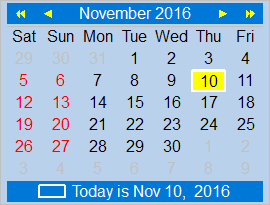 | |
| 4 | + | ||
| 5 | + | Simply drop a [[CalLite|TCalendarLite]] component on the form and get a functional month-calendar. | |
| 6 | + | ||
| 7 | + | ## Changing colors | |
| 8 | + | ||
| 9 | + | The property `Colors` of the calendar collects all settings affecting the colors used for the various items: | |
| 10 | + | ||
| 11 | + | - **ArrowBorderColor**: the color of the border of the arrows above the calendar (default: clSilver ) | |
| 12 | + | - **ArrowColor**: the fill color of the arrows above the calendar (default: clSilver ) | |
| 13 | + | - **BackgroundColor**: the background color of the entire calendar (default: clWhite ) | |
| 14 | + | - **BorderColor**: the color of an optional border around the calenard (default: clSilver ). Add `coShowBorder` to the calendar's `Options` to display the border. | |
| 15 | + | - **DayLineColor**: the color of an optional separating line between the top navigation pane and the calendar's day area (default: clSilver ). Add `coDayLine` to the calendar's `Options` to display the line. | |
| 16 | + | - **HolidayColor**: the text color used to display holidays (default: clRed ). Add an event handler to `OnGetHolidays` to define which days are holidays. | |
| 17 | + | - **PastMonthColor**: the text color used to display the days of the previous or next month (default: clSilver ) | |
| 18 | + | - **SelectedDateColor**: fill color of the currently selected day (default: clMoneyGreen ) | |
| 19 | + | - **TextColor**: text color used for paint the regular calendar days (default: clBlack ) | |
| 20 | + | - **TodayFrameColor**: color used to draw a rectangular line around the "today" cell (default: clLime ) | |
| 21 | + | - **TopRowColor**: background color used for the top navigation line (default: clHighlight) | |
| 22 | + | - **TopRowTextColor**: text color used in the top navigation line (default: clHighlightText) | |
| 23 | + | - **WeekendColor**: text color used for painting weekend days (default: clRed ) | |
| 24 | + | ||
| 25 | + | ## Using the calendar's Options | |
| 26 | + | ||
| 27 | + | The display of the calendar can be modified by changing the calendar's Options, an enumeration of flags: | |
| 28 | + | ||
| 29 | + | ``` pascal | |
| 30 | + | type | |
| 31 | + | TCalOption = (coBoldDayNames, coBoldHolidays, coBoldToday, coBoldTopRow, | |
| 32 | + | coBoldWeekend, coDayLine, coShowBorder, coShowHolidays, | |
| 33 | + | coShowTodayFrame, coShowTodayName, coShowTodayRow, | |
| 34 | + | coShowWeekend, coUseTopRowColors); | |
| 35 | + | ``` | |
| 36 | + | ||
| 37 | + | - **coBoldDayNames**: Draws the line with the day names using bold characters | |
| 38 | + | - **coBoldHolidays**: Draws the day number of holidays using bold characters. Holidays are normally off, but you an add an event handler to `OnGetHolidays` in order to define holidays. | |
| 39 | + | - **coBoldToday**: Draws today's cell using bold characters | |
| 40 | + | - **coBoldTopRow**: Draws the month name and year number in the top row using bold characters | |
| 41 | + | - **coBoldWeekend**: Draws the cells of weekend days using bold characters | |
| 42 | + | - **coDayLine**: Adds a separating line between the top navigation line and the calendar's day area. | |
| 43 | + | - **coShowBorder**: Paints a thin border rectangle around the calendar | |
| 44 | + | - **coShowHolidays**: Activate highlighting holidays. Note that there must be also an event handler for `OnGetHolidays` which defines the holidays. | |
| 45 | + | - **coShowTodayFrame**: Draws a rectangle around the "today" cell. | |
| 46 | + | - **coShowTodayName**: Adds the day name to the line displaying today's date (see also: `coShowTodayRow`) | |
| 47 | + | - **coShowTodayRow**: Shows a line at the bottom of the calendar to display today's date (see also: `coShowTodayName`). | |
| 48 | + | - **coShowWeekend**: Highlights weekend days (see also: `Colors.WeekendColor`). | |
| 49 | + | - **coUseTopRowColors**: Paints background and text of the top navigation row using the colors defined by `Colors.TopRowColor` and `Colors.TopRowTextColor` | |
| 50 | + | ||
| 51 | + | ## Changing the language | |
| 52 | + | ||
| 53 | + | The strings used by the component can be easily translated to a variety of languages by changing the value of the property `Languages`: | |
| 54 | + | ||
| 55 | + | ``` pascal | |
| 56 | + | type | |
| 57 | + | TLanguage = (lgEnglish, lgFrench, lgGerman, lgHebrew, lgSpanish, lgItalian, | |
| 58 | + | lgPolish, lgFinnish); | |
| 59 | + | ``` | |
| 60 | + | ||
| 61 | + | ## Events | |
| 62 | + | ||
| 63 | + | In addition to the standard events TCalendarLite fires the following events. Some events get year, month and day numbers of the currently painted cell as a parameter. A set of state flags indicates whether this day is selected, today or belongs to the previous or next month: | |
| 64 | + | ||
| 65 | + | ``` pascal | |
| 66 | + | type | |
| 67 | + | TCalCellState = (csSelectedDay, csToday, csOtherMonth); | |
| 68 | + | TCalCellStates = set of TCalCellState; | |
| 69 | + | ``` | |
| 70 | + | ||
| 71 | + | - **OnDateChange**: Fires whenever another date is selected in the calendar. | |
| 72 | + | - **OnDrawCell**: Can be used to override the painting process of a day cell completely or partially. If the boolean parameter `AContinueDrawing` is set to true the normal painting process continues after leaving the event handler; if it is false then no default painting occurs for this day. The event can be used, for example, to add birthday or holiday icons to the day cells. | |
| 73 | + | - **OnGetDayText**: Can be used to modify the text display for the specified day. The default is a string showing the day value. Using this event, the names of holidays can be added to calendar, for example. | |
| 74 | + | - **OnGetHolidays**: Defines which days of current month are holidays. The day number of the holidays are encoded as set bits in a 32-bit integer. | |
| 75 | + | - **OnHint**: Defines a hint which can be displayed in a popup hint window for each day. Useful, for example, to show the name of holidays if the mouse hovers over a holiday. | |
| 76 | + | - **OnMonthChange**: Fires whenever another month is displayed in the calendar. Can be used for more efficient holiday calculation. | |
| 77 | + | - **OnPrepareCanvas**: Is called immediately before a cell is painted. Can be used to override Brush and Pen properties, for example, in order to draw different backgrounds for appointments and important events. | |
| 78 | + | ||
| 79 | + | ## Holidays | |
| 80 | + | ||
| 81 | + | The calendar does not "know" any holidays. You must write an event handler to define which days in the current month are holidays. Month and year values of the respective month are passed as parameters. The information that a day is a holiday or not is encoded as set bits in a 32-bit integer. The unit *callite* simplifies this by providing these general-purpose procedures: | |
| 82 | + | ||
| 83 | + | - procedure **AddHoliday**(ADay: Integer; var AHolidays: THolidays): Adds the specified day to the holiday bit list in parameter `AHolidays`. | |
| 84 | + | - function **IsHoliday**(ADay: Integer; AHolidays: THolidays): Boolean: Checks whether the specified day is listed in `AHolidays` | |
| 85 | + | - **ClearHolidays**(var AHolidays: THolidays): Clears the holiday list | |
| 86 | + | ||
| 87 | + | Here is a simple example defining the holidays New Year, Christmas, Easter and Whit Sunday: | |
| 88 | + | ||
| 89 | + | ``` pascal | |
| 90 | + | function Easter(year:integer): TDateTime; | |
| 91 | + | var | |
| 92 | + | Day, Month : integer; | |
| 93 | + | a,b,c,d,e,m,n : integer; | |
| 94 | + | begin | |
| 95 | + | case Year div 100 of | |
| 96 | + | 17 : begin m := 23; n := 3; end; | |
| 97 | + | 18 : begin m := 23; n := 4; end; | |
| 98 | + | 19,20 : begin m := 24; n := 5; end; | |
| 99 | + | 21 : begin m := 24; n := 6; end; | |
| 100 | + | else raise Exception.Create('Only years after 1700 supported.'); | |
| 101 | + | end; | |
| 102 | + | a := Year mod 19; | |
| 103 | + | b := Year mod 4; | |
| 104 | + | c := Year mod 7; | |
| 105 | + | d := (19*a + m) mod 30; | |
| 106 | + | e := (2*b + 4*c + 6*d + n) mod 7; | |
| 107 | + | day := 22 + d + e; | |
| 108 | + | Month := 3; | |
| 109 | + | if Day>31 then begin | |
| 110 | + | Day := d + e - 9; | |
| 111 | + | Month := 4; | |
| 112 | + | if (d=28) and (e=6) and (a>10) then begin | |
| 113 | + | if day=26 then day := 19; | |
| 114 | + | if day=25 then day := 18; | |
| 115 | + | end; | |
| 116 | + | end; | |
| 117 | + | result := EncodeDate(year, month, day); | |
| 118 | + | end; | |
| 119 | + | ||
| 120 | + | procedure TForm1.CalendarLite1GetHolidays(Sender: TObject; AMonth, AYear: Integer; | |
| 121 | + | var Holidays: THolidays); | |
| 122 | + | var | |
| 123 | + | d, m, y: Word; | |
| 124 | + | e: TDate; | |
| 125 | + | begin | |
| 126 | + | ClearHolidays(Holidays); | |
| 127 | + | if not FNoHolidays then | |
| 128 | + | begin | |
| 129 | + | // Fixed holidays | |
| 130 | + | case AMonth of | |
| 131 | + | 1: AddHoliday(1, Holidays); // New Year | |
| 132 | + | 12: AddHoliday(25, Holidays); // Christmas | |
| 133 | + | end; | |
| 134 | + | // Easter | |
| 135 | + | e := Easter(AYear); | |
| 136 | + | DecodeDate(e, y,m,d); | |
| 137 | + | if m = AMonth then | |
| 138 | + | AddHoliday(d, Holidays); | |
| 139 | + | // Whit Sunday --> 49 days after easter | |
| 140 | + | DecodeDate(e+49, y,m,d); | |
| 141 | + | if m = AMonth then | |
| 142 | + | AddHoliday(d, Holidays); | |
| 143 | + | end; | |
| 144 | + | end; | |
| 145 | + | ``` | |
| 146 | + | ||
| 147 | + | Make sure to have the calendar Option `coShowHolidays` set in order to highlight the holidays in the calendar. | |
| 148 | + | ||
| 149 | + | ### Hints for holidays | |
| 150 | + | ||
| 151 | + | If you want to display the holiday name as a mouse popup hint window then you should set the calendar's `ShowHint` to `true` and add this event handler for `OnHint`: | |
| 152 | + | ||
| 153 | + | ``` pascal | |
| 154 | + | procedure TForm1.CalendarLite1Hint(Sender: TObject; AYear, AMonth, ADay: Word; | |
| 155 | + | var AText: String); | |
| 156 | + | var | |
| 157 | + | dt, e: TDate; | |
| 158 | + | begin | |
| 159 | + | AText := ''; | |
| 160 | + | case AMonth of | |
| 161 | + | 1: if ADay = 1 then AText := 'New Year'; | |
| 162 | + | 12: if ADay = 25 then AText := 'Christmas'; | |
| 163 | + | else | |
| 164 | + | e := Easter(AYear); | |
| 165 | + | dt := EncodeDate(AYear, AMonth, ADay); | |
| 166 | + | if (dt = e) then | |
| 167 | + | AText := 'Easter' | |
| 168 | + | else if (dt = e + 49) then | |
| 169 | + | AText := 'Whit Sunday'; | |
| 170 | + | end; | |
| 171 | + | end; | |
| 172 | + | ``` | |
| 173 | + | ||
| 174 | + | ### Embedded holiday names | |
| 175 | + | ||
| 176 | + | In addition, you can also add the holiday name to the calendar grid directly. Add the next event handler for `OnGetDayText`. Note that the size of the calendar must be large enough to provide space for the additional text: | |
| 177 | + | ||
| 178 | + | ``` pascal | |
| 179 | + | procedure TForm1.CalendarLite1GetDayText(Sender: TObject; AYear, AMonth, ADay: Word; | |
| 180 | + | var AText: String); | |
| 181 | + | var | |
| 182 | + | s: String; | |
| 183 | + | begin | |
| 184 | + | GetHintText(Sender, AYear, AMonth, ADay, s); | |
| 185 | + | if s <> '' then | |
| 186 | + | AText := IntToStr(ADay) + LineEnding + s; | |
| 187 | + | end; | |
| 188 | + | ``` | |
| 189 | + | ||
| 190 | + | ### Holidays in popup menu | |
| 191 | + | ||
| 192 | + | If the calendar's `PopupMenu` property is empty a built-in popup menu is provided which displays all the holidays of the currently selected year. As usual, this popup opens with a right-click onto the component. | |
| 193 | + | ||
| 194 | + | ## Drawing icons for specific days | |
| 195 | + | ||
| 196 | + | The next example paints a birthday icon into the Nov 11 cell of each year. The icon is stored in an image list at index 0: | |
| 197 | + | ||
| 198 | + | ``` pascal | |
| 199 | + | procedure TForm1.CalendarLite1DrawCell(Sender: TObject; ACanvas: TCanvas; | |
| 200 | + | AYear,AMonth,ADay: Word; AState: TCalCellStates; var ARect: TRect; | |
| 201 | + | var AContinueDrawing: Boolean); | |
| 202 | + | var | |
| 203 | + | bmp: TBitmap; | |
| 204 | + | begin | |
| 205 | + | if (AMonth = 11) and (ADay = 11) and not (csOtherMonth in AState) then begin | |
| 206 | + | bmp := TBitmap.Create; | |
| 207 | + | try | |
| 208 | + | ImageList1.GetBitmap(0, bmp); | |
| 209 | + | ACanvas.Draw(ARect.Left, (ARect.Top + ARect.Bottom - bmp.Height) div 2, bmp); | |
| 210 | + | inc(ARect.Left, bmp.Width + 2); | |
| 211 | + | // Not changing AContinueDrawing from its default value (true) means | |
| 212 | + | // that the day text is drawn by the built-in procedure into the reduced rectangle | |
| 213 | + | finally | |
| 214 | + | bmp.Free; | |
| 215 | + | end; | |
| 216 | + | end; | |
| 217 | + | end; | |
| 218 | + | ``` | |
| 219 | + | ||
| 220 | + | --- | |
| 221 | + | *From the Free Pascal wiki, page "CalLite: Usage", as it stood on 2019-10-24 after a change by Djzepi, out of the wiki's dump of 2024-05-26. Copyright stays with the author who wrote it, according to the old wiki's [[Licensing]] page. If you have concerns about this material, [message the admin](/wiki-contact).* |