

CalLite
About
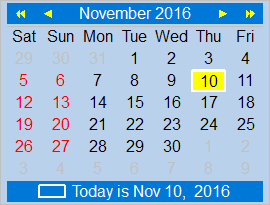 TCalendarLite is a lightweight calendar component, a TCustomControl descendant which consequently is not dependent on any widgetset. It is not a fixed-size component, as are most calendars, but will align and resize as needed. Various properties give access to almost every aspect of its appearance.
Authors
Howard Page-Clark, Ariel Rodriguez and Werner Pamler
License
Modified LGPL (with linking exception, like Lazarus LCL)
Download and Installation
Release version
A zip file with the most recent release version can be found at Lazarus CCR at SourceForge. Unzip the file into any folder.
The current release version is 0.3.1
Development version
Use an svn client to download the current trunk version from svn://svn.code.sf.net/p/lazarus-ccr/svn/components/callite/
Version Notes
- v0.3.10 breaks existing code relying on
TDayOfWeekstarting at value 1. This had to be changed to start at 0 to fix compilation with FPC 3.3.1.
Installation
 In Lazarus, go to "Package" > "Open Package File .lpk". Navigate to the folder with the callite sources, and select callight_pkg.lkp. Click "Compile", then "Use" > "Install". This will rebuild the IDE (it may take some time). When the process is finished the IDE will restart, and you'll find TCalendarLite in the component palette Misc.
Navigation
- Click on any date
- Use the arrow keys on the keyboard
- Click on the arrow keys above the calendar; the single arrow advances by one month, the double arrow advances by one year
- Click on the month name to open a popdown menu with month names, or click on the year number to open a popdown menu with the last and next ten years.
Multi-selection
If the property MultiSelect is set to true then several days can be selected in the calendar. All selected days are drawn with a highlighted background. Multi-selection is controlled by holding special keys down while selecting a day either by a mouse click or a key press:
- CTRL: If the
CTRLkey is pressed while selecting another day then this day is added to the selection. This way a non-contiguous array of dates can be selected. - SHIFT: If the
SHIFTkey is held down during day selection then all day between the prevsiously and the currently selected day are added to the selection. - Double-click: A double click on a workday selects all workdays of the same week. Holding the
CTRLorSHIFTkey down extends the selection by the workdays of one or more weeks. - The selection can be extended into neighboring months if the arrow keys of the keyboard are pressed with the
CTRLkey held down. - Selection is cleared if any date is selected without pressed any of these keys, or if the arrows or dropdown menus in the top bar are used.
- If previously selected days are added for a second time then they are unselected.
At run-time, the selected data can be controlled or queried by these methods of the calendar:
procedure AddSelectedDate(ADate: TDate)- adds the specified date to the list of selected datesprocedure ClearSelectedDates- clears all selected datesfunction IsSelected(ADate: TDate): Boolean- returnstruewhen the given date is selected,falseotherwise.function SelectedDates: TCalDateArray- returns an array of TDate elements which contains the selected dates.
Documentation
See also
From the Free Pascal wiki, page "CalLite", as it stood on 2022-12-18 after a change by Wp, out of the wiki's dump of 2024-05-26. Copyright stays with the author who wrote it, according to the old wiki's Licensing page. If you have concerns about this material, message the admin.
Talk about this page
Nobody has opened a bench for this page yet. Sign in to open one.