

CAPTCHA: what changed
Revision 0 to 1. Removed lines have a minus sign; added lines have a plus sign.
Title: CAPTCHA
| Old | New | Line | |
|---|---|---|---|
| 1 | + | ## About | |
| 2 | + | ||
| 3 | + | 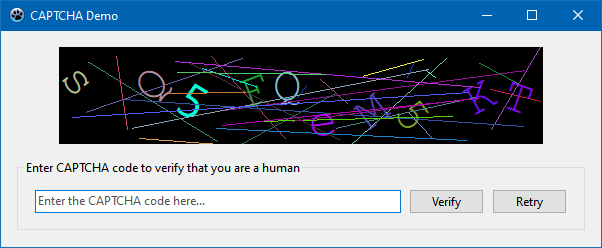 According to [wikipedia](https://en.wikipedia.org/wiki/CAPTCHA), *a **CAPTCHA** (a contrived acronym for "<b>C</b>ompletely <b>A</b>utomated <b>P</b>ublic <b>T</b>uring test to tell <b>C</b>omputers and <b>H</b>umans <b>A</b>part") is a type of challenge–response test used in computing to determine whether or not the user is human*. | |
| 4 | + | ||
| 5 | + | The component `TCaptchaLabel` allows to create a CAPTCHA to be used on any LCL form. It displays random characters which are colored and rotated and overlayed by colored lines to impede machine detection of the CAPTCHA text. | |
| 6 | + | ||
| 7 | + | ### Author | |
| 8 | + | ||
| 9 | + | Werner Pamler | |
| 10 | + | ||
| 11 | + | ### License | |
| 12 | + | ||
| 13 | + | Modified LGPL (with linking exception), like Lazarus LCL. See the file COPYING.modifiedLGPL.txt, included in the Lazarus distribution, for details about the license. | |
| 14 | + | ||
| 15 | + | ## Description | |
| 16 | + | ||
| 17 | + | `TCaptchaLabel` descends from `TGraphicControl` and contains its own drawing routine. Just place it on the form and use it. It displays a random string with rotated characters and overlaid lines. | |
| 18 | + | ||
| 19 | + | ### Methods | |
| 20 | + | ||
| 21 | + | - <b>`function`</b>` Verify(`<b>`const`</b>` AText: String): Boolean` - Compares whether the user-provided string `AText` matches the CAPTCHA string and returns `true` in case of an agreement, or `false` otherwise. | |
| 22 | + | - <b>`procedure`</b>` NewCaptcha` - Generates and displays a new CAPTCHA string | |
| 23 | + | ||
| 24 | + | ### Properties | |
| 25 | + | ||
| 26 | + | - `Text: String` - CAPTCHA string. The characters of the string are selected randomly from the `UpperCaseChars`, `LowerCaseChars`, `NumericChars` and/or `CustomChars`. | |
| 27 | + | - `NumChars: Integer` - Number of characters in the CAPTCHA, i.e. length of `Text` | |
| 28 | + | - `NumLines: Integer` - Number of lines drawn over the CAPTCHA | |
| 29 | + | - `Font1, Font2: TFont` - Two fonts to be mixed within the CAPTCHA characters randomly | |
| 30 | + | - `MaxAngle: Integer` - Maximum rotation angle (in degrees) for the characters which are rotated by a random angle between `-MaxAngle` and `+MaxAngle` | |
| 31 | + | - `Color: TColor` - Background color of the area of the control covered by the CAPTCHA. Character and line colors are selected such that a minimum brightness difference to the background color is achieved. | |
| 32 | + | - `UpperCaseChars: String` - Contains the characters among which upper-case characters in the CAPTCHA are selected randomly. UTF8 encoding is supported as usual (and like for the following strings) | |
| 33 | + | - `LowerCaseChars: String` - Contains the characters among which lower-case characters in the CAPTCHA are selected randomly | |
| 34 | + | - `NumericChars: String` - Contains the numeric characters characters for the CAPTCHA | |
| 35 | + | - `CustomChars: String` - Contains non-alpha and non-numeric characters for the CAPTCHA | |
| 36 | + | - `Options: TCaptchaOptions` - This is a set of the following enumerated options which can be combined: | |
| 37 | + | - `coAlphaUpper` - Use upper-case characters as defined by the the `UppercaseChars` string\ | |
| 38 | + | Note: The characters which are hard to distinguish are skipped, O (upper-case o) vs 0 (zero), l (lower-case L) vs I (upper-case I) | |
| 39 | + | - `coAlphaLower` - Use lower-case characters as defined by the `LowercaseChars` string | |
| 40 | + | - `coNumeric` - Use numeric characters as defined by the `NumericChars` string | |
| 41 | + | - `coCustom` - Use special characters as defined by the `CustomChars` string | |
| 42 | + | - `coRotated` - Characters are rotated | |
| 43 | + | - `coFont1` - Font1 is used | |
| 44 | + | - `coFont2` - Font2 is used | |
| 45 | + | - `coLines` - Lines are drawn over the CAPTCHA | |
| 46 | + | - `NewCaptchaEvent: TNewCaptchaEvent` - Enumerated property which determines a short-cut how to create a new CAPTCHA string at runtime: | |
| 47 | + | - `nceNone` - Feature is deactivated; CAPTCHA can only be changed by code. | |
| 48 | + | - `nceClick` - A new CAPTCHA is created when the user clicks on the control | |
| 49 | + | - `nceDblClick` - A new CAPTCHA is created when the user double-clicks on the control. | |
| 50 | + | ||
| 51 | + | ## Installation | |
| 52 | + | ||
| 53 | + | ### Development version | |
| 54 | + | ||
| 55 | + | The development version (aka trunk) is available at <https://sourceforge.net/p/lazarus-ccr/svn/HEAD/tree/components/captcha/>. Download the package using svn or get the zipped *snapshot* version. | |
| 56 | + | ||
| 57 | + | Load the package file **captcha_pkg.lpk** into the Lazarus Package Editor and click *"Use"* \> *"Install"* to rebuild the Lazarus IDE. When Lazarus restarts you find the new component in the palette *"Misc"*. | |
| 58 | + | ||
| 59 | + | ### Release version | |
| 60 | + | ||
| 61 | + | The stable release version is distributed via the [[Online Package Manager|Online-Package-Manager (OPM)]]: Check the item "Captcha" in the OPM list, click "Install" and confirm the prompt to rebuild the IDE. | |
| 62 | + | ||
| 63 | + | --- | |
| 64 | + | *From the Free Pascal wiki, page "CAPTCHA", as it stood on 2021-10-01 after a change by Trev, out of the wiki's dump of 2024-05-26. Copyright stays with the author who wrote it, according to the old wiki's [[Licensing]] page. If you have concerns about this material, [message the admin](/wiki-contact).* |