

BGRAButton Gallery: what changed
Revision 2 to 3. Removed lines have a minus sign; added lines have a plus sign.
| Old | New | Line | |
|---|---|---|---|
| 1 | - | ||
| 2 | - | ||
| 3 | - | ||
| 4 | - | ||
| 5 | - | ||
| 6 | - | ||
| 7 | - | ||
| 8 | - | ||
| 9 | - | ||
| 10 | - | ||
| 11 | - | ||
| 12 | - | ||
| 13 | - | ||
| 14 | - | ||
| 15 | - | ||
| 16 | - | ||
| 17 | - | ||
| 18 | - | ||
| 19 | - | ||
| 20 | - | ||
| 21 | - | ||
| 22 | - | ||
| 23 | - | ||
| 24 | - | ||
| 25 | 1 | ## Overview | |
| 26 | 2 | ||
| 27 | - | ||
| 3 | + | This is a gallery of creations with BGRAButton. See [[BGRAControls]] article for more information. | |
| 28 | 4 | ||
| 29 | - | ||
| 5 | + | Some of those examples can be found in *testbgracontrols* project in [[BGRAControls]] package. | |
| 30 | 6 | ||
| 31 | - | ||
| 7 | + | 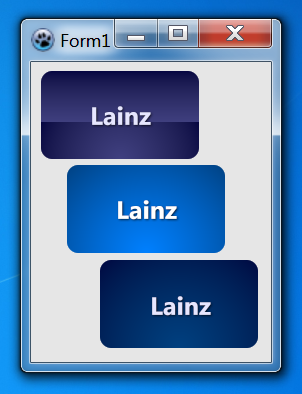 | |
| 32 | 8 | ||
| 33 | - | ||
| 9 | + | *You need BGRABitmapTypes unit to run this code.* | |
| 34 | 10 | ||
| 35 | - | ||
| 36 | - | ||
| 11 | + | Add a new BGRAButton, go OnPaint event and add this code: | |
| 12 | + | ||
| 13 | + | ``` pascal | |
| 37 | 14 | procedure TForm1.FormCreate(Sender: TObject); | |
| 38 | - | ||
| 39 | - | ||
| 40 | - | ||
| 41 | - | ||
| 42 | - | ||
| 43 | - | ||
| 44 | - | ||
| 45 | - | ||
| 46 | - | ||
| 47 | - | ||
| 48 | - | ||
| 49 | - | ||
| 50 | - | ||
| 51 | - | ||
| 52 | - | ||
| 53 | - | ||
| 54 | - | ||
| 55 | - | ||
| 56 | - | ||
| 57 | - | ||
| 58 | - | ||
| 59 | - | ||
| 60 | - | ||
| 61 | - | ||
| 62 | - | ||
| 63 | - | ||
| 64 | - | ||
| 65 | - | ||
| 66 | - | ||
| 67 | - | ||
| 68 | - | ||
| 69 | - | ||
| 70 | - | ||
| 71 | - | ||
| 72 | - | ||
| 73 | - | ||
| 74 | - | ||
| 75 | - | ||
| 76 | - | ||
| 77 | - | ||
| 78 | - | ||
| 79 | - | ||
| 80 | - | ||
| 81 | - | ||
| 82 | - | ||
| 83 | - | ||
| 84 | - | ||
| 85 | - | ||
| 86 | - | ||
| 87 | - | ||
| 88 | - | ||
| 89 | - | ||
| 90 | - | ||
| 91 | - | ||
| 92 | - | ||
| 93 | - | ||
| 94 | - | ||
| 95 | - | ||
| 96 | - | ||
| 15 | + | begin | |
| 16 | + | Self.Color:=RGBToColor(230,230,230); | |
| 17 | + | // Lainz Button | |
| 18 | + | with BGRAButton1 do begin | |
| 19 | + | RoundX:=12; | |
| 20 | + | RoundY:=12; | |
| 21 | + | TextShadowOffsetX:=1; | |
| 22 | + | TextShadowOffsetY:=1; | |
| 23 | + | TextShadowRadius:=2; | |
| 24 | + | // Normal | |
| 25 | + | with BodyNormal do begin | |
| 26 | + | BorderStyle:=bboNone; | |
| 27 | + | Font.Color:=RGBToColor(230,230,255); | |
| 28 | + | Font.Style:=[fsBold]; | |
| 29 | + | Gradient1.EndColor:=RGBToColor(64,64,128); | |
| 30 | + | Gradient1.StartColor:=RGBToColor(0,0,64); | |
| 31 | + | Gradient1EndPercent:=60; | |
| 32 | + | // Gradient2 | |
| 33 | + | with Gradient2 do begin | |
| 34 | + | EndColor:=RGBToColor(0,0,64); | |
| 35 | + | GradientType:=gtRadial; | |
| 36 | + | Point1XPercent:=50; | |
| 37 | + | Point1YPercent:=100; | |
| 38 | + | Point2YPercent:=0; | |
| 39 | + | StartColor:=RGBToColor(64,64,128); | |
| 97 | 40 | end; | |
| 98 | 41 | end; | |
| 42 | + | // Hover | |
| 43 | + | with BodyHover do begin | |
| 44 | + | BorderStyle:=bboNone; | |
| 45 | + | Font.Color:=RGBToColor(255,255,255); | |
| 46 | + | Font.Style:=[fsBold]; | |
| 47 | + | Gradient1EndPercent:=100; | |
| 48 | + | // Gradient1 | |
| 49 | + | with Gradient1 do begin | |
| 50 | + | EndColor:=RGBToColor(0,64,128); | |
| 51 | + | GradientType:=gtRadial; | |
| 52 | + | Point1XPercent:=50; | |
| 53 | + | Point1YPercent:=100; | |
| 54 | + | Point2YPercent:=0; | |
| 55 | + | StartColor:=RGBToColor(0,128,255); | |
| 56 | + | end; | |
| 57 | + | end; | |
| 58 | + | // Clicked | |
| 59 | + | with BodyClicked do begin | |
| 60 | + | BorderStyle:=bboNone; | |
| 61 | + | Font.Color:=RGBToColor(230,230,255); | |
| 62 | + | Font.Style:=[fsBold]; | |
| 63 | + | Gradient1EndPercent:=100; | |
| 64 | + | // Gradient1 | |
| 65 | + | with Gradient1 do begin | |
| 66 | + | EndColor:=RGBToColor(0,0,64); | |
| 67 | + | GradientType:=gtRadial; | |
| 68 | + | Point1XPercent:=50; | |
| 69 | + | Point1YPercent:=100; | |
| 70 | + | Point2YPercent:=0; | |
| 71 | + | StartColor:=RGBToColor(0,64,128); | |
| 72 | + | end; | |
| 73 | + | end; | |
| 74 | + | end; | |
| 75 | + | end; | |
| 99 | 76 | ``` | |
| 100 | 77 | ||
| 101 | 78 | ## Tips | |
| 102 | 79 | ||
| 103 | - | ||
| 80 | + | Those are some tips and how-to's. | |
| 104 | 81 | ||
| 105 | 82 | ### Sphere | |
| 106 | 83 | ||
| 107 | - | ||
| 84 | + | 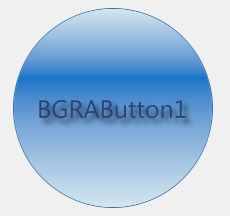 | |
| 108 | 85 | ||
| 109 | - | ||
| 110 | - | ||
| 86 | + | To create a sphere you need to set Width & Height to the same value and RoundX & RoundY a half of Width & a half of Height. Use this code to obtain a sphere like in the previous image: | |
| 87 | + | ||
| 88 | + | ``` pascal | |
| 111 | 89 | BGRAButton1.Width:=200; | |
| 112 | - | ||
| 113 | - | ||
| 114 | - | ||
| 90 | + | BGRAButton1.Height:=200; | |
| 91 | + | BGRAButton.RoundX:=100; | |
| 92 | + | BGRAButton.RoundY:=100; | |
| 115 | 93 | ``` | |
| 116 | 94 | ||
| 117 | - | ||
| 118 | - | ||
| 95 | + | Or do it in this way: | |
| 96 | + | ||
| 97 | + | ``` pascal | |
| 119 | 98 | // Square | |
| 120 | - | ||
| 121 | - | ||
| 122 | - | ||
| 123 | - | ||
| 124 | - | ||
| 125 | - | ||
| 126 | - | ||
| 127 | - | ||
| 128 | - | ||
| 129 | - | ||
| 99 | + | with BGRAButton1 do begin | |
| 100 | + | Width:= 200; | |
| 101 | + | Height:= Width; | |
| 102 | + | end; | |
| 103 | + | ||
| 104 | + | // Sphere | |
| 105 | + | with BGRAButton1 do begin | |
| 106 | + | RoundX:= Round(Width div 2); | |
| 107 | + | RoundY:= Round(Height div 2); | |
| 108 | + | end; | |
| 130 | 109 | ``` | |
| 131 | 110 | ||
| 132 | 111 | ### Only one state | |
| 133 | 112 | ||
| 134 | - | ||
| 135 | - | ||
| 113 | + | If you only want a solid button just with the state *BodyNormal* you must set to true the property *StaticButton*. | |
| 114 | + | ||
| 115 | + | ``` pascal | |
| 136 | 116 | BGRAButton1.StaticButton:=True; | |
| 137 | 117 | ``` | |
| 138 | 118 | ||
| 139 | 119 | ### Button very slow | |
| 140 | 120 | ||
| 141 | - | ||
| 142 | - | ||
| 121 | + | If the button is very slow you can disable *TextShadow* to improve speed. | |
| 122 | + | ||
| 123 | + | ``` pascal | |
| 143 | 124 | BGRAButton1.TextShadow:=False; | |
| 144 | 125 | ``` | |
| 145 | 126 | ||
| 146 | - | ||
| 127 | + | And you can improve speed using *Single gradient button* or *Single color button*. | |
| 147 | 128 | ||
| 148 | 129 | ### Single gradient button | |
| 149 | 130 | ||
| 150 | - | ||
| 151 | - | ||
| 131 | + | You can use just only one gradient if you want. | |
| 132 | + | ||
| 133 | + | ``` pascal | |
| 152 | 134 | BGRAButton1.Gradient1EndPercent:=100; // if you want to use only Gradient1 | |
| 153 | - | ||
| 135 | + | BGRAButton1.Gradient1EndPercent:=0; // if you want to use only Gradient2 | |
| 154 | 136 | ``` | |
| 155 | 137 | ||
| 156 | 138 | ### Single color button | |
| 157 | 139 | ||
| 158 | - | ||
| 159 | - | ||
| 140 | + | Changing the *Style* of the button you can display just a single color as background. | |
| 141 | + | ||
| 142 | + | ``` pascal | |
| 160 | 143 | BGRAButton1.BodyNormal.Style:=bbsColor; | |
| 161 | 144 | ``` | |
| 162 | 145 | ||
| 163 | 146 | ### How to avoid flickering | |
| 164 | 147 | ||
| 165 | - | ||
| 166 | - | ||
| 148 | + | The button will flicker if you are running Windows without themes (classic). To avoid this enable *DoubleBuffered* OnCreate event of each Form. | |
| 149 | + | ||
| 150 | + | ``` pascal | |
| 167 | 151 | procedure TForm1.FormCreate(Sender: TObject); | |
| 168 | - | ||
| 169 | - | ||
| 170 | - | ||
| 152 | + | begin | |
| 153 | + | Self.DoubleBuffered:=True; | |
| 154 | + | end; | |
| 171 | 155 | ``` | |
| 172 | 156 | ||
| 173 | 157 | ### Using as Label | |
| 174 | 158 | ||
| 175 | - | ||
| 176 | - | ||
| 159 | + | The easy way is set to true the property *StaticButton*. | |
| 160 | + | ||
| 161 | + | ``` pascal | |
| 177 | 162 | BGRAButton1.StaticButton:=True; | |
| 178 | 163 | ``` | |
| 179 | 164 | ||
| 180 | - | ||
| 165 | + | Then set BodyNormal.Style to bbsClear and BodyNormal.BorderStyle to bboNone. | |
| 181 | 166 | ||
| 182 | 167 | ## Like Web | |
| 183 | 168 | ||
| 184 | - | ||
| 169 | + | Those are like websites, web apps. | |
| 185 | 170 | ||
| 186 | 171 | ### Facebook Menu | |
| 187 | 172 | ||
| 188 | - | ||
| 173 | + | 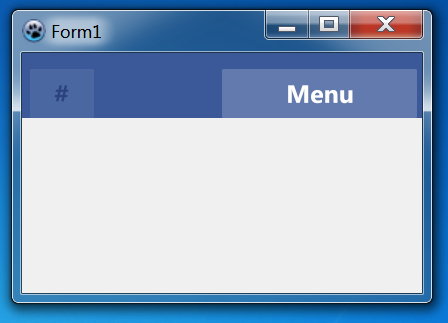 | |
| 189 | 174 | ||
| 190 | - | ||
| 191 | - | ||
| 175 | + | Like Facebook Menu (2011), add a BGRAPanel with 2 BGRAButton inside, then go OnCreate event of Form1 and add this code: | |
| 176 | + | ||
| 177 | + | ``` pascal | |
| 192 | 178 | procedure TForm1.FormCreate(Sender: TObject); | |
| 193 | - | ||
| 194 | - | ||
| 195 | - | ||
| 196 | - | ||
| 197 | - | ||
| 198 | - | ||
| 199 | - | ||
| 200 | - | ||
| 201 | - | ||
| 202 | - | ||
| 203 | - | ||
| 204 | - | ||
| 205 | - | ||
| 206 | - | ||
| 207 | - | ||
| 208 | - | ||
| 209 | - | ||
| 210 | - | ||
| 211 | - | ||
| 212 | - | ||
| 213 | - | ||
| 214 | - | ||
| 215 | - | ||
| 216 | - | ||
| 217 | - | ||
| 218 | - | ||
| 219 | - | ||
| 220 | - | ||
| 221 | - | ||
| 222 | - | ||
| 223 | - | ||
| 224 | - | ||
| 225 | - | ||
| 226 | - | ||
| 227 | - | ||
| 228 | - | ||
| 229 | - | ||
| 230 | - | ||
| 231 | - | ||
| 232 | - | ||
| 233 | - | ||
| 234 | - | ||
| 235 | - | ||
| 236 | - | ||
| 237 | - | ||
| 238 | - | ||
| 239 | - | ||
| 240 | - | ||
| 241 | - | ||
| 242 | - | ||
| 243 | - | ||
| 244 | - | ||
| 245 | - | ||
| 246 | - | ||
| 247 | - | ||
| 248 | - | ||
| 249 | - | ||
| 250 | - | ||
| 251 | - | ||
| 252 | - | ||
| 253 | - | ||
| 254 | - | ||
| 255 | - | ||
| 256 | - | ||
| 179 | + | begin | |
| 180 | + | // Panel | |
| 181 | + | with BGRAPanel1 do begin | |
| 182 | + | BackgroundStyle:=bpsColor; | |
| 183 | + | BevelOuter:=bvNone; | |
| 184 | + | //Color:=RGBToColor(98,122,173); // Light Background | |
| 185 | + | Color:=RGBToColor(59,89,152); // Dark Background | |
| 186 | + | end; | |
| 187 | + | // Light Menu | |
| 188 | + | with BGRAButton1 do begin | |
| 189 | + | TextShadow:=False; | |
| 190 | + | // Normal | |
| 191 | + | with BodyNormal do begin | |
| 192 | + | BorderColor:=RGBToColor(98,122,173); | |
| 193 | + | Color:=RGBToColor(98,122,173); | |
| 194 | + | Font.Color:=clWhite; | |
| 195 | + | Font.Style:=[fsBold]; | |
| 196 | + | Style:=bbsColor; | |
| 257 | 197 | end; | |
| 198 | + | // Hover | |
| 199 | + | with BodyHover do begin | |
| 200 | + | BorderColor:=RGBToColor(109,134,183); | |
| 201 | + | Color:=RGBToColor(109,134,183); | |
| 202 | + | Font.Color:=clWhite; | |
| 203 | + | Font.Style:=[fsBold]; | |
| 204 | + | Style:=bbsColor; | |
| 205 | + | end; | |
| 206 | + | // Clicked | |
| 207 | + | with BodyClicked do begin | |
| 208 | + | BorderColor:=clBlack; | |
| 209 | + | Color:=clWhite; | |
| 210 | + | Font.Color:=clBlack; | |
| 211 | + | Font.Style:=[fsBold]; | |
| 212 | + | Style:=bbsColor; | |
| 213 | + | end; | |
| 214 | + | end; | |
| 215 | + | // Dark Menu | |
| 216 | + | with BGRAButton2 do begin | |
| 217 | + | TextShadow:=False; | |
| 218 | + | // Normal | |
| 219 | + | with BodyNormal do begin | |
| 220 | + | BorderColor:=RGBToColor(59,89,152); | |
| 221 | + | Color:=RGBToColor(59,89,152); | |
| 222 | + | Font.Color:=RGBToColor(42,66,128); | |
| 223 | + | Font.Style:=[fsBold]; | |
| 224 | + | Style:=bbsColor; | |
| 225 | + | end; | |
| 226 | + | // Hover | |
| 227 | + | with BodyHover do begin | |
| 228 | + | BorderColor:=RGBToColor(75,103,161); | |
| 229 | + | Color:=RGBToColor(75,103,161); | |
| 230 | + | Font.Color:=RGBToColor(42,66,128); | |
| 231 | + | Font.Style:=[fsBold]; | |
| 232 | + | Style:=bbsColor; | |
| 233 | + | end; | |
| 234 | + | // Clicked | |
| 235 | + | with BodyClicked do begin | |
| 236 | + | BorderColor:=clBlack; | |
| 237 | + | Color:=clWhite; | |
| 238 | + | Font.Color:=RGBToColor(42,66,128); | |
| 239 | + | Font.Style:=[fsBold]; | |
| 240 | + | Style:=bbsColor; | |
| 241 | + | end; | |
| 242 | + | end; | |
| 243 | + | end; | |
| 258 | 244 | ``` | |
| 259 | 245 | ||
| 260 | - | ||
| 246 | + | You can set *Clicked* properties same as *Hover* for standard buttons (not menu's). | |
| 261 | 247 | ||
| 262 | 248 | ### Google Menu | |
| 263 | 249 | ||
| 264 | - | ||
| 250 | + | 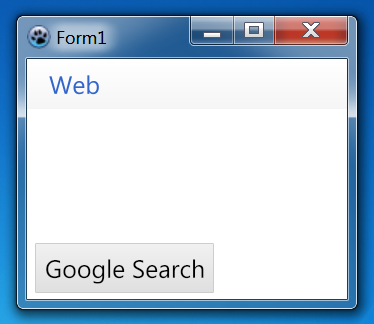 | |
| 265 | 251 | ||
| 266 | - | ||
| 267 | - | ||
| 252 | + | Like Google Menu (2011), add a BGRAPanel with a BGRAButton inside and another BGRAButton in the Form, then go OnCreate event of Form1 and add this code: | |
| 253 | + | ||
| 254 | + | ``` pascal | |
| 268 | 255 | procedure TForm1.FormCreate(Sender: TObject); | |
| 269 | - | ||
| 270 | - | ||
| 271 | - | ||
| 272 | - | ||
| 273 | - | ||
| 274 | - | ||
| 275 | - | ||
| 276 | - | ||
| 277 | - | ||
| 278 | - | ||
| 279 | - | ||
| 280 | - | ||
| 281 | - | ||
| 282 | - | ||
| 283 | - | ||
| 284 | - | ||
| 285 | - | ||
| 286 | - | ||
| 287 | - | ||
| 288 | - | ||
| 289 | - | ||
| 290 | - | ||
| 291 | - | ||
| 292 | - | ||
| 293 | - | ||
| 294 | - | ||
| 295 | - | ||
| 296 | - | ||
| 297 | - | ||
| 298 | - | ||
| 299 | - | ||
| 300 | - | ||
| 301 | - | ||
| 302 | - | ||
| 303 | - | ||
| 304 | - | ||
| 305 | - | ||
| 306 | - | ||
| 307 | - | ||
| 308 | - | ||
| 309 | - | ||
| 310 | - | ||
| 311 | - | ||
| 312 | - | ||
| 313 | - | ||
| 314 | - | ||
| 315 | - | ||
| 316 | - | ||
| 317 | - | ||
| 318 | - | ||
| 319 | - | ||
| 320 | - | ||
| 321 | - | ||
| 322 | - | ||
| 323 | - | ||
| 324 | - | ||
| 325 | - | ||
| 326 | - | ||
| 327 | - | ||
| 328 | - | ||
| 329 | - | ||
| 330 | - | ||
| 256 | + | begin | |
| 257 | + | // Background | |
| 258 | + | Self.Color:=clWhite; | |
| 259 | + | // Panel | |
| 260 | + | with BGRAPanel1 do begin | |
| 261 | + | BevelOuter:=bvNone; | |
| 262 | + | Gradient.StartColor:=clWhite; | |
| 263 | + | Gradient.EndColor:=RGBToColor(245,245,245); | |
| 264 | + | end; | |
| 265 | + | // Menu Button | |
| 266 | + | with BGRAButton1 do begin | |
| 267 | + | TextShadow:=False; | |
| 268 | + | // Normal | |
| 269 | + | with BodyNormal do begin | |
| 270 | + | BorderStyle:=bboNone; | |
| 271 | + | Font.Color:=RGBToColor(51,102,204); | |
| 272 | + | Style:=bbsClear; | |
| 331 | 273 | end; | |
| 274 | + | // Hover | |
| 275 | + | with BodyHover do begin | |
| 276 | + | BorderStyle:=bboNone; | |
| 277 | + | Gradient1.StartColor:=RGBToColor(227,234,248); | |
| 278 | + | Gradient1.EndColor:=RGBToColor(223,229,242); | |
| 279 | + | Font.Color:=RGBToColor(51,102,204); | |
| 280 | + | Gradient1EndPercent:=100; | |
| 281 | + | end; | |
| 282 | + | // Clicked | |
| 283 | + | with BodyClicked do begin | |
| 284 | + | BorderStyle:=bboNone; | |
| 285 | + | Gradient1.StartColor:=RGBToColor(227,234,248); | |
| 286 | + | Gradient1.EndColor:=RGBToColor(223,229,242); | |
| 287 | + | Font.Color:=RGBToColor(51,102,204); | |
| 288 | + | Gradient1EndPercent:=100; | |
| 289 | + | end; | |
| 290 | + | end; | |
| 291 | + | // Button | |
| 292 | + | with BGRAButton2 do begin | |
| 293 | + | TextShadow:=False; | |
| 294 | + | // Normal | |
| 295 | + | with BodyNormal do begin | |
| 296 | + | BorderColor:=RGBToColor(205,205,205); | |
| 297 | + | Gradient1.StartColor:=RGBToColor(241,241,241); | |
| 298 | + | Gradient1.EndColor:=RGBToColor(223,223,223); | |
| 299 | + | Font.Color:=clBlack; | |
| 300 | + | Gradient1EndPercent:=100; | |
| 301 | + | end; | |
| 302 | + | // Hover | |
| 303 | + | with BodyHover do begin | |
| 304 | + | BorderColor:=RGBToColor(205,205,205); | |
| 305 | + | Gradient1.StartColor:=RGBToColor(241,241,241); | |
| 306 | + | Gradient1.EndColor:=RGBToColor(223,223,223); | |
| 307 | + | Font.Color:=clBlack; | |
| 308 | + | Gradient1EndPercent:=100; | |
| 309 | + | end; | |
| 310 | + | // Clicked | |
| 311 | + | with BodyClicked do begin | |
| 312 | + | BorderColor:=RGBToColor(204,204,204); | |
| 313 | + | Color:=RGBToColor(204,204,204); | |
| 314 | + | Font.Color:=clBlack; | |
| 315 | + | Style:=bbsColor; | |
| 316 | + | end; | |
| 317 | + | end; | |
| 318 | + | end; | |
| 332 | 319 | ``` | |
| 333 | 320 | ||
| 334 | 321 | ## Like Windows Controls | |
| 335 | 322 | ||
| 336 | - | ||
| 323 | + | Those are like Windows Controls. | |
| 337 | 324 | ||
| 338 | 325 | ### Windows 7 Button | |
| 339 | 326 | ||
| 340 | - | ||
| 327 | + | 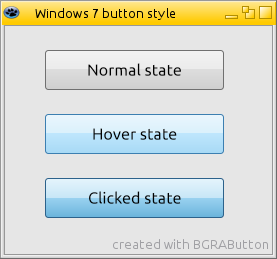 | |
| 341 | 328 | ||
| 342 | - | ||
| 343 | - | ||
| 329 | + | Like Windows 7 button, add a BGRAButton, then go OnCreate event of Form1 and add this code: | |
| 330 | + | ||
| 331 | + | ``` pascal | |
| 344 | 332 | procedure TForm1.FormCreate(Sender: TObject); | |
| 345 | - | ||
| 346 | - | ||
| 347 | - | ||
| 348 | - | ||
| 349 | - | ||
| 350 | - | ||
| 351 | - | ||
| 352 | - | ||
| 353 | - | ||
| 354 | - | ||
| 355 | - | ||
| 356 | - | ||
| 357 | - | ||
| 358 | - | ||
| 359 | - | ||
| 360 | - | ||
| 361 | - | ||
| 362 | - | ||
| 363 | - | ||
| 364 | - | ||
| 365 | - | ||
| 366 | - | ||
| 367 | - | ||
| 368 | - | ||
| 369 | - | ||
| 370 | - | ||
| 371 | - | ||
| 372 | - | ||
| 373 | - | ||
| 374 | - | ||
| 375 | - | ||
| 376 | - | ||
| 377 | - | ||
| 378 | - | ||
| 379 | - | ||
| 380 | - | ||
| 381 | - | ||
| 333 | + | begin | |
| 334 | + | // Button | |
| 335 | + | with BGRAButton1 do begin | |
| 336 | + | TextShadow:=False; | |
| 337 | + | RoundX:=3; | |
| 338 | + | RoundY:=3; | |
| 339 | + | // Normal | |
| 340 | + | with BodyNormal do begin | |
| 341 | + | Font.Color:=clBlack; | |
| 342 | + | Gradient1EndPercent:=50; | |
| 343 | + | BorderColor:=RGBToColor(112,112,112); | |
| 344 | + | Gradient1.StartColor:=RGBToColor(242,242,242); | |
| 345 | + | Gradient1.EndColor:=RGBToColor(235,235,235); | |
| 346 | + | Gradient2.StartColor:=RGBToColor(221,221,221); | |
| 347 | + | Gradient2.EndColor:=RGBToColor(207,207,207); | |
| 382 | 348 | end; | |
| 349 | + | // Hover | |
| 350 | + | with BodyHover do begin | |
| 351 | + | Font.Color:=clBlack; | |
| 352 | + | Gradient1EndPercent:=50; | |
| 353 | + | BorderColor:=RGBToColor(60,127,177); | |
| 354 | + | Gradient1.StartColor:=RGBToColor(234,246,253); | |
| 355 | + | Gradient1.EndColor:=RGBToColor(217,240,252); | |
| 356 | + | Gradient2.StartColor:=RGBToColor(190,230,253); | |
| 357 | + | Gradient2.EndColor:=RGBToColor(167,217,245); | |
| 358 | + | end; | |
| 359 | + | // Clicked | |
| 360 | + | with BodyClicked do begin | |
| 361 | + | Font.Color:=clBlack; | |
| 362 | + | Gradient1EndPercent:=55; | |
| 363 | + | BorderColor:=RGBToColor(44,98,139); | |
| 364 | + | Gradient1.StartColor:=RGBToColor(229,244,252); | |
| 365 | + | Gradient1.EndColor:=RGBToColor(196,229,246); | |
| 366 | + | Gradient2.StartColor:=RGBToColor(152,209,239); | |
| 367 | + | Gradient2.EndColor:=RGBToColor(104,179,219); | |
| 368 | + | end; | |
| 369 | + | end; | |
| 370 | + | end; | |
| 383 | 371 | ``` | |
| 384 | 372 | ||
| 385 | 373 | ### Windows 7 Explorer ToolBar | |
| 386 | 374 | ||
| 387 | - | ||
| 375 | + | 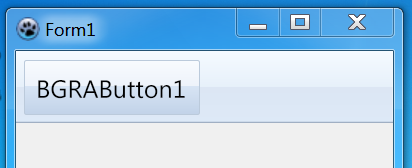 | |
| 388 | 376 | ||
| 389 | - | ||
| 390 | - | ||
| 377 | + | Like Windows 7 explorer toolbar button, add a BGRAVirtualScreen with a BGRAButton inside, then go OnCreate event of Form1 and add this code: | |
| 378 | + | ||
| 379 | + | ``` pascal | |
| 391 | 380 | procedure TForm1.FormCreate(Sender: TObject); | |
| 392 | - | ||
| 393 | - | ||
| 394 | - | ||
| 395 | - | ||
| 396 | - | ||
| 397 | - | ||
| 398 | - | ||
| 399 | - | ||
| 400 | - | ||
| 401 | - | ||
| 402 | - | ||
| 403 | - | ||
| 404 | - | ||
| 405 | - | ||
| 406 | - | ||
| 407 | - | ||
| 408 | - | ||
| 409 | - | ||
| 410 | - | ||
| 411 | - | ||
| 412 | - | ||
| 413 | - | ||
| 414 | - | ||
| 415 | - | ||
| 416 | - | ||
| 417 | - | ||
| 418 | - | ||
| 419 | - | ||
| 420 | - | ||
| 421 | - | ||
| 422 | - | ||
| 423 | - | ||
| 424 | - | ||
| 381 | + | begin | |
| 382 | + | // Button | |
| 383 | + | with BGRAButton1 do begin | |
| 384 | + | TextShadow:=False; | |
| 385 | + | RoundX:=2; | |
| 386 | + | RoundY:=2; | |
| 387 | + | // Normal | |
| 388 | + | with BodyNormal do begin | |
| 389 | + | Font.Color:=clBlack; | |
| 390 | + | BorderStyle:=bboNone; | |
| 391 | + | Style:=bbsClear; | |
| 425 | 392 | end; | |
| 393 | + | // Hover | |
| 394 | + | with BodyHover do begin | |
| 395 | + | Font.Color:=clBlack; | |
| 396 | + | Gradient1EndPercent:=50; | |
| 397 | + | BorderColor:=RGBToColor(187,202,219); | |
| 398 | + | Gradient1.StartColor:=RGBToColor(248,251,254); | |
| 399 | + | Gradient1.EndColor:=RGBToColor(237,242,250); | |
| 400 | + | Gradient2.StartColor:=RGBToColor(215,228,244); | |
| 401 | + | Gradient2.EndColor:=RGBToColor(193,210,232); | |
| 402 | + | end; | |
| 403 | + | // Clicked | |
| 404 | + | with BodyClicked do begin | |
| 405 | + | Font.Color:=clBlack; | |
| 406 | + | Gradient1EndPercent:=55; | |
| 407 | + | BorderColor:=RGBToColor(187,202,219); | |
| 408 | + | Gradient1.StartColor:=RGBToColor(226,236,245); | |
| 409 | + | Gradient1.EndColor:=RGBToColor(216,228,241); | |
| 410 | + | Gradient2.StartColor:=RGBToColor(207,219,236); | |
| 411 | + | Gradient2.EndColor:=RGBToColor(207,220,237); | |
| 412 | + | end; | |
| 413 | + | end; | |
| 414 | + | end; | |
| 426 | 415 | ``` | |
| 427 | 416 | ||
| 428 | - | ||
| 429 | - | ||
| 417 | + | Go to OnRedraw of BGRAVirtualScreen and add this code: | |
| 418 | + | ||
| 419 | + | ``` pascal | |
| 430 | 420 | procedure TForm1.BGRAVirtualScreen1Redraw(Sender: TObject; Bitmap: TBGRABitmap); | |
| 431 | - | ||
| 432 | - | ||
| 433 | - | ||
| 434 | - | ||
| 435 | - | ||
| 436 | - | ||
| 437 | - | ||
| 438 | - | ||
| 439 | - | ||
| 440 | - | ||
| 441 | - | ||
| 442 | - | ||
| 443 | - | ||
| 444 | - | ||
| 445 | - | ||
| 421 | + | var | |
| 422 | + | gradBitmap: TBGRABitmap; | |
| 423 | + | begin | |
| 424 | + | with BGRAVirtualScreen1 do begin | |
| 425 | + | gradBitmap:= DoubleGradientAlphaFill(ClientRect,BGRA(245,250,255,255),BGRA(230,240,250,255), | |
| 426 | + | BGRA(220,230,244,255),BGRA(221,233,247,255),gdVertical,gdVertical,gdVertical,0.50); | |
| 427 | + | end; | |
| 428 | + | with Bitmap do begin | |
| 429 | + | PutImage(0,0,gradBitmap,dmSet); | |
| 430 | + | gradBitmap.Free; | |
| 431 | + | Rectangle(0,0,Width,Height-2,BGRA(255,255,255,100),dmDrawWithTransparency); | |
| 432 | + | SetHorizLine(0,Height-1,Width-1,BGRA(160,175,195,255)); | |
| 433 | + | SetHorizLine(0,Height-2,Width-1,BGRA(205,218,234,255)); | |
| 434 | + | end; | |
| 435 | + | end; | |
| 446 | 436 | ``` | |
| 447 | 437 | ||
| 448 | 438 | ### Office 2010 Button | |
| 449 | 439 | ||
| 450 | - | ||
| 440 | + | 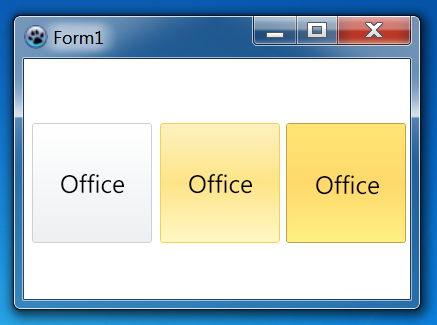 | |
| 451 | 441 | ||
| 452 | - | ||
| 453 | - | ||
| 442 | + | Like Office 2010 button, add a BGRAButton, then go OnCreate event of Form1 and add this code: | |
| 443 | + | ||
| 444 | + | ``` pascal | |
| 454 | 445 | procedure TForm1.FormCreate(Sender: TObject); | |
| 455 | - | ||
| 456 | - | ||
| 457 | - | ||
| 458 | - | ||
| 459 | - | ||
| 460 | - | ||
| 461 | - | ||
| 462 | - | ||
| 463 | - | ||
| 464 | - | ||
| 465 | - | ||
| 466 | - | ||
| 467 | - | ||
| 468 | - | ||
| 469 | - | ||
| 470 | - | ||
| 471 | - | ||
| 472 | - | ||
| 473 | - | ||
| 474 | - | ||
| 475 | - | ||
| 476 | - | ||
| 477 | - | ||
| 478 | - | ||
| 479 | - | ||
| 480 | - | ||
| 481 | - | ||
| 482 | - | ||
| 483 | - | ||
| 484 | - | ||
| 485 | - | ||
| 486 | - | ||
| 487 | - | ||
| 488 | - | ||
| 489 | - | ||
| 490 | - | ||
| 446 | + | begin | |
| 447 | + | Self.Color:=clWhite; | |
| 448 | + | // Button | |
| 449 | + | with BGRAButton1 do begin | |
| 450 | + | RoundX:=3; | |
| 451 | + | RoundY:=3; | |
| 452 | + | TextShadow:=False; | |
| 453 | + | // Normal | |
| 454 | + | with BodyNormal do begin | |
| 455 | + | BorderColor:=RGBToColor(207,208,210); | |
| 456 | + | Font.Color:=clBlack; | |
| 457 | + | Gradient1.StartColor:=RGBToColor(255,255,255); | |
| 458 | + | Gradient1.EndColor:=RGBToColor(237,239,241); | |
| 459 | + | Gradient1EndPercent:=100; | |
| 491 | 460 | end; | |
| 461 | + | // Hover | |
| 462 | + | with BodyHover do begin | |
| 463 | + | BorderColor:=RGBToColor(244,210,81); | |
| 464 | + | Font.Color:=clBlack; | |
| 465 | + | Gradient1.StartColor:=RGBToColor(254,241,189); | |
| 466 | + | Gradient1.EndColor:=RGBToColor(254,228,134); | |
| 467 | + | Gradient1EndPercent:=50; | |
| 468 | + | Gradient2.StartColor:=RGBToColor(254,228,134); | |
| 469 | + | Gradient2.EndColor:=RGBToColor(254,248,196); | |
| 470 | + | end; | |
| 471 | + | // Clicked | |
| 472 | + | with BodyClicked do begin | |
| 473 | + | BorderColor:=RGBToColor(194,161,63); | |
| 474 | + | Font.Color:=clBlack; | |
| 475 | + | Gradient1.StartColor:=RGBToColor(255,229,117); | |
| 476 | + | Gradient1.EndColor:=RGBToColor(255,216,107); | |
| 477 | + | Gradient1EndPercent:=50; | |
| 478 | + | Gradient2.StartColor:=RGBToColor(255,216,107); | |
| 479 | + | Gradient2.EndColor:=RGBToColor(255,239,129); | |
| 480 | + | end; | |
| 481 | + | end; | |
| 482 | + | end; | |
| 492 | 483 | ``` | |
| 493 | 484 | ||
| 494 | 485 | ## Like Mac Controls | |
| 495 | 486 | ||
| 496 | - | ||
| 487 | + | Those are like Mac Controls. | |
| 497 | 488 | ||
| 498 | 489 | ### macOS Lion Button | |
| 499 | 490 | ||
| 500 | - | ||
| 491 | + | 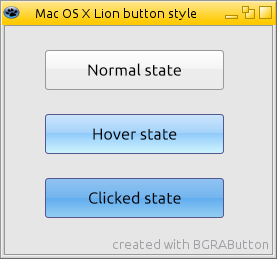 | |
| 501 | 492 | ||
| 502 | - | ||
| 503 | - | ||
| 493 | + | Like macOS Lion button, add a BGRAButton, then go OnCreate event of Form1 and add this code: | |
| 494 | + | ||
| 495 | + | ``` pascal | |
| 504 | 496 | procedure TForm1.FormCreate(Sender: TObject); | |
| 505 | - | ||
| 506 | - | ||
| 507 | - | ||
| 508 | - | ||
| 509 | - | ||
| 510 | - | ||
| 511 | - | ||
| 512 | - | ||
| 513 | - | ||
| 514 | - | ||
| 515 | - | ||
| 516 | - | ||
| 517 | - | ||
| 518 | - | ||
| 519 | - | ||
| 520 | - | ||
| 521 | - | ||
| 522 | - | ||
| 523 | - | ||
| 524 | - | ||
| 525 | - | ||
| 526 | - | ||
| 527 | - | ||
| 528 | - | ||
| 529 | - | ||
| 530 | - | ||
| 531 | - | ||
| 532 | - | ||
| 533 | - | ||
| 534 | - | ||
| 535 | - | ||
| 536 | - | ||
| 537 | - | ||
| 538 | - | ||
| 539 | - | ||
| 540 | - | ||
| 541 | - | ||
| 497 | + | begin | |
| 498 | + | // Button | |
| 499 | + | with BGRAButton1 do begin | |
| 500 | + | TextShadow:=False; | |
| 501 | + | RoundX:=3; | |
| 502 | + | RoundY:=3; | |
| 503 | + | // Normal | |
| 504 | + | with BodyNormal do begin | |
| 505 | + | Font.Color:=clBlack; | |
| 506 | + | Gradient1EndPercent:=50; | |
| 507 | + | BorderColor:=RGBToColor(154,154,154); | |
| 508 | + | Gradient1.StartColor:=RGBToColor(255,255,255); | |
| 509 | + | Gradient1.EndColor:=RGBToColor(243,243,243); | |
| 510 | + | Gradient2.StartColor:=RGBToColor(236,236,236); | |
| 511 | + | Gradient2.EndColor:=RGBToColor(235,235,235); | |
| 542 | 512 | end; | |
| 513 | + | // Hover | |
| 514 | + | with BodyHover do begin | |
| 515 | + | Font.Color:=clBlack; | |
| 516 | + | Gradient1EndPercent:=50; | |
| 517 | + | BorderColor:=RGBToColor(86,87,143); | |
| 518 | + | Gradient1.StartColor:=RGBToColor(204,229,252); | |
| 519 | + | Gradient1.EndColor:=RGBToColor(161,209,249); | |
| 520 | + | Gradient2.StartColor:=RGBToColor(143,202,251); | |
| 521 | + | Gradient2.EndColor:=RGBToColor(207,245,253); | |
| 522 | + | end; | |
| 523 | + | // Clicked | |
| 524 | + | with BodyClicked do begin | |
| 525 | + | Font.Color:=clBlack; | |
| 526 | + | Gradient1EndPercent:=55; | |
| 527 | + | BorderColor:=RGBToColor(86,87,143); | |
| 528 | + | Gradient1.StartColor:=RGBToColor(144,195,241); | |
| 529 | + | Gradient1.EndColor:=RGBToColor(113,180,239); | |
| 530 | + | Gradient2.StartColor:=RGBToColor(97,173,240); | |
| 531 | + | Gradient2.EndColor:=RGBToColor(147,206,241); | |
| 532 | + | end; | |
| 533 | + | end; | |
| 534 | + | end; | |
| 543 | 535 | ``` | |
| 544 | 536 | ||
| 545 | 537 | ## Other | |
| 546 | 538 | ||
| 547 | - | ||
| 539 | + | Other stuff. | |
| 548 | 540 | ||
| 549 | 541 | ### Lazarus Custom Drawn | |
| 550 | 542 | ||
| 551 | - | ||
| 543 | + | 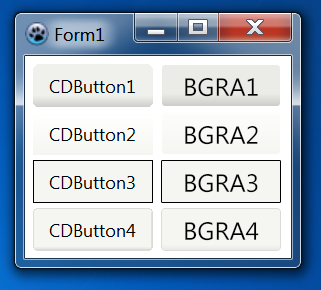 | |
| 552 | 544 | ||
| 553 | - | ||
| 545 | + | *dsAndroid, dsGrad, dsWinCE, dsXPTaskBar* | |
| 554 | 546 | ||
| 555 | - | ||
| 556 | - | ||
| 547 | + | Like [[Lazarus Custom Drawn Controls]]. Add 4 BGRAButton, then go OnCreate event of Form1 and add this code: | |
| 548 | + | ||
| 549 | + | ``` pascal | |
| 557 | 550 | procedure TForm1.FormCreate(Sender: TObject); | |
| 558 | - | ||
| 559 | - | ||
| 560 | - | ||
| 561 | - | ||
| 562 | - | ||
| 563 | - | ||
| 564 | - | ||
| 565 | - | ||
| 566 | - | ||
| 567 | - | ||
| 568 | - | ||
| 569 | - | ||
| 570 | - | ||
| 571 | - | ||
| 572 | - | ||
| 573 | - | ||
| 574 | - | ||
| 575 | - | ||
| 576 | - | ||
| 577 | - | ||
| 578 | - | ||
| 579 | - | ||
| 580 | - | ||
| 581 | - | ||
| 582 | - | ||
| 583 | - | ||
| 584 | - | ||
| 585 | - | ||
| 586 | - | ||
| 587 | - | ||
| 588 | - | ||
| 589 | - | ||
| 590 | - | ||
| 591 | - | ||
| 592 | - | ||
| 593 | - | ||
| 594 | - | ||
| 595 | - | ||
| 596 | - | ||
| 597 | - | ||
| 598 | - | ||
| 599 | - | ||
| 600 | - | ||
| 601 | - | ||
| 602 | - | ||
| 603 | - | ||
| 604 | - | ||
| 605 | - | ||
| 606 | - | ||
| 607 | - | ||
| 608 | - | ||
| 609 | - | ||
| 610 | - | ||
| 611 | - | ||
| 612 | - | ||
| 613 | - | ||
| 614 | - | ||
| 615 | - | ||
| 616 | - | ||
| 617 | - | ||
| 618 | - | ||
| 619 | - | ||
| 620 | - | ||
| 621 | - | ||
| 622 | - | ||
| 623 | - | ||
| 624 | - | ||
| 625 | - | ||
| 626 | - | ||
| 627 | - | ||
| 628 | - | ||
| 629 | - | ||
| 630 | - | ||
| 631 | - | ||
| 632 | - | ||
| 633 | - | ||
| 634 | - | ||
| 635 | - | ||
| 636 | - | ||
| 637 | - | ||
| 638 | - | ||
| 639 | - | ||
| 640 | - | ||
| 641 | - | ||
| 642 | - | ||
| 643 | - | ||
| 644 | - | ||
| 645 | - | ||
| 646 | - | ||
| 647 | - | ||
| 648 | - | ||
| 649 | - | ||
| 650 | - | ||
| 651 | - | ||
| 652 | - | ||
| 653 | - | ||
| 654 | - | ||
| 655 | - | ||
| 656 | - | ||
| 657 | - | ||
| 658 | - | ||
| 659 | - | ||
| 660 | - | ||
| 661 | - | ||
| 662 | - | ||
| 663 | - | ||
| 664 | - | ||
| 665 | - | ||
| 551 | + | begin | |
| 552 | + | // dsAndroid | |
| 553 | + | with BGRAButton1 do begin | |
| 554 | + | TextShadow:=False; | |
| 555 | + | RoundX:=4; | |
| 556 | + | RoundY:=4; | |
| 557 | + | with BodyNormal do begin | |
| 558 | + | BorderStyle:=bboNone; | |
| 559 | + | Font.Color:=clBlack; | |
| 560 | + | Gradient1EndPercent:=100; | |
| 561 | + | Gradient1.EndColor:=RGBToColor(202,202,198); | |
| 562 | + | Gradient1.StartColor:=RGBToColor(235,235,231); | |
| 563 | + | Gradient1.Point1YPercent:=70; | |
| 666 | 564 | end; | |
| 565 | + | with BodyHover do begin | |
| 566 | + | BorderStyle:=bboNone; | |
| 567 | + | Font.Color:=clBlack; | |
| 568 | + | Gradient1EndPercent:=100; | |
| 569 | + | Gradient1.EndColor:=RGBToColor(202,202,198); | |
| 570 | + | Gradient1.StartColor:=RGBToColor(235,235,231); | |
| 571 | + | Gradient1.Point1YPercent:=70; | |
| 572 | + | end; | |
| 573 | + | with BodyClicked do begin | |
| 574 | + | Color:=RGBToColor(227,227,224); | |
| 575 | + | BorderColor:=RGBToColor(172,172,170); | |
| 576 | + | Font.Color:=clBlack; | |
| 577 | + | Style:=bbsColor; | |
| 578 | + | end; | |
| 579 | + | end; | |
| 580 | + | ||
| 581 | + | // dsGrad | |
| 582 | + | with BGRAButton2 do begin | |
| 583 | + | TextShadow:=False; | |
| 584 | + | RoundX:=4; | |
| 585 | + | RoundY:=4; | |
| 586 | + | with BodyNormal do begin | |
| 587 | + | BorderStyle:=bboNone; | |
| 588 | + | Font.Color:=clBlack; | |
| 589 | + | Gradient1EndPercent:=100; | |
| 590 | + | Gradient1.EndColor:=RGBToColor(245,245,241); | |
| 591 | + | Gradient1.StartColor:=RGBToColor(253,253,253); | |
| 592 | + | end; | |
| 593 | + | with BodyHover do begin | |
| 594 | + | BorderStyle:=bboNone; | |
| 595 | + | Font.Color:=clBlack; | |
| 596 | + | Gradient1EndPercent:=100; | |
| 597 | + | Gradient1.EndColor:=RGBToColor(245,245,241); | |
| 598 | + | Gradient1.StartColor:=RGBToColor(253,253,253); | |
| 599 | + | end; | |
| 600 | + | with BodyClicked do begin | |
| 601 | + | Color:=RGBToColor(227,227,224); | |
| 602 | + | BorderColor:=RGBToColor(172,172,170); | |
| 603 | + | Font.Color:=clBlack; | |
| 604 | + | Style:=bbsColor; | |
| 605 | + | end; | |
| 606 | + | end; | |
| 607 | + | ||
| 608 | + | // dsWinCE | |
| 609 | + | with BGRAButton3 do begin | |
| 610 | + | TextShadow:=False; | |
| 611 | + | with BodyNormal do begin | |
| 612 | + | Color:=RGBToColor(245,245,241); | |
| 613 | + | BorderColor:=clBlack; | |
| 614 | + | Font.Color:=clBlack; | |
| 615 | + | Style:=bbsColor; | |
| 616 | + | end; | |
| 617 | + | with BodyHover do begin | |
| 618 | + | Color:=RGBToColor(245,245,241); | |
| 619 | + | BorderColor:=clBlack; | |
| 620 | + | Font.Color:=clBlack; | |
| 621 | + | Style:=bbsColor; | |
| 622 | + | end; | |
| 623 | + | with BodyClicked do begin | |
| 624 | + | Color:=RGBToColor(220,220,216); | |
| 625 | + | BorderColor:=clBlack; | |
| 626 | + | Font.Color:=clBlack; | |
| 627 | + | Style:=bbsColor; | |
| 628 | + | end; | |
| 629 | + | end; | |
| 630 | + | ||
| 631 | + | // dsXPTaskBar | |
| 632 | + | with BGRAButton4 do begin | |
| 633 | + | TextShadow:=False; | |
| 634 | + | RoundX:=4; | |
| 635 | + | RoundY:=4; | |
| 636 | + | with BodyNormal do begin | |
| 637 | + | BorderColor:=RGBToColor(219,219,215); | |
| 638 | + | Font.Color:=clBlack; | |
| 639 | + | Gradient1EndPercent:=100; | |
| 640 | + | Gradient1.EndColor:=RGBToColor(232,232,228); | |
| 641 | + | Gradient1.StartColor:=RGBToColor(245,245,241); | |
| 642 | + | Gradient1.Point1YPercent:=85; | |
| 643 | + | end; | |
| 644 | + | with BodyHover do begin | |
| 645 | + | BorderColor:=RGBToColor(219,219,215); | |
| 646 | + | Font.Color:=clBlack; | |
| 647 | + | Gradient1EndPercent:=100; | |
| 648 | + | Gradient1.EndColor:=RGBToColor(232,232,228); | |
| 649 | + | Gradient1.StartColor:=RGBToColor(245,245,241); | |
| 650 | + | Gradient1.Point1YPercent:=85; | |
| 651 | + | end; | |
| 652 | + | with BodyClicked do begin | |
| 653 | + | Color:=RGBToColor(227,227,224); | |
| 654 | + | BorderColor:=RGBToColor(172,172,170); | |
| 655 | + | Font.Color:=clBlack; | |
| 656 | + | Style:=bbsColor; | |
| 657 | + | end; | |
| 658 | + | end; | |
| 659 | + | end; | |
| 667 | 660 | ``` | |
| 668 | 661 | ||
| 669 | 662 | ## Flash Player Setup | |
| 670 | 663 | ||
| 671 | - | ||
| 664 | + | 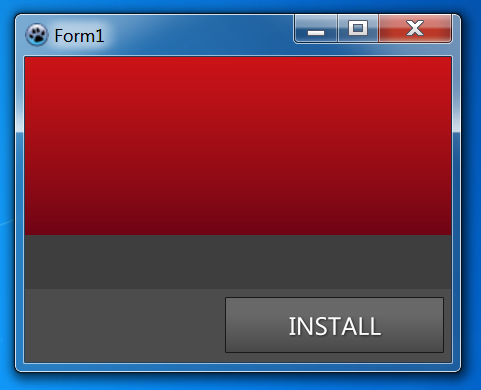 | |
| 672 | 665 | ||
| 673 | - | ||
| 674 | - | ||
| 666 | + | Like Flash Player Setup, add 2 BGRAPanel, the first with a BGRAButton inside, then go OnPaint event of Form1 and add this code: | |
| 667 | + | ||
| 668 | + | ``` pascal | |
| 675 | 669 | procedure TForm1.FormCreate(Sender: TObject); | |
| 676 | - | ||
| 677 | - | ||
| 678 | - | ||
| 679 | - | ||
| 680 | - | ||
| 681 | - | ||
| 682 | - | ||
| 683 | - | ||
| 684 | - | ||
| 685 | - | ||
| 686 | - | ||
| 670 | + | begin | |
| 671 | + | // Background | |
| 672 | + | Self.Color:=RGBToColor(62,62,62); | |
| 673 | + | ||
| 674 | + | // Panel | |
| 675 | + | with BGRAPanel2 do begin | |
| 676 | + | BevelOuter:=bvNone; | |
| 677 | + | With Gradient do begin | |
| 678 | + | StartColor:=RGBToColor(203,19,23); | |
| 679 | + | EndColor:=RGBToColor(110,3,20); | |
| 680 | + | end; | |
| 681 | + | end; | |
| 682 | + | ||
| 683 | + | // Bottom Panel | |
| 684 | + | with BGRAPanel1 do begin | |
| 685 | + | BevelOuter:=bvNone; | |
| 686 | + | BackGroundStyle:=bpsColor; | |
| 687 | + | Color:=RGBToColor(76,76,76); | |
| 688 | + | end; | |
| 689 | + | ||
| 690 | + | // Button | |
| 691 | + | with BGRAButton1 do begin | |
| 692 | + | TextShadowOffSetX:=1; | |
| 693 | + | TextShadowOffSetY:=1; | |
| 694 | + | TextShadowRadius:=2; | |
| 695 | + | // Normal | |
| 696 | + | with BodyNormal do begin | |
| 697 | + | BorderColor:=RGBToColor(24,24,24); | |
| 698 | + | Font.Color:=clWhite; | |
| 699 | + | with Gradient1 do begin | |
| 700 | + | StartColor:=RGBToColor(104,104,104); | |
| 701 | + | EndColor:=RGBToColor(104,104,104); | |
| 687 | 702 | end; | |
| 688 | - | ||
| 689 | - | ||
| 690 | - | ||
| 691 | - | ||
| 692 | - | ||
| 693 | - | ||
| 703 | + | with Gradient2 do begin | |
| 704 | + | StartColor:=RGBToColor(103,103,103); | |
| 705 | + | EndColor:=RGBToColor(71,71,71); | |
| 694 | 706 | end; | |
| 695 | - | ||
| 696 | - | ||
| 697 | - | ||
| 698 | - | ||
| 699 | - | ||
| 700 | - | ||
| 701 | - | ||
| 702 | - | ||
| 703 | - | ||
| 704 | - | ||
| 705 | - | ||
| 706 | - | ||
| 707 | - | ||
| 708 | - | ||
| 709 | - | ||
| 710 | - | ||
| 711 | - | ||
| 712 | - | ||
| 713 | - | ||
| 714 | - | ||
| 715 | - | ||
| 716 | - | ||
| 717 | - | ||
| 718 | - | ||
| 719 | - | ||
| 720 | - | ||
| 721 | - | ||
| 722 | - | ||
| 723 | - | ||
| 724 | - | ||
| 725 | - | ||
| 726 | - | ||
| 727 | - | ||
| 728 | - | ||
| 729 | - | ||
| 730 | - | ||
| 731 | - | ||
| 732 | - | ||
| 733 | - | ||
| 734 | - | ||
| 735 | - | ||
| 736 | - | ||
| 737 | - | ||
| 738 | - | ||
| 739 | - | ||
| 707 | + | end; | |
| 708 | + | // Hover | |
| 709 | + | with BodyHover do begin | |
| 710 | + | BorderColor:=RGBToColor(24,24,24); | |
| 711 | + | Font.Color:=clWhite; | |
| 712 | + | with Gradient1 do begin | |
| 713 | + | StartColor:=RGBToColor(118,118,118); | |
| 714 | + | EndColor:=RGBToColor(118,118,118); | |
| 740 | 715 | end; | |
| 741 | - | ||
| 716 | + | with Gradient2 do begin | |
| 717 | + | StartColor:=RGBToColor(117,117,117); | |
| 718 | + | EndColor:=RGBToColor(81,81,81); | |
| 719 | + | end; | |
| 742 | 720 | end; | |
| 721 | + | // Clicked | |
| 722 | + | with BodyClicked do begin | |
| 723 | + | BorderColor:=RGBToColor(24,24,24); | |
| 724 | + | Font.Color:=clWhite; | |
| 725 | + | with Gradient1 do begin | |
| 726 | + | StartColor:=RGBToColor(92,92,92); | |
| 727 | + | EndColor:=RGBToColor(92,92,92); | |
| 728 | + | end; | |
| 729 | + | with Gradient2 do begin | |
| 730 | + | StartColor:=RGBToColor(91,91,91); | |
| 731 | + | EndColor:=RGBToColor(62,62,62); | |
| 732 | + | end; | |
| 733 | + | end; | |
| 734 | + | end; | |
| 735 | + | ||
| 736 | + | end; | |
| 743 | 737 | ``` | |
| 744 | 738 | ||
| 745 | 739 | --- | |
| 746 | - | ||
| 740 | + | *From the Free Pascal wiki, page "BGRAButton Gallery", as it stood on 2020-02-07 after a change by Trev, out of the wiki's dump of 2024-05-26. Copyright stays with the author who wrote it, according to the old wiki's [[Licensing]] page. If you have concerns about this material, [message the admin](/wiki-contact).* | |
| 741 | + | Category: BGRAControls |