

BGRABitmap tutorial 9: what changed
Revision 1 to 2. Removed lines have a minus sign; added lines have a plus sign.
| Old | New | Line | |
|---|---|---|---|
| 1 | - | ||
| 1 | + | [[BGRABitmap tutorial|**Home**]] | [[BGRABitmap tutorial 1|**Tutorial 1**]] | [[BGRABitmap tutorial 2|**Tutorial 2**]] | [[BGRABitmap tutorial 3|**Tutorial 3**]] | [[BGRABitmap tutorial 4|**Tutorial 4**]] | [[BGRABitmap tutorial 5|**Tutorial 5**]] | [[BGRABitmap tutorial 6|**Tutorial 6**]] | [[BGRABitmap tutorial 7|**Tutorial 7**]] | [[BGRABitmap tutorial 8|**Tutorial 8**]] | **Tutorial 9** | [[BGRABitmap tutorial 10|**Tutorial 10**]] | [[BGRABitmap tutorial 11|**Tutorial 11**]] | [[BGRABitmap tutorial 12|**Tutorial 12**]] | [[BGRABitmap tutorial 13|**Tutorial 13**]] | [[BGRABitmap tutorial 14|**Tutorial 14**]] | [[BGRABitmap tutorial 15|**Tutorial 15**]] | [[BGRABitmap tutorial 16|**Tutorial 16**]] | [[/wiki.freepascal.org/index.php?title=Template:BGRABitmap tutorial index&action=edit|Edit]] | |
| 2 | 2 | ||
| 3 | + | This tutorial shows how to use phong shading to make textures. | |
| 4 | + | ||
| 5 | + | ## Contents | |
| 6 | + | ||
| 7 | + | * 1 Create a new project | |
| 8 | + | * 2 Phong shading and light | |
| 9 | + | * 3 Run the program | |
| 10 | + | * 4 Use phong shading to create textures | |
| 11 | + | * 5 Resulting code | |
| 12 | + | * 6 Run the program | |
| 13 | + | * 7 Using Perlin noise and phong shading together | |
| 14 | + | * 8 Run the program | |
| 15 | + | * 9 Rendering water | |
| 16 | + | * 10 Using thresholds to render snow prints | |
| 17 | + | ||
| 3 | 18 | ### Create a new project | |
| 4 | 19 | ||
| 5 | - | ||
| 20 | + | Create a new project and add a reference to [[BGRABitmap]], the same way as in [[BGRABitmap tutorial 1|the first tutorial]]. | |
| 6 | 21 | ||
| 7 | 22 | ### Phong shading and light | |
| 8 | 23 | ||
| 9 | - | ||
| 10 | - | ||
| 11 | - | ||
| 24 | + | To use phong shading, you need to instanciate a TPhongShading class. It's located in BGRAGradients unit. | |
| 12 | 25 | ||
| 13 | - | ||
| 26 | + | Let's add a variable in the form definition: | |
| 27 | + | ``` | |
| 14 | 28 | TForm1 = class(TForm) | |
| 15 | - | ||
| 16 | - | ||
| 29 | + | ... | |
| 30 | + | phong: TPhongShading; | |
| 17 | 31 | ``` | |
| 18 | 32 | ||
| 19 | - | ||
| 20 | - | ||
| 21 | - | ||
| 33 | + | When the form is created, we can create the class: | |
| 34 | + | ``` | |
| 22 | 35 | procedure TForm1.FormCreate(Sender: TObject); | |
| 23 | - | ||
| 24 | - | ||
| 25 | - | ||
| 26 | - | ||
| 27 | - | ||
| 28 | - | ||
| 29 | - | ||
| 30 | - | ||
| 36 | + | begin | |
| 37 | + | phong := TPhongShading.Create; | |
| 38 | + | phong.LightPositionZ := 150; | |
| 39 | + | phong.SpecularIndex := 20; | |
| 40 | + | phong.AmbientFactor := 0.4; | |
| 41 | + | phong.LightSourceIntensity := 250; | |
| 42 | + | phong.LightSourceDistanceTerm := 200; | |
| 43 | + | end; | |
| 31 | 44 | ``` | |
| 32 | 45 | ||
| 33 | - | ||
| 34 | - | ||
| 35 | - | ||
| 46 | + | The specular index indicates how concentrated the reflected light is. | |
| 36 | 47 | ||
| 37 | - | ||
| 48 | + | When the form is destroyed: | |
| 49 | + | ``` | |
| 38 | 50 | procedure TForm1.FormDestroy(Sender: TObject); | |
| 39 | - | ||
| 40 | - | ||
| 41 | - | ||
| 51 | + | begin | |
| 52 | + | phong.Free; | |
| 53 | + | end; | |
| 42 | 54 | ``` | |
| 43 | 55 | ||
| 44 | - | ||
| 45 | - | ||
| 46 | - | ||
| 56 | + | When the form is painted, add some phong shaded object: | |
| 57 | + | ``` | |
| 47 | 58 | procedure TForm1.FormPaint(Sender: TObject); | |
| 48 | - | ||
| 49 | - | ||
| 50 | - | ||
| 51 | - | ||
| 52 | - | ||
| 53 | - | ||
| 54 | - | ||
| 55 | - | ||
| 56 | - | ||
| 57 | - | ||
| 58 | - | ||
| 59 | + | var | |
| 60 | + | image: TBGRABitmap; | |
| 61 | + | ||
| 62 | + | begin | |
| 63 | + | image := TBGRABitmap.Create(ClientWidth,ClientHeight,ColorToBGRA(ColorToRGB(clBtnFace))); | |
| 64 | + | ||
| 65 | + | phong.DrawSphere(image,rect(20,20,120,120),50,BGRA(255,0,0)); | |
| 66 | + | ||
| 67 | + | image.Draw(Canvas,0,0,True); | |
| 68 | + | image.free; | |
| 69 | + | end; | |
| 59 | 70 | ``` | |
| 60 | 71 | ||
| 61 | - | ||
| 62 | - | ||
| 63 | - | ||
| 72 | + | The parameter of DrawSphere are the destination image, the bounds of the object, the maximum altitude and the color. The diameter of the sphere is 100 so the maximum altitude of a hemisphere is 50. | |
| 64 | 73 | ||
| 65 | - | ||
| 74 | + | Finally when the mouse is moved, it would be nice that the light source followed: | |
| 75 | + | ``` | |
| 66 | 76 | procedure TForm1.FormMouseMove(Sender: TObject; Shift: TShiftState; X, | |
| 67 | - | ||
| 68 | - | ||
| 69 | - | ||
| 70 | - | ||
| 71 | - | ||
| 77 | + | Y: Integer); | |
| 78 | + | begin | |
| 79 | + | phong.LightPosition := point(X,Y); | |
| 80 | + | FormPaint(Sender); | |
| 81 | + | end; | |
| 72 | 82 | ``` | |
| 73 | 83 | ||
| 74 | 84 | ### Run the program | |
| 75 | 85 | ||
| 76 | - | ||
| 86 | + | You should be able to play with the light on the sphere: | |
| 77 | 87 | ||
| 78 | - | ||
| 79 | - | ||
| 80 | - | ||
| 81 | - | ||
| 88 | + | [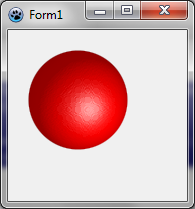](</File:BGRATutorial9a.png>) | |
| 82 | 89 | ||
| 83 | 90 | ### Use phong shading to create textures | |
| 84 | 91 | ||
| 85 | - | ||
| 86 | - | ||
| 87 | - | ||
| 92 | + | The following procedure creates a piece of chocolate: | |
| 93 | + | ``` | |
| 88 | 94 | function CreateChocolateTexture(tx,ty: integer): TBGRABitmap; | |
| 89 | - | ||
| 90 | - | ||
| 91 | - | ||
| 92 | - | ||
| 93 | - | ||
| 94 | - | ||
| 95 | - | ||
| 96 | - | ||
| 97 | - | ||
| 98 | - | ||
| 99 | - | ||
| 100 | - | ||
| 101 | - | ||
| 102 | - | ||
| 103 | - | ||
| 104 | - | ||
| 105 | - | ||
| 106 | - | ||
| 107 | - | ||
| 108 | - | ||
| 109 | - | ||
| 110 | - | ||
| 111 | - | ||
| 112 | - | ||
| 113 | - | ||
| 114 | - | ||
| 115 | - | ||
| 116 | - | ||
| 117 | - | ||
| 118 | - | ||
| 119 | - | ||
| 120 | - | ||
| 121 | - | ||
| 95 | + | var | |
| 96 | + | square,map: TBGRABitmap; | |
| 97 | + | phong: TPhongShading; | |
| 98 | + | margin: integer; | |
| 99 | + | begin | |
| 100 | + | margin := tx div 20; //empty space around the square | |
| 101 | + | square := CreateRectangleMap(tx-2*margin,ty-2*margin,tx div 8); | |
| 102 | + | ||
| 103 | + | //create a map with the square at the middle | |
| 104 | + | map := TBGRABitmap.Create(tx,ty,BGRABlack); | |
| 105 | + | map.PutImage(margin,margin,square,dmDrawWithTransparency); | |
| 106 | + | ||
| 107 | + | //apply blur to make it smoother | |
| 108 | + | BGRAReplace(map,map.FilterBlurRadial(tx div 40,rbFast)); | |
| 109 | + | square.free; | |
| 110 | + | ||
| 111 | + | //create resulting bitmap | |
| 112 | + | result := TBGRABitmap.Create(tx,ty); | |
| 113 | + | ||
| 114 | + | //use phong shading | |
| 115 | + | phong := TPhongShading.Create; | |
| 116 | + | phong.LightSourceDistanceFactor := 0; | |
| 117 | + | phong.LightDestFactor := 0; | |
| 118 | + | phong.LightSourceIntensity := 200; | |
| 119 | + | phong.AmbientFactor := 0.5; | |
| 120 | + | phong.LightPosition := Point(-50,-100); | |
| 121 | + | phong.LightPositionZ := 80; | |
| 122 | + | ||
| 123 | + | //draw the piece of chocolate with max altitude 20 | |
| 124 | + | phong.Draw(result,map,20,0,0,BGRA(86,41,38)); | |
| 125 | + | map.Free; | |
| 126 | + | phong.Free; | |
| 127 | + | end; | |
| 122 | 128 | ``` | |
| 123 | 129 | ||
| 124 | - | ||
| 125 | - | ||
| 126 | - | ||
| 130 | + | The phong shader uses a map of altitudes to render the light effects. Here, the map contains a square. | |
| 127 | 131 | ||
| 128 | - | ||
| 132 | + | Among properties of the phong shader, there is LightSourceDistanceFactor and LightDestFactor. Setting these values to zero make the result tilable. Indeed, when the distance factor is zero, the distance between the light and the object is not taken into account, and when the light destination factor is zero, the position of the object is not taken into account when computing the angle of the light. | |
| 129 | 133 | ||
| 130 | - | ||
| 131 | - | ||
| 134 | + | Now, when the form is created, create the chocolate texture: | |
| 132 | 135 | ``` | |
| 133 | - | ||
| 134 | - | ||
| 135 | - | ||
| 136 | - | ||
| 137 | - | ||
| 136 | + | chocolate := CreateChocolateTexture(80,80); | |
| 138 | 137 | ``` | |
| 139 | 138 | ||
| 140 | - | ||
| 139 | + | And when the form is destroyed: | |
| 140 | + | ``` | |
| 141 | + | chocolate.Free; | |
| 142 | + | ``` | |
| 141 | 143 | ||
| 142 | - | ||
| 143 | - | ||
| 144 | + | Before phong.DrawSphere in the OnPaint event, add this line: | |
| 144 | 145 | ``` | |
| 146 | + | image.FillRect(0,0,80*7,80*4,chocolate,dmSet); | |
| 147 | + | ``` | |
| 145 | 148 | ||
| 146 | 149 | ### Resulting code | |
| 147 | - | ||
| 148 | - | ||
| 150 | + | ``` | |
| 149 | 151 | unit UMain; | |
| 150 | - | ||
| 151 | - | ||
| 152 | - | ||
| 153 | - | ||
| 154 | - | ||
| 155 | - | ||
| 156 | - | ||
| 157 | - | ||
| 158 | - | ||
| 159 | - | ||
| 160 | - | ||
| 161 | - | ||
| 162 | - | ||
| 163 | - | ||
| 164 | - | ||
| 165 | - | ||
| 166 | - | ||
| 167 | - | ||
| 168 | - | ||
| 169 | - | ||
| 170 | - | ||
| 171 | - | ||
| 172 | - | ||
| 173 | - | ||
| 174 | - | ||
| 175 | - | ||
| 176 | - | ||
| 177 | - | ||
| 178 | - | ||
| 179 | - | ||
| 180 | - | ||
| 181 | - | ||
| 182 | - | ||
| 183 | - | ||
| 184 | - | ||
| 185 | - | ||
| 186 | - | ||
| 187 | - | ||
| 188 | - | ||
| 189 | - | ||
| 190 | - | ||
| 191 | - | ||
| 192 | - | ||
| 193 | - | ||
| 194 | - | ||
| 195 | - | ||
| 196 | - | ||
| 197 | - | ||
| 198 | - | ||
| 199 | - | ||
| 200 | - | ||
| 201 | - | ||
| 202 | - | ||
| 203 | - | ||
| 204 | - | ||
| 205 | - | ||
| 206 | - | ||
| 207 | - | ||
| 208 | - | ||
| 209 | - | ||
| 210 | - | ||
| 211 | - | ||
| 212 | - | ||
| 213 | - | ||
| 214 | - | ||
| 215 | - | ||
| 216 | - | ||
| 217 | - | ||
| 218 | - | ||
| 219 | - | ||
| 220 | - | ||
| 221 | - | ||
| 222 | - | ||
| 223 | - | ||
| 224 | - | ||
| 225 | - | ||
| 226 | - | ||
| 227 | - | ||
| 228 | - | ||
| 229 | - | ||
| 230 | - | ||
| 231 | - | ||
| 232 | - | ||
| 233 | - | ||
| 234 | - | ||
| 235 | - | ||
| 236 | - | ||
| 237 | - | ||
| 238 | - | ||
| 239 | - | ||
| 240 | - | ||
| 241 | - | ||
| 242 | - | ||
| 243 | - | ||
| 244 | - | ||
| 245 | - | ||
| 246 | - | ||
| 247 | - | ||
| 248 | - | ||
| 249 | - | ||
| 250 | - | ||
| 152 | + | ||
| 153 | + | {$mode objfpc}{$H+} | |
| 154 | + | ||
| 155 | + | interface | |
| 156 | + | ||
| 157 | + | uses | |
| 158 | + | Classes, SysUtils, FileUtil, LResources, Forms, Controls, Graphics, Dialogs, | |
| 159 | + | ExtCtrls, Buttons, BGRABitmap, BGRABitmapTypes, BGRAGradients; | |
| 160 | + | ||
| 161 | + | type | |
| 162 | + | { TForm1 } | |
| 163 | + | ||
| 164 | + | TForm1 = class(TForm) | |
| 165 | + | Timer1: TTimer; | |
| 166 | + | procedure FormCreate(Sender: TObject); | |
| 167 | + | procedure FormDestroy(Sender: TObject); | |
| 168 | + | procedure FormMouseMove(Sender: TObject; Shift: TShiftState; X, Y: Integer); | |
| 169 | + | procedure FormPaint(Sender: TObject); | |
| 170 | + | private | |
| 171 | + | { private declarations } | |
| 172 | + | public | |
| 173 | + | { public declarations } | |
| 174 | + | phong: TPhongShading; | |
| 175 | + | chocolate: TBGRABitmap; | |
| 176 | + | end; | |
| 177 | + | ||
| 178 | + | var | |
| 179 | + | Form1: TForm1; | |
| 180 | + | ||
| 181 | + | implementation | |
| 182 | + | ||
| 183 | + | function CreateChocolateTexture(tx,ty: integer): TBGRABitmap; | |
| 184 | + | var | |
| 185 | + | square,map: TBGRABitmap; | |
| 186 | + | phong: TPhongShading; | |
| 187 | + | margin: integer; | |
| 188 | + | begin | |
| 189 | + | margin := tx div 20; | |
| 190 | + | square := CreateRectangleMap(tx-2*margin,ty-2*margin,tx div 8); | |
| 191 | + | map := TBGRABitmap.Create(tx,ty,BGRABlack); | |
| 192 | + | map.PutImage(margin,margin,square,dmDrawWithTransparency); | |
| 193 | + | BGRAReplace(map,map.FilterBlurRadial(tx div 40,rbFast)); | |
| 194 | + | square.free; | |
| 195 | + | ||
| 196 | + | result := TBGRABitmap.Create(tx,ty); | |
| 197 | + | phong := TPhongShading.Create; | |
| 198 | + | phong.LightSourceDistanceFactor := 0; | |
| 199 | + | phong.LightDestFactor := 0; | |
| 200 | + | phong.LightSourceIntensity := 200; | |
| 201 | + | phong.AmbientFactor := 0.5; | |
| 202 | + | phong.LightPosition := Point(-50,-100); | |
| 203 | + | phong.LightPositionZ := 80; | |
| 204 | + | phong.Draw(result,map,20,0,0,BGRA(86,41,38)); | |
| 205 | + | map.Free; | |
| 206 | + | phong.Free; | |
| 207 | + | end; | |
| 208 | + | ||
| 209 | + | { TForm1 } | |
| 210 | + | ||
| 211 | + | procedure TForm1.FormCreate(Sender: TObject); | |
| 212 | + | begin | |
| 213 | + | phong := TPhongShading.Create; | |
| 214 | + | phong.LightPositionZ := 150; | |
| 215 | + | phong.SpecularIndex := 20; | |
| 216 | + | phong.AmbientFactor := 0.4; | |
| 217 | + | phong.LightSourceIntensity := 250; | |
| 218 | + | phong.LightSourceDistanceTerm := 200; | |
| 219 | + | ||
| 220 | + | chocolate := CreateChocolateTexture(80,80); | |
| 221 | + | end; | |
| 222 | + | ||
| 223 | + | procedure TForm1.FormDestroy(Sender: TObject); | |
| 224 | + | begin | |
| 225 | + | phong.Free; | |
| 226 | + | chocolate.Free; | |
| 227 | + | end; | |
| 228 | + | ||
| 229 | + | procedure TForm1.FormMouseMove(Sender: TObject; Shift: TShiftState; X, | |
| 230 | + | Y: Integer); | |
| 231 | + | begin | |
| 232 | + | phong.LightPosition := point(X,Y); | |
| 233 | + | FormPaint(Sender); | |
| 234 | + | end; | |
| 235 | + | ||
| 236 | + | ||
| 237 | + | procedure TForm1.FormPaint(Sender: TObject); | |
| 238 | + | var | |
| 239 | + | image: TBGRABitmap; | |
| 240 | + | begin | |
| 241 | + | image := TBGRABitmap.Create(ClientWidth,ClientHeight,ColorToBGRA(ColorToRGB(clBtnFace))); | |
| 242 | + | ||
| 243 | + | image.FillRect(0,0,80*7,80*4,chocolate,dmSet); | |
| 244 | + | phong.DrawSphere(image,rect(20,20,120,120),50,BGRA(255,0,0)); | |
| 245 | + | ||
| 246 | + | image.Draw(Canvas,0,0,True); | |
| 247 | + | image.free; | |
| 248 | + | end; | |
| 249 | + | ||
| 250 | + | initialization | |
| 251 | + | {$I UMain.lrs} | |
| 252 | + | ||
| 253 | + | end. | |
| 251 | 254 | ``` | |
| 252 | 255 | ||
| 253 | 256 | ### Run the program | |
| 254 | 257 | ||
| 255 | - | ||
| 258 | + | You should see a nice bar of chocolate with a big cherry: | |
| 256 | 259 | ||
| 257 | - | ||
| 258 | - | ||
| 259 | - | ||
| 260 | - | ||
| 260 | + | [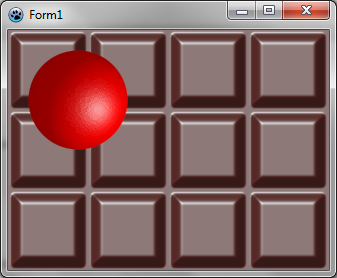](</File:BGRATutorial9b.png>) | |
| 261 | 261 | ||
| 262 | 262 | ### Using Perlin noise and phong shading together | |
| 263 | 263 | ||
| 264 | - | ||
| 265 | - | ||
| 266 | - | ||
| 267 | - | ||
| 268 | - | ||
| 269 | - | ||
| 270 | - | ||
| 271 | - | ||
| 272 | - | ||
| 273 | - | ||
| 274 | - | ||
| 275 | - | ||
| 276 | - | ||
| 277 | - | ||
| 278 | - | ||
| 279 | - | ||
| 280 | - | ||
| 281 | - | ||
| 282 | - | ||
| 283 | - | ||
| 284 | - | ||
| 285 | - | ||
| 286 | - | ||
| 264 | + | The idea is to create a map with a Perlin noise, and then use phong shading to render it. Here is how to create a stone texture: | |
| 287 | 265 | ``` | |
| 288 | - | ||
| 289 | - | ||
| 266 | + | function CreateStoneTexture(tx,ty: integer): TBGRABitmap; | |
| 267 | + | var | |
| 268 | + | temp: TBGRABitmap; | |
| 269 | + | phong: TPhongShading; | |
| 270 | + | begin | |
| 271 | + | result := CreateCyclicPerlinNoiseMap(tx,ty,1,1,0.6); | |
| 272 | + | temp:= result.GetPart(rect(-2,-2,tx+2,ty+2)) as TBGRABitmap; | |
| 273 | + | ||
| 274 | + | phong := TPhongShading.Create; | |
| 275 | + | phong.LightSourceDistanceFactor := 0; | |
| 276 | + | phong.LightDestFactor := 0; | |
| 277 | + | phong.LightSourceIntensity := 100; | |
| 278 | + | phong.LightPositionZ := 100; | |
| 279 | + | phong.NegativeDiffusionFactor := 0.3; | |
| 280 | + | phong.AmbientFactor := 0.5; | |
| 281 | + | phong.Draw(result,temp,30,-2,-2,BGRA(170,170,170)); | |
| 282 | + | ||
| 283 | + | phong.Free; | |
| 284 | + | temp.Free; | |
| 285 | + | end; | |
| 286 | + | ``` | |
| 290 | 287 | ||
| 291 | - | ||
| 288 | + | First, we create a cyclic map. It's important that it be cyclic in order to make a tilable texture. But then, when we will apply phong shading, we need to make the shader aware of the cycle. So, with GetPart, we extract the generated map with 2 more pixels on each border, so the shader can be applied to the map with the cycle. | |
| 292 | 289 | ||
| 293 | - | ||
| 290 | + | The call to phong.Draw with offset (-2,-2) renders the map at the correct location, taking into account that we've added two pixels. | |
| 294 | 291 | ||
| 295 | - | ||
| 292 | + | Now in the OnPaint event: | |
| 293 | + | ``` | |
| 296 | 294 | procedure TForm1.FormPaint(Sender: TObject); | |
| 297 | - | ||
| 298 | - | ||
| 299 | - | ||
| 300 | - | ||
| 301 | - | ||
| 302 | - | ||
| 303 | - | ||
| 304 | - | ||
| 305 | - | ||
| 306 | - | ||
| 307 | - | ||
| 308 | - | ||
| 309 | - | ||
| 295 | + | var | |
| 296 | + | image: TBGRABitmap; | |
| 297 | + | stone: TBGRABitmap; | |
| 298 | + | begin | |
| 299 | + | image := TBGRABitmap.Create(ClientWidth,ClientHeight,ColorToBGRA(ColorToRGB(clBtnFace))); | |
| 300 | + | ||
| 301 | + | stone := CreateStoneTexture(100,100); | |
| 302 | + | image.FillEllipseAntialias(200,100,150,50,stone); | |
| 303 | + | stone.free; | |
| 304 | + | ||
| 305 | + | image.Draw(Canvas,0,0,True); | |
| 306 | + | image.free; | |
| 307 | + | end; | |
| 310 | 308 | ``` | |
| 311 | 309 | ||
| 312 | 310 | ### Run the program | |
| 313 | 311 | ||
| 314 | - | ||
| 312 | + | You should see a form with a stoned background. | |
| 315 | 313 | ||
| 316 | - | ||
| 317 | - | ||
| 318 | - | ||
| 319 | - | ||
| 314 | + | [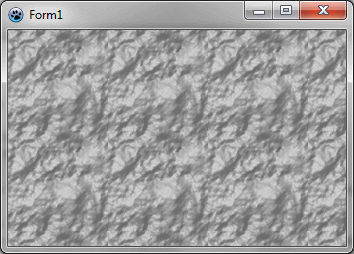](</File:BGRATutorial9c.png>) | |
| 320 | 315 | ||
| 321 | 316 | ### Rendering water | |
| 322 | 317 | ||
| 323 | - | ||
| 324 | - | ||
| 325 | - | ||
| 318 | + | It is almost the same procedure to generate water texture: | |
| 319 | + | ``` | |
| 326 | 320 | function CreateWaterTexture(tx,ty: integer): TBGRABitmap; | |
| 327 | - | ||
| 328 | - | ||
| 329 | - | ||
| 330 | - | ||
| 331 | - | ||
| 332 | - | ||
| 333 | - | ||
| 334 | - | ||
| 335 | - | ||
| 336 | - | ||
| 337 | - | ||
| 338 | - | ||
| 339 | - | ||
| 340 | - | ||
| 341 | - | ||
| 342 | - | ||
| 343 | - | ||
| 344 | - | ||
| 345 | - | ||
| 346 | - | ||
| 347 | - | ||
| 348 | - | ||
| 349 | - | ||
| 321 | + | const blurSize = 5; | |
| 322 | + | var | |
| 323 | + | temp: TBGRABitmap; | |
| 324 | + | phong: TPhongShading; | |
| 325 | + | begin | |
| 326 | + | result := CreateCyclicPerlinNoiseMap(tx,ty,1,1,1.2); | |
| 327 | + | temp:= result.GetPart(rect(-blurSize,-blurSize,tx+blurSize,ty+blurSize)) as TBGRABitmap; | |
| 328 | + | BGRAReplace(temp,temp.FilterBlurRadial(blurSize,rbFast)); | |
| 329 | + | ||
| 330 | + | phong := TPhongShading.Create; | |
| 331 | + | phong.LightSourceDistanceFactor := 0; | |
| 332 | + | phong.LightDestFactor := 0; | |
| 333 | + | phong.LightSourceIntensity := 150; | |
| 334 | + | phong.LightPositionZ := 80; | |
| 335 | + | phong.LightColor := BGRA(105,233,240); | |
| 336 | + | phong.NegativeDiffusionFactor := 0.3; | |
| 337 | + | phong.SpecularIndex := 20; | |
| 338 | + | phong.AmbientFactor := 0.4; | |
| 339 | + | ||
| 340 | + | phong.Draw(result,temp,20,-blurSize,-blurSize,BGRA(28,139,166)); | |
| 341 | + | phong.Free; | |
| 342 | + | temp.Free; | |
| 343 | + | end; | |
| 350 | 344 | ``` | |
| 351 | 345 | ||
| 352 | - | ||
| 346 | + | The main difference is that we apply a blur filter to make it the water smooth and set the light color. | |
| 353 | 347 | ||
| 354 | - | ||
| 355 | - | ||
| 356 | - | ||
| 357 | - | ||
| 348 | + | [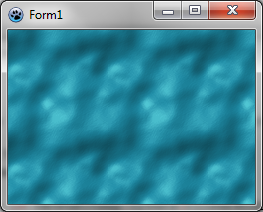](</File:BGRATutorial9d.png>) | |
| 358 | 349 | ||
| 359 | 350 | ### Using thresholds to render snow prints | |
| 360 | 351 | ||
| 361 | - | ||
| 362 | - | ||
| 363 | - | ||
| 352 | + | It is possible to keep only a small subrange of altitudes, to have a texture that shows foot prints in the snow. | |
| 353 | + | ``` | |
| 364 | 354 | function CreateSnowPrintTexture(tx,ty: integer): TBGRABitmap; | |
| 365 | - | ||
| 366 | - | ||
| 367 | - | ||
| 368 | - | ||
| 369 | - | ||
| 370 | - | ||
| 371 | - | ||
| 372 | - | ||
| 373 | - | ||
| 374 | - | ||
| 375 | - | ||
| 376 | - | ||
| 377 | - | ||
| 378 | - | ||
| 379 | - | ||
| 380 | - | ||
| 381 | - | ||
| 382 | - | ||
| 383 | - | ||
| 384 | - | ||
| 385 | - | ||
| 386 | - | ||
| 387 | - | ||
| 388 | - | ||
| 389 | - | ||
| 390 | - | ||
| 391 | - | ||
| 392 | - | ||
| 393 | - | ||
| 394 | - | ||
| 395 | - | ||
| 396 | - | ||
| 397 | - | ||
| 398 | - | ||
| 399 | - | ||
| 400 | - | ||
| 401 | - | ||
| 402 | - | ||
| 403 | - | ||
| 355 | + | var | |
| 356 | + | v: integer; | |
| 357 | + | p: PBGRAPixel; | |
| 358 | + | i: Integer; | |
| 359 | + | ||
| 360 | + | temp: TBGRABitmap; | |
| 361 | + | phong: TPhongShading; | |
| 362 | + | begin | |
| 363 | + | //here a random map is generated | |
| 364 | + | result := CreateCyclicPerlinNoiseMap(tx,ty,1,1,1.2); | |
| 365 | + | ||
| 366 | + | //now we apply thresholds | |
| 367 | + | p := result.Data; | |
| 368 | + | for i := 0 to result.NbPixels-1 do | |
| 369 | + | begin | |
| 370 | + | v := p^.red; | |
| 371 | + | //if the value is above 80 or under 50, then we divide it by 10 to make it almost horizontal | |
| 372 | + | if v > 80 then v := (v-80) div 10+80; | |
| 373 | + | if v < 50 then v := 50-(50-v) div 10; | |
| 374 | + | p^.red := v; | |
| 375 | + | p^.green := v; | |
| 376 | + | p^.blue := v; | |
| 377 | + | inc(p); | |
| 378 | + | end; | |
| 379 | + | ||
| 380 | + | //to make phong shader aware of the cycle | |
| 381 | + | temp:= result.GetPart(rect(-2,-2,tx+2,ty+2)) as TBGRABitmap; | |
| 382 | + | //apply a radial blur | |
| 383 | + | BGRAReplace(temp,temp.FilterBlurRadial(2,rbFast)); | |
| 384 | + | phong := TPhongShading.Create; | |
| 385 | + | phong.LightSourceDistanceFactor := 0; | |
| 386 | + | phong.LightDestFactor := 0; | |
| 387 | + | phong.LightSourceIntensity := 100; | |
| 388 | + | phong.LightPositionZ := 100; | |
| 389 | + | phong.NegativeDiffusionFactor := 0.3; //want shadows | |
| 390 | + | phong.Draw(result,temp,30,-2,-2,BGRAWhite); | |
| 391 | + | phong.Free; | |
| 392 | + | temp.Free; | |
| 393 | + | end; | |
| 404 | 394 | ``` | |
| 405 | 395 | ||
| 406 | - | ||
| 396 | + | We obtain this: | |
| 407 | 397 | ||
| 408 | - | ||
| 409 | - | ||
| 410 | - | ||
| 411 | - | ||
| 398 | + | [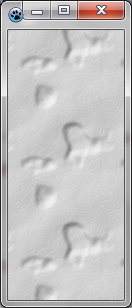](</File:BGRATutorial9e.png>) | |
| 412 | 399 | ||
| 413 | 400 | [[BGRABitmap tutorial 8|Previous tutorial (textures)]] [[BGRABitmap tutorial 10|Next tutorial (texture mapping)]] | |
| 414 | 401 | ||
| 415 | 402 | --- | |
| 416 | - | ||
| 417 | - | ||
| 418 | - | ||
| 403 | + | *From the Free Pascal wiki, page "BGRABitmap tutorial 9", as the Internet Archive kept it on 2024-11-04. Copyright stays with the author who wrote it, according to the old wiki's [[Licensing]] page. If you have concerns about this material, [message the admin](/wiki-contact).* |