

BGRABitmap tutorial 9/ru: what changed
Revision 1 to 2. Removed lines have a minus sign; added lines have a plus sign.
| Old | New | Line | |
|---|---|---|---|
| 1 | 1 | В этом уроке показано, как использовать затенение по Фонгу (фонгирование) для создания текстур. | |
| 2 | 2 | ||
| 3 | 3 | ### Создаём новый проект | |
| 4 | 4 | ||
| 5 | 5 | Создайте новый проект и добавьте ссылку на модуль [[BGRABitmap]], так же, как в [[BGRABitmap tutorial 1/ru|первом уроке]]. | |
| 6 | 6 | ||
| 7 | 7 | ### Затенение по Фонгу и освещённость | |
| 8 | 8 | ||
| 9 | 9 | Для использования фонгирования, Вам необходимо создать экземпляр класса TPhongShading. Он находится в модуле BGRAGradients. | |
| 10 | 10 | ||
| 11 | 11 | Давайте добавим переменную в определение формы: | |
| 12 | 12 | ||
| 13 | 13 | ``` pascal | |
| 14 | 14 | TForm1 = class(TForm) | |
| 15 | 15 | ... | |
| 16 | 16 | phong: TPhongShading; | |
| 17 | 17 | ``` | |
| 18 | 18 | ||
| 19 | 19 | Теперь в обработчике события создания формы (OnCreate) создадим необходимый класс и укажем параметры: | |
| 20 | 20 | ||
| 21 | 21 | ``` pascal | |
| 22 | 22 | procedure TForm1.FormCreate(Sender: TObject); | |
| 23 | 23 | begin | |
| 24 | 24 | phong := TPhongShading.Create; | |
| 25 | 25 | phong.LightPositionZ := 150; | |
| 26 | 26 | phong.SpecularIndex := 20; | |
| 27 | 27 | phong.AmbientFactor := 0.4; | |
| 28 | 28 | phong.LightSourceIntensity := 250; | |
| 29 | 29 | phong.LightSourceDistanceTerm := 200; | |
| 30 | 30 | end; | |
| 31 | 31 | ``` | |
| 32 | 32 | ||
| 33 | 33 | SpecularIndex "индекс зеркальности" указывает на концентрацию отраженного света. | |
| 34 | 34 | ||
| 35 | 35 | А в обработчике события уничтожения формы (OnDestroy) освободим память, выделенную под класс: | |
| 36 | 36 | ||
| 37 | 37 | ``` pascal | |
| 38 | 38 | procedure TForm1.FormDestroy(Sender: TObject); | |
| 39 | 39 | begin | |
| 40 | 40 | phong.Free; | |
| 41 | 41 | end; | |
| 42 | 42 | ``` | |
| 43 | 43 | ||
| 44 | 44 | Когда форма будет прорисовываться, добавим некоторый фонгированный объект: | |
| 45 | 45 | ||
| 46 | 46 | ``` pascal | |
| 47 | 47 | procedure TForm1.FormPaint(Sender: TObject); | |
| 48 | 48 | var | |
| 49 | 49 | image: TBGRABitmap; | |
| 50 | 50 | ||
| 51 | 51 | begin | |
| 52 | 52 | image := TBGRABitmap.Create(ClientWidth,ClientHeight,ColorToBGRA(ColorToRGB(clBtnFace))); | |
| 53 | 53 | ||
| 54 | 54 | phong.DrawSphere(image,rect(20,20,120,120),50,BGRA(255,0,0)); | |
| 55 | 55 | ||
| 56 | 56 | image.Draw(Canvas,0,0,True); | |
| 57 | 57 | image.free; | |
| 58 | 58 | end; | |
| 59 | 59 | ``` | |
| 60 | 60 | ||
| 61 | 61 | Параметры DrawSphere - это: целевое изображение, границы объекта, максимальная высота и цвет. Диаметр сферы равен 100, поэтому максимальная высота полушария равна 50. | |
| 62 | 62 | ||
| 63 | 63 | Наконец, когда мышь перемещается, было бы неплохо, чтобы источник света следовал за курсором: | |
| 64 | 64 | ||
| 65 | 65 | ``` pascal | |
| 66 | 66 | procedure TForm1.FormMouseMove(Sender: TObject; Shift: TShiftState; X, | |
| 67 | 67 | Y: Integer); | |
| 68 | 68 | begin | |
| 69 | 69 | phong.LightPosition := point(X,Y); //координаты источника | |
| 70 | 70 | FormPaint(Sender); //перепрорисовка формы | |
| 71 | 71 | end; | |
| 72 | 72 | ``` | |
| 73 | 73 | ||
| 74 | 74 | ### Запустим программу | |
| 75 | 75 | ||
| 76 | 76 | Вы должны получить возможность играть со светом на сфере: | |
| 77 | 77 | ||
| 78 | - | ||
| 79 | - | ||
| 80 | - | ||
| 81 | - | ||
| 78 | + | 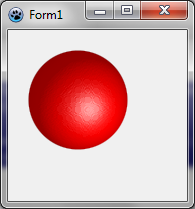 | |
| 82 | 79 | ||
| 83 | 80 | ### Используем фонгирование для создания текстур | |
| 84 | 81 | ||
| 85 | 82 | Следующая процедура создает кусок шоколада: | |
| 86 | 83 | ||
| 87 | 84 | ``` pascal | |
| 88 | 85 | function CreateChocolateTexture(tx,ty: integer): TBGRABitmap; | |
| 89 | 86 | var | |
| 90 | 87 | square,map: TBGRABitmap; | |
| 91 | 88 | phong: TPhongShading; | |
| 92 | 89 | margin: integer; | |
| 93 | 90 | begin | |
| 94 | 91 | margin := tx div 20; //empty space around the square | |
| 95 | 92 | square := CreateRectangleMap(tx-2*margin,ty-2*margin,tx div 8); | |
| 96 | 93 | ||
| 97 | 94 | //создаём карту с квадратом посередине | |
| 98 | 95 | map := TBGRABitmap.Create(tx,ty,BGRABlack); | |
| 99 | 96 | map.PutImage(margin,margin,square,dmDrawWithTransparency); | |
| 100 | 97 | ||
| 101 | 98 | //применим размытие, чтобы сделать его более гладким | |
| 102 | 99 | BGRAReplace(map,map.FilterBlurRadial(tx div 40,rbFast)); | |
| 103 | 100 | square.free; | |
| 104 | 101 | ||
| 105 | 102 | //создаём результирующий растровый рисунок | |
| 106 | 103 | result := TBGRABitmap.Create(tx,ty); | |
| 107 | 104 | ||
| 108 | 105 | //используем фонгирование | |
| 109 | 106 | phong := TPhongShading.Create; | |
| 110 | 107 | phong.LightSourceDistanceFactor := 0; | |
| 111 | 108 | phong.LightDestFactor := 0; | |
| 112 | 109 | phong.LightSourceIntensity := 200; | |
| 113 | 110 | phong.AmbientFactor := 0.5; | |
| 114 | 111 | phong.LightPosition := Point(-50,-100); | |
| 115 | 112 | phong.LightPositionZ := 80; | |
| 116 | 113 | ||
| 117 | 114 | //нарисуем кусок шоколада с максимальной высотой 20 | |
| 118 | 115 | phong.Draw(result,map,20,0,0,BGRA(86,41,38)); | |
| 119 | 116 | map.Free; | |
| 120 | 117 | phong.Free; | |
| 121 | 118 | end; | |
| 122 | 119 | ``` | |
| 123 | 120 | ||
| 124 | 121 | Фонгировщик использует карту высот для визуализации световых эффектов. Здесь карта содержит квадрат. | |
| 125 | 122 | ||
| 126 | 123 | Среди свойств фонгировщика есть LightSourceDistanceFactor и LightDestFactor. Приведение этих значений в ноль делает результат неровным. Действительно, когда коэффициент расстояния равен нулю, расстояние между светом и объектом не учитывается, а когда коэффициент назначения света равен нулю, позиция объекта не учитывается при вычислении угла света. | |
| 127 | 124 | ||
| 128 | 125 | Теперь, когда форма создана, создадим текстуру шоколада: | |
| 129 | 126 | ||
| 130 | 127 | ``` pascal | |
| 131 | 128 | chocolate := CreateChocolateTexture(80,80); | |
| 132 | 129 | ``` | |
| 133 | 130 | ||
| 134 | 131 | А когда форма уничтожается: | |
| 135 | 132 | ||
| 136 | 133 | ``` pascal | |
| 137 | 134 | chocolate.Free; | |
| 138 | 135 | ``` | |
| 139 | 136 | ||
| 140 | 137 | Перед phong.DrawSphere в OnPaint событии, добавим следующую строку: | |
| 141 | 138 | ||
| 142 | 139 | ``` pascal | |
| 143 | 140 | image.FillRect(0,0,80*7,80*4,chocolate,dmSet); | |
| 144 | 141 | ``` | |
| 145 | 142 | ||
| 146 | 143 | ### Весь код | |
| 147 | 144 | ||
| 148 | 145 | ``` pascal | |
| 149 | 146 | unit UMain; | |
| 150 | 147 | ||
| 151 | 148 | {$mode objfpc}{$H+} | |
| 152 | 149 | ||
| 153 | 150 | interface | |
| 154 | 151 | ||
| 155 | 152 | uses | |
| 156 | 153 | Classes, SysUtils, FileUtil, LResources, Forms, Controls, Graphics, Dialogs, | |
| 157 | 154 | ExtCtrls, Buttons, BGRABitmap, BGRABitmapTypes, BGRAGradients; | |
| 158 | 155 | ||
| 159 | 156 | type | |
| 160 | 157 | { TForm1 } | |
| 161 | 158 | ||
| 162 | 159 | TForm1 = class(TForm) | |
| 163 | 160 | Timer1: TTimer; | |
| 164 | 161 | procedure FormCreate(Sender: TObject); | |
| 165 | 162 | procedure FormDestroy(Sender: TObject); | |
| 166 | 163 | procedure FormMouseMove(Sender: TObject; Shift: TShiftState; X, Y: Integer); | |
| 167 | 164 | procedure FormPaint(Sender: TObject); | |
| 168 | 165 | private | |
| 169 | 166 | { private declarations } | |
| 170 | 167 | public | |
| 171 | 168 | { public declarations } | |
| 172 | 169 | phong: TPhongShading; | |
| 173 | 170 | chocolate: TBGRABitmap; | |
| 174 | 171 | end; | |
| 175 | 172 | ||
| 176 | 173 | var | |
| 177 | 174 | Form1: TForm1; | |
| 178 | 175 | ||
| 179 | 176 | implementation | |
| 180 | 177 | ||
| 181 | 178 | function CreateChocolateTexture(tx,ty: integer): TBGRABitmap; | |
| 182 | 179 | var | |
| 183 | 180 | square,map: TBGRABitmap; | |
| 184 | 181 | phong: TPhongShading; | |
| 185 | 182 | margin: integer; | |
| 186 | 183 | begin | |
| 187 | 184 | margin := tx div 20; | |
| 188 | 185 | square := CreateRectangleMap(tx-2*margin,ty-2*margin,tx div 8); | |
| 189 | 186 | map := TBGRABitmap.Create(tx,ty,BGRABlack); | |
| 190 | 187 | map.PutImage(margin,margin,square,dmDrawWithTransparency); | |
| 191 | 188 | BGRAReplace(map,map.FilterBlurRadial(tx div 40,rbFast)); | |
| 192 | 189 | square.free; | |
| 193 | 190 | ||
| 194 | 191 | result := TBGRABitmap.Create(tx,ty); | |
| 195 | 192 | phong := TPhongShading.Create; | |
| 196 | 193 | phong.LightSourceDistanceFactor := 0; | |
| 197 | 194 | phong.LightDestFactor := 0; | |
| 198 | 195 | phong.LightSourceIntensity := 200; | |
| 199 | 196 | phong.AmbientFactor := 0.5; | |
| 200 | 197 | phong.LightPosition := Point(-50,-100); | |
| 201 | 198 | phong.LightPositionZ := 80; | |
| 202 | 199 | phong.Draw(result,map,20,0,0,BGRA(86,41,38)); | |
| 203 | 200 | map.Free; | |
| 204 | 201 | phong.Free; | |
| 205 | 202 | end; | |
| 206 | 203 | ||
| 207 | 204 | { TForm1 } | |
| 208 | 205 | ||
| 209 | 206 | procedure TForm1.FormCreate(Sender: TObject); | |
| 210 | 207 | begin | |
| 211 | 208 | phong := TPhongShading.Create; | |
| 212 | 209 | phong.LightPositionZ := 150; | |
| 213 | 210 | phong.SpecularIndex := 20; | |
| 214 | 211 | phong.AmbientFactor := 0.4; | |
| 215 | 212 | phong.LightSourceIntensity := 250; | |
| 216 | 213 | phong.LightSourceDistanceTerm := 200; | |
| 217 | 214 | ||
| 218 | 215 | chocolate := CreateChocolateTexture(80,80); | |
| 219 | 216 | end; | |
| 220 | 217 | ||
| 221 | 218 | procedure TForm1.FormDestroy(Sender: TObject); | |
| 222 | 219 | begin | |
| 223 | 220 | phong.Free; | |
| 224 | 221 | chocolate.Free; | |
| 225 | 222 | end; | |
| 226 | 223 | ||
| 227 | 224 | procedure TForm1.FormMouseMove(Sender: TObject; Shift: TShiftState; X, | |
| 228 | 225 | Y: Integer); | |
| 229 | 226 | begin | |
| 230 | 227 | phong.LightPosition := point(X,Y); | |
| 231 | 228 | FormPaint(Sender); | |
| 232 | 229 | end; | |
| 233 | 230 | ||
| 234 | 231 | procedure TForm1.FormPaint(Sender: TObject); | |
| 235 | 232 | var | |
| 236 | 233 | image: TBGRABitmap; | |
| 237 | 234 | begin | |
| 238 | 235 | image := TBGRABitmap.Create(ClientWidth,ClientHeight,ColorToBGRA(ColorToRGB(clBtnFace))); | |
| 239 | 236 | ||
| 240 | 237 | image.FillRect(0,0,80*7,80*4,chocolate,dmSet); | |
| 241 | 238 | phong.DrawSphere(image,rect(20,20,120,120),50,BGRA(255,0,0)); | |
| 242 | 239 | ||
| 243 | 240 | image.Draw(Canvas,0,0,True); | |
| 244 | 241 | image.free; | |
| 245 | 242 | end; | |
| 246 | 243 | ||
| 247 | 244 | initialization | |
| 248 | 245 | {$I UMain.lrs} | |
| 249 | 246 | ||
| 250 | 247 | end. | |
| 251 | 248 | ``` | |
| 252 | 249 | ||
| 253 | 250 | ### Запустим программу | |
| 254 | 251 | ||
| 255 | 252 | Вы должны увидеть хорошую плитку шоколада с большой вишней: 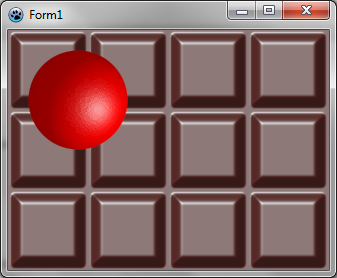 | |
| 256 | 253 | ||
| 257 | 254 | ### Совместное использование шума Перлина и затенения Фонга | |
| 258 | 255 | ||
| 259 | 256 | Идея состоит в том, чтобы создать карту с шумом Перлина, а затем использовать фонгирование для рендеринга. Вот как создать каменную текстуру: | |
| 260 | 257 | ||
| 261 | 258 | ``` pascal | |
| 262 | 259 | function CreateStoneTexture(tx,ty: integer): TBGRABitmap; | |
| 263 | 260 | var | |
| 264 | 261 | temp: TBGRABitmap; | |
| 265 | 262 | phong: TPhongShading; | |
| 266 | 263 | begin | |
| 267 | 264 | result := CreateCyclicPerlinNoiseMap(tx,ty,1,1,0.6); | |
| 268 | 265 | temp:= result.GetPart(rect(-2,-2,tx+2,ty+2)) as TBGRABitmap; | |
| 269 | 266 | ||
| 270 | 267 | phong := TPhongShading.Create; | |
| 271 | 268 | phong.LightSourceDistanceFactor := 0; | |
| 272 | 269 | phong.LightDestFactor := 0; | |
| 273 | 270 | phong.LightSourceIntensity := 100; | |
| 274 | 271 | phong.LightPositionZ := 100; | |
| 275 | 272 | phong.NegativeDiffusionFactor := 0.3; | |
| 276 | 273 | phong.AmbientFactor := 0.5; | |
| 277 | 274 | phong.Draw(result,temp,30,-2,-2,BGRA(170,170,170)); | |
| 278 | 275 | ||
| 279 | 276 | phong.Free; | |
| 280 | 277 | temp.Free; | |
| 281 | 278 | end; | |
| 282 | 279 | ``` | |
| 283 | 280 | ||
| 284 | 281 | First, we create a cyclic map. It's important that it be cyclic in order to make a tilable texture. But then, when we will apply phong shading, we need to make the shader aware of the cycle. So, with GetPart, we extract the generated map with 2 more pixels on each border, so the shader can be applied to the map with the cycle. | |
| 285 | 282 | ||
| 286 | 283 | The call to phong.Draw with offset (-2,-2) renders the map at the correct location, taking into account that we've added two pixels. | |
| 287 | 284 | ||
| 288 | 285 | Now in the OnPaint event : | |
| 289 | 286 | ||
| 290 | 287 | ``` pascal | |
| 291 | 288 | procedure TForm1.FormPaint(Sender: TObject); | |
| 292 | 289 | var | |
| 293 | 290 | image: TBGRABitmap; | |
| 294 | 291 | stone: TBGRABitmap; | |
| 295 | 292 | begin | |
| 296 | 293 | image := TBGRABitmap.Create(ClientWidth,ClientHeight,ColorToBGRA(ColorToRGB(clBtnFace))); | |
| 297 | 294 | ||
| 298 | 295 | stone := CreateStoneTexture(100,100); | |
| 299 | 296 | image.FillEllipseAntialias(200,100,150,50,stone); | |
| 300 | 297 | stone.free; | |
| 301 | 298 | ||
| 302 | 299 | image.Draw(Canvas,0,0,True); | |
| 303 | 300 | image.free; | |
| 304 | 301 | end; | |
| 305 | 302 | ``` | |
| 306 | 303 | ||
| 307 | 304 | ### Run the program | |
| 308 | 305 | ||
| 309 | 306 | You should see a form with a stoned background. | |
| 310 | 307 | ||
| 311 | - | ||
| 312 | - | ||
| 313 | - | ||
| 314 | - | ||
| 308 | + | 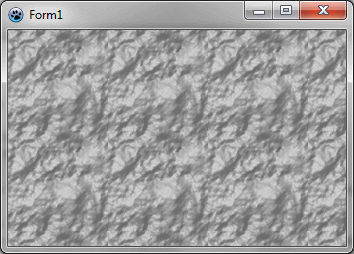 | |
| 315 | 309 | ||
| 316 | 310 | ### Rendering water | |
| 317 | 311 | ||
| 318 | 312 | It is almost the same procedure to generate water texture : | |
| 319 | 313 | ||
| 320 | 314 | ``` pascal | |
| 321 | 315 | function CreateWaterTexture(tx,ty: integer): TBGRABitmap; | |
| 322 | 316 | const blurSize = 5; | |
| 323 | 317 | var | |
| 324 | 318 | temp: TBGRABitmap; | |
| 325 | 319 | phong: TPhongShading; | |
| 326 | 320 | begin | |
| 327 | 321 | result := CreateCyclicPerlinNoiseMap(tx,ty,1,1,1.2); | |
| 328 | 322 | temp:= result.GetPart(rect(-blurSize,-blurSize,tx+blurSize,ty+blurSize)) as TBGRABitmap; | |
| 329 | 323 | BGRAReplace(temp,temp.FilterBlurRadial(blurSize,rbFast)); | |
| 330 | 324 | ||
| 331 | 325 | phong := TPhongShading.Create; | |
| 332 | 326 | phong.LightSourceDistanceFactor := 0; | |
| 333 | 327 | phong.LightDestFactor := 0; | |
| 334 | 328 | phong.LightSourceIntensity := 150; | |
| 335 | 329 | phong.LightPositionZ := 80; | |
| 336 | 330 | phong.LightColor := BGRA(105,233,240); | |
| 337 | 331 | phong.NegativeDiffusionFactor := 0.3; | |
| 338 | 332 | phong.SpecularIndex := 20; | |
| 339 | 333 | phong.AmbientFactor := 0.4; | |
| 340 | 334 | ||
| 341 | 335 | phong.Draw(result,temp,20,-blurSize,-blurSize,BGRA(28,139,166)); | |
| 342 | 336 | phong.Free; | |
| 343 | 337 | temp.Free; | |
| 344 | 338 | end; | |
| 345 | 339 | ``` | |
| 346 | 340 | ||
| 347 | 341 | The main difference is that we apply a blur filter to make it the water smooth and set the light color. | |
| 348 | 342 | ||
| 349 | - | ||
| 350 | - | ||
| 351 | - | ||
| 352 | - | ||
| 343 | + | 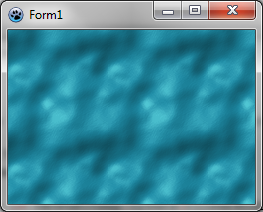 | |
| 353 | 344 | ||
| 354 | 345 | ### Using thresholds to render snow prints | |
| 355 | 346 | ||
| 356 | 347 | It is possible to keep only a small subrange of altitudes, to have a texture that shows foot prints in the snow. | |
| 357 | 348 | ||
| 358 | 349 | ``` pascal | |
| 359 | 350 | function CreateSnowPrintTexture(tx,ty: integer): TBGRABitmap; | |
| 360 | 351 | var | |
| 361 | 352 | v: integer; | |
| 362 | 353 | p: PBGRAPixel; | |
| 363 | 354 | i: Integer; | |
| 364 | 355 | ||
| 365 | 356 | temp: TBGRABitmap; | |
| 366 | 357 | phong: TPhongShading; | |
| 367 | 358 | begin | |
| 368 | 359 | //here a random map is generated | |
| 369 | 360 | result := CreateCyclicPerlinNoiseMap(tx,ty,1,1,1.2); | |
| 370 | 361 | ||
| 371 | 362 | //now we apply thresholds | |
| 372 | 363 | p := result.Data; | |
| 373 | 364 | for i := 0 to result.NbPixels-1 do | |
| 374 | 365 | begin | |
| 375 | 366 | v := p^.red; | |
| 376 | 367 | //if the value is above 80 or under 50, then we divide it by 10 to make it almost horizontal | |
| 377 | 368 | if v > 80 then v := (v-80) div 10+80; | |
| 378 | 369 | if v < 50 then v := 50-(50-v) div 10; | |
| 379 | 370 | p^.red := v; | |
| 380 | 371 | p^.green := v; | |
| 381 | 372 | p^.blue := v; | |
| 382 | 373 | inc(p); | |
| 383 | 374 | end; | |
| 384 | 375 | ||
| 385 | 376 | //to make phong shader aware of the cycle | |
| 386 | 377 | temp:= result.GetPart(rect(-2,-2,tx+2,ty+2)) as TBGRABitmap; | |
| 387 | 378 | //apply a radial blur | |
| 388 | 379 | BGRAReplace(temp,temp.FilterBlurRadial(2,rbFast)); | |
| 389 | 380 | phong := TPhongShading.Create; | |
| 390 | 381 | phong.LightSourceDistanceFactor := 0; | |
| 391 | 382 | phong.LightDestFactor := 0; | |
| 392 | 383 | phong.LightSourceIntensity := 100; | |
| 393 | 384 | phong.LightPositionZ := 100; | |
| 394 | 385 | phong.NegativeDiffusionFactor := 0.3; //want shadows | |
| 395 | 386 | phong.Draw(result,temp,30,-2,-2,BGRAWhite); | |
| 396 | 387 | phong.Free; | |
| 397 | 388 | temp.Free; | |
| 398 | 389 | end; | |
| 399 | 390 | ``` | |
| 400 | 391 | ||
| 401 | 392 | We obtain this : | |
| 402 | 393 | ||
| 403 | - | ||
| 404 | - | ||
| 405 | - | ||
| 406 | - | ||
| 394 | + | 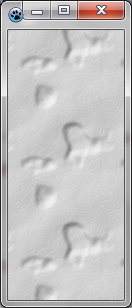 | |
| 407 | 395 | ||
| 408 | 396 | [[BGRABitmap tutorial 8|Previous tutorial (textures)]] [[BGRABitmap tutorial 10|Next tutorial (texture mapping)]] | |
| 409 | 397 | ||
| 410 | 398 | --- | |
| 411 | 399 | *From the Free Pascal wiki, page "BGRABitmap tutorial 9/ru", as it stood on 2020-02-10 after a change by Trev, out of the wiki's dump of 2024-05-26. Copyright stays with the author who wrote it, according to the old wiki's [[Licensing]] page. If you have concerns about this material, [message the admin](/wiki-contact).* |