

BGRABitmap tutorial 9/fr: what changed
Revision 1 to 2. Removed lines have a minus sign; added lines have a plus sign.
| Old | New | Line | |
|---|---|---|---|
| 1 | 1 | Ce tutoriel montre comment utiliser l'éclairage de Phong avec les textures. | |
| 2 | 2 | ||
| 3 | 3 | ### Création d'un nouveau projet | |
| 4 | 4 | ||
| 5 | 5 | Créez un nouveau projet et ajoutez la référence à [[BGRABitmap]], de la même façon que dans [[BGRABitmap tutorial/fr|le premier tutoriel]]. | |
| 6 | 6 | ||
| 7 | 7 | ### Phong et lumière | |
| 8 | 8 | ||
| 9 | 9 | Pour utiliser l'éclairage Phong, vous devez initialiser une classe *TPhongShading*. Elle est située dans l'unité *BGRAGradients*. | |
| 10 | 10 | ||
| 11 | 11 | Ajoutez la variable dans la définition de la fenêtre : | |
| 12 | 12 | ||
| 13 | 13 | ``` pascal | |
| 14 | 14 | TForm1 = class(TForm) | |
| 15 | 15 | ... | |
| 16 | 16 | phong: TPhongShading; | |
| 17 | 17 | ``` | |
| 18 | 18 | ||
| 19 | 19 | Quand la fenêtre est créée, créez la classe : | |
| 20 | 20 | ||
| 21 | 21 | ``` pascal | |
| 22 | 22 | procedure TForm1.FormCreate(Sender: TObject); | |
| 23 | 23 | begin | |
| 24 | 24 | phong := TPhongShading.Create; | |
| 25 | 25 | phong.LightPositionZ := 150; | |
| 26 | 26 | phong.SpecularIndex := 20; | |
| 27 | 27 | phong.AmbientFactor := 0.4; | |
| 28 | 28 | phong.LightSourceIntensity := 250; | |
| 29 | 29 | phong.LightSourceDistanceTerm := 200; | |
| 30 | 30 | end; | |
| 31 | 31 | ``` | |
| 32 | 32 | ||
| 33 | 33 | L'indice spéculaire indique la concentration de la lumière réfléchie. Le facteur ambiant indique l'éclairage de base. La variable *LightSourceDistanceTerm* indique la distance supplémentaire entre la lumière et l'objet. | |
| 34 | 34 | ||
| 35 | 35 | Quand le fenêtre est détruite : | |
| 36 | 36 | ||
| 37 | 37 | ``` pascal | |
| 38 | 38 | procedure TForm1.FormDestroy(Sender: TObject); | |
| 39 | 39 | begin | |
| 40 | 40 | phong.Free; | |
| 41 | 41 | end; | |
| 42 | 42 | ``` | |
| 43 | 43 | ||
| 44 | 44 | Quand l'image est peinte, on ajoute un objet avec éclairage de Phong : | |
| 45 | 45 | ||
| 46 | 46 | ``` pascal | |
| 47 | 47 | var | |
| 48 | 48 | image: TBGRABitmap; | |
| 49 | 49 | ||
| 50 | 50 | begin | |
| 51 | 51 | image := TBGRABitmap.Create(ClientWidth,ClientHeight,ColorToBGRA(ColorToRGB(clBtnFace))); | |
| 52 | 52 | ||
| 53 | 53 | phong.DrawSphere(image,rect(20,20,120,120),50,BGRA(255,0,0)); | |
| 54 | 54 | ||
| 55 | 55 | image.Draw(Canvas,0,0,True); | |
| 56 | 56 | image.free; | |
| 57 | 57 | end; | |
| 58 | 58 | ``` | |
| 59 | 59 | ||
| 60 | 60 | Les paramètres de *DrawSphere* sont l'image de destination, les bornes de l'objet, l'altitude maximum et la couleur. Le diamètre de la sphère est 100 alors l'altitude maximum est un hémisphère de 50. | |
| 61 | 61 | ||
| 62 | 62 | Finalement, quand la souris est déplacée, ce serait bien que la source de lumière suive : | |
| 63 | 63 | ||
| 64 | 64 | ``` pascal | |
| 65 | 65 | procedure TForm1.FormMouseMove(Sender: TObject; Shift: TShiftState; X, | |
| 66 | 66 | Y: Integer); | |
| 67 | 67 | begin | |
| 68 | 68 | phong.LightPosition := point(X,Y); | |
| 69 | 69 | FormPaint(Sender); | |
| 70 | 70 | end; | |
| 71 | 71 | ``` | |
| 72 | 72 | ||
| 73 | 73 | ### Exécution du programme | |
| 74 | 74 | ||
| 75 | 75 | Vous pouvez jouer avec la lumière sur la sphère : | |
| 76 | 76 | ||
| 77 | - | ||
| 78 | - | ||
| 79 | - | ||
| 80 | - | ||
| 77 | + | 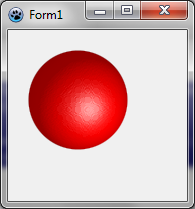 | |
| 81 | 78 | ||
| 82 | 79 | ### Utiliser l'éclairage de Phong pour créer des textures | |
| 83 | 80 | ||
| 84 | 81 | La procédure suivante crée un carré de chocolat : | |
| 85 | 82 | ||
| 86 | 83 | ``` pascal | |
| 87 | 84 | function CreateChocolateTexture(tx,ty: integer): TBGRABitmap; | |
| 88 | 85 | var | |
| 89 | 86 | square,map: TBGRABitmap; | |
| 90 | 87 | phong: TPhongShading; | |
| 91 | 88 | margin: integer; | |
| 92 | 89 | begin | |
| 93 | 90 | margin := tx div 20; //espace vide autour du carré | |
| 94 | 91 | square := CreateRectangleMap(tx-2*margin,ty-2*margin,tx div 8); | |
| 95 | 92 | ||
| 96 | 93 | //crée une carte avec le carré au milieu | |
| 97 | 94 | map := TBGRABitmap.Create(tx,ty,BGRABlack); | |
| 98 | 95 | map.PutImage(margin,margin,square,dmDrawWithTransparency); | |
| 99 | 96 | ||
| 100 | 97 | //applique un flou pour le rendre plus arrondi | |
| 101 | 98 | BGRAReplace(map,map.FilterBlurRadial(tx div 40,rbFast)); | |
| 102 | 99 | square.free; | |
| 103 | 100 | ||
| 104 | 101 | //création de l'image résultante | |
| 105 | 102 | result := TBGRABitmap.Create(tx,ty); | |
| 106 | 103 | ||
| 107 | 104 | //utilisation de l'éclairage de Phong | |
| 108 | 105 | phong := TPhongShading.Create; | |
| 109 | 106 | phong.LightSourceDistanceFactor := 0; | |
| 110 | 107 | phong.LightDestFactor := 0; | |
| 111 | 108 | phong.LightSourceIntensity := 200; | |
| 112 | 109 | phong.AmbientFactor := 0.5; | |
| 113 | 110 | phong.LightPosition := Point(-50,-100); | |
| 114 | 111 | phong.LightPositionZ := 80; | |
| 115 | 112 | ||
| 116 | 113 | //dessine une pièce de chocolat avec une altitude max de 20 | |
| 117 | 114 | phong.Draw(result,map,20,0,0,BGRA(86,41,38)); | |
| 118 | 115 | map.Free; | |
| 119 | 116 | phong.Free; | |
| 120 | 117 | end; | |
| 121 | 118 | ``` | |
| 122 | 119 | ||
| 123 | 120 | Le module d'éclairage de Phong utilise une carte d'altitudes pour calculer les effets de lumière. Ici, la carte contient un carré. | |
| 124 | 121 | ||
| 125 | 122 | Parmi les propriétés de l'éclairage figurent *LightSourceDistanceFactor* et *LightDestFactor*. En mettant ces valeurs à zéro, on permet que la texture soit répétable. En effet, quand le facteur de distance est à zéro, la distance entre la lumière et l'objet n'est pas prise en compte, et quand le facteur de destination de la lumière est à zéro, la position de l'objet n'est pas prise en compte pour le calcul de l'angle de la lumière. | |
| 126 | 123 | ||
| 127 | 124 | Quand la fenêtre est créée, on crée le morceau de chocolat : | |
| 128 | 125 | ||
| 129 | 126 | ``` pascal | |
| 130 | 127 | chocolate := CreateChocolateTexture(80,80); | |
| 131 | 128 | ``` | |
| 132 | 129 | ||
| 133 | 130 | Et quand la fenêtre est détruite : | |
| 134 | 131 | ||
| 135 | 132 | ``` pascal | |
| 136 | 133 | chocolate.Free; | |
| 137 | 134 | ``` | |
| 138 | 135 | ||
| 139 | 136 | Avant *phong.DrawSphere* dans l'événement *OnPaint*, ajoutez cette ligne : | |
| 140 | 137 | ||
| 141 | 138 | ``` pascal | |
| 142 | 139 | image.FillRect(0,0,80*7,80*4,chocolate,dmSet); | |
| 143 | 140 | ``` | |
| 144 | 141 | ||
| 145 | 142 | ### Code résultant | |
| 146 | 143 | ||
| 147 | 144 | ``` pascal | |
| 148 | 145 | unit UMain; | |
| 149 | 146 | ||
| 150 | 147 | {$mode objfpc}{$H+} | |
| 151 | 148 | ||
| 152 | 149 | interface | |
| 153 | 150 | ||
| 154 | 151 | uses | |
| 155 | 152 | Classes, SysUtils, FileUtil, LResources, Forms, Controls, Graphics, Dialogs, | |
| 156 | 153 | ExtCtrls, Buttons, BGRABitmap, BGRABitmapTypes, BGRAGradients; | |
| 157 | 154 | ||
| 158 | 155 | type | |
| 159 | 156 | { TForm1 } | |
| 160 | 157 | ||
| 161 | 158 | TForm1 = class(TForm) | |
| 162 | 159 | Timer1: TTimer; | |
| 163 | 160 | procedure FormCreate(Sender: TObject); | |
| 164 | 161 | procedure FormDestroy(Sender: TObject); | |
| 165 | 162 | procedure FormMouseMove(Sender: TObject; Shift: TShiftState; X, Y: Integer); | |
| 166 | 163 | procedure FormPaint(Sender: TObject); | |
| 167 | 164 | private | |
| 168 | 165 | { private declarations } | |
| 169 | 166 | public | |
| 170 | 167 | { public declarations } | |
| 171 | 168 | phong: TPhongShading; | |
| 172 | 169 | chocolate: TBGRABitmap; | |
| 173 | 170 | end; | |
| 174 | 171 | ||
| 175 | 172 | var | |
| 176 | 173 | Form1: TForm1; | |
| 177 | 174 | ||
| 178 | 175 | implementation | |
| 179 | 176 | ||
| 180 | 177 | function CreateChocolateTexture(tx,ty: integer): TBGRABitmap; | |
| 181 | 178 | var | |
| 182 | 179 | square,map: TBGRABitmap; | |
| 183 | 180 | phong: TPhongShading; | |
| 184 | 181 | margin: integer; | |
| 185 | 182 | begin | |
| 186 | 183 | margin := tx div 20; | |
| 187 | 184 | square := CreateRectangleMap(tx-2*margin,ty-2*margin,tx div 8); | |
| 188 | 185 | map := TBGRABitmap.Create(tx,ty,BGRABlack); | |
| 189 | 186 | map.PutImage(margin,margin,square,dmDrawWithTransparency); | |
| 190 | 187 | BGRAReplace(map,map.FilterBlurRadial(tx div 40,rbFast)); | |
| 191 | 188 | square.free; | |
| 192 | 189 | ||
| 193 | 190 | result := TBGRABitmap.Create(tx,ty); | |
| 194 | 191 | phong := TPhongShading.Create; | |
| 195 | 192 | phong.LightSourceDistanceFactor := 0; | |
| 196 | 193 | phong.LightDestFactor := 0; | |
| 197 | 194 | phong.LightSourceIntensity := 200; | |
| 198 | 195 | phong.AmbientFactor := 0.5; | |
| 199 | 196 | phong.LightPosition := Point(-50,-100); | |
| 200 | 197 | phong.LightPositionZ := 80; | |
| 201 | 198 | phong.Draw(result,map,20,0,0,BGRA(86,41,38)); | |
| 202 | 199 | map.Free; | |
| 203 | 200 | phong.Free; | |
| 204 | 201 | end; | |
| 205 | 202 | ||
| 206 | 203 | { TForm1 } | |
| 207 | 204 | ||
| 208 | 205 | procedure TForm1.FormCreate(Sender: TObject); | |
| 209 | 206 | begin | |
| 210 | 207 | phong := TPhongShading.Create; | |
| 211 | 208 | phong.LightPositionZ := 150; | |
| 212 | 209 | phong.SpecularIndex := 20; | |
| 213 | 210 | phong.AmbientFactor := 0.4; | |
| 214 | 211 | phong.LightSourceIntensity := 250; | |
| 215 | 212 | phong.LightSourceDistanceTerm := 200; | |
| 216 | 213 | ||
| 217 | 214 | chocolate := CreateChocolateTexture(80,80); | |
| 218 | 215 | end; | |
| 219 | 216 | ||
| 220 | 217 | procedure TForm1.FormDestroy(Sender: TObject); | |
| 221 | 218 | begin | |
| 222 | 219 | phong.Free; | |
| 223 | 220 | chocolate.Free; | |
| 224 | 221 | end; | |
| 225 | 222 | ||
| 226 | 223 | procedure TForm1.FormMouseMove(Sender: TObject; Shift: TShiftState; X, | |
| 227 | 224 | Y: Integer); | |
| 228 | 225 | begin | |
| 229 | 226 | phong.LightPosition := point(X,Y); | |
| 230 | 227 | FormPaint(Sender); | |
| 231 | 228 | end; | |
| 232 | 229 | ||
| 233 | 230 | procedure TForm1.FormPaint(Sender: TObject); | |
| 234 | 231 | var | |
| 235 | 232 | image: TBGRABitmap; | |
| 236 | 233 | begin | |
| 237 | 234 | image := TBGRABitmap.Create(ClientWidth,ClientHeight,ColorToBGRA(ColorToRGB(clBtnFace))); | |
| 238 | 235 | ||
| 239 | 236 | image.FillRect(0,0,80*7,80*4,chocolate,dmSet); | |
| 240 | 237 | phong.DrawSphere(image,rect(20,20,120,120),50,BGRA(255,0,0)); | |
| 241 | 238 | ||
| 242 | 239 | image.Draw(Canvas,0,0,True); | |
| 243 | 240 | image.free; | |
| 244 | 241 | end; | |
| 245 | 242 | ||
| 246 | 243 | initialization | |
| 247 | 244 | {$I UMain.lrs} | |
| 248 | 245 | ||
| 249 | 246 | end. | |
| 250 | 247 | ``` | |
| 251 | 248 | ||
| 252 | 249 | ### Exécution du programme | |
| 253 | 250 | ||
| 254 | 251 | Vous devriez voir une plaquette de chocolat appétissante avec une grosse cerise : | |
| 255 | 252 | ||
| 256 | - | ||
| 257 | - | ||
| 258 | - | ||
| 259 | - | ||
| 253 | + | 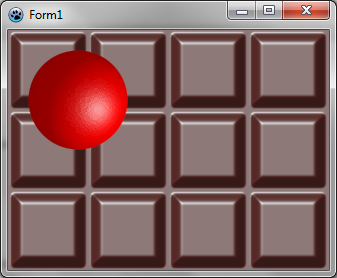 | |
| 260 | 254 | ||
| 261 | 255 | ### Utiliser le bruit de Perlin et l'éclairage de Phong ensemble | |
| 262 | 256 | ||
| 263 | 257 | L'idée est de créer une carte avec un bruit de Perlin, et ensuite d'utiliser l'éclairage de Phong pour le rendu. Voici comme créer une texture de pierre : | |
| 264 | 258 | ||
| 265 | 259 | ``` pascal | |
| 266 | 260 | function CreateStoneTexture(tx,ty: integer): TBGRABitmap; | |
| 267 | 261 | var | |
| 268 | 262 | temp: TBGRABitmap; | |
| 269 | 263 | phong: TPhongShading; | |
| 270 | 264 | begin | |
| 271 | 265 | result := CreateCyclicPerlinNoiseMap(tx,ty,1,1,0.6); | |
| 272 | 266 | temp:= result.GetPart(rect(-2,-2,tx+2,ty+2)) as TBGRABitmap; | |
| 273 | 267 | ||
| 274 | 268 | phong := TPhongShading.Create; | |
| 275 | 269 | phong.LightSourceDistanceFactor := 0; | |
| 276 | 270 | phong.LightDestFactor := 0; | |
| 277 | 271 | phong.LightSourceIntensity := 100; | |
| 278 | 272 | phong.LightPositionZ := 100; | |
| 279 | 273 | phong.NegativeDiffusionFactor := 0.3; | |
| 280 | 274 | phong.AmbientFactor := 0.5; | |
| 281 | 275 | phong.Draw(result,temp,30,-2,-2,BGRA(170,170,170)); | |
| 282 | 276 | ||
| 283 | 277 | phong.Free; | |
| 284 | 278 | temp.Free; | |
| 285 | 279 | end; | |
| 286 | 280 | ``` | |
| 287 | 281 | ||
| 288 | 282 | D'abord, on crée une carte cyclique. C'est important pour que la texture soit répétable. Mais ensuite, quand on appliquera l'effet Phong, on aura besoin de préciser que l'effet de lumière est lui aussi cyclique. Alors, avec *GetPart*, on extrait la carte générée avec 2 pixels en plus sur chaque bord, ainsi le calcul de lumière sera-t-il appliqué convenablement. | |
| 289 | 283 | ||
| 290 | 284 | L'appel à *phong.Draw* avec le décalage (-2,-2) dessine la carte à la position correcte, prenant en compte qu'on a ajouté 2 pixels. | |
| 291 | 285 | ||
| 292 | 286 | Maintenant dans l'événement *OnPaint* : | |
| 293 | 287 | ||
| 294 | 288 | ``` pascal | |
| 295 | 289 | procedure TForm1.FormPaint(Sender: TObject); | |
| 296 | 290 | var | |
| 297 | 291 | image: TBGRABitmap; | |
| 298 | 292 | stone: TBGRABitmap; | |
| 299 | 293 | begin | |
| 300 | 294 | image := TBGRABitmap.Create(ClientWidth,ClientHeight,ColorToBGRA(ColorToRGB(clBtnFace))); | |
| 301 | 295 | ||
| 302 | 296 | stone := CreateStoneTexture(100,100); | |
| 303 | 297 | image.FillEllipseAntialias(200,100,150,50,stone); | |
| 304 | 298 | stone.free; | |
| 305 | 299 | ||
| 306 | 300 | image.Draw(Canvas,0,0,True); | |
| 307 | 301 | image.free; | |
| 308 | 302 | end; | |
| 309 | 303 | ``` | |
| 310 | 304 | ||
| 311 | 305 | ### Exécution du programme | |
| 312 | 306 | ||
| 313 | 307 | Vous devriez voir une fenêtre avec un fond de pierre : | |
| 314 | 308 | ||
| 315 | - | ||
| 316 | - | ||
| 317 | - | ||
| 318 | - | ||
| 309 | + | 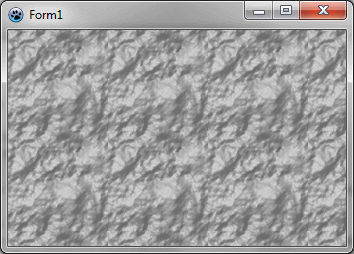 | |
| 319 | 310 | ||
| 320 | 311 | ### Faire de l'eau | |
| 321 | 312 | ||
| 322 | 313 | C'est presque la même procédure pour générer de l'eau : | |
| 323 | 314 | ||
| 324 | 315 | ``` pascal | |
| 325 | 316 | function CreateWaterTexture(tx,ty: integer): TBGRABitmap; | |
| 326 | 317 | const blurSize = 5; | |
| 327 | 318 | var | |
| 328 | 319 | temp: TBGRABitmap; | |
| 329 | 320 | phong: TPhongShading; | |
| 330 | 321 | begin | |
| 331 | 322 | result := CreateCyclicPerlinNoiseMap(tx,ty,1,1,1.2); | |
| 332 | 323 | temp:= result.GetPart(rect(-blurSize,-blurSize,tx+blurSize,ty+blurSize)) as TBGRABitmap; | |
| 333 | 324 | BGRAReplace(temp,temp.FilterBlurRadial(blurSize,rbFast)); | |
| 334 | 325 | ||
| 335 | 326 | phong := TPhongShading.Create; | |
| 336 | 327 | phong.LightSourceDistanceFactor := 0; | |
| 337 | 328 | phong.LightDestFactor := 0; | |
| 338 | 329 | phong.LightSourceIntensity := 150; | |
| 339 | 330 | phong.LightPositionZ := 80; | |
| 340 | 331 | phong.LightColor := BGRA(105,233,240); | |
| 341 | 332 | phong.NegativeDiffusionFactor := 0.3; | |
| 342 | 333 | phong.SpecularIndex := 20; | |
| 343 | 334 | phong.AmbientFactor := 0.4; | |
| 344 | 335 | ||
| 345 | 336 | phong.Draw(result,temp,20,-blurSize,-blurSize,BGRA(28,139,166)); | |
| 346 | 337 | phong.Free; | |
| 347 | 338 | temp.Free; | |
| 348 | 339 | end; | |
| 349 | 340 | ``` | |
| 350 | 341 | ||
| 351 | 342 | La principale différence est qu'on applique un flou pour rendre l'eau ronde et qu'on définit une couleur pour la lumière. | |
| 352 | 343 | ||
| 353 | - | ||
| 354 | - | ||
| 355 | - | ||
| 356 | - | ||
| 344 | + | 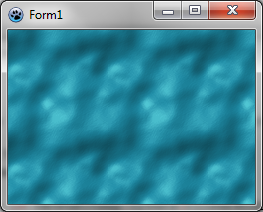 | |
| 357 | 345 | ||
| 358 | 346 | ### Utilisation de seuil pour faire des traces dans la neige | |
| 359 | 347 | ||
| 360 | 348 | Il est possible de ne garder qu'un sous-intervalle des altitudes, pour avoir une texture qui montre des traces de pas dans la neige. | |
| 361 | 349 | ||
| 362 | 350 | ``` pascal | |
| 363 | 351 | function CreateSnowPrintTexture(tx,ty: integer): TBGRABitmap; | |
| 364 | 352 | var | |
| 365 | 353 | v: integer; | |
| 366 | 354 | p: PBGRAPixel; | |
| 367 | 355 | i: Integer; | |
| 368 | 356 | ||
| 369 | 357 | temp: TBGRABitmap; | |
| 370 | 358 | phong: TPhongShading; | |
| 371 | 359 | begin | |
| 372 | 360 | //ici la carte aléatoire est créée | |
| 373 | 361 | result := CreateCyclicPerlinNoiseMap(tx,ty,1,1,1.2); | |
| 374 | 362 | ||
| 375 | 363 | //à présent on applique les seuils | |
| 376 | 364 | p := result.Data; | |
| 377 | 365 | for i := 0 to result.NbPixels-1 do | |
| 378 | 366 | begin | |
| 379 | 367 | v := p^.red; | |
| 380 | 368 | //si la valeur est au-dessus de 80 ou en-dessous de 50, on la divise par 10 pour rendre la carte horizontale | |
| 381 | 369 | if v > 80 then v := (v-80) div 10+80; | |
| 382 | 370 | if v < 50 then v := 50-(50-v) div 10; | |
| 383 | 371 | p^.red := v; | |
| 384 | 372 | p^.green := v; | |
| 385 | 373 | p^.blue := v; | |
| 386 | 374 | inc(p); | |
| 387 | 375 | end; | |
| 388 | 376 | ||
| 389 | 377 | //pour que l'éclairage de Phong prenne en compte le cycle | |
| 390 | 378 | temp:= result.GetPart(rect(-2,-2,tx+2,ty+2)) as TBGRABitmap; | |
| 391 | 379 | //on applique un flou radial | |
| 392 | 380 | BGRAReplace(temp,temp.FilterBlurRadial(2,rbFast)); | |
| 393 | 381 | phong := TPhongShading.Create; | |
| 394 | 382 | phong.LightSourceDistanceFactor := 0; | |
| 395 | 383 | phong.LightDestFactor := 0; | |
| 396 | 384 | phong.LightSourceIntensity := 100; | |
| 397 | 385 | phong.LightPositionZ := 100; | |
| 398 | 386 | phong.NegativeDiffusionFactor := 0.3; //pour avoir des ombres | |
| 399 | 387 | phong.Draw(result,temp,30,-2,-2,BGRAWhite); | |
| 400 | 388 | phong.Free; | |
| 401 | 389 | temp.Free; | |
| 402 | 390 | end; | |
| 403 | 391 | ``` | |
| 404 | 392 | ||
| 405 | 393 | On obtient cela : | |
| 406 | 394 | ||
| 407 | - | ||
| 408 | - | ||
| 409 | - | ||
| 410 | - | ||
| 395 | + | 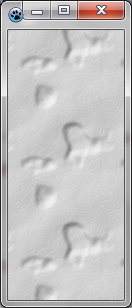 | |
| 411 | 396 | ||
| 412 | 397 | [[BGRABitmap tutorial 8/fr|Tutoriel précédent (textures)]] \| [[BGRABitmap tutorial 10/fr|Tutoriel suivant (plaquage de textures)]] | |
| 413 | 398 | ||
| 414 | 399 | --- | |
| 415 | 400 | *From the Free Pascal wiki, page "BGRABitmap tutorial 9/fr", as it stood on 2020-02-10 after a change by Trev, out of the wiki's dump of 2024-05-26. Copyright stays with the author who wrote it, according to the old wiki's [[Licensing]] page. If you have concerns about this material, [message the admin](/wiki-contact).* | |
| 416 | 401 | Category: Graphics/fr |