

BGRABitmap tutorial 7: what changed
Revision 1 to 2. Removed lines have a minus sign; added lines have a plus sign.
| Old | New | Line | |
|---|---|---|---|
| 1 | 1 | This tutorial shows how to use splines. A sample project can be found in [[BGRABitmap AggPas]]. | |
| 2 | 2 | ||
| 3 | 3 | ### Create a new project | |
| 4 | 4 | ||
| 5 | 5 | Create a new project and add a reference to [[BGRABitmap]], the same way as in [[BGRABitmap tutorial|the first tutorial]]. | |
| 6 | 6 | ||
| 7 | 7 | ### Draw an opened spline | |
| 8 | 8 | ||
| 9 | 9 | With the object inspector, add an OnPaint handler and write: | |
| 10 | 10 | ||
| 11 | 11 | ``` pascal | |
| 12 | 12 | procedure TForm1.FormPaint(Sender: TObject); | |
| 13 | 13 | var | |
| 14 | 14 | image: TBGRABitmap; | |
| 15 | 15 | pts: array of TPointF; | |
| 16 | 16 | storedSpline: array of TPointF; | |
| 17 | 17 | c: TBGRAPixel; | |
| 18 | 18 | ||
| 19 | 19 | begin | |
| 20 | 20 | image := TBGRABitmap.Create(ClientWidth,ClientHeight,ColorToBGRA(ColorToRGB(clBtnFace))); | |
| 21 | 21 | c := ColorToBGRA(ColorToRGB(clWindowText)); | |
| 22 | 22 | ||
| 23 | 23 | //rectangular polyline | |
| 24 | 24 | setlength(pts,4); | |
| 25 | 25 | pts[0] := PointF(50,50); | |
| 26 | 26 | pts[1] := PointF(150,50); | |
| 27 | 27 | pts[2] := PointF(150,150); | |
| 28 | 28 | pts[3] := PointF(50,150); | |
| 29 | 29 | image.DrawPolylineAntialias(pts,BGRA(255,0,0,150),1); | |
| 30 | 30 | ||
| 31 | 31 | //compute spline points and draw as a polyline | |
| 32 | 32 | storedSpline := image.ComputeOpenedSpline(pts,ssVertexToSide); | |
| 33 | 33 | image.DrawPolylineAntialias(storedSpline,c,1); | |
| 34 | 34 | ||
| 35 | 35 | image.Draw(Canvas,0,0,True); | |
| 36 | 36 | image.free; | |
| 37 | 37 | end; | |
| 38 | 38 | ``` | |
| 39 | 39 | ||
| 40 | 40 | There are two lines that draw the spline. The first line computes the spline points, and the second draw them. Notice that it is a specific function for opened splines. | |
| 41 | 41 | ||
| 42 | 42 | ### Draw a closed spline | |
| 43 | 43 | ||
| 44 | 44 | Before image.Draw, add these lines: | |
| 45 | 45 | ||
| 46 | 46 | ``` pascal | |
| 47 | 47 | for i := 0 to 3 do | |
| 48 | 48 | pts[i].x += 200; | |
| 49 | 49 | image.DrawPolylineAntialias(pts,BGRA(255,0,0,150),1); | |
| 50 | 50 | ||
| 51 | 51 | storedSpline := image.ComputeClosedSpline(pts,ssVertexToSide); | |
| 52 | 52 | image.DrawPolygonAntialias(storedSpline,c,1); | |
| 53 | 53 | ``` | |
| 54 | 54 | ||
| 55 | 55 | Go with the text cursor on the 'i' identifier and press Ctrl-Shift-C to add the variable declaration. The loop offsets the points to the right. | |
| 56 | 56 | ||
| 57 | 57 | Two new lines draw a closed spline. Notice the specific function that computes closed splines and the call to DrawPolygonAntialias. | |
| 58 | 58 | ||
| 59 | 59 | You can avoid using a variable to store spline points like this: | |
| 60 | 60 | ||
| 61 | 61 | ``` pascal | |
| 62 | 62 | image.DrawPolygonAntialias(image.ComputeClosedSpline(pts),c,1); | |
| 63 | 63 | ``` | |
| 64 | 64 | ||
| 65 | 65 | However, if you do so, you cannot use the computed points more than once, they must be calculated each time you use them. | |
| 66 | 66 | ||
| 67 | 67 | ### Run the program | |
| 68 | 68 | ||
| 69 | 69 | This should draw two splines, one opened on the left and one closed on the right. | |
| 70 | 70 | ||
| 71 | - | ||
| 72 | - | ||
| 73 | - | ||
| 74 | - | ||
| 71 | + | 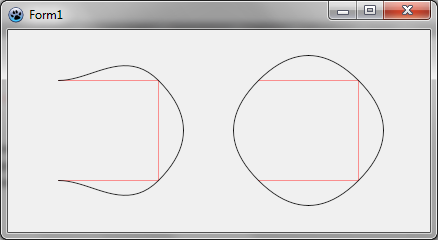 | |
| 75 | 72 | ||
| 76 | 73 | Notice that the spline goes through each point. If you want the curve to stay inside or define tangeants, you need to use control points, which are available in Bézier curves. | |
| 77 | 74 | ||
| 78 | 75 | ### Using Bézier curves | |
| 79 | 76 | ||
| 80 | 77 | Before image.Draw, add these lines: | |
| 81 | 78 | ||
| 82 | 79 | ``` pascal | |
| 83 | 80 | storedSpline := image.ComputeBezierSpline([BezierCurve(PointF(50,50),PointF(150,50),PointF(150,100)), | |
| 84 | 81 | BezierCurve(PointF(150,100),PointF(150,150),PointF(50,150))]); | |
| 85 | 82 | image.DrawPolylineAntialias(storedSpline,c,2); | |
| 86 | 83 | ``` | |
| 87 | 84 | ||
| 88 | 85 | The function BezierCurve defines a curve with an origin and a destination, and one or two control points. Here there is only one control point. Here the control points are defined so that the curve be tangeant to the rectangle defined before. | |
| 89 | 86 | ||
| 90 | 87 | A Bézier spline is simple a series of Bézier curve. Thus, the function ComputeBezierSpline concatenates an array of Bézier curves. Here, we construct a nice U-turn with two curves. | |
| 91 | 88 | ||
| 92 | 89 | ### Run the program | |
| 93 | 90 | ||
| 94 | 91 | You should see a bold Bézier curve inside the left rectangle. | |
| 95 | 92 | ||
| 96 | - | ||
| 97 | - | ||
| 98 | - | ||
| 99 | - | ||
| 93 | + | 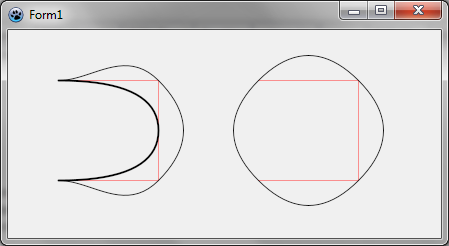 | |
| 100 | 94 | ||
| 101 | 95 | [[BGRABitmap tutorial 6|Previous tutorial (line style)]] [[BGRABitmap tutorial 8|Next tutorial (textures)]] | |
| 102 | 96 | ||
| 103 | 97 | --- | |
| 104 | 98 | *From the Free Pascal wiki, page "BGRABitmap tutorial 7", as it stood on 2023-05-20 after a change by Circular, out of the wiki's dump of 2024-05-26. Copyright stays with the author who wrote it, according to the old wiki's [[Licensing]] page. If you have concerns about this material, [message the admin](/wiki-contact).* | |
| 105 | 99 | Category: BGRABitmap | |
| 106 | 100 | Category: Graphics |