

BGRABitmap tutorial 7/fr: what changed
Revision 0 to 1. Removed lines have a minus sign; added lines have a plus sign.
Title: BGRABitmap tutorial 7/fr
| Old | New | Line | |
|---|---|---|---|
| 1 | + | [[BGRABitmap tutorial/fr|**Accueil**]] | [[BGRABitmap tutorial 1/fr|**Tutoriel 1**]] | [[BGRABitmap tutorial 2/fr|**Tutoriel 2**]] | [[BGRABitmap tutorial 3/fr|**Tutoriel 3**]] | [[BGRABitmap tutorial 4/fr|**Tutoriel 4**]] | [[BGRABitmap tutorial 5/fr|**Tutoriel 5**]] | [[BGRABitmap tutorial 6/fr|**Tutoriel 6**]] | **Tutoriel 7** | [[BGRABitmap tutorial 8/fr|**Tutoriel 8**]] | [[BGRABitmap tutorial 9/fr|**Tutoriel 9**]] | [[BGRABitmap tutorial 10/fr|**Tutoriel 10**]] | [[BGRABitmap tutorial 11/fr|**Tutoriel 11**]] | [[BGRABitmap tutorial 12/fr|**Tutoriel 12**]] | [Edit](<http://wiki.lazarus.freepascal.org/index.php?title=Template:BGRABitmap_tutorial_index/fr&action=edit>) | |
| 2 | + | ||
| 3 | + | Ce tutoriel montre comment utiliser les splines et les courbes de Bézier. | |
| 4 | + | ||
| 5 | + | ## Contents | |
| 6 | + | ||
| 7 | + | * 1 Création d'un nouveau projet | |
| 8 | + | * 2 Dessiner une spline ouverte | |
| 9 | + | * 3 Dessiner une spline fermée | |
| 10 | + | * 4 Exécution du programme | |
| 11 | + | * 5 Utiliser les courbes de Bézier | |
| 12 | + | * 6 Exécution du programme | |
| 13 | + | ||
| 14 | + | ### Création d'un nouveau projet | |
| 15 | + | ||
| 16 | + | Créez un nouveau projet et ajoutez la référence à [[BGRABitmap]], de la même façon que dans [[BGRABitmap tutorial/fr|le premier tutoriel]]. | |
| 17 | + | ||
| 18 | + | ### Dessiner une spline ouverte | |
| 19 | + | ||
| 20 | + | Avec l'inspecteur d'objet, ajoutez un gestionnaire _OnPaint_ avec : | |
| 21 | + | ``` | |
| 22 | + | procedure TForm1.FormPaint(Sender: TObject); | |
| 23 | + | var | |
| 24 | + | image: TBGRABitmap; | |
| 25 | + | pts: array of TPointF; | |
| 26 | + | storedSpline: array of TPointF; | |
| 27 | + | c: TBGRAPixel; | |
| 28 | + | ||
| 29 | + | begin | |
| 30 | + | image := TBGRABitmap.Create(ClientWidth,ClientHeight,ColorToBGRA(ColorToRGB(clBtnFace))); | |
| 31 | + | c := ColorToBGRA(ColorToRGB(clWindowText)); | |
| 32 | + | ||
| 33 | + | //rectangular polyline | |
| 34 | + | setlength(pts,4); | |
| 35 | + | pts[0] := PointF(50,50); | |
| 36 | + | pts[1] := PointF(150,50); | |
| 37 | + | pts[2] := PointF(150,150); | |
| 38 | + | pts[3] := PointF(50,150); | |
| 39 | + | image.DrawPolylineAntialias(pts,BGRA(255,0,0,150),1); | |
| 40 | + | ||
| 41 | + | //compute spline points and draw as a polyline | |
| 42 | + | storedSpline := image.ComputeOpenedSpline(pts); | |
| 43 | + | image.DrawPolylineAntialias(storedSpline,c,1); | |
| 44 | + | ||
| 45 | + | image.Draw(Canvas,0,0,True); | |
| 46 | + | image.free; | |
| 47 | + | end; | |
| 48 | + | ``` | |
| 49 | + | ||
| 50 | + | Il y a deux lignes qui dessinent la spline. La première calcule les points de la spline et la seconde les dessine. Notez qu'il y a une fonction spécifique pour les splines ouvertes. | |
| 51 | + | ||
| 52 | + | ### Dessiner une spline fermée | |
| 53 | + | ||
| 54 | + | Avant _image.Draw_ , ajoutez ces lignes : | |
| 55 | + | ``` | |
| 56 | + | for i := 0 to 3 do | |
| 57 | + | pts[i].x += 200; | |
| 58 | + | image.DrawPolylineAntialias(pts,BGRA(255,0,0,150),1); | |
| 59 | + | ||
| 60 | + | storedSpline := image.ComputeClosedSpline(pts); | |
| 61 | + | image.DrawPolygonAntialias(storedSpline,c,1); | |
| 62 | + | ``` | |
| 63 | + | ||
| 64 | + | Allez avec le curseur texte sur l'identifiant 'i' et appuyez _Ctrl-Shift-C_ pour ajouter la déclaration de la variable. Cette boucle déplace les points vers la droite. | |
| 65 | + | ||
| 66 | + | Les deux nouvelles lignes dessinent une spline fermée. Notez la fonction spécifique pour calculer une spline fermée et l'appel à _DrawPolygonAntialias_. | |
| 67 | + | ||
| 68 | + | Vous pouvez éviter d'utiliser une variable pour stocker les points de la spline comme cela : | |
| 69 | + | ``` | |
| 70 | + | image.DrawPolygonAntialias(image.ComputeClosedSpline(pts),c,1); | |
| 71 | + | ``` | |
| 72 | + | ||
| 73 | + | Cependant, si vous procédez ainsi, vous ne pouvez pas utiliser les points calculés plus d'une fois : ils devront être recalculés à chaque fois que vous les utiliser. | |
| 74 | + | ||
| 75 | + | ### Exécution du programme | |
| 76 | + | ||
| 77 | + | Le programme dessine deux splines : une ouverte à gauche et une fermée à droite. | |
| 78 | + | ||
| 79 | + | [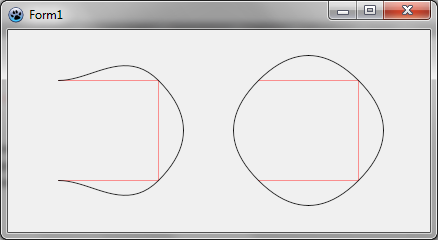](</File:BGRATutorial7.png>) | |
| 80 | + | ||
| 81 | + | Notez que la spline passe par tous les points. Si vous voulez que la courbe reste à l'intérieur, ou définir des tangentes, vous devez définir des points de contrôle qui sont disponibles avec les courbes de Bézier. | |
| 82 | + | ||
| 83 | + | ### Utiliser les courbes de Bézier | |
| 84 | + | ||
| 85 | + | Avant image.Draw, ajoutez ces lignes : | |
| 86 | + | ``` | |
| 87 | + | storedSpline := image.ComputeBezierSpline([BezierCurve(PointF(50,50),PointF(150,50),PointF(150,100)), | |
| 88 | + | BezierCurve(PointF(150,100),PointF(150,150),PointF(50,150))]); | |
| 89 | + | image.DrawPolylineAntialias(storedSpline,c,2); | |
| 90 | + | ``` | |
| 91 | + | ||
| 92 | + | La fonction _BezierCurve_ définit une courbe avec une origine et une destination, et un ou deux points de contrôle. Dans l'exemple, il n'y a qu'un point de contrôle. Les points de contrôles sont définis de telle façon que la courbe soit tangente au rectangle défini précédemment. | |
| 93 | + | ||
| 94 | + | Une spline Bézier est simplement une suite de courbes de Bézier. Ainsi la fonction _ComputeBezierSpline_ concatène un tableau de courbes de Bézier. Ici, vous construisez un joli demi-tour avec deux courbes. | |
| 95 | + | ||
| 96 | + | ### Exécution du programme | |
| 97 | + | ||
| 98 | + | Vous devriez voir une courbe de Bézier en gras à l'intérieur du rectangle gauche. | |
| 99 | + | ||
| 100 | + | [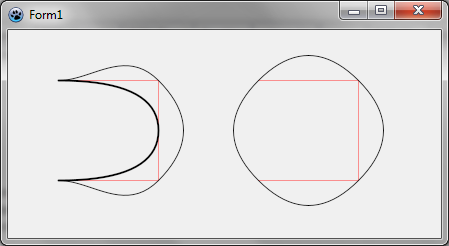](</File:BGRATutorial7b.png>) | |
| 101 | + | ||
| 102 | + | [[BGRABitmap tutorial 6/fr|Tutoriel précédent (styles de lignes)]] [[BGRABitmap tutorial 8/fr|Tutoriel suivant (textures)]] | |
| 103 | + | ||
| 104 | + | --- | |
| 105 | + | *From the Free Pascal wiki, page "BGRABitmap tutorial 7/fr", as the Internet Archive kept it on 2025-03-20. Copyright stays with the author who wrote it, according to the old wiki's [[Licensing]] page. If you have concerns about this material, [message the admin](/wiki-contact).* |