

BGRABitmap tutorial 5: what changed
Revision 1 to 2. Removed lines have a minus sign; added lines have a plus sign.
| Old | New | Line | |
|---|---|---|---|
| 1 | 1 | This tutorial shows you how to use layers and masks. | |
| 2 | 2 | ||
| 3 | 3 | The first part shows how to do without a multi-layer image. | |
| 4 | 4 | ||
| 5 | 5 | The second part of the tutorial shows how to adapt the code to use *TBGRALayeredBitmap*, which is located in the *BGRALayers* unit. | |
| 6 | 6 | ||
| 7 | 7 | ## Without using a multi-layer image | |
| 8 | 8 | ||
| 9 | 9 | ### Create a new project | |
| 10 | 10 | ||
| 11 | 11 | Create a new project and add a reference to [[BGRABitmap]], the same way as in [[BGRABitmap tutorial|the first tutorial]]. | |
| 12 | 12 | ||
| 13 | 13 | ### About masks | |
| 14 | 14 | ||
| 15 | 15 | A mask is a grayscale image. When a mask is applied on an image, the parts of the image that overlap with black parts of the mask are erased and become transparent, whereas parts that overlap with white parts of the mask are kept. In other words, the mask is like an alpha channel the defines opacity. If the mask value is zero, then it becomes transparent, and if a mask value is 255, it becomes opaque. | |
| 16 | 16 | ||
| 17 | - | ||
| 18 | - | ||
| 19 | - | ||
| 20 | - | ||
| 17 | + | 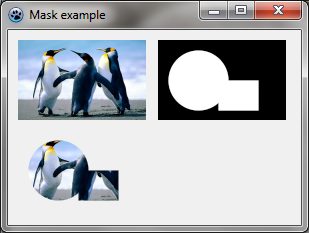 | |
| 21 | 18 | ||
| 22 | 19 | In this example, the image, the start image is in the upper-left corner, the mask in the upper-right one, and the result when applying the mask in the lower-left corner. | |
| 23 | 20 | ||
| 24 | 21 | Code in OnPaint: | |
| 25 | 22 | ||
| 26 | 23 | ``` pascal | |
| 27 | 24 | var temp,tex,mask: TBGRABitmap; | |
| 28 | 25 | begin | |
| 29 | 26 | temp:= TBGRABitmap.Create(640,480,ColorToBGRA(ColorToRGB(clBtnFace))); | |
| 30 | 27 | ||
| 31 | 28 | //loading and scaling texture | |
| 32 | 29 | tex := TBGRABitmap.Create('texture.png'); | |
| 33 | 30 | BGRAReplace(tex,tex.Resample(128,80)); | |
| 34 | 31 | ||
| 35 | 32 | //show image in the upper-left corner | |
| 36 | 33 | temp.PutImage(10,10,tex,dmDrawWithTransparency); | |
| 37 | 34 | ||
| 38 | 35 | //create a mask with ellipse and rectangle | |
| 39 | 36 | mask := TBGRABitmap.Create(128,80,BGRABlack); | |
| 40 | 37 | mask.FillEllipseAntialias(40,40,30,30,BGRAWhite); | |
| 41 | 38 | mask.FillRectAntialias(60,40,100,70,BGRAWhite); | |
| 42 | 39 | ||
| 43 | 40 | //show mask in the upper-right corner | |
| 44 | 41 | temp.PutImage(150,10,mask,dmDrawWithTransparency); | |
| 45 | 42 | ||
| 46 | 43 | //apply the mask to the image | |
| 47 | 44 | tex.ApplyMask(mask); | |
| 48 | 45 | ||
| 49 | 46 | //show the result image in the lower-left corner | |
| 50 | 47 | temp.PutImage(10,100,tex,dmDrawWithTransparency); | |
| 51 | 48 | ||
| 52 | 49 | mask.Free; | |
| 53 | 50 | tex.Free; | |
| 54 | 51 | ||
| 55 | 52 | //show everything on the screen | |
| 56 | 53 | temp.Draw(Canvas,0,0,True); | |
| 57 | 54 | temp.Free; | |
| 58 | 55 | end; | |
| 59 | 56 | ``` | |
| 60 | 57 | ||
| 61 | 58 | ### Erasing parts of an image | |
| 62 | 59 | ||
| 63 | 60 | Some functions allow to erase an ellipse, a rectangle etc. It means that the part of the image becomes transparent. It is thus possible to draw a hole in an image. If the alpha parameter is 255, the hole is completely transparent. If not, the hole is half-transparent. | |
| 64 | 61 | ||
| 65 | - | ||
| 66 | - | ||
| 67 | - | ||
| 68 | - | ||
| 62 | + | 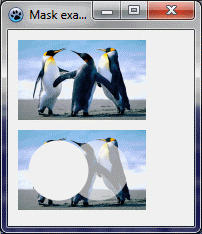 | |
| 69 | 63 | ||
| 70 | 64 | Here an ellipse is erased on the left with an alpha parameter of 255, and another ellipse is erased on the right with an alpha parameter of 128. | |
| 71 | 65 | ||
| 72 | 66 | Code in OnPaint: | |
| 73 | 67 | ||
| 74 | 68 | ``` pascal | |
| 75 | 69 | var image,tex: TBGRABitmap; | |
| 76 | 70 | begin | |
| 77 | 71 | image := TBGRABitmap.Create(640,480,ColorToBGRA(ColorToRGB(clBtnFace))); | |
| 78 | 72 | ||
| 79 | 73 | //load and scale texture | |
| 80 | 74 | tex := TBGRABitmap.Create('texture.png'); | |
| 81 | 75 | BGRAReplace(tex,tex.Resample(128,80)); | |
| 82 | 76 | ||
| 83 | 77 | //show image | |
| 84 | 78 | image.PutImage(10,10,tex,dmDrawWithTransparency); | |
| 85 | 79 | ||
| 86 | 80 | //erase parts | |
| 87 | 81 | tex.EraseEllipseAntialias(40,40,30,30,255); | |
| 88 | 82 | tex.EraseEllipseAntialias(80,40,30,30,128); | |
| 89 | 83 | ||
| 90 | 84 | //show result | |
| 91 | 85 | image.PutImage(10,100,tex,dmDrawWithTransparency); | |
| 92 | 86 | ||
| 93 | 87 | tex.Free; | |
| 94 | 88 | ||
| 95 | 89 | //show everything on the screen | |
| 96 | 90 | image.Draw(Canvas,0,0,True); | |
| 97 | 91 | image.Free; | |
| 98 | 92 | end; | |
| 99 | 93 | ``` | |
| 100 | 94 | ||
| 101 | 95 | ### Add a painting handler | |
| 102 | 96 | ||
| 103 | 97 | With the object inspector, add an OnPaint handler and write: | |
| 104 | 98 | ||
| 105 | 99 | ``` pascal | |
| 106 | 100 | procedure TForm1.FormPaint(Sender: TObject); | |
| 107 | 101 | var image: TBGRABitmap; | |
| 108 | 102 | size: single; | |
| 109 | 103 | ||
| 110 | 104 | procedure DrawMoon; | |
| 111 | 105 | var layer: TBGRABitmap; | |
| 112 | 106 | begin | |
| 113 | 107 | layer := TBGRABitmap.Create(image.Width,image.Height); | |
| 114 | 108 | layer.FillEllipseAntialias(layer.Width/2,layer.Height/2,size*0.4,size*0.4,BGRA(224,224,224,128)); | |
| 115 | 109 | layer.EraseEllipseAntialias(layer.Width/2+size*0.15,layer.Height/2,size*0.3,size*0.3,255); | |
| 116 | 110 | image.PutImage(0,0,layer,dmDrawWithTransparency); | |
| 117 | 111 | layer.Free; | |
| 118 | 112 | end; | |
| 119 | 113 | ||
| 120 | 114 | begin | |
| 121 | 115 | image := TBGRABitmap.Create(ClientWidth,ClientHeight); | |
| 122 | 116 | ||
| 123 | 117 | //Compute available space in both directions | |
| 124 | 118 | if image.Height < image.Width then | |
| 125 | 119 | size := image.Height | |
| 126 | 120 | else | |
| 127 | 121 | size := image.Width; | |
| 128 | 122 | ||
| 129 | 123 | image.GradientFill(0,0,image.Width,image.Height, | |
| 130 | 124 | BGRA(128,192,255),BGRA(0,0,255), | |
| 131 | 125 | gtLinear,PointF(0,0),PointF(0,image.Height), | |
| 132 | 126 | dmSet); | |
| 133 | 127 | ||
| 134 | 128 | DrawMoon; | |
| 135 | 129 | ||
| 136 | 130 | image.Draw(Canvas,0,0,True); | |
| 137 | 131 | image.free; | |
| 138 | 132 | end; | |
| 139 | 133 | ``` | |
| 140 | 134 | ||
| 141 | 135 | The procedure creates an image and fills it with a blue gradient. This is the background layer. | |
| 142 | 136 | ||
| 143 | 137 | The procedure DrawMoon creates a layer, draws a moon in it. First a white disk is drawn, then a smaller disk is subtracted. Finally, this layer is merged with the background. | |
| 144 | 138 | ||
| 145 | 139 | ### Run the program | |
| 146 | 140 | ||
| 147 | 141 | You should see a blue sky with a moon. When you resize the form, the image is resized accordingly. | |
| 148 | 142 | ||
| 149 | - | ||
| 150 | - | ||
| 151 | - | ||
| 152 | - | ||
| 143 | + | 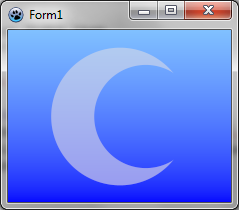 | |
| 153 | 144 | ||
| 154 | 145 | ### Add another layer with a sun | |
| 155 | 146 | ||
| 156 | 147 | In the OnPaint event, add the following subprocedure: | |
| 157 | 148 | ||
| 158 | 149 | ``` pascal | |
| 159 | 150 | procedure DrawSun; | |
| 160 | 151 | var layer,mask: TBGRABitmap; | |
| 161 | 152 | begin | |
| 162 | 153 | layer := TBGRABitmap.Create(image.Width,image.Height); | |
| 163 | 154 | layer.GradientFill(0,0,layer.Width,layer.Height, | |
| 164 | 155 | BGRA(255,255,0),BGRA(255,0,0), | |
| 165 | 156 | gtRadial,PointF(layer.Width/2,layer.Height/2-size*0.15),PointF(layer.Width/2+size*0.45,layer.Height/2-size*0.15), | |
| 166 | 157 | dmSet); | |
| 167 | 158 | mask := TBGRABitmap.Create(layer.Width,layer.Height,BGRABlack); | |
| 168 | 159 | mask.FillEllipseAntialias(layer.Width/2+size*0.15,layer.Height/2,size*0.25,size*0.25,BGRAWhite); | |
| 169 | 160 | layer.ApplyMask(mask); | |
| 170 | 161 | mask.Free; | |
| 171 | 162 | image.PutImage(0,0,layer,dmDrawWithTransparency); | |
| 172 | 163 | layer.Free; | |
| 173 | 164 | end; | |
| 174 | 165 | ``` | |
| 175 | 166 | ||
| 176 | 167 | This procedures creates a radial gradient of red and orange and applies a circular mask to it. This results in a colored disk. Finally, the layer is merged with the background. | |
| 177 | 168 | ||
| 178 | 169 | Add a call to this procedure to draw it after the moon. | |
| 179 | 170 | ||
| 180 | 171 | ### Run the program | |
| 181 | 172 | ||
| 182 | 173 | You should see a blue sky with a moon and a sun. When you resize the form, the image is resized accordingly. | |
| 183 | 174 | ||
| 184 | - | ||
| 185 | - | ||
| 186 | - | ||
| 187 | - | ||
| 175 | + | 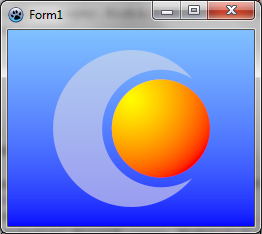 | |
| 188 | 176 | ||
| 189 | 177 | ### Add a light layer | |
| 190 | 178 | ||
| 191 | 179 | Add the following subprocedure in the OnPaint event: | |
| 192 | 180 | ||
| 193 | 181 | ``` pascal | |
| 194 | 182 | procedure ApplyLight; | |
| 195 | 183 | var layer: TBGRABitmap; | |
| 196 | 184 | begin | |
| 197 | 185 | layer := TBGRABitmap.Create(image.Width,image.Height); | |
| 198 | 186 | layer.GradientFill(0,0,layer.Width,layer.Height, | |
| 199 | 187 | BGRA(255,255,255),BGRA(64,64,64), | |
| 200 | 188 | gtRadial,PointF(layer.Width*5/6,layer.Height/2),PointF(layer.Width*1/3,layer.Height/4), | |
| 201 | 189 | dmSet); | |
| 202 | 190 | image.BlendImage(0,0,layer,boMultiply); | |
| 203 | 191 | layer.Free; | |
| 204 | 192 | end; | |
| 205 | 193 | ``` | |
| 206 | 194 | ||
| 207 | 195 | This procedure draws a layer with a white radial gradient. It is then applied to multiply the image. | |
| 208 | 196 | ||
| 209 | 197 | ### Resulting code | |
| 210 | 198 | ||
| 211 | 199 | ``` pascal | |
| 212 | 200 | procedure TForm1.FormPaint(Sender: TObject); | |
| 213 | 201 | var image: TBGRABitmap; | |
| 214 | 202 | size: single; | |
| 215 | 203 | ||
| 216 | 204 | procedure DrawMoon; | |
| 217 | 205 | var layer: TBGRABitmap; | |
| 218 | 206 | begin | |
| 219 | 207 | layer := TBGRABitmap.Create(image.Width,image.Height); | |
| 220 | 208 | layer.FillEllipseAntialias(layer.Width/2,layer.Height/2,size*0.4,size*0.4,BGRA(224,224,224,128)); | |
| 221 | 209 | layer.EraseEllipseAntialias(layer.Width/2+size*0.15,layer.Height/2,size*0.3,size*0.3,255); | |
| 222 | 210 | image.PutImage(0,0,layer,dmDrawWithTransparency); | |
| 223 | 211 | layer.Free; | |
| 224 | 212 | end; | |
| 225 | 213 | ||
| 226 | 214 | procedure DrawSun; | |
| 227 | 215 | var layer,mask: TBGRABitmap; | |
| 228 | 216 | begin | |
| 229 | 217 | layer := TBGRABitmap.Create(image.Width,image.Height); | |
| 230 | 218 | layer.GradientFill(0,0,layer.Width,layer.Height, | |
| 231 | 219 | BGRA(255,255,0),BGRA(255,0,0), | |
| 232 | 220 | gtRadial,PointF(layer.Width/2,layer.Height/2-size*0.15),PointF(layer.Width/2+size*0.45,layer.Height/2-size*0.15), | |
| 233 | 221 | dmSet); | |
| 234 | 222 | mask := TBGRABitmap.Create(layer.Width,layer.Height,BGRABlack); | |
| 235 | 223 | mask.FillEllipseAntialias(layer.Width/2+size*0.15,layer.Height/2,size*0.25,size*0.25,BGRAWhite); | |
| 236 | 224 | layer.ApplyMask(mask); | |
| 237 | 225 | mask.Free; | |
| 238 | 226 | image.PutImage(0,0,layer,dmDrawWithTransparency); | |
| 239 | 227 | layer.Free; | |
| 240 | 228 | end; | |
| 241 | 229 | ||
| 242 | 230 | procedure ApplyLight; | |
| 243 | 231 | var layer: TBGRABitmap; | |
| 244 | 232 | begin | |
| 245 | 233 | layer := TBGRABitmap.Create(image.Width,image.Height); | |
| 246 | 234 | layer.GradientFill(0,0,layer.Width,layer.Height, | |
| 247 | 235 | BGRA(255,255,255),BGRA(64,64,64), | |
| 248 | 236 | gtRadial,PointF(layer.Width*5/6,layer.Height/2),PointF(layer.Width*1/3,layer.Height/4), | |
| 249 | 237 | dmSet); | |
| 250 | 238 | image.BlendImage(0,0,layer,boMultiply); | |
| 251 | 239 | layer.Free; | |
| 252 | 240 | end; | |
| 253 | 241 | ||
| 254 | 242 | begin | |
| 255 | 243 | image := TBGRABitmap.Create(ClientWidth,ClientHeight); | |
| 256 | 244 | ||
| 257 | 245 | if image.Height < image.Width then | |
| 258 | 246 | size := image.Height | |
| 259 | 247 | else | |
| 260 | 248 | size := image.Width; | |
| 261 | 249 | ||
| 262 | 250 | image.GradientFill(0,0,image.Width,image.Height, | |
| 263 | 251 | BGRA(128,192,255),BGRA(0,0,255), | |
| 264 | 252 | gtLinear,PointF(0,0),PointF(0,image.Height), | |
| 265 | 253 | dmSet); | |
| 266 | 254 | ||
| 267 | 255 | DrawMoon; | |
| 268 | 256 | DrawSun; | |
| 269 | 257 | ApplyLight; | |
| 270 | 258 | ||
| 271 | 259 | image.Draw(Canvas,0,0,True); | |
| 272 | 260 | image.free; | |
| 273 | 261 | end; | |
| 274 | 262 | ``` | |
| 275 | 263 | ||
| 276 | 264 | ### Run the program | |
| 277 | 265 | ||
| 278 | 266 | You should see a blue sky with a moon and a sun, with a light effect. When you resize the form, the image is resized accordingly. | |
| 279 | 267 | ||
| 280 | - | ||
| 281 | - | ||
| 282 | - | ||
| 283 | - | ||
| 268 | + | 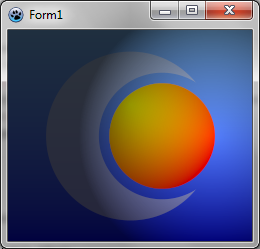 | |
| 284 | 269 | ||
| 285 | 270 | ## Using multi-layer images | |
| 286 | 271 | ||
| 287 | 272 | The "BGRALayers" unit provides a class "TBGRALayeredBitmap" which allows storing a multilayer image. You will use it to save your drawing in OpenRaster format. | |
| 288 | 273 | ||
| 289 | 274 | ### Some adjustments to make | |
| 290 | 275 | ||
| 291 | 276 | First, the result will be stored not in a "TBGRABitmap" but in a "TBGRALayeredBitmap": | |
| 292 | 277 | ||
| 293 | 278 | ``` pascal | |
| 294 | 279 | var image: TBGRABitmap; | |
| 295 | 280 | ||
| 296 | 281 | ... | |
| 297 | 282 | ||
| 298 | 283 | begin | |
| 299 | 284 | image := TBGRABitmap.Create(ClientWidth,ClientHeight); | |
| 300 | 285 | ||
| 301 | 286 | ... | |
| 302 | 287 | ||
| 303 | 288 | image.Draw(Canvas,0,0); // there is no Opaque parameter | |
| 304 | 289 | image.free; | |
| 305 | 290 | end; | |
| 306 | 291 | ``` | |
| 307 | 292 | ||
| 308 | 293 | Then, the procedures that add elements should not draw directly on the image, but add layers. Thus, the following code: | |
| 309 | 294 | ||
| 310 | 295 | ``` pascal | |
| 311 | 296 | image.PutImage(0,0,layer,dmDrawWithTransparency); | |
| 312 | 297 | layer.Free; | |
| 313 | 298 | ``` | |
| 314 | 299 | ||
| 315 | 300 | becomes: | |
| 316 | 301 | ||
| 317 | 302 | ``` pascal | |
| 318 | 303 | image.AddOwnedLayer(layer); | |
| 319 | 304 | ``` | |
| 320 | 305 | ||
| 321 | 306 | And for lighting, the following code: | |
| 322 | 307 | ||
| 323 | 308 | ``` pascal | |
| 324 | 309 | image.BlendImage(0,0,layer,boMultiply); | |
| 325 | 310 | layer.Free; | |
| 326 | 311 | ``` | |
| 327 | 312 | ||
| 328 | 313 | becomes: | |
| 329 | 314 | ||
| 330 | 315 | ``` pascal | |
| 331 | 316 | image.AddOwnedLayer(layer,boMultiply); | |
| 332 | 317 | ``` | |
| 333 | 318 | ||
| 334 | 319 | The background must now also be a layer. Add a new procedure then: | |
| 335 | 320 | ||
| 336 | 321 | ``` pascal | |
| 337 | 322 | procedure CreateBackground; | |
| 338 | 323 | var layer: TBGRABitmap; | |
| 339 | 324 | begin | |
| 340 | 325 | layer := TBGRABitmap.Create(image.Width,image.Height); | |
| 341 | 326 | layer.GradientFill(0,0,image.Width,image.Height, | |
| 342 | 327 | BGRA(128,192,255),BGRA(0,0,255), | |
| 343 | 328 | gtLinear,PointF(0,0),PointF(0,image.Height), | |
| 344 | 329 | dmSet); | |
| 345 | 330 | image.AddOwnedLayer(layer); | |
| 346 | 331 | end; | |
| 347 | 332 | ``` | |
| 348 | 333 | ||
| 349 | 334 | ### Resulting Code with TBGRALayeredBitmap | |
| 350 | 335 | ||
| 351 | 336 | By moving the creation of the multilayer image into a separate function, "CreateMyImage", we get: | |
| 352 | 337 | ||
| 353 | 338 | ``` pascal | |
| 354 | 339 | function CreateMyImage(AWidth,AHeight: integer): TBGRALayeredBitmap; | |
| 355 | 340 | var image: TBGRALayeredBitmap; | |
| 356 | 341 | size: single; | |
| 357 | 342 | ||
| 358 | 343 | procedure CreateMoon; | |
| 359 | 344 | var layer: TBGRABitmap; | |
| 360 | 345 | begin | |
| 361 | 346 | layer := TBGRABitmap.Create(image.Width,image.Height); | |
| 362 | 347 | layer.FillEllipseAntialias(layer.Width/2,layer.Height/2,size*0.4,size*0.4,BGRA(224,224,224,128)); | |
| 363 | 348 | layer.EraseEllipseAntialias(layer.Width/2+size*0.15,layer.Height/2,size*0.3,size*0.3,255); | |
| 364 | 349 | image.AddOwnedLayer(layer); | |
| 365 | 350 | end; | |
| 366 | 351 | ||
| 367 | 352 | procedure CreateSun; | |
| 368 | 353 | var layer,mask: TBGRABitmap; | |
| 369 | 354 | begin | |
| 370 | 355 | layer := TBGRABitmap.Create(image.Width,image.Height); | |
| 371 | 356 | layer.GradientFill(0,0,layer.Width,layer.Height, | |
| 372 | 357 | BGRA(255,255,0),BGRA(255,0,0), | |
| 373 | 358 | gtRadial,PointF(layer.Width/2,layer.Height/2-size*0.15),PointF(layer.Width/2+size*0.45,layer.Height/2-size*0.15), | |
| 374 | 359 | dmSet); | |
| 375 | 360 | mask := TBGRABitmap.Create(layer.Width,layer.Height,BGRABlack); | |
| 376 | 361 | mask.FillEllipseAntialias(layer.Width/2+size*0.15,layer.Height/2,size*0.25,size*0.25,BGRAWhite); | |
| 377 | 362 | layer.ApplyMask(mask); | |
| 378 | 363 | mask.Free; | |
| 379 | 364 | image.AddOwnedLayer(layer); | |
| 380 | 365 | end; | |
| 381 | 366 | ||
| 382 | 367 | procedure CreateLight; | |
| 383 | 368 | var layer: TBGRABitmap; | |
| 384 | 369 | begin | |
| 385 | 370 | layer := TBGRABitmap.Create(image.Width,image.Height); | |
| 386 | 371 | layer.GradientFill(0,0,layer.Width,layer.Height, | |
| 387 | 372 | BGRA(255,255,255),BGRA(64,64,64), | |
| 388 | 373 | gtRadial,PointF(layer.Width*5/6,layer.Height/2),PointF(layer.Width*1/3,layer.Height/4), | |
| 389 | 374 | dmSet); | |
| 390 | 375 | image.AddOwnedLayer(layer,boMultiply); | |
| 391 | 376 | end; | |
| 392 | 377 | ||
| 393 | 378 | procedure CreateBackground; | |
| 394 | 379 | var layer: TBGRABitmap; | |
| 395 | 380 | begin | |
| 396 | 381 | layer := TBGRABitmap.Create(image.Width,image.Height); | |
| 397 | 382 | layer.GradientFill(0,0,image.Width,image.Height, | |
| 398 | 383 | BGRA(128,192,255),BGRA(0,0,255), | |
| 399 | 384 | gtLinear,PointF(0,0),PointF(0,image.Height), | |
| 400 | 385 | dmSet); | |
| 401 | 386 | image.AddOwnedLayer(layer); | |
| 402 | 387 | end; | |
| 403 | 388 | ||
| 404 | 389 | begin | |
| 405 | 390 | image := TBGRALayeredBitmap.Create(AWidth,AHeight); | |
| 406 | 391 | ||
| 407 | 392 | if image.Height < image.Width then | |
| 408 | 393 | size := image.Height | |
| 409 | 394 | else | |
| 410 | 395 | size := image.Width; | |
| 411 | 396 | ||
| 412 | 397 | CreateBackground; | |
| 413 | 398 | CreateMoon; | |
| 414 | 399 | CreateSun; | |
| 415 | 400 | CreateLight; | |
| 416 | 401 | ||
| 417 | 402 | result := image; | |
| 418 | 403 | end; | |
| 419 | 404 | ||
| 420 | 405 | { TForm1 } | |
| 421 | 406 | ||
| 422 | 407 | procedure TForm1.FormPaint(Sender: TObject); | |
| 423 | 408 | var image: TBGRALayeredBitmap; | |
| 424 | 409 | begin | |
| 425 | 410 | image := CreateMyImage(ClientWidth,ClientHeight); | |
| 426 | 411 | image.Draw(Canvas,0,0); | |
| 427 | 412 | image.free; | |
| 428 | 413 | end; | |
| 429 | 414 | ``` | |
| 430 | 415 | ||
| 431 | 416 | ### Saving the image in an OpenRaster file | |
| 432 | 417 | ||
| 433 | 418 | Now, let's create a button with the following code: | |
| 434 | 419 | ||
| 435 | 420 | ``` pascal | |
| 436 | 421 | procedure TForm1.Button1Click(Sender: TObject); | |
| 437 | 422 | var image: TBGRALayeredBitmap; | |
| 438 | 423 | begin | |
| 439 | 424 | image := CreateMyImage(ClientWidth,ClientHeight); | |
| 440 | 425 | image.SaveToFile('myimage.ora'); | |
| 441 | 426 | image.free; | |
| 442 | 427 | end; | |
| 443 | 428 | ``` | |
| 444 | 429 | ||
| 445 | 430 | This code is fairly straightforward: it creates an image of the window size and saves it in OpenRaster format (.ora). You can then import this image into Krita, Gimp, or Paint.NET. | |
| 446 | 431 | ||
| 447 | 432 | [[BGRABitmap tutorial 4|Previous tutorial (direct pixel access)]] [[BGRABitmap tutorial 6|Next tutorial (line style)]] | |
| 448 | 433 | ||
| 449 | 434 | --- | |
| 450 | 435 | *From the Free Pascal wiki, page "BGRABitmap tutorial 5", as it stood on 2024-02-15 after a change by Circular, out of the wiki's dump of 2024-05-26. Copyright stays with the author who wrote it, according to the old wiki's [[Licensing]] page. If you have concerns about this material, [message the admin](/wiki-contact).* | |
| 451 | 436 | Category: BGRABitmap | |
| 452 | 437 | Category: Graphics |