

BGRABitmap tutorial 5/es: what changed
Revision 1 to 2. Removed lines have a minus sign; added lines have a plus sign.
| Old | New | Line | |
|---|---|---|---|
| 1 | 1 | Esta tutoría muestra como usar capas. | |
| 2 | 2 | ||
| 3 | 3 | ### Crear un nuevo proyecto | |
| 4 | 4 | ||
| 5 | 5 | Crea un nuevo proyecto y añade referencia a [[BGRABitmap]], de la misma forma que en [[BGRABitmap tutorial/es|la primer tutoría]]. | |
| 6 | 6 | ||
| 7 | 7 | ### Acerca de las máscaras | |
| 8 | 8 | ||
| 9 | 9 | Una máscara es una imágen de escala de grises. Cuando una máscara es aplicada en una imágen, las partes de la imágen que coinciden con las partes negras de la máscara son borradas y se convierten en transparentes, considerando que las partes que se superponen con las partes blancas de la máscara se mantienen. En otras palabras, la máscara es como un canal alfa define la opacidad. Si el valor de la máscara es cero, entonces se convierte en transparente, y si el valor de la máscara es de 255, se vuelve opaco. | |
| 10 | 10 | ||
| 11 | - | ||
| 12 | - | ||
| 13 | - | ||
| 14 | - | ||
| 11 | + | 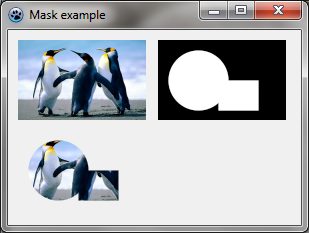 | |
| 15 | 12 | ||
| 16 | 13 | En este ejemplo, en la imágen, la imagen de inicio está en la esquina superior izquierda, la máscara en la parte superior derecha, y el resultado al aplicar la máscara en la esquina inferior izquierda. Código en OnPaint : | |
| 17 | 14 | ||
| 18 | 15 | ``` pascal | |
| 19 | 16 | var temp,tex,mask: TBGRABitmap; | |
| 20 | 17 | begin | |
| 21 | 18 | temp:= TBGRABitmap.Create(640,480,ColorToBGRA(ColorToRGB(clBtnFace))); | |
| 22 | 19 | ||
| 23 | 20 | //cargando y escalando la textura | |
| 24 | 21 | tex := TBGRABitmap.Create('texture.png'); | |
| 25 | 22 | BGRAReplace(tex,tex.Resample(128,80)); | |
| 26 | 23 | ||
| 27 | 24 | //muestra una imágen en la esquina superior izquierda | |
| 28 | 25 | temp.PutImage(10,10,tex,dmDrawWithTransparency); | |
| 29 | 26 | ||
| 30 | 27 | //crea una máscara con un elipse y un rectángulo | |
| 31 | 28 | mask := TBGRABitmap.Create(128,80,BGRABlack); | |
| 32 | 29 | mask.FillEllipseAntialias(40,40,30,30,BGRAWhite); | |
| 33 | 30 | mask.FillRectAntialias(60,40,100,70,BGRAWhite); | |
| 34 | 31 | ||
| 35 | 32 | //muestra la máscara en la parte superior derecha | |
| 36 | 33 | temp.PutImage(150,10,mask,dmDrawWithTransparency); | |
| 37 | 34 | ||
| 38 | 35 | //aplica la máscara a la imágen | |
| 39 | 36 | tex.ApplyMask(mask); | |
| 40 | 37 | ||
| 41 | 38 | //muestra la imágen resultante en la esquina inferior izquierda | |
| 42 | 39 | temp.PutImage(10,100,tex,dmDrawWithTransparency); | |
| 43 | 40 | ||
| 44 | 41 | mask.Free; | |
| 45 | 42 | tex.Free; | |
| 46 | 43 | ||
| 47 | 44 | //muestra todo en la pantalla | |
| 48 | 45 | image.Draw(Canvas,0,0,True); | |
| 49 | 46 | image.Free; | |
| 50 | 47 | end; | |
| 51 | 48 | ``` | |
| 52 | 49 | ||
| 53 | 50 | ### Borrando las partes de una imágen | |
| 54 | 51 | ||
| 55 | 52 | Algunas funciones permiten borrar una elipse, un rectángulo, etc. Esto significa que la parte de la imagen se vuelve transparente. Por tanto, es posible establecer un agujero en una imagen. Si el parámetro alfa es de 255, el agujero es completamente transparente. Sino, el agujero es semitransparente. | |
| 56 | 53 | ||
| 57 | - | ||
| 58 | - | ||
| 59 | - | ||
| 60 | - | ||
| 54 | + | 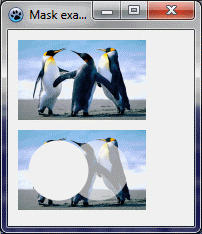 | |
| 61 | 55 | ||
| 62 | 56 | Aquí una elipse se borra de la izquierda con un parámetro alfa de 255, y otra elipse se borra a la derecha con un parámetro alfa del 128. Código OnPaint : | |
| 63 | 57 | ||
| 64 | 58 | ``` pascal | |
| 65 | 59 | var image,tex: TBGRABitmap; | |
| 66 | 60 | begin | |
| 67 | 61 | image := TBGRABitmap.Create(640,480,ColorToBGRA(ColorToRGB(clBtnFace))); | |
| 68 | 62 | ||
| 69 | 63 | //muestra y escala la textura | |
| 70 | 64 | tex := TBGRABitmap.Create('texture.png'); | |
| 71 | 65 | BGRAReplace(tex,tex.Resample(128,80)); | |
| 72 | 66 | ||
| 73 | 67 | //muestra la imágen | |
| 74 | 68 | image.PutImage(10,10,tex,dmDrawWithTransparency); | |
| 75 | 69 | ||
| 76 | 70 | //borra las partes | |
| 77 | 71 | tex.EraseEllipseAntialias(40,40,30,30,255); | |
| 78 | 72 | tex.EraseEllipseAntialias(80,40,30,30,128); | |
| 79 | 73 | ||
| 80 | 74 | //muestra el resultado | |
| 81 | 75 | image.PutImage(10,100,tex,dmDrawWithTransparency); | |
| 82 | 76 | ||
| 83 | 77 | tex.Free; | |
| 84 | 78 | ||
| 85 | 79 | //muestra todo en la pantalla | |
| 86 | 80 | image.Draw(Canvas,0,0,True); | |
| 87 | 81 | image.Free; | |
| 88 | 82 | end; | |
| 89 | 83 | ``` | |
| 90 | 84 | ||
| 91 | 85 | ### Agrega un manejador de pintado | |
| 92 | 86 | ||
| 93 | 87 | Con el inspector de objetos, agrega un manejador OnPaint y escribe : | |
| 94 | 88 | ||
| 95 | 89 | ``` pascal | |
| 96 | 90 | procedure TForm1.FormPaint(Sender: TObject); | |
| 97 | 91 | var image: TBGRABitmap; | |
| 98 | 92 | size: single; | |
| 99 | 93 | ||
| 100 | 94 | procedure DrawMoon; | |
| 101 | 95 | var layer: TBGRABitmap; | |
| 102 | 96 | begin | |
| 103 | 97 | layer := TBGRABitmap.Create(image.Width,image.Height); | |
| 104 | 98 | layer.FillEllipseAntialias(layer.Width/2,layer.Height/2,size*0.4,size*0.4,BGRA(224,224,224,128)); | |
| 105 | 99 | layer.EraseEllipseAntialias(layer.Width/2+size*0.15,layer.Height/2,size*0.3,size*0.3,255); | |
| 106 | 100 | image.PutImage(0,0,layer,dmDrawWithTransparency); | |
| 107 | 101 | layer.Free; | |
| 108 | 102 | end; | |
| 109 | 103 | ||
| 110 | 104 | begin | |
| 111 | 105 | image := TBGRABitmap.Create(ClientWidth,ClientHeight); | |
| 112 | 106 | ||
| 113 | 107 | //Computa el espacio disponible en ambas direcciones | |
| 114 | 108 | if image.Height < image.Width then | |
| 115 | 109 | size := image.Height | |
| 116 | 110 | else | |
| 117 | 111 | size := image.Width; | |
| 118 | 112 | ||
| 119 | 113 | image.GradientFill(0,0,image.Width,image.Height, | |
| 120 | 114 | BGRA(128,192,255),BGRA(0,0,255), | |
| 121 | 115 | gtLinear,PointF(0,0),PointF(0,image.Height), | |
| 122 | 116 | dmSet); | |
| 123 | 117 | ||
| 124 | 118 | DrawMoon; | |
| 125 | 119 | ||
| 126 | 120 | image.Draw(Canvas,0,0,True); | |
| 127 | 121 | image.free; | |
| 128 | 122 | end; | |
| 129 | 123 | ``` | |
| 130 | 124 | ||
| 131 | 125 | El procedimiento crea una imágen y la rellena con un degradado azúl. Esta es la capa de fondo. | |
| 132 | 126 | ||
| 133 | 127 | El procedimiento DrawMoon crea una capa, dibuja una luna en el mismo. En primer lugar un disco blanco se dibuja, a continuación, un disco más pequeño se resta. Por último, esta capa se fusiona con el fondo. | |
| 134 | 128 | ||
| 135 | 129 | ### Ejecuta el programa | |
| 136 | 130 | ||
| 137 | 131 | Deberías ver un cielo azúl con una luna. Cuando cambia el tamaño de la forma, la imagen cambia de tamaño en consecuencia. | |
| 138 | 132 | ||
| 139 | - | ||
| 140 | - | ||
| 141 | - | ||
| 142 | - | ||
| 133 | + | 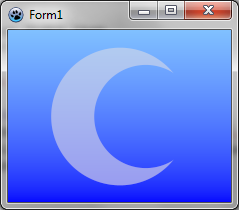 | |
| 143 | 134 | ||
| 144 | 135 | ### Añade otra capa con un sol | |
| 145 | 136 | ||
| 146 | 137 | En el evento OnPaint, añade el siguiente subprocedimiento : | |
| 147 | 138 | ||
| 148 | 139 | ``` pascal | |
| 149 | 140 | procedure DrawSun; | |
| 150 | 141 | var layer,mask: TBGRABitmap; | |
| 151 | 142 | begin | |
| 152 | 143 | layer := TBGRABitmap.Create(image.Width,image.Height); | |
| 153 | 144 | layer.GradientFill(0,0,layer.Width,layer.Height, | |
| 154 | 145 | BGRA(255,255,0),BGRA(255,0,0), | |
| 155 | 146 | gtRadial,PointF(layer.Width/2,layer.Height/2-size*0.15),PointF(layer.Width/2+size*0.45,layer.Height/2-size*0.15), | |
| 156 | 147 | dmSet); | |
| 157 | 148 | mask := TBGRABitmap.Create(layer.Width,layer.Height,BGRABlack); | |
| 158 | 149 | mask.FillEllipseAntialias(layer.Width/2+size*0.15,layer.Height/2,size*0.25,size*0.25,BGRAWhite); | |
| 159 | 150 | layer.ApplyMask(mask); | |
| 160 | 151 | mask.Free; | |
| 161 | 152 | image.PutImage(0,0,layer,dmDrawWithTransparency); | |
| 162 | 153 | layer.Free; | |
| 163 | 154 | end; | |
| 164 | 155 | ``` | |
| 165 | 156 | ||
| 166 | 157 | Este procedimiento crea un gradiente radial de color rojo y naranja y se aplica una máscara circular a la misma. Esto da como resultado un disco de color. Por último, la capa se fusiona con el fondo. | |
| 167 | 158 | ||
| 168 | 159 | Agregue una llamada a este procedimiento para dibujarlo después de la luna. | |
| 169 | 160 | ||
| 170 | 161 | ### Ejecuta el programa | |
| 171 | 162 | ||
| 172 | 163 | Deberías ver un cielo azúl con una luna y un sol. Cuando cambia el tamaño de la forma, la imagen cambia de tamaño en consecuencia. | |
| 173 | 164 | ||
| 174 | - | ||
| 175 | - | ||
| 176 | - | ||
| 177 | - | ||
| 165 | + | 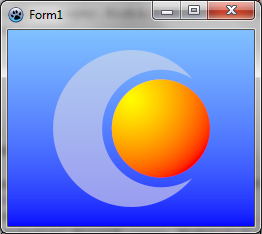 | |
| 178 | 166 | ||
| 179 | 167 | ### Añade una capa de luz | |
| 180 | 168 | ||
| 181 | 169 | Añade el siguiente subprocedimiento en el evento OnPaint : | |
| 182 | 170 | ||
| 183 | 171 | ``` pascal | |
| 184 | 172 | procedure ApplyLight; | |
| 185 | 173 | var layer: TBGRABitmap; | |
| 186 | 174 | begin | |
| 187 | 175 | layer := TBGRABitmap.Create(image.Width,image.Height); | |
| 188 | 176 | layer.GradientFill(0,0,layer.Width,layer.Height, | |
| 189 | 177 | BGRA(255,255,255),BGRA(64,64,64), | |
| 190 | 178 | gtRadial,PointF(layer.Width*5/6,layer.Height/2),PointF(layer.Width*1/3,layer.Height/4), | |
| 191 | 179 | dmSet); | |
| 192 | 180 | image.BlendImage(0,0,layer,boMultiply); | |
| 193 | 181 | layer.Free; | |
| 194 | 182 | end; | |
| 195 | 183 | ``` | |
| 196 | 184 | ||
| 197 | 185 | Este procedimiento dibuja una capa con un degradado radial blanco. Luego es aplicado para multiplicar la imágen. | |
| 198 | 186 | ||
| 199 | 187 | ### Código resultante | |
| 200 | 188 | ||
| 201 | 189 | ``` pascal | |
| 202 | 190 | procedure TForm1.FormPaint(Sender: TObject); | |
| 203 | 191 | var image: TBGRABitmap; | |
| 204 | 192 | size: single; | |
| 205 | 193 | ||
| 206 | 194 | procedure DrawMoon; | |
| 207 | 195 | var layer: TBGRABitmap; | |
| 208 | 196 | begin | |
| 209 | 197 | layer := TBGRABitmap.Create(image.Width,image.Height); | |
| 210 | 198 | layer.FillEllipseAntialias(layer.Width/2,layer.Height/2,size*0.4,size*0.4,BGRA(224,224,224,128)); | |
| 211 | 199 | layer.EraseEllipseAntialias(layer.Width/2+size*0.15,layer.Height/2,size*0.3,size*0.3,255); | |
| 212 | 200 | image.PutImage(0,0,layer,dmDrawWithTransparency); | |
| 213 | 201 | layer.Free; | |
| 214 | 202 | end; | |
| 215 | 203 | ||
| 216 | 204 | procedure DrawSun; | |
| 217 | 205 | var layer,mask: TBGRABitmap; | |
| 218 | 206 | begin | |
| 219 | 207 | layer := TBGRABitmap.Create(image.Width,image.Height); | |
| 220 | 208 | layer.GradientFill(0,0,layer.Width,layer.Height, | |
| 221 | 209 | BGRA(255,255,0),BGRA(255,0,0), | |
| 222 | 210 | gtRadial,PointF(layer.Width/2,layer.Height/2-size*0.15),PointF(layer.Width/2+size*0.45,layer.Height/2-size*0.15), | |
| 223 | 211 | dmSet); | |
| 224 | 212 | mask := TBGRABitmap.Create(layer.Width,layer.Height,BGRABlack); | |
| 225 | 213 | mask.FillEllipseAntialias(layer.Width/2+size*0.15,layer.Height/2,size*0.25,size*0.25,BGRAWhite); | |
| 226 | 214 | layer.ApplyMask(mask); | |
| 227 | 215 | mask.Free; | |
| 228 | 216 | image.PutImage(0,0,layer,dmDrawWithTransparency); | |
| 229 | 217 | layer.Free; | |
| 230 | 218 | end; | |
| 231 | 219 | ||
| 232 | 220 | procedure ApplyLight; | |
| 233 | 221 | var layer: TBGRABitmap; | |
| 234 | 222 | begin | |
| 235 | 223 | layer := TBGRABitmap.Create(image.Width,image.Height); | |
| 236 | 224 | layer.GradientFill(0,0,layer.Width,layer.Height, | |
| 237 | 225 | BGRA(255,255,255),BGRA(64,64,64), | |
| 238 | 226 | gtRadial,PointF(layer.Width*5/6,layer.Height/2),PointF(layer.Width*1/3,layer.Height/4), | |
| 239 | 227 | dmSet); | |
| 240 | 228 | image.BlendImage(0,0,layer,boMultiply); | |
| 241 | 229 | layer.Free; | |
| 242 | 230 | end; | |
| 243 | 231 | ||
| 244 | 232 | begin | |
| 245 | 233 | image := TBGRABitmap.Create(ClientWidth,ClientHeight); | |
| 246 | 234 | ||
| 247 | 235 | if image.Height < image.Width then | |
| 248 | 236 | size := image.Height | |
| 249 | 237 | else | |
| 250 | 238 | size := image.Width; | |
| 251 | 239 | ||
| 252 | 240 | image.GradientFill(0,0,image.Width,image.Height, | |
| 253 | 241 | BGRA(128,192,255),BGRA(0,0,255), | |
| 254 | 242 | gtLinear,PointF(0,0),PointF(0,image.Height), | |
| 255 | 243 | dmSet); | |
| 256 | 244 | ||
| 257 | 245 | DrawMoon; | |
| 258 | 246 | DrawSun; | |
| 259 | 247 | ApplyLight; | |
| 260 | 248 | ||
| 261 | 249 | image.Draw(Canvas,0,0,True); | |
| 262 | 250 | image.free; | |
| 263 | 251 | end; | |
| 264 | 252 | ``` | |
| 265 | 253 | ||
| 266 | 254 | ### Ejecuta el programa | |
| 267 | 255 | ||
| 268 | 256 | Deberías ver un cielo azúl con una luna y un sol, con un efecto de iluminación. Cuando cambia el tamaño de la forma, la imagen cambia de tamaño en consecuencia. | |
| 269 | 257 | ||
| 270 | - | ||
| 271 | - | ||
| 272 | - | ||
| 273 | - | ||
| 258 | + | 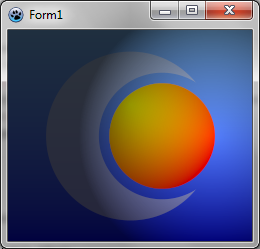 | |
| 274 | 259 | ||
| 275 | 260 | [[BGRABitmap tutorial 4/es|Tutoría anterior (acceso directo a píxeles)]] \| [[BGRABitmap tutorial 6/es|Siguiente tutoría (estilo de línea)]] | |
| 276 | 261 | ||
| 277 | 262 | --- | |
| 278 | 263 | *From the Free Pascal wiki, page "BGRABitmap tutorial 5/es", as it stood on 2020-02-10 after a change by Trev, out of the wiki's dump of 2024-05-26. Copyright stays with the author who wrote it, according to the old wiki's [[Licensing]] page. If you have concerns about this material, [message the admin](/wiki-contact).* | |
| 279 | 264 | Category: Castellano | |
| 280 | 265 | Category: Español |