

BGRABitmap tutorial 3: what changed
Revision 1 to 2. Removed lines have a minus sign; added lines have a plus sign.
| Old | New | Line | |
|---|---|---|---|
| 1 | 1 | This tutorial shows you how to draw on a bitmap with the mouse. | |
| 2 | 2 | ||
| 3 | 3 | ### Create a new project | |
| 4 | 4 | ||
| 5 | 5 | Create a new project and add a reference to [[BGRABitmap]], the same way as in [[BGRABitmap tutorial|the first tutorial]]. | |
| 6 | 6 | ||
| 7 | 7 | ### Create a new image | |
| 8 | 8 | ||
| 9 | 9 | Add a private variable to the main form to store the image: | |
| 10 | 10 | ||
| 11 | 11 | ``` pascal | |
| 12 | 12 | TForm1 = class(TForm) | |
| 13 | 13 | private | |
| 14 | 14 | { private declarations } | |
| 15 | 15 | image: TBGRABitmap; | |
| 16 | 16 | public | |
| 17 | 17 | { public declarations } | |
| 18 | 18 | end; | |
| 19 | 19 | ``` | |
| 20 | 20 | ||
| 21 | 21 | Create the image when the form is created. To do this, double-click on the form, a procedure should appear in the code editor. Add the create instruction: | |
| 22 | 22 | ||
| 23 | 23 | ``` pascal | |
| 24 | 24 | procedure TForm1.FormCreate(Sender: TObject); | |
| 25 | 25 | begin | |
| 26 | 26 | image := TBGRABitmap.Create(640,480,BGRAWhite); //create a 640x480 image | |
| 27 | 27 | end; | |
| 28 | 28 | ``` | |
| 29 | 29 | ||
| 30 | 30 | ### Draw the bitmap | |
| 31 | 31 | ||
| 32 | 32 | Add an OnPaint handler. To do this, select the main form, then go to the object inspector, in the event tab, and double-click on the OnPaint line. Then, add the drawing code: | |
| 33 | 33 | ||
| 34 | 34 | ``` pascal | |
| 35 | 35 | procedure TForm1.FormPaint(Sender: TObject); | |
| 36 | 36 | begin | |
| 37 | 37 | PaintImage; | |
| 38 | 38 | end; | |
| 39 | 39 | ``` | |
| 40 | 40 | ||
| 41 | 41 | Add the PaintImage procedure: | |
| 42 | 42 | ||
| 43 | 43 | ``` pascal | |
| 44 | 44 | procedure TForm1.PaintImage; | |
| 45 | 45 | begin | |
| 46 | 46 | image.Draw(Canvas,0,0,True); | |
| 47 | 47 | end; | |
| 48 | 48 | ``` | |
| 49 | 49 | ||
| 50 | 50 | After writing this, put the cursor on PaintImage and press Ctrl-Shift-C to add the declaration to the interface. | |
| 51 | 51 | ||
| 52 | 52 | ### Handle mouse | |
| 53 | 53 | ||
| 54 | 54 | With the object inspector, add handlers for MouseDown and MouseMove events: | |
| 55 | 55 | ||
| 56 | 56 | ``` pascal | |
| 57 | 57 | procedure TForm1.FormMouseDown(Sender: TObject; Button: TMouseButton; | |
| 58 | 58 | Shift: TShiftState; X, Y: Integer); | |
| 59 | 59 | begin | |
| 60 | 60 | if Button = mbLeft then DrawBrush(X,Y); | |
| 61 | 61 | end; | |
| 62 | 62 | ||
| 63 | 63 | procedure TForm1.FormMouseMove(Sender: TObject; Shift: TShiftState; X, | |
| 64 | 64 | Y: Integer); | |
| 65 | 65 | begin | |
| 66 | 66 | if ssLeft in Shift then DrawBrush(X,Y); | |
| 67 | 67 | end; | |
| 68 | 68 | ``` | |
| 69 | 69 | ||
| 70 | 70 | Add the DrawBrush procedure: | |
| 71 | 71 | ||
| 72 | 72 | ``` pascal | |
| 73 | 73 | procedure TForm1.DrawBrush(X, Y: Integer); | |
| 74 | 74 | const radius = 5; | |
| 75 | 75 | begin | |
| 76 | 76 | image.GradientFill(X-radius,Y-radius, X+radius,Y+radius, | |
| 77 | 77 | BGRABlack,BGRAPixelTransparent, gtRadial, | |
| 78 | 78 | PointF(X,Y), PointF(X+radius,Y), dmDrawWithTransparency); | |
| 79 | 79 | ||
| 80 | 80 | PaintImage; | |
| 81 | 81 | end; | |
| 82 | 82 | ``` | |
| 83 | 83 | ||
| 84 | 84 | After writing this, put the cursor on DrawBrush and press Ctrl-Shift-C to add the declaration to the interface. | |
| 85 | 85 | ||
| 86 | 86 | This procedure draws as radial gradient (gtRadial): | |
| 87 | 87 | ||
| 88 | 88 | - the bounding rectangle is (X-radius,Y-radius, X+radius,Y+radius). | |
| 89 | 89 | - the center is black, the border is transparent | |
| 90 | 90 | - the center is at (X,Y) and the border at (X+radius,Y) | |
| 91 | 91 | ||
| 92 | 92 | ### Code | |
| 93 | 93 | ||
| 94 | 94 | ``` pascal | |
| 95 | 95 | unit UMain; | |
| 96 | 96 | ||
| 97 | 97 | {$mode objfpc}{$H+} | |
| 98 | 98 | ||
| 99 | 99 | interface | |
| 100 | 100 | ||
| 101 | 101 | uses | |
| 102 | 102 | Classes, SysUtils, FileUtil, LResources, Forms, Controls, Graphics, Dialogs, | |
| 103 | 103 | BGRABitmap, BGRABitmapTypes; | |
| 104 | 104 | ||
| 105 | 105 | type | |
| 106 | 106 | { TForm1 } | |
| 107 | 107 | ||
| 108 | 108 | TForm1 = class(TForm) | |
| 109 | 109 | procedure FormCreate(Sender: TObject); | |
| 110 | 110 | procedure FormDestroy(Sender: TObject); | |
| 111 | 111 | procedure FormMouseDown(Sender: TObject; Button: TMouseButton; | |
| 112 | 112 | Shift: TShiftState; X, Y: Integer); | |
| 113 | 113 | procedure FormMouseMove(Sender: TObject; Shift: TShiftState; X, Y: Integer); | |
| 114 | 114 | procedure FormPaint(Sender: TObject); | |
| 115 | 115 | private | |
| 116 | 116 | { private declarations } | |
| 117 | 117 | image: TBGRABitmap; | |
| 118 | 118 | procedure DrawBrush(X, Y: Integer); | |
| 119 | 119 | procedure PaintImage; | |
| 120 | 120 | public | |
| 121 | 121 | { public declarations } | |
| 122 | 122 | end; | |
| 123 | 123 | ||
| 124 | 124 | var | |
| 125 | 125 | Form1: TForm1; | |
| 126 | 126 | ||
| 127 | 127 | implementation | |
| 128 | 128 | ||
| 129 | 129 | { TForm1 } | |
| 130 | 130 | ||
| 131 | 131 | procedure TForm1.FormCreate(Sender: TObject); | |
| 132 | 132 | begin | |
| 133 | 133 | image := TBGRABitmap.Create(640,480,BGRAWhite); | |
| 134 | 134 | end; | |
| 135 | 135 | ||
| 136 | 136 | procedure TForm1.FormDestroy(Sender: TObject); | |
| 137 | 137 | begin | |
| 138 | 138 | image.Free; | |
| 139 | 139 | end; | |
| 140 | 140 | ||
| 141 | 141 | procedure TForm1.FormMouseDown(Sender: TObject; Button: TMouseButton; | |
| 142 | 142 | Shift: TShiftState; X, Y: Integer); | |
| 143 | 143 | begin | |
| 144 | 144 | if Button = mbLeft then DrawBrush(X,Y); | |
| 145 | 145 | end; | |
| 146 | 146 | ||
| 147 | 147 | procedure TForm1.FormMouseMove(Sender: TObject; Shift: TShiftState; X, | |
| 148 | 148 | Y: Integer); | |
| 149 | 149 | begin | |
| 150 | 150 | if ssLeft in Shift then DrawBrush(X,Y); | |
| 151 | 151 | end; | |
| 152 | 152 | ||
| 153 | 153 | procedure TForm1.FormPaint(Sender: TObject); | |
| 154 | 154 | begin | |
| 155 | 155 | PaintImage; | |
| 156 | 156 | end; | |
| 157 | 157 | ||
| 158 | 158 | procedure TForm1.DrawBrush(X, Y: Integer); | |
| 159 | 159 | const radius = 20; | |
| 160 | 160 | begin | |
| 161 | 161 | image.GradientFill(X-radius,Y-radius, X+radius,Y+radius, | |
| 162 | 162 | BGRABlack,BGRAPixelTransparent,gtRadial, | |
| 163 | 163 | PointF(X,Y), PointF(X+radius,Y), dmDrawWithTransparency); | |
| 164 | 164 | ||
| 165 | 165 | PaintImage; | |
| 166 | 166 | end; | |
| 167 | 167 | ||
| 168 | 168 | procedure TForm1.PaintImage; | |
| 169 | 169 | begin | |
| 170 | 170 | image.Draw(Canvas,0,0,True); | |
| 171 | 171 | end; | |
| 172 | 172 | ||
| 173 | 173 | initialization | |
| 174 | 174 | {$I UMain.lrs} | |
| 175 | 175 | ||
| 176 | 176 | end. | |
| 177 | 177 | ``` | |
| 178 | 178 | ||
| 179 | 179 | ### Run the program | |
| 180 | 180 | ||
| 181 | 181 | You should be able to draw on the form. | |
| 182 | 182 | ||
| 183 | - | ||
| 184 | - | ||
| 185 | - | ||
| 186 | - | ||
| 183 | + | 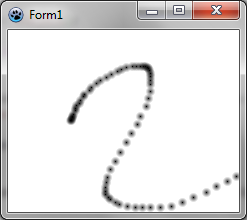 | |
| 187 | 184 | ||
| 188 | 185 | ### Continuous drawing | |
| 189 | 186 | ||
| 190 | 187 | To have a continuous drawing, we need additionnal variables: | |
| 191 | 188 | ||
| 192 | 189 | ``` pascal | |
| 193 | 190 | ||
| 194 | 191 | TForm1 = class(TForm) | |
| 195 | 192 | ... | |
| 196 | 193 | private | |
| 197 | 194 | { private declarations } | |
| 198 | 195 | image: TBGRABitmap; | |
| 199 | 196 | mouseDrawing: boolean; | |
| 200 | 197 | mouseOrigin: TPoint; | |
| 201 | 198 | ``` | |
| 202 | 199 | ||
| 203 | 200 | mouseDrawing will be True during the drawing (with left button pressed) and mouseOrigin will be the starting point of the segment being drawn. | |
| 204 | 201 | ||
| 205 | 202 | The clicking handler becomes a little bit more complicated: | |
| 206 | 203 | ||
| 207 | 204 | ``` pascal | |
| 208 | 205 | procedure TForm1.FormMouseDown(Sender: TObject; Button: TMouseButton; | |
| 209 | 206 | Shift: TShiftState; X, Y: Integer); | |
| 210 | 207 | begin | |
| 211 | 208 | if Button = mbLeft then | |
| 212 | 209 | begin | |
| 213 | 210 | mouseDrawing := True; | |
| 214 | 211 | mouseOrigin := Point(X,Y); | |
| 215 | 212 | DrawBrush(X,Y,True); // or DrawBrush(X,Y); | |
| 216 | 213 | end; | |
| 217 | 214 | end; | |
| 218 | 215 | ``` | |
| 219 | 216 | ||
| 220 | 217 | It initialises the drawing with the current position. Then, it draws as closed segment (note the new parameter for DrawBrush). Indeed, at the beginning, the segment is closed and has a length of zero, which gives a disk: | |
| 221 | 218 | ||
| 222 | - | ||
| 223 | - | ||
| 224 | - | ||
| 225 | - | ||
| 219 | + | 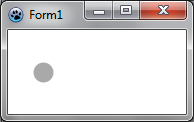 | |
| 226 | 220 | ||
| 227 | 221 | Little by little, we add a new part, which is an opened segment: | |
| 228 | 222 | ||
| 229 | - | ||
| 230 | - | ||
| 231 | - | ||
| 232 | - | ||
| 223 | + | 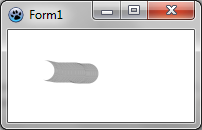 | |
| 233 | 224 | ||
| 234 | 225 | That's why we need a new parameter for the DrawBrush function, which becomes: | |
| 235 | 226 | ||
| 236 | 227 | ``` pascal | |
| 237 | 228 | procedure TForm1.DrawBrush(X, Y: Integer; Closed: Boolean); | |
| 238 | 229 | const brushRadius = 20; | |
| 239 | 230 | begin | |
| 240 | 231 | image.DrawLineAntialias(X,Y,mouseOrigin.X,mouseOrigin.Y,BGRA(0,0,0,128),brushRadius,Closed); | |
| 241 | 232 | mouseOrigin := Point(X,Y); | |
| 242 | 233 | ||
| 243 | 234 | PaintImage; | |
| 244 | 235 | end; | |
| 245 | 236 | ``` | |
| 246 | 237 | ||
| 247 | 238 | We transmit the parameter Closed to DrawLineAntialias, to indicate whether the segment is closed or not. Note coordinates order. The start position and the end position are swapped. Indeed, for DrawLineAntialias, it's the end that is opened, whereas in this case, we want that the beginning be opened. | |
| 248 | 239 | ||
| 249 | 240 | DrawBrush definition must be updated in the interface. | |
| 250 | 241 | ||
| 251 | 242 | The MouseMove handler becomes: | |
| 252 | 243 | ||
| 253 | 244 | ``` pascal | |
| 254 | 245 | procedure TForm1.FormMouseMove(Sender: TObject; Shift: TShiftState; X, | |
| 255 | 246 | Y: Integer); | |
| 256 | 247 | begin | |
| 257 | 248 | if mouseDrawing then DrawBrush(X,Y,False); | |
| 258 | 249 | end; | |
| 259 | 250 | ``` | |
| 260 | 251 | ||
| 261 | 252 | Finally, we need to add a MouseUp handler to update mouseDrawing: | |
| 262 | 253 | ||
| 263 | 254 | ``` pascal | |
| 264 | 255 | procedure TForm1.FormMouseUp(Sender: TObject; Button: TMouseButton; | |
| 265 | 256 | Shift: TShiftState; X, Y: Integer); | |
| 266 | 257 | begin | |
| 267 | 258 | if Button = mbLeft then | |
| 268 | 259 | mouseDrawing := False; | |
| 269 | 260 | end; | |
| 270 | 261 | ``` | |
| 271 | 262 | ||
| 272 | 263 | ### Code | |
| 273 | 264 | ||
| 274 | 265 | ``` pascal | |
| 275 | 266 | unit UMain; | |
| 276 | 267 | ||
| 277 | 268 | {$mode objfpc}{$H+} | |
| 278 | 269 | ||
| 279 | 270 | interface | |
| 280 | 271 | ||
| 281 | 272 | uses | |
| 282 | 273 | Classes, SysUtils, FileUtil, LResources, Forms, Controls, Graphics, Dialogs, | |
| 283 | 274 | BGRABitmap, BGRABitmapTypes; | |
| 284 | 275 | ||
| 285 | 276 | type | |
| 286 | 277 | { TForm1 } | |
| 287 | 278 | ||
| 288 | 279 | TForm1 = class(TForm) | |
| 289 | 280 | procedure FormCreate(Sender: TObject); | |
| 290 | 281 | procedure FormMouseDown(Sender: TObject; Button: TMouseButton; | |
| 291 | 282 | Shift: TShiftState; X, Y: Integer); | |
| 292 | 283 | procedure FormMouseMove(Sender: TObject; Shift: TShiftState; X, Y: Integer); | |
| 293 | 284 | procedure FormMouseUp(Sender: TObject; Button: TMouseButton; | |
| 294 | 285 | Shift: TShiftState; X, Y: Integer); | |
| 295 | 286 | procedure FormPaint(Sender: TObject); | |
| 296 | 287 | private | |
| 297 | 288 | { private declarations } | |
| 298 | 289 | image: TBGRABitmap; | |
| 299 | 290 | mouseDrawing: boolean; | |
| 300 | 291 | mouseOrigin: TPoint; | |
| 301 | 292 | procedure DrawBrush(X, Y: Integer; Closed: boolean); | |
| 302 | 293 | procedure PaintImage; | |
| 303 | 294 | public | |
| 304 | 295 | { public declarations } | |
| 305 | 296 | end; | |
| 306 | 297 | ||
| 307 | 298 | var | |
| 308 | 299 | Form1: TForm1; | |
| 309 | 300 | ||
| 310 | 301 | implementation | |
| 311 | 302 | ||
| 312 | 303 | { TForm1 } | |
| 313 | 304 | ||
| 314 | 305 | procedure TForm1.FormCreate(Sender: TObject); | |
| 315 | 306 | begin | |
| 316 | 307 | image := TBGRABitmap.Create(640,480,BGRAWhite); | |
| 317 | 308 | end; | |
| 318 | 309 | ||
| 319 | 310 | procedure TForm1.FormMouseDown(Sender: TObject; Button: TMouseButton; | |
| 320 | 311 | Shift: TShiftState; X, Y: Integer); | |
| 321 | 312 | begin | |
| 322 | 313 | if Button = mbLeft then | |
| 323 | 314 | begin | |
| 324 | 315 | mouseDrawing := True; | |
| 325 | 316 | mouseOrigin := Point(X,Y); | |
| 326 | 317 | DrawBrush(X,Y,True); | |
| 327 | 318 | end; | |
| 328 | 319 | end; | |
| 329 | 320 | ||
| 330 | 321 | procedure TForm1.FormMouseMove(Sender: TObject; Shift: TShiftState; X, | |
| 331 | 322 | Y: Integer); | |
| 332 | 323 | begin | |
| 333 | 324 | if mouseDrawing then DrawBrush(X,Y,False); | |
| 334 | 325 | end; | |
| 335 | 326 | ||
| 336 | 327 | procedure TForm1.FormMouseUp(Sender: TObject; Button: TMouseButton; | |
| 337 | 328 | Shift: TShiftState; X, Y: Integer); | |
| 338 | 329 | begin | |
| 339 | 330 | if Button = mbLeft then | |
| 340 | 331 | mouseDrawing := False; | |
| 341 | 332 | end; | |
| 342 | 333 | ||
| 343 | 334 | procedure TForm1.FormPaint(Sender: TObject); | |
| 344 | 335 | begin | |
| 345 | 336 | PaintImage; | |
| 346 | 337 | end; | |
| 347 | 338 | ||
| 348 | 339 | procedure TForm1.DrawBrush(X, Y: Integer; Closed: Boolean); | |
| 349 | 340 | const brushRadius = 20; | |
| 350 | 341 | begin | |
| 351 | 342 | image.DrawLineAntialias(X,Y,mouseOrigin.X,mouseOrigin.Y,BGRA(0,0,0,128),brushRadius,Closed); | |
| 352 | 343 | mouseOrigin := Point(X,Y); | |
| 353 | 344 | ||
| 354 | 345 | PaintImage; | |
| 355 | 346 | end; | |
| 356 | 347 | ||
| 357 | 348 | procedure TForm1.PaintImage; | |
| 358 | 349 | begin | |
| 359 | 350 | image.Draw(Canvas,0,0,True); | |
| 360 | 351 | end; | |
| 361 | 352 | ||
| 362 | 353 | initialization | |
| 363 | 354 | {$I UMain.lrs} | |
| 364 | 355 | ||
| 365 | 356 | end. | |
| 366 | 357 | ``` | |
| 367 | 358 | ||
| 368 | 359 | ### Run the program | |
| 369 | 360 | ||
| 370 | 361 | Now the drawing is almost continous: | |
| 371 | 362 | ||
| 372 | - | ||
| 373 | - | ||
| 374 | - | ||
| 375 | - | ||
| 363 | + | 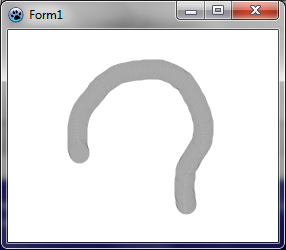 | |
| 376 | 364 | ||
| 377 | 365 | [[BGRABitmap tutorial 2|Previous tutorial (image loading)]] \| [[BGRABitmap tutorial 4|Next tutorial (direct pixel access)]] | |
| 378 | 366 | ||
| 379 | 367 | --- | |
| 380 | 368 | *From the Free Pascal wiki, page "BGRABitmap tutorial 3", as it stood on 2023-02-13 after a change by Wp, out of the wiki's dump of 2024-05-26. Copyright stays with the author who wrote it, according to the old wiki's [[Licensing]] page. If you have concerns about this material, [message the admin](/wiki-contact).* | |
| 381 | 369 | Category: BGRABitmap | |
| 382 | 370 | Category: Graphics |