

BGRABitmap tutorial 3/fr: what changed
Revision 1 to 2. Removed lines have a minus sign; added lines have a plus sign.
| Old | New | Line | |
|---|---|---|---|
| 1 | 1 | Ce tutoriel montre comment dessiner avec la souris. | |
| 2 | 2 | ||
| 3 | 3 | ### Création d'un nouveau projet | |
| 4 | 4 | ||
| 5 | 5 | Créez un nouveau projet et ajoutez la référence à [[BGRABitmap]], de la même façon que dans [[BGRABitmap tutorial/fr|le premier tutoriel]]. | |
| 6 | 6 | ||
| 7 | 7 | ### Création d'une nouvelle image | |
| 8 | 8 | ||
| 9 | 9 | Ajoutez une variable privée à la fenêtre principale pour stocker l'image : | |
| 10 | 10 | ||
| 11 | 11 | ``` pascal | |
| 12 | 12 | TForm1 = class(TForm) | |
| 13 | 13 | private | |
| 14 | 14 | { private declarations } | |
| 15 | 15 | image: TBGRABitmap; | |
| 16 | 16 | public | |
| 17 | 17 | { public declarations } | |
| 18 | 18 | end; | |
| 19 | 19 | ``` | |
| 20 | 20 | ||
| 21 | 21 | Créez l'image quand la fenêtre est créée. Pour cela, double-cliquez sur la fenêtre. Une procédure devrait apparaître dans l'éditeur de code. Ajoutez l'instruction de création : | |
| 22 | 22 | ||
| 23 | 23 | ``` pascal | |
| 24 | 24 | procedure TForm1.FormCreate(Sender: TObject); | |
| 25 | 25 | begin | |
| 26 | 26 | image := TBGRABitmap.Create(640,480,BGRAWhite); //crée une image 640x480 | |
| 27 | 27 | end; | |
| 28 | 28 | ``` | |
| 29 | 29 | ||
| 30 | 30 | ### Dessin de l'image | |
| 31 | 31 | ||
| 32 | 32 | Ajoutez un gestionnaire OnPaint. Pour cela, cliquez sur la fenêtre, allez dans l'inspecteur d'objet dans l'onglet événement, et double-cliquez sur la ligne *OnPaint*. Ensuite, ajoutez le code suivant : | |
| 33 | 33 | ||
| 34 | 34 | ``` pascal | |
| 35 | 35 | procedure TForm1.FormPaint(Sender: TObject); | |
| 36 | 36 | begin | |
| 37 | 37 | PaintImage; | |
| 38 | 38 | end; | |
| 39 | 39 | ``` | |
| 40 | 40 | ||
| 41 | 41 | Ajoutez la procédure PaintImage : | |
| 42 | 42 | ||
| 43 | 43 | ``` pascal | |
| 44 | 44 | procedure TForm1.PaintImage; | |
| 45 | 45 | begin | |
| 46 | 46 | image.Draw(Canvas,0,0,True); | |
| 47 | 47 | end; | |
| 48 | 48 | ``` | |
| 49 | 49 | ||
| 50 | 50 | Après avoir écrit cela, mettez le curseur texte sur *PaintImage* et pressez [[Ctrl-Shift-C]] pour ajouter la déclaration à l'interface. | |
| 51 | 51 | ||
| 52 | 52 | ### Gestion de la souris | |
| 53 | 53 | ||
| 54 | 54 | Avec l'inspecteur d'objet, ajoutez des gestionnaires pour les événements *MouseDown* et *MouseMove* : | |
| 55 | 55 | ||
| 56 | 56 | ``` pascal | |
| 57 | 57 | procedure TForm1.FormMouseDown(Sender: TObject; Button: TMouseButton; | |
| 58 | 58 | Shift: TShiftState; X, Y: Integer); | |
| 59 | 59 | begin | |
| 60 | 60 | if Button = mbLeft then DrawBrush(X,Y); | |
| 61 | 61 | end; | |
| 62 | 62 | ||
| 63 | 63 | procedure TForm1.FormMouseMove(Sender: TObject; Shift: TShiftState; X, | |
| 64 | 64 | Y: Integer); | |
| 65 | 65 | begin | |
| 66 | 66 | if ssLeft in Shift then DrawBrush(X,Y); | |
| 67 | 67 | end; | |
| 68 | 68 | ``` | |
| 69 | 69 | ||
| 70 | 70 | Ajoutez la procédure DrawBrush : | |
| 71 | 71 | ||
| 72 | 72 | ``` pascal | |
| 73 | 73 | procedure TForm1.DrawBrush(X, Y: Integer); | |
| 74 | 74 | const radius = 5; | |
| 75 | 75 | begin | |
| 76 | 76 | image.GradientFill(X-radius,Y-radius, X+radius,Y+radius, | |
| 77 | 77 | BGRABlack,BGRAPixelTransparent, gtRadial, | |
| 78 | 78 | PointF(X,Y), PointF(X+radius,Y), dmDrawWithTransparency); | |
| 79 | 79 | ||
| 80 | 80 | PaintImage; | |
| 81 | 81 | end; | |
| 82 | 82 | ``` | |
| 83 | 83 | ||
| 84 | 84 | Après avoir écrit cela, mettez le curseur texte sur *DrawBrush* et pressez *Ctrl-Shift-C* pour ajouter la déclaration à l'interface. | |
| 85 | 85 | ||
| 86 | 86 | Cette procédure dessine un gradient radial (*gtRadial*) : | |
| 87 | 87 | ||
| 88 | 88 | - le rectangle encadrant est (X-radius,Y-radius, X+radius,Y+radius) ; | |
| 89 | 89 | - le centre est noir et le bord transparent ; | |
| 90 | 90 | - le centre est à (X,Y) et le bord à (X+radius,Y). | |
| 91 | 91 | ||
| 92 | 92 | ### Code | |
| 93 | 93 | ||
| 94 | 94 | ``` pascal | |
| 95 | 95 | unit UMain; | |
| 96 | 96 | ||
| 97 | 97 | {$mode objfpc}{$H+} | |
| 98 | 98 | ||
| 99 | 99 | interface | |
| 100 | 100 | ||
| 101 | 101 | uses | |
| 102 | 102 | Classes, SysUtils, FileUtil, LResources, Forms, Controls, Graphics, Dialogs, | |
| 103 | 103 | BGRABitmap, BGRABitmapTypes; | |
| 104 | 104 | ||
| 105 | 105 | type | |
| 106 | 106 | { TForm1 } | |
| 107 | 107 | ||
| 108 | 108 | TForm1 = class(TForm) | |
| 109 | 109 | procedure FormCreate(Sender: TObject); | |
| 110 | 110 | procedure FormMouseDown(Sender: TObject; Button: TMouseButton; | |
| 111 | 111 | Shift: TShiftState; X, Y: Integer); | |
| 112 | 112 | procedure FormMouseMove(Sender: TObject; Shift: TShiftState; X, Y: Integer); | |
| 113 | 113 | procedure FormPaint(Sender: TObject); | |
| 114 | 114 | private | |
| 115 | 115 | { private declarations } | |
| 116 | 116 | image: TBGRABitmap; | |
| 117 | 117 | procedure DrawBrush(X, Y: Integer); | |
| 118 | 118 | procedure PaintImage; | |
| 119 | 119 | public | |
| 120 | 120 | { public declarations } | |
| 121 | 121 | end; | |
| 122 | 122 | ||
| 123 | 123 | var | |
| 124 | 124 | Form1: TForm1; | |
| 125 | 125 | ||
| 126 | 126 | implementation | |
| 127 | 127 | ||
| 128 | 128 | { TForm1 } | |
| 129 | 129 | ||
| 130 | 130 | procedure TForm1.FormCreate(Sender: TObject); | |
| 131 | 131 | begin | |
| 132 | 132 | image := TBGRABitmap.Create(640,480,BGRAWhite); | |
| 133 | 133 | end; | |
| 134 | 134 | ||
| 135 | 135 | procedure TForm1.FormMouseDown(Sender: TObject; Button: TMouseButton; | |
| 136 | 136 | Shift: TShiftState; X, Y: Integer); | |
| 137 | 137 | begin | |
| 138 | 138 | if Button = mbLeft then DrawBrush(X,Y); | |
| 139 | 139 | end; | |
| 140 | 140 | ||
| 141 | 141 | procedure TForm1.FormMouseMove(Sender: TObject; Shift: TShiftState; X, | |
| 142 | 142 | Y: Integer); | |
| 143 | 143 | begin | |
| 144 | 144 | if ssLeft in Shift then DrawBrush(X,Y); | |
| 145 | 145 | end; | |
| 146 | 146 | ||
| 147 | 147 | procedure TForm1.FormPaint(Sender: TObject); | |
| 148 | 148 | begin | |
| 149 | 149 | PaintImage; | |
| 150 | 150 | end; | |
| 151 | 151 | ||
| 152 | 152 | procedure TForm1.DrawBrush(X, Y: Integer); | |
| 153 | 153 | const radius = 20; | |
| 154 | 154 | begin | |
| 155 | 155 | image.GradientFill(X-radius,Y-radius, X+radius,Y+radius, | |
| 156 | 156 | BGRABlack,BGRAPixelTransparent,gtRadial, | |
| 157 | 157 | PointF(X,Y), PointF(X+radius,Y), dmDrawWithTransparency); | |
| 158 | 158 | ||
| 159 | 159 | PaintImage; | |
| 160 | 160 | end; | |
| 161 | 161 | ||
| 162 | 162 | procedure TForm1.PaintImage; | |
| 163 | 163 | begin | |
| 164 | 164 | image.Draw(Canvas,0,0,True); | |
| 165 | 165 | end; | |
| 166 | 166 | ||
| 167 | 167 | initialization | |
| 168 | 168 | {$I UMain.lrs} | |
| 169 | 169 | ||
| 170 | 170 | end. | |
| 171 | 171 | ``` | |
| 172 | 172 | ||
| 173 | 173 | ### Exécution du programme | |
| 174 | 174 | ||
| 175 | 175 | Vous pouvez dessiner sur la fenêtre. | |
| 176 | 176 | ||
| 177 | - | ||
| 178 | - | ||
| 179 | - | ||
| 180 | - | ||
| 177 | + | 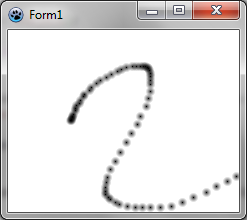 | |
| 181 | 178 | ||
| 182 | 179 | Remarquez que, selon la vitesse de déplacement de la souris, le tracé est plus ou moins foncé. | |
| 183 | 180 | ||
| 184 | 181 | ### Obtenir un tracé continu | |
| 185 | 182 | ||
| 186 | 183 | Afin d'avoir un tracé continu, vous aurez besoin de variables supplémentaires : | |
| 187 | 184 | ||
| 188 | 185 | ``` pascal | |
| 189 | 186 | TForm1 = class(TForm) | |
| 190 | 187 | ... | |
| 191 | 188 | private | |
| 192 | 189 | { private declarations } | |
| 193 | 190 | image: TBGRABitmap; | |
| 194 | 191 | mouseDrawing: boolean; | |
| 195 | 192 | mouseOrigin: TPoint; | |
| 196 | 193 | ``` | |
| 197 | 194 | ||
| 198 | 195 | *mouseDrawing* sera à *True* pendant le tracé (avec le bouton gauche appuyé), et *mouseOrigin* sera le point de départ du segment à dessiner. | |
| 199 | 196 | ||
| 200 | 197 | Au moment du clic, le code devient un peu plus compliqué : | |
| 201 | 198 | ||
| 202 | 199 | ``` pascal | |
| 203 | 200 | procedure TForm1.FormMouseDown(Sender: TObject; Button: TMouseButton; | |
| 204 | 201 | Shift: TShiftState; X, Y: Integer); | |
| 205 | 202 | begin | |
| 206 | 203 | if Button = mbLeft then | |
| 207 | 204 | begin | |
| 208 | 205 | mouseDrawing := True; | |
| 209 | 206 | mouseOrigin := Point(X,Y); | |
| 210 | 207 | DrawBrush(X,Y,True); | |
| 211 | 208 | end; | |
| 212 | 209 | end; | |
| 213 | 210 | ``` | |
| 214 | 211 | ||
| 215 | 212 | On initialise le tracé en précisant la position de départ. Ensuite, on dessine un segment complet (notez le nouveau paramètre de *DrawBrush*). En effet, au début, le segment est complet, ce qui dans le cas d'un segment de longueur zéro correspond à un disque : | |
| 216 | 213 | ||
| 217 | - | ||
| 218 | - | ||
| 219 | - | ||
| 220 | - | ||
| 214 | + | 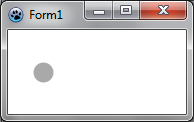 | |
| 221 | 215 | ||
| 222 | 216 | Au fur et à mesure, on ajoute la nouvelle partie tracée, qui est un segment ouvert. Par exemple : | |
| 223 | 217 | ||
| 224 | - | ||
| 225 | - | ||
| 226 | - | ||
| 227 | - | ||
| 218 | + | 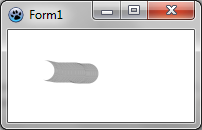 | |
| 228 | 219 | ||
| 229 | 220 | Voilà pourquoi nous avons besoin d'un nouveau paramètre pour la fonction *DrawBrush*, qui devient : | |
| 230 | 221 | ||
| 231 | 222 | ``` pascal | |
| 232 | 223 | procedure TForm1.DrawBrush(X, Y: Integer; Closed: Boolean); | |
| 233 | 224 | const brushRadius = 20; | |
| 234 | 225 | begin | |
| 235 | 226 | image.DrawLineAntialias(X,Y,mouseOrigin.X,mouseOrigin.Y,BGRA(0,0,0,128),brushRadius,Closed); | |
| 236 | 227 | mouseOrigin := Point(X,Y); | |
| 237 | 228 | ||
| 238 | 229 | PaintImage; | |
| 239 | 230 | end; | |
| 240 | 231 | ``` | |
| 241 | 232 | ||
| 242 | 233 | On transmet à *DrawLineAntialias* le paramètre *Closed*, indiquant si le segment est complet. Notez l'ordre des coordonnées. Le départ du segment et son point d'arrivée sont échangés. En effet, pour *DrawLineAntialias*, c'est la fin du segment qui est ouverte, alors que dans notre cas, c'est le début du segment qui est ouvert. | |
| 243 | 234 | ||
| 244 | 235 | Il faut mettre à jour la définition de *DrawBrush* dans l'interface. | |
| 245 | 236 | ||
| 246 | 237 | Le gestionnaire *MouseMove* devient : | |
| 247 | 238 | ||
| 248 | 239 | ``` pascal | |
| 249 | 240 | procedure TForm1.FormMouseMove(Sender: TObject; Shift: TShiftState; X, | |
| 250 | 241 | Y: Integer); | |
| 251 | 242 | begin | |
| 252 | 243 | if mouseDrawing then DrawBrush(X,Y,False); | |
| 253 | 244 | end; | |
| 254 | 245 | ``` | |
| 255 | 246 | ||
| 256 | 247 | Enfin, il faut ajouter un gestionnaire *MouseUp* pour mettre à jour *mouseDrawing* : | |
| 257 | 248 | ||
| 258 | 249 | ``` pascal | |
| 259 | 250 | procedure TForm1.FormMouseUp(Sender: TObject; Button: TMouseButton; | |
| 260 | 251 | Shift: TShiftState; X, Y: Integer); | |
| 261 | 252 | begin | |
| 262 | 253 | if Button = mbLeft then | |
| 263 | 254 | mouseDrawing := False; | |
| 264 | 255 | end; | |
| 265 | 256 | ``` | |
| 266 | 257 | ||
| 267 | 258 | ### Code | |
| 268 | 259 | ||
| 269 | 260 | ``` pascal | |
| 270 | 261 | unit UMain; | |
| 271 | 262 | ||
| 272 | 263 | {$mode objfpc}{$H+} | |
| 273 | 264 | ||
| 274 | 265 | interface | |
| 275 | 266 | ||
| 276 | 267 | uses | |
| 277 | 268 | Classes, SysUtils, FileUtil, LResources, Forms, Controls, Graphics, Dialogs, | |
| 278 | 269 | BGRABitmap, BGRABitmapTypes; | |
| 279 | 270 | ||
| 280 | 271 | type | |
| 281 | 272 | { TForm1 } | |
| 282 | 273 | ||
| 283 | 274 | TForm1 = class(TForm) | |
| 284 | 275 | procedure FormCreate(Sender: TObject); | |
| 285 | 276 | procedure FormMouseDown(Sender: TObject; Button: TMouseButton; | |
| 286 | 277 | Shift: TShiftState; X, Y: Integer); | |
| 287 | 278 | procedure FormMouseMove(Sender: TObject; Shift: TShiftState; X, Y: Integer); | |
| 288 | 279 | procedure FormMouseUp(Sender: TObject; Button: TMouseButton; | |
| 289 | 280 | Shift: TShiftState; X, Y: Integer); | |
| 290 | 281 | procedure FormPaint(Sender: TObject); | |
| 291 | 282 | private | |
| 292 | 283 | { private declarations } | |
| 293 | 284 | image: TBGRABitmap; | |
| 294 | 285 | mouseDrawing: boolean; | |
| 295 | 286 | mouseOrigin: TPoint; | |
| 296 | 287 | procedure DrawBrush(X, Y: Integer; Closed: boolean); | |
| 297 | 288 | procedure PaintImage; | |
| 298 | 289 | public | |
| 299 | 290 | { public declarations } | |
| 300 | 291 | end; | |
| 301 | 292 | ||
| 302 | 293 | var | |
| 303 | 294 | Form1: TForm1; | |
| 304 | 295 | ||
| 305 | 296 | implementation | |
| 306 | 297 | ||
| 307 | 298 | { TForm1 } | |
| 308 | 299 | ||
| 309 | 300 | procedure TForm1.FormCreate(Sender: TObject); | |
| 310 | 301 | begin | |
| 311 | 302 | image := TBGRABitmap.Create(640,480,BGRAWhite); | |
| 312 | 303 | end; | |
| 313 | 304 | ||
| 314 | 305 | procedure TForm1.FormMouseDown(Sender: TObject; Button: TMouseButton; | |
| 315 | 306 | Shift: TShiftState; X, Y: Integer); | |
| 316 | 307 | begin | |
| 317 | 308 | if Button = mbLeft then | |
| 318 | 309 | begin | |
| 319 | 310 | mouseDrawing := True; | |
| 320 | 311 | mouseOrigin := Point(X,Y); | |
| 321 | 312 | DrawBrush(X,Y,True); | |
| 322 | 313 | end; | |
| 323 | 314 | end; | |
| 324 | 315 | ||
| 325 | 316 | procedure TForm1.FormMouseMove(Sender: TObject; Shift: TShiftState; X, | |
| 326 | 317 | Y: Integer); | |
| 327 | 318 | begin | |
| 328 | 319 | if mouseDrawing then DrawBrush(X,Y,False); | |
| 329 | 320 | end; | |
| 330 | 321 | ||
| 331 | 322 | procedure TForm1.FormMouseUp(Sender: TObject; Button: TMouseButton; | |
| 332 | 323 | Shift: TShiftState; X, Y: Integer); | |
| 333 | 324 | begin | |
| 334 | 325 | if Button = mbLeft then | |
| 335 | 326 | mouseDrawing := False; | |
| 336 | 327 | end; | |
| 337 | 328 | ||
| 338 | 329 | procedure TForm1.FormPaint(Sender: TObject); | |
| 339 | 330 | begin | |
| 340 | 331 | PaintImage; | |
| 341 | 332 | end; | |
| 342 | 333 | ||
| 343 | 334 | procedure TForm1.DrawBrush(X, Y: Integer; Closed: Boolean); | |
| 344 | 335 | const brushRadius = 20; | |
| 345 | 336 | begin | |
| 346 | 337 | image.DrawLineAntialias(X,Y,mouseOrigin.X,mouseOrigin.Y,BGRA(0,0,0,128),brushRadius,Closed); | |
| 347 | 338 | mouseOrigin := Point(X,Y); | |
| 348 | 339 | ||
| 349 | 340 | PaintImage; | |
| 350 | 341 | end; | |
| 351 | 342 | ||
| 352 | 343 | procedure TForm1.PaintImage; | |
| 353 | 344 | begin | |
| 354 | 345 | image.Draw(Canvas,0,0,True); | |
| 355 | 346 | end; | |
| 356 | 347 | ||
| 357 | 348 | initialization | |
| 358 | 349 | {$I UMain.lrs} | |
| 359 | 350 | ||
| 360 | 351 | end. | |
| 361 | 352 | ``` | |
| 362 | 353 | ||
| 363 | 354 | ### Exécution du programme | |
| 364 | 355 | ||
| 365 | 356 | À présent, le tracé est presque uniforme : | |
| 366 | 357 | ||
| 367 | - | ||
| 368 | - | ||
| 369 | - | ||
| 370 | - | ||
| 358 | + | 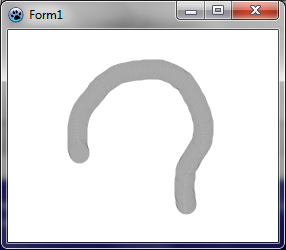 | |
| 371 | 359 | ||
| 372 | 360 | [[BGRABitmap tutorial 2/fr|Tutoriel précédent (chargement d'image)]] \| [[BGRABitmap tutorial 4/fr|Tutoriel suivant (accès direct aux pixels)]] | |
| 373 | 361 | ||
| 374 | 362 | --- | |
| 375 | 363 | *From the Free Pascal wiki, page "BGRABitmap tutorial 3/fr", as it stood on 2020-02-10 after a change by Trev, out of the wiki's dump of 2024-05-26. Copyright stays with the author who wrote it, according to the old wiki's [[Licensing]] page. If you have concerns about this material, [message the admin](/wiki-contact).* |