

BGRABitmap tutorial 3/es: what changed
Revision 3 to 4. Removed lines have a minus sign; added lines have a plus sign.
| Old | New | Line | |
|---|---|---|---|
| 1 | - | ||
| 2 | - | ||
| 3 | - | ||
| 4 | - | ||
| 5 | - | ||
| 6 | - | ||
| 7 | - | ||
| 8 | - | ||
| 9 | - | ||
| 10 | - | ||
| 11 | - | ||
| 12 | - | ||
| 13 | - | ||
| 14 | - | ||
| 15 | - | ||
| 1 | + | Esta tutoría muestra como dibujar en un bitmap con el mouse. | |
| 16 | 2 | ||
| 17 | 3 | ### Crear un nuevo proyecto | |
| 18 | 4 | ||
| 19 | - | ||
| 5 | + | Crea un nuevo proyecto y añade referencia a [[BGRABitmap]], de la misma forma que en [[BGRABitmap tutorial/es|la primer tutoría]]. | |
| 20 | 6 | ||
| 21 | 7 | ### Crea una nueva imágen | |
| 22 | 8 | ||
| 23 | - | ||
| 24 | - | ||
| 25 | - | ||
| 26 | - | ||
| 27 | - | ||
| 28 | - | ||
| 29 | - | ||
| 30 | - | ||
| 31 | - | ||
| 32 | - | ||
| 9 | + | Añade una variable privada a la forma principal para almacenar la imágen : | |
| 33 | 10 | ||
| 34 | - | ||
| 11 | + | ``` pascal | |
| 12 | + | TForm1 = class(TForm) | |
| 13 | + | private | |
| 14 | + | { private declarations } | |
| 15 | + | image: TBGRABitmap; | |
| 16 | + | public | |
| 17 | + | { public declarations } | |
| 18 | + | end; | |
| 35 | 19 | ``` | |
| 20 | + | ||
| 21 | + | Crea la imágen cuando la forma es creada. Para hacer esto, haz doble clic en la forma, un procedimiento debe aparecer en el editor de código. Añade la instrucción de creación : | |
| 22 | + | ||
| 23 | + | ``` pascal | |
| 36 | 24 | procedure TForm1.FormCreate(Sender: TObject); | |
| 37 | - | ||
| 38 | - | ||
| 39 | - | ||
| 25 | + | begin | |
| 26 | + | image := TBGRABitmap.Create(640,480,BGRAWhite); //crea una imágen de 640x480 | |
| 27 | + | end; | |
| 40 | 28 | ``` | |
| 41 | 29 | ||
| 42 | 30 | ### Dibuja el bitmap | |
| 43 | 31 | ||
| 44 | - | ||
| 45 | - | ||
| 32 | + | Añade un manejador OnPaint. Para hacer esto, selecciona la forma principal, luego ve al inspector de objetos, en la pestaña de eventos haz doble clic en la línea OnPaint. Luego agrega el código de dibujo : | |
| 33 | + | ||
| 34 | + | ``` pascal | |
| 46 | 35 | procedure TForm1.FormPaint(Sender: TObject); | |
| 47 | - | ||
| 48 | - | ||
| 49 | - | ||
| 36 | + | begin | |
| 37 | + | PaintImage; | |
| 38 | + | end; | |
| 50 | 39 | ``` | |
| 51 | 40 | ||
| 52 | - | ||
| 53 | - | ||
| 41 | + | Añade el procedimiento PaintImage : | |
| 42 | + | ||
| 43 | + | ``` pascal | |
| 54 | 44 | procedure TForm1.PaintImage; | |
| 55 | - | ||
| 56 | - | ||
| 57 | - | ||
| 45 | + | begin | |
| 46 | + | image.Draw(Canvas,0,0,True); | |
| 47 | + | end; | |
| 58 | 48 | ``` | |
| 59 | 49 | ||
| 60 | - | ||
| 50 | + | Luego de escribir esto, pon el cursor en PaintImage y presiona Ctrl-Shift-C para agregar la declaración a 'interface'. | |
| 61 | 51 | ||
| 62 | 52 | ### Manejar el mouse | |
| 63 | 53 | ||
| 64 | - | ||
| 65 | - | ||
| 54 | + | Con el inspector de objetos, agrega manejadores para los eventos MouseDown y MouseMove : | |
| 55 | + | ||
| 56 | + | ``` pascal | |
| 66 | 57 | procedure TForm1.FormMouseDown(Sender: TObject; Button: TMouseButton; | |
| 67 | - | ||
| 68 | - | ||
| 69 | - | ||
| 70 | - | ||
| 71 | - | ||
| 72 | - | ||
| 73 | - | ||
| 74 | - | ||
| 75 | - | ||
| 76 | - | ||
| 77 | - | ||
| 58 | + | Shift: TShiftState; X, Y: Integer); | |
| 59 | + | begin | |
| 60 | + | if Button = mbLeft then DrawBrush(X,Y); | |
| 61 | + | end; | |
| 78 | 62 | ||
| 79 | - | ||
| 63 | + | procedure TForm1.FormMouseMove(Sender: TObject; Shift: TShiftState; X, | |
| 64 | + | Y: Integer); | |
| 65 | + | begin | |
| 66 | + | if ssLeft in Shift then DrawBrush(X,Y); | |
| 67 | + | end; | |
| 80 | 68 | ``` | |
| 69 | + | ||
| 70 | + | Agrega el procedimiento DrawBrush : | |
| 71 | + | ||
| 72 | + | ``` pascal | |
| 81 | 73 | procedure TForm1.DrawBrush(X, Y: Integer); | |
| 82 | - | ||
| 83 | - | ||
| 84 | - | ||
| 85 | - | ||
| 86 | - | ||
| 87 | - | ||
| 88 | - | ||
| 89 | - | ||
| 74 | + | const radius = 5; | |
| 75 | + | begin | |
| 76 | + | image.GradientFill(X-radius,Y-radius, X+radius,Y+radius, | |
| 77 | + | BGRABlack,BGRAPixelTransparent, gtRadial, | |
| 78 | + | PointF(X,Y), PointF(X+radius,Y), dmDrawWithTransparency); | |
| 79 | + | ||
| 80 | + | PaintImage; | |
| 81 | + | end; | |
| 90 | 82 | ``` | |
| 91 | 83 | ||
| 92 | - | ||
| 84 | + | Luego de escribir esto, pon el cursor en DrawBrush y presiona Ctrl-Shift-C para agregar la declaración a 'interface'. | |
| 93 | 85 | ||
| 94 | - | ||
| 86 | + | Este procedimiento dibuja un gradiente radial (gtRadial) : | |
| 95 | 87 | ||
| 96 | - | ||
| 97 | - | ||
| 98 | - | ||
| 88 | + | - el borde rectangular es (X-radius,Y-radius, X+radius,Y+radius). | |
| 89 | + | - el centro es negro, el borde es transparente | |
| 90 | + | - el centro está en (X,Y) y el borde está en (X+radius,Y) | |
| 99 | 91 | ||
| 100 | 92 | ### Código | |
| 101 | - | ||
| 93 | + | ||
| 94 | + | ``` pascal | |
| 102 | 95 | unit UMain; | |
| 103 | - | ||
| 104 | - | ||
| 105 | - | ||
| 106 | - | ||
| 107 | - | ||
| 108 | - | ||
| 109 | - | ||
| 110 | - | ||
| 111 | - | ||
| 112 | - | ||
| 113 | - | ||
| 114 | - | ||
| 115 | - | ||
| 116 | - | ||
| 117 | - | ||
| 118 | - | ||
| 119 | - | ||
| 120 | - | ||
| 121 | - | ||
| 122 | - | ||
| 123 | - | ||
| 124 | - | ||
| 125 | - | ||
| 126 | - | ||
| 127 | - | ||
| 128 | - | ||
| 129 | - | ||
| 130 | - | ||
| 131 | - | ||
| 132 | - | ||
| 133 | - | ||
| 134 | - | ||
| 135 | - | ||
| 136 | - | ||
| 137 | - | ||
| 138 | - | ||
| 139 | - | ||
| 140 | - | ||
| 141 | - | ||
| 142 | - | ||
| 96 | + | ||
| 97 | + | {$mode objfpc}{$H+} | |
| 98 | + | ||
| 99 | + | interface | |
| 100 | + | ||
| 101 | + | uses | |
| 102 | + | Classes, SysUtils, FileUtil, LResources, Forms, Controls, Graphics, Dialogs, | |
| 103 | + | BGRABitmap, BGRABitmapTypes; | |
| 104 | + | ||
| 105 | + | type | |
| 106 | + | { TForm1 } | |
| 107 | + | ||
| 108 | + | TForm1 = class(TForm) | |
| 109 | + | procedure FormCreate(Sender: TObject); | |
| 110 | + | procedure FormMouseDown(Sender: TObject; Button: TMouseButton; | |
| 143 | 111 | Shift: TShiftState; X, Y: Integer); | |
| 144 | - | ||
| 145 | - | ||
| 146 | - | ||
| 147 | - | ||
| 148 | - | ||
| 149 | - | ||
| 150 | - | ||
| 151 | - | ||
| 152 | - | ||
| 153 | - | ||
| 154 | - | ||
| 155 | - | ||
| 156 | - | ||
| 157 | - | ||
| 158 | - | ||
| 159 | - | ||
| 160 | - | ||
| 161 | - | ||
| 162 | - | ||
| 163 | - | ||
| 164 | - | ||
| 165 | - | ||
| 166 | - | ||
| 167 | - | ||
| 168 | - | ||
| 169 | - | ||
| 170 | - | ||
| 171 | - | ||
| 172 | - | ||
| 173 | - | ||
| 174 | - | ||
| 175 | - | ||
| 176 | - | ||
| 177 | - | ||
| 112 | + | procedure FormMouseMove(Sender: TObject; Shift: TShiftState; X, Y: Integer); | |
| 113 | + | procedure FormPaint(Sender: TObject); | |
| 114 | + | private | |
| 115 | + | { private declarations } | |
| 116 | + | image: TBGRABitmap; | |
| 117 | + | procedure DrawBrush(X, Y: Integer); | |
| 118 | + | procedure PaintImage; | |
| 119 | + | public | |
| 120 | + | { public declarations } | |
| 121 | + | end; | |
| 122 | + | ||
| 123 | + | var | |
| 124 | + | Form1: TForm1; | |
| 125 | + | ||
| 126 | + | implementation | |
| 127 | + | ||
| 128 | + | { TForm1 } | |
| 129 | + | ||
| 130 | + | procedure TForm1.FormCreate(Sender: TObject); | |
| 131 | + | begin | |
| 132 | + | image := TBGRABitmap.Create(640,480,BGRAWhite); | |
| 133 | + | end; | |
| 134 | + | ||
| 135 | + | procedure TForm1.FormMouseDown(Sender: TObject; Button: TMouseButton; | |
| 136 | + | Shift: TShiftState; X, Y: Integer); | |
| 137 | + | begin | |
| 138 | + | if Button = mbLeft then DrawBrush(X,Y); | |
| 139 | + | end; | |
| 140 | + | ||
| 141 | + | procedure TForm1.FormMouseMove(Sender: TObject; Shift: TShiftState; X, | |
| 142 | + | Y: Integer); | |
| 143 | + | begin | |
| 144 | + | if ssLeft in Shift then DrawBrush(X,Y); | |
| 145 | + | end; | |
| 146 | + | ||
| 147 | + | procedure TForm1.FormPaint(Sender: TObject); | |
| 148 | + | begin | |
| 149 | + | PaintImage; | |
| 150 | + | end; | |
| 151 | + | ||
| 152 | + | procedure TForm1.DrawBrush(X, Y: Integer); | |
| 153 | + | const radius = 20; | |
| 154 | + | begin | |
| 155 | + | image.GradientFill(X-radius,Y-radius, X+radius,Y+radius, | |
| 156 | + | BGRABlack,BGRAPixelTransparent,gtRadial, | |
| 157 | + | PointF(X,Y), PointF(X+radius,Y), dmDrawWithTransparency); | |
| 158 | + | ||
| 159 | + | PaintImage; | |
| 160 | + | end; | |
| 161 | + | ||
| 162 | + | procedure TForm1.PaintImage; | |
| 163 | + | begin | |
| 164 | + | image.Draw(Canvas,0,0,True); | |
| 165 | + | end; | |
| 166 | + | ||
| 167 | + | initialization | |
| 168 | + | {$I UMain.lrs} | |
| 169 | + | ||
| 170 | + | end. | |
| 178 | 171 | ``` | |
| 179 | 172 | ||
| 180 | 173 | ### Ejecuta el programa | |
| 181 | 174 | ||
| 182 | - | ||
| 175 | + | Deberías poder dibujar en la forma. | |
| 183 | 176 | ||
| 184 | - | ||
| 177 | + | 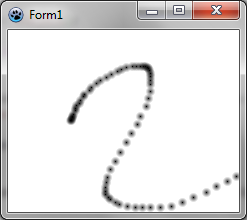 | |
| 185 | 178 | ||
| 186 | 179 | ### Dibujo contínuo | |
| 187 | 180 | ||
| 188 | - | ||
| 189 | - | ||
| 190 | - | ||
| 191 | - | ||
| 192 | - | ||
| 193 | - | ||
| 194 | - | ||
| 195 | - | ||
| 196 | - | ||
| 181 | + | Para tener un dibujo contínuo, necesitamos agregar variables adicionales : | |
| 182 | + | ||
| 183 | + | ``` pascal | |
| 184 | + | TForm1 = class(TForm) | |
| 185 | + | ... | |
| 186 | + | private | |
| 187 | + | { private declarations } | |
| 188 | + | image: TBGRABitmap; | |
| 189 | + | mouseDrawing: boolean; | |
| 190 | + | mouseOrigin: TPoint; | |
| 197 | 191 | ``` | |
| 198 | 192 | ||
| 199 | - | ||
| 193 | + | mouseDrawing va a ser 'True' durante el dibujado (con el botón izquierdo presionado) y mouseOrigin el punto inicial del segmento que está siendo dibujado. | |
| 200 | 194 | ||
| 201 | - | ||
| 202 | - | ||
| 195 | + | El manejador de clic lo convierte en algo un poco mas complicado : | |
| 196 | + | ||
| 197 | + | ``` pascal | |
| 203 | 198 | procedure TForm1.FormMouseDown(Sender: TObject; Button: TMouseButton; | |
| 204 | - | ||
| 205 | - | ||
| 206 | - | ||
| 207 | - | ||
| 208 | - | ||
| 209 | - | ||
| 210 | - | ||
| 211 | - | ||
| 212 | - | ||
| 199 | + | Shift: TShiftState; X, Y: Integer); | |
| 200 | + | begin | |
| 201 | + | if Button = mbLeft then | |
| 202 | + | begin | |
| 203 | + | mouseDrawing := True; | |
| 204 | + | mouseOrigin := Point(X,Y); | |
| 205 | + | DrawBrush(X,Y,True); | |
| 206 | + | end; | |
| 207 | + | end; | |
| 213 | 208 | ``` | |
| 214 | 209 | ||
| 215 | - | ||
| 210 | + | Esto inicializa el dibujado con la posición actual. Luego, esto dibuja un segmento cerrado (fíjate en el nuevo parámetro para DrawBrush). De todas formas, en el principio, el segmento está cerrado y tiene una longitud cero, que nos da un disco : | |
| 216 | 211 | ||
| 217 | - | ||
| 212 | + | 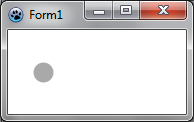 | |
| 218 | 213 | ||
| 219 | - | ||
| 214 | + | De a poco, agregaremos una nueva parte, que es un segmento abierto : | |
| 220 | 215 | ||
| 221 | - | ||
| 216 | + | 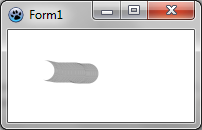 | |
| 222 | 217 | ||
| 223 | - | ||
| 224 | - | ||
| 218 | + | Es por esto que necesitamos un nuevo parámetro para la función DrawBrush, que se convierte en : | |
| 219 | + | ||
| 220 | + | ``` pascal | |
| 225 | 221 | procedure TForm1.DrawBrush(X, Y: Integer; Closed: Boolean); | |
| 226 | - | ||
| 227 | - | ||
| 228 | - | ||
| 229 | - | ||
| 230 | - | ||
| 231 | - | ||
| 232 | - | ||
| 222 | + | const brushRadius = 20; | |
| 223 | + | begin | |
| 224 | + | image.DrawLineAntialias(X,Y,mouseOrigin.X,mouseOrigin.Y,BGRA(0,0,0,128),brushRadius,Closed); | |
| 225 | + | mouseOrigin := Point(X,Y); | |
| 226 | + | ||
| 227 | + | PaintImage; | |
| 228 | + | end; | |
| 233 | 229 | ``` | |
| 234 | 230 | ||
| 235 | - | ||
| 231 | + | Transmitimos el parámetro Closed a DrawLineAntialias, para indicar cuando el segmento está cerrado o no. Mira el orden de las coordenadas. La posición inicial y la posición final están intercambiadas. De todas formas, para DrawLineAntialias, es la parte final que esta abierta, en este caso, necesitamos que la parte inicial esté abierta. | |
| 236 | 232 | ||
| 237 | - | ||
| 233 | + | La definición DrawBrush debe ser actualizada en la 'interface'. | |
| 238 | 234 | ||
| 239 | - | ||
| 240 | - | ||
| 235 | + | El manejador MouseMove se convierte en : | |
| 236 | + | ||
| 237 | + | ``` pascal | |
| 241 | 238 | procedure TForm1.FormMouseMove(Sender: TObject; Shift: TShiftState; X, | |
| 242 | - | ||
| 243 | - | ||
| 244 | - | ||
| 245 | - | ||
| 239 | + | Y: Integer); | |
| 240 | + | begin | |
| 241 | + | if mouseDrawing then DrawBrush(X,Y,False); | |
| 242 | + | end; | |
| 246 | 243 | ``` | |
| 247 | 244 | ||
| 248 | - | ||
| 249 | - | ||
| 245 | + | Finalmente, necesitamos agregar un manejador MouseUp para actualizar mouseDrawing : | |
| 246 | + | ||
| 247 | + | ``` pascal | |
| 250 | 248 | procedure TForm1.FormMouseUp(Sender: TObject; Button: TMouseButton; | |
| 251 | - | ||
| 252 | - | ||
| 253 | - | ||
| 254 | - | ||
| 255 | - | ||
| 249 | + | Shift: TShiftState; X, Y: Integer); | |
| 250 | + | begin | |
| 251 | + | if Button = mbLeft then | |
| 252 | + | mouseDrawing := False; | |
| 253 | + | end; | |
| 256 | 254 | ``` | |
| 257 | 255 | ||
| 258 | 256 | ### Código | |
| 259 | - | ||
| 257 | + | ||
| 258 | + | ``` pascal | |
| 260 | 259 | unit UMain; | |
| 261 | - | ||
| 262 | - | ||
| 263 | - | ||
| 264 | - | ||
| 265 | - | ||
| 266 | - | ||
| 267 | - | ||
| 268 | - | ||
| 269 | - | ||
| 270 | - | ||
| 271 | - | ||
| 272 | - | ||
| 273 | - | ||
| 274 | - | ||
| 275 | - | ||
| 276 | - | ||
| 277 | - | ||
| 278 | - | ||
| 279 | - | ||
| 280 | - | ||
| 281 | - | ||
| 282 | - | ||
| 283 | - | ||
| 284 | - | ||
| 285 | - | ||
| 286 | - | ||
| 287 | - | ||
| 288 | - | ||
| 289 | - | ||
| 290 | - | ||
| 291 | - | ||
| 292 | - | ||
| 293 | - | ||
| 294 | - | ||
| 295 | - | ||
| 296 | - | ||
| 297 | - | ||
| 298 | - | ||
| 299 | - | ||
| 300 | - | ||
| 301 | - | ||
| 302 | - | ||
| 303 | - | ||
| 304 | - | ||
| 260 | + | ||
| 261 | + | {$mode objfpc}{$H+} | |
| 262 | + | ||
| 263 | + | interface | |
| 264 | + | ||
| 265 | + | uses | |
| 266 | + | Classes, SysUtils, FileUtil, LResources, Forms, Controls, Graphics, Dialogs, | |
| 267 | + | BGRABitmap, BGRABitmapTypes; | |
| 268 | + | ||
| 269 | + | type | |
| 270 | + | { TForm1 } | |
| 271 | + | ||
| 272 | + | TForm1 = class(TForm) | |
| 273 | + | procedure FormCreate(Sender: TObject); | |
| 274 | + | procedure FormMouseDown(Sender: TObject; Button: TMouseButton; | |
| 305 | 275 | Shift: TShiftState; X, Y: Integer); | |
| 306 | - | ||
| 307 | - | ||
| 308 | - | ||
| 309 | - | ||
| 310 | - | ||
| 311 | - | ||
| 312 | - | ||
| 313 | - | ||
| 314 | - | ||
| 315 | - | ||
| 316 | - | ||
| 317 | - | ||
| 318 | - | ||
| 319 | - | ||
| 320 | - | ||
| 321 | - | ||
| 276 | + | procedure FormMouseMove(Sender: TObject; Shift: TShiftState; X, Y: Integer); | |
| 277 | + | procedure FormMouseUp(Sender: TObject; Button: TMouseButton; | |
| 322 | 278 | Shift: TShiftState; X, Y: Integer); | |
| 323 | - | ||
| 324 | - | ||
| 325 | - | ||
| 326 | - | ||
| 327 | - | ||
| 328 | - | ||
| 329 | - | ||
| 330 | - | ||
| 331 | - | ||
| 332 | - | ||
| 333 | - | ||
| 334 | - | ||
| 335 | - | ||
| 336 | - | ||
| 337 | - | ||
| 338 | - | ||
| 339 | - | ||
| 340 | - | ||
| 341 | - | ||
| 342 | - | ||
| 343 | - | ||
| 344 | - | ||
| 345 | - | ||
| 346 | - | ||
| 347 | - | ||
| 348 | - | ||
| 349 | - | ||
| 350 | - | ||
| 279 | + | procedure FormPaint(Sender: TObject); | |
| 280 | + | private | |
| 281 | + | { private declarations } | |
| 282 | + | image: TBGRABitmap; | |
| 283 | + | mouseDrawing: boolean; | |
| 284 | + | mouseOrigin: TPoint; | |
| 285 | + | procedure DrawBrush(X, Y: Integer; Closed: boolean); | |
| 286 | + | procedure PaintImage; | |
| 287 | + | public | |
| 288 | + | { public declarations } | |
| 289 | + | end; | |
| 290 | + | ||
| 291 | + | var | |
| 292 | + | Form1: TForm1; | |
| 293 | + | ||
| 294 | + | implementation | |
| 295 | + | ||
| 296 | + | { TForm1 } | |
| 297 | + | ||
| 298 | + | procedure TForm1.FormCreate(Sender: TObject); | |
| 299 | + | begin | |
| 300 | + | image := TBGRABitmap.Create(640,480,BGRAWhite); | |
| 301 | + | end; | |
| 302 | + | ||
| 303 | + | procedure TForm1.FormMouseDown(Sender: TObject; Button: TMouseButton; | |
| 304 | + | Shift: TShiftState; X, Y: Integer); | |
| 305 | + | begin | |
| 306 | + | if Button = mbLeft then | |
| 307 | + | begin | |
| 308 | + | mouseDrawing := True; | |
| 309 | + | mouseOrigin := Point(X,Y); | |
| 310 | + | DrawBrush(X,Y,True); | |
| 311 | + | end; | |
| 312 | + | end; | |
| 313 | + | ||
| 314 | + | procedure TForm1.FormMouseMove(Sender: TObject; Shift: TShiftState; X, | |
| 315 | + | Y: Integer); | |
| 316 | + | begin | |
| 317 | + | if mouseDrawing then DrawBrush(X,Y,False); | |
| 318 | + | end; | |
| 319 | + | ||
| 320 | + | procedure TForm1.FormMouseUp(Sender: TObject; Button: TMouseButton; | |
| 321 | + | Shift: TShiftState; X, Y: Integer); | |
| 322 | + | begin | |
| 323 | + | if Button = mbLeft then | |
| 324 | + | mouseDrawing := False; | |
| 325 | + | end; | |
| 326 | + | ||
| 327 | + | procedure TForm1.FormPaint(Sender: TObject); | |
| 328 | + | begin | |
| 329 | + | PaintImage; | |
| 330 | + | end; | |
| 331 | + | ||
| 332 | + | procedure TForm1.DrawBrush(X, Y: Integer; Closed: Boolean); | |
| 333 | + | const brushRadius = 20; | |
| 334 | + | begin | |
| 335 | + | image.DrawLineAntialias(X,Y,mouseOrigin.X,mouseOrigin.Y,BGRA(0,0,0,128),brushRadius,Closed); | |
| 336 | + | mouseOrigin := Point(X,Y); | |
| 337 | + | ||
| 338 | + | PaintImage; | |
| 339 | + | end; | |
| 340 | + | ||
| 341 | + | procedure TForm1.PaintImage; | |
| 342 | + | begin | |
| 343 | + | image.Draw(Canvas,0,0,True); | |
| 344 | + | end; | |
| 345 | + | ||
| 346 | + | initialization | |
| 347 | + | {$I UMain.lrs} | |
| 348 | + | ||
| 349 | + | end. | |
| 351 | 350 | ``` | |
| 352 | 351 | ||
| 353 | 352 | ### Ejecuta el programa | |
| 354 | 353 | ||
| 355 | - | ||
| 354 | + | Ahora el dibujo es en su mayoría contínuo : | |
| 356 | 355 | ||
| 357 | - | ||
| 356 | + | 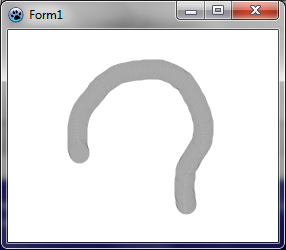 | |
| 358 | 357 | ||
| 359 | - | ||
| 358 | + | [[BGRABitmap tutorial 2/es|Tutoría anterior (cargar imágen)]] \| [[BGRABitmap tutorial 4/es|Siguiente tutoría (acceso directo a píxeles)]] | |
| 360 | 359 | ||
| 361 | 360 | --- | |
| 362 | - | ||
| 361 | + | *From the Free Pascal wiki, page "BGRABitmap tutorial 3/es", as it stood on 2020-02-10 after a change by Trev, out of the wiki's dump of 2024-05-26. Copyright stays with the author who wrote it, according to the old wiki's [[Licensing]] page. If you have concerns about this material, [message the admin](/wiki-contact).* | |
| 362 | + | Category: Castellano | |
| 363 | + | Category: Español |