

BGRABitmap tutorial 1: what changed
Revision 1 to 2. Removed lines have a minus sign; added lines have a plus sign.
| Old | New | Line | |
|---|---|---|---|
| 1 | 1 | This first tutorial shows you how to use [[BGRABitmap]] library. | |
| 2 | 2 | ||
| 3 | 3 | You can download the library on [GitHub](https://github.com/bgrabitmap). | |
| 4 | 4 | ||
| 5 | 5 | ### Create a new project | |
| 6 | 6 | ||
| 7 | 7 | Create an windowed application with menu **Project \> New project**. | |
| 8 | 8 | ||
| 9 | 9 | The main form unit should look like this: | |
| 10 | 10 | ||
| 11 | 11 | ``` pascal | |
| 12 | 12 | unit UMain; | |
| 13 | 13 | ||
| 14 | 14 | {$mode objfpc}{$H+} | |
| 15 | 15 | ||
| 16 | 16 | interface | |
| 17 | 17 | ||
| 18 | 18 | uses | |
| 19 | 19 | Classes, SysUtils, FileUtil, LResources, Forms, Controls, Graphics, Dialogs; | |
| 20 | 20 | ||
| 21 | 21 | type | |
| 22 | 22 | ||
| 23 | 23 | { TForm1 } | |
| 24 | 24 | ||
| 25 | 25 | TForm1 = class(TForm) | |
| 26 | 26 | private | |
| 27 | 27 | { private declarations } | |
| 28 | 28 | public | |
| 29 | 29 | { public declarations } | |
| 30 | 30 | end; | |
| 31 | 31 | ||
| 32 | 32 | var | |
| 33 | 33 | Form1: TForm1; | |
| 34 | 34 | ||
| 35 | 35 | implementation | |
| 36 | 36 | ||
| 37 | 37 | initialization | |
| 38 | 38 | {$I UMain.lrs} | |
| 39 | 39 | ||
| 40 | 40 | end. | |
| 41 | 41 | ``` | |
| 42 | 42 | ||
| 43 | 43 | If you do not find it, use **Ctrl-F12** to show file list. | |
| 44 | 44 | ||
| 45 | 45 | Save your project next to BGRABitmap library with menu **File \> Save all** (not necessarily in the same folder). | |
| 46 | 46 | ||
| 47 | 47 | ### Add reference to BGRABitmap | |
| 48 | 48 | ||
| 49 | 49 | The first time you use BGRABitmap, open bgrabitmappack.lpk with Lazarus and click on "Use \> Add to Project". Then, if you need to add the reference in another project, you can do it through the Project inspector and click on "Add... \> New condition" and choose BGRABitmapPack. | |
| 50 | 50 | ||
| 51 | 51 | In the unit clause, add a reference to BGRABitmap and BGRABitmapTypes after Dialogs. | |
| 52 | 52 | ||
| 53 | 53 | ``` pascal | |
| 54 | 54 | uses | |
| 55 | 55 | Classes, SysUtils, FileUtil, LResources, | |
| 56 | 56 | Forms, Controls, Graphics, Dialogs, | |
| 57 | 57 | BGRABitmap, BGRABitmapTypes; | |
| 58 | 58 | ``` | |
| 59 | 59 | ||
| 60 | 60 | #### Alternative ways of referencing | |
| 61 | 61 | ||
| 62 | 62 | ##### By installing BGRABitmap package | |
| 63 | 63 | ||
| 64 | 64 | Open bgrabitmappack.lpk as a package. Make sure it is possible to install it by going in the package window into "Options \> IDE Integration" and setting the package type to "designtime and runtime". Then in the package window, click on install. A dialog pops up, asking if the package must be added to Lazarus and if it needs to be compiled again. Choose Yes twice. | |
| 65 | 65 | ||
| 66 | 66 | If everything is fine, Lazarus restarts and BGRABitmap units are available. If it does not work, you can simply add BGRABitmap to the search path without compiling Lazarus. | |
| 67 | 67 | ||
| 68 | 68 | ##### By adding BGRABitmap units to the search path | |
| 69 | 69 | ||
| 70 | 70 | Another way is to add BGRABitmap units to the search path of the project. To do this, go to compiler options with menu **Project \> Compiler options**. In other unit files path, add the relative path to BGRABitmap. For example, if BGRABitmap is in a folder next to your project, the relative path could be "..\BGRABitmap". | |
| 71 | 71 | ||
| 72 | 72 | If you copy BGRABitmap files in the same folder as your project, then you do not need to add such search path. However, it is not recommended because if you have multiple projects using the library, it could become a repetitive task to update to a new version of the library. | |
| 73 | 73 | ||
| 74 | 74 | If you are lost with relative path, you can also add the relative path by adding the BGRABitmap unit to your project. To do so, open within your project the file bgrabitmap.pas. Then use menu **Project \> Add file to project**. Lazarus will ask if you want to add the file and the new directory to the project. | |
| 75 | 75 | ||
| 76 | 76 | ### Add some drawing | |
| 77 | 77 | ||
| 78 | 78 | Add a painting event. To do this, click on the form, then go to the object inspector, in the event tab, and double click on the OnPaint line. Lazarus will add automatically a FormPaint handler to the main form unit. Add for example the following code inside it: | |
| 79 | 79 | ||
| 80 | 80 | ``` pascal | |
| 81 | 81 | procedure TForm1.FormPaint(Sender: TObject); | |
| 82 | 82 | var bmp: TBGRABitmap; | |
| 83 | 83 | begin | |
| 84 | 84 | bmp := TBGRABitmap.Create(ClientWidth, ClientHeight, BGRABlack); | |
| 85 | 85 | bmp.FillRect(20, 20, 100, 40, BGRA(255,192,0), dmSet); //fill an orange rectangle | |
| 86 | 86 | bmp.Draw(Canvas, 0, 0, True); //render BGRABitmap on the form | |
| 87 | 87 | bmp.Free; //free memory | |
| 88 | 88 | end; | |
| 89 | 89 | ``` | |
| 90 | 90 | ||
| 91 | 91 | As you can see, you need to define a [[TBGRABitmap class|TBGRABitmap]] variable and create it. There are several constructors for [[TBGRABitmap class|TBGRABitmap]]. The one used here creates a bitmap of size ClientWidth x ClientHeight and filled with black. ClientWidth and ClientHeight are form properties that return the available space for drawing inside the form. | |
| 92 | 92 | ||
| 93 | 93 | The FillRect procedure takes usual parameters for drawing a rectangle, that is the upper-left corner followed by the lower-right corner plus 1. It means that the pixel at (100,40) is excluded from the rectangle. | |
| 94 | 94 | ||
| 95 | 95 | After that, there is a color parameter with red/green/blue components, and a drawing mode. dmSet means to simply replace the pixels. | |
| 96 | 96 | ||
| 97 | 97 | Do not forget to free the object after using it, to avoid a memory leak. | |
| 98 | 98 | ||
| 99 | 99 | ### Resulting code | |
| 100 | 100 | ||
| 101 | 101 | You should obtain the following code: | |
| 102 | 102 | ||
| 103 | 103 | ``` pascal | |
| 104 | 104 | unit UMain; | |
| 105 | 105 | ||
| 106 | 106 | {$mode objfpc}{$H+} | |
| 107 | 107 | ||
| 108 | 108 | interface | |
| 109 | 109 | ||
| 110 | 110 | uses | |
| 111 | 111 | Classes, SysUtils, FileUtil, LResources, | |
| 112 | 112 | Forms, Controls, Graphics, Dialogs, | |
| 113 | 113 | BGRABitmap, BGRABitmapTypes; | |
| 114 | 114 | ||
| 115 | 115 | type | |
| 116 | 116 | ||
| 117 | 117 | { TForm1 } | |
| 118 | 118 | ||
| 119 | 119 | TForm1 = class(TForm) | |
| 120 | 120 | procedure FormPaint(Sender: TObject); | |
| 121 | 121 | private | |
| 122 | 122 | { private declarations } | |
| 123 | 123 | public | |
| 124 | 124 | { public declarations } | |
| 125 | 125 | end; | |
| 126 | 126 | ||
| 127 | 127 | var | |
| 128 | 128 | Form1: TForm1; | |
| 129 | 129 | ||
| 130 | 130 | implementation | |
| 131 | 131 | ||
| 132 | 132 | { TForm1 } | |
| 133 | 133 | ||
| 134 | 134 | procedure TForm1.FormPaint(Sender: TObject); | |
| 135 | 135 | var bmp: TBGRABitmap; | |
| 136 | 136 | begin | |
| 137 | 137 | bmp := TBGRABitmap.Create(ClientWidth, ClientHeight, BGRABlack); | |
| 138 | 138 | bmp.FillRect(20, 20, 100, 40, BGRA(255, 192, 0), dmSet); | |
| 139 | 139 | bmp.Draw(Canvas, 0, 0, True); | |
| 140 | 140 | bmp.Free; | |
| 141 | 141 | end; | |
| 142 | 142 | ||
| 143 | 143 | initialization | |
| 144 | 144 | {$I UMain.lrs} | |
| 145 | 145 | ||
| 146 | 146 | end. | |
| 147 | 147 | ``` | |
| 148 | 148 | ||
| 149 | 149 | ### Run the program | |
| 150 | 150 | ||
| 151 | 151 | You should obtain a window filled in black with an orange rectangle in it. | |
| 152 | 152 | ||
| 153 | - | ||
| 154 | - | ||
| 155 | - | ||
| 156 | - | ||
| 153 | + | 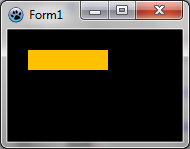 | |
| 157 | 154 | ||
| 158 | 155 | [[BGRABitmap tutorial 2|Go to next tutorial (image loading)]] | |
| 159 | 156 | ||
| 160 | 157 | --- | |
| 161 | 158 | *From the Free Pascal wiki, page "BGRABitmap tutorial 1", as it stood on 2020-02-11 after a change by Andry, out of the wiki's dump of 2024-05-26. Copyright stays with the author who wrote it, according to the old wiki's [[Licensing]] page. If you have concerns about this material, [message the admin](/wiki-contact).* | |
| 162 | 159 | Category: BGRABitmap | |
| 163 | 160 | Category: Graphics |