

BGRABitmap tutorial 16: what changed
Revision 1 to 2. Removed lines have a minus sign; added lines have a plus sign.
| Old | New | Line | |
|---|---|---|---|
| 1 | - | ||
| 1 | + | [[BGRABitmap tutorial|**Home**]] | [[BGRABitmap tutorial 1|**Tutorial 1**]] | [[BGRABitmap tutorial 2|**Tutorial 2**]] | [[BGRABitmap tutorial 3|**Tutorial 3**]] | [[BGRABitmap tutorial 4|**Tutorial 4**]] | [[BGRABitmap tutorial 5|**Tutorial 5**]] | [[BGRABitmap tutorial 6|**Tutorial 6**]] | [[BGRABitmap tutorial 7|**Tutorial 7**]] | [[BGRABitmap tutorial 8|**Tutorial 8**]] | [[BGRABitmap tutorial 9|**Tutorial 9**]] | [[BGRABitmap tutorial 10|**Tutorial 10**]] | [[BGRABitmap tutorial 11|**Tutorial 11**]] | [[BGRABitmap tutorial 12|**Tutorial 12**]] | [[BGRABitmap tutorial 13|**Tutorial 13**]] | [[BGRABitmap tutorial 14|**Tutorial 14**]] | [[BGRABitmap tutorial 15|**Tutorial 15**]] | **Tutorial 16** | [[/wiki.freepascal.org/index.php?title=Template:BGRABitmap tutorial index&action=edit|Edit]] | |
| 2 | 2 | ||
| 3 | - | ||
| 3 | + | This tutorial shows how to use textures with 3D objects. | |
| 4 | 4 | ||
| 5 | - | ||
| 5 | + | ## Creating textures | |
| 6 | 6 | ||
| 7 | - | ||
| 7 | + | To create textures, we will use the following unit. To understand how it works, you can have look at the [[BGRABitmap tutorial 8|texture tutorial]]. Here is the unit: | |
| 8 | + | ``` | |
| 8 | 9 | unit utexture; | |
| 9 | - | ||
| 10 | - | ||
| 11 | - | ||
| 12 | - | ||
| 13 | - | ||
| 14 | - | ||
| 15 | - | ||
| 16 | - | ||
| 17 | - | ||
| 18 | - | ||
| 19 | - | ||
| 20 | - | ||
| 21 | - | ||
| 22 | - | ||
| 23 | - | ||
| 24 | - | ||
| 25 | - | ||
| 26 | - | ||
| 27 | - | ||
| 28 | - | ||
| 29 | - | ||
| 30 | - | ||
| 31 | - | ||
| 32 | - | ||
| 33 | - | ||
| 34 | - | ||
| 35 | - | ||
| 36 | - | ||
| 37 | - | ||
| 38 | - | ||
| 39 | - | ||
| 40 | - | ||
| 41 | - | ||
| 42 | - | ||
| 43 | - | ||
| 44 | - | ||
| 45 | - | ||
| 46 | - | ||
| 47 | - | ||
| 48 | - | ||
| 49 | - | ||
| 50 | - | ||
| 51 | - | ||
| 52 | - | ||
| 53 | - | ||
| 54 | - | ||
| 55 | - | ||
| 56 | - | ||
| 57 | - | ||
| 58 | - | ||
| 59 | - | ||
| 60 | - | ||
| 61 | - | ||
| 62 | - | ||
| 63 | - | ||
| 64 | - | ||
| 65 | - | ||
| 66 | - | ||
| 67 | - | ||
| 68 | - | ||
| 69 | - | ||
| 70 | - | ||
| 71 | - | ||
| 72 | - | ||
| 73 | - | ||
| 74 | - | ||
| 75 | - | ||
| 76 | - | ||
| 77 | - | ||
| 78 | - | ||
| 79 | - | ||
| 80 | - | ||
| 81 | - | ||
| 82 | - | ||
| 83 | - | ||
| 84 | - | ||
| 85 | - | ||
| 86 | - | ||
| 87 | - | ||
| 88 | - | ||
| 89 | - | ||
| 90 | - | ||
| 91 | - | ||
| 92 | - | ||
| 93 | - | ||
| 94 | - | ||
| 95 | - | ||
| 96 | - | ||
| 10 | + | ||
| 11 | + | {$mode objfpc}{$H+} | |
| 12 | + | ||
| 13 | + | interface | |
| 14 | + | ||
| 15 | + | uses | |
| 16 | + | Classes, SysUtils, BGRABitmap, BGRABitmapTypes; | |
| 17 | + | ||
| 18 | + | function CreateGrassTexture(tx,ty: integer): TBGRABitmap; | |
| 19 | + | function CreateVerticalWoodTexture(tx, ty: integer): TBGRABitmap; | |
| 20 | + | function CreateWoodTexture(tx,ty: integer): TBGRABitmap; | |
| 21 | + | ||
| 22 | + | implementation | |
| 23 | + | ||
| 24 | + | uses BGRAGradients; | |
| 25 | + | ||
| 26 | + | function Interp256(value1,value2,position: integer): integer; inline; | |
| 27 | + | begin | |
| 28 | + | result := (value1*(256-position)+value2*position) shr 8; | |
| 29 | + | end; | |
| 30 | + | ||
| 31 | + | function Interp256(color1,color2: TBGRAPixel; position: integer): TBGRAPixel; inline; | |
| 32 | + | begin | |
| 33 | + | result.red := Interp256(color1.red,color2.red,position); | |
| 34 | + | result.green := Interp256(color1.green,color2.green,position); | |
| 35 | + | result.blue := Interp256(color1.blue,color2.blue,position); | |
| 36 | + | result.alpha := Interp256(color1.alpha,color2.alpha,position); | |
| 37 | + | end; | |
| 38 | + | ||
| 39 | + | function CreateWoodTexture(tx,ty: integer): TBGRABitmap; | |
| 40 | + | var | |
| 41 | + | colorOscillation, globalColorVariation: integer; | |
| 42 | + | p: PBGRAPixel; | |
| 43 | + | i: Integer; | |
| 44 | + | begin | |
| 45 | + | result := CreateCyclicPerlinNoiseMap(tx,ty,1.5,1.5,1,rfBestQuality); | |
| 46 | + | p := result.Data; | |
| 47 | + | for i := 0 to result.NbPixels-1 do | |
| 48 | + | begin | |
| 49 | + | colorOscillation := round(sqrt((sin(p^.red*Pi/16)+1)/2)*256); | |
| 50 | + | globalColorVariation := p^.red; | |
| 51 | + | p^:= Interp256( Interp256(BGRA(247,188,120),BGRA(255,218,170),colorOscillation), | |
| 52 | + | Interp256(BGRA(157,97,60),BGRA(202,145,112),colorOscillation), globalColorVariation); | |
| 53 | + | inc(p); | |
| 54 | + | end; | |
| 55 | + | end; | |
| 56 | + | ||
| 57 | + | function CreateVerticalWoodTexture(tx, ty: integer): TBGRABitmap; | |
| 58 | + | var | |
| 59 | + | globalPos: single; | |
| 60 | + | colorOscillation, globalColorVariation: integer; | |
| 61 | + | p: PBGRAPixel; | |
| 62 | + | i: Integer; | |
| 63 | + | x,nbVertical: integer; | |
| 64 | + | begin | |
| 65 | + | result := CreateCyclicPerlinNoiseMap(tx,ty,1,1,1,rfBestQuality); | |
| 66 | + | p := result.Data; | |
| 67 | + | x := 0; | |
| 68 | + | nbVertical := tx div 128; | |
| 69 | + | if nbVertical = 0 then nbVertical := 1; | |
| 70 | + | for i := 0 to result.NbPixels-1 do | |
| 71 | + | begin | |
| 72 | + | globalPos := p^.red*Pi/32 + nbVertical*x*2*Pi/tx*8; | |
| 73 | + | colorOscillation := round(sqrt((sin(globalPos)+1)/2)*256); | |
| 74 | + | globalColorVariation := p^.red; //round(sin(globalPos/8)*128+128); | |
| 75 | + | p^:= Interp256( Interp256(BGRA(247,188,120),BGRA(255,218,170),colorOscillation), | |
| 76 | + | Interp256(BGRA(157,97,60),BGRA(202,145,112),colorOscillation), globalColorVariation); | |
| 77 | + | inc(p); | |
| 78 | + | inc(x); | |
| 79 | + | if x = tx then x := 0; | |
| 80 | + | end; | |
| 81 | + | end; | |
| 82 | + | ||
| 83 | + | function CreateGrassTexture(tx,ty: integer): TBGRABitmap; | |
| 84 | + | var | |
| 85 | + | p: PBGRAPixel; | |
| 86 | + | i: Integer; | |
| 87 | + | begin | |
| 88 | + | result := CreateCyclicPerlinNoiseMap(tx,ty,1,1,1,rfBestQuality); | |
| 89 | + | p := result.Data; | |
| 90 | + | for i := 0 to result.NbPixels-1 do | |
| 91 | + | begin | |
| 92 | + | p^ := Interp256( BGRA(0,128,0), BGRA(192,255,0), p^.red ); | |
| 93 | + | inc(p); | |
| 94 | + | end; | |
| 95 | + | end; | |
| 96 | + | ||
| 97 | + | end. | |
| 97 | 98 | ``` | |
| 98 | 99 | ||
| 99 | 100 | ## Wooden cube on the grass | |
| 100 | 101 | ||
| 101 | - | ||
| 102 | - | ||
| 103 | - | ||
| 102 | + | Here is a unit that creates a scene with a square of grass with a wooden cube on it: | |
| 103 | + | ``` | |
| 104 | 104 | unit ex2; | |
| 105 | - | ||
| 106 | - | ||
| 107 | - | ||
| 108 | - | ||
| 109 | - | ||
| 110 | - | ||
| 111 | - | ||
| 112 | - | ||
| 113 | - | ||
| 114 | - | ||
| 115 | - | ||
| 116 | - | ||
| 117 | - | ||
| 118 | - | ||
| 119 | - | ||
| 120 | - | ||
| 121 | - | ||
| 122 | - | ||
| 123 | - | ||
| 124 | - | ||
| 125 | - | ||
| 126 | - | ||
| 127 | - | ||
| 128 | - | ||
| 129 | - | ||
| 130 | - | ||
| 131 | - | ||
| 132 | - | ||
| 133 | - | ||
| 134 | - | ||
| 135 | - | ||
| 136 | - | ||
| 137 | - | ||
| 138 | - | ||
| 139 | - | ||
| 140 | - | ||
| 141 | - | ||
| 142 | - | ||
| 143 | - | ||
| 144 | - | ||
| 145 | - | ||
| 146 | - | ||
| 147 | - | ||
| 148 | - | ||
| 149 | - | ||
| 150 | - | ||
| 151 | - | ||
| 152 | - | ||
| 153 | - | ||
| 154 | - | ||
| 155 | - | ||
| 156 | - | ||
| 157 | - | ||
| 158 | - | ||
| 159 | - | ||
| 160 | - | ||
| 161 | - | ||
| 162 | - | ||
| 163 | - | ||
| 164 | - | ||
| 165 | - | ||
| 166 | - | ||
| 167 | - | ||
| 168 | - | ||
| 169 | - | ||
| 170 | - | ||
| 171 | - | ||
| 172 | - | ||
| 173 | - | ||
| 174 | - | ||
| 175 | - | ||
| 176 | - | ||
| 177 | - | ||
| 178 | - | ||
| 179 | - | ||
| 180 | - | ||
| 181 | - | ||
| 182 | - | ||
| 183 | - | ||
| 184 | - | ||
| 185 | - | ||
| 186 | - | ||
| 187 | - | ||
| 188 | - | ||
| 189 | - | ||
| 190 | - | ||
| 191 | - | ||
| 192 | - | ||
| 193 | - | ||
| 194 | - | ||
| 195 | - | ||
| 196 | - | ||
| 197 | - | ||
| 105 | + | ||
| 106 | + | {$mode objfpc}{$H+} | |
| 107 | + | ||
| 108 | + | interface | |
| 109 | + | ||
| 110 | + | uses | |
| 111 | + | Classes, SysUtils, BGRAScene3D, BGRABitmap, BGRABitmapTypes; | |
| 112 | + | ||
| 113 | + | type | |
| 114 | + | { TExample2 } | |
| 115 | + | ||
| 116 | + | TExample2 = class(TBGRAScene3D) | |
| 117 | + | grass,wood,vWood: TBGRABitmap; | |
| 118 | + | ||
| 119 | + | constructor Create; | |
| 120 | + | procedure ApplyTexCoord(face: IBGRAFace3D; Times: integer = 2); | |
| 121 | + | procedure Render; override; | |
| 122 | + | destructor Destroy; override; | |
| 123 | + | end; | |
| 124 | + | ||
| 125 | + | implementation | |
| 126 | + | ||
| 127 | + | uses utexture; | |
| 128 | + | ||
| 129 | + | const texSize = 128; | |
| 130 | + | ||
| 131 | + | { TExample2 } | |
| 132 | + | ||
| 133 | + | constructor TExample2.Create; | |
| 134 | + | var | |
| 135 | + | base,v: array of IBGRAVertex3D; | |
| 136 | + | box : IBGRAObject3D; | |
| 137 | + | begin | |
| 138 | + | inherited Create; | |
| 139 | + | ||
| 140 | + | //create textures | |
| 141 | + | grass := CreateGrassTexture(texSize,texSize); | |
| 142 | + | vWood := CreateVerticalWoodTexture(texSize,texSize); | |
| 143 | + | wood := CreateWoodTexture(texSize,texSize); | |
| 144 | + | ||
| 145 | + | //create ground | |
| 146 | + | with CreateObject(grass) do | |
| 147 | + | begin | |
| 148 | + | base := MainPart.Add([-50,20,-50, -50,20,50, 50,20,50, 50,20,-50]); | |
| 149 | + | ApplyTexCoord(AddFace(base),4); | |
| 150 | + | end; | |
| 151 | + | ||
| 152 | + | //create wooden box | |
| 153 | + | box := CreateObject(vWood); | |
| 154 | + | with box do | |
| 155 | + | begin | |
| 156 | + | v := MainPart.Add([-1,-1,-1, 1,-1,-1, 1,1,-1, -1,1,-1, | |
| 157 | + | -1,-1,+1, 1,-1,+1, 1,1,+1, -1,1,+1]); | |
| 158 | + | ||
| 159 | + | ApplyTexCoord(AddFace([v[0],v[1],v[2],v[3]])); | |
| 160 | + | ApplyTexCoord(AddFace([v[4],v[5],v[1],v[0]],wood)); | |
| 161 | + | ApplyTexCoord(AddFace([v[7],v[6],v[5],v[4]])); | |
| 162 | + | ApplyTexCoord(AddFace([v[3],v[2],v[6],v[7]],wood)); | |
| 163 | + | ApplyTexCoord(AddFace([v[1],v[5],v[6],v[2]])); | |
| 164 | + | ApplyTexCoord(AddFace([v[4],v[0],v[3],v[7]])); | |
| 165 | + | ||
| 166 | + | MainPart.Scale(20); | |
| 167 | + | end; | |
| 168 | + | //RemoveObject(box); | |
| 169 | + | ||
| 170 | + | ViewPoint := Point3D(-40,-40,-100); | |
| 171 | + | end; | |
| 172 | + | ||
| 173 | + | procedure TExample2.ApplyTexCoord(face: IBGRAFace3D; Times: integer); | |
| 174 | + | begin | |
| 175 | + | with face do | |
| 176 | + | begin | |
| 177 | + | TexCoord[0] := PointF(0,0); | |
| 178 | + | TexCoord[1] := PointF(texSize*Times-1,0); | |
| 179 | + | TexCoord[2] := PointF(texSize*Times-1,texSize*Times-1); | |
| 180 | + | TexCoord[3] := PointF(0,texSize*Times-1); | |
| 181 | + | end; | |
| 182 | + | end; | |
| 183 | + | ||
| 184 | + | procedure TExample2.Render; | |
| 185 | + | begin | |
| 186 | + | inherited Render; | |
| 187 | + | end; | |
| 188 | + | ||
| 189 | + | destructor TExample2.Destroy; | |
| 190 | + | begin | |
| 191 | + | grass.free; | |
| 192 | + | wood.free; | |
| 193 | + | vWood.free; | |
| 194 | + | inherited Destroy; | |
| 195 | + | end; | |
| 196 | + | ||
| 197 | + | end. | |
| 198 | 198 | ``` | |
| 199 | 199 | ||
| 200 | - | ||
| 200 | + | First the needed textures are created. The grass is created as an object with grass texture, defined by 4 vertices. The texture is defined as a parameter to the CreateObject function. The AddFace returns an IBGRAFace3D object which is passed to the custom procedure ApplyTexCoord. This procedure sets the TexCoord property for each vertex of the face. These coordinates are floating point pixel-centered coordinates. | |
| 201 | 201 | ||
| 202 | - | ||
| 202 | + | The wooden box is created as an object with vertical wood texture. The vertices define a cube with unit coordinates. It is scaled later on. When creating top and bottom faces, another texture is applied which is a perpendicular wood texture. | |
| 203 | 203 | ||
| 204 | - | ||
| 204 | + | Finally the view point is set. To be a little bit from the side. The default value is (0,0,-100). This way the scene has some perspective. | |
| 205 | 205 | ||
| 206 | - | ||
| 207 | - | ||
| 208 | - | ||
| 209 | - | ||
| 206 | + | [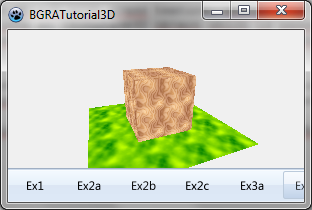](</File:BGRATutorial16a.png>) | |
| 210 | 207 | ||
| 211 | 208 | ### Lighting and normals | |
| 212 | 209 | ||
| 213 | - | ||
| 214 | - | ||
| 215 | - | ||
| 216 | - | ||
| 217 | - | ||
| 218 | - | ||
| 219 | - | ||
| 220 | - | ||
| 221 | - | ||
| 222 | - | ||
| 210 | + | It is possible to add some lighting: | |
| 223 | 211 | ``` | |
| 212 | + | LightingNormal:= lnFace; | |
| 213 | + | ||
| 214 | + | AmbiantLightness := 0.25; | |
| 215 | + | with CreateObject do | |
| 216 | + | begin | |
| 217 | + | AddPointLight(MainPart.Add(-100,-80,0),140,0.5); | |
| 218 | + | end; | |
| 219 | + | ``` | |
| 224 | 220 | ||
| 225 | - | ||
| 221 | + | Here lightness is used like in the previous tutorial. But the light is a point. To define a vertex, it is necessary to create an object to contain it. It is possible later to move the light. The further an object is from the light, the darker it is. The optimal distance parameter specifies the distance for which the light intensity is defined by the next parameter. It means that if the object is at a distance of 140, the lightness added will be 0.5. | |
| 226 | 222 | ||
| 227 | - | ||
| 223 | + | Notice that we defined LightingNormal to lnFace. This means that the light is computed considering the faces are flat. There is no roundiness added to the lighting. This will be useful in other cases but not here. | |
| 228 | 224 | ||
| 229 | - | ||
| 230 | - | ||
| 231 | - | ||
| 232 | - | ||
| 225 | + | [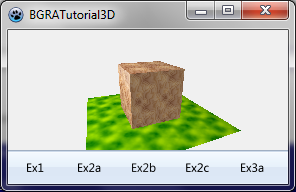](</File:BGRATutorial16b.png>) | |
| 233 | 226 | ||
| 234 | 227 | [[BGRABitmap tutorial 15|Previous tutorial (3D)]] | |
| 235 | 228 | ||
| 236 | 229 | --- | |
| 237 | - | ||
| 238 | - | ||
| 239 | - | ||
| 230 | + | *From the Free Pascal wiki, page "BGRABitmap tutorial 16", as the Internet Archive kept it on 2024-06-13. Copyright stays with the author who wrote it, according to the old wiki's [[Licensing]] page. If you have concerns about this material, [message the admin](/wiki-contact).* |