

BGRABitmap tutorial 14: what changed
Revision 1 to 2. Removed lines have a minus sign; added lines have a plus sign.
| Old | New | Line | |
|---|---|---|---|
| 1 | - | ||
| 1 | + | [[BGRABitmap tutorial|**Home**]] | [[BGRABitmap tutorial 1|**Tutorial 1**]] | [[BGRABitmap tutorial 2|**Tutorial 2**]] | [[BGRABitmap tutorial 3|**Tutorial 3**]] | [[BGRABitmap tutorial 4|**Tutorial 4**]] | [[BGRABitmap tutorial 5|**Tutorial 5**]] | [[BGRABitmap tutorial 6|**Tutorial 6**]] | [[BGRABitmap tutorial 7|**Tutorial 7**]] | [[BGRABitmap tutorial 8|**Tutorial 8**]] | [[BGRABitmap tutorial 9|**Tutorial 9**]] | [[BGRABitmap tutorial 10|**Tutorial 10**]] | [[BGRABitmap tutorial 11|**Tutorial 11**]] | [[BGRABitmap tutorial 12|**Tutorial 12**]] | [[BGRABitmap tutorial 13|**Tutorial 13**]] | **Tutorial 14** | [[BGRABitmap tutorial 15|**Tutorial 15**]] | [[BGRABitmap tutorial 16|**Tutorial 16**]] | [[/wiki.freepascal.org/index.php?title=Template:BGRABitmap tutorial index&action=edit|Edit]] | |
| 2 | 2 | ||
| 3 | - | ||
| 3 | + | This tutorial shows how to use the Canvas2D property of BGRABitmap. Canvas2D is designed to work like the Javascript 2D context of the HTML Canvas object. | |
| 4 | 4 | ||
| 5 | - | ||
| 5 | + | ## Contents | |
| 6 | 6 | ||
| 7 | - | ||
| 8 | - | ||
| 9 | - | ||
| 10 | - | ||
| 11 | - | ||
| 12 | - | ||
| 7 | + | * 1 First program | |
| 8 | + | * 2 Complex shapes | |
| 9 | + | * 3 Using transformations | |
| 10 | + | * 4 Gradients and memory usage | |
| 11 | + | * 5 More examples | |
| 13 | 12 | ||
| 14 | - | ||
| 15 | - | ||
| 16 | - | ||
| 17 | - | ||
| 13 | + | ## First program | |
| 18 | 14 | ||
| 19 | - | ||
| 20 | - | ||
| 21 | - | ||
| 15 | + | Here is a very simple example: | |
| 22 | 16 | ``` | |
| 23 | - | ||
| 24 | - | ||
| 25 | - | ||
| 26 | - | ||
| 27 | - | ||
| 28 | - | ||
| 29 | - | ||
| 30 | - | ||
| 31 | - | ||
| 32 | - | ||
| 33 | - | ||
| 34 | - | ||
| 35 | - | ||
| 36 | - | ||
| 37 | - | ||
| 38 | - | ||
| 17 | + | procedure TForm1.FormPaint(Sender: TObject); | |
| 18 | + | var bmp: TBGRABitmap; | |
| 19 | + | ctx: TBGRACanvas2D; | |
| 20 | + | begin | |
| 21 | + | bmp := TBGRABitmap.Create(ClientWidth,ClientHeight,BGRA(210,210,210)); | |
| 22 | + | ||
| 23 | + | ctx := bmp.Canvas2D; | |
| 24 | + | ctx.fillStyle('rgb(240,128,0)'); | |
| 25 | + | ctx.fillRect(30,30,80,60); | |
| 26 | + | ctx.strokeRect(50,50,80,60); | |
| 27 | + | ||
| 28 | + | bmp.Draw(Canvas,0,0); | |
| 29 | + | bmp.Free; | |
| 30 | + | end; | |
| 31 | + | ``` | |
| 39 | 32 | ||
| 40 | - | ||
| 33 | + | Note that path fonctions are defined in the [[BGRABitmap Geometry types|IBGRAPath interface]]. The **TBGRAPath** class of unit BGRAPath[[1]](<https://github.com/bgrabitmap/bgrabitmap/blob/master/bgrabitmap/bgrapath.pas>) provides an independent path object that you can use to create shapes. A sample project can be found in [[BGRABitmap AggPas]]> "BGRABitmap AggPas"). | |
| 34 | + | --- | |
| 35 | + | ||
| 36 | + | The bitmap has a Canvas2D property which provides the fillRect and strokeRect function. The fillStyle is defined to orange by specifying a css color string. When the shape is filled, it uses the fill style, and when the border is drawn, it uses the stroke style. | |
| 41 | 37 | ||
| 42 | - | ||
| 43 | - | ||
| 44 | - | ||
| 45 | - | ||
| 46 | - | ||
| 47 | - | ||
| 48 | - | ||
| 49 | - | ||
| 50 | - | ||
| 51 | - | ||
| 38 | + | The code above is equivalent to this Javascript code: | |
| 52 | 39 | ``` | |
| 40 | + | var canvas = document.getElementsByTagName("canvas")[0]; | |
| 41 | + | canvas.width = 200 | |
| 42 | + | canvas.height = 200 | |
| 43 | + | if (canvas.getContext){ | |
| 44 | + | var ctx = canvas.getContext("2d"); | |
| 45 | + | ctx.fillStyle = "rgb(240,128,0)"; | |
| 46 | + | ctx.fillRect(30,30,80,60); | |
| 47 | + | ctx.strokeRect(50,50,80,60); | |
| 48 | + | } | |
| 49 | + | ``` | |
| 53 | 50 | ||
| 54 | - | ||
| 55 | - | ||
| 56 | - | ||
| 57 | - | ||
| 51 | + | [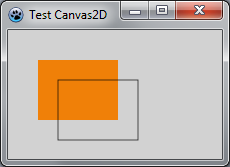](</File:BGRATutorial14a.png>) | |
| 58 | 52 | ||
| 59 | 53 | ## Complex shapes | |
| 60 | 54 | ||
| 61 | - | ||
| 62 | - | ||
| 63 | - | ||
| 64 | - | ||
| 65 | - | ||
| 66 | - | ||
| 67 | - | ||
| 68 | - | ||
| 69 | - | ||
| 70 | - | ||
| 71 | - | ||
| 72 | - | ||
| 73 | - | ||
| 74 | - | ||
| 75 | - | ||
| 76 | - | ||
| 77 | - | ||
| 78 | - | ||
| 79 | - | ||
| 80 | - | ||
| 81 | - | ||
| 82 | - | ||
| 55 | + | To draw a complex shape, it is necessary to define a path: | |
| 83 | 56 | ``` | |
| 57 | + | procedure pave(); | |
| 58 | + | begin | |
| 59 | + | ctx.fillStyle ('rgb(130,100,255)'); | |
| 60 | + | ctx.strokeStyle ('rgb(0,0,255)'); | |
| 61 | + | ctx.beginPath(); | |
| 62 | + | ctx.lineWidth:=2; | |
| 63 | + | ctx.moveTo(5,5);ctx.lineTo(20,10);ctx.lineTo(55,5);ctx.lineTo(45,18);ctx.lineTo(30,50); | |
| 64 | + | ctx.closePath(); | |
| 65 | + | ctx.stroke(); | |
| 66 | + | ctx.fill(); | |
| 67 | + | end; | |
| 68 | + | ||
| 69 | + | begin | |
| 70 | + | bmp := TBGRABitmap.Create(ClientWidth,ClientHeight,BGRA(210,210,210)); | |
| 71 | + | ctx := bmp.Canvas2D; | |
| 72 | + | pave(); | |
| 73 | + | bmp.Draw(Canvas,0,0); | |
| 74 | + | bmp.Free; | |
| 75 | + | end; | |
| 76 | + | ``` | |
| 84 | 77 | ||
| 85 | - | ||
| 78 | + | Notice that the line width is defined by the property lineWidth and that the path begins with a beginPath call. If you want more information on the way path works, see the [Javascript documentation](<https://developer.mozilla.org/en/Canvas_tutorial/Drawing_shapes>). | |
| 86 | 79 | ||
| 87 | - | ||
| 88 | - | ||
| 89 | - | ||
| 90 | - | ||
| 80 | + | [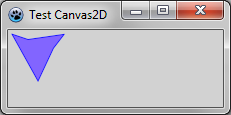](</File:Tutorial14b.png>) | |
| 91 | 81 | ||
| 92 | 82 | ## Using transformations | |
| 93 | 83 | ||
| 94 | - | ||
| 95 | - | ||
| 96 | - | ||
| 97 | - | ||
| 98 | - | ||
| 99 | - | ||
| 100 | - | ||
| 101 | - | ||
| 102 | - | ||
| 103 | - | ||
| 104 | - | ||
| 105 | - | ||
| 106 | - | ||
| 107 | - | ||
| 108 | - | ||
| 109 | - | ||
| 110 | - | ||
| 111 | - | ||
| 112 | - | ||
| 113 | - | ||
| 114 | - | ||
| 115 | - | ||
| 116 | - | ||
| 84 | + | Now we can draw the triangle six times with a rotation by calling transformation functions. | |
| 117 | 85 | ``` | |
| 86 | + | procedure six(); | |
| 87 | + | var | |
| 88 | + | i: Integer; | |
| 89 | + | begin | |
| 90 | + | ctx.save(); | |
| 91 | + | for i := 0 to 5 do | |
| 92 | + | begin | |
| 93 | + | ctx.rotate(2*PI/6); | |
| 94 | + | pave(); | |
| 95 | + | end; | |
| 96 | + | ctx.restore(); | |
| 97 | + | end; | |
| 98 | + | begin | |
| 99 | + | bmp := TBGRABitmap.Create(ClientWidth,ClientHeight,BGRA(210,210,210)); | |
| 100 | + | ctx := bmp.Canvas2D; | |
| 101 | + | ctx.translate(80,80); | |
| 102 | + | six; | |
| 103 | + | bmp.Draw(Canvas,0,0); | |
| 104 | + | bmp.Free; | |
| 105 | + | end; | |
| 106 | + | ``` | |
| 118 | 107 | ||
| 119 | - | ||
| 120 | - | ||
| 121 | - | ||
| 122 | - | ||
| 108 | + | [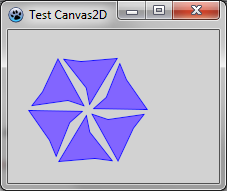](</File:BGRATutorial14c.png>) | |
| 123 | 109 | ||
| 124 | 110 | ## Gradients and memory usage | |
| 125 | 111 | ||
| 126 | - | ||
| 127 | - | ||
| 128 | - | ||
| 112 | + | To use gradients, Canvas2D provides the createLinearGradient and createPattern functions. Theses functions return an interfaced object. You must not free them explicitely. They are freed when there are no more references to them. For example: | |
| 113 | + | ``` | |
| 129 | 114 | var | |
| 130 | - | ||
| 131 | - | ||
| 132 | - | ||
| 133 | - | ||
| 134 | - | ||
| 135 | - | ||
| 136 | - | ||
| 137 | - | ||
| 138 | - | ||
| 139 | - | ||
| 140 | - | ||
| 141 | - | ||
| 142 | - | ||
| 143 | - | ||
| 144 | - | ||
| 145 | - | ||
| 146 | - | ||
| 147 | - | ||
| 115 | + | grad: IBGRACanvasGradient2D; | |
| 116 | + | begin | |
| 117 | + | grad := ctx.createLinearGradient(0,0,320,240); | |
| 118 | + | grad.addColorStop(0.3, '#ff0000'); | |
| 119 | + | grad.addColorStop(0.6, '#0000ff'); | |
| 120 | + | ctx.fillStyle(grad); | |
| 121 | + | ||
| 122 | + | grad := ctx.createLinearGradient(0,0,320,240); | |
| 123 | + | grad.addColorStop(0.3, '#ffffff'); | |
| 124 | + | grad.addColorStop(0.6, '#000000'); | |
| 125 | + | ctx.strokeStyle(grad); | |
| 126 | + | ctx.lineWidth := 5; | |
| 127 | + | ||
| 128 | + | ctx.moveto(160,120); | |
| 129 | + | ctx.arc(160,120,100,Pi/6,-Pi/6,false); | |
| 130 | + | ctx.fill(); | |
| 131 | + | ctx.stroke(); | |
| 132 | + | end; | |
| 148 | 133 | ``` | |
| 149 | 134 | ||
| 150 | - | ||
| 135 | + | The grad variable is assigned with the gradient objects, but there is no call to Free. | |
| 151 | 136 | ||
| 152 | - | ||
| 153 | - | ||
| 154 | - | ||
| 155 | - | ||
| 137 | + | [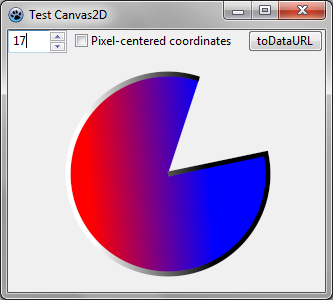](</File:BGRATutorial14d.png>) | |
| 156 | 138 | ||
| 157 | 139 | ## More examples | |
| 158 | 140 | ||
| 159 | - | ||
| 141 | + | Other examples are in the testcanvas2d directory of BGRABitmap archive. Scripts are taken from the [Jean-Paul Davalan web site](<https://web.archive.org/web/20190207062328/http://jean-paul.davalan.pagesperso-orange.fr/lang/jsc/js09.html>) (Internet Archive link) which contains HTML Canvas examples. | |
| 160 | 142 | ||
| 161 | 143 | [[BGRABitmap tutorial 13|Previous tutorial (pixel coordinates)]] [[BGRABitmap tutorial 15|Next tutorial (3D)]] | |
| 162 | 144 | ||
| 163 | 145 | --- | |
| 164 | - | ||
| 165 | - | ||
| 166 | - | ||
| 146 | + | *From the Free Pascal wiki, page "BGRABitmap tutorial 14", as the Internet Archive kept it on 2024-12-09. Copyright stays with the author who wrote it, according to the old wiki's [[Licensing]] page. If you have concerns about this material, [message the admin](/wiki-contact).* |