

BGRABitmap tutorial 13: what changed
Revision 1 to 2. Removed lines have a minus sign; added lines have a plus sign.
| Old | New | Line | |
|---|---|---|---|
| 1 | 1 | This tutorial talks about the coordinate system of BGRABitmap. A sample project showing how gamma factor affects antialiasing can be found in [[BGRABitmap AggPas]]. | |
| 2 | 2 | ||
| 3 | 3 | ### Pixel coordinates | |
| 4 | 4 | ||
| 5 | 5 | Standard canvas routines use integer coordinates. This is also the case with the CanvasBGRA property, which emulates standard canvas functions, but with antialiasing (AntialiasingMode), alphablending (Opacity property of Pen, Brush and Font) and gamma correction. | |
| 6 | 6 | ||
| 7 | 7 | When using pure integer coordinates without antialiasing, the coordinates specify a pixel position, i.e. a square. So when drawing a line from (0,0) to (5,5), the top-left pixel is the first painted pixel. In standard canvas, the last pixel is not painted, so the end of the line will be at (4,4). | |
| 8 | 8 | ||
| 9 | - | ||
| 10 | - | ||
| 11 | - | ||
| 12 | - | ||
| 9 | + | 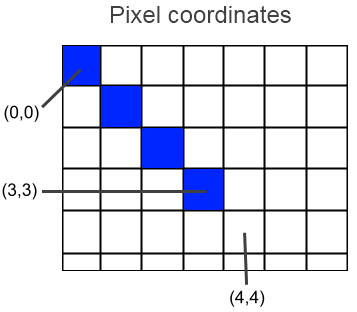 | |
| 13 | 10 | ||
| 14 | 11 | When drawing an ellipse, the bounding rectangle specifies the pixels that will be used to render the ellipse. Once again, in standard canvas, the lower-right coordinates are excluded from the drawing, so filling the rectangle (0,0)-(5,5) will in fact fill pixels having coordinates from 0 to 4. | |
| 15 | 12 | ||
| 16 | 13 | ### Floating coordinates | |
| 17 | 14 | ||
| 18 | 15 | Now, when working with floating point values, the coordinates specify a position that can be anywhere on the pixels. The width value of the pen really means a distance, and not a number of pixels. So what does (0.0,0.0) mean ? | |
| 19 | 16 | ||
| 20 | 17 | #### Top-left distance floating point coordinates | |
| 21 | 18 | ||
| 22 | 19 | It can, for example, be the distance from the top-left corner (this is not the case with BGRABitmap). In this case, this coordinate would be the upper-left corner of the first pixel. But if we do this, the behavior is slightely different between integer coordinates and floating point coordinates. Indeed, imagine we draw an horizontal segment on pixels (0,1) to (4,1). In pixel coordinates it would be the line (0,1)-(5,1) and the width would be 1 pixel. Now if we want to define this segment with floating point coordinates: the left side would be at 0.0, the right at 5.0, that's ok. The top side would be at 1.0 and the bottom at 2.0. Here is the problem. The center of the line is at a vertical coordinate of 1.5. So to draw this line, we should supply coordinates (0.0,1.5)-(5.0,1.5). | |
| 23 | 20 | ||
| 24 | - | ||
| 25 | - | ||
| 26 | - | ||
| 27 | - | ||
| 21 | + | 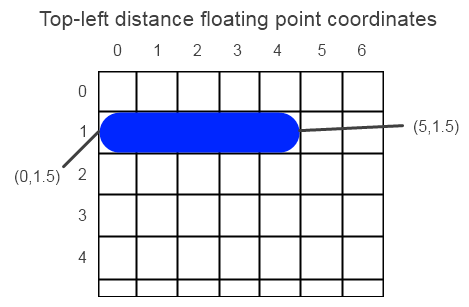 | |
| 28 | 22 | ||
| 29 | 23 | In fact every 1-pixel wide line with integer coordinates would be drawn between pixels, and with antialiasing, this leads to blurred lines. What appeared to be ok with horizontal coordinates is in fact an illusion, because if the line has caps, the correct coordinates are (0.5,1.5)-(4.5,1.5). If we ignore the last pixel issue, we see that these coordinates are simply 0.5 greater. | |
| 30 | 24 | ||
| 31 | 25 | #### Pixel-center floating point coordinates | |
| 32 | 26 | ||
| 33 | 27 | The coordinates can be the distance from the center of the top-left pixel. In other words, integer values are at the center of the pixels. This is the case with BGRABitmap functions. Using these coordinates, the line that fills pixels (0,1) to (4,1) is simply (0.0,1.0)-(4.0,1.0). | |
| 34 | 28 | ||
| 35 | - | ||
| 36 | - | ||
| 37 | - | ||
| 38 | - | ||
| 29 | + | 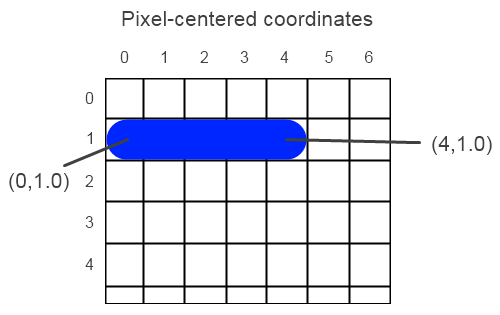 | |
| 39 | 30 | ||
| 40 | 31 | This is strange from a mathematical point of view, but very convenient, because you can use integer coordinates to draw normal 1-pixel wide lines. This way, there is little difference between calls to CanvasBGRA functions and BGRABitmap normal floating point functions. | |
| 41 | 32 | ||
| 42 | 33 | ### Create a new project | |
| 43 | 34 | ||
| 44 | 35 | Create a new project and add a reference to [[BGRABitmap]], the same way as in [[BGRABitmap tutorial|the first tutorial]]. | |
| 45 | 36 | ||
| 46 | 37 | ### Canvas and BGRACanvas | |
| 47 | 38 | ||
| 48 | 39 | Let's try to show what happens at the pixel level. | |
| 49 | 40 | ||
| 50 | 41 | First, we'll use the standard Canvas: | |
| 51 | 42 | ||
| 52 | 43 | ``` pascal | |
| 53 | 44 | procedure TForm1.FormPaint(Sender: TObject); | |
| 54 | 45 | var image: TBGRABitmap; | |
| 55 | 46 | begin | |
| 56 | 47 | image := TBGRABitmap.Create(10,10); | |
| 57 | 48 | with image.Canvas do | |
| 58 | 49 | begin | |
| 59 | 50 | //clear with white | |
| 60 | 51 | brush.color := clWhite; | |
| 61 | 52 | FillRect(0,0,image.width,image.height); | |
| 62 | 53 | //blue ellipse with black border | |
| 63 | 54 | brush.style := bsClear; | |
| 64 | 55 | pen.color := clBlack; | |
| 65 | 56 | Ellipse(0,0,9,9); | |
| 66 | 57 | end; | |
| 67 | 58 | /stretch the image so we can see the pixels | |
| 68 | 59 | BGRAReplace(image,image.Resample(image.Width*10,image.Height*10,rmSimpleStretch)); | |
| 69 | 60 | image.Draw(Canvas,0,0,True); | |
| 70 | 61 | image.free; | |
| 71 | 62 | end; | |
| 72 | 63 | ``` | |
| 73 | 64 | ||
| 74 | 65 | The resample option rmSimpleStretch prevents the use of interpolation filters. | |
| 75 | 66 | ||
| 76 | 67 | You should get this: | |
| 77 | 68 | ||
| 78 | - | ||
| 79 | - | ||
| 80 | - | ||
| 81 | - | ||
| 69 | + | 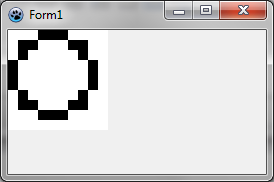 | |
| 82 | 70 | ||
| 83 | 71 | The pixels of coordinate 9 are not filled as explained above about rectangle bounds. Now, let's draw this BGRACanvas. Just change the 'with' line: | |
| 84 | 72 | ||
| 85 | 73 | ``` pascal | |
| 86 | 74 | with image.CanvasBGRA do | |
| 87 | 75 | ``` | |
| 88 | 76 | ||
| 89 | 77 | Now you should get this: | |
| 90 | 78 | ||
| 91 | - | ||
| 92 | - | ||
| 93 | - | ||
| 94 | - | ||
| 79 | + | 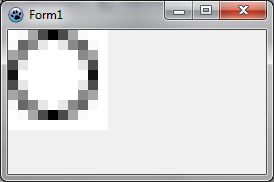 | |
| 95 | 80 | ||
| 96 | 81 | The result is very similar except with antialiasing. | |
| 97 | 82 | ||
| 98 | 83 | ### Subtle considerations | |
| 99 | 84 | ||
| 100 | 85 | Suppose we want to fill an antialiased ellipse that fit exactly in a 9x9 bitmap. We could try with this code: | |
| 101 | 86 | ||
| 102 | 87 | ``` pascal | |
| 103 | 88 | procedure TForm1.FormPaint(Sender: TObject); | |
| 104 | 89 | var image: TBGRABitmap; | |
| 105 | 90 | begin | |
| 106 | 91 | image := TBGRABitmap.Create(9,9,BGRAWhite); | |
| 107 | 92 | image.FillEllipseAntialias(4,4, 4,4, BGRABlack); | |
| 108 | 93 | BGRAReplace(image,image.Resample(image.Width*10,image.Height*10,rmSimpleStretch)); | |
| 109 | 94 | image.Draw(Canvas,0,0,True); | |
| 110 | 95 | image.free; | |
| 111 | 96 | end; | |
| 112 | 97 | ``` | |
| 113 | 98 | ||
| 114 | 99 | We get: | |
| 115 | 100 | ||
| 116 | - | ||
| 117 | - | ||
| 118 | - | ||
| 119 | - | ||
| 101 | + | 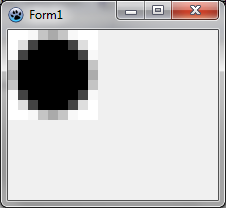 | |
| 120 | 102 | ||
| 121 | 103 | As you can see, the border is not completely filled. The ellipse is smaller than expected. In fact, the center of the ellipse is (4,4) so the left border is at (0,4). But remember it is the center of the pixel. So if we want the ellipse to go to the border of the pixel, we need to add 0.5 to the radius: | |
| 122 | 104 | ||
| 123 | 105 | ``` pascal | |
| 124 | 106 | image.FillEllipseAntialias(4,4, 4.5,4.5, BGRABlack); | |
| 125 | 107 | ``` | |
| 126 | 108 | ||
| 127 | - | ||
| 128 | - | ||
| 129 | - | ||
| 130 | - | ||
| 109 | + | 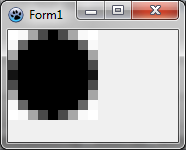 | |
| 131 | 110 | ||
| 132 | 111 | #### Filled shapes with canvas | |
| 133 | 112 | ||
| 134 | 113 | Note that with standard canvas, the result is very surprising. Suppose we want to do the same thing. We could try this: | |
| 135 | 114 | ||
| 136 | 115 | ``` pascal | |
| 137 | 116 | brush.color := clWhite; | |
| 138 | 117 | FillRect(0,0,image.width,image.height); | |
| 139 | 118 | brush.color := clBlue; | |
| 140 | 119 | pen.style := psClear; | |
| 141 | 120 | Ellipse(0,0,9,9); | |
| 142 | 121 | ``` | |
| 143 | 122 | ||
| 144 | 123 | We get this: | |
| 145 | 124 | ||
| 146 | - | ||
| 147 | - | ||
| 148 | - | ||
| 149 | - | ||
| 125 | + | 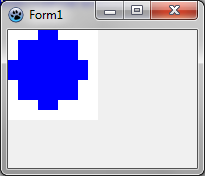 | |
| 150 | 126 | ||
| 151 | 127 | So in this case, there is yet another pixel substracted. The ellipse is 8 pixels wide whereas the supplied rectangle is 9 pixels wide. | |
| 152 | 128 | ||
| 153 | 129 | [[BGRABitmap tutorial 12|Previous tutorial (text functions)]] [[BGRABitmap tutorial 14|Next tutorial (canvas2D)]] | |
| 154 | 130 | ||
| 155 | 131 | --- | |
| 156 | 132 | *From the Free Pascal wiki, page "BGRABitmap tutorial 13", as it stood on 2023-05-20 after a change by Circular, out of the wiki's dump of 2024-05-26. Copyright stays with the author who wrote it, according to the old wiki's [[Licensing]] page. If you have concerns about this material, [message the admin](/wiki-contact).* | |
| 157 | 133 | Category: BGRABitmap | |
| 158 | 134 | Category: Graphics |