

BGRABitmap tutorial 12/fr: what changed
Revision 1 to 2. Removed lines have a minus sign; added lines have a plus sign.
| Old | New | Line | |
|---|---|---|---|
| 1 | - | ||
| 1 | + | Ce tutoriel montre comment utiliser les fonctions texte par défaut. Pour les fonctions avancées, voir les [[BGRABitmap tutorial Font rendering/fr|moteurs de rendu]]. | |
| 2 | 2 | ||
| 3 | - | ||
| 3 | + | ### Texte simple | |
| 4 | 4 | ||
| 5 | - | ||
| 5 | + | Vous pouvez dessiner un texte simple comme cela : | |
| 6 | 6 | ||
| 7 | - | ||
| 8 | - | ||
| 9 | - | ||
| 10 | - | ||
| 11 | - | ||
| 12 | - | ||
| 7 | + | ``` pascal | |
| 8 | + | procedure TForm1.FormPaint(Sender: TObject); | |
| 9 | + | var | |
| 10 | + | image: TBGRABitmap; | |
| 11 | + | c: TBGRAPixel; | |
| 12 | + | begin | |
| 13 | + | image := TBGRABitmap.Create(ClientWidth,ClientHeight, ColorToBGRA(ColorToRGB(clBtnFace)) ); | |
| 14 | + | c := ColorToBGRA(ColorToRGB(clBtnText)); //retrieve default text color | |
| 13 | 15 | ||
| 14 | - | ||
| 16 | + | image.FontHeight := 30; | |
| 17 | + | image.FontAntialias := true; | |
| 18 | + | image.FontStyle := [fsBold]; | |
| 19 | + | image.TextOut(ClientWidth-5,5,'Hello world',c,); | |
| 20 | + | image.SetPixel(5,5,c); | |
| 15 | 21 | ||
| 16 | - | ||
| 17 | - | ||
| 18 | - | ||
| 19 | - | ||
| 20 | - | ||
| 21 | - | ||
| 22 | - | ||
| 23 | - | ||
| 24 | - | ||
| 25 | - | ||
| 26 | - | ||
| 27 | - | ||
| 28 | - | ||
| 29 | - | ||
| 30 | - | ||
| 31 | - | ||
| 32 | - | ||
| 33 | - | ||
| 34 | - | ||
| 22 | + | image.Draw(Canvas,0,0,True); | |
| 23 | + | image.free; | |
| 24 | + | end; | |
| 35 | 25 | ``` | |
| 36 | 26 | ||
| 37 | - | ||
| 27 | + | Ici, la taille de police est de 30 pixels, avec anticrénelage. Utiliser l'anticrénelage pour le texte est plus lent mais plus joli. | |
| 38 | 28 | ||
| 39 | - | ||
| 29 | + | Le coin en haut à gauche du texte est aux coordonnées (5,5). Cette origine est montrée avec un *SetPixel*. | |
| 40 | 30 | ||
| 41 | - | ||
| 31 | + | 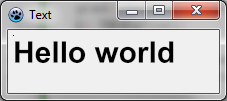 | |
| 42 | 32 | ||
| 43 | 33 | #### Utiliser l'alignement | |
| 44 | 34 | ||
| 45 | - | ||
| 46 | - | ||
| 47 | - | ||
| 48 | - | ||
| 35 | + | Remplacez les *TextOut* et *SetPixel* par : | |
| 36 | + | ||
| 37 | + | ``` pascal | |
| 38 | + | image.TextOut(ClientWidth-5,5,'Hello world',c,taRightJustify); | |
| 39 | + | image.SetPixel(ClientWidth-5,5,c); | |
| 49 | 40 | ``` | |
| 50 | 41 | ||
| 51 | - | ||
| 42 | + | Maintenant, l'origine est sur le côté droit de la fenêtre, et le texte est aligné sur la droite. | |
| 52 | 43 | ||
| 53 | - | ||
| 44 | + | 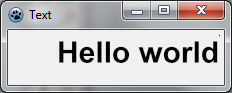 | |
| 54 | 45 | ||
| 55 | 46 | ### Rotation de texte | |
| 56 | 47 | ||
| 57 | - | ||
| 58 | - | ||
| 59 | - | ||
| 60 | - | ||
| 48 | + | Il est aussi facile de dessiner du texte en rotation. Pour cela, utilisez *TextOutAngle* ou bien la propriété *FontOrientation* : | |
| 49 | + | ||
| 50 | + | ``` pascal | |
| 51 | + | image.TextOutAngle(30,5,-450,'Hello world',c, taLeftJustify); | |
| 52 | + | image.SetPixel(30,5,c); | |
| 61 | 53 | ``` | |
| 62 | 54 | ||
| 63 | - | ||
| 55 | + | L'angle est en dixièmes de degrés et les valeurs positives sont dans le sens inverse des aiguilles d'une montre. Ceci est une convention pour être compatible avec la propriété *Orientation* de l'objet *Font* du canevas standard. | |
| 64 | 56 | ||
| 65 | - | ||
| 57 | + | 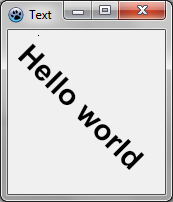 | |
| 66 | 58 | ||
| 67 | - | ||
| 59 | + | Remarquez à présent où est l'origine du texte (le pixel ajouté). | |
| 68 | 60 | ||
| 69 | 61 | ### Texte avec retour à la ligne | |
| 70 | 62 | ||
| 71 | - | ||
| 72 | - | ||
| 73 | - | ||
| 74 | - | ||
| 63 | + | Il y a une version facile à utiliser de *TextRect* : | |
| 64 | + | ||
| 65 | + | ``` pascal | |
| 66 | + | image.TextRect(rect(5,5,ClientWidth-5,ClientHeight-5),'This is a text that should be word wrapped',taCenter,tlCenter,c); | |
| 67 | + | image.Rectangle(rect(5,5,ClientWidth-5,ClientHeight-5),c,dmSet); | |
| 75 | 68 | ``` | |
| 76 | 69 | ||
| 77 | - | ||
| 70 | + | Les paramètres sont : | |
| 78 | 71 | ||
| 79 | - | ||
| 80 | - | ||
| 81 | - | ||
| 82 | - | ||
| 83 | - | ||
| 72 | + | - le rectangle englobant (il y a un clipping) ; | |
| 73 | + | - le texte ; | |
| 74 | + | - l'alignement horizontal ; | |
| 75 | + | - l'alignement vertical ; | |
| 76 | + | - la couleur. | |
| 84 | 77 | ||
| 85 | - | ||
| 78 | + | 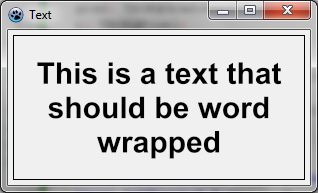 | |
| 86 | 79 | ||
| 87 | 80 | ### Texte avec une ombre | |
| 88 | 81 | ||
| 89 | - | ||
| 90 | - | ||
| 82 | + | Vous pouvez dessiner un texte avec une ombre floue avec *TextShadow* de l'unité *BGRAGradients* : | |
| 83 | + | ||
| 84 | + | ``` pascal | |
| 91 | 85 | var | |
| 92 | - | ||
| 93 | - | ||
| 94 | - | ||
| 95 | - | ||
| 96 | - | ||
| 97 | - | ||
| 98 | - | ||
| 99 | - | ||
| 100 | - | ||
| 101 | - | ||
| 102 | - | ||
| 103 | - | ||
| 104 | - | ||
| 105 | - | ||
| 86 | + | image,txt: TBGRABitmap; | |
| 87 | + | grad: TBGRAGradientScanner; | |
| 88 | + | c: TBGRAPixel; | |
| 89 | + | begin | |
| 90 | + | image := TBGRABitmap.Create(ClientWidth,ClientHeight, ColorToBGRA(ColorToRGB(clBtnFace)) ); | |
| 91 | + | c := ColorToBGRA(ColorToRGB(clBtnText)); | |
| 92 | + | ||
| 93 | + | txt := TextShadow(ClientWidth,ClientHeight,'Hello world',30,c,BGRABlack,5,5,5); | |
| 94 | + | image.PutImage(0,0,txt,dmDrawWithTransparency); | |
| 95 | + | txt.Free; | |
| 96 | + | ||
| 97 | + | image.Draw(Canvas,0,0,True); | |
| 98 | + | image.free; | |
| 99 | + | end; | |
| 106 | 100 | ``` | |
| 107 | 101 | ||
| 108 | - | ||
| 102 | + | La procédure *TextShadow* crée une image qui contient le texte avec une ombre. Les paramètres sont : | |
| 109 | 103 | ||
| 110 | - | ||
| 111 | - | ||
| 112 | - | ||
| 113 | - | ||
| 114 | - | ||
| 115 | - | ||
| 104 | + | - la taille de l'image ; | |
| 105 | + | - le texte ; | |
| 106 | + | - la hauteur de la police ; | |
| 107 | + | - la couleur ; | |
| 108 | + | - la couleur de l'ombre ; | |
| 109 | + | - le décalage et le rayon de flou de l'ombre. | |
| 116 | 110 | ||
| 117 | - | ||
| 111 | + | N'oubliez pas de libérer l'image après utilisation. | |
| 118 | 112 | ||
| 119 | - | ||
| 113 | + | 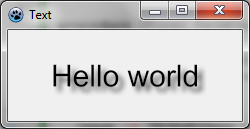 | |
| 120 | 114 | ||
| 121 | 115 | ### Texte avec dégradé | |
| 122 | 116 | ||
| 123 | - | ||
| 124 | - | ||
| 117 | + | Comme les autres fonctions, vous pouvez passer en paramètre un dégradé ou une texture pour remplir le texte. Voici un exemple : | |
| 118 | + | ||
| 119 | + | ``` pascal | |
| 125 | 120 | uses BGRAGradientScanner; | |
| 126 | - | ||
| 127 | - | ||
| 128 | - | ||
| 129 | - | ||
| 130 | - | ||
| 131 | - | ||
| 132 | - | ||
| 133 | - | ||
| 134 | - | ||
| 135 | - | ||
| 136 | - | ||
| 137 | - | ||
| 138 | - | ||
| 139 | - | ||
| 140 | - | ||
| 141 | - | ||
| 142 | - | ||
| 143 | - | ||
| 121 | + | ||
| 122 | + | var | |
| 123 | + | image: TBGRABitmap; | |
| 124 | + | grad: TBGRAGradientScanner; | |
| 125 | + | begin | |
| 126 | + | image := TBGRABitmap.Create(ClientWidth,ClientHeight, ColorToBGRA(ColorToRGB(clBtnFace)) ); | |
| 127 | + | ||
| 128 | + | grad := TBGRAGradientScanner.Create(BGRA(255,255,0),BGRA(255,0,0),gtLinear,PointF(0,0),PointF(0,35),True,True); | |
| 129 | + | image.FontHeight := 30; | |
| 130 | + | image.FontAntialias := true; | |
| 131 | + | image.FontStyle := [fsBold]; | |
| 132 | + | image.TextOut(6,6,'Hello world',BGRABlack); //draw a black border | |
| 133 | + | image.TextOut(5,5,'Hello world',grad); //draw gradient text | |
| 134 | + | grad.free; | |
| 135 | + | ||
| 136 | + | image.Draw(Canvas,0,0,True); | |
| 137 | + | image.free; | |
| 138 | + | end; | |
| 144 | 139 | ``` | |
| 145 | 140 | ||
| 146 | - | ||
| 141 | + | En premier lieu, un dégradé sinusoïdal horizontal est créé, de couleurs jaune et rouge. Il est ensuite utilisé comme texture. | |
| 147 | 142 | ||
| 148 | - | ||
| 143 | + | 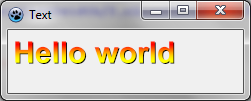 | |
| 149 | 144 | ||
| 150 | 145 | [[BGRABitmap tutorial 11/fr|Tutoriel précédent (combiner les transformations)]] | |
| 151 | 146 | ||
| 152 | 147 | --- | |
| 153 | - | ||
| 148 | + | *From the Free Pascal wiki, page "BGRABitmap tutorial 12/fr", as it stood on 2020-02-09 after a change by Trev, out of the wiki's dump of 2024-05-26. Copyright stays with the author who wrote it, according to the old wiki's [[Licensing]] page. If you have concerns about this material, [message the admin](/wiki-contact).* |