

BGRABitmap tutorial 12/es: what changed
Revision 1 to 2. Removed lines have a minus sign; added lines have a plus sign.
| Old | New | Line | |
|---|---|---|---|
| 1 | 1 | Esta tutoría muestra como usar funciones de texto. | |
| 2 | 2 | ||
| 3 | 3 | ### Crear un nuevo proyecto | |
| 4 | 4 | ||
| 5 | 5 | Crea un nuevo proyecto y añade referencia a [[BGRABitmap]], de la misma forma que en[[BGRABitmap tutorial/es|la primer tutoríal]]. | |
| 6 | 6 | ||
| 7 | 7 | ### Texto simple | |
| 8 | 8 | ||
| 9 | 9 | Puedes dibujar un texto simple como este : | |
| 10 | 10 | ||
| 11 | 11 | ``` pascal | |
| 12 | 12 | procedure TForm1.FormPaint(Sender: TObject); | |
| 13 | 13 | var | |
| 14 | 14 | image: TBGRABitmap; | |
| 15 | 15 | c: TBGRAPixel; | |
| 16 | 16 | begin | |
| 17 | 17 | image := TBGRABitmap.Create(ClientWidth,ClientHeight, ColorToBGRA(ColorToRGB(clBtnFace)) ); | |
| 18 | 18 | c := ColorToBGRA(ColorToRGB(clBtnText)); //devuelve el color de texto predeterminado | |
| 19 | 19 | ||
| 20 | 20 | image.FontHeight := 30; | |
| 21 | 21 | image.FontAntialias := true; | |
| 22 | 22 | image.FontStyle := [fsBold]; | |
| 23 | 23 | image.TextOut(ClientWidth-5,5,'Hello world',c,); | |
| 24 | 24 | image.SetPixel(5,5,c); | |
| 25 | 25 | ||
| 26 | 26 | image.Draw(Canvas,0,0,True); | |
| 27 | 27 | image.free; | |
| 28 | 28 | end; | |
| 29 | 29 | ``` | |
| 30 | 30 | ||
| 31 | 31 | Aquí el tamaño de la fuente está establecido a 30 píxeles, con antiafilado. Usar antiafilado de fuentes es mas lento pero es mas hermoso. | |
| 32 | 32 | ||
| 33 | 33 | La esquina superior izquierda del texto está en (5,5). Este origen es mostrado con SetPixel. | |
| 34 | 34 | ||
| 35 | - | ||
| 36 | - | ||
| 37 | - | ||
| 38 | - | ||
| 35 | + | 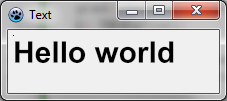 | |
| 39 | 36 | ||
| 40 | 37 | #### Usar alineamiento | |
| 41 | 38 | ||
| 42 | 39 | Simplemente reemplaza las lineas TextOut y SetPixel con : | |
| 43 | 40 | ||
| 44 | 41 | ``` pascal | |
| 45 | 42 | image.TextOut(ClientWidth-5,5,'Hello world',c,taRightJustify); | |
| 46 | 43 | image.SetPixel(ClientWidth-5,5,c); | |
| 47 | 44 | ``` | |
| 48 | 45 | ||
| 49 | 46 | Ahora el origen está en el lado derecho de la forma, y el texto está alineado a la derecha. | |
| 50 | 47 | ||
| 51 | - | ||
| 52 | - | ||
| 53 | - | ||
| 54 | - | ||
| 48 | + | 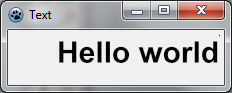 | |
| 55 | 49 | ||
| 56 | 50 | ### Texto rotado | |
| 57 | 51 | ||
| 58 | 52 | Es también simple dibujar texto rotado. Para hacer esto usa TextOutAngle o determina la propiedad FontOrientation : | |
| 59 | 53 | ||
| 60 | 54 | ``` pascal | |
| 61 | 55 | image.TextOutAngle(30,5,-450,'Hello world',c, taLeftJustify); | |
| 62 | 56 | image.SetPixel(30,5,c); | |
| 63 | 57 | ``` | |
| 64 | 58 | ||
| 65 | 59 | El ángulo se expresa en décimas de grados y el valor positivo significa que va en sentido antihorario. | |
| 66 | 60 | ||
| 67 | - | ||
| 68 | - | ||
| 69 | - | ||
| 70 | - | ||
| 61 | + | 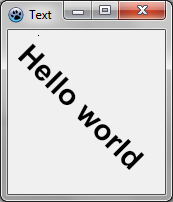 | |
| 71 | 62 | ||
| 72 | 63 | Fíjate donde está el origen del texto (en el píxel agregado). | |
| 73 | 64 | ||
| 74 | 65 | ### Texto ajustado | |
| 75 | 66 | ||
| 76 | 67 | Esta es una forma fácil para usar TextRect : | |
| 77 | 68 | ||
| 78 | 69 | ``` pascal | |
| 79 | 70 | image.TextRect(rect(5,5,ClientWidth-5,ClientHeight-5),'This is a text that should be word wrapped',taCenter,tlCenter,c); | |
| 80 | 71 | image.Rectangle(rect(5,5,ClientWidth-5,ClientHeight-5),c,dmSet); | |
| 81 | 72 | ``` | |
| 82 | 73 | ||
| 83 | 74 | Los parámetros son : | |
| 84 | 75 | ||
| 85 | 76 | - el rectángulo delimitador | |
| 86 | 77 | - el texto | |
| 87 | 78 | - alineación horizontal | |
| 88 | 79 | - alineación vertical | |
| 89 | 80 | - color | |
| 90 | 81 | ||
| 91 | - | ||
| 92 | - | ||
| 93 | - | ||
| 94 | - | ||
| 82 | + | 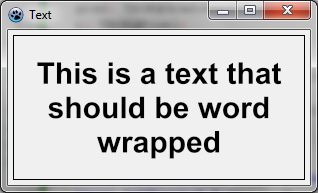 | |
| 95 | 83 | ||
| 96 | 84 | ### Texto con sombra | |
| 97 | 85 | ||
| 98 | 86 | Puedes hacer un texto sombreado con un efecto de desenfoque : | |
| 99 | 87 | ||
| 100 | 88 | ``` pascal | |
| 101 | 89 | var | |
| 102 | 90 | image,txt: TBGRABitmap; | |
| 103 | 91 | grad: TBGRAGradientScanner; | |
| 104 | 92 | c: TBGRAPixel; | |
| 105 | 93 | begin | |
| 106 | 94 | image := TBGRABitmap.Create(ClientWidth,ClientHeight, ColorToBGRA(ColorToRGB(clBtnFace)) ); | |
| 107 | 95 | c := ColorToBGRA(ColorToRGB(clBtnText)); | |
| 108 | 96 | ||
| 109 | 97 | txt := TextShadow(ClientWidth,ClientHeight,'Hello world',30,c,BGRABlack,5,5,5); | |
| 110 | 98 | image.PutImage(0,0,txt,dmDrawWithTransparency); | |
| 111 | 99 | txt.Free; | |
| 112 | 100 | ||
| 113 | 101 | image.Draw(Canvas,0,0,True); | |
| 114 | 102 | image.free; | |
| 115 | 103 | end; | |
| 116 | 104 | ``` | |
| 117 | 105 | ||
| 118 | 106 | El procedimiento TextShadow crea un bitmap que contiene el texto con una sombra. Los parámetros son : | |
| 119 | 107 | ||
| 120 | 108 | - El tamaño del bitmap | |
| 121 | 109 | - El texto | |
| 122 | 110 | - Alto de la Fuente | |
| 123 | 111 | - Color de la Fuente | |
| 124 | 112 | - Color de la sombra | |
| 125 | 113 | - Desplazamiento de la sombra y tamaño del desenfoque | |
| 126 | 114 | ||
| 127 | 115 | No olvides liberar el bitmap luego de utilizarlo. | |
| 128 | 116 | ||
| 129 | - | ||
| 130 | - | ||
| 131 | - | ||
| 132 | - | ||
| 117 | + | 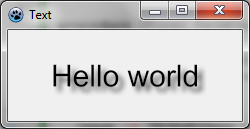 | |
| 133 | 118 | ||
| 134 | 119 | ### Texto con gradiente | |
| 135 | 120 | ||
| 136 | 121 | Como otras funciones de dibujo, puedes proveer de un gradiente o textura para rellenar el texto con el. Aquí hay un ejemplo : | |
| 137 | 122 | ||
| 138 | 123 | ``` pascal | |
| 139 | 124 | uses BGRAGradientScanner; | |
| 140 | 125 | ||
| 141 | 126 | var | |
| 142 | 127 | image: TBGRABitmap; | |
| 143 | 128 | grad: TBGRAGradientScanner; | |
| 144 | 129 | begin | |
| 145 | 130 | image := TBGRABitmap.Create(ClientWidth,ClientHeight, ColorToBGRA(ColorToRGB(clBtnFace)) ); | |
| 146 | 131 | ||
| 147 | 132 | grad := TBGRAGradientScanner.Create(BGRA(255,255,0),BGRA(255,0,0),gtLinear,PointF(0,0),PointF(0,35),True,True); | |
| 148 | 133 | image.FontHeight := 30; | |
| 149 | 134 | image.FontAntialias := true; | |
| 150 | 135 | image.FontStyle := [fsBold]; | |
| 151 | 136 | image.TextOut(6,6,'Hello world',BGRABlack); //dibuja un borde negro | |
| 152 | 137 | image.TextOut(5,5,'Hello world',grad); //dibuja texto degradado | |
| 153 | 138 | grad.free; | |
| 154 | 139 | ||
| 155 | 140 | image.Draw(Canvas,0,0,True); | |
| 156 | 141 | image.free; | |
| 157 | 142 | end; | |
| 158 | 143 | ``` | |
| 159 | 144 | ||
| 160 | 145 | Primero se crea un gradiente horizontal, con color amarillo y rojo. Este se usa como textura. | |
| 161 | 146 | ||
| 162 | - | ||
| 163 | - | ||
| 164 | - | ||
| 165 | - | ||
| 147 | + | 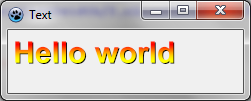 | |
| 166 | 148 | ||
| 167 | 149 | [[BGRABitmap tutorial 11/es|Tutoría anterior (combinando transformaciones)]] | |
| 168 | 150 | ||
| 169 | 151 | --- | |
| 170 | 152 | *From the Free Pascal wiki, page "BGRABitmap tutorial 12/es", as it stood on 2020-02-09 after a change by Trev, out of the wiki's dump of 2024-05-26. Copyright stays with the author who wrote it, according to the old wiki's [[Licensing]] page. If you have concerns about this material, [message the admin](/wiki-contact).* | |
| 171 | 153 | Category: Castellano | |
| 172 | 154 | Category: Español |