

BGRABitmap tutorial 11: what changed
Revision 1 to 2. Removed lines have a minus sign; added lines have a plus sign.
| Old | New | Line | |
|---|---|---|---|
| 1 | 1 | This tutorial shows how to combine transformations. A sample project can be found in [[BGRABitmap AggPas]]. | |
| 2 | 2 | ||
| 3 | 3 | ### Create a new project | |
| 4 | 4 | ||
| 5 | 5 | Create a new project and add a reference to [[BGRABitmap]], the same way as in [[BGRABitmap tutorial|the first tutorial]]. | |
| 6 | 6 | ||
| 7 | 7 | ### Affine transformation of a radial gradient | |
| 8 | 8 | ||
| 9 | 9 | Here is an affine transformation applied on a gradient like we did with textures: | |
| 10 | 10 | ||
| 11 | 11 | ``` pascal | |
| 12 | 12 | uses BGRAGradientScanner, BGRATransform; | |
| 13 | 13 | ||
| 14 | 14 | procedure TForm1.FormPaint(Sender: TObject); | |
| 15 | 15 | var image: TBGRABitmap; | |
| 16 | 16 | grad: TBGRAGradientScanner; | |
| 17 | 17 | affine: TBGRAAffineScannerTransform; | |
| 18 | 18 | begin | |
| 19 | 19 | image := TBGRABitmap.Create(ClientWidth,ClientHeight, BGRABlack ); | |
| 20 | 20 | ||
| 21 | 21 | grad := TBGRAGradientScanner.Create(BGRA(0,0,255),BGRAWhite,gtRadial,PointF(0,0),PointF(1,0),True,True); | |
| 22 | 22 | ||
| 23 | 23 | affine := TBGRAAffineScannerTransform.Create(grad); | |
| 24 | 24 | affine.Scale(150,80); | |
| 25 | 25 | affine.RotateDeg(-30); | |
| 26 | 26 | affine.Translate(ClientWidth/2, ClientHeight/2); | |
| 27 | 27 | ||
| 28 | 28 | image.Fill(affine); | |
| 29 | 29 | ||
| 30 | 30 | affine.free; | |
| 31 | 31 | grad.free; | |
| 32 | 32 | ||
| 33 | 33 | image.Draw(Canvas,0,0,True); | |
| 34 | 34 | image.free; | |
| 35 | 35 | end; | |
| 36 | 36 | ``` | |
| 37 | 37 | ||
| 38 | 38 | The base gradient is radial, centered at origin (0,0), of radius 1. | |
| 39 | 39 | ||
| 40 | 40 | The affine transformation does the following: | |
| 41 | 41 | ||
| 42 | 42 | - stretch the gradient to a size of 150x80 | |
| 43 | 43 | - rotate 30 degrees in counterclockwise direction | |
| 44 | 44 | - center it in the form | |
| 45 | 45 | ||
| 46 | 46 | The Fill instruction draws the result into the image. | |
| 47 | 47 | ||
| 48 | 48 | ### Run the program | |
| 49 | 49 | ||
| 50 | 50 | You should obtain a blue and white ellipse gradient. | |
| 51 | 51 | ||
| 52 | - | ||
| 53 | - | ||
| 54 | - | ||
| 55 | - | ||
| 52 | + | 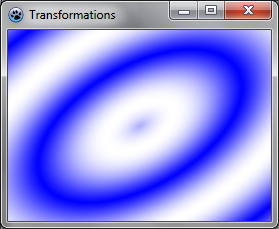 | |
| 56 | 53 | ||
| 57 | 54 | ### Combine with a twirl | |
| 58 | 55 | ||
| 59 | 56 | We can add another transformation to it like this: | |
| 60 | 57 | ||
| 61 | 58 | ``` pascal | |
| 62 | 59 | var image: TBGRABitmap; | |
| 63 | 60 | grad: TBGRAGradientScanner; | |
| 64 | 61 | affine: TBGRAAffineScannerTransform; | |
| 65 | 62 | twirl: TBGRATwirlScanner; | |
| 66 | 63 | begin | |
| 67 | 64 | image := TBGRABitmap.Create(ClientWidth,ClientHeight, BGRABlack ); | |
| 68 | 65 | ||
| 69 | 66 | grad := TBGRAGradientScanner.Create(BGRA(0,0,255),BGRAWhite,gtRadial,PointF(0,0),PointF(1,0),True,True); | |
| 70 | 67 | ||
| 71 | 68 | affine := TBGRAAffineScannerTransform.Create(grad); | |
| 72 | 69 | affine.Scale(150,80); | |
| 73 | 70 | affine.RotateDeg(-30); | |
| 74 | 71 | affine.Translate(ClientWidth/2, ClientHeight/2); | |
| 75 | 72 | ||
| 76 | 73 | twirl := TBGRATwirlScanner.Create(affine,Point(ClientWidth div 2, ClientHeight div 2),100); | |
| 77 | 74 | image.Fill(twirl); | |
| 78 | 75 | twirl.Free; | |
| 79 | 76 | ||
| 80 | 77 | affine.free; | |
| 81 | 78 | grad.free; | |
| 82 | 79 | ||
| 83 | 80 | image.Draw(Canvas,0,0,True); | |
| 84 | 81 | image.free; | |
| 85 | 82 | end; | |
| 86 | 83 | ``` | |
| 87 | 84 | ||
| 88 | 85 | Here, we simply create a twirl transformation applied to the previous one, and fill with it. | |
| 89 | 86 | ||
| 90 | 87 | ### Run the program | |
| 91 | 88 | ||
| 92 | 89 | Now the center of the gradient is twirled. | |
| 93 | 90 | ||
| 94 | - | ||
| 95 | - | ||
| 96 | - | ||
| 97 | - | ||
| 91 | + | 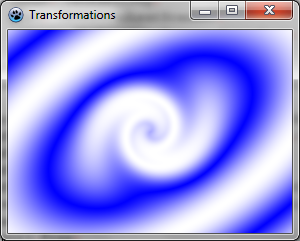 | |
| 98 | 92 | ||
| 99 | 93 | ### Use a custom scanner | |
| 100 | 94 | ||
| 101 | 95 | We may want to create our own gradient generator. Here is for example a multiply gradient: | |
| 102 | 96 | ||
| 103 | 97 | ``` pascal | |
| 104 | 98 | type | |
| 105 | 99 | { TBGRAMultiplyScanner } | |
| 106 | 100 | ||
| 107 | 101 | TBGRAMultiplyScanner = class(TBGRACustomScanner) | |
| 108 | 102 | function ScanAt(X, Y: Single): TBGRAPixel; override; | |
| 109 | 103 | end; | |
| 110 | 104 | ||
| 111 | 105 | { TBGRAMultiplyScanner } | |
| 112 | 106 | ||
| 113 | 107 | function TBGRAMultiplyScanner.ScanAt(X, Y: Single): TBGRAPixel; | |
| 114 | 108 | function cycle512(value: integer): integer; inline; | |
| 115 | 109 | begin | |
| 116 | 110 | result := value and 511; | |
| 117 | 111 | if result >= 256 then result := 511-result; | |
| 118 | 112 | end; | |
| 119 | 113 | ||
| 120 | 114 | var | |
| 121 | 115 | mul: integer; | |
| 122 | 116 | begin | |
| 123 | 117 | mul := cycle512(round(x*y)); | |
| 124 | 118 | result := BGRA(mul,mul,mul,255); | |
| 125 | 119 | end; | |
| 126 | 120 | ``` | |
| 127 | 121 | ||
| 128 | 122 | It is derived from TBGRACustomScanner to be used for filling, and the ScanAt function is overridden. It computes the product of both coordinates and make a cycle of 512 with it (from 0 to 255 and then from 255 down to 0). | |
| 129 | 123 | ||
| 130 | 124 | Let's draw it on the screen with a simple affine transformation: | |
| 131 | 125 | ||
| 132 | 126 | ``` pascal | |
| 133 | 127 | var image: TBGRABitmap; | |
| 134 | 128 | grad: TBGRAMultiplyScanner; | |
| 135 | 129 | affine: TBGRAAffineScannerTransform; | |
| 136 | 130 | begin | |
| 137 | 131 | image := TBGRABitmap.Create(ClientWidth,ClientHeight, BGRABlack ); | |
| 138 | 132 | ||
| 139 | 133 | grad := TBGRAMultiplyScanner.Create; | |
| 140 | 134 | affine := TBGRAAffineScannerTransform.Create(grad); | |
| 141 | 135 | affine.Scale(6,4); | |
| 142 | 136 | affine.Translate(ClientWidth/2, ClientHeight/2); | |
| 143 | 137 | image.Fill(affine); | |
| 144 | 138 | affine.free; | |
| 145 | 139 | grad.free; | |
| 146 | 140 | ||
| 147 | 141 | image.Draw(Canvas,0,0,True); | |
| 148 | 142 | image.free; | |
| 149 | 143 | end; | |
| 150 | 144 | ``` | |
| 151 | 145 | ||
| 152 | 146 | ### Run the program | |
| 153 | 147 | ||
| 154 | 148 | It should look like this: | |
| 155 | 149 | ||
| 156 | - | ||
| 157 | - | ||
| 158 | - | ||
| 159 | - | ||
| 150 | + | 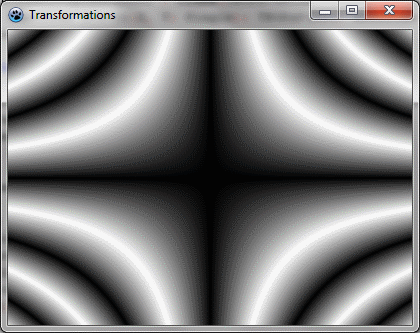 | |
| 160 | 151 | ||
| 161 | 152 | ### Make it beautiful | |
| 162 | 153 | ||
| 163 | 154 | Add some colors by modifying the ScanAt procedure of the multiply gradient: | |
| 164 | 155 | ||
| 165 | 156 | ``` pascal | |
| 166 | 157 | var | |
| 167 | 158 | mul: integer; | |
| 168 | 159 | begin | |
| 169 | 160 | mul := round(x*y); | |
| 170 | 161 | result := BGRA(cycle512(round(x*10)),cycle512(mul),cycle512(round(y*10)),255); | |
| 171 | 162 | end; | |
| 172 | 163 | ``` | |
| 173 | 164 | ||
| 174 | 165 | The red and blue intensities are filled with a cycle of x and y positions. | |
| 175 | 166 | ||
| 176 | 167 | And add some rotation: | |
| 177 | 168 | ||
| 178 | 169 | ``` pascal | |
| 179 | 170 | affine := TBGRAAffineScannerTransform.Create(grad); | |
| 180 | 171 | affine.Scale(6,4); | |
| 181 | 172 | affine.RotateDeg(-30); | |
| 182 | 173 | affine.Translate(ClientWidth/2, ClientHeight/2); | |
| 183 | 174 | ``` | |
| 184 | 175 | ||
| 185 | - | ||
| 186 | - | ||
| 187 | - | ||
| 188 | - | ||
| 176 | + | 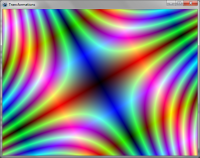 | |
| 189 | 177 | ||
| 190 | 178 | [[BGRABitmap tutorial 10|Previous tutorial (texture mapping)]] [[BGRABitmap tutorial 12|Next tutorial (text functions)]] | |
| 191 | 179 | ||
| 192 | 180 | --- | |
| 193 | 181 | *From the Free Pascal wiki, page "BGRABitmap tutorial 11", as it stood on 2023-05-20 after a change by Circular, out of the wiki's dump of 2024-05-26. Copyright stays with the author who wrote it, according to the old wiki's [[Licensing]] page. If you have concerns about this material, [message the admin](/wiki-contact).* | |
| 194 | 182 | Category: BGRABitmap | |
| 195 | 183 | Category: Graphics |