

BGRABitmap/es: what changed
Revision 0 to 1. Removed lines have a minus sign; added lines have a plus sign.
Title: BGRABitmap/es
| Old | New | Line | |
|---|---|---|---|
| 1 | + | Ver tambien: [[Developing with Graphics]] | |
| 2 | + | ||
| 3 | + | ### Description | |
| 4 | + | ||
| 5 | + | **BGRABitmap** es un conjunto de unidades diseñado para modificar y crear imagenes con transparencia (canales alfa). El acceso directo a un pixel permite procesar rapidamente una imagen. La libreria a sido probado en Windows, Ubuntu y Mac OS X (La última versión no trabaja en Mac), con win32, gtk1, gtk2 y carbon. | |
| 6 | + | ||
| 7 | + | La clase principal es *TBGRABitmap*, el cual es derivado de *TFPCustomImage*. Tambien esta *TBGRAPtrBitmap* el cual permite editar datos BGRA que estan actualmente cargados en memoria. Este formato se compone de 4 bytes por cada pixel (azul, verde, rojo y alfa en ese orden) | |
| 8 | + | ||
| 9 | + | ### Usando BGRABitmap | |
| 10 | + | ||
| 11 | + | #### Tutorial | |
| 12 | + | ||
| 13 | + | - [Cómo convertir una aplicación de TCanvas a BGRABitmap (inglés)](http://www.youtube.com/watch?v=HGYSLgtYx-U) | |
| 14 | + | - [[BGRABitmap tutorial|Una serie de tutoriales para aprender paso por paso (inglés)]] | |
| 15 | + | - Ejemplos en [LazPaint repository](http://lazpaint.svn.sourceforge.net/viewvc/lazpaint/). | |
| 16 | + | ||
| 17 | + | #### Información General | |
| 18 | + | ||
| 19 | + | Muchas funciones de TBGRABitmap tienen nombres largos. Casi todo es accesible como una función o una propiedad del objeto TBGRABitmap. Por ejemplo, puede utilizar CanvasBGRA tener algo similar a TCanvas y Canvas2D para tener características como el [lienzo (*canvas*) HTML](https://developer.mozilla.org/en/HTML:Canvas). | |
| 20 | + | ||
| 21 | + | Algunas caracteristicas especiales requieren el uso de unidades, pero de repente no los necesite. Por ejemplo TBGRAMultishapeFiller que tiene una funcion antialiased de poligonos esta en BGRAPolygon, TBGRATextEffect esta en BGRATextFX, las trasnformaciones 2D estan en BGRATransform, TBGRAScene3D esta en BGRAScene3D. Tenga en cuenta que los nombres de las unidades son adecuados para que se pueda pueda encontrar lo que se necesita. | |
| 22 | + | ||
| 23 | + | Double-buffering en realidad no forma parte de BGRABitmap, porque este trata más acerca de como manipular los formularios. Para hacer un double-buffering, se puede usar TBGRAVirtualScreen el esta en el paquete [[BGRAControls]]. | |
| 24 | + | ||
| 25 | + | Aprte de esto, el double-buffering que esta en BGRABitmap trabaja igual que un double-buffering. Se necesita tener un mapa de bits para almacenar el dibujo, para después mostrarlo con un simple instrucción. Si necesita usar capas, BGRALayers proporciona TBGRALayeredBitmap. | |
| 26 | + | ||
| 27 | + | #### Ejemplo Simple | |
| 28 | + | ||
| 29 | + | Se debe copiar la unidad BGRABitmap y enlazarlo a tu projecto: | |
| 30 | + | ||
| 31 | + | ``` pascal | |
| 32 | + | Uses Classes, SysUtils, BGRABitmap, BGRABitmapTypes; | |
| 33 | + | ``` | |
| 34 | + | ||
| 35 | + | La unidad BGRABitmapTypes contiene todas las definiciones necesarias, pero se debe declarar una variable de tipo BGRABitmap para cargar y mostrar un mapa de bits. Entonces, el primer paso es crear un objeto TBGRABitmap: | |
| 36 | + | ||
| 37 | + | ``` pascal | |
| 38 | + | var bmp: TBGRABitmap; | |
| 39 | + | begin | |
| 40 | + | bmp := TBGRABitmap.Create(100,100,BGRABlack); //creates a 100x100 pixels image with black background | |
| 41 | + | ||
| 42 | + | bmp.FillRect(20,20,60,60,BGRAWhite, dmSet); //draws a white square without transparency | |
| 43 | + | bmp.FillRect(40,40,80,80,BGRA(0,0,255,128), dmDrawWithTransparency); //draws a transparent blue square | |
| 44 | + | end; | |
| 45 | + | ``` | |
| 46 | + | ||
| 47 | + | Finalmente a mostrar el mapa de bits: | |
| 48 | + | ||
| 49 | + | ``` pascal | |
| 50 | + | procedure TFMain.FormPaint(Sender: TObject); | |
| 51 | + | begin | |
| 52 | + | bmp.Draw(Canvas, 0, 0, True); // draw the bitmap in opaque mode (faster) | |
| 53 | + | end; | |
| 54 | + | ``` | |
| 55 | + | ||
| 56 | + | ### Nociones | |
| 57 | + | ||
| 58 | + | Los pixels en un mapa de bits con transparencia son guardados con 4 valores, con 4 bytes en el siguiente orden azul, verde, rojo y alfa. El último canal define el nivel de opacidad (0 significa trasnparente, 255 significa opaco), los otros canales definen el color. | |
| 59 | + | ||
| 60 | + | Existen basicamente dos modos de pintado. El primero consiste en reemplazar la informacion correspondiente del pixel a dibujar, el segundo consiste en mezclar el pixel existente con el nuevo, el cual es llamada "alpha blending" | |
| 61 | + | ||
| 62 | + | Las funciones BGRABitmap proponen 4 modos: | |
| 63 | + | ||
| 64 | + | - dmSet : reemplaza los cuatro bytes del pixel a dibujar, no manipula la transparencia. | |
| 65 | + | - dmDrawWithTransparency : dibuja con "alpha blending" y con correción de gamma (ver abajo). | |
| 66 | + | - dmFastBlend or dmLinearBlend : dibuja con "alpha blending" pero sin correción de gamma. (rápido pero produce distorsiones de color con intensidades bajas). | |
| 67 | + | - dmXor : aplica Xor para cada componente, incluido el alfa (si desea invertir el color y mantener el componente alfa, utilizar BGRA (255,255,255,0)) | |
| 68 | + | ||
| 69 | + | ### Funciones integradas de dibujo | |
| 70 | + | ||
| 71 | + | - dibuja/borra pixels | |
| 72 | + | - dibuja una linea con o sin antialiasing | |
| 73 | + | - coordenadas de punto flotante | |
| 74 | + | - ancho de lapiz con punto flotante | |
| 75 | + | - rectangulo (marco o relleno) | |
| 76 | + | - Elipses y poligonos con antialiasing | |
| 77 | + | - cálcula spline (curvas suaves) | |
| 78 | + | - relleno simple (Floodfill) o relleno progresivo | |
| 79 | + | - representacion de colores degradados (lineal, radial, ...) | |
| 80 | + | - rectangulos redondeados | |
| 81 | + | - textos con transparencia | |
| 82 | + | ||
| 83 | + | ### Dibujando con Canvas | |
| 84 | + | ||
| 85 | + | Es posible dibujar con un objeto *Canvas*, con las funciones usuales pero sin antialiasing. La opacidad de los dibujado es definido por la propiedad *CanvasOpacity*. Este suele ser lento porque necesita de los algoritmos de transformacion de imagen. Si su proyecto lo permite, es mejor utilizar CanvasBGRA en su lugar, el cual permite usar transparencia y anti-aliasing con los mismos nombres de las funciones que tiene TCanvas. | |
| 86 | + | ||
| 87 | + | ### Direct access to pixels | |
| 88 | + | ||
| 89 | + | To access pixels, there are two properties, *Data* and *Scanline*. The first gives a pointer to the first pixel of the image, and the second gives a pointer to the first pixel of a given line. | |
| 90 | + | ||
| 91 | + | ``` pascal | |
| 92 | + | var | |
| 93 | + | bmp: TBGRABitmap; | |
| 94 | + | p: PBGRAPixel; | |
| 95 | + | n: integer; | |
| 96 | + | ||
| 97 | + | begin | |
| 98 | + | bmp := TBGRABitmap.Create('image.png'); | |
| 99 | + | p := bmp.Data; | |
| 100 | + | for n := bmp.NbPixels-1 downto 0 do | |
| 101 | + | begin | |
| 102 | + | p^.red := not p^.red; //invert red canal | |
| 103 | + | inc(p); | |
| 104 | + | end; | |
| 105 | + | bmp.InvalidateBitmap; //note that we have accessed directly to pixels | |
| 106 | + | bmp.Draw(Canvas,0,0,True); | |
| 107 | + | bmp.Free; | |
| 108 | + | end; | |
| 109 | + | ``` | |
| 110 | + | ||
| 111 | + | It is necessary to call the function *InvalidateBitmap* to rebuild the image in a next call to *Draw*' for example. Notice that the line order can be reverse, depending on the *LineOrder* property. | |
| 112 | + | ||
| 113 | + | See also the comparison between [[Fast direct pixel access|direct pixel access methods]]. | |
| 114 | + | ||
| 115 | + | ### Image manipulation | |
| 116 | + | ||
| 117 | + | Available filters (prefixed with Filter) : | |
| 118 | + | ||
| 119 | + | - Radial blur : non directional blur | |
| 120 | + | - Motion blur : directional blur | |
| 121 | + | - Custom blur : blur according to a mask | |
| 122 | + | ||
| 123 | + | - Median : computes the median of colors around each pixel, which softens corners | |
| 124 | + | - Pixelate : simplifies the image with rectangles of the same color | |
| 125 | + | - Smooth : soften whole image, complementary to Sharpen | |
| 126 | + | - Sharpen : makes contours more accute, complementary to Smooth | |
| 127 | + | ||
| 128 | + | - Contour : draws contours on a white background (like a pencil drawing) | |
| 129 | + | - Emboss : draws contours with shadow | |
| 130 | + | - EmbossHighlight : draws contours of a selection defined with grayscale | |
| 131 | + | ||
| 132 | + | - Grayscale : converts colors to grayscale with gamma correction | |
| 133 | + | - Normalize : uses whole range of color luminosity | |
| 134 | + | ||
| 135 | + | - Rotate : rotation of the image around a point | |
| 136 | + | - Sphere : distorts the image to make it look like projected on a sphere | |
| 137 | + | - Twirl : distorts the image with a twirl effect | |
| 138 | + | - Cylinder : distorts the image to make it look like projected on a cylinder | |
| 139 | + | - Plane : computes a high precision projection on a horizontal plane. This is quite slow. | |
| 140 | + | - SmartZoom3 : resizes the image x3 and detects borders, to have a useful zoom with ancient games sprites | |
| 141 | + | ||
| 142 | + | Some functions are not prefixed with Filter, because they do not return a newly allocated image. They modify the image in-place : | |
| 143 | + | ||
| 144 | + | - VerticalFlip : flips the image vertically | |
| 145 | + | - HoriztonalFlip : flips the image horizontally | |
| 146 | + | - Negative : inverse of colors | |
| 147 | + | - LinearNegative : inverse without gamma correction | |
| 148 | + | - SwapRedBlue : swap red and blue channels (to convert between BGRA and RGBA) | |
| 149 | + | - ConvertToLinearRGB : to convert from sRGB to RGB. Note the format used by BGRABitmap is sRGB when using | |
| 150 | + | ||
| 151 | + | dmDrawWithTransparency and RGB when using dmLinearBlend. | |
| 152 | + | ||
| 153 | + | - ConvertFromLinearRGB : convert from RGB to sRGB. | |
| 154 | + | ||
| 155 | + | ### Images combination | |
| 156 | + | ||
| 157 | + | PutImage is the basic image drawing function and BlendImage allows to combine images, like layers of image editing softwares. Available modes are the following: | |
| 158 | + | ||
| 159 | + | - LinearBlend : simple superimposition without gamma correction (equivalent to dmFastBlend) | |
| 160 | + | - Transparent : superimposition with gamma correction | |
| 161 | + | - Multiply : multiplication of color values (with gamma correction) | |
| 162 | + | - LinearMultiply : multiplication of color values (without gamma correction) | |
| 163 | + | - Additive : addition of color values (with gamma correction) | |
| 164 | + | - LinearAdd : addition of color values (without gamma correction) | |
| 165 | + | - Difference : difference of color values (with gamma correction) | |
| 166 | + | - LinearDifference : difference of color values (without gamma correction) | |
| 167 | + | - Negation : makes common colors disappear (with gamma correction) | |
| 168 | + | - LinearNegation : makes common colors disappear (without gamma correction) | |
| 169 | + | - Reflect, Glow : for light effects | |
| 170 | + | - ColorBurn, ColorDodge, Overlay, Screen : misc. filters | |
| 171 | + | - Lighten : keeps the lightest color values | |
| 172 | + | - Darken : keeps the darkest color values | |
| 173 | + | - Xor : exclusive or of color values | |
| 174 | + | ||
| 175 | + | These modes can be used in TBGRALayeredBitmap, which makes it easier because BlendImage only provides the basic blending operations. | |
| 176 | + | ||
| 177 | + | ### Screenshots | |
| 178 | + | ||
| 179 | + | 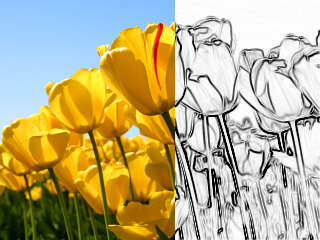 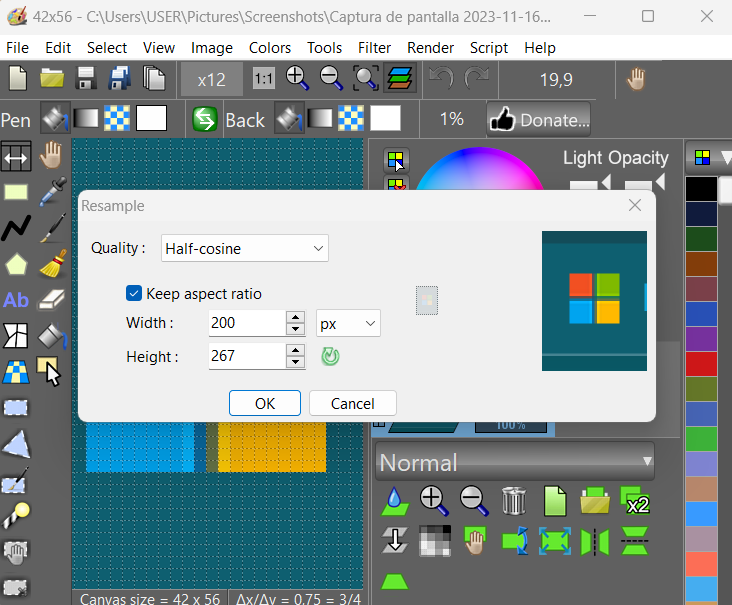 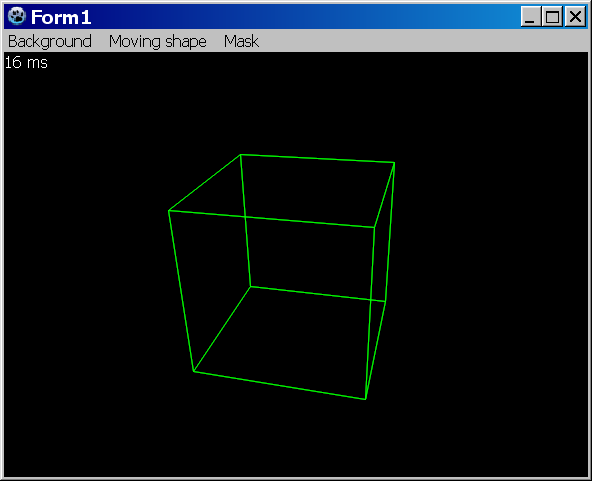 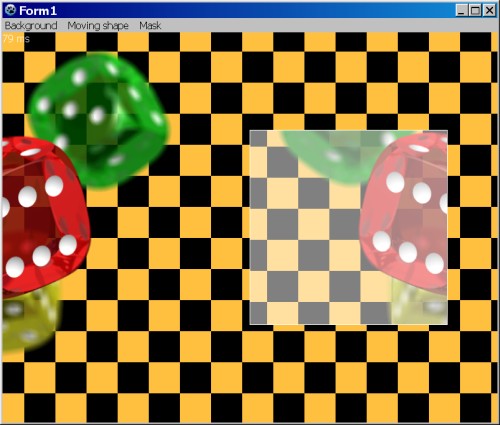 | |
| 180 | + | ||
| 181 | + | ### Licence | |
| 182 | + | ||
| 183 | + | modified LGPL | |
| 184 | + | ||
| 185 | + | ### Download | |
| 186 | + | ||
| 187 | + | Latest version: <https://github.com/bgrabitmap/bgrabitmap/releases> | |
| 188 | + | ||
| 189 | + | Sourceforge with [[LazPaint]]: <http://sourceforge.net/projects/lazpaint/files/src/> | |
| 190 | + | ||
| 191 | + | GitHub: <https://github.com/bgrabitmap/lazpaint/> | |
| 192 | + | ||
| 193 | + | --- | |
| 194 | + | *From the Free Pascal wiki, page "BGRABitmap/es", as it stood on 2022-09-11 after a change by Circular, out of the wiki's dump of 2024-05-26. Copyright stays with the author who wrote it, according to the old wiki's [[Licensing]] page. If you have concerns about this material, [message the admin](/wiki-contact).* |