

Autosize / Layout: what changed
Revision 1 to 2. Removed lines have a minus sign; added lines have a plus sign.
| Old | New | Line | |
|---|---|---|---|
| 1 | 1 | ## Overview | |
| 2 | 2 | ||
| 3 | 3 | The [[LCL]] can automatically alter a control's size and position so it adapts to changes in font, theme and text or other content. If you want to run your program on several platforms, or if your captions are available in several languages, your controls need to adapt correctly to their environment. The [[LCL]] allows you not only to make a quick first design (moving controls around on a form using the mouse) but also later to set several key properties which will make the controls automatically adapt subsequently to changed content etc. | |
| 4 | 4 | ||
| 5 | 5 | - Fixed design: this is the default when placing a control in the Designer. The control's position is fixed relative to its parent. The control's size and position (Left, Top) is fully adjustable by the programmer. You can move the control around with the mouse, and resize it freely. | |
| 6 | 6 | - Aligned: aligned controls fill up the remaining parental space at the top, bottom, left, or right, or fill the entire remaining space. | |
| 7 | 7 | - Anchored: you can anchor a control's sides (left, top, right, bottom) to its parent or to another control. Anchoring means: the [[LCL]] will try to maintain the same distance from the anchor point. | |
| 8 | 8 | - Layout: controls can be automatically aligned in rows and columns (e.g. TRadioGroup) | |
| 9 | 9 | - Custom via OnResize: you can align controls yourself in code using the OnResize and OnChangeBounds events. | |
| 10 | 10 | - Custom controls: writing your own controls, you can override nearly every [[LCL]] behaviour you want. | |
| 11 | 11 | ||
| 12 | 12 | ### Precedence rules | |
| 13 | 13 | ||
| 14 | 14 | 1. Constraints | |
| 15 | 15 | 2. Align | |
| 16 | 16 | 3. Anchors | |
| 17 | 17 | 4. ChildSizing.Layout | |
| 18 | 18 | 5. AutoSize | |
| 19 | 19 | 6. OnResize, OnChangeBounds - however, if you set bounds that conflict with the rules above you will create an endless loop | |
| 20 | 20 | ||
| 21 | 21 | ### Common Properties | |
| 22 | 22 | ||
| 23 | 23 | Several important properties can be changed to configure autosizing: | |
| 24 | 24 | ||
| 25 | 25 | - Left, Top, Width, Height | |
| 26 | 26 | - AutoSize: autosize instructs the [[LCL]] to automatically resize the Width and Height of a control | |
| 27 | 27 | - Anchors: lets you create dependencies, for example to anchor a ComboBox to the right side of a Label. | |
| 28 | 28 | - Align | |
| 29 | 29 | - Constraints: lets you set a minimum and maximum for the Width and Height | |
| 30 | 30 | - BorderSpacing: lets you set the spacing between anchored controls | |
| 31 | 31 | - ChildSizing: lets you set the layout and spacing of child controls | |
| 32 | 32 | ||
| 33 | 33 | The internals of the algorithms are explained here: [[LCL AutoSizing]]. | |
| 34 | 34 | ||
| 35 | 35 | ## Fixed design | |
| 36 | 36 | ||
| 37 | 37 | Fixed design is the default. The Anchor's property is set to \[akLeft,akTop\], which means the values of Left and Top are not changed by the [[LCL]]. If AutoSize is false, the [[LCL]] does not alter Width or Height. If AutoSize is true, the Width and Height are changed to fit the content. For example, TLabel.AutoSize defaults to true and thus changing its Caption will resize the label to accommodate the changed wording. TButton.AutoSize defaults to false, so changing a button's Caption does not resize the button. When you set Button.AutoSize to true the Button will shrink or enlarge every time the button's Caption or its font (or theme) changes. Note, this change does not always happen immediately. For example during FormCreate all autosizing is suspended. At any time you can change the "Left", "Top", "Width", or the "Height" property. | |
| 38 | 38 | ||
| 39 | 39 | ## AutoSize | |
| 40 | 40 | ||
| 41 | 41 | `AutoSize` is a boolean property found in many classes; it permits the size of a control to be adjusted automatically to accommodate differences in the text or graphic contained therein, and allows most efficient use of available space. This is a crucial mechanism to create cross platform forms. | |
| 42 | 42 | ||
| 43 | 43 | Normally AutoSize=true does two things for a visible control: | |
| 44 | 44 | ||
| 45 | 45 | - If possible it resizes the control to the preferred size. For example a TButton's Width and Height is resized to fit the caption, while a TEdit is only resized in Height. A TEdit's Width is not autosized. You can change the Width of a TEdit. (see GetPreferredSize). | |
| 46 | 46 | - It moves all fixed positioned child controls by the same amount, so that the leftmost child control is moved to Left=0 (depends on BorderSpacing) and the topmost child control is moved to Top=0. | |
| 47 | 47 | ||
| 48 | 48 | ### Lazarus vs Delphi | |
| 49 | 49 | ||
| 50 | 50 | - Delphi's AutoSize happens only when certain properties change, for example when the Font of a TLabel is changed. The [[LCL]] AutoSize is always active. Delphi allows one to change the size of a Label which has AutoSize=true, the Lazarus control does not. | |
| 51 | 51 | - Delphi's hidden controls are not autosized. | |
| 52 | 52 | - With Delphi, changing the size of a control does not resize/move anchored child controls during loading, but a constructor is normally used to make the desired effect. When using akRight,akBottom anchors, set AnchorSides and BorderSpacing to keep the distance correct. | |
| 53 | 53 | ||
| 54 | 54 | ### AutoSize and resizing the control | |
| 55 | 55 | ||
| 56 | 56 | With AutoSize=false buttons are given a default fixed size. | |
| 57 | 57 | ||
| 58 | - | ||
| 59 | - | ||
| 60 | - | ||
| 61 | - | ||
| 58 | + | 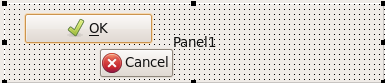 | |
| 62 | 59 | ||
| 63 | 60 | When setting AutoSize=true for each button, the buttons are enlarged (or shrunk) to fit the text and theme frame. | |
| 64 | 61 | ||
| 65 | - | ||
| 66 | - | ||
| 67 | - | ||
| 68 | - | ||
| 62 | + | 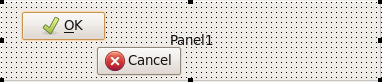 | |
| 69 | 63 | ||
| 70 | 64 | AutoSize does not shrink to the smallest possible size as you can see in the OK Button. It uses the GetPreferredSize method of the control, which calls the CalculatePreferredSize method. The default TWinControl implementation queries the widget set, which might have a preferred width or height. Each control can override the CalculatePreferredSize method. For example TImage overrides it and returns the size of the Picture. If no preferred width (height) is available the returned value is 0 and the [[LCL]] will keep the Width (Height) (unless the ControlStyle flag csAutoSize0x0 is set, which is currently only used by TPanel). | |
| 71 | 65 | ||
| 72 | 66 | A TWinControl computes the size of all its child controls and uses that to compute its preferred size. | |
| 73 | 67 | ||
| 74 | 68 | When a control is anchored to both left and right its *width is fixed*. For example with *Align=alTop* the control is anchored to left and right and follows the width of the Parent. If *Parent.AutoSize* is true, then the *Parent* will use the preferred width of the control to compute its own preferred width, and thus the control will be resized to its preferred width. See [[Autosize / Layout|Align and AutoSize]]. If no preferred width is available, then the last set bounds are used (**BaseBounds** or **ReadBounds**). If no bounds were set, the **GetControlClassDefaultSize** method is used. Same for **Height** and anchoring to top and bottom. | |
| 75 | 69 | ||
| 76 | 70 | Constraints are always applied and have precedence. | |
| 77 | 71 | ||
| 78 | 72 | ### AutoSize and moving child controls | |
| 79 | 73 | ||
| 80 | 74 | When AutoSize=false you can place and move controls freely: | |
| 81 | 75 | ||
| 82 | - | ||
| 83 | - | ||
| 84 | - | ||
| 85 | - | ||
| 76 | + |  | |
| 86 | 77 | ||
| 87 | 78 | When AutoSize=true child controls with fixed positions are moved to fit. | |
| 88 | 79 | ||
| 89 | - | ||
| 90 | - | ||
| 91 | - | ||
| 92 | - | ||
| 80 | + | 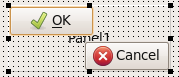 | |
| 93 | 81 | ||
| 94 | 82 | Both buttons on the panel were moved by the same amount to top and left, so that there is no space left to the left and top. If the buttons would have BorderSpacing\>0 or the Panel.ChildSizing.LeftRightSpacing\>0 the buttons would be moved so that the defined space is used. | |
| 95 | 83 | ||
| 96 | 84 | Only child controls with the following values are moved: | |
| 97 | 85 | ||
| 98 | 86 | - Anchors=\[akLeft,akRight\] | |
| 99 | 87 | - AnchorSide\[akLeft\].Control=nil | |
| 100 | 88 | - AnchorSide\[akTop\].Control=nil | |
| 101 | 89 | - Align=alNone | |
| 102 | 90 | ||
| 103 | 91 | The moving of the child controls depend on the propert [[Autosize / Layout|ChildSizing.Layout]]. The layout is applied in the method TWinControl.AlignControls which can be overridden completely or in parts. For example TToolBar overrides ControlsAligned to position all controls with Align=alCustom and defines a flow layout where controls that do not fit are put into subsequent lines. | |
| 104 | 92 | ||
| 105 | 93 | Controls can disable the moving of child controls by setting the ControlStyle flag csAutoSizeKeepChildLeft and csAutoSizeKeepChildTop (since 0.9.29). | |
| 106 | 94 | ||
| 107 | 95 | ### AutoSize and Forms | |
| 108 | 96 | ||
| 109 | 97 | Forms without Parent are controlled by the window manager and can therefore not be placed or resized freely. Setting the size is only a recommendation and might be ignored by the window manager. For example you might set the Width of a Form to 1000 and the widget set might answer with a resize to 800. If you set the Width in OnResize you might create an endless loop. That's why the [[LCL]] TForm disables AutoSize when the widget set resizes the form. | |
| 110 | 98 | ||
| 111 | 99 | That means AutoSize for forms stops when the user resizes the form or if the window manager does not like the bounds. For example some Linux window managers have features like magnetic sides which resizes windows in relationship to other windows. | |
| 112 | 100 | ||
| 113 | 101 | #### Force the auto sizing of a form | |
| 114 | 102 | ||
| 115 | 103 | You can start/execute a new AutoSize by doing: | |
| 116 | 104 | ||
| 117 | 105 | ``` pascal | |
| 118 | 106 | Form1.AutoSize := False; | |
| 119 | 107 | Form1.AutoSize := True; | |
| 120 | 108 | ``` | |
| 121 | 109 | ||
| 122 | 110 | #### Compute the size of an autosized form in advance | |
| 123 | 111 | ||
| 124 | 112 | When placing an autosized form you might need the size of the form before showing it. Autosizing requires the handle. You can compute the size of a form before showing it with: | |
| 125 | 113 | ||
| 126 | 114 | ``` pascal | |
| 127 | 115 | Form1.HandleNeeded; | |
| 128 | 116 | Form1.GetPreferredSize(PreferredWidth,PreferredHeight); | |
| 129 | 117 | ``` | |
| 130 | 118 | ||
| 131 | 119 | **Note**: The window manager and form events might change the size. The preferred size does not include the form's window borders. This is a planned feature. | |
| 132 | 120 | ||
| 133 | 121 | ## Anchor Sides | |
| 134 | 122 | ||
| 135 | 123 | Controls have four sides: akLeft, akTop, akRight and akBottom. Each side can be anchored to the parent or the side of another sibling (a control with the same parent). Anchoring means **keeping the distance**. The default is Anchors=\[akLeft,akTop\]. Vertical anchors are independent of horizontal anchors. Some properties like Align and Parent.AutoSize have higher precedence and can change the behaviour. | |
| 136 | 124 | ||
| 137 | 125 | ### Anchored to Parent or Nil | |
| 138 | 126 | ||
| 139 | 127 | Anchoring to Nil (the default) has almost the same effect as anchoring to the Parent. Both try to keep the distance to a side of the Parent's client area. Anchoring to Nil uses the distance of the last SetBounds call, while Anchoring to Parent uses the BorderSpacing value. | |
| 140 | 128 | ||
| 141 | 129 | There are four combinations of akLeft,akRight (akTop,akBottom): | |
| 142 | 130 | ||
| 143 | 131 | - **akLeft, no akRight**: the control's **Left** is fixed and not changed by the [[LCL]]. The right side is not anchored, so it follows the left side. That means the **Width** is kept too. | |
| 144 | 132 | - **akLeft and akRight**: the control's **Left** is fixed and not changed by the [[LCL]]. The right side is anchored to the Parent's right side. That means if the Parent is enlarged by 100pixel then the control's **Width** is enlarged by 100pixel too. | |
| 145 | 133 | - **akRight, no akLeft**: the control's left side is not anchored, so it will follow its right side. The right side is anchored. That means if the parent is enlarged by 100pixel then the control is moved to the right by 100pixel. | |
| 146 | 134 | - **no akLeft and no akRight**: neither sides are anchored. The position of the center of the control scales with the parent. For example if the control is in the middle of the parent and the parent is enlarged by 100 pixel, then the control is moved 50pixel to the right. | |
| 147 | 135 | ||
| 148 | 136 | #### Changing the size of the parent of an anchored control | |
| 149 | 137 | ||
| 150 | 138 | When changing the size of a parent all anchored child controls are moved and/or resized immediately unless AutoSizing is disabled. For example AutoSizing is disabled during loading of a form and during creation of a form. | |
| 151 | 139 | ||
| 152 | 140 | A GroupBox with a Button: 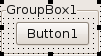 | |
| 153 | 141 | ||
| 154 | 142 | When the GroupBox is enlarged the distance of the anchored side is kept: | |
| 155 | 143 | ||
| 156 | 144 | With akLeft, no akRight: 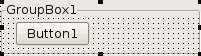 | |
| 157 | 145 | ||
| 158 | 146 | With akLeft and akRight: 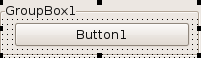 | |
| 159 | 147 | ||
| 160 | 148 | With akRight, no akLeft: 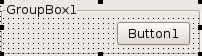 | |
| 161 | 149 | ||
| 162 | 150 | Three buttons in a groupbox: 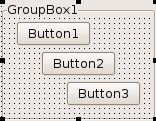 | |
| 163 | 151 | ||
| 164 | 152 | With no akLeft and no akRight their centers are scaled: 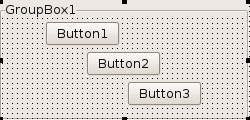 | |
| 165 | 153 | ||
| 166 | 154 | **Notes:** | |
| 167 | 155 | ||
| 168 | 156 | - Loading a form is like one big SetBounds. During loading properties are set using the values of the lfm. Keep in mind that there can be multiple lfm files because of ancestors and frames. After loading the [[LCL]] enables autosizing. Anchored controls use the bounds at the end of loading. Any step in between is ignored. | |
| 169 | 157 | - For custom controls it is often better to set AnchorSides instead of only Anchors. | |
| 170 | 158 | ||
| 171 | 159 | #### Changing the size of an anchored control | |
| 172 | 160 | ||
| 173 | 161 | When changing the Width of an anchored control, for example via the Object Inspector or via code *Button1.Width:=3*, you can see the difference between anchoring to *Parent* and anchoring to *Nil*. Anchoring to Parent will resize and move the Button1, while anchoring to Nil will only resize. For example: | |
| 174 | 162 | ||
| 175 | 163 | ##### Anchored to nil | |
| 176 | 164 | ||
| 177 | 165 | 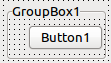 A Button1 anchored \[akTop,akRight\], AnchorSide\[akRight\].Control=nil | |
| 178 | 166 | ||
| 179 | 167 | 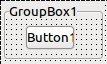 Setting the Width to a smaller value will shrink the button, keeping the button's *Left*, increasing the distance of the right side. | |
| 180 | 168 | ||
| 181 | 169 | 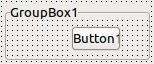 When the Groupbox is resized the button will keep the new distance. | |
| 182 | 170 | ||
| 183 | 171 | **Explanation:** setting the **Width** is equivalent to calling SetBounds(**Left**,Top,**NewWidth**,Height). That's why the *Left* is kept. This is Delphi compatible. | |
| 184 | 172 | ||
| 185 | 173 | ##### Anchored to Parent | |
| 186 | 174 | ||
| 187 | 175 | 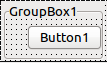 A Button1 anchored \[akTop,akRight\], AnchorSide\[akRight\].Control=Button1.Parent | |
| 188 | 176 | ||
| 189 | 177 | 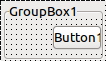 Setting the Width to a smaller value will shrink the button, keeping the right distance, changing the button's *Left*. | |
| 190 | 178 | ||
| 191 | 179 | #### Anchored to sibling | |
| 192 | 180 | ||
| 193 | 181 | You can anchor to neighbor controls. The following example shows: | |
| 194 | 182 | ||
| 195 | 183 | - you can anchor a label's left to the left of a button | |
| 196 | 184 | - anchor a label's top to the bottom of a button | |
| 197 | 185 | - anchor the center of a label to the center of a button | |
| 198 | 186 | ||
| 199 | - | ||
| 200 | - | ||
| 201 | - | ||
| 202 | - | ||
| 187 | + | 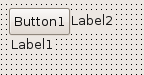 | |
| 203 | 188 | ||
| 204 | - | ||
| 205 | - | ||
| 206 | - | ||
| 207 | - | ||
| 189 | + | 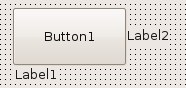 | |
| 208 | 190 | ||
| 209 | 191 | For more details and how to setup anchors see: [[Anchor Sides]]. | |
| 210 | 192 | ||
| 211 | - | ||
| 212 | - | ||
| 213 | - | ||
| 214 | - | ||
| 193 | + | 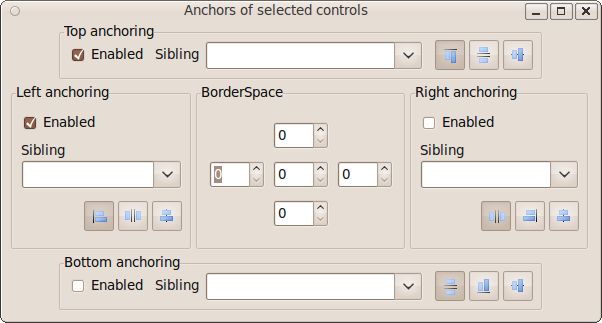 | |
| 215 | 194 | ||
| 216 | 195 | ### BorderSpacing | |
| 217 | 196 | ||
| 218 | 197 | The BorderSpacing properties controls the minimum amount of space around a control. The properties are: | |
| 219 | 198 | ||
| 220 | 199 | - **Around**: this amount in pixel is added to Left, Top, Right, Bottom. | |
| 221 | 200 | - **Left**: space in pixel on the left side of the control | |
| 222 | 201 | - **Top**: space in pixel above the control | |
| 223 | 202 | - **Right**: space in pixel on the right side of the control | |
| 224 | 203 | - **Bottom**: space in pixel below the control | |
| 225 | 204 | - **InnerBorder**: this amount in pixel is added twice to the preferred width and height. Some controls override the calculation and ignore this property. An example where it works is TButton. With InnerBorder you can make a button bigger than needed. | |
| 226 | 205 | - **CellAlignHorizontal**: This is used in table layouts like ChildSizing.Layout=cclLeftToRightThenTopToBottom. If the control is smaller than the table cell, this property defines where to align the control: to the left ccaLeftTop, to the right ccaRightBottom or in the middle ccaCenter. | |
| 227 | 206 | - **CellAlignVertical**: same as CellAlignHorizontal but for vertical alignment. | |
| 228 | 207 | ||
| 229 | 208 | #### BorderSpacing rules | |
| 230 | 209 | ||
| 231 | 210 | - Around is added to Left,Top,Right,Bottom borderspacing | |
| 232 | 211 | - The space can be even bigger, if the controls have constraints that don't allow to expand. | |
| 233 | 212 | ||
| 234 | 213 | ##### Anchoring to the opposite side | |
| 235 | 214 | ||
| 236 | 215 | For example right side of A to left side of B. | |
| 237 | 216 | ||
| 238 | 217 | Both borderspacings of A and B are used. | |
| 239 | 218 | ||
| 240 | 219 | - The horizontal space between two controls (LeftControl, RightControl on Parent) is the maximum of | |
| 241 | 220 | - LeftControl.BorderSpacing.Right + LeftControl.BorderSpacing.Around | |
| 242 | 221 | - RightControl.BorderSpacing.Left + RightControl.BorderSpacing.Around | |
| 243 | 222 | - Parent.ChildSizing.HorizontalSpacing | |
| 244 | 223 | - The vertical space works analog: between two controls (TopControl, BottomControl on Parent) is the maximum of | |
| 245 | 224 | - TopControl.BorderSpacing.Bottom + TopControl.BorderSpacing.Around | |
| 246 | 225 | - BottomControl.BorderSpacing.Top + BottomControl.BorderSpacing.Around | |
| 247 | 226 | - Parent.ChildSizing.VerticalSpacing | |
| 248 | 227 | ||
| 249 | 228 | For instance if LeftControl.BorderSpacing.Right = 3 and LeftControl.BorderSpacing.Around = 4, then there is at least 7 pixel space between the two controls. If RightControl.BorderSpacing.Left = 4 and RightControl.BorderSpacing.Around = 4 then the space will be at least 8. If Parent.ChildSizing.HorizontalSpacing = 10 then the space will be at least 10. | |
| 250 | 229 | ||
| 251 | 230 | ##### Anchoring to the same side | |
| 252 | 231 | ||
| 253 | 232 | For example right side of A to right side of B. | |
| 254 | 233 | ||
| 255 | 234 | - Only borderspacings of A is used. | |
| 256 | 235 | - Parent.ChildSizing.Horizontal/VerticalSpacing are not used. | |
| 257 | 236 | ||
| 258 | 237 | ##### Anchoring to center | |
| 259 | 238 | ||
| 260 | 239 | For example center of A to center of B. | |
| 261 | 240 | ||
| 262 | 241 | No borderspacing is used and no Parent.ChildSizing.Horizontal/VerticalSpacing is used. | |
| 263 | 242 | ||
| 264 | 243 | ##### Example | |
| 265 | 244 | ||
| 266 | 245 | A common example is anchoring a Label to an Edit. | |
| 267 | 246 | ||
| 268 | - | ||
| 269 | - | ||
| 270 | - | ||
| 271 | - | ||
| 247 | + | 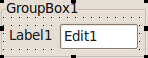 | |
| 272 | 248 | ||
| 273 | 249 | The Label center is vertically anchored to the Edit. The Edit's left side is anchored to the right side of the Label. Both have BorderSpacing.Around=6. This results in 6 pixel space between the Label and the Edit and 6 pixel space left of the Label and 6 pixel space right of the Edit. There is 6 pixel space above and below the Edit as well. | |
| 274 | 250 | ||
| 275 | 251 | - The left space between a control and its parent (Label1 on GroupBox1) is the maximum of | |
| 276 | 252 | - Label1.BorderSpacing.Left + Label1.BorderSpacing.Around | |
| 277 | 253 | - GroupBox1.ChildSizing.LeftTopSpacing | |
| 278 | 254 | ||
| 279 | 255 | - The right space between a control and its parent (Edit1 on GroupBox1) is the maximum of | |
| 280 | 256 | - Edit1.BorderSpacing.Right + Edit1.BorderSpacing.Around | |
| 281 | 257 | - GroupBox1.ChildSizing.RightBottomSpacing | |
| 282 | 258 | ||
| 283 | 259 | - When a control's center is anchored to another control, for example the above Label is centered vertically to the Edit1, then all spacings are ignored. | |
| 284 | 260 | ||
| 285 | 261 | - When a control's left side is anchored to the left side of another control (i.e. they are aligned with the left side), then the distance between both left's side is the | |
| 286 | 262 | - Control1.BorderSpacing.Left + Control1.BorderSpacing.Around | |
| 287 | 263 | ||
| 288 | 264 | Here is a more complex example: | |
| 289 | 265 | ||
| 290 | - | ||
| 291 | - | ||
| 292 | - | ||
| 293 | - | ||
| 266 | + | 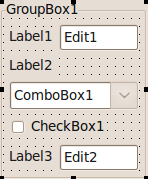 | |
| 294 | 267 | ||
| 295 | 268 | The important parts of the lfm code: | |
| 296 | 269 | ||
| 297 | 270 | ``` pascal | |
| 298 | 271 | object GroupBox1: TGroupBox | |
| 299 | 272 | AutoSize = True | |
| 300 | 273 | Caption = 'GroupBox1' | |
| 301 | 274 | TabOrder = 0 | |
| 302 | 275 | object Label1: TLabel | |
| 303 | 276 | AnchorSideLeft.Control = GroupBox1 | |
| 304 | 277 | AnchorSideTop.Control = Edit1 | |
| 305 | 278 | AnchorSideTop.Side = asrCenter | |
| 306 | 279 | BorderSpacing.Around = 6 | |
| 307 | 280 | Caption = 'Label1' | |
| 308 | 281 | end | |
| 309 | 282 | object Edit1: TEdit | |
| 310 | 283 | AnchorSideLeft.Control = Label1 | |
| 311 | 284 | AnchorSideLeft.Side = asrBottom | |
| 312 | 285 | AnchorSideTop.Control = GroupBox1 | |
| 313 | 286 | AnchorSideRight.Control = GroupBox1 | |
| 314 | 287 | AnchorSideRight.Side = asrBottom | |
| 315 | 288 | Anchors = [akTop, akLeft, akRight] | |
| 316 | 289 | BorderSpacing.Around = 6 | |
| 317 | 290 | TabOrder = 0 | |
| 318 | 291 | Text = 'Edit1' | |
| 319 | 292 | end | |
| 320 | 293 | object Label2: TLabel | |
| 321 | 294 | AnchorSideLeft.Control = GroupBox1 | |
| 322 | 295 | AnchorSideTop.Control = Edit1 | |
| 323 | 296 | AnchorSideTop.Side = asrBottom | |
| 324 | 297 | BorderSpacing.Around = 6 | |
| 325 | 298 | Caption = 'Label2' | |
| 326 | 299 | end | |
| 327 | 300 | object ComboBox1: TComboBox | |
| 328 | 301 | AnchorSideLeft.Control = Label2 | |
| 329 | 302 | AnchorSideTop.Control = Label2 | |
| 330 | 303 | AnchorSideTop.Side = asrBottom | |
| 331 | 304 | AnchorSideRight.Control = GroupBox1 | |
| 332 | 305 | AnchorSideRight.Side = asrBottom | |
| 333 | 306 | Anchors = [akTop, akLeft, akRight] | |
| 334 | 307 | BorderSpacing.Right = 6 | |
| 335 | 308 | TabOrder = 1 | |
| 336 | 309 | Text = 'ComboBox1' | |
| 337 | 310 | end | |
| 338 | 311 | object CheckBox1: TCheckBox | |
| 339 | 312 | AnchorSideLeft.Control = GroupBox1 | |
| 340 | 313 | AnchorSideTop.Control = ComboBox1 | |
| 341 | 314 | AnchorSideTop.Side = asrBottom | |
| 342 | 315 | BorderSpacing.Around = 6 | |
| 343 | 316 | Caption = 'CheckBox1' | |
| 344 | 317 | TabOrder = 2 | |
| 345 | 318 | end | |
| 346 | 319 | object Label3: TLabel | |
| 347 | 320 | AnchorSideLeft.Control = GroupBox1 | |
| 348 | 321 | AnchorSideTop.Control = Edit2 | |
| 349 | 322 | AnchorSideTop.Side = asrCenter | |
| 350 | 323 | BorderSpacing.Around = 6 | |
| 351 | 324 | Caption = 'Label3' | |
| 352 | 325 | end | |
| 353 | 326 | object Edit2: TEdit | |
| 354 | 327 | AnchorSideLeft.Control = Label3 | |
| 355 | 328 | AnchorSideLeft.Side = asrBottom | |
| 356 | 329 | AnchorSideTop.Control = CheckBox1 | |
| 357 | 330 | AnchorSideTop.Side = asrBottom | |
| 358 | 331 | BorderSpacing.Around = 6 | |
| 359 | 332 | TabOrder = 3 | |
| 360 | 333 | Text = 'Edit2' | |
| 361 | 334 | end | |
| 362 | 335 | end | |
| 363 | 336 | ``` | |
| 364 | 337 | ||
| 365 | 338 | #### BorderSpacing and Align | |
| 366 | 339 | ||
| 367 | 340 | BorderSpacing works with Align. In the example below there is a Memo1 with Align=alTop and a Memo2 with Align=alCLient. | |
| 368 | 341 | ||
| 369 | 342 | - Normally the two Memos would fill the whole GroupBox. | |
| 370 | 343 | - But the Memo1 has BorderSpacing.Around=10, so there 10 pixel space around Memo1. | |
| 371 | 344 | - The Memo2 has BorderSpacing.Top=20. The space between Memo1 and Memo2 is the maximum, which is the 20 from Memo2. | |
| 372 | 345 | - Memo2 has also BorderSpacing.Right=50 so there is 50 Pixel space right of Memo2. | |
| 373 | 346 | - The GroupBox can define default space for all its child controls via ChildSizing.LeftRightSpacing/VerticalSpacing/HorizontalSpacing. In this example it does not (all 0). | |
| 374 | 347 | ||
| 375 | - | ||
| 376 | - | ||
| 377 | - | ||
| 378 | - | ||
| 348 | + | 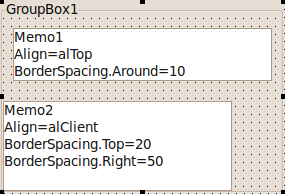 | |
| 379 | 349 | ||
| 380 | 350 | ## Align | |
| 381 | 351 | ||
| 382 | 352 | The Align property works pretty much like in Delphi and can be used to quickly fill an area. For example to let a TListBox fill the entire area of its Parent, set ListBox1.Align=alClient. The align values alTop, alBottom, alLeft and alRight will place controls without overlapping if possible. That means all controls with Align in alLeft,alTop,alBottom,alRight will not overlap if there is enough space. | |
| 383 | 353 | ||
| 384 | 354 | The algorithm works as follows: | |
| 385 | 355 | ||
| 386 | 356 | - First all controls with alTop are put to the top of the client area. If there are several controls with alTop the last added/moved will be put topmost. The algorithm will try to avoid overlapping and keep the height of the control, while expanding the width to maximum. AnchorSides of the left, top and right sides are ignored. The bottom AnchorSide works normal. Borderspacing and Parent.ChildSizing spaces are considered, so you can define space around each aligned control. | |
| 387 | 357 | - Then all controls with alBottom are put to the bottom of the client area. Otherwise it works analog to alTop. | |
| 388 | 358 | - Then all controls with alLeft are put to the left of the client area between the alTop and alBottom controls. Otherwise it works analog to alTop. | |
| 389 | 359 | - Then all controls with alRight are put to the right of the client area between the alTop and alBottom controls. Otherwise it works analog to alTop. | |
| 390 | 360 | - If there is a control with alClient it will fill the remaining client. | |
| 391 | 361 | - If there is more than one control with alClient they will be placed at the same position, overlapping each other. Use the Visibility property to define which one is shown. | |
| 392 | 362 | ||
| 393 | - | ||
| 394 | - | ||
| 395 | - | ||
| 396 | - | ||
| 363 | + | 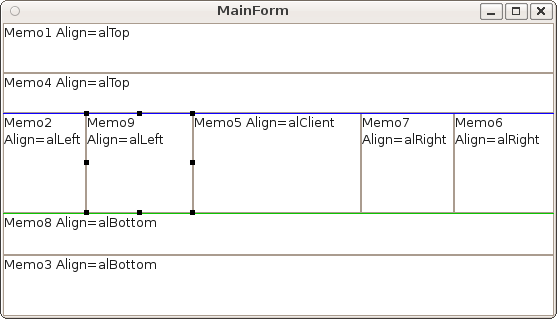 | |
| 397 | 364 | ||
| 398 | 365 | ### Align and BorderSpacing | |
| 399 | 366 | ||
| 400 | 367 | The space of BorderSpacing and of the parent's ChildSizing is applied to aligned controls. The memo below has Align=alClient. | |
| 401 | 368 | ||
| 402 | - | ||
| 403 | - | ||
| 404 | - | ||
| 405 | - | ||
| 369 | + | 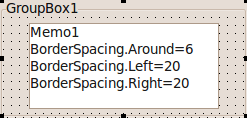 | |
| 406 | 370 | ||
| 407 | 371 | ### Align and Anchoring | |
| 408 | 372 | ||
| 409 | 373 | The free side of an aligned control (e.g. the right side of a **Align=alLeft**) follows the anchoring rules. If the anchor is not set, then the control will keep its **Width**. If the anchor is set, then the **Width** will change. | |
| 410 | 374 | ||
| 411 | 375 | ### Align and AutoSize | |
| 412 | 376 | ||
| 413 | 377 | A control aligned with alLeft or alRight expands vertically, and will use its designed width. If *AutoSize* is set to *true*, then the *Width* will be the preferred width. The button below has *Align=alRight* and *AutoSize=true*. | |
| 414 | 378 | ||
| 415 | - | ||
| 416 | - | ||
| 417 | - | ||
| 418 | - | ||
| 379 | + | 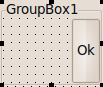 | |
| 419 | 380 | ||
| 420 | 381 | ### Align and parent AutoSize | |
| 421 | 382 | ||
| 422 | 383 | A control aligned with alClient fills the remaining space. A parent control with *AutoSize=true* will expand or shrink to enclose its children exactly. What happens if you combine these two properties? Say you put a button with Align=alClient into a groupbox with AutoSize=true? | |
| 423 | 384 | ||
| 424 | - | ||
| 425 | - | ||
| 426 | - | ||
| 427 | - | ||
| 385 | + | 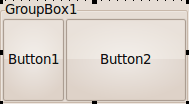 | |
| 428 | 386 | ||
| 429 | 387 | The [[LCL]] uses the *preferred size* of the buttons and expands or shrinks the groupbox accordingly: | |
| 430 | 388 | ||
| 431 | - | ||
| 432 | - | ||
| 433 | - | ||
| 434 | - | ||
| 389 | + | 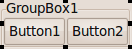 | |
| 435 | 390 | ||
| 436 | 391 | ### alCustom | |
| 437 | 392 | ||
| 438 | 393 | This Align value exists for custom AutoSize algorithms and is treated by the [[LCL]] almost like alNone. Controls with alCustom are not moved by the [[LCL]] but by your custom control. You have to override CalculatePreferredSize and DoAutoSize. | |
| 439 | 394 | ||
| 440 | 395 | ### Order of controls with same Align | |
| 441 | 396 | ||
| 442 | 397 | Controls with same Align are positioned in the following order. On alLeft the control with the lowest Left wins, for alTop the lowest Top, for alRight the biggest Left+Width, for alBottom the biggest Top+Height. If two controls have the same coordinate the one last moved (calls to SetBounds or SetParent) wins. Controls can override CreateControlAlignList to change the order or override DoAlignChildControls to handle the whole Align. | |
| 443 | 398 | ||
| 444 | 399 | Note: Before 0.9.29 controls at the same coordinate were put in Z order. This resulted in reordering in some cases and had to be fixed. There is one incompatibility: If you added several controls with alTop or alLeft without specifying bounds the controls are put at 0,0 and therefore the last added wins, where formerly the first won. | |
| 445 | 400 | ||
| 446 | 401 | Note for Delphians: Contrary to the VCL the LCL can and often does delay recomputing the layout. Delphi does the layout after every property change. Setting Align=alTop calls in the VCL a special AlignControls, where the current control has a special meaning. That's why in the VCL the order of setting properties is important. The LCL layout algorithm is independent of the chronological order of setting the properties. | |
| 447 | 402 | ||
| 448 | 403 | For example all changes in FormCreate are delayed and the layout is computed from the final property values. On the other hand ButtonClick has no delay (aka you have to add the Disable/EnableAutoSize yourself), so inserting alTop controls may have different results. | |
| 449 | 404 | ||
| 450 | 405 | If you want a specific order, use Disable/EnableAutoSize and set the "Top" properties. For example TForm.OnCreate is called with AutoSize disabled, so you can use: | |
| 451 | 406 | ||
| 452 | 407 | ``` pascal | |
| 453 | 408 | procedure TForm1.FormCreate(Sender: TObject); | |
| 454 | 409 | begin | |
| 455 | 410 | // making sure Panel2 is above Panel1, even though Panel1 is set first: | |
| 456 | 411 | Panel1.Align:=alTop; | |
| 457 | 412 | Panel1.Top:=1; | |
| 458 | 413 | Panel2.Align:=alTop; | |
| 459 | 414 | Panel2.Top:=0; | |
| 460 | 415 | end; | |
| 461 | 416 | ``` | |
| 462 | 417 | ||
| 463 | 418 | ## Layout | |
| 464 | 419 | ||
| 465 | 420 | ### Rows, columns and lines | |
| 466 | 421 | ||
| 467 | 422 | You can align child controls in rows and columns using the ChildSizing properties. For example: | |
| 468 | 423 | ||
| 469 | 424 | - ChildSizing.Layout=cclLeftToRightThenTopToBottom | |
| 470 | 425 | - ChildSizing.ControlsPerLine=3 | |
| 471 | 426 | - AutoSize=false (the groupbox does not resize to fit the child controls) | |
| 472 | 427 | ||
| 473 | - | ||
| 474 | - | ||
| 475 | - | ||
| 476 | - | ||
| 428 | + | 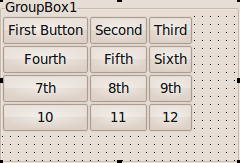 | |
| 477 | 429 | ||
| 478 | 430 | The **Layout** property defaults to cclNone. If you set **Layout** to another value, every child, that has *normal* anchors, will be aligned. *Normal* anchors means: | |
| 479 | 431 | ||
| 480 | 432 | - Anchors=\[akLeft,akTop\] | |
| 481 | 433 | - AnchorSide\[akLeft\].Control=nil | |
| 482 | 434 | - AnchorSide\[akTop\].Control=nil | |
| 483 | 435 | - Align=alNone | |
| 484 | 436 | ||
| 485 | 437 | The value **cclLeftToRightThenTopToBottom** will put the first child at top, left, the second to the right, and so forth. This is a **line**. The property **ControlsPerLine** defines when a new line is started. In the above example each line (row) has 3 controls. There are 12 controls, so there are 4 lines (rows) each with 3 controls (columns). If *ControlsPerLine* is 0 it means unlimited controls per line - there would be only one row with all childs. | |
| 486 | 438 | ||
| 487 | 439 | You can see that the rows have different sizes, each row has the size of the biggest control and that the controls are resized to column width. There is no space between the rows. The space in the image comes from the used theme, not from the [[LCL]]. | |
| 488 | 440 | ||
| 489 | 441 | ### Fixed space between rows and columns | |
| 490 | 442 | ||
| 491 | 443 | You can add space between with these properties: | |
| 492 | 444 | ||
| 493 | 445 | - ChildSizing.VerticalSpacing - Space between rows | |
| 494 | 446 | - ChildSizing.HorizontalSpacing - Space between columns | |
| 495 | 447 | - ChildSizing.LeftRightSpacing - Space on the left and right of *all* columns | |
| 496 | 448 | - ChildSizing.TopBottomSpacing - Space above and below of *all* columns | |
| 497 | 449 | ||
| 498 | 450 | The above example with ChildSizing.VerticalSpacing=6, ChildSizing.HorizontalSpacing=15, ChildSizing.LeftRightSpacing=30, ChildSizing.TopBottomSpacing=10, AutoSize=true | |
| 499 | 451 | ||
| 500 | - | ||
| 501 | - | ||
| 502 | - | ||
| 503 | - | ||
| 452 | + | 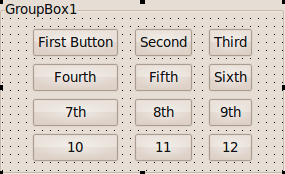 | |
| 504 | 453 | ||
| 505 | 454 | Additionally you can add individual space for each control with its BorderSpacing properties. | |
| 506 | 455 | ||
| 507 | 456 | ### Enlarge | |
| 508 | 457 | ||
| 509 | 458 | The above example resized the GroupBox to the needed space. If your GroupBox has a fixed size or if it is not freely resizable, for instance if the GroupBox should fill the whole width of the form, then the childs should enlarge. There are several modes. The default mode *ChildSizing.EnlargeHorizontal=crsAnchorAligning* is to not enlarge anything. The space on the right side will be unused. | |
| 510 | 459 | ||
| 511 | 460 | - crsAnchorAligning - do not use the extra space | |
| 512 | 461 | - crsScaleChilds - multiply the width/height with the same factor | |
| 513 | 462 | - crsHomogeneousChildResize - add to each width/height the same amount | |
| 514 | 463 | - crsHomogeneousSpaceResize - add to each space between the childs the same amount | |
| 515 | 464 | ||
| 516 | 465 | #### crsScaleChilds | |
| 517 | 466 | ||
| 518 | 467 | ChildSizing.EnlargeHorizontal=crsScaleChilds, ChildSizing.EnlargeVertical=crsScaleChilds, AutoSize=false | |
| 519 | 468 | ||
| 520 | - | ||
| 521 | - | ||
| 522 | - | ||
| 523 | - | ||
| 469 | + | 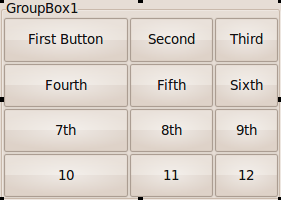 | |
| 524 | 470 | ||
| 525 | 471 | For example if the ClientWidth is twice as big as needed, then every child will be twice as big. | |
| 526 | 472 | ||
| 527 | 473 | #### crsHomogeneousChildResize | |
| 528 | 474 | ||
| 529 | 475 | ChildSizing.EnlargeHorizontal=crsHomogeneousChildResize, ChildSizing.EnlargeVertical=crsHomogeneousChildResize, AutoSize=false | |
| 530 | 476 | ||
| 531 | - | ||
| 532 | - | ||
| 533 | - | ||
| 534 | - | ||
| 477 | + | 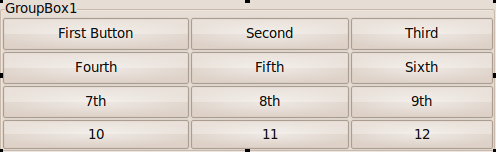 | |
| 535 | 478 | ||
| 536 | 479 | For example if the ClientWidth is 30 pixel bigger than needed, then every child will be 10 pixel broader. | |
| 537 | 480 | ||
| 538 | 481 | #### crsHomogeneousSpaceResize | |
| 539 | 482 | ||
| 540 | 483 | ChildSizing.EnlargeHorizontal=crsHomogeneousSpaceResize, ChildSizing.EnlargeVertical=crsHomogeneousSpaceResize, AutoSize=false | |
| 541 | 484 | ||
| 542 | - | ||
| 543 | - | ||
| 544 | - | ||
| 545 | - | ||
| 485 | + | 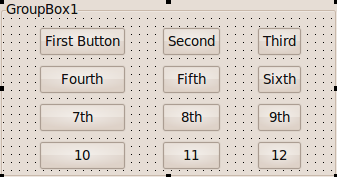 | |
| 546 | 486 | ||
| 547 | 487 | For example if the ClientWidth is 40 pixel bigger than needed, there will be 10 pixel space on the left, right and between each child. | |
| 548 | 488 | ||
| 549 | 489 | ### Shrink | |
| 550 | 490 | ||
| 551 | 491 | Shrinking works similarly to enlarging. You can set different modes if there is not enough space for controls. **ShrinkHorizontal**, **ShrinkVertical**. | |
| 552 | 492 | ||
| 553 | 493 | ### Individual cells | |
| 554 | 494 | ||
| 555 | 495 | In the above examples all controls were resized the same, each filled the whole *cell*. A *cell* is the space in a specific row and column. Normally a control fills the whole cell space. This can be changed with the properties **BorderSpacing.CellAlignHorizontal** and **BorderSpacing.CellAlignVertical**. | |
| 556 | 496 | ||
| 557 | 497 | For example set the *BorderSpacing.CellAlignHorizontal* of the fifth button to **caCenter** you will get this: | |
| 558 | 498 | ||
| 559 | - | ||
| 560 | - | ||
| 561 | - | ||
| 562 | - | ||
| 499 | + | 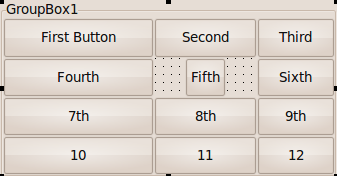 | |
| 563 | 500 | ||
| 564 | 501 | There are four possible values for CellAlignHorizontal/CellAlignVertical: | |
| 565 | 502 | ||
| 566 | 503 | - caFill: the child control fills the whole width (height) of the cell | |
| 567 | 504 | - caCenter: the child control uses its preferred width (height) and will be centered in the cell | |
| 568 | 505 | - caLeftTop: the child control uses its preferred width (height) and will be leftaligned in the cell | |
| 569 | 506 | - caRightBottom: the child control uses its preferred width (height) and will be rightaligned in the cell | |
| 570 | 507 | ||
| 571 | - | ||
| 572 | - | ||
| 573 | - | ||
| 574 | - | ||
| 508 | + | 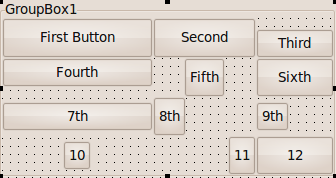 | |
| 575 | 509 | ||
| 576 | 510 | ## Custom layout with OnResize / OnChangeBounds | |
| 577 | 511 | ||
| 578 | 512 | Sometimes the [[LCL]] layout is not sufficient. The below example shows a GroupBox1 with a ListBox1 and a Memo1. The ListBox1 should fill one third of the space, the Memo1 takes the rest. | |
| 579 | 513 | ||
| 580 | - | ||
| 581 | - | ||
| 582 | - | ||
| 583 | - | ||
| 514 | + | 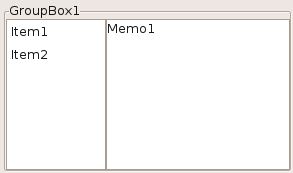 | |
| 584 | 515 | ||
| 585 | 516 | Whenever the GroupBox is resized the ListBox1.Width should be one third. To achieve this set the OnResize event of the GroupBox1 to: | |
| 586 | 517 | ||
| 587 | 518 | ``` pascal | |
| 588 | 519 | procedure TForm1.GroupBox1Resize(Sender: TObject); | |
| 589 | 520 | begin | |
| 590 | 521 | ListBox1.Width := GroupBox1.ClientWidth div 3; | |
| 591 | 522 | end; | |
| 592 | 523 | ``` | |
| 593 | 524 | ||
| 594 | 525 | ### Common mistake: Wrong OnResize event | |
| 595 | 526 | ||
| 596 | 527 | Do not put *all* your resizing code into the Form OnResize event. The Form OnResize event is only called when the Form was resized. The child controls (e.g. a GroupBox1) is resized later, so the GroupBox1.ClientWidth has still the old value during the FormResize event. You must use the GroupBox1.OnResize event to react to changes of GroupBox1.ClientWidth. | |
| 597 | 528 | ||
| 598 | 529 | ### Common mistake: Width instead of ClientWidth, AdjustClientRect | |
| 599 | 530 | ||
| 600 | 531 | The Width is the size including the frame. The ClientWidth is the inner Width without the frame. Some controls like the TPanel paints a further frame. Then you have to use AdjustClientRect. The same example, but instead of a GroupBox1 the ListBox1 is in a Panel1: | |
| 601 | 532 | ||
| 602 | 533 | ``` pascal | |
| 603 | 534 | procedure TForm1.Panel1Resize(Sender: TObject); | |
| 604 | 535 | var | |
| 605 | 536 | r: TRect; | |
| 606 | 537 | begin | |
| 607 | 538 | r := Panel1.ClientRect; | |
| 608 | 539 | Panel1.AdjustClientRect(r); | |
| 609 | 540 | ListBox1.Width := (r.Right - r.Left) div 3; | |
| 610 | 541 | end; | |
| 611 | 542 | ``` | |
| 612 | 543 | ||
| 613 | 544 | ## Custom Controls | |
| 614 | 545 | ||
| 615 | 546 | When you write your own control, you can override and fine tune many parts of the [[LCL]] autosizing. | |
| 616 | 547 | ||
| 617 | 548 | ### SetBounds, ChangeBounds, DoSetBounds | |
| 618 | 549 | ||
| 619 | 550 | **SetBounds** is called when the properties Left, Top, Width, Height, BoundsRect is set or the user calls it directly. SetBounds updates the BaseBounds and BaseParentClientSize, which are used by anchoring to keep the distance. For example loading a Form with TMemo and the lfm contains TMemo's Left and Width, then SetBounds is called two times for the memo. When the user maximizes a window, SetBounds is called for the form, but not for the Memo, keeping the BaseBounds of the Memo. If the Memo is anchored to the right, the Width of the Memo is changed based on the BaseBounds and BaseParentClientSize. Keep in mind that the given aLeft, aTop, aWidth, aHeight might not be valid and will be changed by the [[LCL]] before applied. Delphi calls SetBounds more often. SetBounds calls ChangeBounds with KeepBase=false. | |
| 620 | 551 | ||
| 621 | 552 | **ChangeBounds** is called whenever the position or size of the control is set, either via the properties or by the layouter of the [[LCL]]. SetBounds calls internally ChangeBounds with KeepBase=false, while the [[LCL]] layouter calls it with KeepBase=true. Override this for code that might change the preferred size or resizes other controls. Keep in mind that the given aLeft, aTop, aWidth, aHeight might not be valid and will be changed by the [[LCL]] before applied. You can call this function. | |
| 622 | 553 | ||
| 623 | 554 | **DoSetBounds** is a low level function to set the private variables FLeft, FTop, FWidth, FHeight. Do not call this function, only the [[LCL]] calls it. It also updates FClientWidth and FClientHeight accordingly. Override this to update the content layout of the control, for example scroll bars. As always: do not paint here, but call Invalidate and paint in OnPaint or override Paint. | |
| 624 | 555 | ||
| 625 | 556 | **DoAdjustClientRectChange** is called by the [[LCL]] and the [[LCL]] interface, when the ClientRect has changed and the Width and Height were kept. | |
| 626 | 557 | ||
| 627 | 558 | **WMSize** exists for Delphi/VCL compatibility. It is called by the [[LCL]] interface and on every change of bounds. | |
| 628 | 559 | ||
| 629 | 560 | ### AdjustClientRect | |
| 630 | 561 | ||
| 631 | 562 | The method AdjustClientRect can be overriden by your custom controls and affects Align, ChildSizing.Layout and AnchorSides. It does not affect the meaning of Left, Top and does not affect normal anchoring (for example setting). | |
| 632 | 563 | ||
| 633 | 564 | When you want to draw your own frame, then the child controls should be aligned within these frames. For example TPanel draws a frame and reduces the client area by overriding the method **AdjustClientRect**: | |
| 634 | 565 | ||
| 635 | 566 | ``` pascal | |
| 636 | 567 | TCustomPanel = class(TCustomControl) | |
| 637 | 568 | ... | |
| 638 | 569 | protected | |
| 639 | 570 | ... | |
| 640 | 571 | procedure AdjustClientRect(var aRect: TRect); override; | |
| 641 | 572 | ... | |
| 642 | 573 | ||
| 643 | 574 | procedure TCustomPanel.AdjustClientRect(var aRect: TRect); | |
| 644 | 575 | var | |
| 645 | 576 | BevelSize: Integer; | |
| 646 | 577 | begin | |
| 647 | 578 | inherited AdjustClientRect(aRect); | |
| 648 | 579 | ||
| 649 | 580 | BevelSize := BorderWidth; | |
| 650 | 581 | if (BevelOuter <> bvNone) then | |
| 651 | 582 | inc(BevelSize, BevelWidth); | |
| 652 | 583 | if (BevelInner <> bvNone) then | |
| 653 | 584 | inc(BevelSize, BevelWidth); | |
| 654 | 585 | ||
| 655 | 586 | InflateRect(aRect, -BevelSize, -BevelSize); | |
| 656 | 587 | end; | |
| 657 | 588 | ``` | |
| 658 | 589 | ||
| 659 | 590 | #### AdjustClientRect and Align | |
| 660 | 591 | ||
| 661 | 592 | AdjustClientRect can be used to reduce the client area used by all autosize operations. For example TPanel uses AdjustClientRect to reduce the client area by the borderwidth: | |
| 662 | 593 | ||
| 663 | - | ||
| 664 | - | ||
| 665 | - | ||
| 666 | - | ||
| 594 | + |  | |
| 667 | 595 | ||
| 668 | 596 | The Button1 in the screenshot was created with Align=alClient. ChildSizing.Layout is affected too. | |
| 669 | 597 | ||
| 670 | 598 | When anchoring to a parent via AnchorSides the AdjustClientRect is used too: | |
| 671 | 599 | ||
| 672 | 600 | ``` pascal | |
| 673 | 601 | Button1.AnchorParallel(akTop,0,Button1.Parent); | |
| 674 | 602 | ``` | |
| 675 | 603 | ||
| 676 | 604 | The Button1's top side is anchored to the top side of the parent's client area. If the AdjustClientRect adds 3 to the Top the Button1.Top will be 3 (3 plus 0). | |
| 677 | 605 | ||
| 678 | 606 | ### Own AutoSize | |
| 679 | 607 | ||
| 680 | 608 | When *AutoSize* is set to true the control should be resized to the preferred size if possible. | |
| 681 | 609 | ||
| 682 | 610 | #### Preferred Size | |
| 683 | 611 | ||
| 684 | 612 | The new size is fetched by the [[LCL]] via **GetPreferredSize** which calls **CalculatePreferredSize**, which can be overridden. For example let's write a **TQuadrat**, which is a TShape, but its height should equal its width: | |
| 685 | 613 | ||
| 686 | 614 | ``` pascal | |
| 687 | 615 | TQuadrat = class(TShape) | |
| 688 | 616 | protected | |
| 689 | 617 | procedure CalculatePreferredSize(var PreferredWidth, | |
| 690 | 618 | PreferredHeight: integer; WithThemeSpace: Boolean); override; | |
| 691 | 619 | end; | |
| 692 | 620 | ... | |
| 693 | 621 | procedure TQuadrat.CalculatePreferredSize(var PreferredWidth, | |
| 694 | 622 | PreferredHeight: integer; WithThemeSpace: Boolean); | |
| 695 | 623 | begin | |
| 696 | 624 | PreferredHeight:=Width; | |
| 697 | 625 | end; | |
| 698 | 626 | ``` | |
| 699 | 627 | ||
| 700 | 628 | The method CalculatePreferredSize gets two var parameters: *PreferredWidth* and *PreferredHeight*. They default to 0 which means: there is no preferred size, so the [[LCL]] will not change the size. The above function sets *PreferredHeight* to the current *Width*. The boolean parameter *WithThemeSpace* is deprecated and always false. | |
| 701 | 629 | ||
| 702 | 630 | **Important**: CalculatePreferredSize must not change the bounds or any other value of the control that can trigger an autosize. Doing so will create a loop. | |
| 703 | 631 | ||
| 704 | 632 | Computing the *PreferredWidth/Height* can be expensive. Therefore the [[LCL]] caches the result until *InvalidatePreferredSize* is called for the control. In our example the *PreferredHeight* depends on the *Width*, so we must invalidate when the *Width* changes: | |
| 705 | 633 | ||
| 706 | 634 | ``` pascal | |
| 707 | 635 | TQuadrat = class(TShape) | |
| 708 | 636 | protected | |
| 709 | 637 | ... | |
| 710 | 638 | procedure DoSetBounds(ALeft, ATop, AWidth, AHeight: integer); override; | |
| 711 | 639 | end; | |
| 712 | 640 | ... | |
| 713 | 641 | procedure TQuadrat.DoSetBounds(ALeft, ATop, AWidth, AHeight: integer); | |
| 714 | 642 | begin | |
| 715 | 643 | inherited DoSetBounds(ALeft, ATop, AWidth, AHeight); | |
| 716 | 644 | InvalidatePreferredSize; | |
| 717 | 645 | // Note: The AdjustSize can be omitted here, because the [[LCL]] does that after calling DoSetBounds. | |
| 718 | 646 | end; | |
| 719 | 647 | ``` | |
| 720 | 648 | ||
| 721 | 649 | The [[LCL]] will automatically trigger the autosizing when the bounds have changed, so the example is complete. | |
| 722 | 650 | ||
| 723 | 651 | The default TWinControl implementation of CalculatePreferredSize queries the widget set, which might return a preferred width and/or height. Each control can override the CalculatePreferredSize method. For example TImage overrides it and returns the size of the Picture. If no preferred width (height) is available the returned value is 0 and the [[LCL]] will keep the current Width (Height). If 0 is a valid size for your control, you must set the ControlStyle flag csAutoSize0x0 (ControlStyle:=ControlStyle+\[csAutoSize0x0\];). An example is the [[LCL]] control TPanel. | |
| 724 | 652 | ||
| 725 | 653 | #### AdjustSize | |
| 726 | 654 | ||
| 727 | 655 | When the preferred size depends on a new property, then every time the property changes the auto sizing must be triggered. For example: | |
| 728 | 656 | ||
| 729 | 657 | ``` pascal | |
| 730 | 658 | procedure TQuadrat.SetSubTitle(const AValue: string); | |
| 731 | 659 | begin | |
| 732 | 660 | if FSubTitle = AValue then exit; | |
| 733 | 661 | FSubTitle := AValue; | |
| 734 | 662 | InvalidatePreferredSize; | |
| 735 | 663 | AdjustSize; | |
| 736 | 664 | end; | |
| 737 | 665 | ``` | |
| 738 | 666 | ||
| 739 | 667 | ## Reduce overhead with DisableAutoSizing, EnableAutoSizing | |
| 740 | 668 | ||
| 741 | 669 | Since Lazarus 0.9.29 there is a new autosizing algorithm, that reduces the overhead and allows deep nested dependencies. Up to 0.9.28 DisableAlign/EnableAlign and Disable/EnableAutoSizing worked only for one control and its direct child controls. | |
| 742 | 670 | ||
| 743 | 671 | Each time you change a property the [[LCL]] triggers a recomputation of the layout: | |
| 744 | 672 | ||
| 745 | 673 | ``` pascal | |
| 746 | 674 | Label1.Caption := 'A'; // first recompute | |
| 747 | 675 | Label2.Caption := 'B'; // second recompute | |
| 748 | 676 | ``` | |
| 749 | 677 | ||
| 750 | 678 | The recomputations will trigger events and send messages. To reduce the overhead you can suspend the autosizing: | |
| 751 | 679 | ||
| 752 | 680 | ``` pascal | |
| 753 | 681 | DisableAutoSizing; | |
| 754 | 682 | try | |
| 755 | 683 | Label1.Caption := 'A'; // no recompute | |
| 756 | 684 | Label2.Caption := 'B'; // no recompute | |
| 757 | 685 | finally | |
| 758 | 686 | EnableAutoSizing; // one recompute | |
| 759 | 687 | end; | |
| 760 | 688 | ``` | |
| 761 | 689 | ||
| 762 | 690 | You must balance calls to Disable/EnableAutoSizing. Autosizing starts only when EnableAutoSizing is called after a corresponding (earlier) DisableAutoSizing. | |
| 763 | 691 | ||
| 764 | 692 | Since 0.9.29 the Disable/EnableAutoSizing works for the entire form. This means every call to DisableAutoSizing suspends autosizing for **all** controls on that form. If you write your own control you can now use the following: | |
| 765 | 693 | ||
| 766 | 694 | ``` pascal | |
| 767 | 695 | procedure TMyRadioGroup.DoSomething; | |
| 768 | 696 | begin | |
| 769 | 697 | DisableAutoSizing; // disables not only TMyRadioGroup, but the whole form's autosizing | |
| 770 | 698 | try | |
| 771 | 699 | // delete items ... | |
| 772 | 700 | // add, reorder items ... | |
| 773 | 701 | // change item captions ... | |
| 774 | 702 | finally | |
| 775 | 703 | EnableAutoSizing; // recompute | |
| 776 | 704 | end; | |
| 777 | 705 | end; | |
| 778 | 706 | ``` | |
| 779 | 707 | ||
| 780 | 708 | Which basically means: you do not have to care. Just call Disable/EnableAutoSizing. | |
| 781 | 709 | ||
| 782 | 710 | Note: this is wrong: | |
| 783 | 711 | ||
| 784 | 712 | ``` pascal | |
| 785 | 713 | Button1.DisableAutoSizing; | |
| 786 | 714 | Label1.EnableAutoSizing; // wrong: every control has its own autosizing reference counter | |
| 787 | 715 | ``` | |
| 788 | 716 | ||
| 789 | 717 | ### DisableAutoSizing and Form bounds | |
| 790 | 718 | ||
| 791 | 719 | DisableAutoSizing has another useful effect under asynchronous Window Managers such as you find in Linux systems. Each time a form is resized or moved the bounds are sent to the widget set (DoSendBoundsToInterface). Even if the form is not shown the Handle is resized. The window manager often treats these bounds only as a proposal. The window manager has its own logic and often only the first bounds sent are used. The second, third or further moves may be ignored. With DisableAutoSizing you can make sure that only the final bounds are sent to the widget set making the form bounds more reliable. | |
| 792 | 720 | ||
| 793 | 721 | ## Example: a button panel | |
| 794 | 722 | ||
| 795 | 723 | This example combines several of the [[LCL]] layout mechanisms to create a panel with three buttons: a *Help* button to the left and *Ok* and *Cancel* buttons to the right. We want the panel to be at the bottom of the form filling the entire width. The buttons and the panel are autosized to fit all fonts and themes. | |
| 796 | 724 | ||
| 797 | 725 | Step 1: Create the panel and set its Align property to alBottom. Add three TBitBtns. | |
| 798 | 726 | ||
| 799 | - | ||
| 800 | - | ||
| 801 | - | ||
| 802 | - | ||
| 727 | + |  | |
| 803 | 728 | ||
| 804 | 729 | Set the *Kind* properties of the BitBtns to show the glyphs. You might need to set GlyphShowMode to gsmAlways to see them on your platform. Set the BitBtn's *AutoSize* property to *True*, which will shrink/enlarge the buttons to fit perfectly around the glyphs and text. Depending on your theme and platform you might notice that the buttons have different heights. | |
| 805 | 730 | ||
| 806 | - | ||
| 807 | - | ||
| 808 | - | ||
| 809 | - | ||
| 731 | + |  | |
| 810 | 732 | ||
| 811 | 733 | Set the *Align* property of the help button to *alLeft* and set the other two buttons' *Align* property to *alRight*. This will enlarge the buttons vertically and move them to the far left/right. alLeft/alRight has no effect on the width, so the buttons use their preferred width. | |
| 812 | 734 | ||
| 813 | - | ||
| 814 | - | ||
| 815 | - | ||
| 816 | - | ||
| 735 | + |  | |
| 817 | 736 | ||
| 818 | 737 | The Panel height is still fixed. Now set the panel *AutoSize* property to *True*. The panel now shrinks vertically to fit the tallest button. | |
| 819 | 738 | ||
| 820 | - | ||
| 821 | - | ||
| 822 | - | ||
| 823 | - | ||
| 739 | + |  | |
| 824 | 740 | ||
| 825 | 741 | The *Ok* button has a short caption, so the button is very small. Set the button's *Constraints.MinWidth* to *75*. The button will now enlarge somewhat. | |
| 826 | 742 | ||
| 827 | - | ||
| 828 | - | ||
| 829 | - | ||
| 830 | - | ||
| 743 | + |  | |
| 831 | 744 | ||
| 832 | 745 | Now add some space around the buttons. Set the panel's *ChildSizing.LeftTopSpacing/RightBottomSpacing/HorizontalSpacing* to *6*. | |
| 833 | 746 | ||
| 834 | - | ||
| 835 | - | ||
| 836 | - | ||
| 837 | - | ||
| 747 | + |  | |
| 838 | 748 | ||
| 839 | 749 | Finally clear the *Caption* of the panel and set its *BevelOuter* to *bvNone*. | |
| 840 | 750 | ||
| 841 | - | ||
| 842 | - | ||
| 843 | - | ||
| 844 | - | ||
| 751 | + |  | |
| 845 | 752 | ||
| 846 | 753 | ## Scrolling | |
| 847 | 754 | ||
| 848 | 755 | Some [[LCL]] controls like *TScrollBox*, *TForm*, and *TFrame* show scrollbars if the child controls are too big to fit the scrollbox, form or frame. They inherit this behaviour from their ancestor **TScrollingWinControl**. | |
| 849 | 756 | ||
| 850 | 757 | A scrolling control's **logical client area** can be bigger than the **visible client area**. The *visible client area* is **ClientRect**. It always starts at 0,0 and its width and height is the inner area. For example in a TGroupBox it is the size of the area inside the frame. So the following is always true: | |
| 851 | 758 | ||
| 852 | 759 | ``` pascal | |
| 853 | 760 | ClientWidth <= Width | |
| 854 | 761 | ClientHeight <= Height | |
| 855 | 762 | ``` | |
| 856 | 763 | ||
| 857 | 764 | The **logical client area** is defined by the method **GetLogicalClientRect**. By default it is the same as *ClientRect*. When a child control is anchored to the right side, it uses the *logical client area*. *TScrollingWinControl* overrides this method and returns the *Range* of the scrollbars if they are bigger than the *ClientRect*. The **Range** can be set manually or automatically with *AutoScroll=true*. An example for *AutoScroll=true*: | |
| 858 | 765 | ||
| 859 | - | ||
| 860 | - | ||
| 861 | - | ||
| 862 | - | ||
| 766 | + | 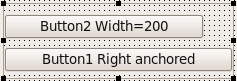 | |
| 863 | 767 | ||
| 864 | 768 | The upper button has a fixed Width of 200. The lower button is anchored to the right side of the panel. Therefore the child controls have a preferred width of 200. Because the panel is bigger than 200 the logical client area is bigger too and the lower button expands. | |
| 865 | 769 | ||
| 866 | 770 | Now the panel is shrunk, so that the ClientWidth becomes lower than 200: | |
| 867 | 771 | ||
| 868 | - | ||
| 869 | - | ||
| 870 | - | ||
| 871 | - | ||
| 772 | + | 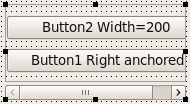 | |
| 872 | 773 | ||
| 873 | 774 | The preferred width is still 200, so the logical client area is now 200 and bigger than the visible client area. The lower button has now a Width of 200 and the panel shows a horizontal scrollbar. | |
| 874 | 775 | ||
| 875 | 776 | ### Scroll Position | |
| 876 | 777 | ||
| 877 | 778 | Changing the Position of a scrollbar does not change the Left or Top of any child control, nor does it change the logical client area, nor does it affect autosizing. The child controls are only virtually moved. | |
| 878 | 779 | ||
| 879 | 780 | ### Scrolling and AutoSize | |
| 880 | 781 | ||
| 881 | 782 | When AutoSize=true the [[LCL]] will expand the control to accommodate all its child controls, and no scrollbars are needed. If the control cannot be expanded, then (only) is the secondary action of AutoSize executed: moving the child controls. | |
| 882 | 783 | ||
| 883 | 784 | ## Docking | |
| 884 | 785 | ||
| 885 | 786 | Docking uses the described methods and properties of this page, see [[Docking]]. | |
| 886 | 787 | ||
| 887 | 788 | ## Splitter | |
| 888 | 789 | ||
| 889 | 790 | See [[TSplitter]]. | |
| 890 | 791 | ||
| 891 | 792 | ## TLabel.WordWrap | |
| 892 | 793 | ||
| 893 | 794 | **TLabel.WordWrap** changes the behavior of the preferred size of the label. **WordWrap=true** requires that the Width of the label is fixed, for example by anchoring the left and right size of the label. The preferred height of the label is then computed by breaking the Caption into multiple lines. | |
| 894 | 795 | ||
| 895 | 796 | ## DPI auto-adjustment and absolute layout auto-adjustment | |
| 896 | 797 | ||
| 897 | 798 | Historically the [[LCL]] has been utilized mostly to design absolute layouts, despite the huge amount of options which Lazarus offers for flexible layouts, like Align, Anchors, etc, as described on the rest of this article. On top of that, it has also historically ignored the DPI of the target and instead utilized values in pixels to measure the left, top, width and height properties of controls. For desktop platforms and Windows CE this has worked reasonably well, but with the advent of [[LCL]] support for Android this could no longer be ignored. Starting in Lazarus 0.9.31 the [[LCL]] can reinterprete the [[LCL]] absolute layout in pixels as a flexible grid. There are multiple modes to choose from and they will allow to reinterprete the pixel values as either really absolute, or as in being adjusted for the DPI or as in being considered simply a fraction of the form size. | |
| 898 | 799 | ||
| 899 | 800 | It is important to note that these new rules affect only controls which are positioned without Align and with the most standard Anchors only. | |
| 900 | 801 | ||
| 901 | 802 | In the case where the values will be adjusted for DPI, there is a new property: TCustomForm.DesignTimeDPI which should store the DPI value of the system where the form was designed. The positioning values will be expanded when the target DPI is larger than the design time DPI or reduced otherwise. The common value for desktop DPIs is 96 and is the default value given. | |
| 902 | 803 | ||
| 903 | 804 | property DesignTimeDPI: Integer read FDesignTimeDPI write FDesignTimeDPI; | |
| 904 | 805 | ||
| 905 | 806 | The way in which the layout is adjusted can be controlled with the property TApplication.LayoutAdjustmentPolicy | |
| 906 | 807 | ||
| 907 | 808 | ``` pascal | |
| 908 | 809 | TLayoutAdjustmentPolicy = ( | |
| 909 | 810 | lapDefault, // widget set dependent | |
| 910 | 811 | lapFixedLayout, // A fixed absolute layout in all platforms | |
| 911 | 812 | lapAutoAdjustWithoutHorizontalScrolling, // Smartphone platforms use this one, | |
| 912 | 813 | // the x axis is stretched to fill the screen and | |
| 913 | 814 | // the y is scaled to fit the DPI | |
| 914 | 815 | lapAutoAdjustForDPI // For desktops using High DPI, scale x and y to fit the DPI | |
| 915 | 816 | ); | |
| 916 | 817 | ``` | |
| 917 | 818 | ||
| 918 | 819 | And the following new methods in TControl allow to force a layout-autoadjustment in a particular control and all its children or to control how particular descendants of TControl react to this: | |
| 919 | 820 | ||
| 920 | 821 | ``` pascal | |
| 921 | 822 | TControl = class | |
| 922 | 823 | public | |
| 923 | 824 | ... | |
| 924 | 825 | procedure AutoAdjustLayout(AMode: TLayoutAdjustmentPolicy; | |
| 925 | 826 | const AFromDPI, AToDPI, AOldFormWidth, ANewFormWidth: Integer); virtual; | |
| 926 | 827 | function ShouldAutoAdjustLeftAndTop: Boolean; virtual; | |
| 927 | 828 | function ShouldAutoAdjustWidthAndHeight: Boolean; virtual; | |
| 928 | 829 | ``` | |
| 929 | 830 | ||
| 930 | 831 | LCL-CustomDrawn-Android will call AutoAdjustLayout when the screen rotates, for example. | |
| 931 | 832 | ||
| 932 | 833 | ## More details | |
| 933 | 834 | ||
| 934 | 835 | Many controls override *TControl.DoAutoSize* to perform the actual auto-sizing. | |
| 935 | 836 | ||
| 936 | 837 | IMPORTANT: Many Delphi controls override this method and many call this method directly after setting some properties. | |
| 937 | 838 | ||
| 938 | 839 | During handle creation not all interfaces can create complete Device Contexts which are needed to calculate things like text size. | |
| 939 | 840 | ||
| 940 | 841 | That's why you should always call *AdjustSize* instead of `DoAutoSize`. | |
| 941 | 842 | ||
| 942 | 843 | `TControl.AdjustSize` calls `DoAutoSize` in a smart fashion. | |
| 943 | 844 | ||
| 944 | 845 | During loading and handle creation the calls are delayed. | |
| 945 | 846 | ||
| 946 | 847 | This method initially does the same as *TWinControl.DoAutoSize*. But since `DoAutoSize` is commonly overriden by descendant components, it is not useful to perform all tests, which can result in too much overhead. To reduce this the [[LCL]] calls `AdjustSize` instead. | |
| 947 | 848 | ||
| 948 | 849 | When setting AutoSize = true the [[LCL]] autosizes the control in width and height. This is one of the most complex parts of the [[LCL]], because the result depends on nearly a hundred properties. Let's start simple: | |
| 949 | 850 | ||
| 950 | 851 | The [[LCL]] will only autosize the *Width* (Height) if it is free to resize. In other words - the width is not autosized if: | |
| 951 | 852 | ||
| 952 | 853 | - the left and right side is anchored. You can anchor the sides with the **Anchors** property or by setting the *Align* property to alTop, alBottom or alClient. | |
| 953 | 854 | - the *Width* is bound by the *Constraints* properties. The Contraints can also be overriden by the widget set. For example the winapi does not allow resizing the height of a combobox. And the gtk widget set does not allow resizing the width of a vertical scrollbar. | |
| 954 | 855 | ||
| 955 | 856 | Same for *Height*. | |
| 956 | 857 | ||
| 957 | 858 | The new size is calculated by the protected method **TControl.CalculatePreferredSize**. This method asks the widget set for an appropriate Width and Height. For example a TButton has preferred Width and Height. A TComboBox has only a preferred Height. The preferred Width is returned as 0 and so the [[LCL]] does not autosize the Width - it keeps the width unaltered. Finally a TMemo has no preferred Width or Height. Therefore AutoSize has no effect on a TMemo. | |
| 958 | 859 | ||
| 959 | 860 | Some controls override this method. For example the TGraphicControl descendants like TLabel have no window handle and so cannot query the widget set. They must calculate their preferred Width and Height themselves. | |
| 960 | 861 | ||
| 961 | 862 | The widget sets must override the GetPreferredSize method for each widget class that has a preferred size (Width or Height or both). | |
| 962 | 863 | ||
| 963 | 864 | ### Parent.AutoSize | |
| 964 | 865 | ||
| 965 | 866 | The above described the simple explanation. The real algorithm provides far more possibilities and is therefore far more complex. | |
| 966 | 867 | ||
| 967 | 868 | ### Properties / Methods | |
| 968 | 869 | ||
| 969 | 870 | - Left | |
| 970 | 871 | - Top | |
| 971 | 872 | ||
| 972 | 873 | If Parent\<\>nil then Left, Top are the pixel distance to the top, left pixel of the parent's client area (not scrolled). Remember the client area is always *without* the frame and scrollbars of the parent. For Delphi users: Some VCL controls like TGroupbox define the client area as the whole control including the frame and some not - the [[LCL]] is more consistent, and therefore Delphi incompatible. Left and Top can be negative or bigger than the client area. Some widget sets define a minimum/maximum somewhere around 10.000 or more. | |
| 973 | 874 | ||
| 974 | 875 | When the client area is scrolled the Left and Top are kept unchanged. | |
| 975 | 876 | ||
| 976 | 877 | During resizing/moving Left and Top are not always in sync with the coordinates of the Handle object. | |
| 977 | 878 | ||
| 978 | 879 | If Parent=nil then Left, Top depend on the widget set and the window manager. Till Lazarus 0.9.25 this is typically the screen coordinate of the left,top of the client area of the form. This is Delphi incompatible. It is planned to change this to the Left, Top of the window. | |
| 979 | 880 | ||
| 980 | 881 | Hint: Each time you change Left and Top the [[LCL]] moves instantly and recomputes the whole layout. If you want to change Left *and* Top use instead: | |
| 981 | 882 | ||
| 982 | 883 | ``` pascal | |
| 983 | 884 | with Button1 do | |
| 984 | 885 | SetBounds(NewLeft, NewTop, Width, Height); | |
| 985 | 886 | ``` | |
| 986 | 887 | ||
| 987 | 888 | - Width | |
| 988 | 889 | - Height | |
| 989 | 890 | ||
| 990 | 891 | The Size in pixels must not be negative, and most widget sets do not allow Width=0 and/or Height=0. Some controls on some platforms define a bigger minimum constraint in Constraints.MinInterfaceWidth/Height. Instead of sizing a control to Width=0 and/or Height=0, set Visible=false or Parent=nil. During resizing/moving Width and Height are not always in sync with the size of the Handle object. | |
| 991 | 892 | ||
| 992 | 893 | - BoundsRect | |
| 993 | 894 | ||
| 994 | 895 | Same as Bounds(Left, Top, Width, Height). | |
| 995 | 896 | ||
| 996 | 897 | Common newbie mistake: | |
| 997 | 898 | ||
| 998 | 899 | ``` pascal | |
| 999 | 900 | BoundsRect.Left := 3; // WRONG: common newbie mistake | |
| 1000 | 901 | ``` | |
| 1001 | 902 | ||
| 1002 | 903 | This has no effect, because reading BoundsRect is a function. It creates a temporary TRect on the stack. The above is the same as | |
| 1003 | 904 | ||
| 1004 | 905 | ``` pascal | |
| 1005 | 906 | var | |
| 1006 | 907 | r: TRect; | |
| 1007 | 908 | begin | |
| 1008 | 909 | r := BoundsRect; // fetch the bounds | |
| 1009 | 910 | r.Left := 3; // change a value on the stack | |
| 1010 | 911 | end; // no change | |
| 1011 | 912 | ``` | |
| 1012 | 913 | ||
| 1013 | 914 | - ClientRect | |
| 1014 | 915 | ||
| 1015 | 916 | Left and Top are always 0,0. Width and Height are the visible size in pixels of the client area. Remember the client area is without the frame and without scrollbars. In a scrollable client area the logical client area can be bigger than the visible. | |
| 1016 | 917 | ||
| 1017 | 918 | - ClientOrigin | |
| 1018 | 919 | ||
| 1019 | 920 | Returns the screen coordinate of the topleft coordinate 0,0 of the client area. Note that this value is the position as stored in the interface and is not always in sync with the [[LCL]]. When a control is moved, the [[LCL]] sets the bounds to the desired position and sends a move message to the interface. It is up to the interface to handle moves instantly or queued. | |
| 1020 | 921 | ||
| 1021 | 922 | - LCLIntf.GetClientBounds | |
| 1022 | 923 | ||
| 1023 | 924 | Returns the client bounds of a control. Like ClientRect, but Left and Top are the pixel distances to the control's left, top. For example on a TGroupBox the Left, Top are the width and height of the left and top frame border. Scrolling has no effect on GetClientBounds. | |
| 1024 | 925 | ||
| 1025 | 926 | - LCLIntf.GetWindowRect | |
| 1026 | 927 | ||
| 1027 | 928 | After the call, ARect will be the control area in screen coordinates. That means, Left and Top will be the screen coordinate of the TopLeft pixel of the Handle object and Right and Bottom will be the screen coordinate of the BottomRight pixel. | |
| 1028 | 929 | ||
| 1029 | 930 | - FBaseBoundsLock: integer | |
| 1030 | 931 | ||
| 1031 | 932 | Increased/Decreased by LockBaseBounds/UnlockBaseBounds. Used to keep FBaseBounds during SetBounds calls. | |
| 1032 | 933 | ||
| 1033 | 934 | - FBaseParentClientSize: TPoint | |
| 1034 | 935 | ||
| 1035 | 936 | The Parent.ClientRect size valid for the FBaseBounds. FBaseBounds and FBaseParentClientSize are used to calculate the distance for akRight (akBottom). When the parent is resized, the [[LCL]] knows what distance to keep. | |
| 1036 | 937 | ||
| 1037 | 938 | - FBoundsRectForNewParent: TRect | |
| 1038 | 939 | ||
| 1039 | 940 | When changing the Parent of a control the Handle is recreated and many things can happen. Especially for docking forms the process is too unreliable. Therefore the BoundsRect is saved. The VCL uses a similar mechanism. | |
| 1040 | 941 | ||
| 1041 | 942 | - fLastAlignedBounds: TRect | |
| 1042 | 943 | ||
| 1043 | 944 | See TControl.SetAlignedBounds for an explanation. In short: It stops some circles between interface and [[LCL]] autosizing. | |
| 1044 | 945 | ||
| 1045 | 946 | - FLastChangebounds: TRect | |
| 1046 | 947 | ||
| 1047 | 948 | Used to stop calling ChangeBounds with the same coordinates. This happens very often. | |
| 1048 | 949 | ||
| 1049 | 950 | - FLastDoChangeBounds: TRect | |
| 1050 | 951 | ||
| 1051 | 952 | Used to avoid calling OnChangeBounds with the same coordinates. This reduces user defined autosizing. | |
| 1052 | 953 | ||
| 1053 | 954 | - FLastResizeClientHeight: integer | |
| 1054 | 955 | - FLastResizeClientWidth: integer | |
| 1055 | 956 | - FLastResizeHeight: integer | |
| 1056 | 957 | - FLastResizeWidth: integer | |
| 1057 | 958 | ||
| 1058 | 959 | Used to avoid calling OnResize with the same coordinates. This reduces user defined autosizing. | |
| 1059 | 960 | ||
| 1060 | 961 | - FLoadedClientSize: TPoint | |
| 1061 | 962 | ||
| 1062 | 963 | During loading many things are delayed and many things are set and worse: in the wrong order. That's why SetClientWidth/SetClientHeight calls are stored and set at end of loading again. This way the [[LCL]] can restore the distances (e.g. akRight) used during designing. | |
| 1063 | 964 | ||
| 1064 | 965 | - FReadBounds: TRect | |
| 1065 | 966 | ||
| 1066 | 967 | Same as FLoadedClientSize, but for SetLeft, SetTop, SetWidth, SetHeight. | |
| 1067 | 968 | ||
| 1068 | 969 | - procedure SetBoundsRectForNewParent(const AValue: TRect); | |
| 1069 | 970 | ||
| 1070 | 971 | Used to set FBoundsRectForNewParent. See above. | |
| 1071 | 972 | ||
| 1072 | 973 | - procedure SetAlignedBounds(aLeft, aTop, aWidth, aHeight: integer); virtual; | |
| 1073 | 974 | ||
| 1074 | 975 | As SetBounds but without changing the default sizes. | |
| 1075 | 976 | ||
| 1076 | 977 | - procedure SetInitialBounds(aLeft, aTop, aWidth, aHeight: integer); virtual; | |
| 1077 | 978 | ||
| 1078 | 979 | A smart version of SetBounds, reducing overhead during creation and loading. | |
| 1079 | 980 | ||
| 1080 | 981 | - procedure UpdateBaseBounds(StoreBounds, StoreParentClientSize, UseLoadedValues: boolean); virtual; | |
| 1081 | 982 | ||
| 1082 | 983 | Commit current bounds to base bounds. | |
| 1083 | 984 | ||
| 1084 | 985 | - procedure SetClientHeight(Value: Integer); | |
| 1085 | 986 | - procedure SetClientSize(Value: TPoint); | |
| 1086 | 987 | - procedure SetClientWidth(Value: Integer); | |
| 1087 | 988 | ||
| 1088 | 989 | Exists for Delphi compatibility too. Resizes the control, to get the wanted ClientRect size. | |
| 1089 | 990 | ||
| 1090 | 991 | - procedure ChangeBounds(ALeft, ATop, AWidth, AHeight: integer); virtual; | |
| 1091 | 992 | ||
| 1092 | 993 | This is the internal SetBounds. Applies constraints, updates base bounds, calls OnChangeBound, OnResize, locks bounds. | |
| 1093 | 994 | ||
| 1094 | 995 | - procedure DoSetBounds(ALeft, ATop, AWidth, AHeight: integer); virtual; | |
| 1095 | 996 | ||
| 1096 | 997 | This really sets the FLeft, FTop, FWidth, FHeight private variables. | |
| 1097 | 998 | ||
| 1098 | 999 | - procedure SetBounds(aLeft, aTop, aWidth, aHeight: integer); virtual; | |
| 1099 | 1000 | ||
| 1100 | 1001 | This is the standard procedure overriden by many Delphi controls. TWinControl overrides it too. | |
| 1101 | 1002 | ||
| 1102 | 1003 | - - ignores calls when bounds are locked | |
| 1103 | 1004 | - lock the FBoundsRealized to avoid overhead to the interface during auto sizing. | |
| 1104 | 1005 | ||
| 1105 | 1006 | ChangeBounds is not locked this way. | |
| 1106 | 1007 | ||
| 1107 | 1008 | - Function GetClientOrigin: TPoint; virtual; | |
| 1108 | 1009 | ||
| 1109 | 1010 | Screen coordinate of Left, Top of client area. | |
| 1110 | 1011 | ||
| 1111 | 1012 | - Function GetClientRect: TRect; virtual; | |
| 1112 | 1013 | ||
| 1113 | 1014 | Size of client area. (always Left=0, Top=0) | |
| 1114 | 1015 | ||
| 1115 | 1016 | - Function GetScrolledClientRect: TRect; virtual; | |
| 1116 | 1017 | ||
| 1117 | 1018 | Visible client area in ClientRect. | |
| 1118 | 1019 | ||
| 1119 | 1020 | - function GetChildsRect(Scrolled: boolean): TRect; virtual; | |
| 1120 | 1021 | ||
| 1121 | 1022 | Returns the Client rectangle relative to the control's Left, Top. If Scrolled is true, the rectangle is moved by the current scrolling values (for an example see TScrollingWincontrol). | |
| 1122 | 1023 | ||
| 1123 | 1024 | - function GetClientScrollOffset: TPoint; virtual; | |
| 1124 | 1025 | ||
| 1125 | 1026 | Returns the scrolling offset of the client area. | |
| 1126 | 1027 | ||
| 1127 | 1028 | - function GetControlOrigin: TPoint; virtual; | |
| 1128 | 1029 | ||
| 1129 | 1030 | Returns the screen coordinate of the topleft coordinate 0,0 of the control area. (The topleft pixel of the control on the screen) Note that this value is the position as stored in the interface and is not always in sync with the [[LCL]]. When a control is moved, the [[LCL]] sets the bounds to the wanted position and sends a move message to the interface. It is up to the interface to handle moves instantly or queued. | |
| 1130 | 1031 | ||
| 1131 | 1032 | ## FAQ | |
| 1132 | 1033 | ||
| 1133 | 1034 | ### Why does AutoSize not work in the designer properly? | |
| 1134 | 1035 | ||
| 1135 | 1036 | In the designer controls can be dragged around and properties can be set in almost any order. To allow this and avoid possible conflicts, the AutoSizing is not updated on every change at design time. | |
| 1136 | 1037 | ||
| 1137 | 1038 | ### Why does TForm.AutoSize not work when something changes? | |
| 1138 | 1039 | ||
| 1139 | 1040 | See [[Autosize / Layout|AutoSize and Forms]] | |
| 1140 | 1041 | ||
| 1141 | 1042 | ### Do I need to call Application.ProcessMessages when creating lots of controls? | |
| 1142 | 1043 | ||
| 1143 | 1044 | Application.ProcessMessages is called by the [[LCL]] automatically after every message (e.g. after every event like OnClick). Calling it yourself is only needed if the changes should become visible to the user immediately. For example: | |
| 1144 | 1045 | ||
| 1145 | 1046 | ``` pascal | |
| 1146 | 1047 | procedure TFrom.Button1Click(Sender: TObject); | |
| 1147 | 1048 | begin | |
| 1148 | 1049 | // change width of a control | |
| 1149 | 1050 | Button1.Width := Button1.Width + 10; | |
| 1150 | 1051 | // apply any needed changes and repaint the button | |
| 1151 | 1052 | Application.ProcessMessages; | |
| 1152 | 1053 | // do a lot of things that takes a long time | |
| 1153 | 1054 | ... | |
| 1154 | 1055 | // after leaving the OnClick the LCL automatically processes messages | |
| 1155 | 1056 | end; | |
| 1156 | 1057 | ``` | |
| 1157 | 1058 | ||
| 1158 | 1059 | ### When enabling Anchors at runtime the control resizes, does not use the current values. Why? | |
| 1159 | 1060 | ||
| 1160 | 1061 | akBottom means: keep a distance to the bottom side of the parent. The distance to keep is defined by the base bounds. They are set at designtime or by runtime calls of SetBounds or UpdateBaseBounds. | |
| 1161 | 1062 | ||
| 1162 | 1063 | For example: A TListBox (Anchors=\[akLeft,aTop\]) at designtime has a bottom distance of 100 pixel. And a button to enable/disable the akBottom of the TListBox. Now start the application and press the button to enable akBottom. The 100 pixel distance will be activated, because this was the last time the programmer defined the base bounds of the TListBox. All other resizes were done by the [[LCL]] and are irrelevant. The programmers base bounds rules. You can resize the form and the 100 pixel will be kept. In order to use the current bounds as base bounds use: | |
| 1163 | 1064 | ||
| 1164 | 1065 | ``` pascal | |
| 1165 | 1066 | ListBox1.UpdateBaseBounds(true, true, false); | |
| 1166 | 1067 | ListBox1.Anchors := ListBox1.Anchors + [akBottom]; | |
| 1167 | 1068 | ``` | |
| 1168 | 1069 | ||
| 1169 | 1070 | Setting Anchors does not automatically call UpdateBaseBounds, because this would destroy the ability to change properties independently. | |
| 1170 | 1071 | ||
| 1171 | 1072 | ### Resizing stringgrid columns in form's OnResize event does not work | |
| 1172 | 1073 | ||
| 1173 | 1074 | The Form's OnResize is triggered when the Form's Width, Height, ClientWidth or ClientHeight changes. This is per se independent of TStringGrid. Of course it often happens that both the Form and the TStringGrid are resized. This means using forms OnResize will often work, but not always. A prominent example where it always fails is when the theme is changed and you have a TStringGrid in a TGroupBox in a TForm. When the theme changed the form size is kept, so no Forms OnResize is triggered. But the TGroupBox changed, so the TStringGrid should be resized. | |
| 1174 | 1075 | ||
| 1175 | 1076 | Solution: Use the TStringGrid's OnResize. | |
| 1176 | 1077 | ||
| 1177 | 1078 | ### Why is TForm.Width equal to TForm.ClientWidth? | |
| 1178 | 1079 | ||
| 1179 | 1080 | Mattias' notes: | |
| 1180 | 1081 | ||
| 1181 | 1082 | "There are historical and technical reasons. | |
| 1182 | 1083 | ||
| 1183 | 1084 | For forms without parent the Clientwidth equals the Width, because the real Width including the frame was not available on Linux ten years ago (at least not reliable on various window managers). I didn't test, but I heard it is now possible with gtk2. The main problem is the autosizing, because this needs the frame sizes before the form is mapped to the screen. It might be, that this is only available after an event, which means that you have to wait for it, which means trouble for ShowModal. Changing this breaks compatibility with a lot of existing [[LCL]] code, but for this we added the LCLVersion in the lfm files. | |
| 1184 | 1085 | ||
| 1185 | 1086 | There is a new compiler define **LCLRealFormBounds** In Lazarus trunk 1.7 that enables real size for a form. To use it just compile your application with LCLRealFormBounds ON. For now, only win32 widget set is supported. | |
| 1186 | 1087 | ||
| 1187 | 1088 | For all other controls the rules is ClientWidth\<=Width. The Width is the ClientWidth plus the widget frame. The question is if the scrollbars belong to the frame. I would say yes and it was implemented that way some time ago. Apparently this has changed. See the current cursor problem on synedit." | |
| 1188 | 1089 | ||
| 1189 | 1090 | ### I get an infinite loop / How to debug autosizing? | |
| 1190 | 1091 | ||
| 1191 | 1092 | Here are some notes, describing what other users did wrong and how to find out: | |
| 1192 | 1093 | ||
| 1193 | 1094 | #### Differences to Delphi | |
| 1194 | 1095 | ||
| 1195 | 1096 | For Delphi users: Please read: [[Autosize / Layout|Lazarus_vs_Delphi]] | |
| 1196 | 1097 | ||
| 1197 | 1098 | #### Overriding a [[LCL]] method and triggering a recompute | |
| 1198 | 1099 | ||
| 1199 | 1100 | You override a method and tell the [[LCL]] to compute again, even if nothing changed. Check for AdjustSize, Realign, AlignControls, InvalidatePreferredSize. For example: | |
| 1200 | 1101 | ||
| 1201 | 1102 | ``` pascal | |
| 1202 | 1103 | procedure TMainForm.SetBounds(ALeft, ATop, AWidth, AHeight: integer); | |
| 1203 | 1104 | begin | |
| 1204 | 1105 | // This will create an endless loop | |
| 1205 | 1106 | InvalidatePreferredSize; | |
| 1206 | 1107 | ||
| 1207 | 1108 | // This will create an endless loop too: | |
| 1208 | 1109 | OtherComponent.Left:=10; | |
| 1209 | 1110 | OtherComponent.Left:=20; | |
| 1210 | 1111 | ||
| 1211 | 1112 | inherited SetBounds(ALeft, ATop, AWidth, AHeight); | |
| 1212 | 1113 | end; | |
| 1213 | 1114 | ``` | |
| 1214 | 1115 | ||
| 1215 | 1116 | Explanation: The SetBounds method is called often, even without changing anything. For example a "Left:=30;" will do so. | |
| 1216 | 1117 | ||
| 1217 | 1118 | Remedy: Check for changes: | |
| 1218 | 1119 | ||
| 1219 | 1120 | ``` pascal | |
| 1220 | 1121 | procedure TMainForm.SetBounds(ALeft, ATop, AWidth, AHeight: integer); | |
| 1221 | 1122 | begin | |
| 1222 | 1123 | if (Left <> ALeft) or (Top <> ATop) or (Width <> AWidth) or (Height <> AHeight) then | |
| 1223 | 1124 | InvalidatePreferredSize; | |
| 1224 | 1125 | inherited SetBounds(ALeft, ATop, AWidth, AHeight); | |
| 1225 | 1126 | end; | |
| 1226 | 1127 | ``` | |
| 1227 | 1128 | ||
| 1228 | 1129 | ##### TWinControl.AlignControls | |
| 1229 | 1130 | ||
| 1230 | 1131 | ``` pascal | |
| 1231 | 1132 | procedure AlignControls(aControl: TControl; var aRect: TRect); override; | |
| 1232 | 1133 | ``` | |
| 1233 | 1134 | ||
| 1234 | 1135 | AlignControls moves and sizes all child controls. The [[LCL]] implementation ignores controls with Align=alCustom. | |
| 1235 | 1136 | ||
| 1236 | 1137 | The parameter aControl: TControl is kept for VCL compatibility. The [[LCL]] always passes nil. It gives aControl precedence when applying the Align property. When you have for example two controls A,B with Align=alLeft then the one with the lower Left is put left most. If both have the same Left then creation order wins. Now imagine you want to switch both controls A,B in the designer. You drag B to the left. This results in setting B.Left to 0. Now AlignControls starts and find both A.Left=0 and B.Left=0. Normally A would win. To let B win the VCL calls AlignControls(B,r). So aControl is the last moved. Contrary to the VCL the [[LCL]] allows to combine multiple layout changes without recomputing on every step. The [[LCL]] keeps track of the last moved controls in TWinControl.fAlignControls and applies the order in TWinControl.CreateControlAlignList. The aControl parameter is always nil. | |
| 1237 | 1138 | ||
| 1238 | 1139 | See TWinControl.CreateControlAlignList. | |
| 1239 | 1140 | ||
| 1240 | 1141 | #### OnResize/OnChangeBounds conflict with [[LCL]] properties | |
| 1241 | 1142 | ||
| 1242 | 1143 | You set bounds that bite the [[LCL]] properties. For example a TLabel.AutoSize is true by default. If you set the Label1.Width in an OnResize event, the [[LCL]] will recompute, resize the Label1 and call the OnResize again. Start your application in the debugger and reproduce the bug. When it enters the loop, pause the application and see the call stack. If you see one of your events or your methods start searching there. For example: | |
| 1243 | 1144 | ||
| 1244 | 1145 | ``` pascal | |
| 1245 | 1146 | procedure TMainForm.FormResize(Sender: TObject); | |
| 1246 | 1147 | begin | |
| 1247 | 1148 | // if Button1 is anchored or AutoSize=true then the following might create an endless loop: | |
| 1248 | 1149 | Button1.Width:=100; | |
| 1249 | 1150 | end; | |
| 1250 | 1151 | ``` | |
| 1251 | 1152 | ||
| 1252 | 1153 | #### [[LCL]] interface bug, custom widget | |
| 1253 | 1154 | ||
| 1254 | 1155 | Sometimes the [[LCL]] interface or your custom control has a bug and undoes the [[LCL]] bounds. Compile the [[LCL]] with -dVerboseIntfSizing. This will write the communication between [[LCL]] and the [[LCL]] interface. If a widget does not allow free resizing, it must tell the [[LCL]] via the Constraints. Search for SetInterfaceConstraints in the various [[LCL]] interfaces and TWSControlClass.ConstraintWidth/Height. | |
| 1255 | 1156 | ||
| 1256 | 1157 | #### alCustom | |
| 1257 | 1158 | ||
| 1258 | 1159 | You use alCustom. This was only half implemented in earlier Lazarus versions, but some clever programmers used it to create some special effects. Now it is implemented and your program does not work anymore. Please see here what alCustom does: [[Autosize / Layout|alCustom]]. | |
| 1259 | 1160 | ||
| 1260 | 1161 | ## See also | |
| 1261 | 1162 | ||
| 1262 | 1163 | - [[Docking]] | |
| 1263 | 1164 | - [[High DPI]] | |
| 1264 | 1165 | - [[Anchor Sides]] | |
| 1265 | 1166 | ||
| 1266 | 1167 | --- | |
| 1267 | 1168 | *From the Free Pascal wiki, page "Autosize / Layout", as it stood on 2021-04-13 after a change by Trev, out of the wiki's dump of 2024-05-26. Copyright stays with the author who wrote it, according to the old wiki's [[Licensing]] page. If you have concerns about this material, [message the admin](/wiki-contact).* |