

Arduino/es
Este artículo describe la manera de comunicar tu aplicación Lazarus/FPC con Placas Arduino. Esto abre un mundo completamente nuevo de sensores y actuadores físicos inteligentes para monitorización, control y adquisición de datos.
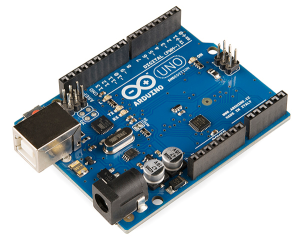
Comunicación serie
Aquí se muestra como comunicar con tu placa a través del canal de comunicación serie.
Lazarus side serial application
Existen varias posibilidades para comunicaciones serie en Lazarus/FPC.
Minimal Lazarus Synaser serial example
We will use Synaser from Synapse library in this example. Create Lazarus application with one form and two buttons. Include Synaser unit and add Synapse package as a new requirement to your project. In OnClick event of both buttons put something like this:
procedure TForm1.Button1Click(Sender: TObject);
var
  ser: TBlockSerial;
begin
  ser := TBlockSerial.Create;
  try
    ser.Connect('COM1'); // Escribe aquí el puerto COM asociado a la comunicación con Arduino(en linux es algo así como
                            '/dev/ttyUSB0')
    Sleep(250);
    ser.config(9600, 8, 'N', SB1, False, False);  // Establecemos los parámetros para la conexión Serie.
    ser.SendString('on'); // Enviamos la cadena 'on', El pulsador 2 debería tener aquí 'off'
  finally
    ser.free; // Liberamos los recursos tomados para TBlockSerial.
  end;
end;
Arduino side serial application
You can program your Arduino in several languages.
Minimal Arduino C sketch serial example
You can follow this nice step by step tutorial. In short, you need to add a led with proper resistor to your input pin 13, compile this sketch in your Arduino IDE, and download it to your board:
int led = 13; // Pin 13

void setup()
{
    pinMode(led, OUTPUT); // Set pin 13 as digital out

    // Start up serial connection
    Serial.begin(9600); // baud rate
    Serial.flush();
}

void loop()
{
    String input = "";

    // Read any serial input
    while (Serial.available() > 0)
    {
        input += (char) Serial.read(); // Read in one char at a time
        delay(5); // Delay for 5 ms so the next char has time to be received
    }

    if (input == "on")
    {
        digitalWrite(led, HIGH); // on
    }
    else if (input == "off")
    {
        digitalWrite(led, LOW); // off
    }
}
Minimal Arduino mikroPascal serial example
mikroPascal for AVR can be used to develop Arduino programs. TBD.
Minimal Arduino E-Lab AvrCo serial example
E-Lab AvrCo Multitasking Pascal can be used to develop Arduino programs. TBD.
Minimal Arduino FPC serial example
Efectivamente, tu placa Arduino 8-bit AVR [AVR Programming|puede ser programada con FPC]] también. TBD.
Comunicación Ethernet
Aquí mostramos como comunicar con la placa a través del canal de comunicación Ethernet.
Lazarus side ethernet application
TBD
Arduino side ethernet application
TBD
Resources
Forum topic that started this article
Raspberry Pi Lazarus application talking to Arduino over serial
FPC application talking to ESP8266 over TCP
FPC application talking to Arduino Nano over TCP
From the Free Pascal wiki, page "Arduino/es", as it stood on 2020-02-09 after a change by GAN, out of the wiki's dump of 2024-05-26. Copyright stays with the author who wrote it, according to the old wiki's Licensing page. If you have concerns about this material, message the admin.
Talk about this page
Nobody has opened a bench for this page yet. Sign in to open one.