

Application Bundle: what changed
Revision 5 to 6. Removed lines have a minus sign; added lines have a plus sign.
| Old | New | Line | |
|---|---|---|---|
| 1 | 1 | ## Overview | |
| 2 | 2 | ||
| 3 | 3 | An application bundle is a directory with the extension ".app" on macOS systems. It contains the application executable, resource files, library files (if any), help files and information about the application and is necessary for the correct execution of applications. The Mac Finder treats this .app directory as the application file and by default does not show any of its sub-directories. | |
| 4 | 4 | ||
| 5 | 5 | From within Lazarus it is used for the [[Carbon Interface|Carbon]] and [[Cocoa Interface|Cocoa]] interfaces, but one can also build applications with other interfaces (eg Gtk or Qt) by using scripts. | |
| 6 | 6 | ||
| 7 | 7 | You can learn more about application bundles in the Apple Bundle Programming Guide. | |
| 8 | 8 | ||
| 9 | 9 | Application (bundle) settings are located in the property list file: [[macOS property list files|Info.plist]] located in the `bundle.app/Contents/` directory. | |
| 10 | 10 | ||
| 11 | 11 | The **PkgInfo** file is an alternative way to specify the type and creator codes of your application or bundle. This file is not required, but can improve performance for code that accesses this information. Regardless of whether you provide this file, you should always include type and creator information in your information property list file using the CFBundlePackageType and CFBundleSignature keys, respectively. The contents of the PkgInfo file are the 4-byte package type followed by the 4-byte signature of your application. Thus, for the TextEdit application, whose type is 'APPL' and whose signature is 'ttxt', the file would contain the ASCII string “APPLttxt”. | |
| 12 | 12 | ||
| 13 | 13 | To access the application bundle contents in Finder, you need to right click (ctrl-left click) on a bundle and select *Show Package Contents* | |
| 14 | 14 | ||
| 15 | 15 | 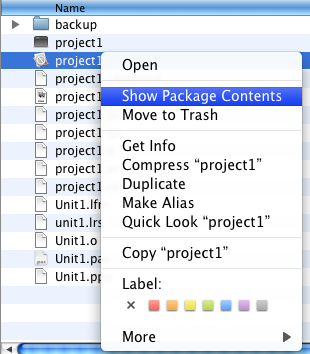 | |
| 16 | 16 | ||
| 17 | 17 | 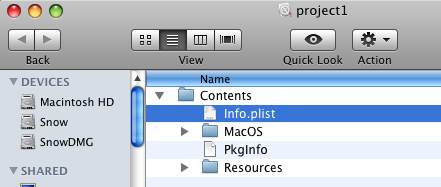 | |
| 18 | 18 | ||
| 19 | 19 | ## Application bundle layout | |
| 20 | 20 | ||
| 21 | 21 | The basic structure of a Mac application bundle: | |
| 22 | 22 | ||
| 23 | - | ||
| 23 | + | ```text | |
| 24 | 24 | MyApp.app/ | |
| 25 | 25 | Contents/ | |
| 26 | 26 | Info.plist | |
| 27 | 27 | MacOS/ | |
| 28 | 28 | PkgInfo | |
| 29 | 29 | Resources/ | |
| 30 | 30 | ``` | |
| 31 | 31 | ||
| 32 | 32 | | Sub-Directory of the Contents directory | Usage description | | |
| 33 | 33 | |----|----| | |
| 34 | 34 | | MacOS | (Required) Contains the application’s standalone executable code. Typically, this directory contains only one binary file with your application’s main entry point and statically linked code. However, you may put other standalone executables (such as command-line tools) in this directory as well. | | |
| 35 | 35 | | Resources | Contains all of the application’s resource files. The contents of this directory are further organized to distinguish between localized and nonlocalized resources. For more information about the structure of this directory, see [[Add an Apple Help Book to your macOS app|Adding a Help Book - Bundle layouts]]. | | |
| 36 | 36 | | Frameworks | Contains any private shared libraries and frameworks used by the executable. The frameworks in this directory are revision-locked to the application and cannot be superseded by any other, even newer, versions that may be available to the operating system. In other words, the frameworks included in this directory take precedence over any other similarly named frameworks found in other parts of the operating system. For information on how to add shared libraries to your application bundle, see [[macOS Dynamic Libraries]]. | | |
| 37 | 37 | | PlugIns | Contains loadable bundles that extend the basic features of your application. You use this directory to include code modules that must be loaded into your application’s process space in order to be used. You would not use this directory to store standalone executables. | | |
| 38 | 38 | | SharedSupport | Contains additional non-critical resources that do not impact the ability of the application to run. You might use this directory to include things like document templates, clip art, and tutorials that your application expects to be present but that do not affect the ability of your application to run. | | |
| 39 | 39 | ||
| 40 | 40 | ## Creating the Application Bundle | |
| 41 | 41 | ||
| 42 | 42 | ### Using Lazarus | |
| 43 | 43 | ||
| 44 | 44 | Open a project in the Lazarus IDE and go to Project -\> Project Options -\> Application tab and push the [[IDE Window: Project Options|Create Application Bundle]] button. The resulting Application Bundle will contain a symbolic link to the real executable. | |
| 45 | 45 | ||
| 46 | 46 | > **Note:** You must remove the symbolic link and copy the real executable "project1" into the `project1.app/Contents/MacOS/` directory to distribute the application and use it on another computer. | |
| 47 | 47 | ||
| 48 | 48 | ### Using the Lazarus command-line tool | |
| 49 | 49 | ||
| 50 | 50 | Open `/Applications/Lazarus/components/macfiles/examples/createmacapplication.lpi` in the Lazarus IDE. Compile. | |
| 51 | 51 | ||
| 52 | 52 | Open a Terminal of your choice and type: | |
| 53 | 53 | ||
| 54 | 54 | ``` bash | |
| 55 | 55 | cd project1/ | |
| 56 | 56 | /Applications/Lazarus/components/macfiles/examples/createmacapplication project1 | |
| 57 | 57 | ln -s ../../../project1 project1.app/Contents/MacOS/project1 | |
| 58 | 58 | ``` | |
| 59 | 59 | ||
| 60 | 60 | ### Using a shell script | |
| 61 | 61 | ||
| 62 | 62 | You can adapt the following shell script to create a customized application bundle for your application. It allows the creation of either a debug or a release bundle. | |
| 63 | 63 | ||
| 64 | 64 | - In the debug bundle, a link to the executable is placed, allowing for debugging using the Lazarus IDE, | |
| 65 | 65 | - In the release bundle, the executable is copied so the application bundle as a whole can be used stand-alone/copied to other locations. | |
| 66 | 66 | ||
| 67 | 67 | ``` bash | |
| 68 | 68 | #!/bin/sh | |
| 69 | 69 | # Force Bourne shell in case tcsh is default. | |
| 70 | 70 | # | |
| 71 | 71 | ||
| 72 | 72 | # | |
| 73 | 73 | # Reads the bundle type | |
| 74 | 74 | # | |
| 75 | 75 | ||
| 76 | 76 | echo "========================================================" | |
| 77 | 77 | echo " Bundle creation script" | |
| 78 | 78 | echo "========================================================" | |
| 79 | 79 | echo "" | |
| 80 | 80 | echo " Please select which kind of bundle you would like to build:" | |
| 81 | 81 | echo "" | |
| 82 | 82 | echo " 1 > Debug bundle" | |
| 83 | 83 | echo " 2 > Release bundle" | |
| 84 | 84 | echo " 0 > Exit" | |
| 85 | 85 | ||
| 86 | 86 | read command | |
| 87 | 87 | ||
| 88 | 88 | case $command in | |
| 89 | 89 | ||
| 90 | 90 | 1) ;; | |
| 91 | 91 | ||
| 92 | 92 | 2) ;; | |
| 93 | 93 | ||
| 94 | 94 | 0) exit 0;; | |
| 95 | 95 | ||
| 96 | 96 | *) echo "Invalid command" | |
| 97 | 97 | exit 0;; | |
| 98 | 98 | ||
| 99 | 99 | esac | |
| 100 | 100 | ||
| 101 | 101 | # | |
| 102 | 102 | # Creates the bundle | |
| 103 | 103 | # | |
| 104 | 104 | ||
| 105 | 105 | appname=Magnifier | |
| 106 | 106 | appfolder=$appname.app | |
| 107 | 107 | macosfolder=$appfolder/Contents/MacOS | |
| 108 | 108 | plistfile=$appfolder/Contents/Info.plist | |
| 109 | 109 | appfile=magnifier | |
| 110 | 110 | ||
| 111 | 111 | PkgInfoContents="APPL????" | |
| 112 | 112 | ||
| 113 | 113 | # | |
| 114 | 114 | if ! [ -e $appfile ] | |
| 115 | 115 | then | |
| 116 | 116 | echo "$appfile does not exist" | |
| 117 | 117 | elif [ -e $appfolder ] | |
| 118 | 118 | then | |
| 119 | 119 | echo "$appfolder already exists" | |
| 120 | 120 | else | |
| 121 | 121 | echo "Creating $appfolder..." | |
| 122 | 122 | mkdir $appfolder | |
| 123 | 123 | mkdir $appfolder/Contents | |
| 124 | 124 | mkdir $appfolder/Contents/MacOS | |
| 125 | 125 | mkdir $appfolder/Contents/Frameworks # optional, for including libraries or frameworks | |
| 126 | 126 | mkdir $appfolder/Contents/Resources | |
| 127 | 127 | ||
| 128 | 128 | # | |
| 129 | 129 | # For a debug bundle, | |
| 130 | 130 | # Instead of copying executable into .app folder after each compile, | |
| 131 | 131 | # simply create a symbolic link to executable. | |
| 132 | 132 | # | |
| 133 | 133 | if [ $command = 1 ]; then | |
| 134 | 134 | ln -s ../../../$appname $macosfolder/$appname | |
| 135 | 135 | else | |
| 136 | 136 | cp $appname $macosfolder/$appname | |
| 137 | 137 | fi | |
| 138 | 138 | ||
| 139 | 139 | # Copy the resource files to the correct place | |
| 140 | 140 | cp *.bmp $appfolder/Contents/Resources | |
| 141 | 141 | cp icon3.ico $appfolder/Contents/Resources | |
| 142 | 142 | cp icon3.png $appfolder/Contents/Resources | |
| 143 | 143 | cp macicon.icns $appfolder/Contents/Resources | |
| 144 | 144 | cp docs/*.* $appfolder/Contents/Resources | |
| 145 | 145 | # | |
| 146 | 146 | # Create PkgInfo file. | |
| 147 | 147 | echo $PkgInfoContents >$appfolder/Contents/PkgInfo | |
| 148 | 148 | # | |
| 149 | 149 | # Create information property list file (Info.plist). | |
| 150 | 150 | echo '<?xml version="1.0" encoding="UTF-8"?>' >$plistfile | |
| 151 | 151 | echo '<!DOCTYPE plist PUBLIC "-//Apple Computer//DTD PLIST 1.0//EN" "http://www.apple.com/DTDs/PropertyList-1.0.dtd">' >>$plistfile | |
| 152 | 152 | echo '<plist version="1.0">' >>$plistfile | |
| 153 | 153 | echo '<dict>' >>$plistfile | |
| 154 | 154 | echo ' <key>CFBundleDevelopmentRegion</key>' >>$plistfile | |
| 155 | 155 | echo ' <string>English</string>' >>$plistfile | |
| 156 | 156 | echo ' <key>CFBundleExecutable</key>' >>$plistfile | |
| 157 | 157 | echo ' <string>'$appname'</string>' >>$plistfile | |
| 158 | 158 | echo ' <key>CFBundleIconFile</key>' >>$plistfile | |
| 159 | 159 | echo ' <string>macicon.icns</string>' >>$plistfile | |
| 160 | 160 | echo ' <key>CFBundleIdentifier</key>' >>$plistfile | |
| 161 | 161 | echo ' <string>org.magnifier.magnifier</string>' >>$plistfile | |
| 162 | 162 | echo ' <key>CFBundleInfoDictionaryVersion</key>' >>$plistfile | |
| 163 | 163 | echo ' <string>6.0</string>' >>$plistfile | |
| 164 | 164 | echo ' <key>CFBundlePackageType</key>' >>$plistfile | |
| 165 | 165 | echo ' <string>APPL</string>' >>$plistfile | |
| 166 | 166 | echo ' <key>CFBundleSignature</key>' >>$plistfile | |
| 167 | 167 | echo ' <string>MAG#</string>' >>$plistfile | |
| 168 | 168 | echo ' <key>CFBundleVersion</key>' >>$plistfile | |
| 169 | 169 | echo ' <string>1.0</string>' >>$plistfile | |
| 170 | 170 | echo '</dict>' >>$plistfile | |
| 171 | 171 | echo '</plist>' >>$plistfile | |
| 172 | 172 | fi | |
| 173 | 173 | ``` | |
| 174 | 174 | ||
| 175 | 175 | ## Executing an application via the Application Bundle | |
| 176 | 176 | ||
| 177 | 177 | You can start the application from the Lazarus IDE, by clicking on its Finder icon or in the native macOS Terminal.app by typing: | |
| 178 | 178 | ||
| 179 | 179 | ``` bash | |
| 180 | 180 | open project1.app | |
| 181 | 181 | ``` | |
| 182 | 182 | ||
| 183 | 183 | or | |
| 184 | 184 | ||
| 185 | 185 | ``` bash | |
| 186 | 186 | ./project1.app/Contents/MacOS/project1 | |
| 187 | 187 | ``` | |
| 188 | 188 | ||
| 189 | 189 | ## See also | |
| 190 | 190 | ||
| 191 | 191 | - [[Add an Apple Help Book to your macOS app]] | |
| 192 | 192 | - [[Deploying Your Application|Deploying your macOS application]] | |
| 193 | 193 | - [[Hiding a macOS app from the Dock]] | |
| 194 | 194 | - [[macOS property list files]] | |
| 195 | 195 | ||
| 196 | 196 | ## External links | |
| 197 | 197 | ||
| 198 | 198 | - [Apple: NSBundle class](https://developer.apple.com/documentation/foundation/nsbundle) | |
| 199 | 199 | - [Apple: Bundle Resources](https://developer.apple.com/documentation/bundleresources/) | |
| 200 | 200 | - [Apple: CFBundle](https://developer.apple.com/documentation/corefoundation/cfbundle) | |
| 201 | 201 | - [Apple: Bundle Configuration](https://developer.apple.com/documentation/bundleresources/information_property_list/bundle_configuration) | |
| 202 | 202 | - [Apple: Resource Programming Guide](https://developer.apple.com/library/archive/documentation/Cocoa/Conceptual/LoadingResources/Introduction/Introduction.html) | |
| 203 | 203 | - [Apple: Bundle Programming Guide](https://developer.apple.com/library/archive/documentation/CoreFoundation/Conceptual/CFBundles/Introduction/Introduction.html) | |
| 204 | 204 | ||
| 205 | 205 | --- | |
| 206 | 206 | *From the Free Pascal wiki, page "Application Bundle", as it stood on 2022-03-13 after a change by Trev, out of the wiki's dump of 2024-05-26. Copyright stays with the author who wrote it, according to the old wiki's [[Licensing]] page. If you have concerns about this material, [message the admin](/wiki-contact).* |