

Android4Pascal: what changed
Revision 1 to 2. Removed lines have a minus sign; added lines have a plus sign.
| Old | New | Line | |
|---|---|---|---|
| 1 | 1 | *(Android only)* | |
| 2 | 2 | ||
| 3 | 3 | Android4Pascal are the bindings which connect Pascal applications running as executables in Android with the Android Java APIs. | |
| 4 | 4 | ||
| 5 | 5 | ## Download | |
| 6 | 6 | ||
| 7 | 7 | ### Latest development version | |
| 8 | 8 | ||
| 9 | 9 | - svn co <https://lazarus-ccr.svn.sourceforge.net/svnroot/lazarus-ccr/bindings/android-sdk> android-sdk | |
| 10 | 10 | - svn co <https://lazarus-ccr.svn.sourceforge.net/svnroot/lazarus-ccr/examples/androidlcl> androidlcl | |
| 11 | 11 | ||
| 12 | 12 | Changelog: | |
| 13 | 13 | ||
| 14 | 14 | - Added a tool to automatically generate the bindings | |
| 15 | 15 | - Added many new APIs (don't remember all of them) | |
| 16 | 16 | ||
| 17 | 17 | ### Version 0.3 | |
| 18 | 18 | ||
| 19 | 19 | Released June 2011 | |
| 20 | 20 | ||
| 21 | 21 | svn co <https://p-tools.svn.sourceforge.net/svnroot/p-tools/systeminfo4android/> systeminfo4android | |
| 22 | 22 | ||
| 23 | 23 | Changelog: | |
| 24 | 24 | ||
| 25 | 25 | - Added support for reading android.util.DisplayMetrics, Activity.getWindowManager, WindowManager.getDefaultDisplay, Display.getMetrics | |
| 26 | 26 | ||
| 27 | 27 | ### Version 0.2 | |
| 28 | 28 | ||
| 29 | 29 | Released on March 2011 | |
| 30 | 30 | ||
| 31 | 31 | This version was distributed as an example project which can be obtained with the following svn command: | |
| 32 | 32 | ||
| 33 | 33 | svn co <https://p-tools.svn.sourceforge.net/svnroot/p-tools/turbochessclock4android/> -r 230 turbochessclock4android | |
| 34 | 34 | ||
| 35 | 35 | #### Android API Hello World in Pascal | |
| 36 | 36 | ||
| 37 | 37 | Here is an example Pascal application written for Android. It shows how to create controls, receive callback events and how to use the timer. | |
| 38 | 38 | ||
| 39 | 39 | The full directory structure can be download with this svn command: | |
| 40 | 40 | ||
| 41 | 41 | ` svn co `[`https://p-tools.svn.sourceforge.net/svnroot/p-tools/turbochessclock4android`](https://p-tools.svn.sourceforge.net/svnroot/p-tools/turbochessclock4android)` turbochessclock4android` | |
| 42 | 42 | ||
| 43 | - | ||
| 44 | - | ||
| 45 | - | ||
| 46 | - | ||
| 43 | + | 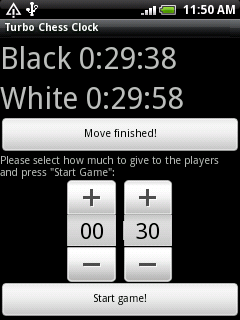 | |
| 47 | 44 | ||
| 48 | 45 | Here is the Pascal code from this example: | |
| 49 | 46 | ||
| 50 | 47 | ``` pascal | |
| 51 | 48 | { | |
| 52 | 49 | A simple Chess Clock application | |
| 53 | 50 | ||
| 54 | 51 | Author: Felipe Monteiro de Carvalho - 2011 | |
| 55 | 52 | License: Public Domain | |
| 56 | 53 | } | |
| 57 | 54 | program turbochessclock4android; | |
| 58 | 55 | ||
| 59 | 56 | {$mode objfpc}{$H+} | |
| 60 | 57 | ||
| 61 | 58 | uses | |
| 62 | 59 | Classes, SysUtils, androidpipescomm, androidview, javalang, | |
| 63 | 60 | androidapp, androidtimer, androidutil; | |
| 64 | 61 | ||
| 65 | 62 | type | |
| 66 | 63 | TEventHandler = class | |
| 67 | 64 | public | |
| 68 | 65 | procedure HandleOnTimer(ASender: TObject); | |
| 69 | 66 | procedure buttonStartClickCallback(v: TView); | |
| 70 | 67 | procedure buttonMoveClickCallback(v: TView); | |
| 71 | 68 | end; | |
| 72 | 69 | ||
| 73 | 70 | var | |
| 74 | 71 | layout: TLinearLayout; | |
| 75 | 72 | params: TLayoutParams; | |
| 76 | 73 | tv, black_label, white_label: TTextView; | |
| 77 | 74 | scroller: TScrollView; | |
| 78 | 75 | btn_move, btn_start: TButton; | |
| 79 | 76 | tp: TTimePicker; | |
| 80 | 77 | WhiteTimeCount: Integer = 0; | |
| 81 | 78 | BlackTimeCount: Integer = 0; | |
| 82 | 79 | MyTimer: TAndroidTimer; | |
| 83 | 80 | MyEventHandler: TEventHandler; | |
| 84 | 81 | IsWhitePlayerMove: Boolean = True; | |
| 85 | 82 | ||
| 86 | 83 | procedure TEventHandler.buttonStartClickCallback(v: TView); | |
| 87 | 84 | begin | |
| 88 | 85 | black_label.setVisibility(VISIBLE); | |
| 89 | 86 | white_label.setVisibility(VISIBLE); | |
| 90 | 87 | btn_move.setVisibility(VISIBLE); | |
| 91 | 88 | // | |
| 92 | 89 | WhiteTimeCount := tp.getCurrentHour() * 60 * 60 + tp.getCurrentMinute() * 60; | |
| 93 | 90 | BlackTimeCount := WhiteTimeCount; | |
| 94 | 91 | // | |
| 95 | 92 | MyTimer.removeCallbacks(); | |
| 96 | 93 | MyTimer.postDelayed(100); | |
| 97 | 94 | end; | |
| 98 | 95 | ||
| 99 | 96 | procedure TEventHandler.buttonMoveClickCallback(v: TView); | |
| 100 | 97 | begin | |
| 101 | 98 | IsWhitePlayerMove := not IsWhitePlayerMove; | |
| 102 | 99 | end; | |
| 103 | 100 | ||
| 104 | 101 | procedure TEventHandler.HandleOnTimer(ASender: TObject); | |
| 105 | 102 | var | |
| 106 | 103 | lSeconds, lMinutes, lHours: Integer; | |
| 107 | 104 | begin | |
| 108 | 105 | if IsWhitePlayerMove then | |
| 109 | 106 | begin | |
| 110 | 107 | lSeconds := WhiteTimeCount mod 60; | |
| 111 | 108 | lMinutes := (WhiteTimeCount mod (60 * 60)) div 60; | |
| 112 | 109 | lHours := WhiteTimeCount div (60 * 60); | |
| 113 | 110 | white_label.setText(Format('White %d:%d:%d', [lHours, lMinutes, lSeconds])); | |
| 114 | 111 | // | |
| 115 | 112 | if WhiteTimeCount = 0 then Exit; | |
| 116 | 113 | Dec(WhiteTimeCount); | |
| 117 | 114 | end | |
| 118 | 115 | else | |
| 119 | 116 | begin | |
| 120 | 117 | lSeconds := BlackTimeCount mod 60; | |
| 121 | 118 | lMinutes := (BlackTimeCount mod (60 * 60)) div 60; | |
| 122 | 119 | lHours := BlackTimeCount div (60 * 60); | |
| 123 | 120 | black_label.setText(Format('Black %d:%d:%d', [lHours, lMinutes, lSeconds])); | |
| 124 | 121 | // | |
| 125 | 122 | if BlackTimeCount = 0 then Exit; | |
| 126 | 123 | Dec(BlackTimeCount); | |
| 127 | 124 | end; | |
| 128 | 125 | // | |
| 129 | 126 | MyTimer.removeCallbacks(); | |
| 130 | 127 | // Note that this has a low precision, but it enough for this simple app | |
| 131 | 128 | // A more precise app would keep another time count instead of just using Dec | |
| 132 | 129 | // at each timer call | |
| 133 | 130 | MyTimer.postDelayed(1000); | |
| 134 | 131 | end; | |
| 135 | 132 | ||
| 136 | 133 | begin | |
| 137 | 134 | // Here add any initialization. | |
| 138 | 135 | // Any initialization code will be run inside Activity.onCreate, | |
| 139 | 136 | // so keep it as short as possible! | |
| 140 | 137 | // It should mostly contain GUI initialization | |
| 141 | 138 | // User interface | |
| 142 | 139 | MyEventHandler := TEventHandler.Create; | |
| 143 | 140 | ||
| 144 | 141 | // Prepares the UI of the program | |
| 145 | 142 | layout := TLinearLayout.Create; | |
| 146 | 143 | params := TLayoutParams.Create(androidview.FILL_PARENT, androidview.FILL_PARENT); | |
| 147 | 144 | layout.setLayoutParams(params); | |
| 148 | 145 | params.Free; | |
| 149 | 146 | layout.setOrientation(androidview.VERTICAL); | |
| 150 | 147 | ||
| 151 | 148 | // Game UI | |
| 152 | 149 | ||
| 153 | 150 | black_label := TTextView.Create; | |
| 154 | 151 | black_label.setText('Black time:'); | |
| 155 | 152 | black_label.setVisibility(GONE); | |
| 156 | 153 | black_label.setTextSize(COMPLEX_UNIT_PX, 40); | |
| 157 | 154 | layout.addView(black_label); | |
| 158 | 155 | ||
| 159 | 156 | white_label := TTextView.Create; | |
| 160 | 157 | white_label.setText('White time:'); | |
| 161 | 158 | white_label.setVisibility(GONE); | |
| 162 | 159 | white_label.setTextSize(COMPLEX_UNIT_PX, 40); | |
| 163 | 160 | layout.addView(white_label); | |
| 164 | 161 | ||
| 165 | 162 | btn_move := TButton.Create; | |
| 166 | 163 | btn_move.setText('Move finished!'); | |
| 167 | 164 | btn_move.setOnClickListener(@MyEventHandler.buttonMoveClickCallback); | |
| 168 | 165 | btn_move.setVisibility(GONE); | |
| 169 | 166 | layout.addView(btn_move); | |
| 170 | 167 | ||
| 171 | 168 | // Config UI | |
| 172 | 169 | ||
| 173 | 170 | tv := TTextView.Create; | |
| 174 | 171 | tv.setText('Please select how much to give to the players and press "Start Game":'); | |
| 175 | 172 | layout.addView(tv); | |
| 176 | 173 | ||
| 177 | 174 | tp := TTimePicker.Create; | |
| 178 | 175 | tp.setIs24HourView(True); | |
| 179 | 176 | tp.setCurrentHour(0); | |
| 180 | 177 | tp.setCurrentMinute(30); | |
| 181 | 178 | layout.addView(tp); | |
| 182 | 179 | ||
| 183 | 180 | btn_start := TButton.Create; | |
| 184 | 181 | btn_start.setText('Start game!'); | |
| 185 | 182 | btn_start.setOnClickListener(@MyEventHandler.buttonStartClickCallback); | |
| 186 | 183 | layout.addView(btn_start); | |
| 187 | 184 | ||
| 188 | 185 | // And also allow the user to scroll the UI if it is larger then the screen width | |
| 189 | 186 | // Scrolling takes place only horizontally | |
| 190 | 187 | ||
| 191 | 188 | scroller := TScrollView.Create; | |
| 192 | 189 | scroller.addView(layout); | |
| 193 | 190 | ||
| 194 | 191 | Activity.setContentView(scroller); | |
| 195 | 192 | ||
| 196 | 193 | MyTimer := TAndroidTimer.Create; | |
| 197 | 194 | MyTimer.OnTimer := @MyEventHandler.HandleOnTimer; | |
| 198 | 195 | ||
| 199 | 196 | // Now tell Java that the initialization has finished | |
| 200 | 197 | vAndroidPipesComm.onCreateFinished(); | |
| 201 | 198 | // Here you can add any other initialization, | |
| 202 | 199 | // specially non-GUI code | |
| 203 | 200 | ||
| 204 | 201 | // Now we block our execution waiting for callbacks from Java | |
| 205 | 202 | vAndroidPipesComm.MessageLoop(); | |
| 206 | 203 | end. | |
| 207 | 204 | ``` | |
| 208 | 205 | ||
| 209 | 206 | ##### Compiling the example project in Linux | |
| 210 | 207 | ||
| 211 | 208 | 1\> Get a working arm-linux cross-compiler which generates ARMv5 eabi with softfloat (as many phones like HTC Wildfire have no FPU) | |
| 212 | 209 | ||
| 213 | 210 | To do this one can download an unofficial build of FPC 2.5.1 from here: | |
| 214 | 211 | ||
| 215 | 212 | <http://sourceforge.net/projects/p-tools/files/Free%20Pascal%20for%20ARM/> Compiled for ARMv5 eabi with softfloat. | |
| 216 | 213 | ||
| 217 | 214 | Or an older FPC 2.4.2 | |
| 218 | 215 | ||
| 219 | 216 | <http://members.yline.com/~tom_at_work/fpc-2.4.2.UNOFFICIAL.arm-linux.tar> Compiled for ARMv5 eabi with softfloat. | |
| 220 | 217 | ||
| 221 | 218 | Or build your own. There are instructions here: [[Setup Cross Compile For ARM]] | |
| 222 | 219 | ||
| 223 | 220 | 2\> Install the Android SDK. Instructions here: [[Android Interface/Using the Android SDK, Emulator and Phones|Android_Interface/Using_the_Android_SDK%2C_Emulator_and_Phones#Using_the_Android_SDK]] | |
| 224 | 221 | ||
| 225 | 222 | 3\> Install ant, for example in Mandriva Linux: | |
| 226 | 223 | ||
| 227 | 224 | ` urpmi ant` | |
| 228 | 225 | ||
| 229 | 226 | 4\> Open the project turbochessclock/turbochessclock4android.lpi in Lazarus and build it | |
| 230 | 227 | ||
| 231 | 228 | 5\> Build the APK file in debug mode | |
| 232 | 229 | ||
| 233 | 230 | ` ant debug` | |
| 234 | 231 | ||
| 235 | 232 | 6\> Connect your phone and make sure you can connect to it via ADB. More info here: [[Android Interface/Using the Android SDK, Emulator and Phones|Android_Interface/Using_the_Android_SDK%2C_Emulator_and_Phones#Recognition_of_devices_under_Linux]] | |
| 236 | 233 | ||
| 237 | 234 | 7\> Install the APK file in your phone via ADB or whatever other method you prefer: | |
| 238 | 235 | ||
| 239 | 236 | ` ../android-sdk-linux_x86/tools/adb install android/bin/TurboChessClock4Android-debug.apk` | |
| 240 | 237 | ||
| 241 | 238 | If the package is already installed you need need to do this instead: | |
| 242 | 239 | ||
| 243 | 240 | ` ../android-sdk-linux_x86/tools/adb uninstall com.pascal.turbochessclock`\ | |
| 244 | 241 | ` ../android-sdk-linux_x86/tools/adb install android/bin/TurboChessClock4Android-debug.apk` | |
| 245 | 242 | ||
| 246 | 243 | ### Version 0.1 | |
| 247 | 244 | ||
| 248 | 245 | Released on January 2011 | |
| 249 | 246 | ||
| 250 | 247 | This version was distributed as an example project which can be obtained with the following svn command: | |
| 251 | 248 | ||
| 252 | 249 | svn co <https://p-tools.svn.sourceforge.net/svnroot/PascalNotes4Android/> -r 230 PascalNotes4Android | |
| 253 | 250 | ||
| 254 | 251 | ## See also | |
| 255 | 252 | ||
| 256 | 253 | - [[Android Interface/Native Android GUI]] | |
| 257 | 254 | - [[Android Programming]] | |
| 258 | 255 | ||
| 259 | 256 | --- | |
| 260 | 257 | *From the Free Pascal wiki, page "Android4Pascal", as it stood on 2020-02-09 after a change by GAN, out of the wiki's dump of 2024-05-26. Copyright stays with the author who wrote it, according to the old wiki's [[Licensing]] page. If you have concerns about this material, [message the admin](/wiki-contact).* | |
| 261 | 258 | Category: Android |