

Aero Glass/pl
Deutsch · English · Español · Polski
(Windows only)
Efekt szkła (Aero Glass) na formularzu
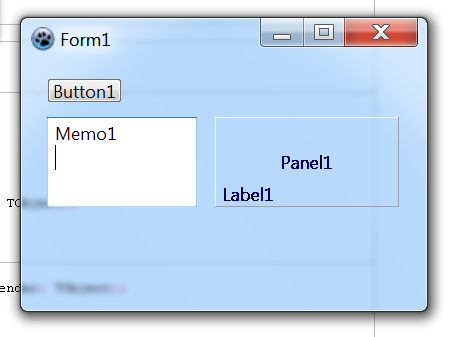
Na początku utwórz moduł ,,glass.pas", zawierający poniższy kod:
unit glass;

{$mode delphi}
//{$mode objfpc}{$H+}

interface

uses
  Windows, Forms, Graphics;

type
  _MARGINS = packed record
    cxLeftWidth    : Integer;
    cxRightWidth   : Integer;
    cyTopHeight    : Integer;
    cyBottomHeight : Integer;
  end;

  PMargins = ^_MARGINS;
  TMargins = _MARGINS;

  DwmIsCompositionEnabledFunc      = function(pfEnabled: PBoolean): HRESULT; stdcall;
  DwmExtendFrameIntoClientAreaFunc = function(destWnd: HWND; const pMarInset: PMargins): HRESULT; stdcall;
  SetLayeredWindowAttributesFunc   = function(destWnd: HWND; cKey: TColor; bAlpha: Byte; dwFlags: DWord): BOOL; stdcall;

const
  WS_EX_LAYERED = $80000;
  LWA_COLORKEY  = 1;

procedure GlassForm(frm: TForm; tmpMargins: TMargins; cBlurColorKey: TColor = clFuchsia);
function WindowsAeroGlassCompatible: Boolean;

implementation

function WindowsAeroGlassCompatible: Boolean;
var
  osVinfo: TOSVERSIONINFO;
begin
  ZeroMemory(@osVinfo, SizeOf(osVinfo));
  OsVinfo.dwOSVersionInfoSize := SizeOf(TOSVERSIONINFO);
  if (
  (GetVersionEx(osVInfo)   = True) and
  (osVinfo.dwPlatformId    = VER_PLATFORM_WIN32_NT) and
  (osVinfo.dwMajorVersion >= 6)
  )
  then Result:=True
  else Result:=False;
end;

procedure GlassForm(frm: TForm; tmpMargins: TMargins; cBlurColorKey: TColor = clFuchsia);
var
  hDwmDLL: Cardinal;
  fDwmIsCompositionEnabled: DwmIsCompositionEnabledFunc;
  fDwmExtendFrameIntoClientArea: DwmExtendFrameIntoClientAreaFunc;
  fSetLayeredWindowAttributesFunc: SetLayeredWindowAttributesFunc;
  bCmpEnable: Boolean;
  mgn: TMargins;
begin
  { Kontynuuj, jeśli wersja Windowsa jest kompatybilna }
  if WindowsAeroGlassCompatible then begin
    { Kontynuuj, jeśli biblioteka ,,dwmapi" jest załadowana }
    hDwmDLL := LoadLibrary('dwmapi.dll');
    if hDwmDLL <> 0 then begin
      { Pobierz wartości }
      @fDwmIsCompositionEnabled        := GetProcAddress(hDwmDLL, 'DwmIsCompositionEnabled');
      @fDwmExtendFrameIntoClientArea   := GetProcAddress(hDwmDLL, 'DwmExtendFrameIntoClientArea');
      @fSetLayeredWindowAttributesFunc := GetProcAddress(GetModulehandle(user32), 'SetLayeredWindowAttributes');
      { Kontynuuj, jeśli wartości <> nil }
      if (
      (@fDwmIsCompositionEnabled <> nil) and
      (@fDwmExtendFrameIntoClientArea <> nil) and
      (@fSetLayeredWindowAttributesFunc <> nil)
      )
      then begin
        { Kontynuuj, jeżeli kompozycje systemowe są włączone }
        fDwmIsCompositionEnabled(@bCmpEnable);
        if bCmpEnable = True then begin
          { Ustaw kolor formy na cBlurColorKey }
          frm.Color := cBlurColorKey;
          { ... }
          SetWindowLong(frm.Handle, GWL_EXSTYLE, GetWindowLong(frm.Handle, GWL_EXSTYLE) or WS_EX_LAYERED);
          { ... }
          fSetLayeredWindowAttributesFunc(frm.Handle, cBlurColorKey, 0, LWA_COLORKEY);
          { Ustaw marginesy }
          ZeroMemory(@mgn, SizeOf(mgn));
          mgn.cxLeftWidth    := tmpMargins.cxLeftWidth;
          mgn.cxRightWidth   := tmpMargins.cxRightWidth;
          mgn.cyTopHeight    := tmpMargins.cyTopHeight;
          mgn.cyBottomHeight := tmpMargins.cyBottomHeight;
          { Rozszerz formę }
          fDwmExtendFrameIntoClientArea(frm.Handle,@mgn);
        end;
      end;
      { Zwolnij bibliotekę ,,dwmapi" }
      FreeLibrary(hDWMDLL);
    end;
  end;
end;

end.
Następnie skopiuj powyższy plik do folderu głównego Twojej aplikacji (tu: MojProjekt):
MojProjekt\glass.pas
W sekcji ,,uses" dopisz nazwę powyższego modułu:
unit form1;

{$mode objfpc}{$H+}

interface

uses
  Classes, SysUtils, FileUtil, Forms, Controls, Graphics, Dialogs
  glass; // Tu zawiera się procedura GlassForm
Utwórz zdarzenie OnActivate i uzupełnij je, tak jak poniżej:
procedure TForm1.FormActivate(Sender: TObject);
var
  tmpMargins: TMargins;
begin
  { Jeżeli marginesy mają wartość -1, to cała forma będzie pokryta szkłem }
  tmpMargins.cxLeftWidth    := -1;
  tmpMargins.cxRightWidth   := -1;
  tmpMargins.cyBottomHeight := -1;
  tmpMargins.cyTopHeight    := -1;
  { NazwaFormularza ; Marginesy ; KolorPrzezroczystości }
  GlassForm(Self, tmpMargins, clFuchsia);
end;
WAŻNE: Przed uruchomieniem aplikacji włącz kompozycje, wchodząc w Projekt > Opcje projektu > Użyj pliku manifest aby odblokować kompozycje.
Bugi
Po włączeniu efektu szkła wyraźnie widać, iż napisy (TLabel) nie mają tzw. ,,otoczki szkła". Aby rozwiązać ten problem, należy odpowiednio zaprogramować napisy. Z pomocą przychodzą poniższe linki do komponentów zwanych ,,Glow Labels":
Jeżeli ustawisz kolor części systemowych (np. kolor okna), to kliknięcie na formularz będzie niemożliwe (forma traci fokus przez szkło).
Informacje
Powyższe kody zostały przekonwertowane do Lazarusa na podstawie "Aero Glass Effekt für Delphi-Forms, Delphi-Unit von Daniel Mitte (2006)":
Tu znajduje się komponent (przekonwertowany także do Lazarusa):
Tłumaczenie
Na język polski przełożył: --User:Matek.y 18:30, 12.12.2017
From the Free Pascal wiki, page "Aero Glass/pl", as it stood on 2020-02-04 after a change by GAN, out of the wiki's dump of 2024-05-26. Copyright stays with the author who wrote it, according to the old wiki's Licensing page. If you have concerns about this material, message the admin.
Talk about this page
Nobody has opened a bench for this page yet. Sign in to open one.