

Aero Glass/es: what changed
Revision 1 to 2. Removed lines have a minus sign; added lines have a plus sign.
| Old | New | Line | |
|---|---|---|---|
| 1 | 1 | ## Efecto Aero Glass en Lazarus Form | |
| 2 | 2 | ||
| 3 | - | ||
| 4 | - | ||
| 5 | - | ||
| 6 | - | ||
| 7 | - | ||
| 8 | - | ||
| 3 | + | [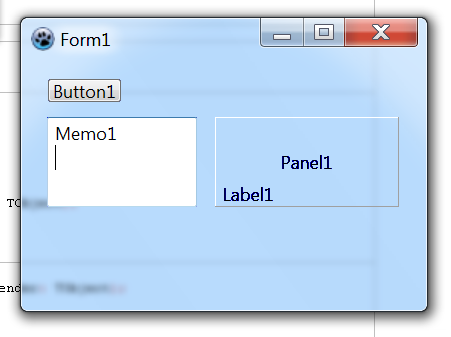](</File:aero_glass_lazarus.png>) | |
| 9 | 4 | ||
| 10 | - | ||
| 5 | + | Primero guarda el siguiente código en un archivo de texto "glass.pas": | |
| 6 | + | ``` | |
| 11 | 7 | // Aero Glass Effekt für Delphi-Forms | |
| 12 | - | ||
| 13 | - | ||
| 14 | - | ||
| 15 | - | ||
| 16 | - | ||
| 17 | - | ||
| 18 | - | ||
| 19 | - | ||
| 20 | - | ||
| 21 | - | ||
| 22 | - | ||
| 23 | - | ||
| 24 | - | ||
| 25 | - | ||
| 26 | - | ||
| 27 | - | ||
| 28 | - | ||
| 29 | - | ||
| 30 | - | ||
| 31 | - | ||
| 32 | - | ||
| 33 | - | ||
| 34 | - | ||
| 35 | - | ||
| 36 | - | ||
| 37 | - | ||
| 38 | - | ||
| 39 | - | ||
| 40 | - | ||
| 41 | - | ||
| 42 | - | ||
| 43 | - | ||
| 44 | - | ||
| 45 | - | ||
| 46 | - | ||
| 47 | - | ||
| 48 | - | ||
| 49 | - | ||
| 50 | - | ||
| 51 | - | ||
| 52 | - | ||
| 53 | - | ||
| 54 | - | ||
| 55 | - | ||
| 56 | - | ||
| 57 | - | ||
| 58 | - | ||
| 59 | - | ||
| 60 | - | ||
| 61 | - | ||
| 62 | - | ||
| 63 | - | ||
| 64 | - | ||
| 65 | - | ||
| 66 | - | ||
| 67 | - | ||
| 68 | - | ||
| 69 | - | ||
| 70 | - | ||
| 71 | - | ||
| 72 | - | ||
| 73 | - | ||
| 74 | - | ||
| 75 | - | ||
| 76 | - | ||
| 77 | - | ||
| 78 | - | ||
| 79 | - | ||
| 80 | - | ||
| 81 | - | ||
| 82 | - | ||
| 83 | - | ||
| 84 | - | ||
| 85 | - | ||
| 86 | - | ||
| 87 | - | ||
| 88 | - | ||
| 89 | - | ||
| 90 | - | ||
| 91 | - | ||
| 92 | - | ||
| 93 | - | ||
| 94 | - | ||
| 95 | - | ||
| 96 | - | ||
| 8 | + | // | |
| 9 | + | // Mit der Methode GlassForm kann für eine Form der | |
| 10 | + | // Aero Glass Effekt unter Vista aktiviert werden. | |
| 11 | + | // Der erste Parameter ist die Form-Klasse, der zweite | |
| 12 | + | // optionale Parameter ist der BlurColorKey. Mit dem | |
| 13 | + | // BlurColorKey wird eine Farbe festgelegt, auf dem | |
| 14 | + | // der Effekt wirken soll, d.h. benutzt eine Komponente, | |
| 15 | + | // auf der Form, für visuelle Darstellungen (Linien, Punkte, | |
| 16 | + | // Bilder, ...), diese Farbe, so wird an dieser Stelle der | |
| 17 | + | // Effekt wirksam. Der Standardwert für BlurColorKey ist | |
| 18 | + | // clFuchsia. | |
| 19 | + | // | |
| 20 | + | // Hinweis: Für die Aktivierung wird zusätzlich TXPManifest | |
| 21 | + | // bzw. eine RES-Datei die die Manifest-Daten | |
| 22 | + | // enthält benötigt. | |
| 23 | + | // | |
| 24 | + | // | |
| 25 | + | // Delphi-Unit von Daniel Mitte (2006) | |
| 26 | + | // | |
| 27 | + | // | |
| 28 | + | // Beispiel: | |
| 29 | + | // | |
| 30 | + | // uses glass; | |
| 31 | + | // | |
| 32 | + | // [...] | |
| 33 | + | // | |
| 34 | + | // procedure TForm1.FormActivate(Sender: TObject); | |
| 35 | + | // begin | |
| 36 | + | // GlassForm(Form1); | |
| 37 | + | // // oder mit anderem BlurColorKey | |
| 38 | + | // // GlassForm(Form1, clBlue) | |
| 39 | + | // end; | |
| 40 | + | ||
| 41 | + | unit glass; | |
| 42 | + | ||
| 43 | + | interface | |
| 44 | + | ||
| 45 | + | {$mode delphi} | |
| 46 | + | ||
| 47 | + | uses | |
| 48 | + | Windows, | |
| 49 | + | Forms, | |
| 50 | + | Graphics; | |
| 51 | + | ||
| 52 | + | procedure GlassForm(frm: TForm; cBlurColorKey: TColor = clFuchsia); | |
| 53 | + | ||
| 54 | + | implementation | |
| 55 | + | ||
| 56 | + | procedure GlassForm(frm: TForm; cBlurColorKey: TColor = clFuchsia); | |
| 57 | + | const | |
| 58 | + | WS_EX_LAYERED = $80000; | |
| 59 | + | LWA_COLORKEY = 1; | |
| 60 | + | ||
| 61 | + | type | |
| 62 | + | _MARGINS = packed record | |
| 63 | + | cxLeftWidth: Integer; | |
| 64 | + | cxRightWidth: Integer; | |
| 65 | + | cyTopHeight: Integer; | |
| 66 | + | cyBottomHeight: Integer; | |
| 67 | + | end; | |
| 68 | + | PMargins = ^_MARGINS; | |
| 69 | + | TMargins = _MARGINS; | |
| 70 | + | ||
| 71 | + | DwmIsCompositionEnabledFunc = function(pfEnabled: PBoolean): HRESULT; stdcall; | |
| 72 | + | DwmExtendFrameIntoClientAreaFunc = function(destWnd: HWND; const pMarInset: PMargins): HRESULT; stdcall; | |
| 73 | + | SetLayeredWindowAttributesFunc = function(destWnd: HWND; cKey: TColor; bAlpha: Byte; dwFlags: DWord): BOOL; stdcall; | |
| 74 | + | ||
| 75 | + | var | |
| 76 | + | hDWMDLL: Cardinal; | |
| 77 | + | osVinfo: TOSVERSIONINFO; | |
| 78 | + | fDwmIsCompositionEnabled: DwmIsCompositionEnabledFunc; | |
| 79 | + | fDwmExtendFrameIntoClientArea: DwmExtendFrameIntoClientAreaFunc; | |
| 80 | + | fSetLayeredWindowAttributesFunc: SetLayeredWindowAttributesFunc; | |
| 81 | + | bCmpEnable: Boolean; | |
| 82 | + | mgn: TMargins; | |
| 83 | + | ||
| 97 | 84 | begin | |
| 98 | - | ||
| 99 | - | ||
| 100 | - | ||
| 101 | - | ||
| 102 | - | ||
| 85 | + | ZeroMemory(@osVinfo, SizeOf(osVinfo)); | |
| 86 | + | OsVinfo.dwOSVersionInfoSize := SizeOf(TOSVERSIONINFO); | |
| 87 | + | ||
| 88 | + | if ((GetVersionEx(osVInfo) = True) and (osVinfo.dwPlatformId = VER_PLATFORM_WIN32_NT) and (osVinfo.dwMajorVersion >= 6)) then | |
| 103 | 89 | begin | |
| 104 | - | ||
| 105 | - | ||
| 106 | - | ||
| 90 | + | hDWMDLL := LoadLibrary('dwmapi.dll'); | |
| 91 | + | ||
| 92 | + | if hDWMDLL <> 0 then | |
| 107 | 93 | begin | |
| 108 | - | ||
| 109 | - | ||
| 110 | - | ||
| 111 | - | ||
| 112 | - | ||
| 113 | - | ||
| 114 | - | ||
| 115 | - | ||
| 116 | - | ||
| 117 | - | ||
| 118 | - | ||
| 119 | - | ||
| 94 | + | @fDwmIsCompositionEnabled := GetProcAddress(hDWMDLL, 'DwmIsCompositionEnabled'); | |
| 95 | + | @fDwmExtendFrameIntoClientArea := GetProcAddress(hDWMDLL, 'DwmExtendFrameIntoClientArea'); | |
| 96 | + | @fSetLayeredWindowAttributesFunc := GetProcAddress(GetModulehandle(user32), 'SetLayeredWindowAttributes'); | |
| 97 | + | ||
| 98 | + | if ((@fDwmIsCompositionEnabled <> nil) and (@fDwmExtendFrameIntoClientArea <> nil) and (@fSetLayeredWindowAttributesFunc <> nil)) then | |
| 99 | + | begin | |
| 100 | + | fDwmIsCompositionEnabled(@bCmpEnable); | |
| 101 | + | ||
| 102 | + | if bCmpEnable = True then | |
| 103 | + | begin | |
| 104 | + | frm.Color := cBlurColorKey; | |
| 105 | + | ||
| 106 | + | SetWindowLong(frm.Handle, GWL_EXSTYLE, GetWindowLong(frm.Handle, GWL_EXSTYLE) or WS_EX_LAYERED); | |
| 107 | + | fSetLayeredWindowAttributesFunc(frm.Handle, cBlurColorKey, 0, LWA_COLORKEY); | |
| 108 | + | ||
| 109 | + | ZeroMemory(@mgn, SizeOf(mgn)); | |
| 110 | + | mgn.cxLeftWidth := -1; | |
| 111 | + | mgn.cxRightWidth := -1; | |
| 112 | + | mgn.cyTopHeight := -1; | |
| 113 | + | mgn.cyBottomHeight := -1; | |
| 114 | + | ||
| 115 | + | fDwmExtendFrameIntoClientArea(frm.Handle, @mgn); | |
| 116 | + | end; | |
| 117 | + | end; | |
| 118 | + | ||
| 119 | + | FreeLibrary(hDWMDLL); | |
| 120 | 120 | end; | |
| 121 | 121 | end; | |
| 122 | - | ||
| 123 | - | ||
| 124 | 122 | end; | |
| 125 | - | ||
| 126 | - | ||
| 127 | - | ||
| 128 | - | ||
| 123 | + | ||
| 124 | + | end. | |
| 129 | 125 | ``` | |
| 130 | 126 | ||
| 131 | - | ||
| 132 | - | ||
| 133 | - | ||
| 134 | - | ||
| 135 | - | ||
| 136 | - | ||
| 127 | + | Luego copia "glass.pas" a la carpeta principal de tu proyecto: | |
| 128 | + | ``` | |
| 129 | + | MyProyecto\glass.pas | |
| 130 | + | ``` | |
| 137 | 131 | ||
| 138 | - | ||
| 132 | + | En la sección "uses" de tu proyecto necesitas agregar "glass": | |
| 133 | + | ``` | |
| 139 | 134 | unit form1; | |
| 140 | - | ||
| 141 | - | ||
| 142 | - | ||
| 143 | - | ||
| 144 | - | ||
| 145 | - | ||
| 146 | - | ||
| 147 | - | ||
| 135 | + | ||
| 136 | + | {$mode objfpc}{$H+} | |
| 137 | + | ||
| 138 | + | interface | |
| 139 | + | ||
| 140 | + | uses | |
| 141 | + | Classes, SysUtils, FileUtil, Forms, Controls, Graphics, Dialogs | |
| 142 | + | glass; // Esto incluye el procedimiento GlassForm | |
| 148 | 143 | ``` | |
| 149 | 144 | ||
| 150 | - | ||
| 151 | - | ||
| 152 | - | ||
| 145 | + | En el evento OnActivate llama el procedimiento de esta forma: | |
| 146 | + | ``` | |
| 153 | 147 | procedure TForm1.FormActivate(Sender: TObject); | |
| 154 | - | ||
| 155 | - | ||
| 156 | - | ||
| 148 | + | begin | |
| 149 | + | GlassForm(Form1,clBlue); // Esto aplica el efecto Aero Glass en Form1 | |
| 150 | + | end; | |
| 157 | 151 | ``` | |
| 158 | 152 | ||
| 159 | - | ||
| 153 | + | Necesitas tener habilitados los Temas (Themes), ve a Opciones > Opciones del proyecto > y seleccionando las opciones "Usar el archivo de manifiesto para habilitar temas (solo Windows)" | |
| 160 | 154 | ||
| 161 | 155 | ## Acerca de | |
| 162 | 156 | ||
| 163 | - | ||
| 157 | + | Convetdido a lazarus usando "{$mode delphi}" desde "Aero Glass Effekt für Delphi-Forms, Delphi-Unit von Daniel Mitte (2006)": | |
| 164 | 158 | ||
| 165 | - | ||
| 159 | + | * [Aero Glass Effekt für Delphi-Forms](<http://www.delphipraxis.net/74538-aero-glass-effekt-fuer-delphi-forms.html>) | |
| 166 | 160 | ||
| 167 | 161 | --- | |
| 168 | - | ||
| 169 | - | ||
| 170 | - | ||
| 162 | + | *From the Free Pascal wiki, page "Aero Glass/es", as the Internet Archive kept it on 2024-03-08. Copyright stays with the author who wrote it, according to the old wiki's [[Licensing]] page. If you have concerns about this material, [message the admin](/wiki-contact).* |