

Aero Glass/de: what changed
Revision 1 to 2. Removed lines have a minus sign; added lines have a plus sign.
| Old | New | Line | |
|---|---|---|---|
| 1 | 1 | ## Der Aero-Glass-Effekt in einem Lazarus-Formular | |
| 2 | 2 | ||
| 3 | - | ||
| 4 | - | ||
| 5 | - | ||
| 6 | - | ||
| 3 | + | 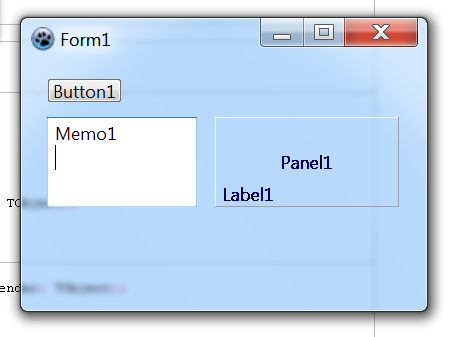 | |
| 7 | 4 | ||
| 8 | 5 | **Hinweis:** Funktioniert nur mit Windows ! | |
| 9 | 6 | ||
| 10 | 7 | Speichern Sie zuerst den nachfolgenden Code in einer Textdatei namens "glass.pas": | |
| 11 | 8 | ||
| 12 | 9 | ``` pascal | |
| 13 | 10 | // Aero Glass Effekt für Delphi-Forms | |
| 14 | 11 | // | |
| 15 | 12 | // Mit der Methode GlassForm kann für eine Form der | |
| 16 | 13 | // Aero Glass Effekt unter Vista aktiviert werden. | |
| 17 | 14 | // Der erste Parameter ist die Form-Klasse, der zweite | |
| 18 | 15 | // optionale Parameter ist der BlurColorKey. Mit dem | |
| 19 | 16 | // BlurColorKey wird eine Farbe festgelegt, auf dem | |
| 20 | 17 | // der Effekt wirken soll, d.h. benutzt eine Komponente, | |
| 21 | 18 | // auf der Form, für visuelle Darstellungen (Linien, Punkte, | |
| 22 | 19 | // Bilder, ...), diese Farbe, so wird an dieser Stelle der | |
| 23 | 20 | // Effekt wirksam. Der Standardwert für BlurColorKey ist | |
| 24 | 21 | // clFuchsia. | |
| 25 | 22 | // | |
| 26 | 23 | // Hinweis: Für die Aktivierung wird zusätzlich TXPManifest | |
| 27 | 24 | // bzw. eine RES-Datei die die Manifest-Daten | |
| 28 | 25 | // enthält benötigt. | |
| 29 | 26 | // | |
| 30 | 27 | // | |
| 31 | 28 | // Delphi-Unit von Daniel Mitte (2006) | |
| 32 | 29 | // | |
| 33 | 30 | // | |
| 34 | 31 | // Beispiel: | |
| 35 | 32 | // | |
| 36 | 33 | // uses glass; | |
| 37 | 34 | // | |
| 38 | 35 | // [...] | |
| 39 | 36 | // | |
| 40 | 37 | // procedure TForm1.FormActivate(Sender: TObject); | |
| 41 | 38 | // begin | |
| 42 | 39 | // GlassForm(Form1); | |
| 43 | 40 | // // oder mit anderem BlurColorKey | |
| 44 | 41 | // // GlassForm(Form1, clBlue) | |
| 45 | 42 | // end; | |
| 46 | 43 | ||
| 47 | 44 | unit glass; | |
| 48 | 45 | ||
| 49 | 46 | interface | |
| 50 | 47 | ||
| 51 | 48 | {$mode delphi} | |
| 52 | 49 | ||
| 53 | 50 | uses | |
| 54 | 51 | Windows, | |
| 55 | 52 | Forms, | |
| 56 | 53 | Graphics; | |
| 57 | 54 | ||
| 58 | 55 | procedure GlassForm(frm: TForm; cBlurColorKey: TColor = clFuchsia); | |
| 59 | 56 | ||
| 60 | 57 | implementation | |
| 61 | 58 | ||
| 62 | 59 | procedure GlassForm(frm: TForm; cBlurColorKey: TColor = clFuchsia); | |
| 63 | 60 | const | |
| 64 | 61 | WS_EX_LAYERED = $80000; | |
| 65 | 62 | LWA_COLORKEY = 1; | |
| 66 | 63 | ||
| 67 | 64 | type | |
| 68 | 65 | _MARGINS = packed record | |
| 69 | 66 | cxLeftWidth: Integer; | |
| 70 | 67 | cxRightWidth: Integer; | |
| 71 | 68 | cyTopHeight: Integer; | |
| 72 | 69 | cyBottomHeight: Integer; | |
| 73 | 70 | end; | |
| 74 | 71 | PMargins = ^_MARGINS; | |
| 75 | 72 | TMargins = _MARGINS; | |
| 76 | 73 | ||
| 77 | 74 | DwmIsCompositionEnabledFunc = function(pfEnabled: PBoolean): HRESULT; stdcall; | |
| 78 | 75 | DwmExtendFrameIntoClientAreaFunc = function(destWnd: HWND; const pMarInset: PMargins): HRESULT; stdcall; | |
| 79 | 76 | SetLayeredWindowAttributesFunc = function(destWnd: HWND; cKey: TColor; bAlpha: Byte; dwFlags: DWord): BOOL; stdcall; | |
| 80 | 77 | ||
| 81 | 78 | var | |
| 82 | 79 | hDWMDLL: Cardinal; | |
| 83 | 80 | osVinfo: TOSVERSIONINFO; | |
| 84 | 81 | fDwmIsCompositionEnabled: DwmIsCompositionEnabledFunc; | |
| 85 | 82 | fDwmExtendFrameIntoClientArea: DwmExtendFrameIntoClientAreaFunc; | |
| 86 | 83 | fSetLayeredWindowAttributesFunc: SetLayeredWindowAttributesFunc; | |
| 87 | 84 | bCmpEnable: Boolean; | |
| 88 | 85 | mgn: TMargins; | |
| 89 | 86 | ||
| 90 | 87 | begin | |
| 91 | 88 | ZeroMemory(@osVinfo, SizeOf(osVinfo)); | |
| 92 | 89 | OsVinfo.dwOSVersionInfoSize := SizeOf(TOSVERSIONINFO); | |
| 93 | 90 | ||
| 94 | 91 | if ((GetVersionEx(osVInfo) = True) and (osVinfo.dwPlatformId = VER_PLATFORM_WIN32_NT) and (osVinfo.dwMajorVersion >= 6)) then | |
| 95 | 92 | begin | |
| 96 | 93 | hDWMDLL := LoadLibrary('dwmapi.dll'); | |
| 97 | 94 | ||
| 98 | 95 | if hDWMDLL <> 0 then | |
| 99 | 96 | begin | |
| 100 | 97 | @fDwmIsCompositionEnabled := GetProcAddress(hDWMDLL, 'DwmIsCompositionEnabled'); | |
| 101 | 98 | @fDwmExtendFrameIntoClientArea := GetProcAddress(hDWMDLL, 'DwmExtendFrameIntoClientArea'); | |
| 102 | 99 | @fSetLayeredWindowAttributesFunc := GetProcAddress(GetModulehandle(user32), 'SetLayeredWindowAttributes'); | |
| 103 | 100 | ||
| 104 | 101 | if ((@fDwmIsCompositionEnabled <> nil) and (@fDwmExtendFrameIntoClientArea <> nil) and (@fSetLayeredWindowAttributesFunc <> nil)) then | |
| 105 | 102 | begin | |
| 106 | 103 | fDwmIsCompositionEnabled(@bCmpEnable); | |
| 107 | 104 | ||
| 108 | 105 | if bCmpEnable = True then | |
| 109 | 106 | begin | |
| 110 | 107 | frm.Color := cBlurColorKey; | |
| 111 | 108 | ||
| 112 | 109 | SetWindowLong(frm.Handle, GWL_EXSTYLE, GetWindowLong(frm.Handle, GWL_EXSTYLE) or WS_EX_LAYERED); | |
| 113 | 110 | fSetLayeredWindowAttributesFunc(frm.Handle, cBlurColorKey, 0, LWA_COLORKEY); | |
| 114 | 111 | ||
| 115 | 112 | ZeroMemory(@mgn, SizeOf(mgn)); | |
| 116 | 113 | mgn.cxLeftWidth := -1; | |
| 117 | 114 | mgn.cxRightWidth := -1; | |
| 118 | 115 | mgn.cyTopHeight := -1; | |
| 119 | 116 | mgn.cyBottomHeight := -1; | |
| 120 | 117 | ||
| 121 | 118 | fDwmExtendFrameIntoClientArea(frm.Handle, @mgn); | |
| 122 | 119 | end; | |
| 123 | 120 | end; | |
| 124 | 121 | ||
| 125 | 122 | FreeLibrary(hDWMDLL); | |
| 126 | 123 | end; | |
| 127 | 124 | end; | |
| 128 | 125 | end; | |
| 129 | 126 | ||
| 130 | 127 | end. | |
| 131 | 128 | ``` | |
| 132 | 129 | ||
| 133 | 130 | Kopieren Sie die Datei "glass.pas" in den Hauptordner Ihres Projektes: | |
| 134 | 131 | ||
| 135 | 132 | ` MeinProjekt\glass.pas`\ | |
| 136 | 133 | ` ` | |
| 137 | 134 | ||
| 138 | 135 | Fügen Sie im Abschnitt "uses" Ihres Projektes das Wort "glass" hinzu: | |
| 139 | 136 | ||
| 140 | 137 | ``` pascal | |
| 141 | 138 | unit form1; | |
| 142 | 139 | ||
| 143 | 140 | {$mode objfpc}{$H+} | |
| 144 | 141 | ||
| 145 | 142 | interface | |
| 146 | 143 | ||
| 147 | 144 | uses | |
| 148 | 145 | Classes, SysUtils, FileUtil, Forms, Controls, Graphics, Dialogs | |
| 149 | 146 | glass; // Dadurch wird die Prozedur 'GlassForm' verfügbar gemacht | |
| 150 | 147 | ``` | |
| 151 | 148 | ||
| 152 | 149 | Rufen Sie diese Prozedur im 'OnActivate'-Ereignis eines jeden Formulars auf: | |
| 153 | 150 | ||
| 154 | 151 | ``` pascal | |
| 155 | 152 | procedure TForm1.FormActivate(Sender: TObject); | |
| 156 | 153 | begin | |
| 157 | 154 | GlassForm(Form1,clBlue); // Dies wendet den Aero-Glass-Effekt auf Form1 an | |
| 158 | 155 | end; | |
| 159 | 156 | ``` | |
| 160 | 157 | ||
| 161 | 158 | Außerdem müssen Sie *Themen* aktivieren, um diese Prozedur einsetzen zu können. Gehen Sie dazu zu Projektinspektor \> Einstellungen \> Projekteinstellungen \> und wählen Sie "Themen mit Manifest-Datei einschalten (nur in Windows)". | |
| 162 | 159 | ||
| 163 | 160 | ## Fehler | |
| 164 | 161 | ||
| 165 | 162 | Wie Sie sehen können, werden die Labels im ersten Bild nicht sehr schön dargestellt in Aero Glass. Es folgen einige Links zu Komponenten und Code die zeigen, wie man "Labels zum Leuchten bringt": | |
| 166 | 163 | ||
| 167 | 164 | - [GlowLabel for Delphi](http://development.mwcs.de/glowlabel.html) | |
| 168 | 165 | - [Aero Glass - ein Text (Label) hintergrund "machen"](http://www.delphipraxis.net/953968-post4.html) | |
| 169 | 166 | ||
| 170 | 167 | ## Über | |
| 171 | 168 | ||
| 172 | 169 | Diese Komponente wurde zu Lazarus konvertiert mit "{\$mode delphi}". Sie stammt her von "Aero Glass Effekt für Delphi-Forms, Delphi-Unit von Daniel Mitte (2006)": | |
| 173 | 170 | ||
| 174 | 171 | - [Aero Glass Effekt für Delphi-Forms](http://www.delphipraxis.net/74538-aero-glass-effekt-fuer-delphi-forms.html) | |
| 175 | 172 | ||
| 176 | 173 | Es gibt eine Delphi-Komponente (die nach Lazarus portiert werden könnte) hier: | |
| 177 | 174 | ||
| 178 | 175 | - [D. Mitte in Torry's Delphi Page](http://www.torry.net/authorsmore.php?id=6179) | |
| 179 | 176 | ||
| 180 | 177 | --- | |
| 181 | 178 | *From the Free Pascal wiki, page "Aero Glass/de", as it stood on 2020-02-04 after a change by GAN, out of the wiki's dump of 2024-05-26. Copyright stays with the author who wrote it, according to the old wiki's [[Licensing]] page. If you have concerns about this material, [message the admin](/wiki-contact).* | |
| 182 | 179 | Category: Tutorials/de |